| 内容 | 参考链接 |
|---|---|
| Vue3.0 项目启动 | Vue3.0 项目启动(打造企业级音乐App) |
| Vue3.0项目——打造企业级音乐App(一) | Tab栏、轮播图、歌单列表、滚动组件 |
| Vue3.0项目——打造企业级音乐App(二) | 图片懒加载、v-loading指令的开发和优化 |
文章目录
vue3.0-music

main.js 文件
import { createApp } from 'vue'
import App from './App.vue'
import router from './router'
import store from './store'
import lazyPlugin from 'vue3-lazy'

// 引入全局样式文件
import '@/assets/scss/index.scss'

createApp(App).use(store).use(router).use(lazyPlugin, {
    loading: require('@/assets/images/default.png')
}).mount('#app')
recommend.vue 组件
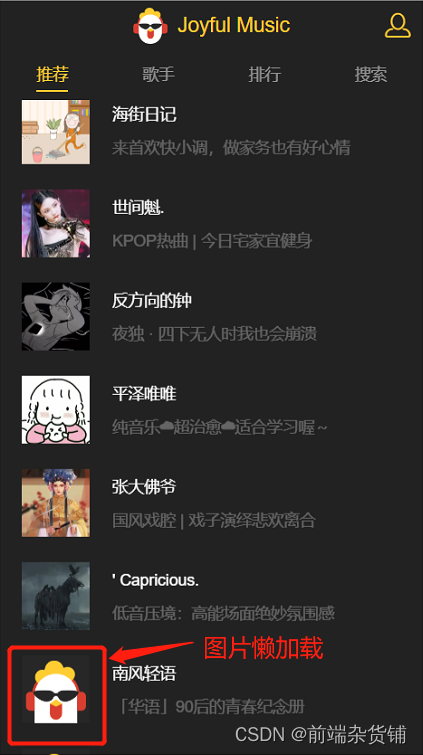
:src 为 v-lazy,实现图片的懒加载 <div class="icon">
<img width="60" height="60" v-lazy="item.pic">
</div>
效果图如下:

./components/base/loading/loading.vue 组件
<template>
  <div class="loading">
    <div class="loading-content">
      <img width="24" height="24" src="./loading.gif">
      <p class="desc">{{title}}</p>
    </div>
  </div>
</template>

<script>
  export default {
    name: 'loading',
    data() {
      return {
        title: '正在载入...'
      }
    },
    methods: {
      setTitle(title) {
        this.title = title
      }
    }
  }
</script>

<style lang="scss" scoped>...</script>
./components/base/loading/directive.js 文件
// 自定义指令 loading
import { createApp } from 'vue'
import Loading from './loading'

const loadingDirective = {
    mounted(el, binding) {
        const app = createApp(Loading)
        const instance = app.mount(document.createElement('div'))
        el.instance = instance
        if (binding.value) {
            append(el)
        }
    },
    // 更新的时候,loading 为 true,则还是执行 append(el),为 false,执行 remove(el)
    updated (el, binding) {
        if (binding.value !== binding.oldValue) {
            binding.value ? append(el) : remove(el)
        }
    }
}

function append(el) {
    el.appendChild(el.instance.$el)
}

function remove(el) {
    el.removeChild(el.instance.$el)
}

export default loadingDirective
main.js 文件
import { createApp } from 'vue'
import App from './App.vue'
import router from './router'
import store from './store'
import lazyPlugin from 'vue3-lazy'
import loadingDirective from './components/base/loading/directive'

import '@/assets/scss/index.scss'

createApp(App).use(store).use(router).use(lazyPlugin, {
    loading: require('@/assets/images/default.png')
}).directive('loading', loadingDirective).mount('#app')
./views/recommend.vue 组件
<div class="recommend" v-loading="loading">
...
	<h1 class="list-title" v-show="!loading">热门歌单推荐</h1>
</div>

./components/base/loading/directive.js 文件
// 自定义指令 loading
import { createApp } from 'vue'
import Loading from './loading'
import { addClass, removeClass } from '@/assets/js/dom'

// g-relative 是在 base.sass 中定义好的 position: relative
const relativeCls = 'g-relative'

const loadingDirective = {
    mounted(el, binding) {
        const app = createApp(Loading)
        const instance = app.mount(document.createElement('div'))
        el.instance = instance
        // 拿到动态参数
        const title = binding.arg
        if (typeof title !== 'undefined') {
            instance.setTitle(title)
        }

        if (binding.value) {
            append(el)
        }
    },
    // 更新的时候,loading 为 true,则还是执行 append(el),为 false,执行 remove(el)
    updated (el, binding) {
        const title = binding.arg
        if (typeof title !== 'undefined') {
            el.instance.setTitle(title)
        }
        if (binding.value !== binding.oldValue) {
            binding.value ? append(el) : remove(el)
        }
    }
}

function append(el) {
    // 获取元素当前样式
    const style = getComputedStyle(el)
    // 如果样式不属于以下三种之一,则给 el 添加需要的定位
    if (['absolute', 'fixed', 'relative'].indexOf(style.position) === -1) {
        // 添加样式
        addClass(el, relativeCls)
    }
    el.appendChild(el.instance.$el)
}

function remove(el) {
    removeClass(el, relativeCls)
    el.removeChild(el.instance.$el)
}

export default loadingDirective
./src/js/dom.js 文件
export function addClass(el, className) {
  if (!el.classList.contains(className)) {
    el.classList.add(className)
  }
}

export function removeClass(el, className) {
  el.classList.remove(className)
}
recommend.vue 组件
<div class="recommend" v-loading:[loadingText]="loading">
	...
</div>

data() {
  return {
    loadingText: '正在载入...'
  }
}
至此,推荐页面的基本开发先告一段落,接下来将进行歌手页面的开发
不积跬步无以至千里 不积小流无以成江海
点个关注不迷路,持续更新中…
我花了三天的时间用头撞墙,试图弄清楚为什么简单的“rake”不能通过我的规范文件。如果您遇到这种情况:任何文件夹路径中都不要有空格!。严重地。事实上,从现在开始,您命名的任何内容都没有空格。这是我的控制台输出:(在/Users/*****/Desktop/LearningRuby/learn_ruby)$rake/Users/*******/Desktop/LearningRuby/learn_ruby/00_hello/hello_spec.rb:116:in`require':cannotloadsuchfile--hello(LoadError) 最佳
我是Google云的新手,我正在尝试对其进行首次部署。我的第一个部署是RubyonRails项目。我基本上是在关注thisguideinthegoogleclouddocumentation.唯一的区别是我使用的是我自己的项目,而不是他们提供的“helloworld”项目。这是我的app.yaml文件runtime:customvm:trueentrypoint:bundleexecrackup-p8080-Eproductionconfig.ruresources:cpu:0.5memory_gb:1.3disk_size_gb:10当我转到我的项目目录并运行gcloudprevie
当我在我的Rails应用程序根目录中运行rakedoc:app时,API文档是使用/doc/README_FOR_APP作为主页生成的。我想向该文件添加.rdoc扩展名,以便它在GitHub上正确呈现。更好的是,我想将它移动到应用程序根目录(/README.rdoc)。有没有办法通过修改包含的rake/rdoctask任务在我的Rakefile中执行此操作?是否有某个地方可以查找可以修改的主页文件的名称?还是我必须编写一个新的Rake任务?额外的问题:Rails应用程序的两个单独文件/README和/doc/README_FOR_APP背后的逻辑是什么?为什么不只有一个?
我正在使用Postgres.app在OSX(10.8.3)上。我已经修改了我的PATH,以便应用程序的bin文件夹位于所有其他文件夹之前。Rammy:~phrogz$whichpg_config/Applications/Postgres.app/Contents/MacOS/bin/pg_config我已经安装了rvm并且可以毫无错误地安装pggem,但是当我需要它时我得到一个错误:Rammy:~phrogz$gem-v1.8.25Rammy:~phrogz$geminstallpgFetching:pg-0.15.1.gem(100%)Buildingnativeextension
项目介绍随着我国经济迅速发展,人们对手机的需求越来越大,各种手机软件也都在被广泛应用,但是对于手机进行数据信息管理,对于手机的各种软件也是备受用户的喜爱小学生兴趣延时班预约小程序的设计与开发被用户普遍使用,为方便用户能够可以随时进行小学生兴趣延时班预约小程序的设计与开发的数据信息管理,特开发了小程序的设计与开发的管理系统。小学生兴趣延时班预约小程序的设计与开发的开发利用现有的成熟技术参考,以源代码为模板,分析功能调整与小学生兴趣延时班预约小程序的设计与开发的实际需求相结合,讨论了小学生兴趣延时班预约小程序的设计与开发的使用。开发环境开发说明:前端使用微信微信小程序开发工具:后端使用ssm:VU
我正在使用ruby2.1.0我有一个json文件。例如:test.json{"item":[{"apple":1},{"banana":2}]}用YAML.load加载这个文件安全吗?YAML.load(File.read('test.json'))我正在尝试加载一个json或yaml格式的文件。 最佳答案 YAML可以加载JSONYAML.load('{"something":"test","other":4}')=>{"something"=>"test","other"=>4}JSON将无法加载YAML。JSON.load("
我发现ruby加载路径是一个数组,很多项目都是这样使用的:$:.unshift(File.expand_path("../../lib",__FILE__))可以将本地文件添加到ruby路径数组的前面,方便我们require或者load。所以,我希望知道为什么我们不使用push将文件添加到数组的末尾? 最佳答案 假设您有一个“date.rb”文件(为什么不呢)并且您想要加载这个文件,而不是标准库日期。如果您使用追加,当您调用require'date'时您的文件将永远不会被加载,因为它位于数组的末尾并且标准日期会在之前找到。因此,如果
我在en:语言环境中有一个字符串display_device:toplay:getplayer冒号给我的错误是cannotloadtranslationsfromC:/DocumentsandSettings/rajg/discoveryaws/branches/internationalization/config/locales/en.yml,expectedittoreturnahash,butdoesnot我怎样才能让它工作? 最佳答案 如果你用这样的引号将它括起来,你可以在你的字符串中转义冒号(和其他“重要”字符):dis
我的测试尝试访问网页并验证页面上是否存在某些元素。例如,它访问http://foo.com/homepage.html并检查Logo图像,然后访问http://bar.com/store/blah.html并检查页面上是否出现了某些文本。我的目标是访问经过Kerberos身份验证的网页。我发现Kerberos代码如下:主文件uri=URI.parse(Capybara.app_host)kerberos=Kerberos.new(uri.host)@kerberos_token=kerberos.encoded_tokenkerberos.rb文件classKerberosdefini
参考文章搭建文章gitte源码在线体验可以注册两个号来测试演示图:一.整体介绍 介绍SignalR一种通讯模型Hub(中心模型,或者叫集线器模型),调用这个模型写好的方法,去发送消息。 内容有: ①:Hub模型的方法介绍 ②:服务器端代码介绍 ③:前端vue3安装并调用后端方法 ④:聊天室样例整体流程:1、进入网站->调用连接SignalR的方法2、与好友发送消息->调用SignalR的自定义方法 前端通过,signalR内置方法.invoke() 去请求接口3、监听接受方法(渲染消息)通过new signalR.HubConnectionBuilder().on
