网络爬虫—selenium验证码破解
前言:
🏘️🏘️个人简介:以山河作礼。
🎖️🎖️:Python领域新星创作者,CSDN实力新星认证
📝📝第一篇文章《1.认识网络爬虫》获得全站热榜第一,python领域热榜第一。
🧾 🧾第四篇文章《4.网络爬虫—Post请求(实战演示)》全站热榜第八。
🧾 🧾第八篇文章《8.网络爬虫—正则表达式RE实战》全站热榜第十二。
🧾 🧾第十篇文章《10.网络爬虫—MongoDB详讲与实战》全站热榜第八,领域热榜第二
🧾 🧾第十三篇文章《13.网络爬虫—多进程详讲(实战演示)》全站热榜第十二。
🎁🎁《Python网络爬虫》专栏累计发表十四篇文章,上榜五篇。欢迎免费订阅!欢迎大家一起学习,一起成长!!
💕💕悲索之人烈焰加身,堕落者不可饶恕。永恒燃烧的羽翼,带我脱离凡间的沉沦。
🧾 🧾网络爬虫是一种自动化程序,用于从Web页面中提取数据。然而,有些网站为了防止爬虫程序抓取数据,会加入一些验证码,使得程序无法自动化地完成数据采集任务。为了解决这个问题,我们可以使用selenium来破解验证码。
🧾 Selenium是一个开源的自动化测试工具,它可以模拟用户在浏览器中的操作,包括点击、输入等。使用selenium可以模拟用户手动输入验证码,从而实现验证码的破解。
首先我们介绍两个第三方破解平台:
第一款第三方打码平台是 :超级鹰
帮助开发者解决图像验证码的识别问题。它采用了最先进的图像识别技术,可以快速准确地识别各种形式的图像验证码,如数字、字母、中文、滑动拼图
第二款第三方平台是 :图灵
基于人工智能的定制化识别平台 可用于识别包括英数类型,中文类型,滑块类型等验证码,
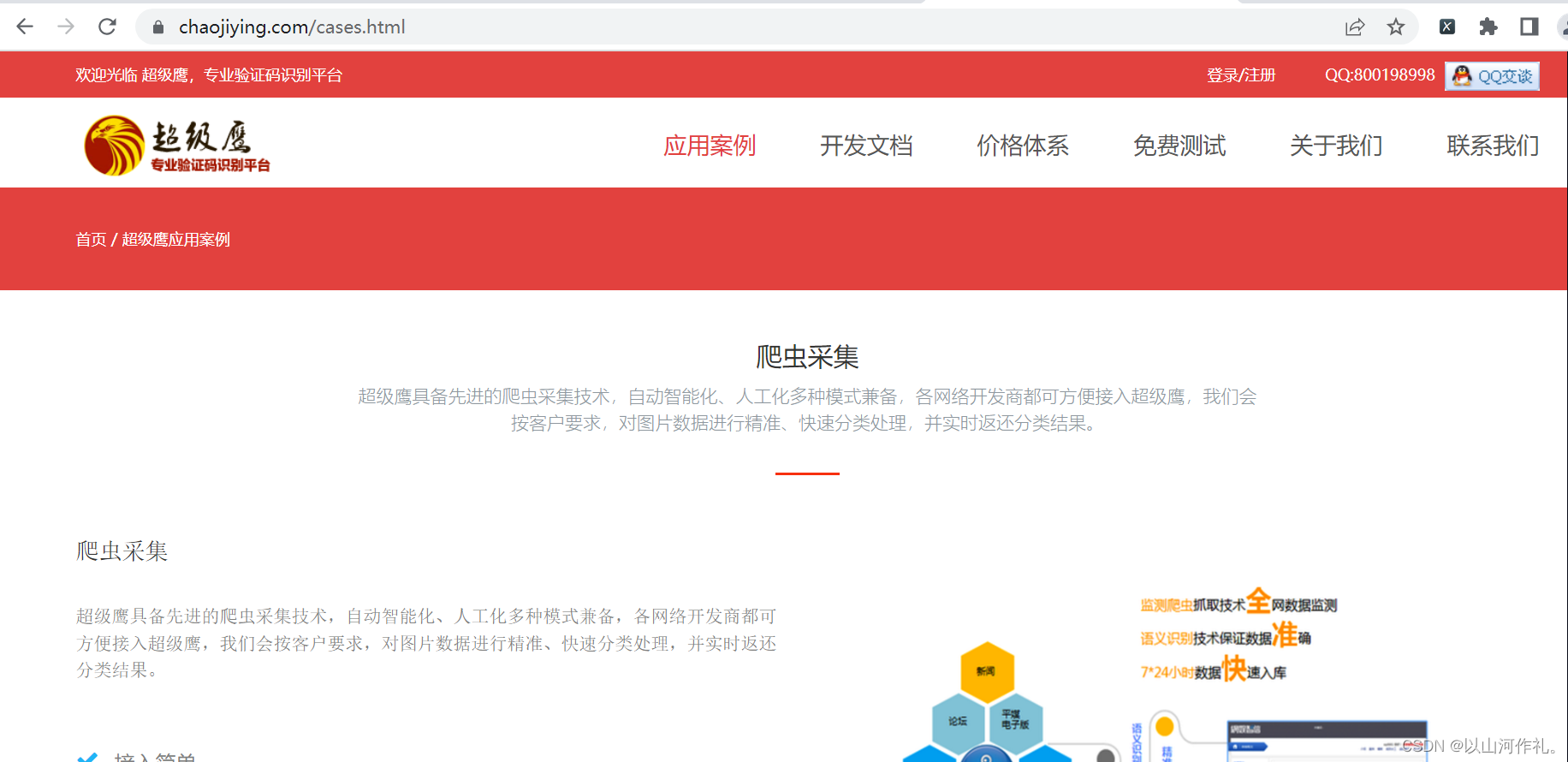
超级鹰是一款第三方打码平台,可以帮助开发者解决图像验证码的识别问题。它采用了最先进的图像识别技术,可以快速准确地识别各种形式的图像验证码,如数字、字母、中文、滑动拼图等。开发者只需调用接口即可将验证码提交给超级鹰进行识别,并获得识别结果。此外,超级鹰还提供了多种识别方式,如手动识别、自动识别、多人协作等,可以满足不同的识别需求。包含文字和图片的验证码,比如滑动拼图验证码。它可以先将验证码图片拆分成多个小块,再对每个小块进行识别,最后将结果合并起来得到整个验证码的识别结果。这种识别方式可以大大提高验证码的识别准确率。🎯1.首先我们登录注册,方便我们后面使用
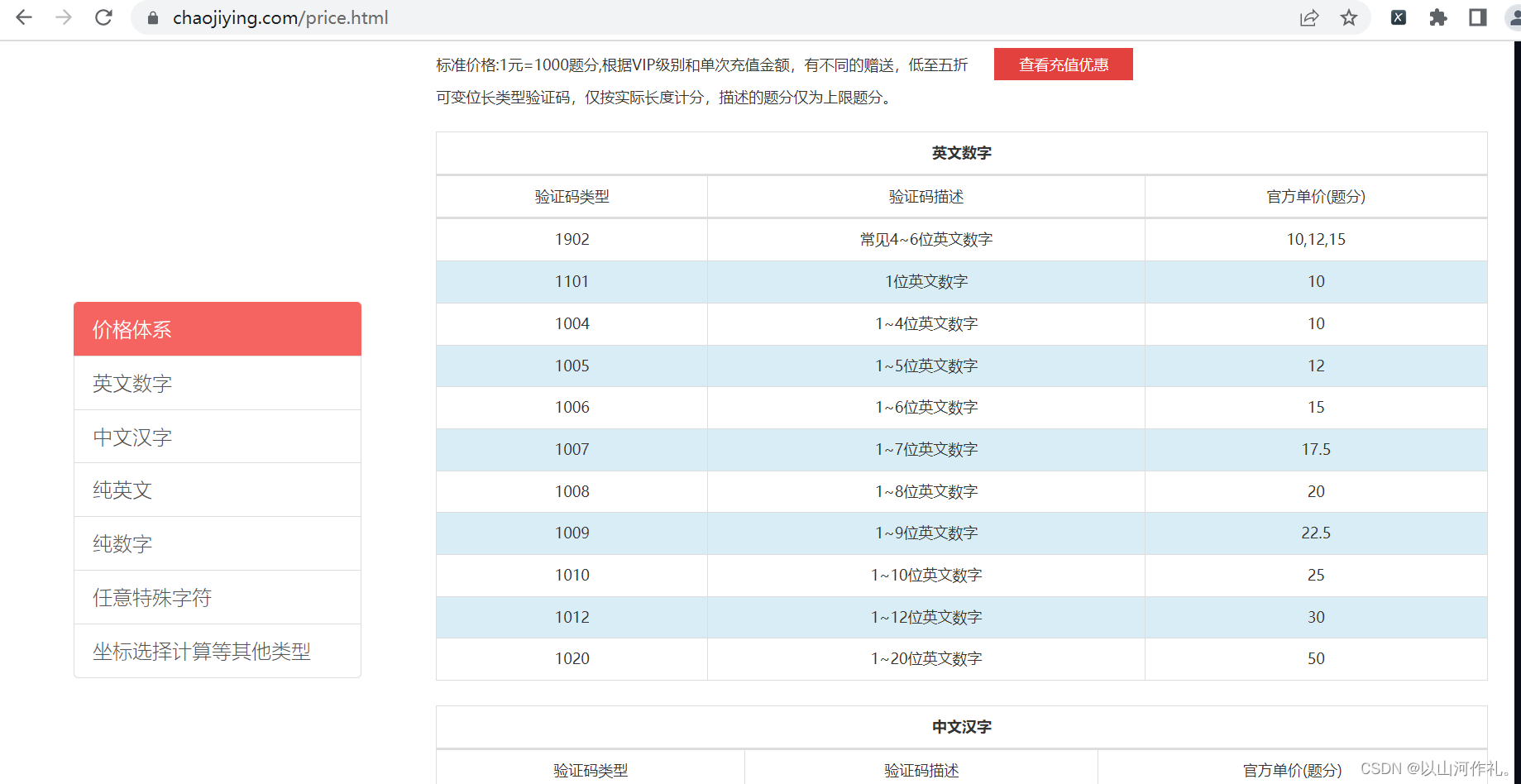
🎯2.选择我们需要的价格体系,待会也会用到
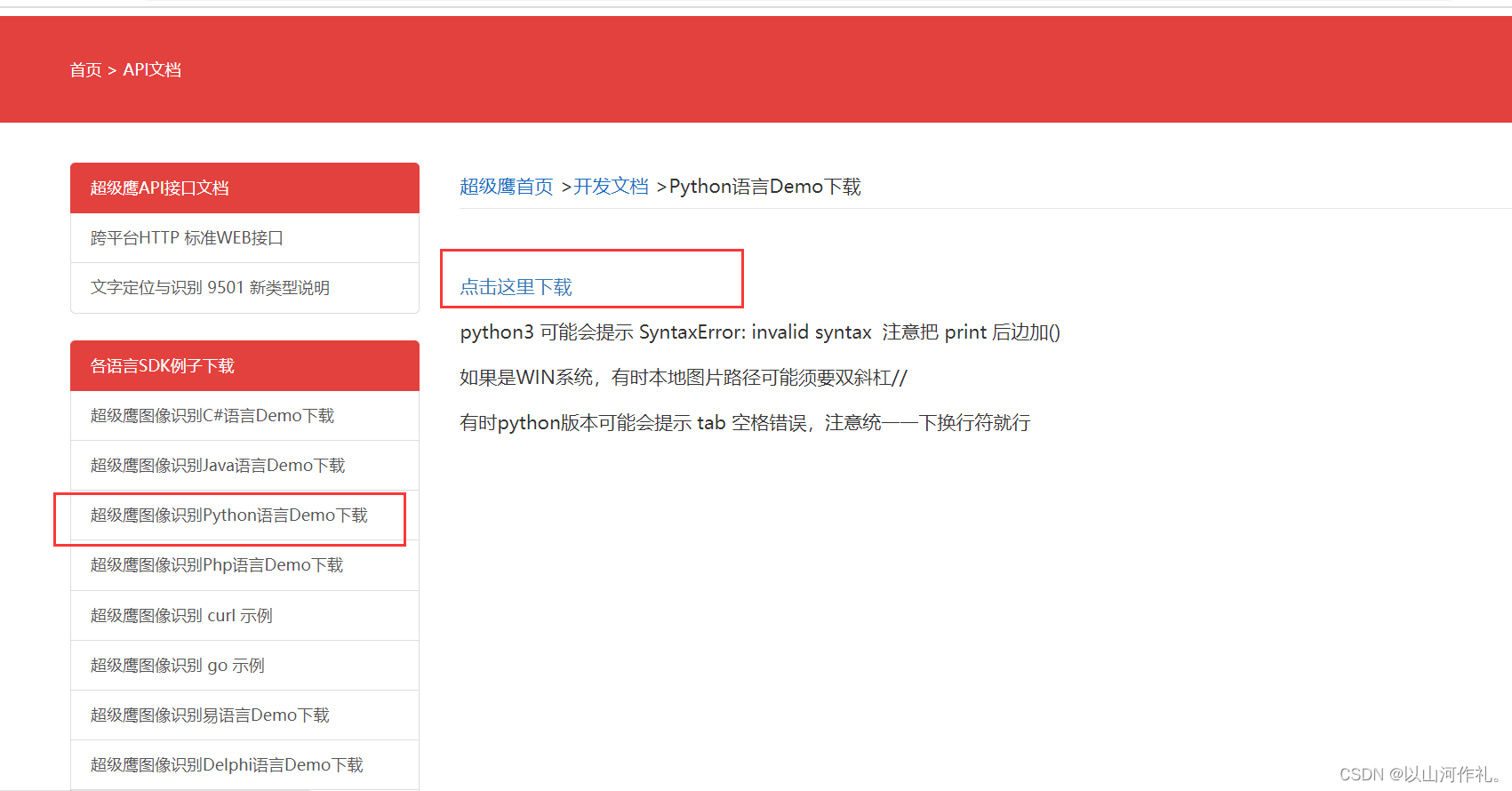
🎯3.Python语言Demo下载
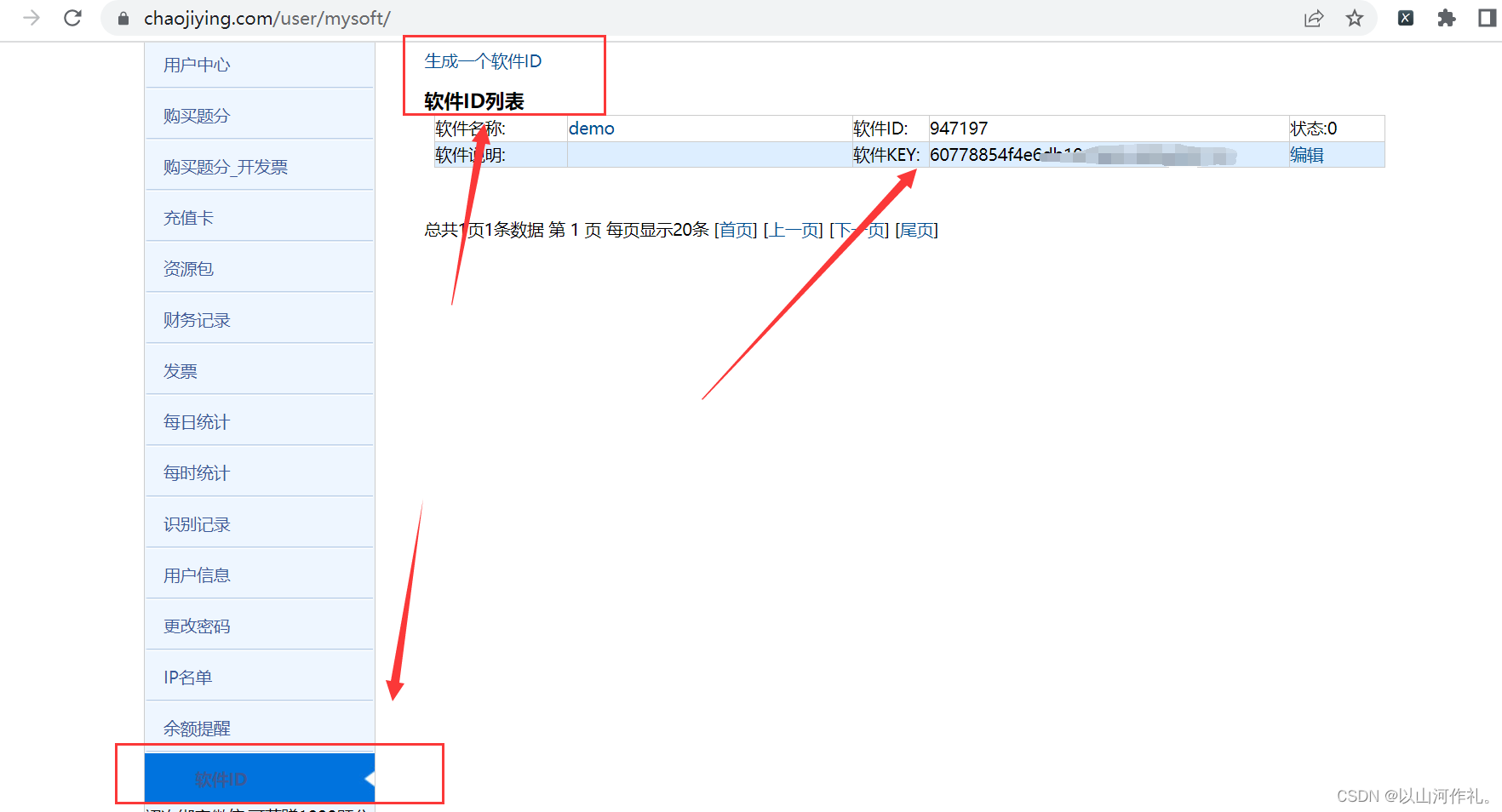
🎯4.获取软件Key和软件ID

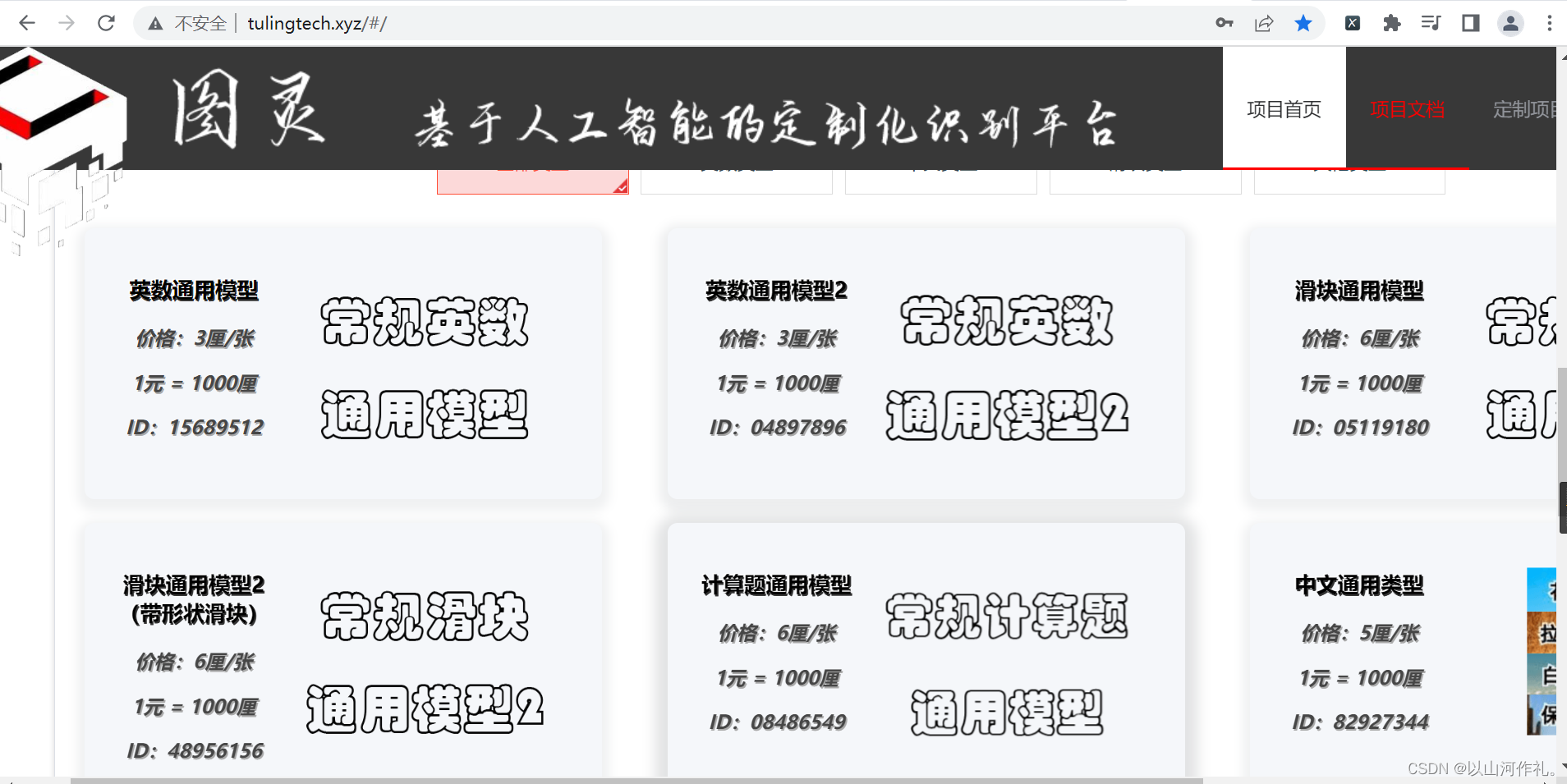
🧾 🧾主页如下,包含各种验证码识别:
🧾 识别接口说明
① 识别接口

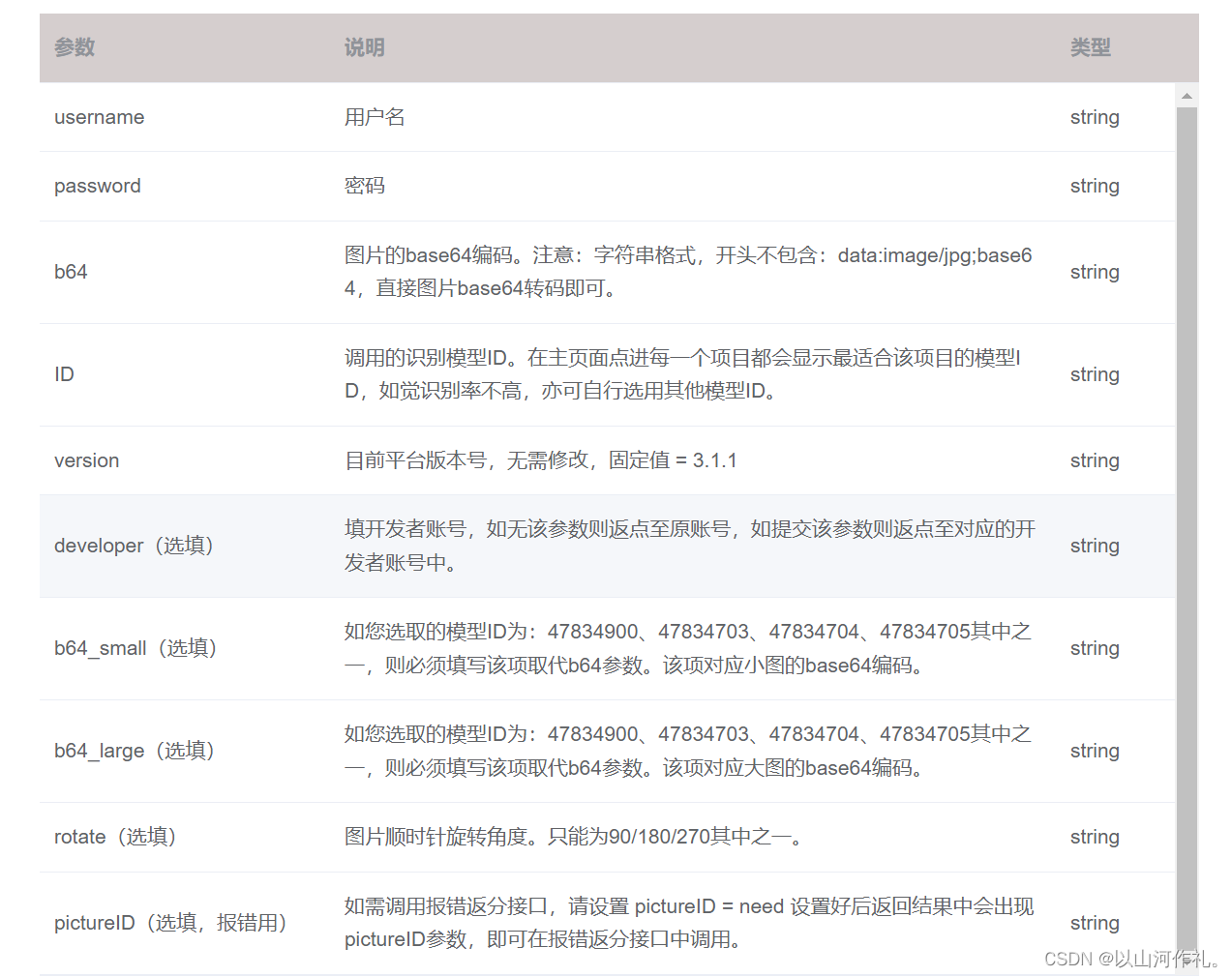
② 识别请求参数说明
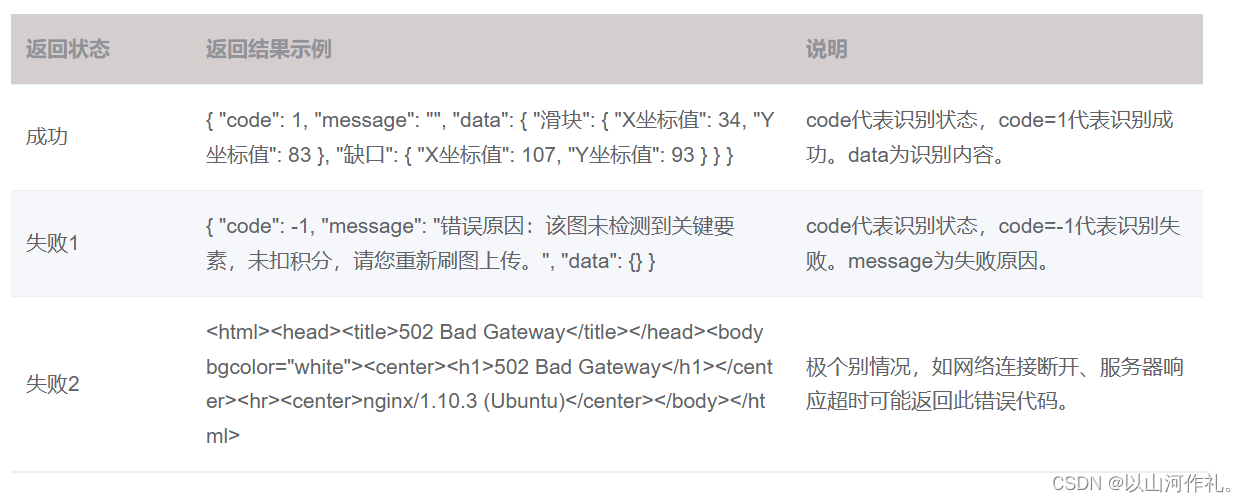
③ 识别返回结果说明
python API调用代码:
import base64
import json
import requests

# 复制以下代码,只需填入自己的账号密码、待识别的图片路径即可。
# 关于ID:选做识别的模型ID。

def b64_api(username, password, img_path, ID):
    with open(img_path, 'rb') as f:
        b64_data = base64.b64encode(f.read())
    b64 = b64_data.decode()
    data = {"username": username, "password": password, "ID": ID, "b64": b64, "version": "3.1.1"}
    data_json = json.dumps(data)
    result = json.loads(requests.post("http://www.tulingcloud.com/tuling/predict", data=data_json).text)
    return result

if __name__ == "__main__":
    img_path = r"C:/Users/Administrator/Desktop/file.jpg"
    result = b64_api(username="你的账号", password="你的密码", img_path=img_path, ID="你选用的模型ID(8位数字)")
    print(result)
到此为止,我们认识了两种用于破解验证码的平台,我们现在实战操作,方便大家理解学习。
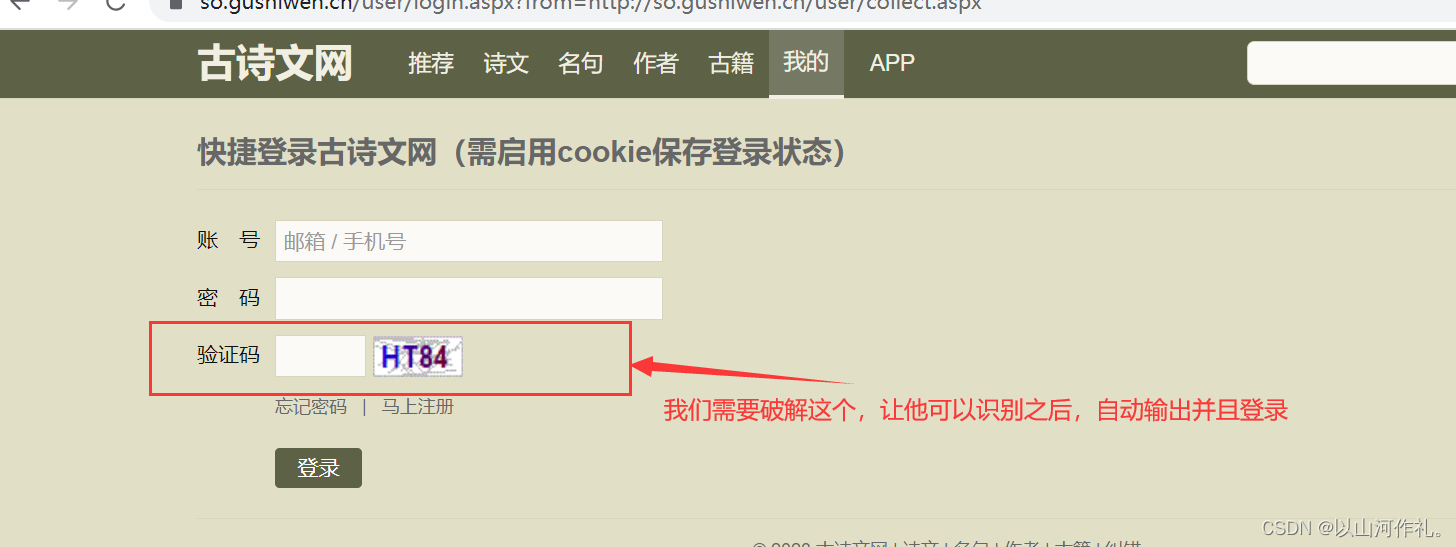
🧾 我们来看一下我们的目标:
🎯1.使用selenium自动化登录目标网站
from selenium import webdriver
from selenium.webdriver.chrome.service import Service
from selenium.webdriver.common.by import By

service = Service(executable_path='D:\chorm\chromedriver_win32/chromedriver.exe')
driver = webdriver.Chrome(service=service)

url = 'https://so.gushiwen.cn/user/login.aspx?from=http://so.gushiwen.cn/user/collect.aspx'
driver.get(url)
🎯2.通过行为链,输入账号密码,因为我没有注册,所以随便输入的,不过影响不大,我们需要的是输入正确的验证码。
# 账号输入
driver.find_element(By.ID, 'email').send_keys('xxxxx')
# 密码输入
driver.find_element(By.ID, 'pwd').send_keys('xxxx')
🎯3.然后获取验证码的照片到本地,方便我们待会调用接口来破解。
img_code = driver.find_element(By.ID, 'imgCode')
img_code.screenshot('img.png')  # 保存成图片

🎯4.调用接口,来破解验证码。
from chaojiying import Chaojiying_Client

chaojiying = Chaojiying_Client('xxxx', 'xxxxx', '924117')  # 用户中心>>软件ID 生成一个替换 96001
image = open('img.png', 'rb')  # 本地图片文件路径 来替换 a.jpg 有时WIN系统须要//
pic_str = (chaojiying.PostPic(image.read(), 1004)['pic_str'])
image.close()

driver.find_element(By.ID, 'code').send_keys(pic_str)
🧾 🧾我们的目标就完成了,是不是很简单,后期把账号密码换成注册过的,就能实现自动登录和验证了。
完整代码:
from selenium import webdriver
from selenium.webdriver.chrome.service import Service
from selenium.webdriver.common.by import By

service = Service(executable_path='D:\chorm\chromedriver_win32/chromedriver.exe')
driver = webdriver.Chrome(service=service)

url = 'https://so.gushiwen.cn/user/login.aspx?from=http://so.gushiwen.cn/user/collect.aspx'
driver.get(url)

# 账号输入
driver.find_element(By.ID, 'email').send_keys('xxxxx')
# 密码输入
driver.find_element(By.ID, 'pwd').send_keys('xxxx')
# 获取验证码
img_code = driver.find_element(By.ID, 'imgCode')
img_code.screenshot('img.png')  # 保存成图片


from chaojiying import Chaojiying_Client

chaojiying = Chaojiying_Client('*****', '*****', '924117')  # 用户中心>>软件ID 生成一个替换 96001
image = open('img.png', 'rb')  # 本地图片文件路径 来替换 a.jpg 有时WIN系统须要//
pic_str = (chaojiying.PostPic(image.read(), 1004)['pic_str'])
image.close()

driver.find_element(By.ID, 'code').send_keys(pic_str)

input()
🧾 我们来看一下我们的目标:
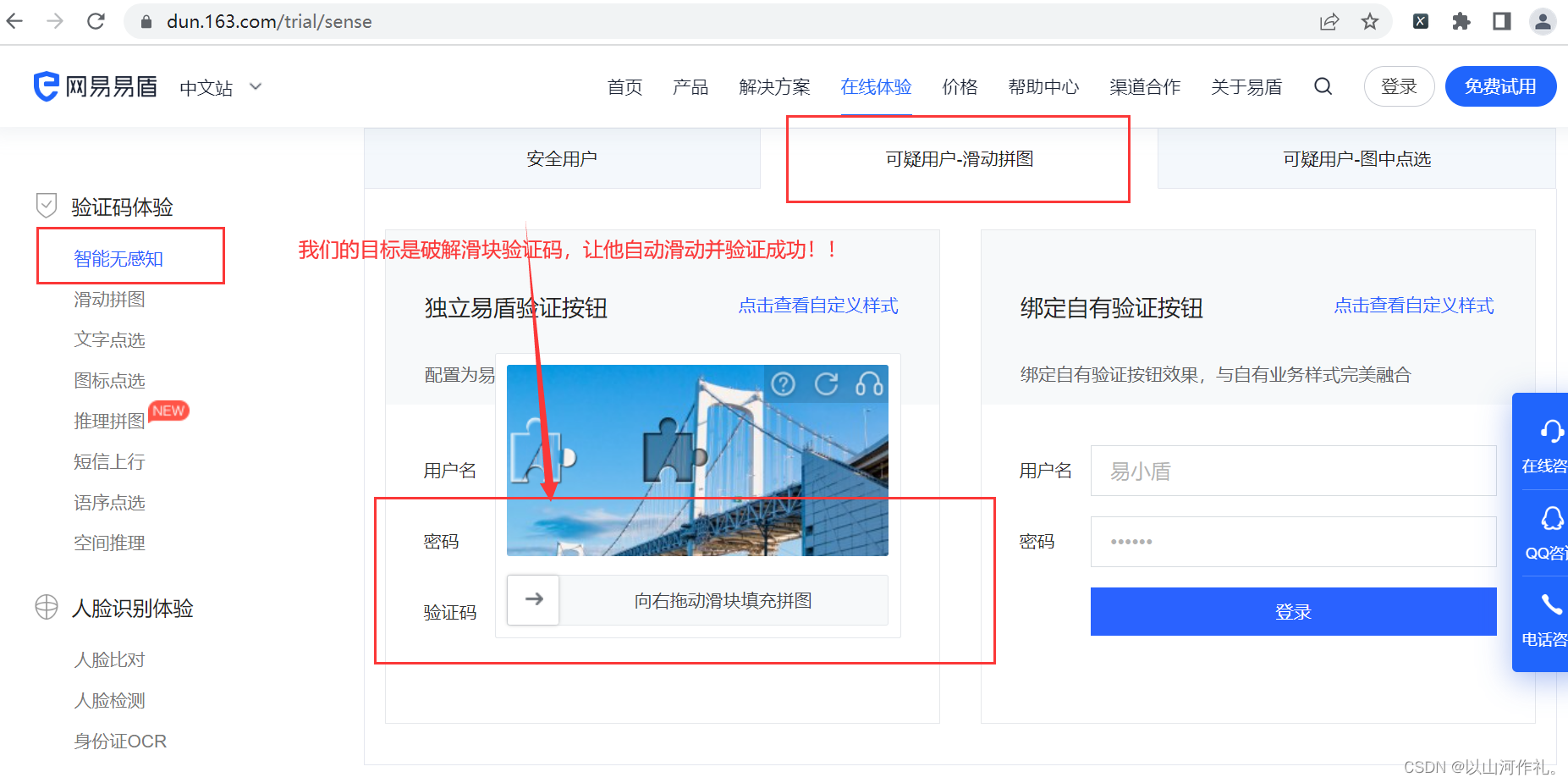
🎯1.思路和破解英数验证码一样,使用selenium自动打开网址,然后通过行为链点击到上图这个页面。
service = Service(executable_path='D:\chorm\chromedriver_win32/chromedriver.exe')
driver = webdriver.Chrome(service=service)
driver.set_window_size(1100, 800)  # 将浏览器窗口大小设置为宽1100像素,高800像素。

url = 'https://dun.163.com/trial/sense'
driver.get(url)
print(driver.page_source)
wait = WebDriverWait(driver, 20)  # 等待20秒,有数据就进行操作,没有就报错
wait.until(PE((By.XPATH, '/html/body/main/div[1]/div/div[2]/div[2]/ul/li[2]'))).click()  # 点击可疑用户-滑动拼图

js = f'window.scrollTo(0,{300})'
driver.execute_script(js)  # 将当前页面滚动到垂直方向上300像素的位置。
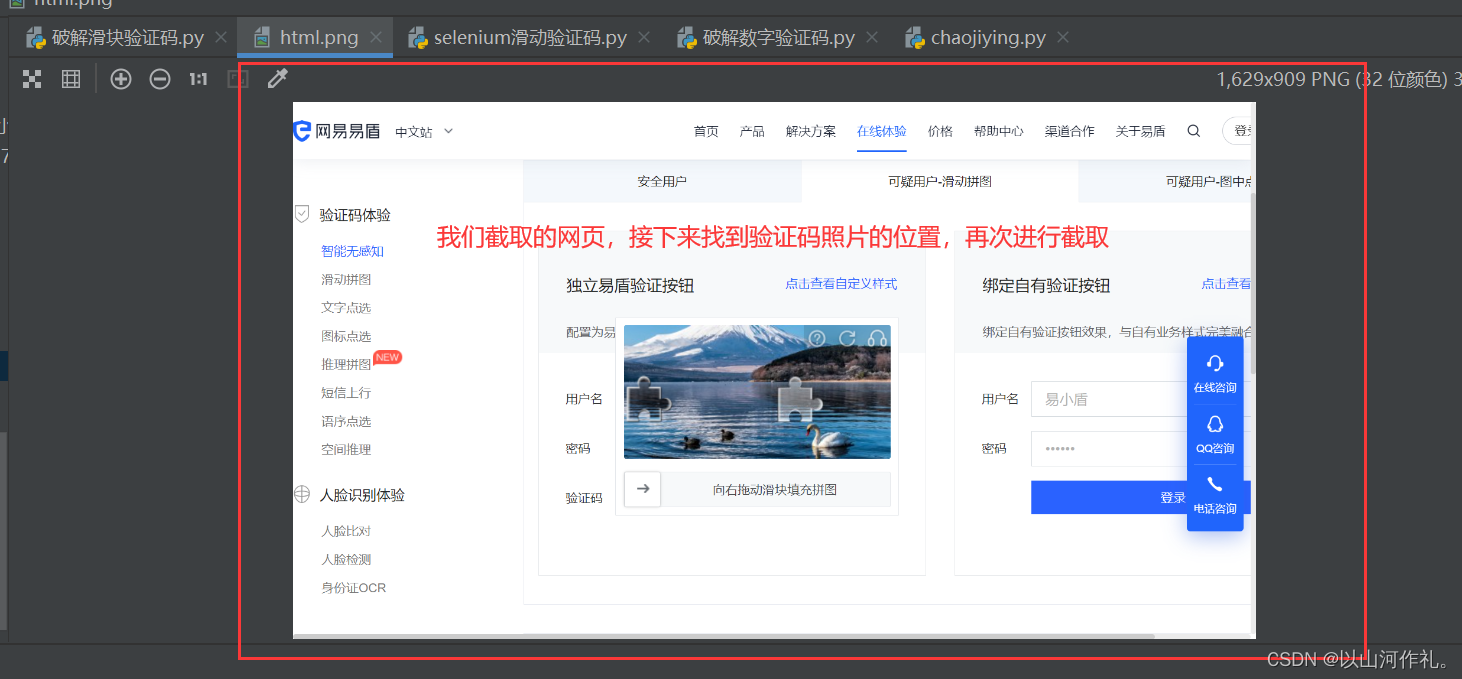
🎯2.然后我们对出现的验证码进行截图:
# 点击验证码位置,方便弹出验证码图框
wait.until(PE((By.XPATH,
               '/html/body/main/div[1]/div/div[2]/div[2]/div[1]/div[2]/div[1]/div/div[2]/div[3]/div/div/div[1]/div[1]'))).click()

sleep(3)  # 休眠三秒,方便我们截图,防止验证码出现不及时

# 截图网页
driver.save_screenshot("html.png")

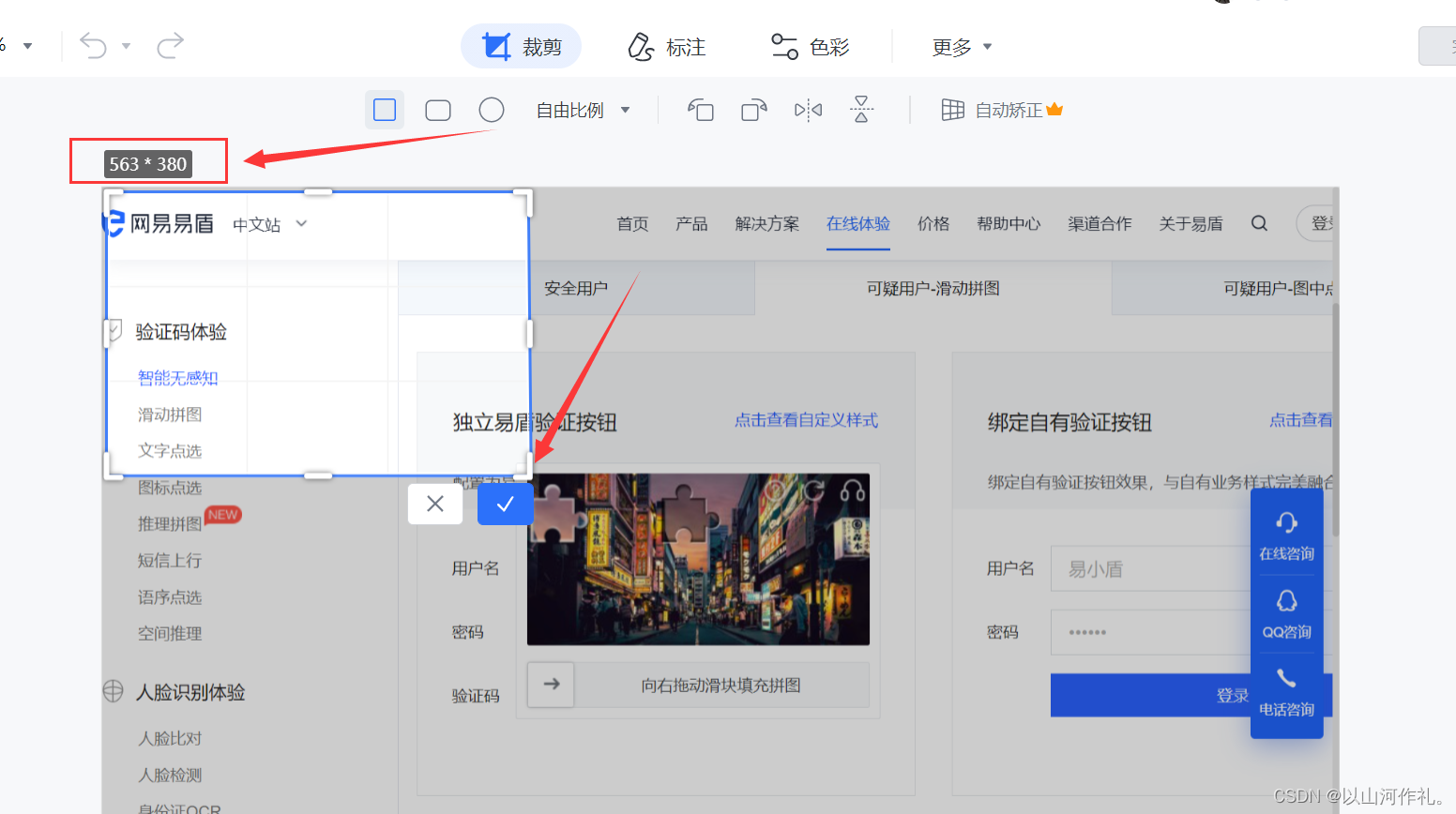
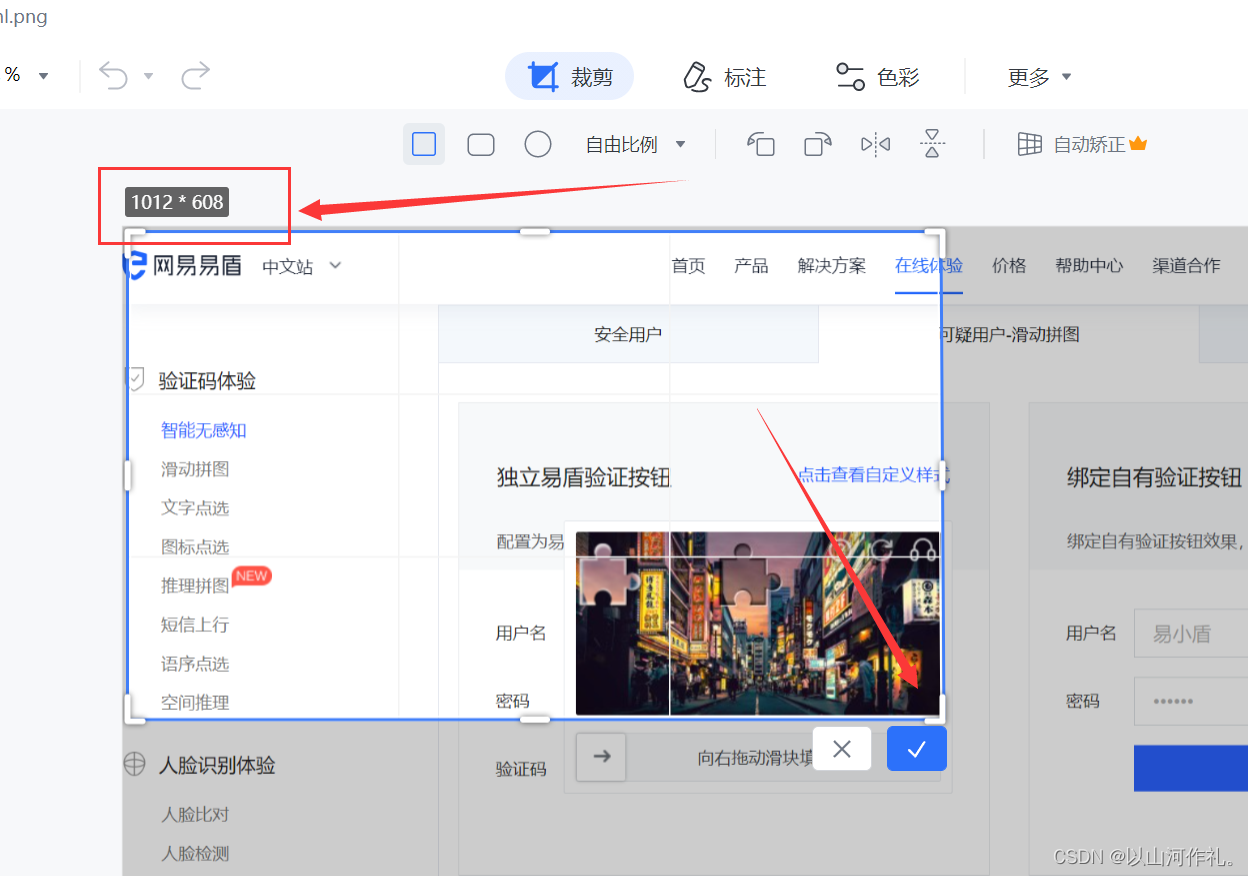
# 剪切滑动部分
img = Image.open("html.png")

# 剪切验证码的位置   图片的左上角和右下角 x和y轴
cropped = img.crop((563, 380, 1012, 608))

# 保存剪切的验证码照片
cropped.save("yzm.png")
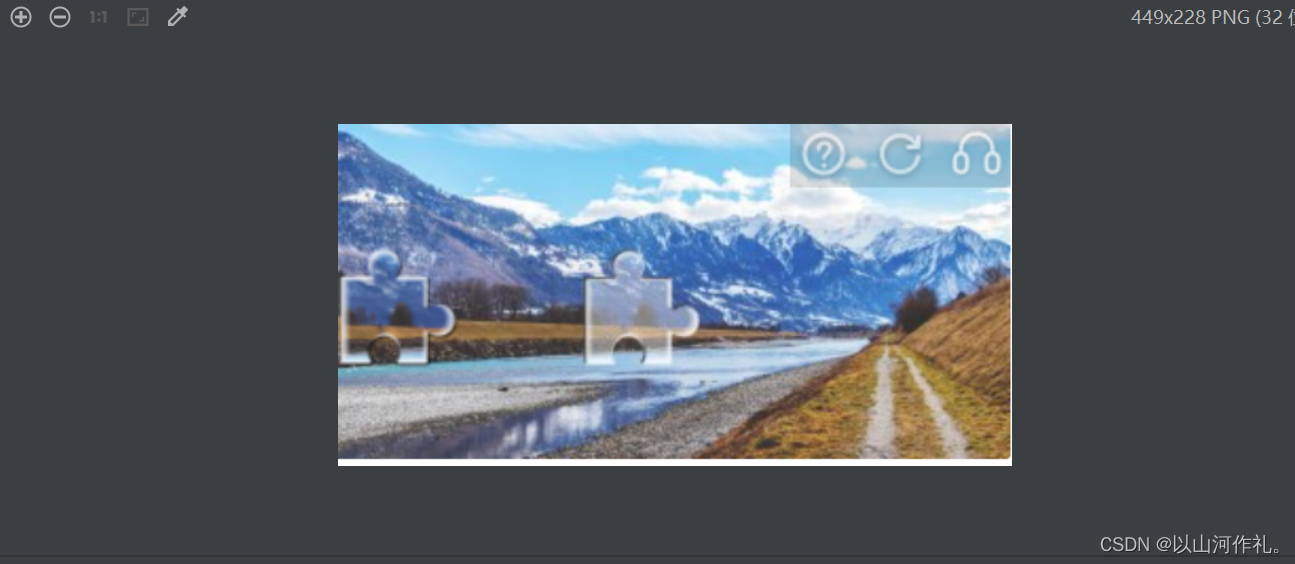
🎯3.调用ApI接口对截取的验证码进行识别
# api接口

def b64_api(username, password, img_path, ID):  # 账户  密码  照片 ID
    with open(img_path, 'rb') as f:
        b64_data = base64.b64encode(f.read())
    b64 = b64_data.decode()
    data = {"username": username, "password": password, "ID": ID, "b64": b64, "version": "3.1.1"}
    data_json = json.dumps(data)
    result = json.loads(requests.post("http://www.tulingtech.xyz/tuling/predict", data=data_json).text)
    return result
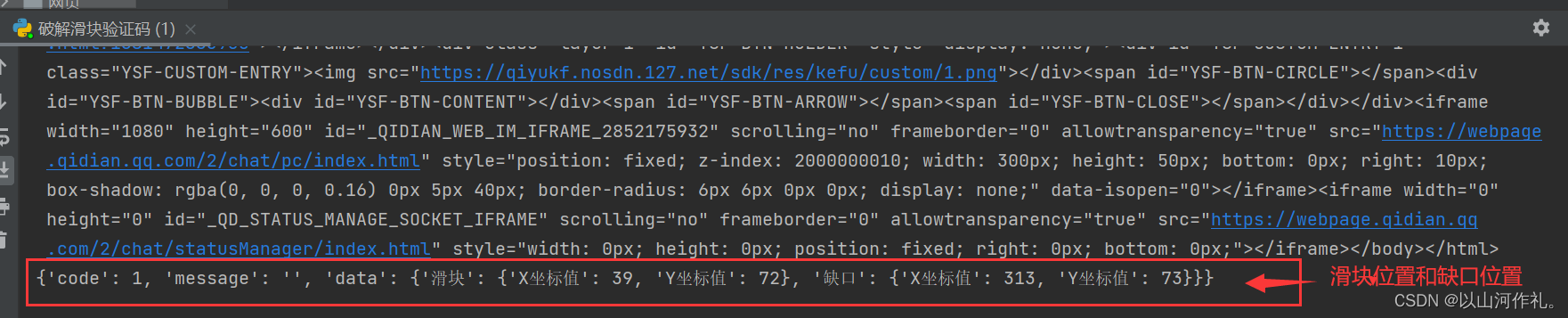
🎯4.selenium 滑动线性 更加模拟人的行为进行点击
# selenium 滑动线性  更加模拟人去操作
def get_move_track(gap):
    track = []  # 移动轨迹
    current = 0  # 当前位移
    # 减速阈值
    mid = gap * 4 / 5  # 前4/5段加速 后1/5段减速
    t = 0.2  # 计算间隔
    v = 0  # 初速度
    while current < gap:
        if current < mid:
            a = 5  # 加速度为+5
        else:
            a = -5  # 加速度为-5
        v0 = v  # 初速度v0
        v = v0 + a * t  # 当前速度
        move = v0 * t + 1 / 2 * a * t * t  # 移动距离
        current += move  # 当前位移
        track.append(round(move))  # 加入轨迹
    return track
🎯5.讲破解出的数据交给代码,让他帮助我们输入并且通过行为链来拖动滑块填充拼图,完成验证码的验证。
x = int(result['data']['滑块']['X坐标值'])
q = int(result['data']['缺口']['X坐标值'])
ranges = int((q - x) * 0.68)

move_track = get_move_track(ranges)  # 将结果交给滑动线性函数

# 滑动代码

element = wait.until(PE((By.CLASS_NAME, 'yidun_jigsaw')))  # 滑块

ActionChains(driver).click_and_hold(element).perform()  # 通过行为链,按住它,然后执行
for i in move_track:  # 循环每次滑动的距离
    # 执行移动
    ActionChains(driver).move_by_offset(i, 0).perform()
ActionChains(driver).release().perform()  # 松开按键,完成滑动
运行结果:
智能无感知验证码_智能验证码_验证码API_在线体验
完整代码:
import base64
import json
from time import sleep
import requests
from PIL import Image  # pillow
from selenium import webdriver
from selenium.webdriver.chrome.service import Service
from selenium.webdriver.common.action_chains import ActionChains
from selenium.webdriver.common.by import By
from selenium.webdriver.support.expected_conditions import presence_of_element_located as PE
from selenium.webdriver.support.ui import WebDriverWait

service = Service(executable_path='D:\chorm\chromedriver_win32/chromedriver.exe')
driver = webdriver.Chrome(service=service)
driver.set_window_size(1100, 800)  # 将浏览器窗口大小设置为宽1100像素,高800像素。

url = 'https://dun.163.com/trial/sense'
driver.get(url)
print(driver.page_source)
wait = WebDriverWait(driver, 20)  # 等待20秒,有数据就进行操作,没有就报错
wait.until(PE((By.XPATH, '/html/body/main/div[1]/div/div[2]/div[2]/ul/li[2]'))).click()  # 点击可疑用户-滑动拼图

js = f'window.scrollTo(0,{300})'
driver.execute_script(js)  # 将当前页面滚动到垂直方向上300像素的位置。

# 点击验证码位置,方便弹出验证码图框
wait.until(PE((By.XPATH,
               '/html/body/main/div[1]/div/div[2]/div[2]/div[1]/div[2]/div[1]/div/div[2]/div[3]/div/div/div[1]/div[1]'))).click()

sleep(3)  # 休眠三秒,方便我们截图,防止验证码出现不及时

# 截图网页
driver.save_screenshot("html.png")

# 剪切滑动部分
img = Image.open("html.png")

# 剪切验证码的位置   图片的左上角和右下角 x和y轴
cropped = img.crop((563, 380, 1012, 608))

# 保存剪切的验证码照片
cropped.save("yzm.png")


# 调用api接口对照片验证码进行识别

def b64_api(username, password, img_path, ID):  # 账户  密码  照片 ID
    with open(img_path, 'rb') as f:
        b64_data = base64.b64encode(f.read())
    b64 = b64_data.decode()
    data = {"username": username, "password": password, "ID": ID, "b64": b64, "version": "3.1.1"}
    data_json = json.dumps(data)
    result = json.loads(requests.post("http://www.tulingtech.xyz/tuling/predict", data=data_json).text)
    return result


# 78915616

result = b64_api('****', '*****', "yzm.png", '78915616')

# 输出滑块和缺口的位置参数
print(result)


# selenium 滑动线性  更加模拟人去操作
def get_move_track(gap):
    track = []  # 移动轨迹
    current = 0  # 当前位移
    # 减速阈值
    mid = gap * 4 / 5  # 前4/5段加速 后1/5段减速
    t = 0.2  # 计算间隔
    v = 0  # 初速度
    while current < gap:
        if current < mid:
            a = 5  # 加速度为+5
        else:
            a = -5  # 加速度为-5
        v0 = v  # 初速度v0
        v = v0 + a * t  # 当前速度
        move = v0 * t + 1 / 2 * a * t * t  # 移动距离
        current += move  # 当前位移
        track.append(round(move))  # 加入轨迹
    return track


x = int(result['data']['滑块']['X坐标值'])
q = int(result['data']['缺口']['X坐标值'])
ranges = int((q - x) * 0.68)

move_track = get_move_track(ranges)  # 将结果交给滑动线性函数

# 滑动代码

element = wait.until(PE((By.CLASS_NAME, 'yidun_jigsaw')))  # 滑块

ActionChains(driver).click_and_hold(element).perform()  # 通过行为链,按住它,然后执行
for i in move_track:  # 循环每次滑动的距离
    # 执行移动
    ActionChains(driver).move_by_offset(i, 0).perform()
ActionChains(driver).release().perform()  # 松开按键,完成滑动

input()
📌📌使用selenium破解验证码需要模拟用户操作,包括手动输入验证码和提交表单等。验证码的设计越来越复杂,破解难度也越来越大。因此,在使用selenium破解验证码时,需要根据具体情况选择合适的方法。
👉👉本专栏所有文章是博主学习笔记,仅供学习使用,爬虫只是一种技术,希望学习过的人能正确使用它。
博主也会定时一周三更爬虫相关技术更大家系统学习,如有问题,可以私信我,没有回,那我可能在上课或者睡觉,写作不易,感谢大家的支持!!🌹🌹🌹
给定这段代码defcreate@upgrades=User.update_all(["role=?","upgraded"],:id=>params[:upgrade])redirect_toadmin_upgrades_path,:notice=>"Successfullyupgradeduser."end我如何在该操作中实际验证它们是否已保存或未重定向到适当的页面和消息? 最佳答案 在Rails3中,update_all不返回任何有意义的信息,除了已更新的记录数(这可能取决于您的DBMS是否返回该信息)。http://ar.ru
我想安装一个带有一些身份验证的私有(private)Rubygem服务器。我希望能够使用公共(public)Ubuntu服务器托管内部gem。我读到了http://docs.rubygems.org/read/chapter/18.但是那个没有身份验证-如我所见。然后我读到了https://github.com/cwninja/geminabox.但是当我使用基本身份验证(他们在他们的Wiki中有)时,它会提示从我的服务器获取源。所以。如何制作带有身份验证的私有(private)Rubygem服务器?这是不可能的吗?谢谢。编辑:Geminabox问题。我尝试“捆绑”以安装新的gem..
我希望我的UserPrice模型的属性在它们为空或不验证数值时默认为0。这些属性是tax_rate、shipping_cost和price。classCreateUserPrices8,:scale=>2t.decimal:tax_rate,:precision=>8,:scale=>2t.decimal:shipping_cost,:precision=>8,:scale=>2endendend起初,我将所有3列的:default=>0放在表格中,但我不想要这样,因为它已经填充了字段,我想使用占位符。这是我的UserPrice模型:classUserPrice回答before_val
我有一个表单,其中有很多字段取自数组(而不是模型或对象)。我如何验证这些字段的存在?solve_problem_pathdo|f|%>... 最佳答案 创建一个简单的类来包装请求参数并使用ActiveModel::Validations。#definedsomewhere,atthesimplest:require'ostruct'classSolvetrue#youcouldevencheckthesolutionwithavalidatorvalidatedoerrors.add(:base,"WRONG!!!")unlesss
我有一些非常大的模型,我必须将它们迁移到最新版本的Rails。这些模型有相当多的验证(User有大约50个验证)。是否可以将所有这些验证移动到另一个文件中?说app/models/validations/user_validations.rb。如果可以,有人可以提供示例吗? 最佳答案 您可以为此使用关注点:#app/models/validations/user_validations.rbrequire'active_support/concern'moduleUserValidationsextendActiveSupport:
当我的预订模型通过rake任务在状态机上转换时,我试图找出如何跳过对ActiveRecord对象的特定实例的验证。我想在reservation.close时跳过所有验证!叫做。希望调用reservation.close!(:validate=>false)之类的东西。仅供引用,我们正在使用https://github.com/pluginaweek/state_machine用于状态机。这是我的预订模型的示例。classReservation["requested","negotiating","approved"])}state_machine:initial=>'requested
我有一个服务模型/表及其注册表。在表单中,我几乎拥有服务的所有字段,但我想在验证服务对象之前自动设置其中一些值。示例:--服务Controller#创建Action:defcreate@service=Service.new@service_form=ServiceFormObject.new(@service)@service_form.validate(params[:service_form_object])and@service_form.saverespond_with(@service_form,location:admin_services_path)end在验证@ser
这里有一个很好的答案解释了如何在Ruby中下载文件而不将其加载到内存中:https://stackoverflow.com/a/29743394/4852737require'open-uri'download=open('http://example.com/image.png')IO.copy_stream(download,'~/image.png')我如何验证下载文件的IO.copy_stream调用是否真的成功——这意味着下载的文件与我打算下载的文件完全相同,而不是下载一半的损坏文件?documentation说IO.copy_stream返回它复制的字节数,但是当我还没有下
我想在Ruby中创建一个用于开发目的的极其简单的Web服务器(不,不想使用现成的解决方案)。代码如下:#!/usr/bin/rubyrequire'socket'server=TCPServer.new('127.0.0.1',8080)whileconnection=server.acceptheaders=[]length=0whileline=connection.getsheaders想法是从命令行运行这个脚本,提供另一个脚本,它将在其标准输入上获取请求,并在其标准输出上返回完整的响应。到目前为止一切顺利,但事实证明这真的很脆弱,因为它在第二个请求上中断并出现错误:/usr/b
网络编程套接字网络编程基础知识理解源`IP`地址和目的`IP`地址理解源MAC地址和目的MAC地址认识端口号理解端口号和进程ID理解源端口号和目的端口号认识`TCP`协议认识`UDP`协议网络字节序socket编程接口`sockaddr``UDP`网络程序服务器端代码逻辑:需要用到的接口服务器端代码`udp`客户端代码逻辑`udp`客户端代码`TCP`网络程序服务器代码逻辑多个版本服务器单进程版本多进程版本多线程版本线程池版本服务器端代码客户端代码逻辑客户端代码TCP协议通讯流程TCP协议的客户端/服务器程序流程三次握手(建立连接)数据传输四次挥手(断开连接)TCP和UDP对比网络编程基础知识
