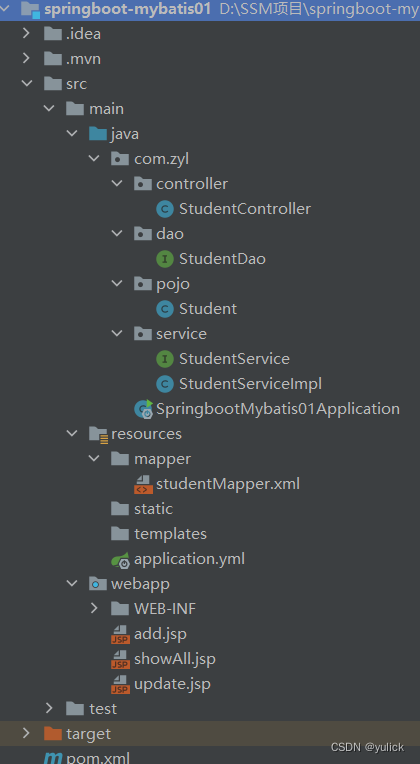
<dependency>
            <groupId>org.springframework.boot</groupId>
            <artifactId>spring-boot-starter-web</artifactId>
        </dependency>

        <dependency>
            <groupId>org.springframework.boot</groupId>
            <artifactId>spring-boot-starter-test</artifactId>
            <scope>test</scope>
        </dependency>

        <dependency>
            <groupId>org.springframework.boot</groupId>
            <artifactId>spring-boot-starter</artifactId>
        </dependency>

        <dependency>
            <groupId>org.mybatis.spring.boot</groupId>
            <artifactId>mybatis-spring-boot-starter</artifactId>
            <version>1.3.2</version>
        </dependency>

        <dependency>
            <groupId>mysql</groupId>
            <artifactId>mysql-connector-java</artifactId>
            <scope>runtime</scope>
        </dependency>


        <!--数据库连接池-->
        <dependency>
            <groupId>com.alibaba</groupId>
            <artifactId>druid</artifactId>
            <version>1.1.12</version>
        </dependency>

        <dependency>
            <groupId>org.junit.jupiter</groupId>
            <artifactId>junit-jupiter-api</artifactId>
            <version>RELEASE</version>
        </dependency>

        <dependency>
            <groupId>jstl</groupId>
            <artifactId>jstl</artifactId>
            <version>1.2</version>
        </dependency>


        <dependency>
            <groupId>org.apache.tomcat.embed</groupId>
            <artifactId>tomcat-embed-jasper</artifactId>
        </dependency>

        <dependency>
            <groupId>org.springframework.boot</groupId>
            <artifactId>spring-boot-starter-tomcat</artifactId>
        </dependency>

#配数据源信息
spring:
  datasource:
    type: com.alibaba.druid.pool.DruidDataSource
    driver-class-name: com.mysql.cj.jdbc.Driver
    url: jdbc:mysql://localhost:3306/spring-mybatis?serverTimezone=Asia/Shanghai
    username: root
    password: 625814
  mvc: #配置jsp映射路径 return "index" /index.jsp
    view:
      prefix: /
      suffix: .jsp
  main:
    allow-circular-references: true

mybatis:
  type-aliases-package: com.zyl.pojo   #别名
mapper-locations: classpath:/mapper/*Mapper.xml (1). 封装实体类
package com.zyl.pojo;

public class Student {

    private Integer id;
    private String name;
    private Integer age;
    private String gender;

    public Student() {
    }

    public Student(Integer id, String name, Integer age, String gender) {
        this.id = id;
        this.name = name;
        this.age = age;
        this.gender = gender;
    }

    public Integer getId() {
        return id;
    }

    public void setId(Integer id) {
        this.id = id;
    }

    public String getName() {
        return name;
    }

    public void setName(String name) {
        this.name = name;
    }

    public Integer getAge() {
        return age;
    }

    public void setAge(Integer age) {
        this.age = age;
    }

    public String getGender() {
        return gender;
    }

    public void setGender(String gender) {
        this.gender = gender;
    }

    @Override
    public String toString() {
        return "Student{" +
                "id=" + id +
                ", name='" + name + '\'' +
                ", age=" + age +
                ", gender='" + gender + '\'' +
                '}';
    }
}
(2). 书写dao层
package com.zyl.dao;

import com.zyl.pojo.Student;
import org.apache.ibatis.annotations.Mapper;

import java.util.List;

@Mapper
public interface StudentDao {

    //全部查询
    public List<Student>  queryAll();
}
(3). mapper映射文件
<?xml version="1.0" encoding="UTF8" ?>
<!DOCTYPE mapper
        PUBLIC "-//mybatis.org//DTD Mapper 3.0//EN"
        "http://mybatis.org/dtd/mybatis-3-mapper.dtd">
<mapper namespace="com.zyl.dao.StudentDao">
        <select id="queryAll" resultType="student">
            select * from student
        </select>
</mapper>
(4). service接口
package com.zyl.service;

import com.zyl.pojo.Student;

import java.util.List;

public interface StudentService {

    //全部查询
    public List<Student> queryAll();
}
(5). service接口实现
package com.zyl.service;

import com.zyl.dao.StudentDao;
import com.zyl.pojo.Student;
import org.springframework.beans.factory.annotation.Autowired;
import org.springframework.stereotype.Service;

import java.util.List;

@Service
public class StudentServiceImpl implements StudentService{
    @Autowired
    private StudentDao studentDao;

    @Override
    public List<Student> queryAll() {
        return studentDao.queryAll();
    }
}
(6). controller
package com.zyl.controller;

import com.zyl.pojo.Student;
import com.zyl.service.StudentService;
import org.springframework.beans.factory.annotation.Autowired;
import org.springframework.stereotype.Controller;
import org.springframework.ui.Model;
import org.springframework.ui.ModelMap;
import org.springframework.web.bind.annotation.RequestMapping;


import java.util.List;

@Controller
@RequestMapping("/student")
public class StudentController {
    @Autowired
    private StudentService studentService;

    @RequestMapping("/queryAll")
    public String queryAll(Model model){
        List<Student> list = studentService.queryAll();
        model.addAttribute("list",list);
        return "showAll";
    }
}
(7). jsp编写
<%@ page contentType="text/html;charset=UTF-8" language="java" %>
<%@taglib prefix="c" uri="http://java.sun.com/jsp/jstl/core" %>
<html>
<head>
    <title>Title</title>
</head>
<body>
<center>
    <h3>学生信息展示页面</h3>
    <table border="1" width="600px">
        <tr>
            <td>学生编号</td>
            <td>学生姓名</td>
            <td>学生性别</td>
            <td>学生年龄</td>
            <td>学生操作</td>
        </tr>
        <c:forEach items="${list}" var="a">
            <tr>
                <td>${a.id}</td>
                <td>${a.name}</td>
                <td>${a.gender}</td>
                <td>${a.age}</td>

            </tr>
        </c:forEach>
    </table>
</center>
</body>
</html>

(1). dao接口
    //根据id删除学生信息
    public void deleteById(Integer id);
(2). mapper映射文件
    <delete id="deleteById" parameterType="Integer">
        delete  from student where id=#{id}
    </delete>
(3). service接口
    //根据id删除学生信息
    public void deleteById(Integer id);
(4). service接口实现
 @Override
    public void deleteById(Integer id) {
        try{
            studentDao.deleteById(id);
        }catch (Exception e){
            throw new RuntimeException("根据id删除有异常");
        }

    }
(5). controller
    @RequestMapping("/deleteById")
    public String deleteById(Integer id){
        try{
            studentService.deleteById(id);
            return "redirect:/student/queryAll";
        }catch (Exception e){
            return "error";
        }
    }
(6). jsp代码
<td>
     <a href="${pageContext.request.contextPath}/student/deleteById?id=${a.id}">删除</a>
</td>(1). dao层
 //添加学生信息
    public void insertStudent(Student student);
(2). mapper映射文件
 <insert id="insertStudent" parameterType="student">
        INSERT INTO student(name,age,gender) values(#{name},#{age},#{gender})
    </insert>
(3). service接口
  //添加学生信息
    public void insertStudent(Student student);
(4).service接口实现
    @Override
    public void insertStudent(Student student) {
        try{
            studentDao.insertStudent(student);
        }catch (Exception e){
            throw new RuntimeException("添加有异常");
        }
    }
(5). controller
 @RequestMapping("/add")
    public String add(){
        return "add";
    }


    @RequestMapping("/addStudent")
    public String addStudent(Student student){
        try{
            studentService.insertStudent(student);
            return "redirect:/student/queryAll";
        }catch (Exception e){
            return "error";
        }
    }
(6). jsp代码
<%--
  Created by IntelliJ IDEA.
  User: lenovo
  Date: 2022/5/15
  Time: 23:39
  To change this template use File | Settings | File Templates.
--%>
<%@ page contentType="text/html;charset=UTF-8" language="java" %>
<html>
<head>
    <title>添加</title>
</head>
<body>
    <h3>学生信息添加</h3>
    <form action="${pageContext.request.contextPath}/student/addStudent">
        学生姓名:<input type="text" name="name">
        学生年龄:<input type="text" name="age">
        学生性别:<input type="radio" name="gender" value="男" checked="checked">男<br>
                 <input type="radio" name="gender" value="女">女
       <br>
        <input type="submit" value="提交">
    </form>
</body>
</html>
在showAll.jsp加上(其实此处不要写成这样 controller中add可以去掉 这里直接href跳转到add页面)
<a href="${pageContext.request.contextPath}/student/add">添加</a>(1). 思路

(2). 数据回显
A. dao接口
  //根据ID查询学生信息
    public Student selectById(Integer id);
B.mapper映射文件
   <!--根据ID查询-->
    <select id="selectById" parameterType="Integer" resultType="student">
        select * from student where id=#{id}
    </select>
C.service接口
    //根据ID查询学生信息
    public Student queryById(Integer id);
D.service接口实现
    @Override
    public Student queryById(Integer id) {
        return studentDao.selectById(id);
    }
E.controller
   //根据ID查询学生信息
    @RequestMapping("/queryById")
    public String queryById(Integer id, ModelMap mm){
        Student student = studentService.queryById(id);
        mm.addAttribute("student",student);
        //跳转到修改页面,进行数据回显
        return "update";
    }
F.jsp代码
<%@ page contentType="text/html;charset=UTF-8" language="java" %>
<%@ taglib prefix="c" uri="http://java.sun.com/jsp/jstl/core" %>
<html>
<head>
    <title>添加</title>
</head>
<body>
<center>
    <h3>学生信息修改页面</h3>
    <form action="${pageContext.request.contextPath}/student/changeStudent">
        <input type="hidden" name="id" value="${student.id}">
        学生姓名:<input type="text" name="name" value="${student.name}"><br>
        学生年龄:<input type="text" name="age" value="${student.age}"><br>
        学生性别:<input type="radio" name="gender" value="男"
                    <c:if test="${student.gender=='男'}">checked="checked"</c:if>
    >男
        <input type="radio" name="gender" value="女"
               <c:if test="${student.gender=='女'}">checked="checked"
        </c:if>
        >女
        <br>
        <input type="submit" value="修改">
    </form>
</center>
</body>
</html>
(3).数据修改
A. dao层
 //修改学生
    public void updateStudent(Student student);
B. mapper映射文件
    <update id="updateStudent" parameterType="student">
        update student set name=#{name},age=#{age},gender=#{gender} where id=#{id}
    </update>
C. service接口
//修改学生
    public void updateStudent(Student student);
D. service接口实现
 @Override
    public void updateStudent(Student student) {
        try{
            studentDao.updateStudent(student);
        }catch (Exception e){
            throw new RuntimeException("修改数据异常");
        }
    }
E. controller
  //修改数据
    @RequestMapping("/changeStudent")
    public String changeStudent(Student student){
        try{
            studentService.updateStudent(student);
            return "redirect:/student/queryAll";
        }catch (Exception e){
            return "error";
        }
    }
F. jsp页面同回显页面
在多模块开发下可能会碰到页面404的情况 打开 Edit Configrations 修改下面箭头标记处 这样表示当前目录

我有一个用户工厂。我希望默认情况下确认用户。但是鉴于unconfirmed特征,我不希望它们被确认。虽然我有一个基于实现细节而不是抽象的工作实现,但我想知道如何正确地做到这一点。factory:userdoafter(:create)do|user,evaluator|#unwantedimplementationdetailshereunlessFactoryGirl.factories[:user].defined_traits.map(&:name).include?(:unconfirmed)user.confirm!endendtrait:unconfirmeddoenden
有没有办法在这个简单的get方法中添加超时选项?我正在使用法拉第3.3。Faraday.get(url)四处寻找,我只能先发起连接后应用超时选项,然后应用超时选项。或者有什么简单的方法?这就是我现在正在做的:conn=Faraday.newresponse=conn.getdo|req|req.urlurlreq.options.timeout=2#2secondsend 最佳答案 试试这个:conn=Faraday.newdo|conn|conn.options.timeout=20endresponse=conn.get(url
我想在Ruby中创建一个用于开发目的的极其简单的Web服务器(不,不想使用现成的解决方案)。代码如下:#!/usr/bin/rubyrequire'socket'server=TCPServer.new('127.0.0.1',8080)whileconnection=server.acceptheaders=[]length=0whileline=connection.getsheaders想法是从命令行运行这个脚本,提供另一个脚本,它将在其标准输入上获取请求,并在其标准输出上返回完整的响应。到目前为止一切顺利,但事实证明这真的很脆弱,因为它在第二个请求上中断并出现错误:/usr/b
我意识到这可能是一个非常基本的问题,但我现在已经花了几天时间回过头来解决这个问题,但出于某种原因,Google就是没有帮助我。(我认为部分问题在于我是一个初学者,我不知道该问什么......)我也看过O'Reilly的RubyCookbook和RailsAPI,但我仍然停留在这个问题上.我找到了一些关于多态关系的信息,但它似乎不是我需要的(尽管如果我错了请告诉我)。我正在尝试调整MichaelHartl'stutorial创建一个包含用户、文章和评论的博客应用程序(不使用脚手架)。我希望评论既属于用户又属于文章。我的主要问题是:我不知道如何将当前文章的ID放入评论Controller。
我的工作要求我为某些测试自动生成电子邮件。我一直在四处寻找,但未能找到可以快速实现的合理解决方案。它需要在outlook而不是其他邮件服务器中,因为我们有一些奇怪的身份验证规则,我们需要保存草稿而不是仅仅发送邮件的选项。显然win32ole可以做到这一点,但我找不到任何相当简单的例子。 最佳答案 假设存储了Outlook凭据并且您设置为自动登录到Outlook,WIN32OLE可以很好地完成此操作:require'win32ole'outlook=WIN32OLE.new('Outlook.Application')message=
华为OD机试题本篇题目:明明的随机数题目输入描述输出描述:示例1输入输出说明代码编写思路最近更新的博客华为od2023|什么是华为od,od薪资待遇,od机试题清单华为OD机试真题大全,用Python解华为机试题|机试宝典【华为OD机试】全流程解析+经验分享,题型分享,防作弊指南华为o
C#实现简易绘图工具一.引言实验目的:通过制作窗体应用程序(C#画图软件),熟悉基本的窗体设计过程以及控件设计,事件处理等,熟悉使用C#的winform窗体进行绘图的基本步骤,对于面向对象编程有更加深刻的体会.Tutorial任务设计一个具有基本功能的画图软件**·包括简单的新建文件,保存,重新绘图等功能**·实现一些基本图形的绘制,包括铅笔和基本形状等,学习橡皮工具的创建**·设计一个合理舒适的UI界面**注明:你可能需要先了解一些关于winform窗体应用程序绘图的基本知识,以及关于GDI+类和结构的知识二.实验环境Windows系统下的visualstudio2017C#窗体应用程序三.
//1.验证返回状态码是否是200pm.test("Statuscodeis200",function(){pm.response.to.have.status(200);});//2.验证返回body内是否含有某个值pm.test("Bodymatchesstring",function(){pm.expect(pm.response.text()).to.include("string_you_want_to_search");});//3.验证某个返回值是否是100pm.test("Yourtestname",function(){varjsonData=pm.response.json
在前面两节的例子中,主界面窗口的尺寸和标签控件显示的矩形区域等,都是用C++代码编写的。窗口和控件的尺寸都是预估的,控件如果多起来,那就不好估计每个控件合适的位置和大小了。用C++代码编写图形界面的问题就是不直观,因此Qt项目开发了专门的可视化图形界面编辑器——QtDesigner(Qt设计师)。通过QtDesigner就可以很方便地创建图形界面文件*.ui,然后将ui文件应用到源代码里面,做到“所见即所得”,大大方便了图形界面的设计。本节就演示一下QtDesigner的简单使用,学习拖拽控件和设置控件属性,并将ui文件应用到Qt程序代码里。使用QtDesigner设计界面在开始菜单中找到「Q
MIMO技术的优缺点优点通过下面三个增益来总体概括:阵列增益。阵列增益是指由于接收机通过对接收信号的相干合并而活得的平均SNR的提高。在发射机不知道信道信息的情况下,MIMO系统可以获得的阵列增益与接收天线数成正比复用增益。在采用空间复用方案的MIMO系统中,可以获得复用增益,即信道容量成倍增加。信道容量的增加与min(Nt,Nr)成正比分集增益。在采用空间分集方案的MIMO系统中,可以获得分集增益,即可靠性性能的改善。分集增益用独立衰落支路数来描述,即分集指数。在使用了空时编码的MIMO系统中,由于接收天线或发射天线之间的间距较远,可认为它们各自的大尺度衰落是相互独立的,因此分布式MIMO
