常用的并且能为大多数浏览器所识别的类型大概有:text、password、number、button、reset、submit、hidden、radio、checkbox、file、image、color、range、date、month、week、time、datetime-local。
<!-- text类型 文本框  默认text文本框 -->
<input type="text"></input>

<!-- password类型 密码框 -->
<input type="password"></input>

<!-- number类型 数字框 -->
<input type="number"></input>

<!-- button类型 按钮 -->
<input type="button"></input>

<!-- reset类型 重置按钮  一般用于form表单中 -->
<input type="reset"></input>

<!-- submit类型 提交按钮  一般用于form表单中 -->
<input type="submit"></input>

<!-- hidden类型 隐藏  会将input隐藏,所以什么都看不到,而且被隐藏的input框也不会占用空间 -->
<input type="hidden"></input>

<!-- radio类型 单选按钮 -->
<input type="radio"></input>

<!-- checkbox类型 复选按钮 -->
<input type="checkbox"></input>

<!-- image类型 图片 -->
<input type="image" src="../../image/one.png"></input>

<!-- color类型 颜色 -->
<input type="color"></input>

<!-- range类型 滑动条 -->
<input type="range"></input>

<!-- date类型 日期 -->
<input type="date"></input>

<!-- month类型 月份 -->
<input type="month"></input>

<!-- week类型 周 -->
<input type="date"></input>

<!-- time类型 时间 -->
<input type="time"></input>

<!-- datetime类型 时间、日、月、年(UTC时间) 火狐、360浏览器都对datetime不支持,会按照text类型处理。 -->
<input type="datetime"></input>

<!-- datetime-local类型 时间、日、月、年(本地时间) -->
<input type="datetime-local"></input>

<!-- tel类型 电话  我认为没有实际用处 -->
<input type="tel"></input>

<!-- email类型 邮箱 火狐对email类型有校验,360浏览器无校验 -->
<input type="email"></input>

<!-- file 类型 文件 -->
<input type="file"></input>
<input type="file" accept multiple></input>
代表是否可以选择多个文件,多个文件时其value值为第一个文件的虚拟路径。
<input id="fileId2" type="file" multiple="multiple" name="file" />
在 change 事件监听的函数内,event.target.files 就是用户上传的图片信息。
<input style="display: none"
	id="file" ref="files"
	type="file"
	@change="uploadData(e)"
	accept=".doc,.docx,.pdf,.ai,.psd"
	multiple="multiple" />
 // 获取文件 这里是使用的 vue3.0 语法
        const uploadData = (e) => {
            let e = window.event || e  // change事件获取到的数据
            if (e.target.files[0].size > 500 * 1024 * 1024) { // 限制文件上传大小
                ElMessage.error('上传单个文件大小不能超过 500M!')
            } else {
                state.ruleForm.documentFile = e.target.files[0]  // 文件赋值
            }
        }
第一种:vue3.0的写法 把 input file 样式设置display:none; 隐藏, 或者 设置透明度 opacity设置为0,然后用一个好看的按钮代替点击,之后,在input中设置ref 用来获取数据。 js中获取ref然后链接设置样式的点击事件
<el-button  @click="goFile" size="small" type="primary">
      <i class="el-icon-upload2"></i>上传文件
</el-button>
<input style="display: none"
	id="file" ref="files"
	type="file"
	@change="uploadData(e)"
	accept=".doc,.docx,.pdf,.ai,.psd"
	multiple="multiple" />
// 先在vue 中获取 ref
import {  toRefs,ref } from 'vue'

export default {
    name: 'FileData',
    components: {},
    setup () {
        const state = reactive({
         loading: false,
            pageInfo: {
                page: 1,
                rows: 10,
                total: 0,
            }
         })
        const files = ref(null) // 获取ref 这里对接html的ref
        // 这里对接html 代码 的点击事件
        const goFile = () => {
            files.value.click()
        }
        // 最后return 出去
        return {
            ...toRefs(state),
            goFile,
            files,
        }
效果:
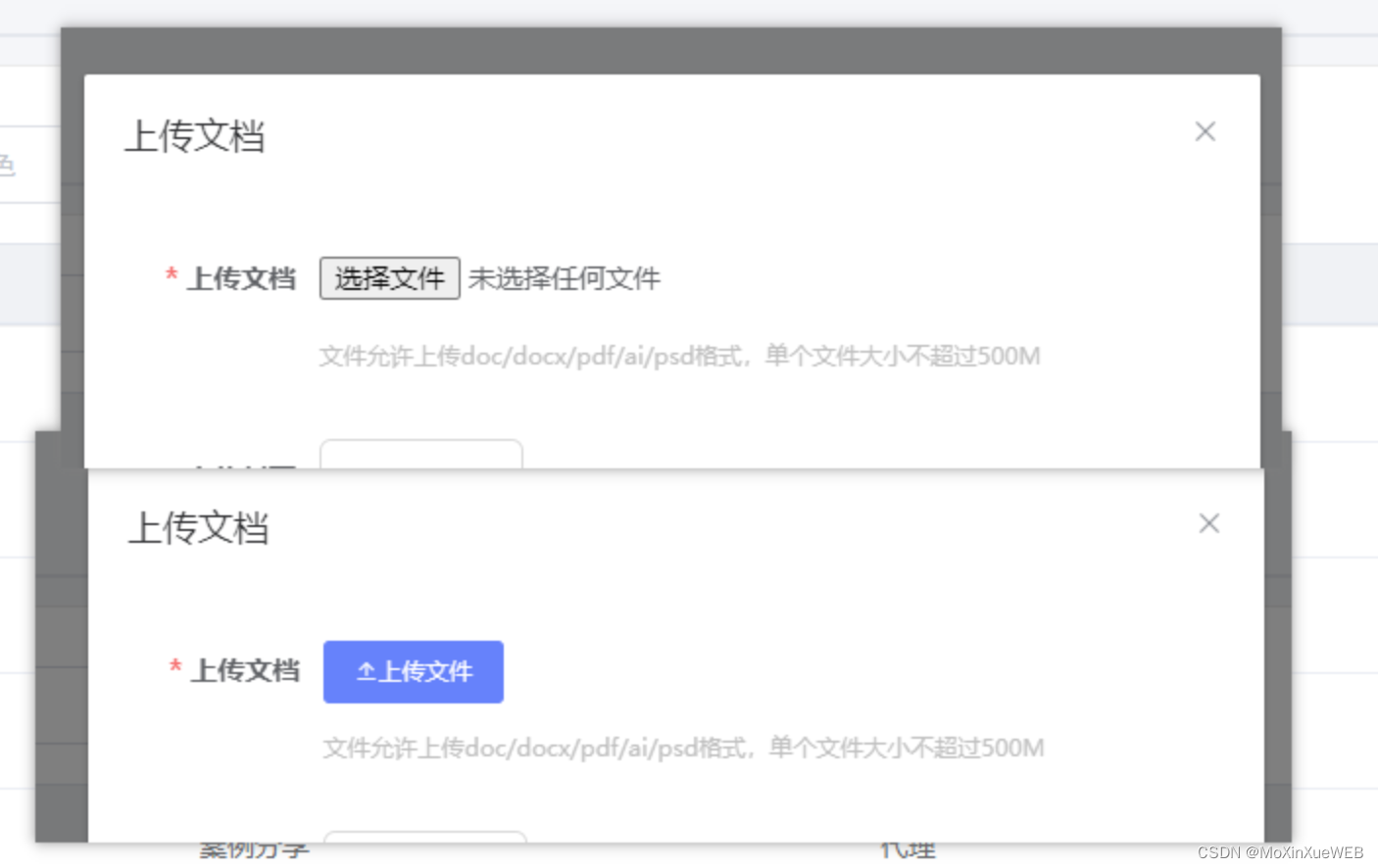
第二种方法:vue2.0 写法,vue2.0很多种写法,我举例一种:使用 label元素 与 input file控件关联,然后隐藏 input。也是一样的。只不过不用调用方法了。
 <input style="display: none"
 	id="fileImg" ref="filesImg" type="file"
 	@change="uploadImg(e)"
	accept=".jpg,.png,.gif,.bmp"
	multiple="multiple" />
  // 获取图片
        const uploadImg = (e) => {
            let e = window.event || e // change事件获取到的数据
            if (e.target.files[0].size > 2 * 1024 * 1024) { // 限制上传图片文件大小
                ElMessage.error('上传单个封面大小不能超过 2M!')
            } else {
                state.ruleForm.coverFile = e.target.files[0]
                // 获取图片地址
                let file = e.target.files[0]
                let reader = new FileReader()
                reader.readAsDataURL(file)
                reader.onload = function (result) {
                    state.coverFile = result.target.result // 图片地址 Base64 格式的 可预览
                }
            }
        }
获取到的files文件的value 赋值为空,但是这种方式不能彻底清理文件达到解决问题的方法,最后,外部加一个form表单,然后清空form表单里面的内容
<form id="dataForm">
       <input style="display: none"
        id="file"
        ref="files"
        type="file"
        @change="uploadData(e)"
        accept=".jpg,.docx,.pdf,.ai,.psd,.png,.gif,.bmp"
        multiple="multiple" />
    </form>
document.getElementById('DataForm')&&document.getElementById('DataForm').reset();
*.3gpp    audio/3gpp, video/3gpp
*.ac3    audio/ac3
*.asf       allpication/vnd.ms-asf
*.au           audio/basic
*.css           text/css
*.csv           text/csv
*.doc    application/msword
*.dot    application/msword
*.dtd    application/xml-dtd
*.dwg    image/vnd.dwg
*.dxf      image/vnd.dxf
*.gif            image/gif
*.htm    text/html
*.html    text/html
*.jp2            image/jp2
*.jpe       image/jpeg
*.jpeg    image/jpeg
*.jpg          image/jpeg
*.js       text/javascript, application/javascript
*.json    application/json
*.mp2    audio/mpeg, video/mpeg
*.mp3    audio/mpeg
*.mp4    audio/mp4, video/mp4
*.mpeg    video/mpeg
*.mpg    video/mpeg
*.mpp    application/vnd.ms-project
*.ogg    application/ogg, audio/ogg
*.pdf    application/pdf
*.png    image/png
*.pot    application/vnd.ms-powerpoint
*.pps    application/vnd.ms-powerpoint
*.ppt    application/vnd.ms-powerpoint
*.rtf            application/rtf, text/rtf
*.svf           image/vnd.svf
*.tif         image/tiff
*.tiff       image/tiff
*.txt           text/plain
*.wdb    application/vnd.ms-works
*.wps    application/vnd.ms-works
*.xhtml    application/xhtml+xml
*.xlc      application/vnd.ms-excel
*.xlm    application/vnd.ms-excel
*.xls           application/vnd.ms-excel
*.xlt      application/vnd.ms-excel
*.xlw      application/vnd.ms-excel
*.xml    text/xml, application/xml
*.zip            aplication/zip
*.xlsx     application/vnd.openxmlformats-officedocument.spreadsheetml.sheet
我有一个Ruby程序,它使用rubyzip压缩XML文件的目录树。gem。我的问题是文件开始变得很重,我想提高压缩级别,因为压缩时间不是问题。我在rubyzipdocumentation中找不到一种为创建的ZIP文件指定压缩级别的方法。有人知道如何更改此设置吗?是否有另一个允许指定压缩级别的Ruby库? 最佳答案 这是我通过查看rubyzip内部创建的代码。level=Zlib::BEST_COMPRESSIONZip::ZipOutputStream.open(zip_file)do|zip|Dir.glob("**/*")d
我试图在一个项目中使用rake,如果我把所有东西都放到Rakefile中,它会很大并且很难读取/找到东西,所以我试着将每个命名空间放在lib/rake中它自己的文件中,我添加了这个到我的rake文件的顶部:Dir['#{File.dirname(__FILE__)}/lib/rake/*.rake'].map{|f|requiref}它加载文件没问题,但没有任务。我现在只有一个.rake文件作为测试,名为“servers.rake”,它看起来像这样:namespace:serverdotask:testdoputs"test"endend所以当我运行rakeserver:testid时
我的目标是转换表单输入,例如“100兆字节”或“1GB”,并将其转换为我可以存储在数据库中的文件大小(以千字节为单位)。目前,我有这个:defquota_convert@regex=/([0-9]+)(.*)s/@sizes=%w{kilobytemegabytegigabyte}m=self.quota.match(@regex)if@sizes.include?m[2]eval("self.quota=#{m[1]}.#{m[2]}")endend这有效,但前提是输入是倍数(“gigabytes”,而不是“gigabyte”)并且由于使用了eval看起来疯狂不安全。所以,功能正常,
Rails2.3可以选择随时使用RouteSet#add_configuration_file添加更多路由。是否可以在Rails3项目中做同样的事情? 最佳答案 在config/application.rb中:config.paths.config.routes在Rails3.2(也可能是Rails3.1)中,使用:config.paths["config/routes"] 关于ruby-on-rails-Rails3中的多个路由文件,我们在StackOverflow上找到一个类似的问题
对于具有离线功能的智能手机应用程序,我正在为Xml文件创建单向文本同步。我希望我的服务器将增量/差异(例如GNU差异补丁)发送到目标设备。这是计划:Time=0Server:hasversion_1ofXmlfile(~800kiB)Client:hasversion_1ofXmlfile(~800kiB)Time=1Server:hasversion_1andversion_2ofXmlfile(each~800kiB)computesdeltaoftheseversions(=patch)(~10kiB)sendspatchtoClient(~10kiBtransferred)Cl
我正在寻找执行以下操作的正确语法(在Perl、Shell或Ruby中):#variabletoaccessthedatalinesappendedasafileEND_OF_SCRIPT_MARKERrawdatastartshereanditcontinues. 最佳答案 Perl用__DATA__做这个:#!/usr/bin/perlusestrict;usewarnings;while(){print;}__DATA__Texttoprintgoeshere 关于ruby-如何将脚
使用带有Rails插件的vim,您可以创建一个迁移文件,然后一次性打开该文件吗?textmate也可以这样吗? 最佳答案 你可以使用rails.vim然后做类似的事情::Rgeneratemigratonadd_foo_to_bar插件将打开迁移生成的文件,这正是您想要的。我不能代表textmate。 关于ruby-使用VimRails,您可以创建一个新的迁移文件并一次性打开它吗?,我们在StackOverflow上找到一个类似的问题: https://sta
好的,所以我的目标是轻松地将一些数据保存到磁盘以备后用。您如何简单地写入然后读取一个对象?所以如果我有一个简单的类classCattr_accessor:a,:bdefinitialize(a,b)@a,@b=a,bendend所以如果我从中非常快地制作一个objobj=C.new("foo","bar")#justgaveitsomerandomvalues然后我可以把它变成一个kindaidstring=obj.to_s#whichreturns""我终于可以将此字符串打印到文件或其他内容中。我的问题是,我该如何再次将这个id变回一个对象?我知道我可以自己挑选信息并制作一个接受该信
我正在编写一个小脚本来定位aws存储桶中的特定文件,并创建一个临时验证的url以发送给同事。(理想情况下,这将创建类似于在控制台上右键单击存储桶中的文件并复制链接地址的结果)。我研究过回形针,它似乎不符合这个标准,但我可能只是不知道它的全部功能。我尝试了以下方法:defauthenticated_url(file_name,bucket)AWS::S3::S3Object.url_for(file_name,bucket,:secure=>true,:expires=>20*60)end产生这种类型的结果:...-1.amazonaws.com/file_path/file.zip.A
我注意到像bundler这样的项目在每个specfile中执行requirespec_helper我还注意到rspec使用选项--require,它允许您在引导rspec时要求一个文件。您还可以将其添加到.rspec文件中,因此只要您运行不带参数的rspec就会添加它。使用上述方法有什么缺点可以解释为什么像bundler这样的项目选择在每个规范文件中都需要spec_helper吗? 最佳答案 我不在Bundler上工作,所以我不能直接谈论他们的做法。并非所有项目都checkin.rspec文件。原因是这个文件,通常按照当前的惯例,只
