文章目录
经过前面的学习Spring系列的操作已经差不多了,接下来我们继续学习更加重要的知识,将前端传递的参数存储起来,或者查询数据库里面的数据
MyBatis是款优秀的持久层框架,它支持自定义SQL、存储过程以及高级映射。MyBatis几乎祛除了所有的JDBC代码以及设置参数和获取结果集的操作。MyBatis可以通过简单的XML或者注解来配置和映射原始类型、接口和Java POJO为数据库中的记录
简单来说MyBatis是简单完成程序和数据库交互的工具,也就是更简单的操作和读取数据库的工具
对于后端程序员来说,程序是由以下两个程序组成的:
而这两个重要的组成部分要通讯,就要依靠数据库连接工具,那么数据库连接工具有哪些?比如JDBC还有今天我们要介绍的MyBatis。既然已经有了JDBC,为什么还要学习MyBatis?这是因为JDBC操作太繁琐了,我们来回顾一下JDBC的操作流程:
DataSourceDataSource获取数据库连接ConnectionConnection及SQL创建操作命令对象StatementStatement执行SQL语句ResultSet,更新操作:返回更新的数量MyBatis的学习只分为两部分:
开始搭建MyBatis之前,我们需要先来看看它在整个框架之中的地位
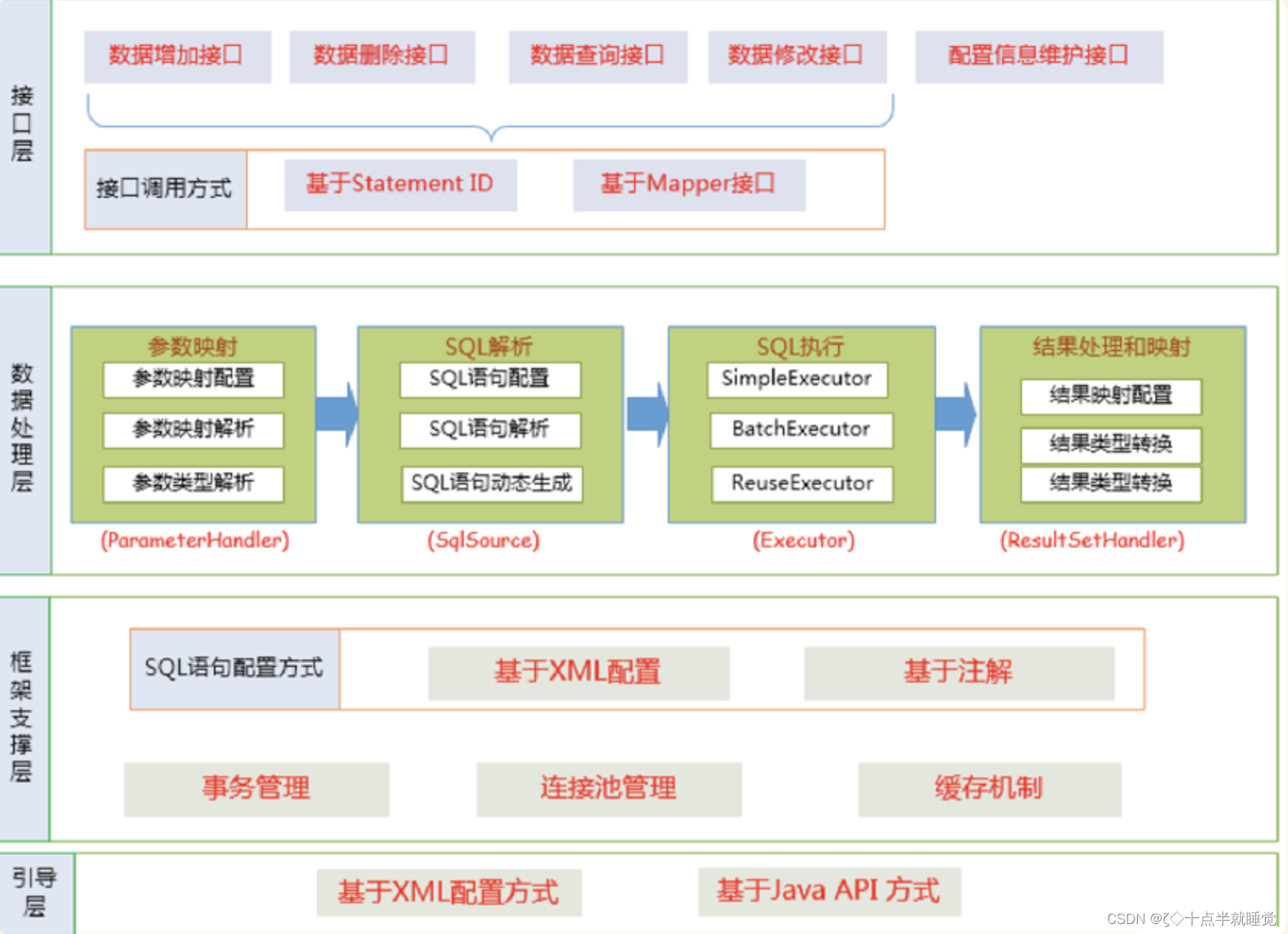
MyBatis也是一个ORM框架,ORM即对象关系映射。在面向对象编程语言当中,讲关系型数据库中的数据与对象建立起映射关系,进行自动完成数据与对象的相互转换
ORM把数据库映射为对象:
一般的ORM框架,会将数据库模型的每一张表都映射为一个Java类
也就是说使用MyBatis可以像操作对象一样操作数据库中的表,可以实现对象和数据表之间的转换,我们接下来看看MyBatis的使用
使用MyBatis的方式来读取用户表当中的所有用户,我们使用个人博客的数据包。
-- 创建数据库
drop database if exists mycnblog;
create database mycnblog DEFAULT CHARACTER SET utf8mb4;
-- 使⽤数据数据
use mycnblog;
-- 创建表[⽤户表]
drop table if exists userinfo;
create table userinfo(
                         id int primary key auto_increment,
                         username varchar(100) not null,
                         password varchar(32) not null,
                         photo varchar(500) default '',
                         createtime datetime default now(),
                         updatetime datetime default now(),
                         `state` int default 1
) default charset 'utf8mb4';
-- 创建⽂章表
drop table if exists articleinfo;
create table articleinfo(
                            id int primary key auto_increment,
                            title varchar(100) not null,
                            content text not null,
                            createtime datetime default now(),
                            updatetime datetime default now(),
                            uid int not null,
                            rcount int not null default 1,
                            `state` int default 1
)default charset 'utf8mb4';
-- 创建视频表
drop table if exists videoinfo;
create table videoinfo(
                          vid int primary key,
                          `title` varchar(250),
                          `url` varchar(1000),
                          createtime datetime default now(),
                          updatetime datetime default now(),
                          uid int
)default charset 'utf8mb4';
-- 添加⼀个⽤户信息
INSERT INTO `mycnblog`.`userinfo` (`id`, `username`, `password`, `photo`,
`createtime`, `updatetime`, `state`) VALUES
(1, 'admin', 'admin', '', '2021-12-06 17:10:48', '2021-12-06 17:10:48', 1)
;
-- ⽂章添加测试数据
insert into articleinfo(title,content,uid)
values('Java','Java正⽂',1);

-- 添加视频
insert into videoinfo(vid,title,url,uid) values(1,'java title','http://ww
w.baidu.com',1);
添加MyBatis框架支持分为两种情况:一种情况是对之前的Spring项目进行升级,另一种情况是创建一个全新的MyBatis和Spring Boot项目
扩展:在老项目当中快速的添加框架,更简单的操作是使用EditStarters插件
此步骤需要进行两项设置,数据库连接字符串设置和MyBatis的XML文件配置
spring:
  datasource:
    url: jdbc:mysql://127.0.0.1:3306/mycnblog?characterEncoding=utf8&&useSSL=false
    username: root
    password: 123456
    driver-class-name: com.mysql.cj.jdbc.Driver
注意事项:
如果使用mysql-connector-java是5.x之前使用的
con.mysql.jdbc.Driver如果大于5.x使用的是com.mysql.cj.jdbc.Driver
MyBatis的XML中保存的是查询数据库的具体操作的SQL,配置如下:
mybatis:
  mapper-locations: classpath:mybatis/**Mapper.xml
下面按照后端开发的工程思路,也就是下面的流程来实现MyBatis查询所有用户的功能:
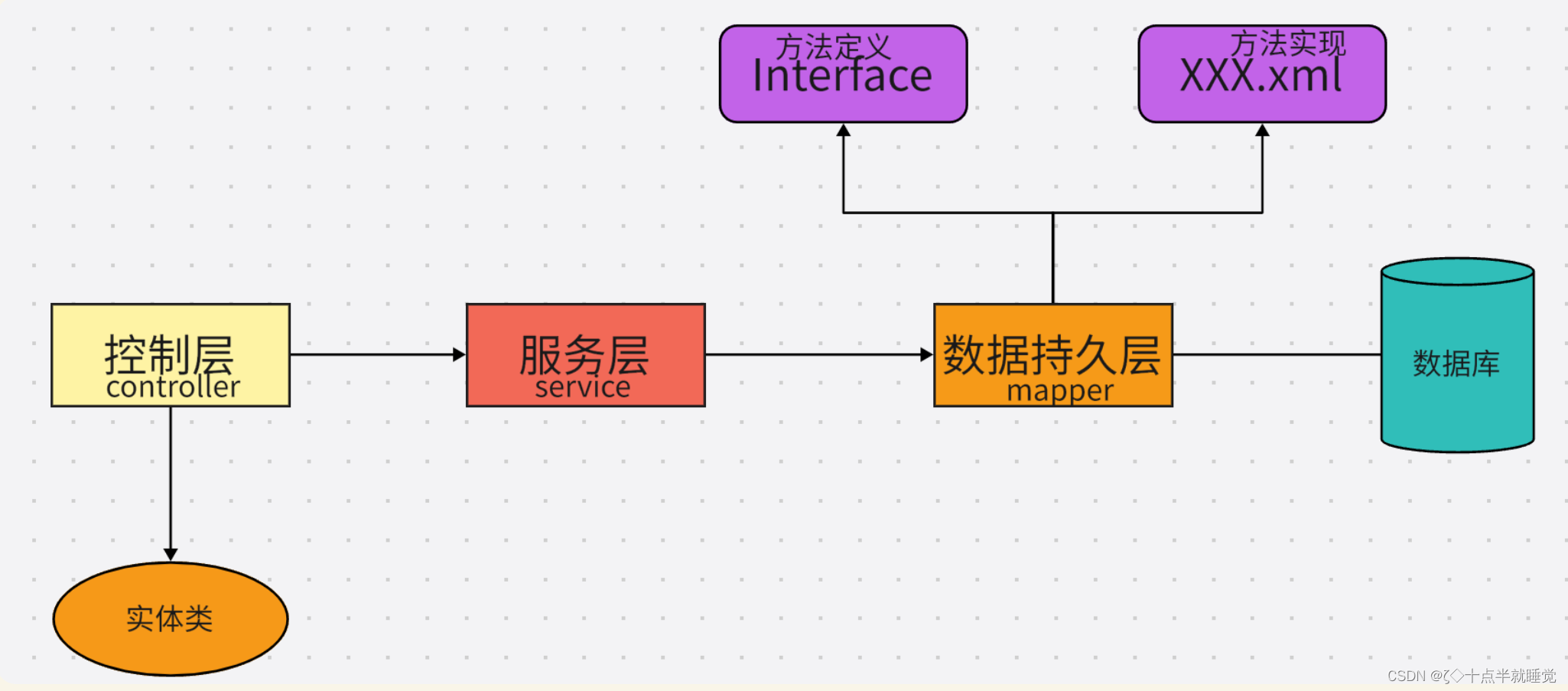
先添加用户的实体类:
import lombok.Data;
import java.util.Date;
@Data
public class User {
 private Integer id;
 private String username;
 private String password;
 private String photo;
 private Date createTime;
 private Date updateTime;
}
数据持久层的接口定义:
@Mapper
public interface UserMapper {
    public UserInfo getUserById(@Param("id") Integer id);

    public void add(@RequestBody UserInfo userInfo);
}
数据持久层的实现,MyBatis的固定格式:
<?xml version="1.0" encoding="UTF-8"?>
<!DOCTYPE mapper PUBLIC "-//mybatis.org//DTD Mapper 3.0//EN" "http://mybatis.org/dtd/mybatis-3-mapper.dtd">
<mapper namespace="com.example.demo.mapper.UserMapper">
    <select id="getUserById" resultType="com.example.demo.model.UserInfo">
        select * from userinfo where id = #{id}
    </select>
</mapper>
<select> 标签:是用来执行数据库的查询操作的
服务层代码如下:
@Service
public class UserService {
    @Resource
    private UserMapper userMapper;

    public UserInfo getUserById(Integer id) {
        return userMapper.getUserById(id);
    }
}
控制层的代码实现如下:
@Controller
@ResponseBody
public class UserController {
    @Resource
    private UserService userService;

    @RequestMapping("/getuserbyid")
    public UserInfo getUserById(Integer id) {
        return userService.getUserById(id);
    }
}
<insert id="add">
    insert into userinfo(username, password, photo) values (#{username}, #{password}, #{photo})
</insert>
<insert id="getId" useGeneratedKeys="true" keyProperty="id" keyColumn="id">
    insert into userinfo(username, password, photo) values (#{username}, #{password}, #{photo})
</insert>
<delete id="del">
    delete from userinfo where id = #{id}
</delete>
<update id="update">
    update userinfo set username = #{name} where id = #{id}
</update>
controller代码如下:
@RequestMapping("/getuserbyid")
public UserInfo getUserById(Integer id) {
    return userService.getUserById(id);
}
Mapper.xml实现代码如下:
<select id="getUserById" resultType="com.example.demo.model.UserInfo">
    select * from userinfo where id = #{id}
</select>
预编译处理是指:MyBatis在处理#{}时,会将SQL中的#{}替换为?,使用statement的set方法来赋值。直接替换:是MyBatis在处理 时,就是把 {}时,就是把 时,就是把{}替换成变量的值
使用${}可以实现排序查询,而是用#{}就不能实现排序查询,因为当使用#{}查询时,如果传递的值为String则会加引号,就会导致SQL错误。
<select id="isLogin" resultType="com.example.demo.model.User">
	select * from userinfo where username='${name}' and password='${pwd}'
</select>
结论:用于查询的字段,尽量使用#{}预查询的方式
like使用#{}报错,这个时候不能使用${},可以考虑使用MySQL内置的函数concat()来处理,实现代码如下:
<select id="findUserByName3" resultType="com.example.demo.model.User">
    select * from userinfo where username like concat('%',#{username},'%');
</select>
concat可以连接字符。
如果增、删、改返回影响的行数,那么在mapper.xml中可以不设置返回的类型的。但是即使是最简单的查询,也要设置返回类型否则就会出现错误。
也就是说**对于<select>查询标签,至少存在两个属性:
<resultType和<resultMap绝大多数查询场景可以使用resultType进行返回,如下代码所示:
<select id="getNameById" resultType="java.lang.String">
    select username from userinfo where id=#{id}
</select>
它的优点就是使用方便、直接定义到某个实体类就可以
resultMap使用场景:
字段名和属性名不同的情况
<resultMap id="BaseMap" type="com.example.demo.model.User">
    <id column="id" property="id"></id>
    <result column="username" property="username"></result>
    <result column="password" property="pwd"></result>
</resultMap>
<select id="getUserById" resultMap="com.example.demo.mapper.UserMapper.BaseMap">
    select * from userinfo where id=#{id}
</select>
在多表查询的时候,如果使用resultMap标签,在一个类中包含了另一个对象是查询不出来包含的对象的。如下图所示:

此时我们就需要使用特殊手段来实现联表查询了。
一对一映射要使用<association>标签,具体实现如下所示:一篇文章只能对应一个作者
<resultMap id="BaseMap" type="com.example.demo.model.ArticleInfo">
    <id column="id" property="id"></id>
    <result column="title" property="title"></result>
    <result column="content" property="content"></result>
    <result column="createtime" property="createtime"></result>
    <result column="updatetime" property="updatetime"></result>
    <result column="uid" property="uid"></result>
    <result column="rcount" property="rcount"></result>
    <result column="state" property="state"></result>
    <association property="userInfo" resultMap="com.example.demo.mapper.UserMapper.BaseMap" columnPrefix="u_">				</association>
</resultMap>

<select id="getArticleById" resultMap="BaseMap">
    select a.*, u.id u_id, u.username u_username, u.password u_password from articleinfo a left join userinfo u on a.uid = u.id where a.id = #{id}
</select>
以上使用<assciation>标签,表示一对一的结果映射:
注意:columnPrefix属性不能省略,如果省略当联表中有相同的字段,那么会导致查询出错
一对多需要使用<collection>标签,用法和<association>相同,如下所示:
<resultMap id="BaseMap" type="com.example.demo.model.ArticleInfo">
    <id column="id" property="id"></id>
    <result column="title" property="title"></result>
    <result column="content" property="content"></result>
    <result column="createtime" property="createtime"></result>
    <result column="updatetime" property="updatetime"></result>
    <result column="uid" property="uid"></result>
    <result column="rcount" property="rcount"></result>
    <result column="state" property="state"></result>
    <association property="userInfo" resultMap="com.example.demo.mapper.UserMapper.BaseMap" columnPrefix="u_">		    </association>
</resultMap>

<select id="getArticleById" resultMap="BaseMap">
    select a.*, u.id u_id, u.username u_username, u.password u_password from articleinfo a left join userinfo u on a.uid = u.id where a.id = #{id}
</select>
动态SQL是MyBatis的强大特性之一,能够完成不同条件下不同的sql拼接
<if>标签在注册的时候,我们可能遇到这样一个问题。注册分为两个字段:必填字段和非必传字段,那如果在添加用户的时候又不确定的字段传入,程序应该如何实现?
这个时候我们就需要使用动态标签了。
<insert id="add2">
    insert into userinfo(username, password
    <if test="photo != null">
        ,photo
    </if>) values (#{username}, #{password}
    <if test="photo != null">
        ,#{photo}
    </if>
    );
</insert>
注意test中的,是传入对象的属性,不是数据库字段
<trim>标签之前的插入功能,只是有一个字段为可选项,如果所有字段都是非必选项,就需要考虑用标签结合标签,对多个字段都采用动态生成的方式。
标签当中有如下属性:
使用方法如下:
<insert id="add3">
    insert into userinfo
    <trim prefix="(" suffix=")" suffixOverrides=",">
        <if test="username != null">
            username,
        </if>
        <if test="password != null">
            password,
        </if>
        <if test="photo != null">
            photo
        </if>
        values
        <trim prefix="(" suffix=")" suffixOverrides=",">
            <if test="username != null">
                #{username},
            </if>
            <if test="password != null">
                #{password},
            </if>
            <if test="photo != null">
                #{photo}
            </if>
        </trim>
    </trim>
</insert>
以上SQL动态解析时,会将第一个trim部分如下处理:
prefix配置,开始加上(suffix配置,结束部分加上)suffixOverrides配置去掉最后一个,<where>标签传入对象时,根据属性做where条件查询,用户对象中属性不为null,都为查询条件。
<select id="getUserById" resultMap="BaseMap">
    select * from userinfo
    <where>
        <if test="id != null">
            id = #{id}
        </if>
    </where>
</select>
<set>标签根据传入的用户对象属性来更新用户数据,可以使用标签来指定动态内容
<update id="updateById" parameterType="org.example.model.User">
    update user
    <set>
        <if test="username != null">
            username=#{username},
        </if>
        <if test="password != null">
            password=#{password},
        </if>
        <if test="nickname != null">
            nickname=#{nickname},
        </if>
        <if test="sex != null">
            sex=#{sex},
        </if>
        <if test="birthday != null">
            birthday=#{birthday},
        </if>
        <if test="head != null">
            head=#{head},
        </if>
        <if test="createTime != null">
            create_time=#{createTime},
        </if>
    </set>
    where id=#{id}
</update>
<foreach>标签对集合进行遍历时, 可以使用该标签。<foreach>标签有以下属性。
我正在用Ruby编写一个简单的程序来检查域列表是否被占用。基本上它循环遍历列表,并使用以下函数进行检查。require'rubygems'require'whois'defcheck_domain(domain)c=Whois::Client.newc.query("google.com").available?end程序不断出错(即使我在google.com中进行硬编码),并打印以下消息。鉴于该程序非常简单,我已经没有什么想法了-有什么建议吗?/Library/Ruby/Gems/1.8/gems/whois-2.0.2/lib/whois/server/adapters/base.
我主要使用Ruby来执行此操作,但到目前为止我的攻击计划如下:使用gemsrdf、rdf-rdfa和rdf-microdata或mida来解析给定任何URI的数据。我认为最好映射到像schema.org这样的统一模式,例如使用这个yaml文件,它试图描述数据词汇表和opengraph到schema.org之间的转换:#SchemaXtoschema.orgconversion#data-vocabularyDV:name:namestreet-address:streetAddressregion:addressRegionlocality:addressLocalityphoto:i
我真的很习惯使用Ruby编写以下代码:my_hash={}my_hash['test']=1Java中对应的数据结构是什么? 最佳答案 HashMapmap=newHashMap();map.put("test",1);我假设? 关于java-等价于Java中的RubyHash,我们在StackOverflow上找到一个类似的问题: https://stackoverflow.com/questions/22737685/
我知道我可以指定某些字段来使用pluck查询数据库。ids=Item.where('due_at但是我想知道,是否有一种方法可以指定我想避免从数据库查询的某些字段。某种反拔?posts=Post.where(published:true).do_not_lookup(:enormous_field) 最佳答案 Model#attribute_names应该返回列/属性数组。您可以排除其中一些并传递给pluck或select方法。像这样:posts=Post.where(published:true).select(Post.attr
有时我需要处理键/值数据。我不喜欢使用数组,因为它们在大小上没有限制(很容易不小心添加超过2个项目,而且您最终需要稍后验证大小)。此外,0和1的索引变成了魔数(MagicNumber),并且在传达含义方面做得很差(“当我说0时,我的意思是head...”)。散列也不合适,因为可能会不小心添加额外的条目。我写了下面的类来解决这个问题:classPairattr_accessor:head,:taildefinitialize(h,t)@head,@tail=h,tendend它工作得很好并且解决了问题,但我很想知道:Ruby标准库是否已经带有这样一个类? 最佳
我正在尝试使用boilerpipe来自JRuby。我看过guide从JRuby调用Java,并成功地将它与另一个Java包一起使用,但无法弄清楚为什么同样的东西不能用于boilerpipe。我正在尝试基本上从JRuby中执行与此Java等效的操作:URLurl=newURL("http://www.example.com/some-location/index.html");Stringtext=ArticleExtractor.INSTANCE.getText(url);在JRuby中试过这个:require'java'url=java.net.URL.new("http://www
我只想对我一直在思考的这个问题有其他意见,例如我有classuser_controller和classuserclassUserattr_accessor:name,:usernameendclassUserController//dosomethingaboutanythingaboutusersend问题是我的User类中是否应该有逻辑user=User.newuser.do_something(user1)oritshouldbeuser_controller=UserController.newuser_controller.do_something(user1,user2)我
什么是ruby的rack或python的Java的wsgi?还有一个路由库。 最佳答案 来自Python标准PEP333:Bycontrast,althoughJavahasjustasmanywebapplicationframeworksavailable,Java's"servlet"APImakesitpossibleforapplicationswrittenwithanyJavawebapplicationframeworktoruninanywebserverthatsupportstheservletAPI.ht
我正在尝试使用Curbgem执行以下POST以解析云curl-XPOST\-H"X-Parse-Application-Id:PARSE_APP_ID"\-H"X-Parse-REST-API-Key:PARSE_API_KEY"\-H"Content-Type:image/jpeg"\--data-binary'@myPicture.jpg'\https://api.parse.com/1/files/pic.jpg用这个:curl=Curl::Easy.new("https://api.parse.com/1/files/lion.jpg")curl.multipart_form_
无论您是想搭建桌面端、WEB端或者移动端APP应用,HOOPSPlatform组件都可以为您提供弹性的3D集成架构,同时,由工业领域3D技术专家组成的HOOPS技术团队也能为您提供技术支持服务。如果您的客户期望有一种在多个平台(桌面/WEB/APP,而且某些客户端是“瘦”客户端)快速、方便地将数据接入到3D应用系统的解决方案,并且当访问数据时,在各个平台上的性能和用户体验保持一致,HOOPSPlatform将帮助您完成。利用HOOPSPlatform,您可以开发在任何环境下的3D基础应用架构。HOOPSPlatform可以帮您打造3D创新型产品,HOOPSSDK包含的技术有:快速且准确的CAD
