2022.05.26更新
激活函数是一种添加到人工神经网络中的函数,类似于人类大脑中基于神经元的模型,激活函数最终决定了要发射给下一个神经元的内容。
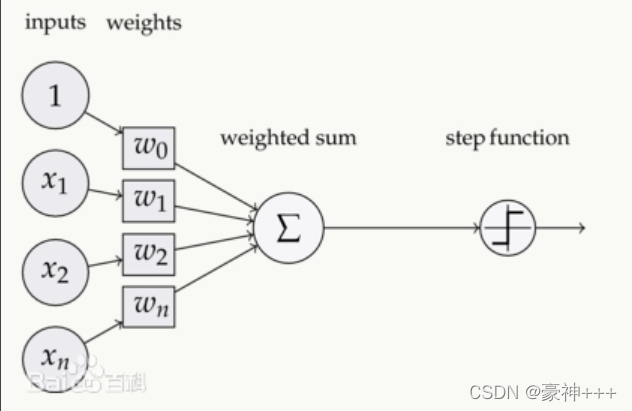
此图来自百度百科,其中step function就是激活函数,它是对之前一层进行汇总后信号进行激活,传给下一层神经元。
常用的激活函数有以下10个:
- Sigmoid
- Tanh
- ReLU
- Softmax
- Leaky ReLU
- ELU
- PReLU
- Swish
- Squareplus
- SMU
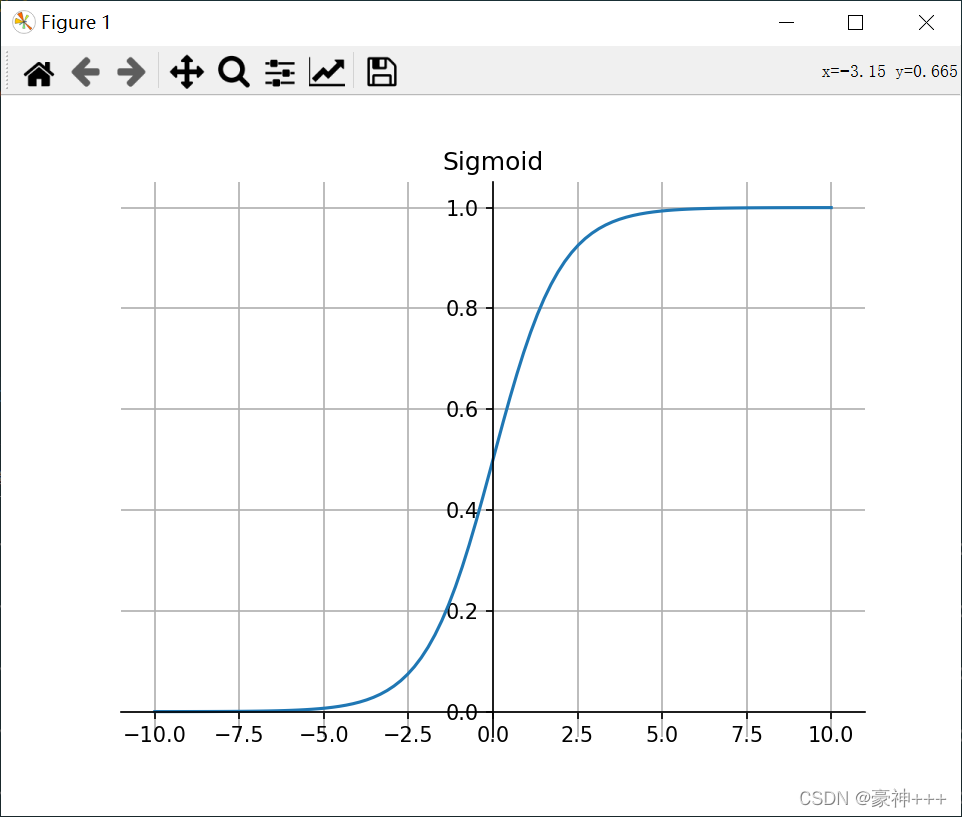
如上图是Sigmoid函数的函数图像。
Sigmoid 函数的图像看起来像一个 S 形曲线。
公式:
f
(
x
)
=
1
1
+
e
−
x
f(x)=\frac 1{1+e^{-x}}
f(x)=1+e−x1
特点:
代码演示:
import matplotlib.pyplot as plt
import numpy as np

def sigmoid(x):
    return 1 / (1 + np.exp(-x))

fig, ax = plt.subplots()

x = np.linspace(-10, 10, 100)
y = sigmoid(x)

ax.plot(x, y)
# 画轴
ax.spines['top'].set_color('none')
ax.spines['right'].set_color('none')

ax.spines['bottom'].set_position(('data', 0))
ax.spines['left'].set_position(('axes', 0.5))
plt.grid() # 设置方格
plt.title("Sigmoid")
plt.show()
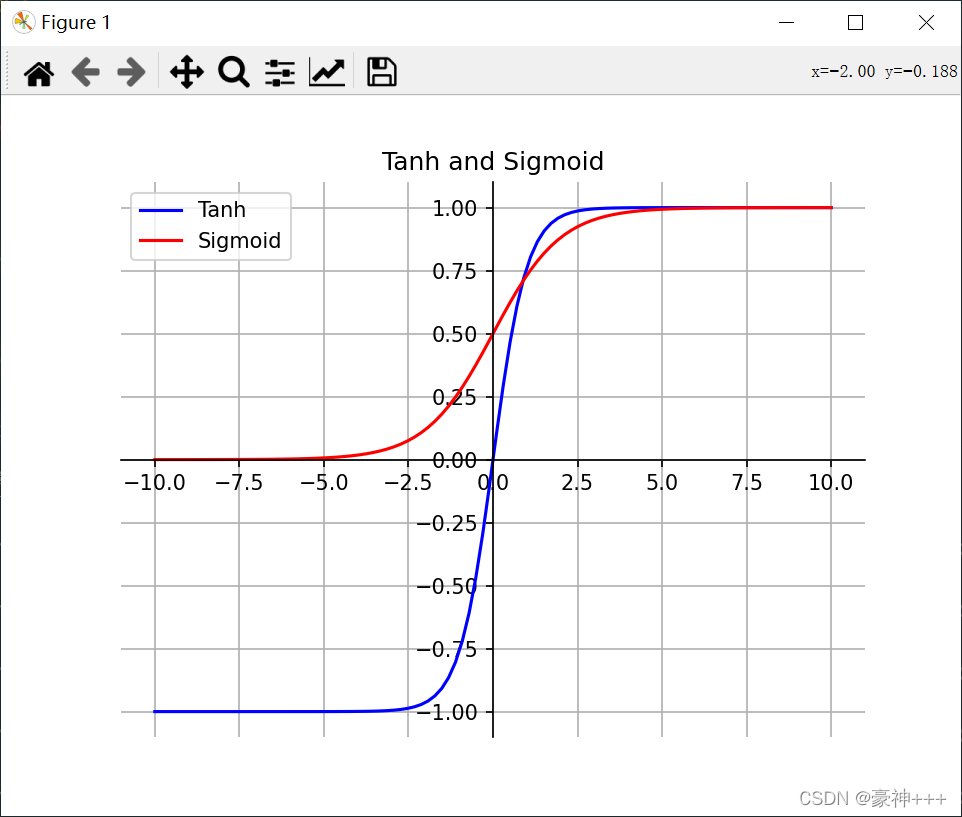
如上图是Tanh函数的函数图像。
Tanh 函数的图像看起来像一个有点扁的 S 形曲线。Tanh 是一个双曲正切函数。Tanh 函数和 Sigmoid 函数的曲线相对相似。但是它比 Sigmoid 函数更有一些优势。
公式:
f
(
x
)
=
2
1
+
e
−
2
x
−
1
f(x)=\frac 2{1+e^{-2x}}-1
f(x)=1+e−2x2−1
特点:
import matplotlib.pyplot as plt
import numpy as np

def sigmoid(x):
    return 1 / (1 + np.exp(-x))

def tanh(x):
    return 2 / (1 + np.exp(-2*x)) - 1

fig, ax = plt.subplots()

x = np.linspace(-10, 10, 100)
y1 = tanh(x)

y2 = sigmoid(x)

ax.plot(x, y1, '-b', label='Tanh')
ax.plot(x, y2, '-r', label='Sigmoid')
ax.legend() # 设置图例
# 画轴
ax.spines['top'].set_color('none')
ax.spines['right'].set_color('none')

ax.spines['bottom'].set_position(('data', 0))
ax.spines['left'].set_position(('axes', 0.5))
plt.grid() # 设置方格
plt.title("Tanh and Sigmoid")
plt.show()
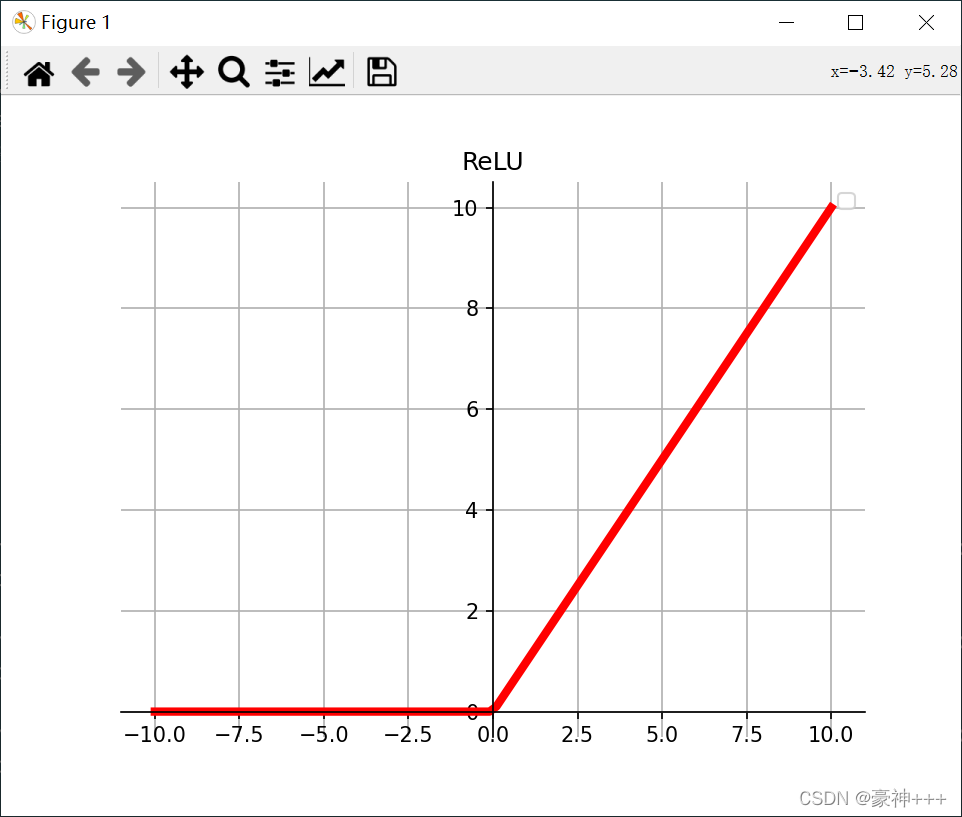
如上图是ReLU函数的函数图像。
ReLU 函数是深度学习中较为流行的一种激活函数。
公式:
f
(
x
)
=
{
m
a
x
(
0
,
x
)
x ≥ 0
0
x < 0
f(x)= \begin{cases} {max(0, x)}&\text{x ≥ 0}\\ 0& \text{x < 0} \end{cases}
f(x)={max(0,x)0x ≥ 0x < 0
特点:
import matplotlib.pyplot as plt
import numpy as np

def relu(x):
    return np.maximum(0, x)

fig, ax = plt.subplots()

x = np.linspace(-10, 10, 100)
y = relu(x)
ax.plot(x, y, '-r', linewidth=4)
ax.legend() # 设置图例
# 画轴
ax.spines['top'].set_color('none')
ax.spines['right'].set_color('none')

ax.spines['bottom'].set_position(('data', 0))
ax.spines['left'].set_position(('axes', 0.5))
plt.grid() # 设置方格
plt.title("ReLU")
plt.show()
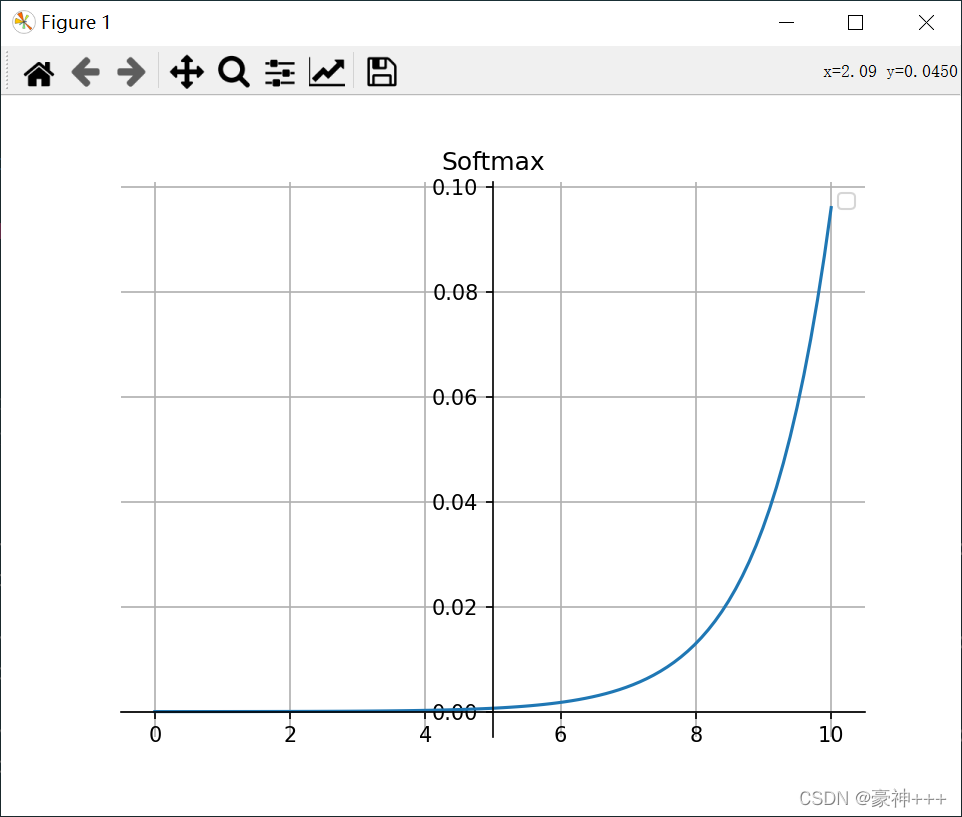
如上图是Softmax函数的函数图像。
公式:
e
x
i
∑
j
=
1
n
e
x
j
\frac {e^{x_i}}{\sum_{j=1}^ne^{x_j}}
∑j=1nexjexi
特点:
代码演示
import matplotlib.pyplot as plt
import numpy as np

def softmax(x):
    x = np.exp(x) / np.sum(np.exp(x))
    return x
fig, ax = plt.subplots()

x = np.linspace(-10, 10, 100)
y = softmax(x)
ax.plot(x, y)
ax.legend() # 设置图例
# 画轴
ax.spines['top'].set_color('none')
ax.spines['right'].set_color('none')

ax.spines['bottom'].set_position(('data', 0))
ax.spines['left'].set_position(('axes', 0.5))
plt.grid() # 设置方格
plt.title("Softmax")
plt.show()
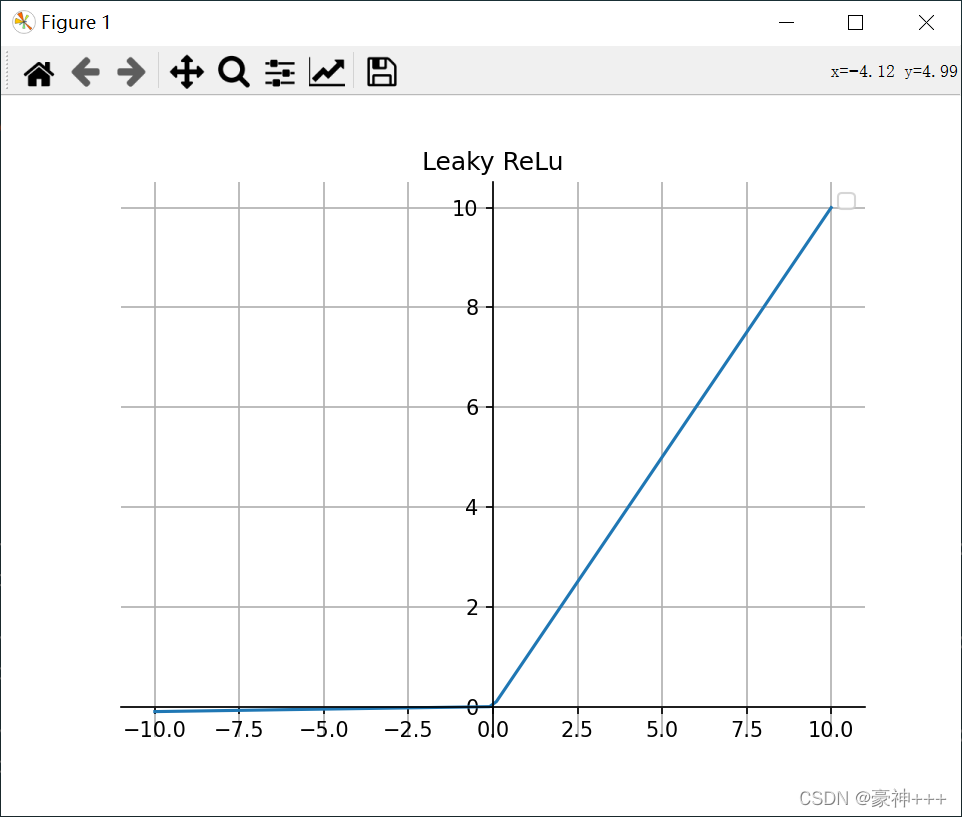
如上图是Leaky ReLU函数的函数图像。
它是一种专门设计用于解决 ReLU 梯度消失问题的激活函数。
公式:
f
(
x
)
=
{
x
x ≥ 0
a
x
x < 0
f(x)= \begin{cases} {x}&\text{x ≥ 0}\\ {ax}& \text{x < 0} \end{cases}
f(x)={xaxx ≥ 0x < 0
特点:
注意: 从理论上讲,Leaky ReLU 具有 ReLU 的所有优点,而且 Dead ReLU 不会有任何问题,但在实际操作中,尚未完全证明 Leaky ReLU 总是比 ReLU 更好。
代码演示:
import matplotlib.pyplot as plt
import numpy as np

def leaky_relu(x,a=0.01):
    return np.maximum(a*x, x)

fig, ax = plt.subplots()

x = np.linspace(-10, 10, 100)
y = leaky_relu(x)
ax.plot(x, y)
ax.legend() # 设置图例
# 画轴
ax.spines['top'].set_color('none')
ax.spines['right'].set_color('none')

ax.spines['bottom'].set_position(('data', 0))
ax.spines['left'].set_position(('axes', 0.5))
plt.grid() # 设置方格
plt.title("Leaky ReLu")
plt.show()

如上图是ELU函数的函数图像。
ELU 的提出也解决了 ReLU 的问题。与 ReLU 相比,ELU 有负值,这会使激活的平均值接近零。均值激活接近于零可以使学习更快,因为它们使梯度更接近自然梯度。
公式:
f
(
x
)
=
{
x
x ≥ 0
α
(
e
x
−
1
)
x < 0
f(x)= \begin{cases} {x}&\text{x ≥ 0}\\ {\alpha(e^x - 1)}& \text{x < 0} \end{cases}
f(x)={xα(ex−1)x ≥ 0x < 0
特点:
注意: 它的计算强度更高。与 Leaky ReLU 类似,尽管理论上比 ReLU 要好,但目前在实践中没有充分的证据表明 ELU 总是比 ReLU 好。
代码演示:
import matplotlib.pyplot as plt
import numpy as np

def elu(x,alpha=1):
    a = x[x>0]
    b = alpha*(np.exp(x[x<0])-1)
    result=np.concatenate((b,a),axis=0)
    return result

fig, ax = plt.subplots()

x = np.linspace(-10, 10, 100)
y = elu(x)
ax.plot(x, y)
ax.legend() # 设置图例
# 画轴
ax.spines['top'].set_color('none')
ax.spines['right'].set_color('none')

ax.spines['bottom'].set_position(('data', 0))
ax.spines['left'].set_position(('axes', 0.5))
plt.grid() # 设置方格
plt.title("ELU")
plt.show()

PReLU 也是 ReLU 的改进版本。
公式:
f
(
x
)
=
{
x
x ≥ 0
α
x
x < 0
f(x)= \begin{cases} {x}&\text{x ≥ 0}\\ {\alpha x}& \text{x < 0} \end{cases}
f(x)={xαxx ≥ 0x < 0
若
α
\alpha
α是可学习的参数,则
f
(
x
)
f(x)
f(x)变为 PReLU。
特点:
代码就不演示了,和上面得Leaky ReLU一样。
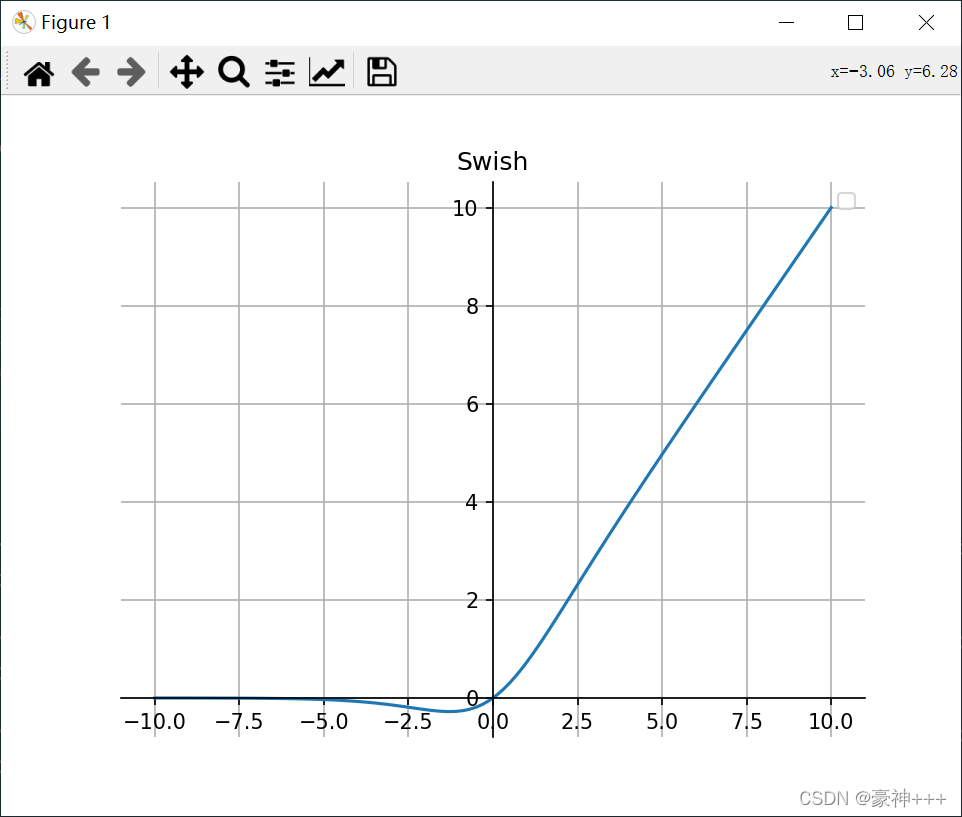
如上图是Swish函数的函数图像。
Swish 的设计受到了 LSTM 和高速网络中 gating 的 sigmoid 函数使用的启发。我们使用相同的 gating 值来简化 gating 机制,这称为 self-gating。
self-gating 的优点在于它只需要简单的标量输入,而普通的 gating 则需要多个标量输入。这使得诸如 Swish 之类的 self-gated 激活函数能够轻松替换以单个标量为输入的激活函数(例如 ReLU),而无需更改隐藏容量或参数数量。
公式:
y
=
x
∗
s
i
g
m
o
i
d
(
x
)
y = x * sigmoid (x)
y=x∗sigmoid(x)
特点:
代码演示:
import matplotlib.pyplot as plt
import numpy as np

def sigmoid(x):
    return 1 / (1 + np.exp(-x))

def swish(x):
    return sigmoid(x) * x

fig, ax = plt.subplots()

x = np.linspace(-10, 10, 100)
y = swish(x)
ax.plot(x, y)
ax.legend() # 设置图例
# 画轴
ax.spines['top'].set_color('none')
ax.spines['right'].set_color('none')

ax.spines['bottom'].set_position(('data', 0))
ax.spines['left'].set_position(('axes', 0.5))
plt.grid() # 设置方格
plt.title("Swish")
plt.show()
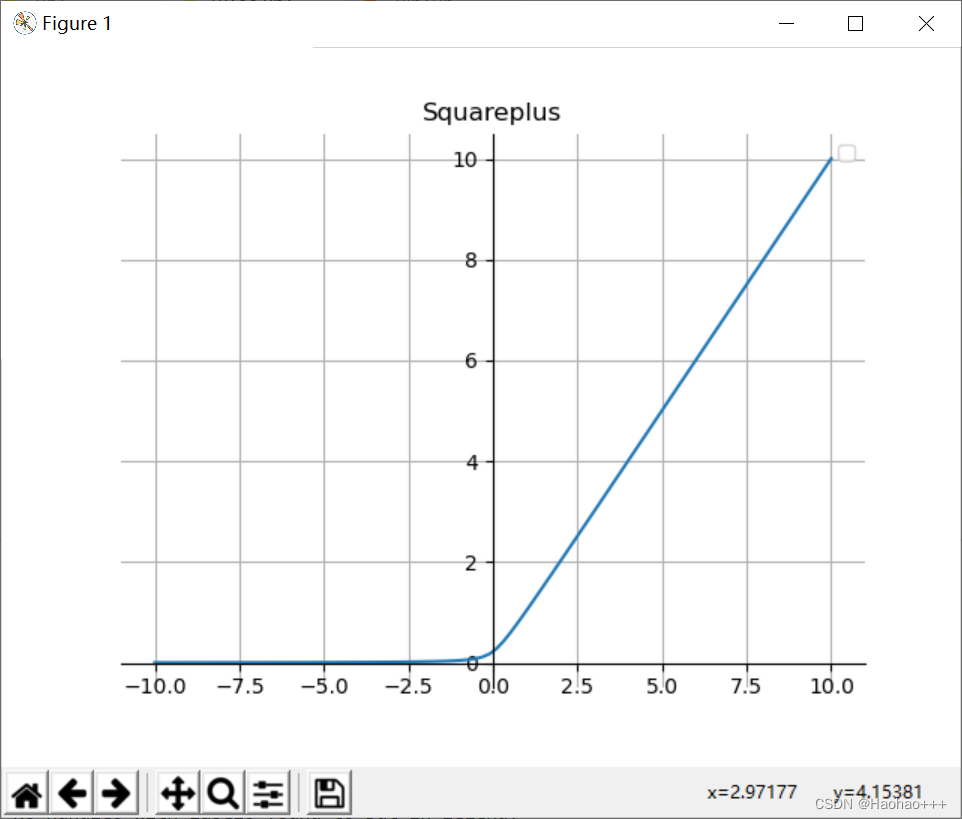
如上图是Squareplus函数的函数图像。
Squareplus是Softplus优化版本,Squareplus由超参数b>0定义,它决定了x=0附近弯曲区域的大小。
公式:
y
=
1
2
(
x
+
x
2
+
b
)
y=\frac 1{2}(x+\sqrt{x^2+b})
y=21(x+x2+b)
特点:
代码演示:
import numpy as np
import matplotlib.pyplot as plt

def Squareplus(x, b=0.2):
    x = 0.5 * (x + np.sqrt(x**2+b))
    return x

fig, ax = plt.subplots()

x = np.linspace(-10, 10, 100)
y = Squareplus(x)
ax.plot(x, y)
ax.legend() # 设置图例
# 画轴
ax.spines['top'].set_color('none')
ax.spines['right'].set_color('none')

ax.spines['bottom'].set_position(('data', 0))
ax.spines['left'].set_position(('axes', 0.5))
plt.grid() # 设置方格
plt.title("Squareplus")
plt.show()
该函数是在已知激活函数Leaky ReLU近似的基础上,提出了一种新的激活函数,称之为Smooth Maximum Unit(SMU)。用SMU替换ReLU,ShuffleNet V2模型在CIFAR100数据集上得到了6.22%的提升。
参考:https://github.com/iFe1er/SMU_pytorch
tensorflow2.x代码如下:
import tensorflow as tf

def SMU(x,alpha=0.25):
    mu = tf.compat.v1.get_variable('SMU_mu', shape=(),
                       initializer=tf.constant_initializer(1000000),
                       dtype=tf.float32)
    return ((1+alpha)*x + (1-alpha)*x*tf.math.erf(mu*(1-alpha)*x))/2

def SMU1(x,alpha=0.25):
    mu = tf.compat.v1.get_variable('SMU1_mu', shape=(),
                       initializer=tf.constant_initializer(4.352665993287951e-9),
                       dtype=tf.float32)
    return ((1+alpha)*x+tf.math.sqrt(tf.math.square(x-alpha*x)+tf.math.square(mu)))/2
pytorch代码如下:
import torch
from torch import nn

class SMU(nn.Module):
    '''
    Implementation of SMU activation.
    Shape:
        - Input: (N, *) where * means, any number of additional
          dimensions
        - Output: (N, *), same shape as the input
    Parameters:
        - alpha: hyper parameter
    References:
        - See related paper:
        https://arxiv.org/abs/2111.04682
    Examples:
        >>> smu = SMU()
        >>> x = torch.Tensor([0.6,-0.3])
        >>> x = smu(x)
    '''
    def __init__(self, alpha = 0.25):
        '''
        Initialization.
        INPUT:
            - alpha: hyper parameter
            aplha is initialized with zero value by default
        '''
        super(SMU,self).__init__()
        self.alpha = alpha
        # initialize mu
        self.mu = torch.nn.Parameter(torch.tensor(1000000.0))

    def forward(self, x):
        return ((1+self.alpha)*x + (1-self.alpha)*x*torch.erf(self.mu*(1-self.alpha)*x))/2


class SMU1(nn.Module):
    '''
    Implementation of SMU-1 activation.
    Shape:
        - Input: (N, *) where * means, any number of additional
          dimensions
        - Output: (N, *), same shape as the input
    Parameters:
        - alpha: hyper parameter
    References:
        - See related paper:
        https://arxiv.org/abs/2111.04682
    Examples:
        >>> smu1 = SMU1()
        >>> x = torch.Tensor([0.6,-0.3])
        >>> x = smu1(x)
    '''
    def __init__(self, alpha = 0.25):
        '''
        Initialization.
        INPUT:
            - alpha: hyper parameter
            aplha is initialized with zero value by default
        '''
        super(SMU1,self).__init__()
        self.alpha = alpha
        # initialize mu
        self.mu = torch.nn.Parameter(torch.tensor(4.352665993287951e-9))

    def forward(self, x):
        return ((1+self.alpha)*x+torch.sqrt(torch.square(x-self.alpha*x)+torch.square(self.mu)))/2
关闭。这个问题是opinion-based.它目前不接受答案。想要改进这个问题?更新问题,以便editingthispost可以用事实和引用来回答它.关闭4年前。Improvethisquestion我想在固定时间创建一系列低音和高音调的哔哔声。例如:在150毫秒时发出高音调的蜂鸣声在151毫秒时发出低音调的蜂鸣声200毫秒时发出低音调的蜂鸣声250毫秒的高音调蜂鸣声有没有办法在Ruby或Python中做到这一点?我真的不在乎输出编码是什么(.wav、.mp3、.ogg等等),但我确实想创建一个输出文件。
大约一年前,我决定确保每个包含非唯一文本的Flash通知都将从模块中的方法中获取文本。我这样做的最初原因是为了避免一遍又一遍地输入相同的字符串。如果我想更改措辞,我可以在一个地方轻松完成,而且一遍又一遍地重复同一件事而出现拼写错误的可能性也会降低。我最终得到的是这样的:moduleMessagesdefformat_error_messages(errors)errors.map{|attribute,message|"Error:#{attribute.to_s.titleize}#{message}."}enddeferror_message_could_not_find(obje
我有一个用户工厂。我希望默认情况下确认用户。但是鉴于unconfirmed特征,我不希望它们被确认。虽然我有一个基于实现细节而不是抽象的工作实现,但我想知道如何正确地做到这一点。factory:userdoafter(:create)do|user,evaluator|#unwantedimplementationdetailshereunlessFactoryGirl.factories[:user].defined_traits.map(&:name).include?(:unconfirmed)user.confirm!endendtrait:unconfirmeddoenden
这个问题在这里已经有了答案:关闭10年前。PossibleDuplicate:Pythonconditionalassignmentoperator对于这样一个简单的问题表示歉意,但是谷歌搜索||=并不是很有帮助;)Python中是否有与Ruby和Perl中的||=语句等效的语句?例如:foo="hey"foo||="what"#assignfooifit'sundefined#fooisstill"hey"bar||="yeah"#baris"yeah"另外,类似这样的东西的通用术语是什么?条件分配是我的第一个猜测,但Wikipediapage跟我想的不太一样。
什么是ruby的rack或python的Java的wsgi?还有一个路由库。 最佳答案 来自Python标准PEP333:Bycontrast,althoughJavahasjustasmanywebapplicationframeworksavailable,Java's"servlet"APImakesitpossibleforapplicationswrittenwithanyJavawebapplicationframeworktoruninanywebserverthatsupportstheservletAPI.ht
华为OD机试题本篇题目:明明的随机数题目输入描述输出描述:示例1输入输出说明代码编写思路最近更新的博客华为od2023|什么是华为od,od薪资待遇,od机试题清单华为OD机试真题大全,用Python解华为机试题|机试宝典【华为OD机试】全流程解析+经验分享,题型分享,防作弊指南华为o
我想解析一个已经存在的.mid文件,改变它的乐器,例如从“acousticgrandpiano”到“violin”,然后将它保存回去或作为另一个.mid文件。根据我在文档中看到的内容,该乐器通过program_change或patch_change指令进行了更改,但我找不到任何在已经存在的MIDI文件中执行此操作的库.他们似乎都只支持从头开始创建的MIDI文件。 最佳答案 MIDIpackage会为您完成此操作,但具体方法取决于midi文件的原始内容。一个MIDI文件由一个或多个音轨组成,每个音轨是十六个channel中任何一个上的
C#实现简易绘图工具一.引言实验目的:通过制作窗体应用程序(C#画图软件),熟悉基本的窗体设计过程以及控件设计,事件处理等,熟悉使用C#的winform窗体进行绘图的基本步骤,对于面向对象编程有更加深刻的体会.Tutorial任务设计一个具有基本功能的画图软件**·包括简单的新建文件,保存,重新绘图等功能**·实现一些基本图形的绘制,包括铅笔和基本形状等,学习橡皮工具的创建**·设计一个合理舒适的UI界面**注明:你可能需要先了解一些关于winform窗体应用程序绘图的基本知识,以及关于GDI+类和结构的知识二.实验环境Windows系统下的visualstudio2017C#窗体应用程序三.
本文主要介绍在使用Selenium进行自动化测试或者任务时,对于使用了iframe的页面,如何定位iframe中的元素文章目录场景描述解决方案具体代码场景描述当我们在使用Selenium进行自动化测试的时候,可能会遇到一些界面或者窗体是使用HTML的iframe标签进行承载的。对于iframe中的标签,如果直接查找是无法找到的,会抛出没有找到元素的异常。比如近在咫尺的例子就是,CSDN的登录窗体就是使用的iframe,大家可以尝试通过F12开发者模式查看到的tag_name,class_name,id或者xpath来定位中的页面元素,会抛出NoSuchElementException异常。解决
MIMO技术的优缺点优点通过下面三个增益来总体概括:阵列增益。阵列增益是指由于接收机通过对接收信号的相干合并而活得的平均SNR的提高。在发射机不知道信道信息的情况下,MIMO系统可以获得的阵列增益与接收天线数成正比复用增益。在采用空间复用方案的MIMO系统中,可以获得复用增益,即信道容量成倍增加。信道容量的增加与min(Nt,Nr)成正比分集增益。在采用空间分集方案的MIMO系统中,可以获得分集增益,即可靠性性能的改善。分集增益用独立衰落支路数来描述,即分集指数。在使用了空时编码的MIMO系统中,由于接收天线或发射天线之间的间距较远,可认为它们各自的大尺度衰落是相互独立的,因此分布式MIMO
