接下来快速看下elasticsearch的使用
Elasticsearch虽然是一种NoSql库,但最终的目的是存储数据、检索数据。因此很多概念与MySQL类似的。
| ES中的概念 | 数据库概念 | 说明 |
|---|---|---|
| 索引库(indices) | 数据库(Database) | ES中可以有多个索引库,就像Mysql中有多个Database一样。 |
| 类型 | 表(table) | mysql中database可以有多个table,table用来约束数据结构。而ES中的每个索引库中只有一个类型,类型中用来约束字段属性的叫做映射(mapping) |
| 映射(mappings) | 表的字段约束 | mysql表对字段有约束,ES中叫做映射,用来约束字段属性,包括:字段名称、数据类型等信息 |
| 文档(document) | 行(Row) | 存入索引库原始的数据,比如每一条商品信息,就是一个文档。对应mysql中的每行数据 |
| 字段(field) | 列(Column) | 文档中的属性,一个文档可以有多个属性。就像mysql中一行数据可以有多个列。 |
因此,我们对ES的操作,就是对索引库、类型映射、文档数据的操作:
操作MySQL,主要是database操作、表操作、数据操作,对应在elasticsearch中,分别是对索引库操作、类型映射操作、文档数据的操作:
而ES中完成上述操作都可以通过Rest风格的API来完成,符合请求要求的Http请求就可以完成数据的操作,详见官方文档:https://www.elastic.co/guide/en/elasticsearch/reference/current/index.html
下面我们分别来学习。
按照Rest风格,增删改查分别使用:POST、DELETE、PUT、GET等请求方式,路径一般是资源名称。因此索引库操作的语法类似。
创建索引库的请求格式:
请求方式:PUT
请求路径:/索引库名
请求参数:格式:
{
    "settings": {
        "属性名": "属性值"
    }
}
settings:就是索引库设置,其中可以定义索引库的各种属性,目前我们可以不设置,都走默认。
示例:
put /索引库名
{
    "settings": {
        "属性名": "属性值"
      }
}
在Kibana中测试一下:
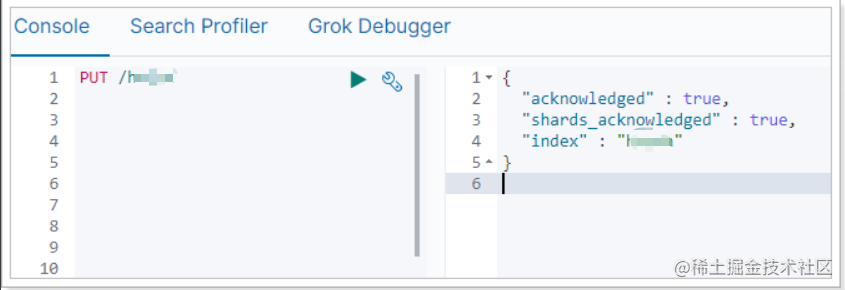
这里我们没有写settings属性,索引库配置都走默认。
Get请求可以帮我们查看索引信息,格式:
GET /索引库名
在Kibana中测试一下:
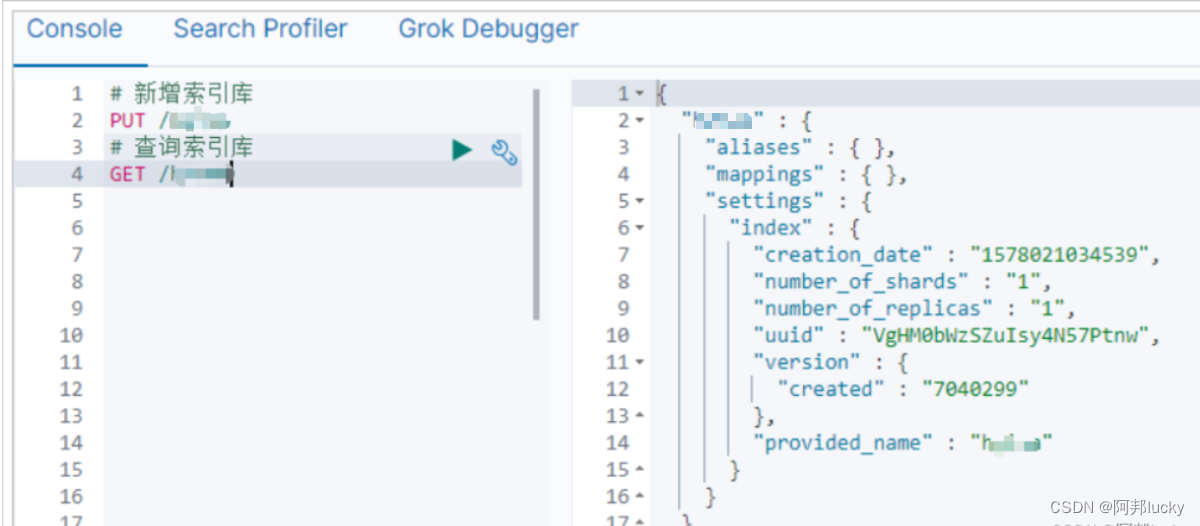
可以看到返回的信息也是JSON格式,其中包含这么几个属性:
删除索引使用DELETE请求,格式:
DELETE /索引库名
在Kibana中测试一下:
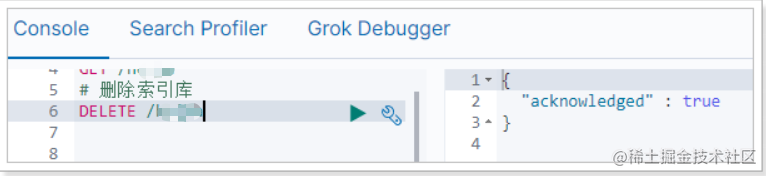
索引库操作:
PUT /库名称GET /索引库名称DELETE /索引库名称MySQL中有表,并且表中有对字段的约束,对应到elasticsearch中就是类型映射mapping.
索引库数据类型是松散的,不过也需要我们指定具体的字段及字段约束信息。而约束字段信息的就叫做映射(mapping)。
映射属性包括很多:
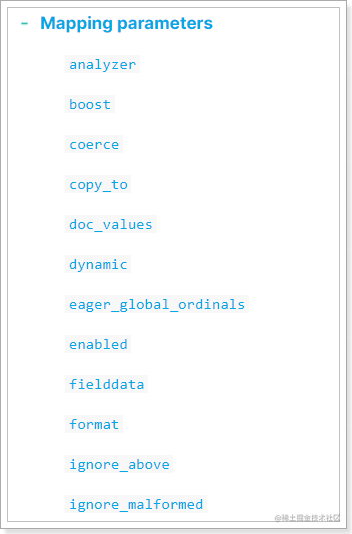
参考官网:https://www.elastic.co/guide/en/elasticsearch/reference/7.x/mapping-params.html
elasticsearch字段的映射属性该怎么选,除了字段名称外,我们一般要考虑这样几个问题:
1)数据的类型是什么?
type属性来指定2)数据是否参与搜索?
index属性来指定是否参与搜索,默认为true,也就是每个字段都参与搜索3)数据存储时是否需要分词?
4)如果分词的话用什么分词器?
analyzer属性指定elasticsearch提供了非常丰富的数据类型:
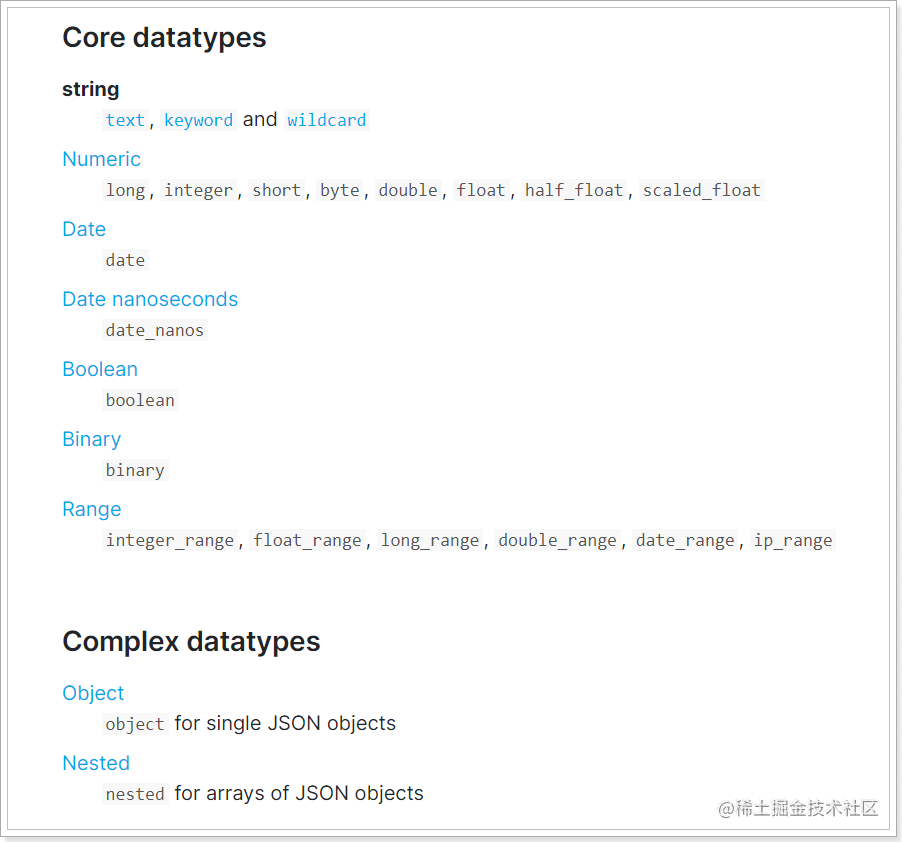
比较常见的有:
string类型,又分两种:
Numerical:数值类型,分两类
基本数据类型:long、interger、short、byte、double、float、half_float
浮点数的高精度类型:scaled_float
Date:日期类型
Object:对象,对象不便于搜索。因此ES会把对象数据扁平化处理再存储。
我们可以给一个已经存在的索引库添加映射关系,也可以创建索引库的同时直接指定映射关系。
我们假设已经存在一个索引库,此时要给索引库添加映射。
语法
请求方式依然是PUT
PUT /索引库名/_mapping
{
  "properties": {
    "字段名1": {
      "type": "类型",
      "index": true,
      "analyzer": "分词器"
    },
    "字段名2": {
      "type": "类型",
      "index": true,
      "analyzer": "分词器"
    },
    ...
  }
}
类型名称:就是前面将的type的概念,类似于数据库中的表 字段名:任意填写,下面指定许多属性,例如:
示例
发起请求:
PUT /hello/_mapping
{
  "properties": {
    "title": {
      "type": "text",
      "analyzer": "ik_max_word"
    },
    "images": {
      "type": "keyword",
      "index": "false"
    },
    "price": {
      "type": "float"
    }
  }
}
响应结果:
{
  "acknowledged": true
}
上述案例中,就给hello这个索引库中设置了3个字段:
title:商品标题
images:商品图片
price:商品价格
并且给这些字段设置了一些属性:
如果一个索引库是不存在的,我们就不能用上面的语法,而是这样:
PUT /索引库名
{
    "mappings":{
      "properties": {
        "字段名1": {
          "type": "类型",
          "index": true,
          "analyzer": "分词器"
        },
        "字段名2": {
          "type": "类型",
          "index": true,
          "analyzer": "分词器"
        },
        ...
      }
    }
}
示例:
# 创建索引库和映射
PUT /hello2
{
  "mappings": {
    "properties": {
      "title": {
        "type": "text",
        "analyzer": "ik_max_word"
      },
      "images": {
        "type": "keyword",
        "index": "false"
      },
      "price": {
        "type": "float"
      }
    }
  }
}
结果:
{
  "acknowledged" : true,
  "shards_acknowledged" : true,
  "index" : "hello"
}
查看使用Get请求
语法:
GET /索引库名/_mapping
示例:
GET /hello/_mapping
响应:
{
  "hello" : {
    "aliases" : { },
    "mappings" : {
      "properties" : {
        "images" : {
          "type" : "keyword",
          "index" : false
        },
        "price" : {
          "type" : "float"
        },
        "title" : {
          "type" : "text",
          "analyzer" : "ik_max_word"
        }
      }
    },
    "settings" : {
      "index" : {
        "creation_date" : "1590744589271",
        "number_of_shards" : "1",
        "number_of_replicas" : "1",
        "uuid" : "v7AHmI9ST76rHiCNHb5KQg",
        "version" : {
          "created" : "7040299"
        },
        "provided_name" : "hello"
      }
    }
  }
}
我们把数据库中的每一行数据查询出来,存入索引库,就是文档。文档的主要操作包括新增、查询、修改、删除。
通过POST请求,可以向一个已经存在的索引库中添加文档数据。ES中,文档都是以JSON格式提交的。
语法:
POST /{索引库名}/_doc
{
    "key":"value"
}
示例:
# 新增文档数据
POST /hello/_doc
{
    "title":"小米手机",
    "images":"http://image.aa.com/12479122.jpg",
    "price":2699.00
}
响应:
{
  "_index" : "hello",
  "_type" : "_doc",
  "_id" : "rGFGbm8BR8Fh6kyTbuq8",
  "_version" : 1,
  "result" : "created",
  "_shards" : {
    "total" : 2,
    "successful" : 1,
    "failed" : 0
  },
  "_seq_no" : 0,
  "_primary_term" : 1
}
结果解释:
_index:新增到了哪一个索引库。_id:这条文档数据的唯一标示,文档的增删改查都依赖这个id作为唯一标示。此处是由ES随即生成的,我们也可以指定使用某个IDresult:执行结果,可以看到结果显示为:created,说明文档创建成功。通过POST请求,可以向一个已经存在的索引库中添加文档数据。ES中,文档都是以JSON格式提交的。
语法:
POST /{索引库名}/_doc/{id}
{
    "key":"value"
}
示例:
# 新增文档数据并指定id
POST /hello/_doc/1
{
    "title":"小米手机",
    "images":"http://image.lello.com/12479122.jpg",
    "price":2699.00
}
响应:
{
  "_index" : "hello",
  "_type" : "_doc",
  "_id" : "1",
  "_version" : 1,
  "result" : "created",
  "_shards" : {
    "total" : 2,
    "successful" : 1,
    "failed" : 0
  },
  "_seq_no" : 1,
  "_primary_term" : 1
}
同样新增成功了!
根据rest风格,新增是post,查询应该是get,不过查询一般都需要条件,这里我们把刚刚生成数据的id带上。
语法:
GET /{索引库名称}/_doc/{id}
通过kibana查看数据:
GET /hello/_doc/rGFGbm8BR8Fh6kyTbuq8
查看结果:
{
  "_index": "hello",
  "_type": "goods",
  "_id": "r9c1KGMBIhaxtY5rlRKv",
  "_version": 1,
  "found": true,
  "_source": {
    "title": "小米手机",
    "images": "http://image.lello.com/12479122.jpg",
    "price": 2699
  }
}
_source:源文档信息,所有的数据都在里面。把刚才新增的请求方式改为PUT,就是修改了。不过修改必须指定id,
比如,我们把使用id为3,不存在,则应该是新增:
# 新增
PUT /hello/_doc/2
{
    "title":"大米手机",
    "images":"http://image.lello.com/12479122.jpg",
    "price":2899.00
}
结果:
{
  "_index" : "hello",
  "_type" : "_doc",
  "_id" : "2",
  "_version" : 1,
  "result" : "created",
  "_shards" : {
    "total" : 2,
    "successful" : 1,
    "failed" : 0
  },
  "_seq_no" : 2,
  "_primary_term" : 1
}
可以看到是created,是新增。
我们再次执行刚才的请求,不过把数据改一下:
# 修改
PUT /hello/_doc/2
{
    "title":"大米手机Pro",
    "images":"http://image.lello.com/12479122.jpg",
    "price":3099.00
}
查看结果:
{
  "_index" : "hello",
  "_type" : "_doc",
  "_id" : "2",
  "_version" : 2,
  "result" : "updated",
  "_shards" : {
    "total" : 2,
    "successful" : 1,
    "failed" : 0
  },
  "_seq_no" : 3,
  "_primary_term" : 1
}
可以看到结果是:updated,显然是更新数据
说明:
es对API的要求并没有那么严格
如:
删除使用DELETE请求,同样,需要根据id进行删除:
语法
DELETE /索引库名/类型名/id值
示例
# 根据id删除数据
DELETE /hello/_doc/rGFGbm8BR8Fh6kyTbuq8
结果:
{
  "_index" : "hello",
  "_type" : "_doc",
  "_id" : "rGFGbm8BR8Fh6kyTbuq8",
  "_version" : 2,
  "result" : "deleted",
  "_shards" : {
    "total" : 2,
    "successful" : 1,
    "failed" : 0
  },
  "_seq_no" : 4,
  "_primary_term" : 1
}
可以看到结果result为:deleted,说明删除成功了。
刚刚我们在新增数据时,添加的字段都是提前在类型中通过mapping定义过的,如果我们添加的字段并没有提前定义过,能够成功吗?
事实上Elasticsearch有一套默认映射规则,如果新增的字段从未定义过,那么就会按照默认映射规则来存储。
测试一下:
# 新增未映射字段
POST /hello/_doc/3
{
    "title":"超大米手机",
    "images":"http://image.lello.com/12479122.jpg",
    "price":3299.00,
    "stock": 200,
    "saleable":true,
    "subTitle":"超级双摄,亿级像素"
}
我们额外添加了stock库存,saleable是否上架,subtitle副标题、3个字段。
来看结果:
{
  "_index" : "hello",
  "_type" : "_doc",
  "_id" : "3",
  "_version" : 1,
  "result" : "created",
  "_shards" : {
    "total" : 2,
    "successful" : 1,
    "failed" : 0
  },
  "_seq_no" : 5,
  "_primary_term" : 1
}
成功了!在看下索引库的映射关系:
{
  "hello" : {
    "mappings" : {
      "properties" : {
        "images" : {
          "type" : "keyword",
          "index" : false
        },
        "price" : {
          "type" : "float"
        },
        "saleable" : {
          "type" : "boolean"
        },
        "stock" : {
          "type" : "long"
        },
        "subTitle" : {
          "type" : "text",
          "fields" : {
            "keyword" : {
              "type" : "keyword",
              "ignore_above" : 256
            }
          }
        },
        "title" : {
          "type" : "text",
          "analyzer" : "ik_max_word"
        }
      }
    }
  }
}
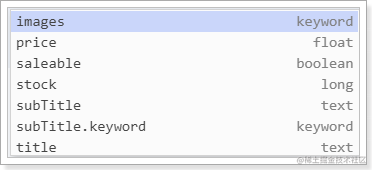
stock、saleable、subtitle都被成功映射了:
stock:默认映射为long类型
saleable:映射为布尔类型
subtitle是String类型数据,ES无法确定该用text还是keyword,它就会存入两个字段。例如:
如图:
默认映射规则不一定符合我们的需求,我们可以按照自己的方式来定义默认规则。这就需要用到动态模板了。
动态模板的语法:
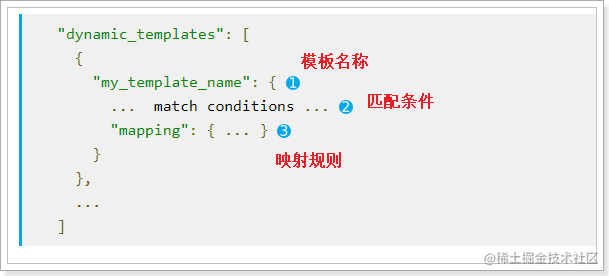
模板名称,随便起
匹配条件,凡是符合条件的未定义字段,都会按照这个mapping中的规则来映射,匹配规则包括:
match_mapping_type:按照数据类型匹配,如:string匹配字符串类型,long匹配整型match和unmatch:按照名称通配符匹配,如:t_*匹配名称以t开头的字段映射规则,匹配成功后的映射规则
凡是映射规则中未定义,而符合2中的匹配条件的字段,就会按照3中定义的映射方式来映射
在kibana中定义一个索引库,并且设置动态模板:
# 动态模板
PUT hello3
{
  "mappings": {
      "properties": {
        "title": {
          "type": "text",
          "analyzer": "ik_max_word"
        }
      },
      "dynamic_templates": [
        {
          "strings": {
            "match_mapping_type": "string",
            "mapping": {
              "type": "keyword"
            }
          }
        }
      ]
    }
}
这个动态模板的意思是:凡是string类型的自动,统一按照 keyword来处理。
接下来新增一个数据试试:
POST /hello2/_doc/1
{
    "title":"超大米手机",
    "images":"http://image.lello.com/12479122.jpg",
    "price":3299.00
}
然后查看映射:
GET /hello2/_mapping
结果:
{
  "hello2" : {
    "mappings" : {
      "dynamic_templates" : [
        {
          "strings" : {
            "match_mapping_type" : "string",
            "mapping" : {
              "type" : "keyword"
            }
          }
        }
      ],
      "properties" : {
        "images" : {
          "type" : "keyword"
        },
        "price" : {
          "type" : "float"
        },
        "title" : {
          "type" : "text",
          "analyzer" : "ik_max_word"
        }
      }
    }
  }
}
可以看到images是一个字符串,被映射成了keyword类型。
首先我们批量导入一些数据,方便后面的讲解:
# 删除hello索引库
DELETE /hello
# 重新创建
PUT /hello
{
  "mappings": {
    "properties": {
      "title": {
        "type": "text",
        "analyzer": "ik_max_word"
      },
      "images": {
        "type": "keyword",
        "index": "false"
      },
      "price": {
        "type": "float"
      }
    }
  }
}
# 批量导入
POST _bulk
{"index":{"_index":"hello","_type":"_doc","_id":"1"}}
{"title":"三星 Note II (N7100) 云石白 联通3G手机","images":"http://image.aa.com/12479122.jpg","price":2599.00}
{"index":{"_index":"hello","_type":"_doc","_id":"2"}}
{"title":"三星 B9120 钛灰色 联通3G手机 双卡双待双通","images":"http://image.aa.com/12479122.jpg","price":2899.00}
{"index":{"_index":"hello","_type":"_doc","_id":"3"}}
{"title":"夏普(SHARP)LCD-46DS40A 46英寸 日本原装液晶面板 智能全高清液晶电视","images":"http://image.aa.com/12479122.jpg","price":12880.00}
{"index":{"_index":"hello","_type":"_doc","_id":"4"}}
{"title":"中兴 U288 珠光白 移动3G手机","images":"http://image.aa.com/12479122.jpg","price":1099.00}
{"index":{"_index":"hello","_type":"_doc","_id":"5"}}
{"title":"飞利浦 老人手机 (X2560) 喜庆红 移动联通2G手机 双卡双待","images":"http://image.aa.com/12479122.jpg","price":500.00}
{"index":{"_index":"hello","_type":"_doc","_id":"6"}}
{"title":"诺基亚(NOKIA) 1050 (RM-908) 黑色 移动联通2G手机","images":"http://image.aa.com/12479122.jpg","price":998.00}
{"index":{"_index":"hello","_type":"_doc","_id":"7"}}
{"title":"海信(Hisense)LED42EC260JD 42英寸 窄边网络 LED电视(黑色)","images":"http://image.aa.com/12479122.jpg","price":3255.00}
{"index":{"_index":"hello","_type":"_doc","_id":"8"}}
{"title":"酷派 8076D 咖啡棕 移动3G手机 双卡双待","images":"http://image.aa.com/12479122.jpg","price":1499.00}
{"index":{"_index":"hello","_type":"_doc","_id":"9"}}
{"title":"华为 P6 (P6-C00) 黑 电信3G手机 双卡双待双通", "images":"http://image.aa.com/12479122.jpg","price":2340.00}
{"index":{"_index":"hello","_type":"_doc","_id":"10"}}
{"title":"康佳(KONKA) LED42K11A 42英寸 网络安卓智能液晶电视(黑色+银色)","images":"http://image.aa.com/12479122.jpg","price":3699.00}
elasticsearch提供的查询方式有很多,例如:
虽然查询的方式有很多,但是基本语法是一样的:
基本语法
GET /索引库名/_search
{
    "query":{
        "查询类型":{
            "查询条件":"查询条件值"
        }
    }
}
这里的query代表一个查询对象,里面可以有不同的查询属性
查询类型,有许多固定的值,如:
查询条件:查询条件会根据类型的不同,写法也有差异,后面详细讲解
注意: 只有index为true的字段才可以作为查询条件哦~~
示例:
# 查询所有 match_all
GET /hello/_search
{
    "query":{
        "match_all": {}
    }
}
query:代表查询对象match_all:代表查询所有结果:
{
"took" : 3,
"timed_out" : false,
"_shards" : {
"total" : 1,
"successful" : 1,
"skipped" : 0,
"failed" : 0
},
"hits" : {
"total" : {
"value" : 10,
"relation" : "eq"
},
"max_score" : 1.0,
"hits" : [
{
"_index" : "hello",
"_type" : "_doc",
"_id" : "2",
"_score" : 1.0,
"_source" : {
"title" : "三星 Note II (N7100) 云石白 联通3G手机",
"images" : "http://image.aa.com/12479122.jpg",
"price" : 2599
}
},
{
"_index" : "hello",
"_type" : "_doc",
"_id" : "1",
"_score" : 1.0,
"_source" : {
"title" : "三星 B9120 钛灰色 联通3G手机 双卡双待双通",
"images" : "http://image.aa.com/12479122.jpg",
"price" : 2899
}
},
{
"_index" : "hello",
"_type" : "_doc",
"_id" : "3",
"_score" : 1.0,
"_source" : {
"title" : "夏普(SHARP)LCD-46DS40A 46英寸 日本原装液晶面板 智能全高清液晶电视",
"images" : "http://image.aa.com/12479122.jpg",
"price" : 12880
}
},
{
"_index" : "hello",
"_type" : "_doc",
"_id" : "4",
"_score" : 1.0,
"_source" : {
"title" : "中兴 U288 珠光白 移动3G手机",
"images" : "http://image.aa.com/12479122.jpg",
"price" : 1099
}
},
{
"_index" : "hello",
"_type" : "_doc",
"_id" : "5",
"_score" : 1.0,
"_source" : {
"title" : "飞利浦 老人手机 (X2560) 喜庆红 移动联通2G手机 双卡双待",
"images" : "http://image.aa.com/12479122.jpg",
"price" : 500
}
},
{
"_index" : "hello",
"_type" : "_doc",
"_id" : "6",
"_score" : 1.0,
"_source" : {
"title" : "诺基亚(NOKIA) 1050 (RM-908) 黑色 移动联通2G手机",
"images" : "http://image.aa.com/12479122.jpg",
"price" : 998
}
},
{
"_index" : "hello",
"_type" : "_doc",
"_id" : "7",
"_score" : 1.0,
"_source" : {
"title" : "海信(Hisense)LED42EC260JD 42英寸 窄边网络 LED电视(黑色)",
"images" : "http://image.aa.com/12479122.jpg",
"price" : 3255
}
},
{
"_index" : "hello",
"_type" : "_doc",
"_id" : "8",
"_score" : 1.0,
"_source" : {
"title" : "酷派 8076D 咖啡棕 移动3G手机 双卡双待",
"images" : "http://image.aa.com/12479122.jpg",
"price" : 1499
}
},
{
"_index" : "hello",
"_type" : "_doc",
"_id" : "9",
"_score" : 1.0,
"_source" : {
"title" : "华为 P6 (P6-C00) 黑 电信3G手机 双卡双待双通",
"images" : "http://image.aa.com/12479122.jpg",
"price" : 2340
}
},
{
"_index" : "hello",
"_type" : "_doc",
"_id" : "10",
"_score" : 1.0,
"_source" : {
"title" : "康佳(KONKA) LED42K11A 42英寸 网络安卓智能液晶电视(黑色+银色)",
"images" : "http://image.aa.com/12479122.jpg",
"price" : 3699
}
}
]
}
}
took:查询花费时间,单位是毫秒
time_out:是否超时
_shards:分片信息
hits:搜索结果总览对象
total:搜索到的总条数
max_score:所有结果中文档得分的最高分
hits:搜索结果的文档对象数组,每个元素是一条搜索到的文档信息
Elasticsearch 默认是按照文档与查询的相关度 (匹配度) 的得分倒序返回结果的. 得分 (_score) 就越大, 表示相关性越高.
match类型查询,会把查询条件进行分词,然后进行查询,多个词条之间默认是or的关系
语法:
GET /hello/_search
{
    "query":{
        "match":{
            "字段名":"搜索条件"
        }
    }
}
示例:
GET /hello/_search
{
    "query":{
        "match":{
            "title":"三星手机"
        }
    }
}
结果:
{
  "took" : 5,
  "timed_out" : false,
  "_shards" : {
    "total" : 1,
    "successful" : 1,
    "skipped" : 0,
    "failed" : 0
  },
  "hits" : {
    "total" : {
      "value" : 7,
      "relation" : "eq"
    },
    "max_score" : 5.250329,
    "hits" : [
      {
        "_index" : "hello",
        "_type" : "_doc",
        "_id" : "2",
        "_score" : 5.250329,
        "_source" : {
          "title" : "三星 Note II (N7100) 云石白 联通3G手机",
          "images" : "http://image.aa.com/12479122.jpg",
          "price" : 2599
        }
      },
      {
        "_index" : "hello",
        "_type" : "_doc",
        "_id" : "1",
        "_score" : 5.250329,
        "_source" : {
          "title" : "三星 B9120 钛灰色 联通3G手机 双卡双待双通",
          "images" : "http://image.aa.com/12479122.jpg",
          "price" : 2899
        }
      },
      {
        "_index" : "hello",
        "_type" : "_doc",
        "_id" : "5",
        "_score" : 1.0063455,
        "_source" : {
          "title" : "飞利浦 老人手机 (X2560) 喜庆红 移动联通2G手机 双卡双待",
          "images" : "http://image.aa.com/12479122.jpg",
          "price" : 500
        }
      },
      {
        "_index" : "hello",
        "_type" : "_doc",
        "_id" : "4",
        "_score" : 0.83515364,
        "_source" : {
          "title" : "中兴 U288 珠光白 移动3G手机",
          "images" : "http://image.aa.com/12479122.jpg",
          "price" : 1099
        }
      },
      {
        "_index" : "hello",
        "_type" : "_doc",
        "_id" : "6",
        "_score" : 0.8129092,
        "_source" : {
          "title" : "诺基亚(NOKIA) 1050 (RM-908) 黑色 移动联通2G手机",
          "images" : "http://image.aa.com/12479122.jpg",
          "price" : 998
        }
      },
      {
        "_index" : "hello",
        "_type" : "_doc",
        "_id" : "8",
        "_score" : 0.8129092,
        "_source" : {
          "title" : "酷派 8076D 咖啡棕 移动3G手机 双卡双待",
          "images" : "http://image.aa.com/12479122.jpg",
          "price" : 1499
        }
      },
      {
        "_index" : "hello",
        "_type" : "_doc",
        "_id" : "9",
        "_score" : 0.73464036,
        "_source" : {
          "title" : "华为 P6 (P6-C00) 黑 电信3G手机 双卡双待双通",
          "images" : "http://image.aa.com/12479122.jpg",
          "price" : 2340
        }
      }
    ]
  }
}
查询结果中把title 字段包含了 “三星” 或 “手机” 的数据都查询了处理,说明在默认情况下,
分词查询 将查询条件进行分词,并以 or 的关系,将所有满足条件的数据查了出来。
某些情况下,我们需要更精确查找,我们希望这个关系变成and,可以这样做:
GET /hello/_search
{
    "query":{
        "match":{
            "title":{"query":"三星手机","operator":"and"}
        }
    }
}
结果:
{
  "took" : 2,
  "timed_out" : false,
  "_shards" : {
    "total" : 1,
    "successful" : 1,
    "skipped" : 0,
    "failed" : 0
  },
  "hits" : {
    "total" : {
      "value" : 2,
      "relation" : "eq"
    },
    "max_score" : 5.250329,
    "hits" : [
      {
        "_index" : "hello",
        "_type" : "_doc",
        "_id" : "2",
        "_score" : 5.250329,
        "_source" : {
          "title" : "三星 Note II (N7100) 云石白 联通3G手机",
          "images" : "http://image.aa.com/12479122.jpg",
          "price" : 2599
        }
      },
      {
        "_index" : "hello",
        "_type" : "_doc",
        "_id" : "1",
        "_score" : 5.250329,
        "_source" : {
          "title" : "三星 B9120 钛灰色 联通3G手机 双卡双待双通",
          "images" : "http://image.aa.com/12479122.jpg",
          "price" : 2899
        }
      }
    ]
  }
}
本例中,只有同时包含三星和手机的词条才会被搜索到。
term 查询,词条查询。查询的条件是一个词条,不会被分词。可以是keyword类型的字符串、数值、或者text类型字段中分词得到的某个词条.
GET /hello/_search
{
    "query":{
        "term": {
          "price": 2599
        }
    }
}
结果:
{
  "took" : 0,
  "timed_out" : false,
  "_shards" : {
    "total" : 1,
    "successful" : 1,
    "skipped" : 0,
    "failed" : 0
  },
  "hits" : {
    "total" : {
      "value" : 1,
      "relation" : "eq"
    },
    "max_score" : 1.0,
    "hits" : [
      {
        "_index" : "hello",
        "_type" : "_doc",
        "_id" : "2",
        "_score" : 1.0,
        "_source" : {
          "title" : "三星 Note II (N7100) 云石白 联通3G手机",
          "images" : "http://image.aa.com/12479122.jpg",
          "price" : 2599
        }
      }
    ]
  }
}
相似度查询
首先看一个概念,叫做编辑距离:一个词条变为另一个词条需要修改的次数,例如:
facebool 要修改成facebook 需要做的是把 l 修改成k ,一次即可,编辑距离就是1
模糊查询允许用户查询内容与实际内容存在偏差,但是编辑距离不能超过2,示例:
# 模糊查询 fuzzy
GET /hello/_search
{
    "query":{
        "fuzzy": {
          "title": {
            "value": "飞利铺",
            "fuzziness": 1
          }
        }
    }
}
本例中我搜索的是飞利铺,看看结果:
{
  "took" : 2,
  "timed_out" : false,
  "_shards" : {
    "total" : 1,
    "successful" : 1,
    "skipped" : 0,
    "failed" : 0
  },
  "hits" : {
    "total" : {
      "value" : 1,
      "relation" : "eq"
    },
    "max_score" : 1.2439895,
    "hits" : [
      {
        "_index" : "hello",
        "_type" : "_doc",
        "_id" : "5",
        "_score" : 1.2439895,
        "_source" : {
          "title" : "飞利浦 老人手机 (X2560) 喜庆红 移动联通2G手机 双卡双待",
          "images" : "http://image.aa.com/12479122.jpg",
          "price" : 500
        }
      }
    ]
  }
}
可以看到结果中飞利浦还是被搜索到了。
range 查询找出那些落在指定区间内的数字或者时间
# 范围查询
GET /hello/_search
{
  "query": {
    "range": {
      "price": {
        "gte": 1000,
        "lt": 2800
      }
    }
  }
}
range查询允许以下字符:
| 操作符 | 说明 |
|---|---|
| gt | 大于 |
| gte | 大于等于 |
| lt | 小于 |
| lte | 小于等于 |
结果:
{
  "took" : 0,
  "timed_out" : false,
  "_shards" : {
    "total" : 1,
    "successful" : 1,
    "skipped" : 0,
    "failed" : 0
  },
  "hits" : {
    "total" : {
      "value" : 4,
      "relation" : "eq"
    },
    "max_score" : 1.0,
    "hits" : [
      {
        "_index" : "hello",
        "_type" : "_doc",
        "_id" : "2",
        "_score" : 1.0,
        "_source" : {
          "title" : "三星 Note II (N7100) 云石白 联通3G手机",
          "images" : "http://image.aa.com/12479122.jpg",
          "price" : 2599
        }
      },
      {
        "_index" : "hello",
        "_type" : "_doc",
        "_id" : "4",
        "_score" : 1.0,
        "_source" : {
          "title" : "中兴 U288 珠光白 移动3G手机",
          "images" : "http://image.aa.com/12479122.jpg",
          "price" : 1099
        }
      },
      {
        "_index" : "hello",
        "_type" : "_doc",
        "_id" : "8",
        "_score" : 1.0,
        "_source" : {
          "title" : "酷派 8076D 咖啡棕 移动3G手机 双卡双待",
          "images" : "http://image.aa.com/12479122.jpg",
          "price" : 1499
        }
      },
      {
        "_index" : "hello",
        "_type" : "_doc",
        "_id" : "9",
        "_score" : 1.0,
        "_source" : {
          "title" : "华为 P6 (P6-C00) 黑 电信3G手机 双卡双待双通",
          "images" : "http://image.aa.com/12479122.jpg",
          "price" : 2340
        }
      }
    ]
  }
}
bool把各种其它查询通过must(与)、must_not(非)、should(或)的方式进行组合
# 想查找手机
# 想查找价格 2099 ~ 2999
# 不想用三星
GET /hello/_search
{
  "query": {
    "bool": {
      "must": [
        {
          "match": {
            "title": "手机"
          }
        },
        {
          "range": {
            "price": {
              "gte": 2099,
              "lte": 2999
            }
          }
        }
      ],
      "must_not": [
        {
          "match": {
            "title": "三星"
          }
        }
      ]
    }
  }
}
结果:
{
"took" : 7,
"timed_out" : false,
"_shards" : {
"total" : 1,
"successful" : 1,
"skipped" : 0,
"failed" : 0
},
"hits" : {
"total" : {
"value" : 1,
"relation" : "eq"
},
"max_score" : 1.7346404,
"hits" : [
{
"_index" : "hello",
"_type" : "_doc",
"_id" : "9",
"_score" : 1.7346404,
"_source" : {
"title" : "华为 P6 (P6-C00) 黑 电信3G手机 双卡双待双通",
"images" : "http://image.aa.com/12479122.jpg",
"price" : 2340
}
}
]
}
}
三个关系规则:
常见组合:
各种组合参考(自己理解):
1)、MUST和MUST表示“与”的关系,即“交集”。
2)、MUST和MUST_NOT前者包含后者不包含。
3)、MUST_NOT和MUST_NOT没意义
4)、SHOULD与MUST表示MUST,SHOULD失去意义;
5)、SHOUlD与MUST_NOT相当于MUST与MUST_NOT。
6)、SHOULD与SHOULD表示“或”的概念。
排序、高亮、分页并不属于查询的条件,因此并不是在query内部,而是与query平级,
基本语法:
GET /{索引库名称}/_search
{
  "query": { ... },
  "sort": [
    {
      "{排序字段}": {
        "order": "{asc或desc}"
      }
    }
  ]
}
sort 可以让我们按照不同的字段进行排序,并且通过order指定排序的方式
注意: 分词字段不能参与排序哦~~
# 排序
GET /hello/_search
{
  "query": {
    "match": {
      "title": "手机"
    }
  },
  "sort": [
    {
      "price": {
        "order": "desc"
      }
    }
  ]
}
结果:
{
  "took" : 5,
  "timed_out" : false,
  "_shards" : {
    "total" : 1,
    "successful" : 1,
    "skipped" : 0,
    "failed" : 0
  },
  "hits" : {
    "total" : {
      "value" : 7,
      "relation" : "eq"
    },
    "max_score" : null,
    "hits" : [
      {
        "_index" : "hello",
        "_type" : "_doc",
        "_id" : "1",
        "_score" : null,
        "_source" : {
          "title" : "三星 B9120 钛灰色 联通3G手机 双卡双待双通",
          "images" : "http://image.aa.com/12479122.jpg",
          "price" : 2899
        },
        "sort" : [
          2899.0
        ]
      },
      {
        "_index" : "hello",
        "_type" : "_doc",
        "_id" : "2",
        "_score" : null,
        "_source" : {
          "title" : "三星 Note II (N7100) 云石白 联通3G手机",
          "images" : "http://image.aa.com/12479122.jpg",
          "price" : 2599
        },
        "sort" : [
          2599.0
        ]
      },
      {
        "_index" : "hello",
        "_type" : "_doc",
        "_id" : "9",
        "_score" : null,
        "_source" : {
          "title" : "华为 P6 (P6-C00) 黑 电信3G手机 双卡双待双通",
          "images" : "http://image.aa.com/12479122.jpg",
          "price" : 2340
        },
        "sort" : [
          2340.0
        ]
      },
      {
        "_index" : "hello",
        "_type" : "_doc",
        "_id" : "8",
        "_score" : null,
        "_source" : {
          "title" : "酷派 8076D 咖啡棕 移动3G手机 双卡双待",
          "images" : "http://image.aa.com/12479122.jpg",
          "price" : 1499
        },
        "sort" : [
          1499.0
        ]
      },
      {
        "_index" : "hello",
        "_type" : "_doc",
        "_id" : "4",
        "_score" : null,
        "_source" : {
          "title" : "中兴 U288 珠光白 移动3G手机",
          "images" : "http://image.aa.com/12479122.jpg",
          "price" : 1099
        },
        "sort" : [
          1099.0
        ]
      },
      {
        "_index" : "hello",
        "_type" : "_doc",
        "_id" : "6",
        "_score" : null,
        "_source" : {
          "title" : "诺基亚(NOKIA) 1050 (RM-908) 黑色 移动联通2G手机",
          "images" : "http://image.aaa.com/12479122.jpg",
          "price" : 998
        },
        "sort" : [
          998.0
        ]
      },
      {
        "_index" : "hello",
        "_type" : "_doc",
        "_id" : "5",
        "_score" : null,
        "_source" : {
          "title" : "飞利浦 老人手机 (X2560) 喜庆红 移动联通2G手机 双卡双待",
          "images" : "http://image.aa.com/12479122.jpg",
          "price" : 500
        },
        "sort" : [
          500.0
        ]
      }
    ]
  }
}
高亮是在搜索结果中把搜索关键字标记出来,因此必须使用match这样的条件搜索。
elasticsearch中实现高亮的语法比较简单:
GET /hello/_search
{
  "query": {
    "match": {
      "title": "联通手机"
    }
  },
  "highlight": {
    "pre_tags": "<em>",
    "post_tags": "</em>",
    "fields": {
      "title": {}
    }
  }
}
在使用match查询的同时,加上一个highlight属性:
pre_tags:前置标签,可以省略,默认是em
post_tags:后置标签,可以省略,默认是em
fields:需要高亮的字段
结果:
{
"took" : 6,
"timed_out" : false,
"_shards" : {
"total" : 1,
"successful" : 1,
"skipped" : 0,
"failed" : 0
},
"hits" : {
"total" : {
"value" : 7,
"relation" : "eq"
},
"max_score" : 1.8434389,
"hits" : [
{
"_index" : "hello",
"_type" : "_doc",
"_id" : "5",
"_score" : 1.8434389,
"_source" : {
"title" : "飞利浦 老人手机 (X2560) 喜庆红 移动联通2G手机 双卡双待",
"images" : "http://image.aa.com/12479122.jpg",
"price" : 500
},
"highlight" : {
"title" : [
"飞利浦 老人<em>手机</em> (X2560) 喜庆红 移动<em>联通</em>2G<em>手机</em> 双卡双待"
]
}
},
{
"_index" : "hello",
"_type" : "_doc",
"_id" : "6",
"_score" : 1.761483,
"_source" : {
"title" : "诺基亚(NOKIA) 1050 (RM-908) 黑色 移动联通2G手机",
"images" : "http://image.aa.com/12479122.jpg",
"price" : 998
},
"highlight" : {
"title" : [
"诺基亚(NOKIA) 1050 (RM-908) 黑色 移动<em>联通</em>2G<em>手机</em>"
]
}
},
{
"_index" : "hello",
"_type" : "_doc",
"_id" : "2",
"_score" : 1.6723943,
"_source" : {
"title" : "三星 Note II (N7100) 云石白 联通3G手机",
"images" : "http://image.aa.com/12479122.jpg",
"price" : 2599
},
"highlight" : {
"title" : [
"三星 Note II (N7100) 云石白 <em>联通</em>3G<em>手机</em>"
]
}
},
{
"_index" : "hello",
"_type" : "_doc",
"_id" : "1",
"_score" : 1.6723943,
"_source" : {
"title" : "三星 B9120 钛灰色 联通3G手机 双卡双待双通",
"images" : "http://image.aa.com/12479122.jpg",
"price" : 2899
},
"highlight" : {
"title" : [
"三星 B9120 钛灰色 <em>联通</em>3G<em>手机</em> 双卡双待双通"
]
}
},
{
"_index" : "hello",
"_type" : "_doc",
"_id" : "4",
"_score" : 0.83515364,
"_source" : {
"title" : "中兴 U288 珠光白 移动3G手机",
"images" : "http://image.aa.com/12479122.jpg",
"price" : 1099
},
"highlight" : {
"title" : [
"中兴 U288 珠光白 移动3G<em>手机</em>"
]
}
},
{
"_index" : "hello",
"_type" : "_doc",
"_id" : "8",
"_score" : 0.8129092,
"_source" : {
"title" : "酷派 8076D 咖啡棕 移动3G手机 双卡双待",
"images" : "http://image.aa.com/12479122.jpg",
"price" : 1499
},
"highlight" : {
"title" : [
"酷派 8076D 咖啡棕 移动3G<em>手机</em> 双卡双待"
]
}
},
{
"_index" : "hello",
"_type" : "_doc",
"_id" : "9",
"_score" : 0.73464036,
"_source" : {
"title" : "华为 P6 (P6-C00) 黑 电信3G手机 双卡双待双通",
"images" : "http://image.aa.com/12479122.jpg",
"price" : 2340
},
"highlight" : {
"title" : [
"华为 P6 (P6-C00) 黑 电信3G<em>手机</em> 双卡双待双通"
]
}
}
]
}
}
通过from和size来指定分页的开始位置及每页大小。
如果size不指定, 默认为10
语法:
GET /hello/_search
{
  "query": {
    "match_all": {}
  },
  "sort": [
    {
      "price": {
        "order": "asc"
      }
    }
  ],
  "from": 0,
  "size": 2
}
结果:
{
  "took" : 0,
  "timed_out" : false,
  "_shards" : {
    "total" : 1,
    "successful" : 1,
    "skipped" : 0,
    "failed" : 0
  },
  "hits" : {
    "total" : {
      "value" : 10,
      "relation" : "eq"
    },
    "max_score" : null,
    "hits" : [
      {
        "_index" : "hello",
        "_type" : "_doc",
        "_id" : "5",
        "_score" : null,
        "_source" : {
          "title" : "飞利浦 老人手机 (X2560) 喜庆红 移动联通2G手机 双卡双待",
          "images" : "http://image.aa.com/12479122.jpg",
          "price" : 500
        },
        "sort" : [
          500.0
        ]
      },
      {
        "_index" : "hello",
        "_type" : "_doc",
        "_id" : "6",
        "_score" : null,
        "_source" : {
          "title" : "诺基亚(NOKIA) 1050 (RM-908) 黑色 移动联通2G手机",
          "images" : "http://image.aa.com/12479122.jpg",
          "price" : 998
        },
        "sort" : [
          998.0
        ]
      }
    ]
  }
}
但是,其本质是逻辑分页,因此为了避免深度分页的问题,ES限制最多查到第10000条。
如果需要查询到10000以后的数据,你可以采用两种方式:
当我们在京东这样的电商网站购物,往往查询条件不止一个,还会有很多过滤条件:
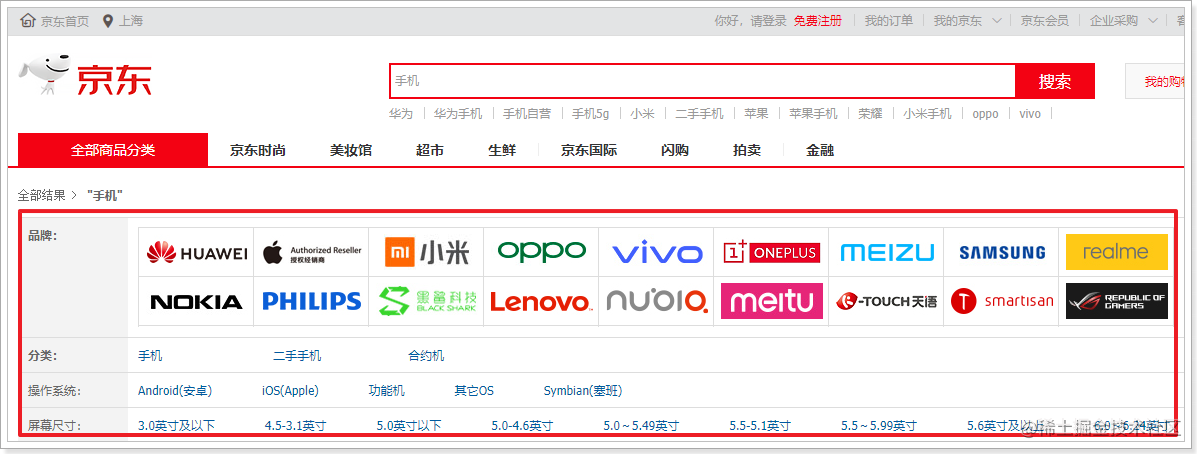
而在默认情况下,所有的查询条件、过滤条件都会影响打分和排名。而对搜索结果打分是比较影响性能的,因此我们一般只对用户输入的搜索条件对应的字段打分,其它过滤项不打分。此时就不能简单实用布尔查询的must来组合条件了,而是实用filter方式。
示例,比如我们要查询手机,同时对价格过滤,原本的写法是这样的:
GET /hello/_search
{
  "query": {
    "bool": {
      "must": [
        {
          "match": {
            "title": "手机"
          }
        },
        {
          "range": {
            "price": {
              "gte": 2099,
              "lte": 2999
            }
          }
        }
      ]
    }
  }
}
现在要修改成这样:
GET /hello/_search
{
  "query": {
    "bool": {
      "must": {
        "match": {
          "title": "手机"
        }
      },
      "filter": [
          {
            "range": {
                "price": {
                  "gte": 2099,
                  "lte": 2999
                }
             }
          }
      ]
    }
  }
}
_source筛选默认情况下,elasticsearch在搜索的结果中,会把文档中保存在_source的所有字段都返回。
如果我们只想获取其中的部分字段,我们可以添加_source的过滤
示例:
GET /hello/_search
{
  "_source": ["title","price"],
  "query": {
    "term": {
      "price": 2699
    }
  }
}
返回的结果:
{
  "took" : 1,
  "timed_out" : false,
  "_shards" : {
    "total" : 1,
    "successful" : 1,
    "skipped" : 0,
    "failed" : 0
  },
  "hits" : {
    "total" : {
      "value" : 1,
      "relation" : "eq"
    },
    "max_score" : 1.0,
    "hits" : [
      {
        "_index" : "hello",
        "_type" : "_doc",
        "_id" : "5",
        "_score" : 1.0,
        "_source" : {
          "price" : 500,
          "title" : "飞利浦 老人手机 (X2560) 喜庆红 移动联通2G手机 双卡双待"
        }
      }
    ]
  }
}
我们也可以通过:
二者都是可选的。
示例:
GET /hello/_search
{
  "_source": {
    "includes":["title","price"]
  },
  "query": {
    "term": {
      "price": 500
    }
  }
}
与下面的结果将是一样的:
GET /hello/_search
{
  "_source": {
     "excludes": ["images"]
  },
  "query": {
    "term": {
      "price": 500
    }
  }
}
聚合(aggregations)可以让我们极其方便的实现对数据的统计、分析。例如:
实现这些统计功能的比数据库的sql要方便的多,而且查询速度非常快,可以实现近实时搜索效果。
要注意:参与聚合的字段,必须是keyword类型 和 数值类型 。
Elasticsearch中的聚合,包含多种类型,最常用的两种,一个叫桶,一个叫度量:
桶(bucket)
桶的作用,是按照某种方式对数据进行分组,每一组数据在ES中称为一个桶,例如我们根据国籍对人划分,可以得到中国桶、英国桶,日本桶……或者我们按照年龄段对人进行划分:010,1020,2030,3040等。
Elasticsearch中提供的划分桶的方式有很多:
综上所述,我们发现bucket aggregations 只负责对数据进行分组,并不进行计算,因此往往bucket中往往会嵌套另一种聚合:metrics aggregations即度量
度量(metrics)
分组完成以后,我们一般会对组中的数据进行聚合运算,例如求平均值、最大、最小、求和等,这些在ES中称为度量
比较常用的一些度量聚合方式:
为了测试聚合,我们先批量导入一些数据
创建索引:
PUT /car
{
  "mappings": {
    "properties": {
      "color": {
        "type": "keyword"
      },
      "make": {
        "type": "keyword"
      }
    }
  }
}
注意:在ES中,需要进行聚合、排序的字段其处理方式比较特殊,因此不能被分词,必须使用keyword或数值类型。这里我们将color和make这两个文字类型的字段设置为keyword类型,这个类型不会被分词,将来就可以参与聚合
导入数据,这里是采用批处理的API,大家直接复制到kibana运行即可:
POST /car/_bulk
{ "index": {}}
{ "price" : 10000, "color" : "红", "make" : "本田", "sold" : "2014-10-28" }
{ "index": {}}
{ "price" : 20000, "color" : "红", "make" : "本田", "sold" : "2014-11-05" }
{ "index": {}}
{ "price" : 30000, "color" : "绿", "make" : "福特", "sold" : "2014-05-18" }
{ "index": {}}
{ "price" : 15000, "color" : "蓝", "make" : "丰田", "sold" : "2014-07-02" }
{ "index": {}}
{ "price" : 12000, "color" : "绿", "make" : "丰田", "sold" : "2014-08-19" }
{ "index": {}}
{ "price" : 20000, "color" : "红", "make" : "本田", "sold" : "2014-11-05" }
{ "index": {}}
{ "price" : 80000, "color" : "红", "make" : "宝马", "sold" : "2014-01-01" }
{ "index": {}}
{ "price" : 25000, "color" : "蓝", "make" : "福特", "sold" : "2014-02-12" }
度量计算
类似数据库中聚合运算,es提供了更为丰富的各种运算分析方法
语法:
{
"query":{},
...
"aggs":{
"自定义的聚合处理名称": {
"聚合类型":{
"field":"域字段"
}
}
}
}
常用度量类型:
count 数量
min 最小值
max 最大值
avg 平均值
sum 求和
stats 显示上面5种信息
get /car/_search
{
"query":{
"match_all": {}
},
"aggs":{
"avg_price":{
"stats": {
"field": "price"
}
}
}
}
// 对价格进行分析 的结果
"aggregations" : {
"avg_price" : {
"count" : 8, //8条记录
"min" : 10000.0, // 最小值
"max" : 80000.0, // 最大值
"avg" : 26500.0, // 平均值
"sum" : 212000.0 // 所有价格之和
}
}
类似于数据库中的分组,
首先,我们按照 汽车的颜色color来划分桶,按照颜色分桶,最好是使用TermAggregation类型,按照颜色的名称来分桶。
GET /car/_search
{
    "size" : 0,
    "aggs" : {
        "my_popular_colors" : {
            "terms" : {
              "field" : "color"
            }
        }
    }
}
size: 查询条数,这里设置为0,因为我们不关心搜索到的数据,只关心聚合结果,提高效率
aggs:声明这是一个聚合查询,是aggregations的缩写
popular_colors:给这次聚合起一个名字,可任意指定。
terms:聚合的类型,这里选择terms,是根据词条内容(这里是颜色)划分
结果:
{
  "took": 33,
  "timed_out": false,
  "_shards": {
    "total": 5,
    "successful": 5,
    "skipped": 0,
    "failed": 0
  },
  "hits": {
    "total": 8,
    "max_score": 0,
    "hits": []
  },
  "aggregations": {
    "my_popular_colors": {
      "doc_count_error_upper_bound": 0,
      "sum_other_doc_count": 0,
      "buckets": [
        {
          "key": "红",
          "doc_count": 4
        },
        {
          "key": "绿",
          "doc_count": 2
        },
        {
          "key": "蓝",
          "doc_count": 2
        }
      ]
    }
  }
}
hits:查询结果为空,因为我们设置了size为0
aggregations:聚合的结果
my_popular_colors:我们定义的聚合名称
buckets:查找到的桶,每个不同的color字段值都会形成一个桶
通过聚合的结果我们发现,目前红色的小车比较畅销!
前面的例子告诉我们每个桶里面的文档数量,这很有用。 但通常,我们的应用需要提供更复杂的文档度量。 例如,每种颜色汽车的平均价格是多少?
因此,我们需要告诉Elasticsearch使用哪个字段,使用何种度量方式进行运算,这些信息要嵌套在桶内,度量的运算会基于桶内的文档进行
现在,我们为刚刚的聚合结果添加 求价格平均值的度量:
GET /car/_search
{
    "size" : 0,
    "aggs" : {
        "my_popular_colors" : {
            "terms" : {
              "field" : "color"
            },
            "aggs":{
                "my_avg_price": {
                   "avg": {
                      "field": "price"
                   }
                }
            }
        }
    }
}
结果:
{
"took" : 8,
"timed_out" : false,
"_shards" : {
"total" : 1,
"successful" : 1,
"skipped" : 0,
"failed" : 0
},
"hits" : {
"total" : {
"value" : 8,
"relation" : "eq"
},
"max_score" : null,
"hits" : [ ]
},
"aggregations" : {
"my_popular_colors" : {
"doc_count_error_upper_bound" : 0,
"sum_other_doc_count" : 0,
"buckets" : [
{
"key" : "红",
"doc_count" : 4,
"my_avg_price" : {
"value" : 32500.0
}
},
{
"key" : "绿",
"doc_count" : 2,
"my_avg_price" : {
"value" : 21000.0
}
},
{
"key" : "蓝",
"doc_count" : 2,
"my_avg_price" : {
"value" : 20000.0
}
}
]
}
}
}
可以看到每个桶中都有自己的avg_price字段,这是度量聚合的结果
刚刚的案例中,我们在桶内嵌套度量运算。事实上桶不仅可以嵌套运算, 还可以再嵌套其它桶。也就是说在每个分组中,再分更多组。
比如:我们想统计每种颜色的汽车中,分别属于哪个制造商,按照make字段再进行分桶
我希望将Favorite模型添加到我的User和Link模型。业务逻辑用户可以有多个链接(即可以添加多个链接)用户可以收藏多个链接(他们自己的或其他用户的)一个链接可以被多个用户收藏,但只有一个所有者我对如何为这种关联建模以及在模型就位后如何创建用户收藏夹感到困惑?classUser 最佳答案 下面的数据模型怎么样:classUser:destroyhas_many:favorite_links,:through=>:favorites,:source=>:linkendclassLink:destroyhas_many:favor
我想为我的Rails网络应用程序提供推荐功能。特别是,我想向新注册的用户推荐他可能想要关注的其他用户。Rails中是否有用于此目的的引擎/gem?如果没有,我应该从哪里开始构建它?谢谢。 最佳答案 有Coletivogemhttps://github.com/diogenes/coletivo我试了一下。在MySQL上运行。Neo4jhttp://neo4j.org真的很容易实现一个“跟随谁”。事实上,大多数展示其能力的样本都涉及“跟随谁”。快速提示-只有在JRuby上运行时,Neo4j.rb才会很酷。如果不是-使用Neograph
目录前言滤波电路科普主要分类实际情况单位的概念常用评价参数函数型滤波器简单分析滤波电路构成低通滤波器RC低通滤波器RL低通滤波器高通滤波器RC高通滤波器RL高通滤波器部分摘自《LC滤波器设计与制作》,侵权删。前言最近需要学习放大电路和滤波电路,但是由于只在之前做音乐频谱分析仪的时候简单了解过一点点运放,所以也是相当从零开始学习了。滤波电路科普主要分类滤波器:主要是从不同频率的成分中提取出特定频率的信号。有源滤波器:由RC元件与运算放大器组成的滤波器。可滤除某一次或多次谐波,最普通易于采用的无源滤波器结构是将电感与电容串联,可对主要次谐波(3、5、7)构成低阻抗旁路。无源滤波器:无源滤波器,又称
@作者:SYFStrive @博客首页:HomePage📜:微信小程序📌:个人社区(欢迎大佬们加入)👉:社区链接🔗📌:觉得文章不错可以点点关注👉:专栏连接🔗💃:感谢支持,学累了可以先看小段由小胖给大家带来的街舞👉微信小程序(🔥)目录自定义组件-behaviors 1、什么是behaviors 2、behaviors的工作方式 3、创建behavior 4、导入并使用behavior 5、behavior中所有可用的节点 6、同名字段的覆盖和组合规则总结最后自定义组件-behaviors 1、什么是behaviorsbehaviors是小程序中,用于实现
遍历文件夹我们通常是使用递归进行操作,这种方式比较简单,也比较容易理解。本文为大家介绍另一种不使用递归的方式,由于没有使用递归,只用到了循环和集合,所以效率更高一些!一、使用递归遍历文件夹整体思路1、使用File封装初始目录,2、打印这个目录3、获取这个目录下所有的子文件和子目录的数组。4、遍历这个数组,取出每个File对象4-1、如果File是否是一个文件,打印4-2、否则就是一个目录,递归调用代码实现publicclassSearchFile{publicstaticvoidmain(String[]args){//初始目录Filedir=newFile("d:/Dev");Datebeg
ES一、简介1、ElasticStackES技术栈:ElasticSearch:存数据+搜索;QL;Kibana:Web可视化平台,分析。LogStash:日志收集,Log4j:产生日志;log.info(xxx)。。。。使用场景:metrics:指标监控…2、基本概念Index(索引)动词:保存(插入)名词:类似MySQL数据库,给数据Type(类型)已废弃,以前类似MySQL的表现在用索引对数据分类Document(文档)真正要保存的一个JSON数据{name:"tcx"}二、入门实战{"name":"DESKTOP-1TSVGKG","cluster_name":"elasticsear
您将如何构建一个简单的Sinatra应用程序?我正在制作,我希望该应用具有以下功能:“应用程序”更像是一个包含所有信息的管理仪表板。然后另一个应用程序将通过REST访问信息。我还没有创建仪表板,只是从数据库中获取东西session和身份验证(尚未实现)您可以上传图片,其他应用可以显示这些图片我已经使用RSpec创建了一个测试文件通过Prawn生成报告目前的设置是这样的:app.rbtest_app.rb因为我实际上只有应用程序和测试文件。到目前为止,我已经将Datamapper用于ORM,将SQLite用于数据库。这是我的第一个Ruby/Sinatra项目,所以欢迎任何和所有建议-我应
有没有办法快速将表格格式的ruby哈希打印到文件中?如:keyAkeyBkeyC...1232343451253474456...其中散列的值是不同大小的数组。还是使用双循环是唯一的方法?谢谢 最佳答案 试试我写的这个gem(在表中打印散列、ruby对象、ActiveRecord对象):http://github.com/arches/table_print 关于ruby-如何以表格格式快速打印Ruby哈希值?,我们在StackOverflow上找到一个类似的问题:
不知何故,我似乎无法获得包含我的聚合的响应...使用curl它按预期工作:HBZUMB01$curl-XPOST"http://localhost:9200/contents/_search"-d'{"size":0,"aggs":{"sport_count":{"value_count":{"field":"dwid"}}}}'我收到回复:{"took":4,"timed_out":false,"_shards":{"total":5,"successful":5,"failed":0},"hits":{"total":90,"max_score":0.0,"hits":[]},"a
您能为RubyonRails推荐好的数据网格类/gem吗?喜欢http://code.google.com/p/zend-framework-datagrid/采埃孚 最佳答案 你也可以试试datagridgem。这不仅关注带有列的网格,还关注过滤器。classSimpleReportincludeDatagridscopedoUser.includes(:group)endfilter(:category,:enum,:select=>["first","second"])filter(:disabled,:eboolean)fi
