
关注微信公众号:K哥爬虫,持续分享爬虫进阶、JS/安卓逆向等技术干货!
本文章中所有内容仅供学习交流,抓包内容、敏感网址、数据接口均已做脱敏处理,严禁用于商业用途和非法用途,否则由此产生的一切后果均与作者无关,若有侵权,请在公众号联系我立即删除!
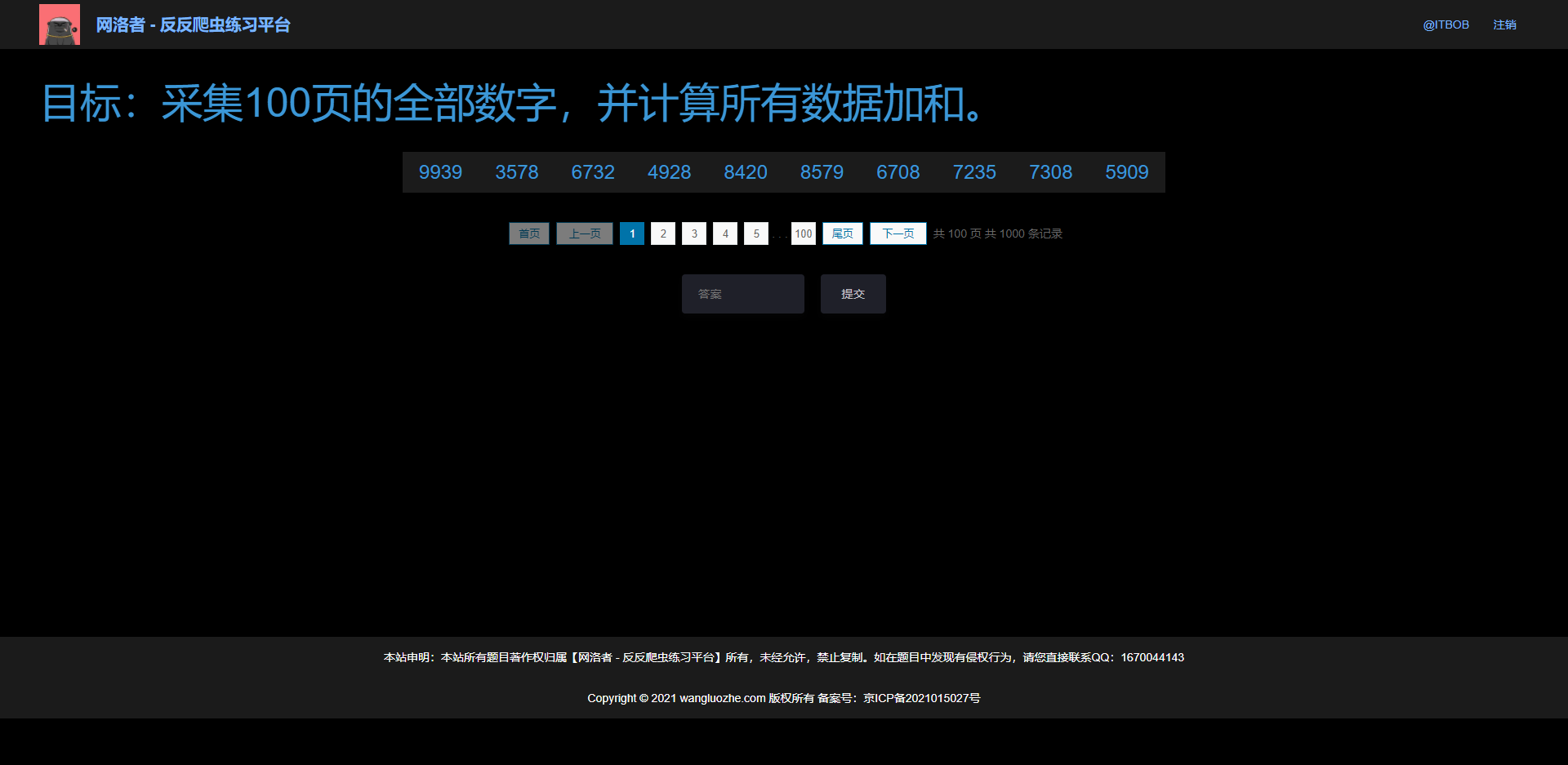
直接搜索,或者跟栈,可以轻松找到加密入口,打开 F12 有两个反调试,一是无限 debugger,右键 Never pause here 即可,二是定时器,控制台输入 for (let i = 1; i < 99999; i++) window.clearInterval(i); 过掉即可。
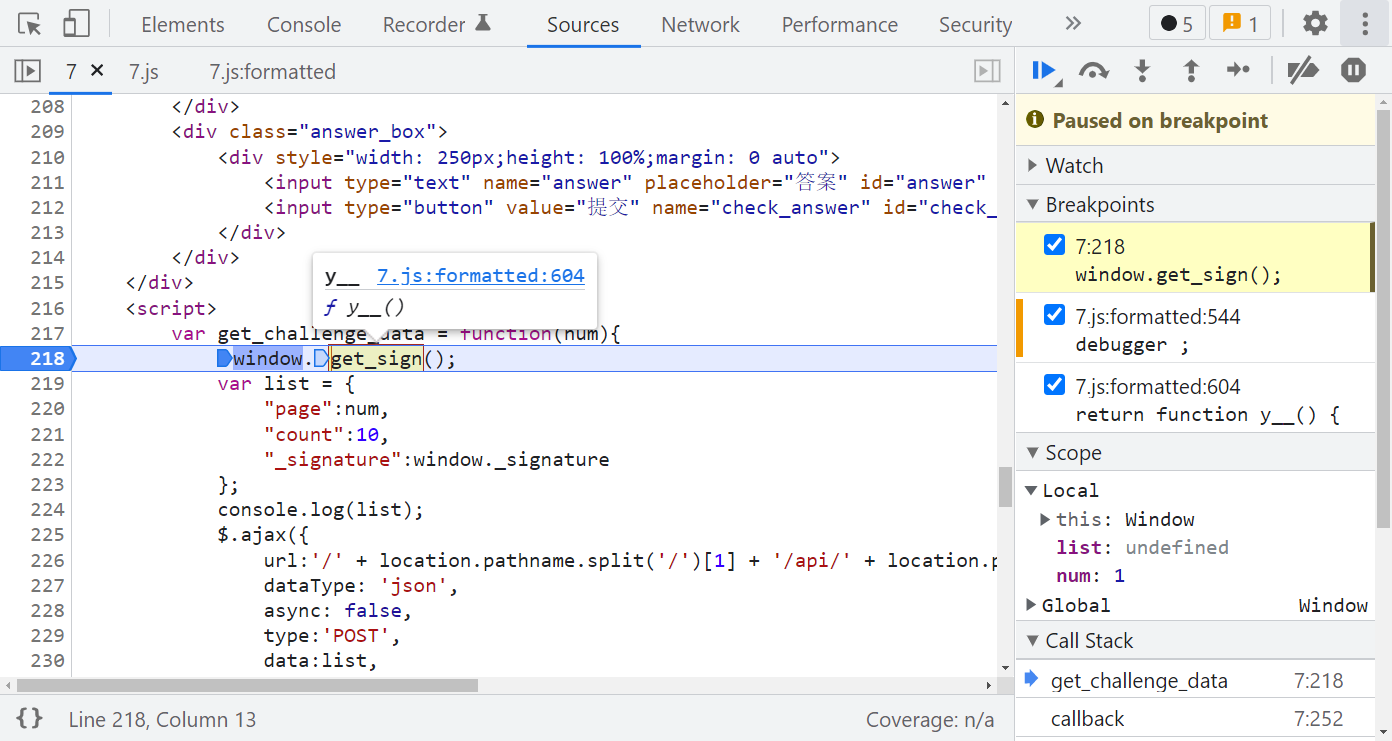
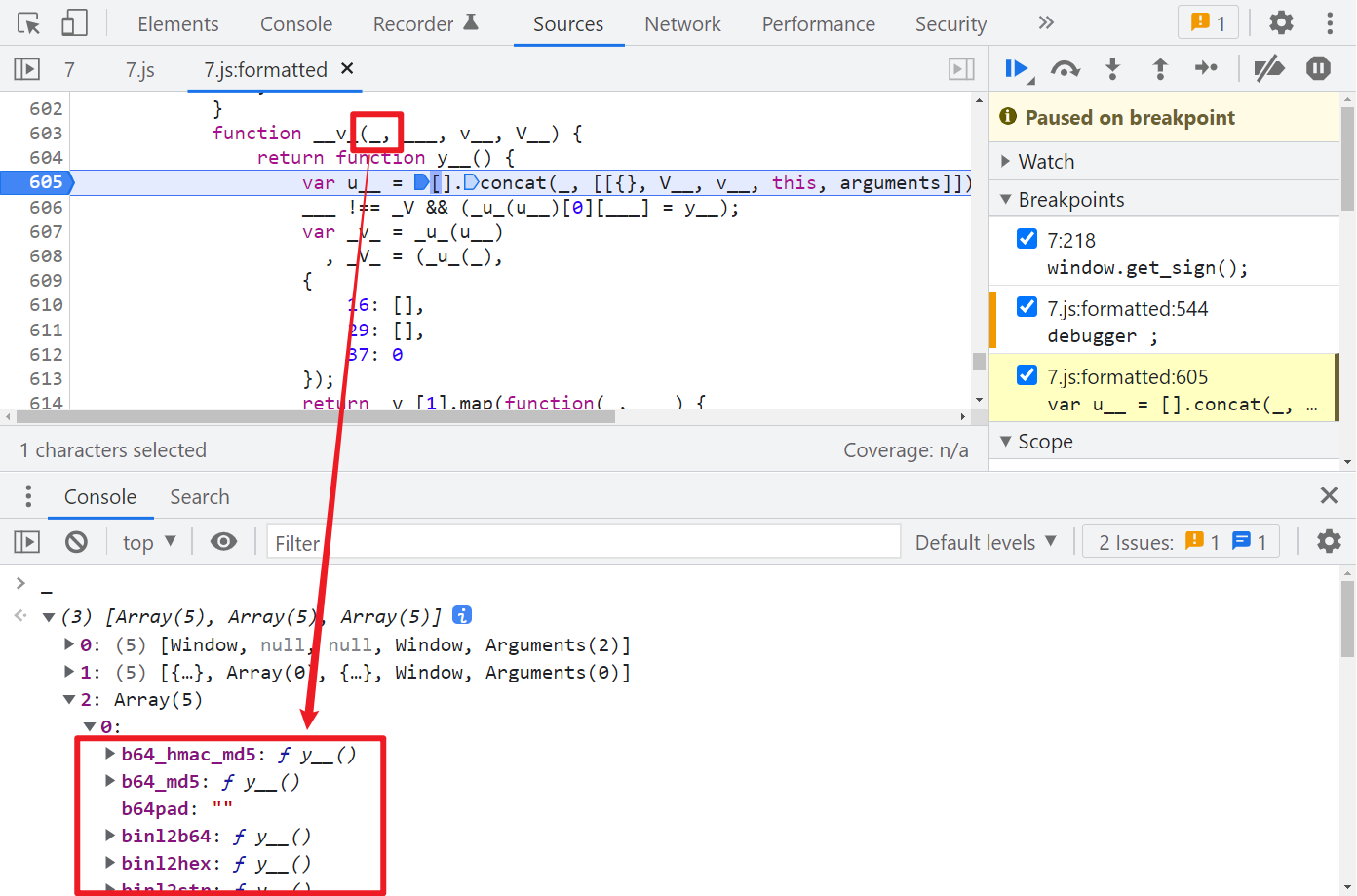
跟进 y__(),就可以看到 jsvmpzl 混淆的代码了,如果有做过猿人学平台的题,会发现此混淆和猿人学第 18 题(https://match.yuanrenxue.com/match/18)是一样的,在 y__() 第一行下个断点,观察 __v_() 第一个参数 _,_[2][0] 你会发现有关 MD5 算法的一些特征,如下图所示:
那么我们直接大胆猜测一下,是不是就是某个数据经过 MD5 之后就是 _signature 了呢?再继续调试一下,注意 arguments 的变化:
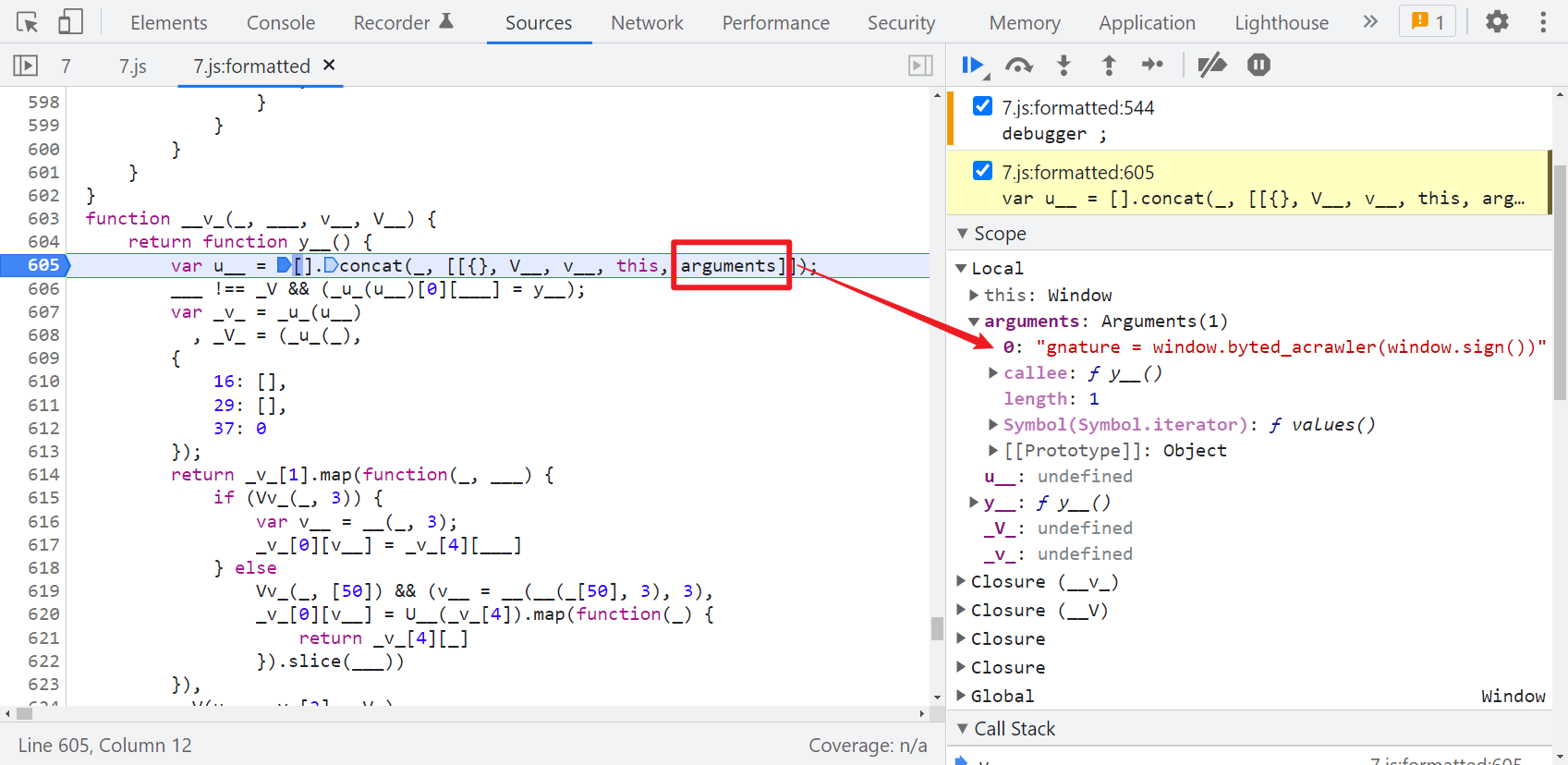
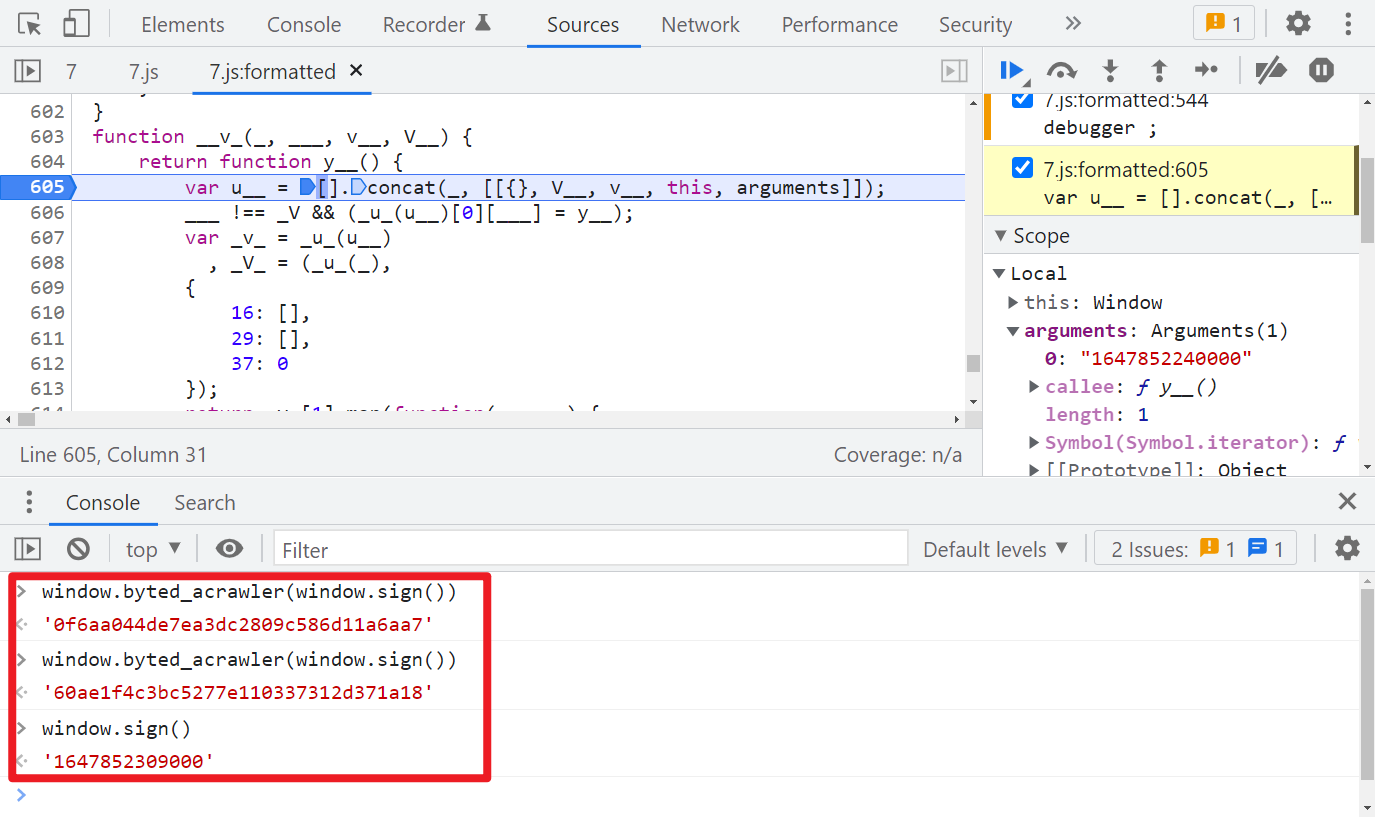
很明显这个 window.byted_acrawler(window.sign()) 应该就是生成 _signature 的语句,这个方法和某字节系的 _signature 生成的方法名称是一样的,直接在控制台输出一下可以拿到值,其中 window.sign() 是取的时间戳:
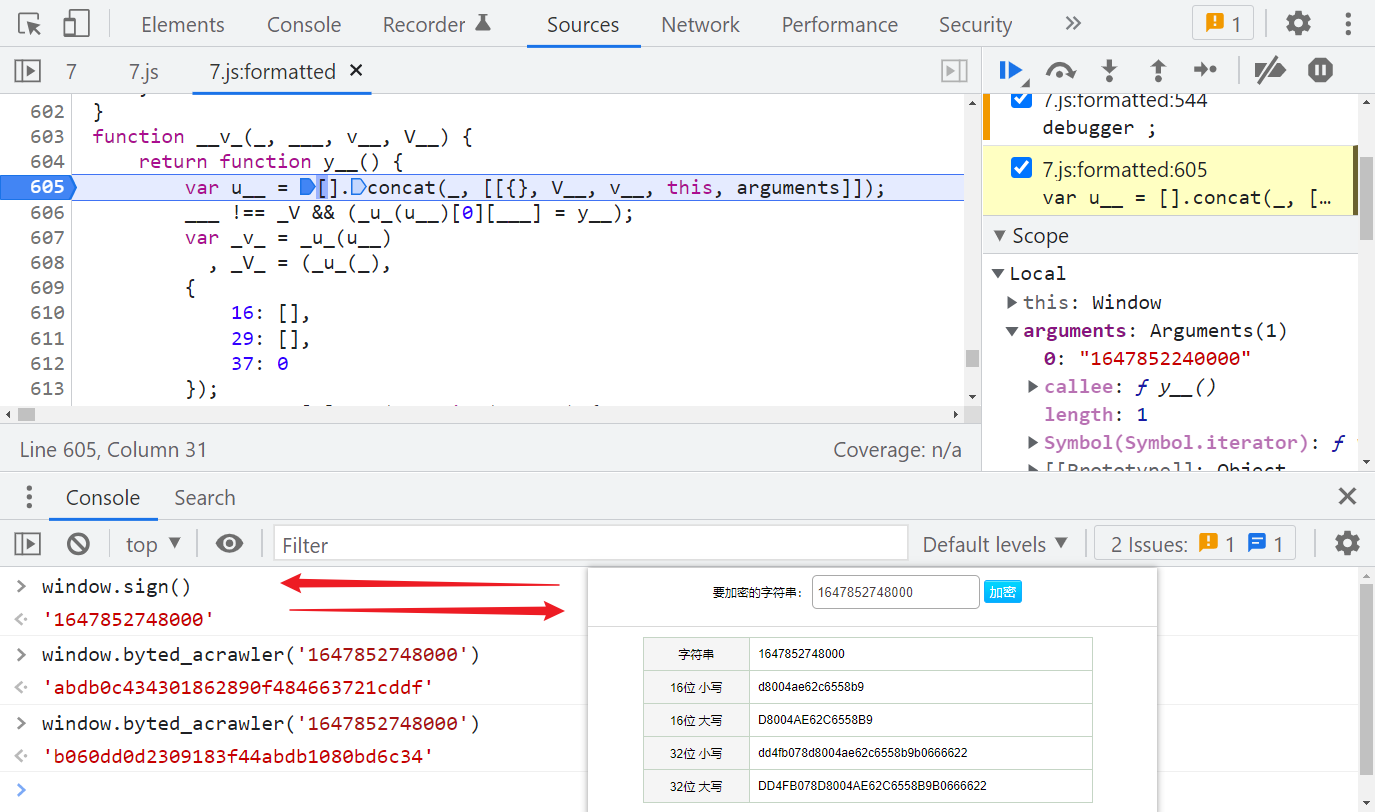
我们前面猜测是 MD5,直接验证一下,发现并不是的,即便是同一个时间戳,经过 window.byted_acrawler() 后得到的值每次也都不一样:
经过前面的分析,既然标准的 MD5 不行,那有没有可能是魔改的 MD5 呢?首先找个 JavaScript 标准的 MD5 代码看一下,比如:http://pajhome.org.uk/crypt/md5/md5.html
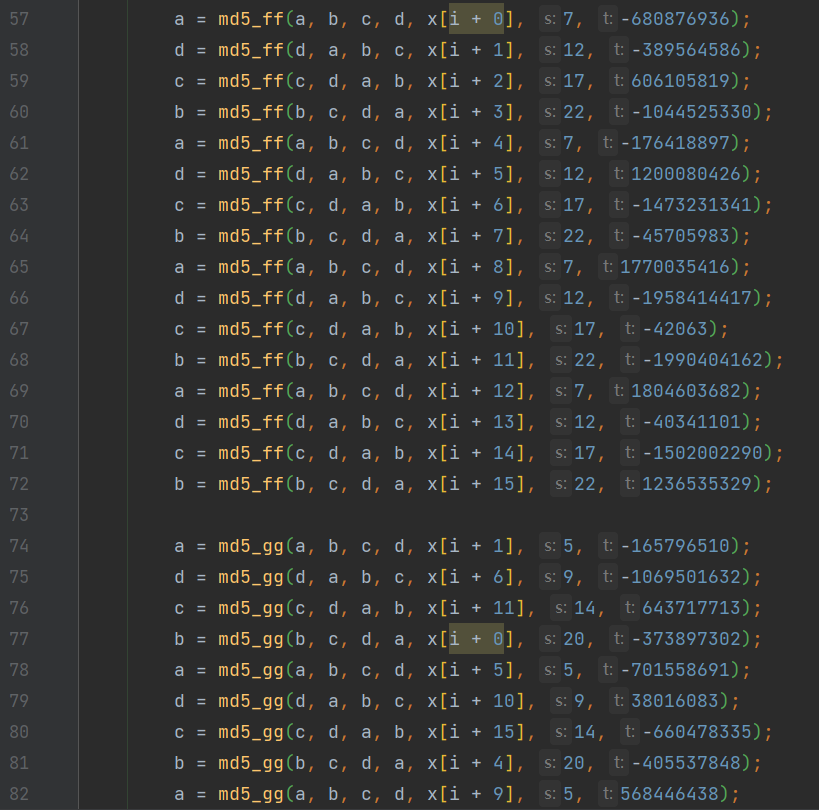
可以注意到,源码里面有很多 md5_ff、md5_gg、md5_hh、md5_ii 的方法,最后一个值都是固定的,那么有没有可能此题就是在标准 MD5 的基础上修改了一些默认值呢?所以我们可以直接 Hook 这些关键方法,在控制台输出传入的值,来一一对比一下,看看默认值是否是一样的,为了方便观察,我们还可以为输出语句加上颜色,Hook 代码如下:
let oldFF = _[2][0]['md5_ff'];
let oldGG = _[2][0]['md5_gg'];
let oldHH = _[2][0]['md5_hh'];
let oldII = _[2][0]['md5_ii'];

let color_white_red = "color: white; background: red;"
let color_white_grey = "color: white; background: grey;"
let color_white_darkcyan = "color: white; background: darkcyan;"
let color_white_green = "color: white; background: green;"
let color_white_orange = "color: white; background: orange;"

_[2][0]['md5_ff'] = function (a, b, c, d, e, f, g) {
    debugger;
    let result = oldFF(a, b, c, d, e, f, g);
    console.log("%c Function: %c md5_ff %c Result: %c %s %c Params: %c %s, %s, %s, %s, %s, %s, %s ", color_white_red, color_white_grey, color_white_red, color_white_grey, result, color_white_red, color_white_grey, a, b, c, d, e, f, g)
    return result;
};

_[2][0]['md5_gg'] = function (a, b, c, d, e, f, g) {
    debugger;
    let result = oldGG(a, b, c, d, e, f, g);
    console.log("%c Function: %c md5_gg %c Result: %c %s %c Params: %c %s, %s, %s, %s, %s, %s, %s ", color_white_red, color_white_darkcyan, color_white_red, color_white_darkcyan, result, color_white_red, color_white_darkcyan, a, b, c, d, e, f, g)
    return result;
};

_[2][0]['md5_hh'] = function (a, b, c, d, e, f, g) {
    debugger;
    let result = oldHH(a, b, c, d, e, f, g);
    console.log("%c Function: %c md5_hh %c Result: %c %s %c Params: %c %s, %s, %s, %s, %s, %s, %s ", color_white_red, color_white_green, color_white_red, color_white_green, result, color_white_red, color_white_green, a, b, c, d, e, f, g)
    return result;
};

_[2][0]['md5_ii'] = function (a, b, c, d, e, f, g) {
    debugger;
    let result = oldII(a, b, c, d, e, f, g);
    console.log("%c Function: %c md5_ii %c Result: %c %s %c Params: %c %s, %s, %s, %s, %s, %s, %s ", color_white_red, color_white_orange, color_white_red, color_white_orange, result, color_white_red, color_white_orange, a, b, c, d, e, f, g)
    return result;
};
Hook 代码写得比较死板,熟悉 JS 的大佬可自己优化一下,注意注入代码的时机,清除定时器后,断点运行到 y__() 方法后再注入,然后取消断点,一直下一步,就可以在控制台看到输出的参数了,如下图所示:
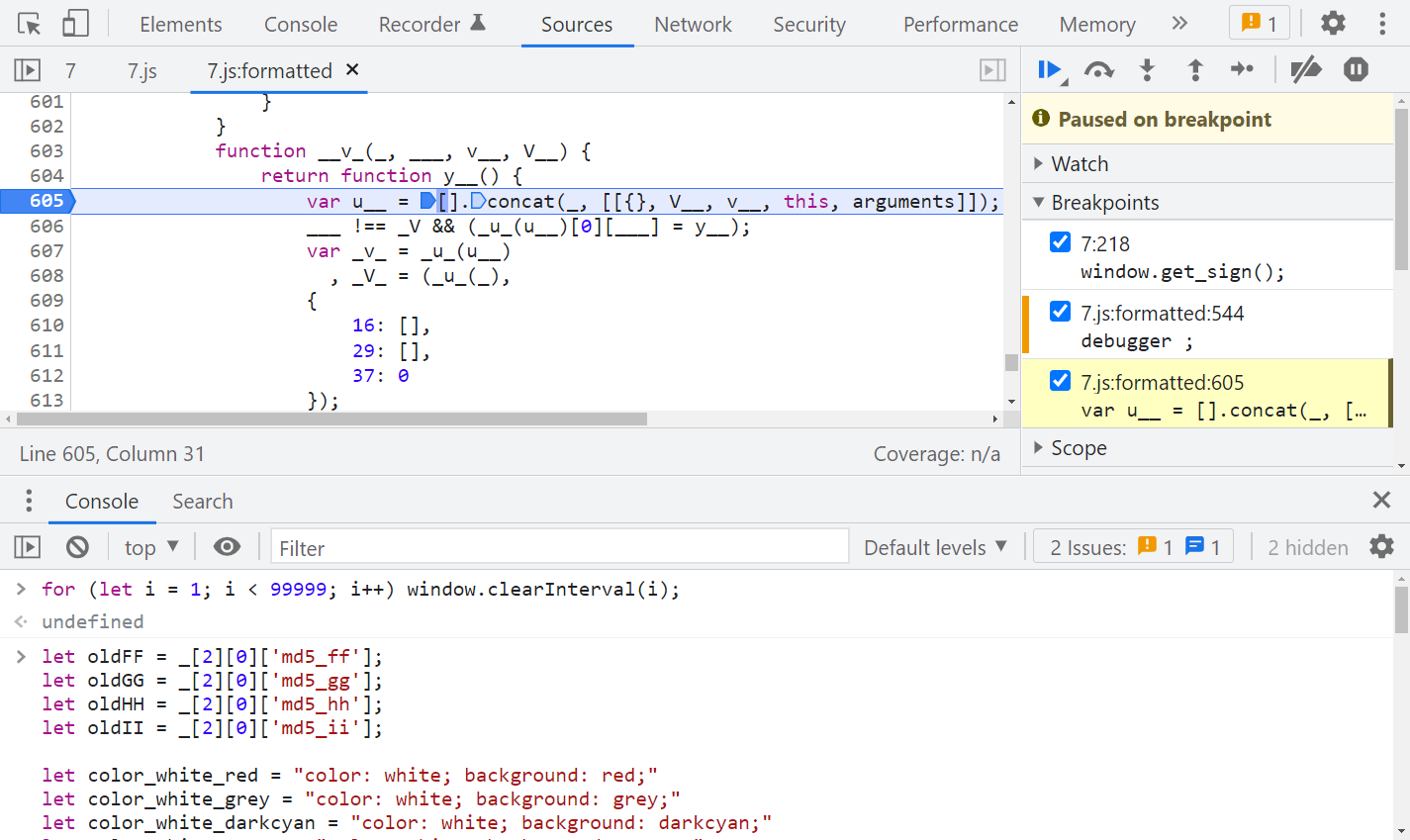
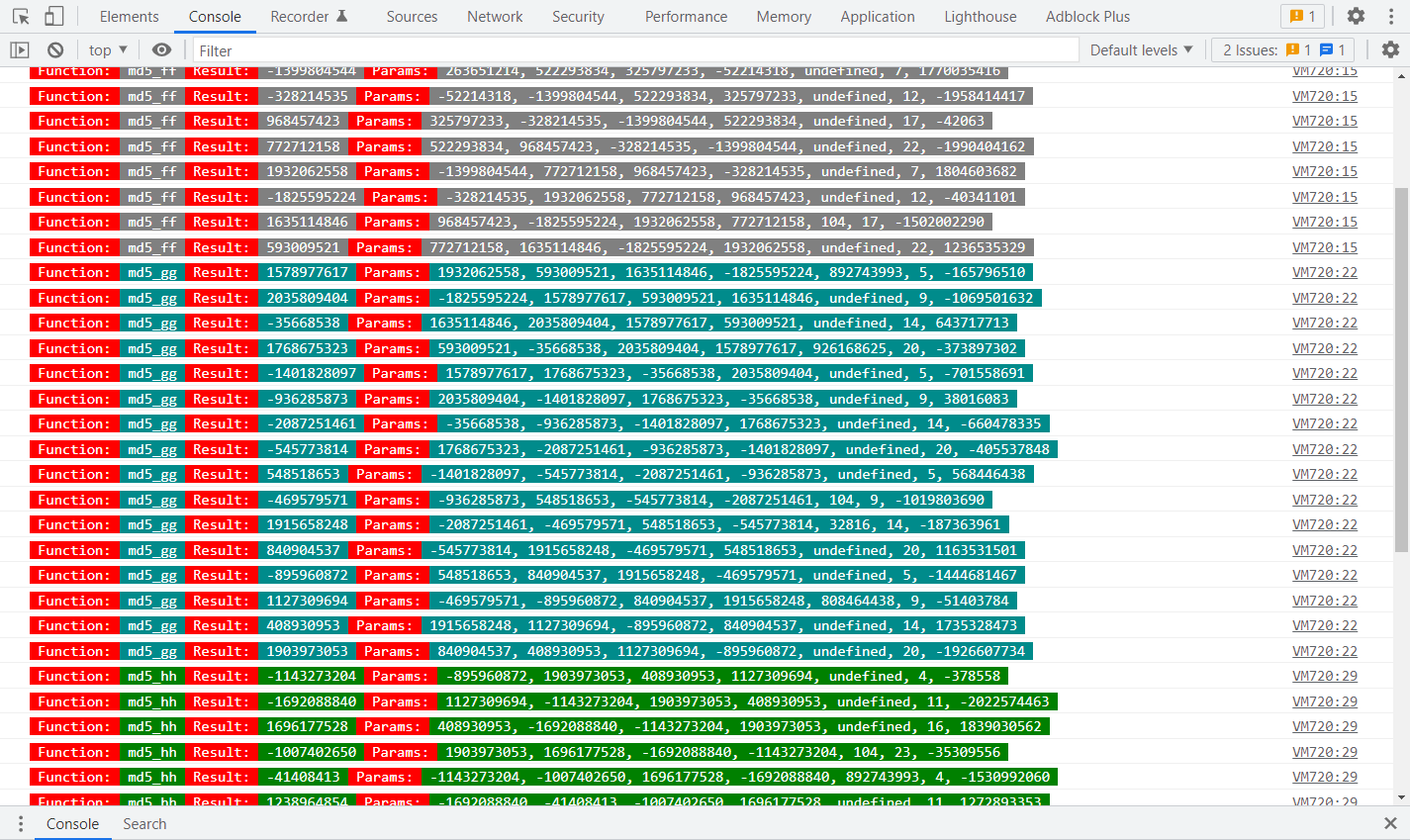
与默认参数进行对比,可以发现 md5_hh() 里有两个默认参数被修改了:
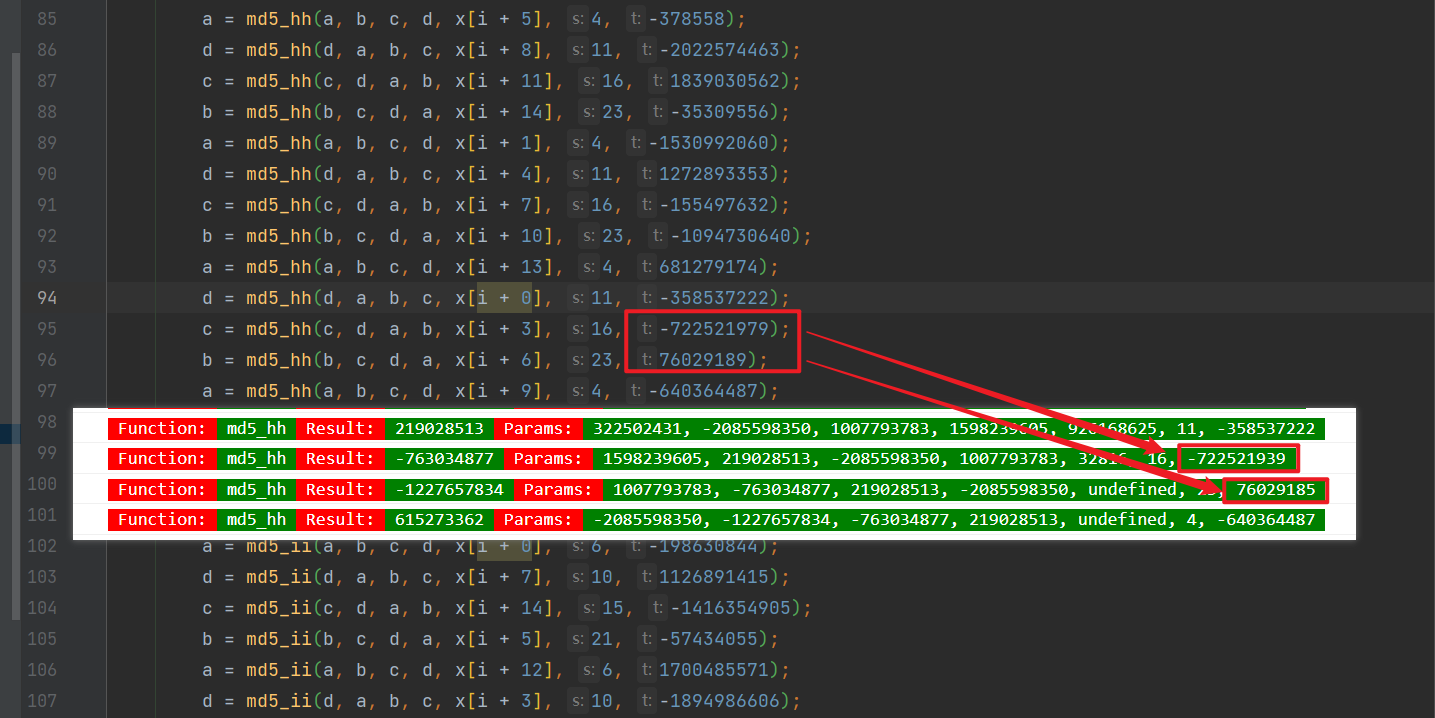
默认的 -722521979 改成了 -722521939、76029189 改成了 76029185,本地代码修改一下即可:
/* ==================================
# @Time    : 2021-12-23
# @Author  : 微信公众号:K哥爬虫
# @FileName: challenge_7.js
# @Software: PyCharm
# ================================== */


/*
 * A JavaScript implementation of the RSA Data Security, Inc. MD5 Message
 * Digest Algorithm, as defined in RFC 1321.
 * Version 2.2 Copyright (C) Paul Johnston 1999 - 2009
 * Other contributors: Greg Holt, Andrew Kepert, Ydnar, Lostinet
 * Distributed under the BSD License
 * See http://pajhome.org.uk/crypt/md5 for more info.
 */

/*
 * Configurable variables. You may need to tweak these to be compatible with
 * the server-side, but the defaults work in most cases.
 */
var hexcase = 0;   /* hex output format. 0 - lowercase; 1 - uppercase        */
var b64pad  = "";  /* base-64 pad character. "=" for strict RFC compliance   */

/*
 * These are the functions you'll usually want to call
 * They take string arguments and return either hex or base-64 encoded strings
 */
function hex_md5(s)    { return rstr2hex(rstr_md5(str2rstr_utf8(s))); }
function b64_md5(s)    { return rstr2b64(rstr_md5(str2rstr_utf8(s))); }
function any_md5(s, e) { return rstr2any(rstr_md5(str2rstr_utf8(s)), e); }
function hex_hmac_md5(k, d)
  { return rstr2hex(rstr_hmac_md5(str2rstr_utf8(k), str2rstr_utf8(d))); }
function b64_hmac_md5(k, d)
  { return rstr2b64(rstr_hmac_md5(str2rstr_utf8(k), str2rstr_utf8(d))); }
function any_hmac_md5(k, d, e)
  { return rstr2any(rstr_hmac_md5(str2rstr_utf8(k), str2rstr_utf8(d)), e); }

/*
 * Perform a simple self-test to see if the VM is working
 */
function md5_vm_test()
{
  return hex_md5("abc").toLowerCase() == "900150983cd24fb0d6963f7d28e17f72";
}

/*
 * Calculate the MD5 of a raw string
 */
function rstr_md5(s)
{
  return binl2rstr(binl_md5(rstr2binl(s), s.length * 8));
}

/*
 * Calculate the HMAC-MD5, of a key and some data (raw strings)
 */
function rstr_hmac_md5(key, data)
{
  var bkey = rstr2binl(key);
  if(bkey.length > 16) bkey = binl_md5(bkey, key.length * 8);

  var ipad = Array(16), opad = Array(16);
  for(var i = 0; i < 16; i++)
  {
    ipad[i] = bkey[i] ^ 0x36363636;
    opad[i] = bkey[i] ^ 0x5C5C5C5C;
  }

  var hash = binl_md5(ipad.concat(rstr2binl(data)), 512 + data.length * 8);
  return binl2rstr(binl_md5(opad.concat(hash), 512 + 128));
}

/*
 * Convert a raw string to a hex string
 */
function rstr2hex(input)
{
  try { hexcase } catch(e) { hexcase=0; }
  var hex_tab = hexcase ? "0123456789ABCDEF" : "0123456789abcdef";
  var output = "";
  var x;
  for(var i = 0; i < input.length; i++)
  {
    x = input.charCodeAt(i);
    output += hex_tab.charAt((x >>> 4) & 0x0F)
           +  hex_tab.charAt( x        & 0x0F);
  }
  return output;
}

/*
 * Convert a raw string to a base-64 string
 */
function rstr2b64(input)
{
  try { b64pad } catch(e) { b64pad=''; }
  var tab = "ABCDEFGHIJKLMNOPQRSTUVWXYZabcdefghijklmnopqrstuvwxyz0123456789+/";
  var output = "";
  var len = input.length;
  for(var i = 0; i < len; i += 3)
  {
    var triplet = (input.charCodeAt(i) << 16)
                | (i + 1 < len ? input.charCodeAt(i+1) << 8 : 0)
                | (i + 2 < len ? input.charCodeAt(i+2)      : 0);
    for(var j = 0; j < 4; j++)
    {
      if(i * 8 + j * 6 > input.length * 8) output += b64pad;
      else output += tab.charAt((triplet >>> 6*(3-j)) & 0x3F);
    }
  }
  return output;
}

/*
 * Convert a raw string to an arbitrary string encoding
 */
function rstr2any(input, encoding)
{
  var divisor = encoding.length;
  var i, j, q, x, quotient;

  /* Convert to an array of 16-bit big-endian values, forming the dividend */
  var dividend = Array(Math.ceil(input.length / 2));
  for(i = 0; i < dividend.length; i++)
  {
    dividend[i] = (input.charCodeAt(i * 2) << 8) | input.charCodeAt(i * 2 + 1);
  }

  /*
   * Repeatedly perform a long division. The binary array forms the dividend,
   * the length of the encoding is the divisor. Once computed, the quotient
   * forms the dividend for the next step. All remainders are stored for later
   * use.
   */
  var full_length = Math.ceil(input.length * 8 /
                                    (Math.log(encoding.length) / Math.log(2)));
  var remainders = Array(full_length);
  for(j = 0; j < full_length; j++)
  {
    quotient = Array();
    x = 0;
    for(i = 0; i < dividend.length; i++)
    {
      x = (x << 16) + dividend[i];
      q = Math.floor(x / divisor);
      x -= q * divisor;
      if(quotient.length > 0 || q > 0)
        quotient[quotient.length] = q;
    }
    remainders[j] = x;
    dividend = quotient;
  }

  /* Convert the remainders to the output string */
  var output = "";
  for(i = remainders.length - 1; i >= 0; i--)
    output += encoding.charAt(remainders[i]);

  return output;
}

/*
 * Encode a string as utf-8.
 * For efficiency, this assumes the input is valid utf-16.
 */
function str2rstr_utf8(input)
{
  var output = "";
  var i = -1;
  var x, y;

  while(++i < input.length)
  {
    /* Decode utf-16 surrogate pairs */
    x = input.charCodeAt(i);
    y = i + 1 < input.length ? input.charCodeAt(i + 1) : 0;
    if(0xD800 <= x && x <= 0xDBFF && 0xDC00 <= y && y <= 0xDFFF)
    {
      x = 0x10000 + ((x & 0x03FF) << 10) + (y & 0x03FF);
      i++;
    }

    /* Encode output as utf-8 */
    if(x <= 0x7F)
      output += String.fromCharCode(x);
    else if(x <= 0x7FF)
      output += String.fromCharCode(0xC0 | ((x >>> 6 ) & 0x1F),
                                    0x80 | ( x         & 0x3F));
    else if(x <= 0xFFFF)
      output += String.fromCharCode(0xE0 | ((x >>> 12) & 0x0F),
                                    0x80 | ((x >>> 6 ) & 0x3F),
                                    0x80 | ( x         & 0x3F));
    else if(x <= 0x1FFFFF)
      output += String.fromCharCode(0xF0 | ((x >>> 18) & 0x07),
                                    0x80 | ((x >>> 12) & 0x3F),
                                    0x80 | ((x >>> 6 ) & 0x3F),
                                    0x80 | ( x         & 0x3F));
  }
  return output;
}

/*
 * Encode a string as utf-16
 */
function str2rstr_utf16le(input)
{
  var output = "";
  for(var i = 0; i < input.length; i++)
    output += String.fromCharCode( input.charCodeAt(i)        & 0xFF,
                                  (input.charCodeAt(i) >>> 8) & 0xFF);
  return output;
}

function str2rstr_utf16be(input)
{
  var output = "";
  for(var i = 0; i < input.length; i++)
    output += String.fromCharCode((input.charCodeAt(i) >>> 8) & 0xFF,
                                   input.charCodeAt(i)        & 0xFF);
  return output;
}

/*
 * Convert a raw string to an array of little-endian words
 * Characters >255 have their high-byte silently ignored.
 */
function rstr2binl(input)
{
  var output = Array(input.length >> 2);
  for(var i = 0; i < output.length; i++)
    output[i] = 0;
  for(var i = 0; i < input.length * 8; i += 8)
    output[i>>5] |= (input.charCodeAt(i / 8) & 0xFF) << (i%32);
  return output;
}

/*
 * Convert an array of little-endian words to a string
 */
function binl2rstr(input)
{
  var output = "";
  for(var i = 0; i < input.length * 32; i += 8)
    output += String.fromCharCode((input[i>>5] >>> (i % 32)) & 0xFF);
  return output;
}

/*
 * Calculate the MD5 of an array of little-endian words, and a bit length.
 */
function binl_md5(x, len)
{
  /* append padding */
  x[len >> 5] |= 0x80 << ((len) % 32);
  x[(((len + 64) >>> 9) << 4) + 14] = len;

  var a =  1732584193;
  var b = -271733879;
  var c = -1732584194;
  var d =  271733878;

  for(var i = 0; i < x.length; i += 16)
  {
    var olda = a;
    var oldb = b;
    var oldc = c;
    var oldd = d;

    a = md5_ff(a, b, c, d, x[i+ 0], 7 , -680876936);
    d = md5_ff(d, a, b, c, x[i+ 1], 12, -389564586);
    c = md5_ff(c, d, a, b, x[i+ 2], 17,  606105819);
    b = md5_ff(b, c, d, a, x[i+ 3], 22, -1044525330);
    a = md5_ff(a, b, c, d, x[i+ 4], 7 , -176418897);
    d = md5_ff(d, a, b, c, x[i+ 5], 12,  1200080426);
    c = md5_ff(c, d, a, b, x[i+ 6], 17, -1473231341);
    b = md5_ff(b, c, d, a, x[i+ 7], 22, -45705983);
    a = md5_ff(a, b, c, d, x[i+ 8], 7 ,  1770035416);
    d = md5_ff(d, a, b, c, x[i+ 9], 12, -1958414417);
    c = md5_ff(c, d, a, b, x[i+10], 17, -42063);
    b = md5_ff(b, c, d, a, x[i+11], 22, -1990404162);
    a = md5_ff(a, b, c, d, x[i+12], 7 ,  1804603682);
    d = md5_ff(d, a, b, c, x[i+13], 12, -40341101);
    c = md5_ff(c, d, a, b, x[i+14], 17, -1502002290);
    b = md5_ff(b, c, d, a, x[i+15], 22,  1236535329);

    a = md5_gg(a, b, c, d, x[i+ 1], 5 , -165796510);
    d = md5_gg(d, a, b, c, x[i+ 6], 9 , -1069501632);
    c = md5_gg(c, d, a, b, x[i+11], 14,  643717713);
    b = md5_gg(b, c, d, a, x[i+ 0], 20, -373897302);
    a = md5_gg(a, b, c, d, x[i+ 5], 5 , -701558691);
    d = md5_gg(d, a, b, c, x[i+10], 9 ,  38016083);
    c = md5_gg(c, d, a, b, x[i+15], 14, -660478335);
    b = md5_gg(b, c, d, a, x[i+ 4], 20, -405537848);
    a = md5_gg(a, b, c, d, x[i+ 9], 5 ,  568446438);
    d = md5_gg(d, a, b, c, x[i+14], 9 , -1019803690);
    c = md5_gg(c, d, a, b, x[i+ 3], 14, -187363961);
    b = md5_gg(b, c, d, a, x[i+ 8], 20,  1163531501);
    a = md5_gg(a, b, c, d, x[i+13], 5 , -1444681467);
    d = md5_gg(d, a, b, c, x[i+ 2], 9 , -51403784);
    c = md5_gg(c, d, a, b, x[i+ 7], 14,  1735328473);
    b = md5_gg(b, c, d, a, x[i+12], 20, -1926607734);

    a = md5_hh(a, b, c, d, x[i+ 5], 4 , -378558);
    d = md5_hh(d, a, b, c, x[i+ 8], 11, -2022574463);
    c = md5_hh(c, d, a, b, x[i+11], 16,  1839030562);
    b = md5_hh(b, c, d, a, x[i+14], 23, -35309556);
    a = md5_hh(a, b, c, d, x[i+ 1], 4 , -1530992060);
    d = md5_hh(d, a, b, c, x[i+ 4], 11,  1272893353);
    c = md5_hh(c, d, a, b, x[i+ 7], 16, -155497632);
    b = md5_hh(b, c, d, a, x[i+10], 23, -1094730640);
    a = md5_hh(a, b, c, d, x[i+13], 4 ,  681279174);
    d = md5_hh(d, a, b, c, x[i+ 0], 11, -358537222);
    // 注释掉的是默认值
    // c = md5_hh(c, d, a, b, x[i+ 3], 16, -722521979);
    c = md5_hh(c, d, a, b, x[i+ 3], 16, -722521939);
    // b = md5_hh(b, c, d, a, x[i+ 6], 23,  76029189);
    b = md5_hh(b, c, d, a, x[i+ 6], 23,  76029185);
    a = md5_hh(a, b, c, d, x[i+ 9], 4 , -640364487);
    d = md5_hh(d, a, b, c, x[i+12], 11, -421815835);
    c = md5_hh(c, d, a, b, x[i+15], 16,  530742520);
    b = md5_hh(b, c, d, a, x[i+ 2], 23, -995338651);

    a = md5_ii(a, b, c, d, x[i+ 0], 6 , -198630844);
    d = md5_ii(d, a, b, c, x[i+ 7], 10,  1126891415);
    c = md5_ii(c, d, a, b, x[i+14], 15, -1416354905);
    b = md5_ii(b, c, d, a, x[i+ 5], 21, -57434055);
    a = md5_ii(a, b, c, d, x[i+12], 6 ,  1700485571);
    d = md5_ii(d, a, b, c, x[i+ 3], 10, -1894986606);
    c = md5_ii(c, d, a, b, x[i+10], 15, -1051523);
    b = md5_ii(b, c, d, a, x[i+ 1], 21, -2054922799);
    a = md5_ii(a, b, c, d, x[i+ 8], 6 ,  1873313359);
    d = md5_ii(d, a, b, c, x[i+15], 10, -30611744);
    c = md5_ii(c, d, a, b, x[i+ 6], 15, -1560198380);
    b = md5_ii(b, c, d, a, x[i+13], 21,  1309151649);
    a = md5_ii(a, b, c, d, x[i+ 4], 6 , -145523070);
    d = md5_ii(d, a, b, c, x[i+11], 10, -1120210379);
    c = md5_ii(c, d, a, b, x[i+ 2], 15,  718787259);
    b = md5_ii(b, c, d, a, x[i+ 9], 21, -343485551);

    a = safe_add(a, olda);
    b = safe_add(b, oldb);
    c = safe_add(c, oldc);
    d = safe_add(d, oldd);
  }
  return Array(a, b, c, d);
}

/*
 * These functions implement the four basic operations the algorithm uses.
 */
function md5_cmn(q, a, b, x, s, t)
{
  return safe_add(bit_rol(safe_add(safe_add(a, q), safe_add(x, t)), s),b);
}
function md5_ff(a, b, c, d, x, s, t)
{
  return md5_cmn((b & c) | ((~b) & d), a, b, x, s, t);
}
function md5_gg(a, b, c, d, x, s, t)
{
  return md5_cmn((b & d) | (c & (~d)), a, b, x, s, t);
}
function md5_hh(a, b, c, d, x, s, t)
{
  return md5_cmn(b ^ c ^ d, a, b, x, s, t);
}
function md5_ii(a, b, c, d, x, s, t)
{
  return md5_cmn(c ^ (b | (~d)), a, b, x, s, t);
}

/*
 * Add integers, wrapping at 2^32. This uses 16-bit operations internally
 * to work around bugs in some JS interpreters.
 */
function safe_add(x, y)
{
  var lsw = (x & 0xFFFF) + (y & 0xFFFF);
  var msw = (x >> 16) + (y >> 16) + (lsw >> 16);
  return (msw << 16) | (lsw & 0xFFFF);
}

/*
 * Bitwise rotate a 32-bit number to the left.
 */
function bit_rol(num, cnt)
{
  return (num << cnt) | (num >>> (32 - cnt));
}

function getSignature() {
    return hex_md5(Date.parse(Date()).toString())
}

console.log(getSignature())
Python 调用代码:
# ==================================
# --*-- coding: utf-8 --*--
# @Time    : 2021-12-23
# @Author  : 微信公众号:K哥爬虫
# @FileName: challenge_7.py
# @Software: PyCharm
# ==================================


import time
import execjs
import requests


challenge_api = "http://spider.wangluozhe.com/challenge/api/7"
headers = {
    "Cookie": "Cookie 替换成你的",
    "Host": "spider.wangluozhe.com",
    "Origin": "http://spider.wangluozhe.com",
    "Referer": "http://spider.wangluozhe.com/challenge/7",
    "User-Agent": "Mozilla/5.0 (Windows NT 10.0; Win64; x64) AppleWebKit/537.36 (KHTML, like Gecko) Chrome/96.0.4664.45 Safari/537.36",
    "X-Requested-With": "XMLHttpRequest"
}


def get_signature():
    now = str(int(time.time())) + "000"
    with open('challenge_7.js', 'r', encoding='utf-8') as f:
        wlz_js = execjs.compile(f.read())
    # signature = wlz_js.call("getSignature")
    signature = wlz_js.call("hex_md5", now)
    print("signature: ", signature)
    return signature


def main():
    result = 0
    for page in range(1, 101):
        data = {
            "page": page,
            "count": 10,
            "_signature": get_signature()
        }
        response = requests.post(url=challenge_api, headers=headers, data=data).json()
        print(response)
        for d in response["data"]:
            result += d["value"]
    print("结果为: ", result)


if __name__ == '__main__':
    main()
这里还有一点小细节,如果是 Python 生成时间戳传入 JS 的 hex_md5 方法的话,要保证时间戳的最后三位为0,不然校验通不过,通常的写法是 str(int(time.time() * 1000)),这里要改一下:str(int(time.time())) + "000",不用 Python 的话,也可以在 JS 里写个方法直接返回 hex_md5(Date.parse(Date()).toString()) 也行。
还有一个问题就是如果你找的 MD5 代码不规范,准确来说是和题目使用的 MD5 代码不太一样的话,有可能本地要改的地方就不止这两处了,所以尽量找一个方法名都一样的JS,能省不少事儿。
除了 Hook 以外,我们还可以通过插桩调试的方式,将整个生成 _signature 的流程、涉及到的参数、生成的值,都通过日志的形式打印出来,逆向分析其逻辑。PS:插桩,即日志断点,鼠标右键选择 Add logpoint 即可添加一个日志断点,相当于 console.log(),此功能是 Chrome 73 版本新增的。
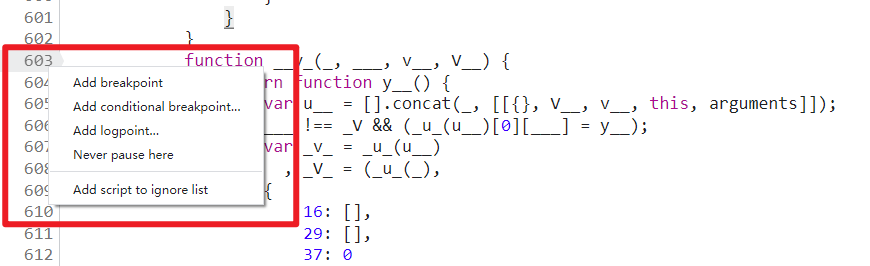
jquery.min.js 之类的库文件,我们单步调试的时候并不想进入到该文件中,那么可以将此类文件右键添加忽略掉。关键的日志断点有以下三处:
arguments 为当前传入函数的参数值;___.join(vV_) 为当前调用的方法名称,也会输出方法中的参数名称;__V(_, ___(u_), 0, 0, _U__).apply(void 0, y__(v___)) 为当前方法执行完毕的结果。肯定有人会疑惑,如何知道应该在这三个地方下日志断点呢?答案是只能自己单步、多步调试,找规律、仔细观察,就像交流群里的小小白大佬说的一样,屁股坐烂就行了。当然也不是只有这三个地方能输出对应的信息,有可能其他地方也可以,这就要看你自己调试了。
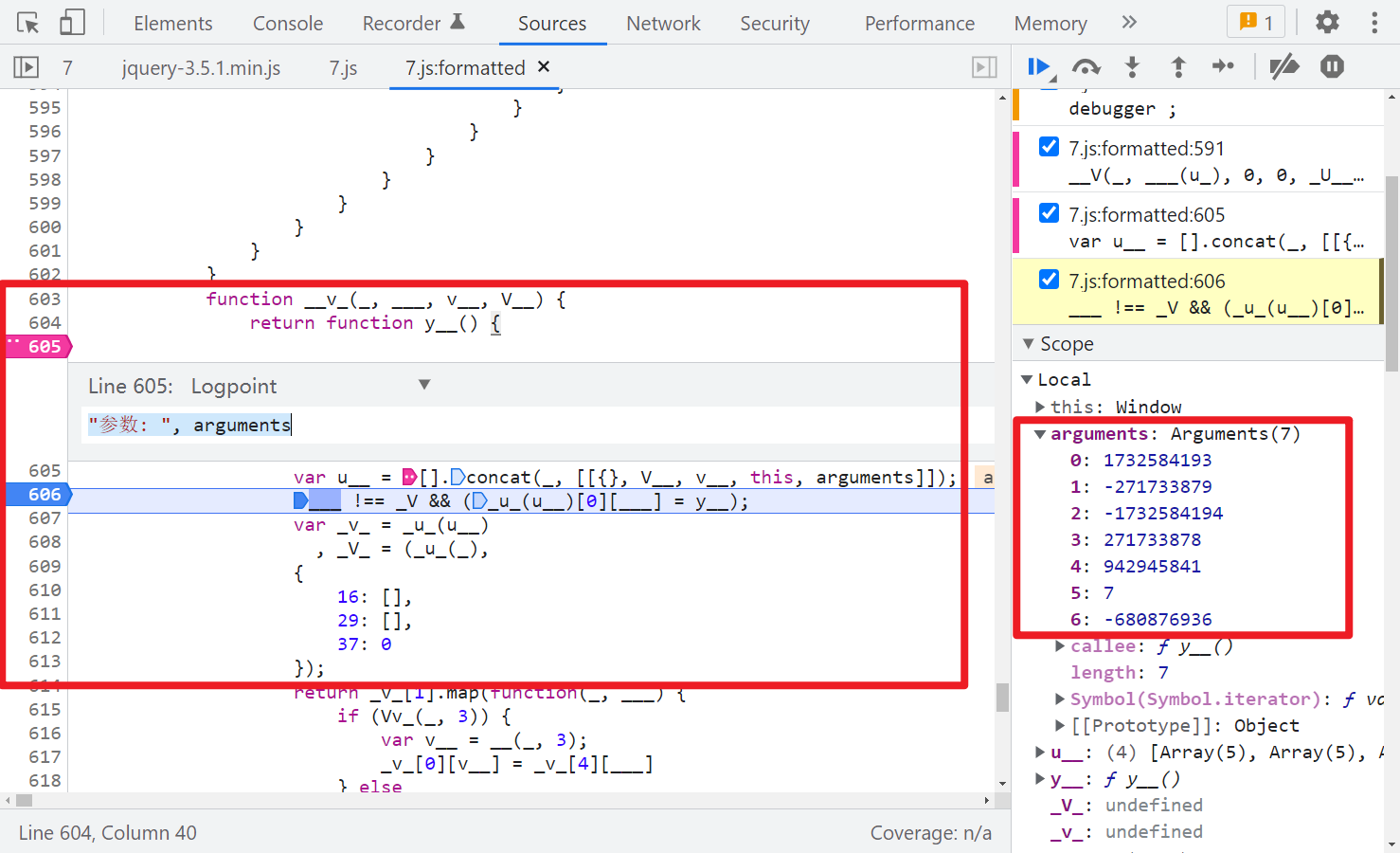
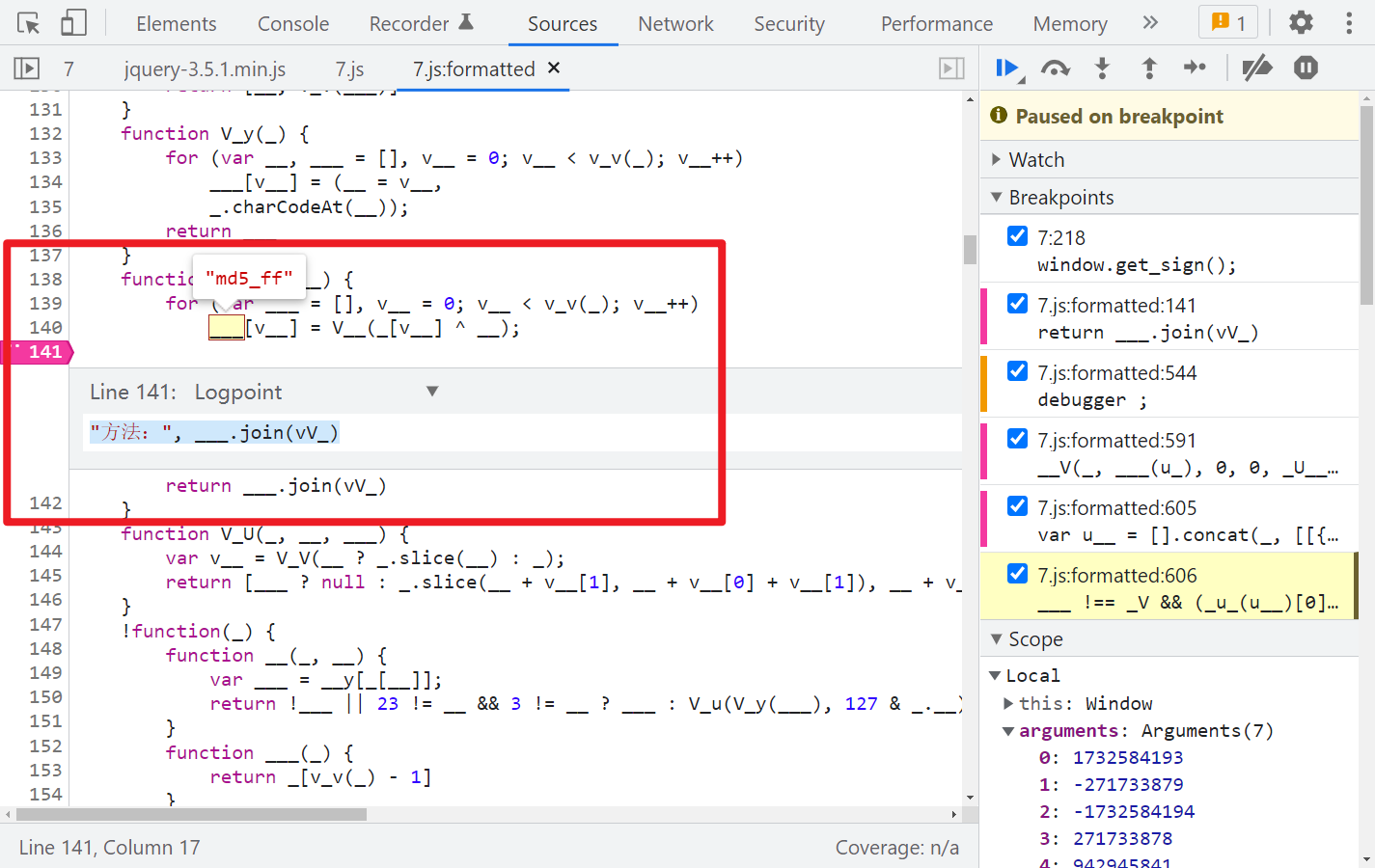
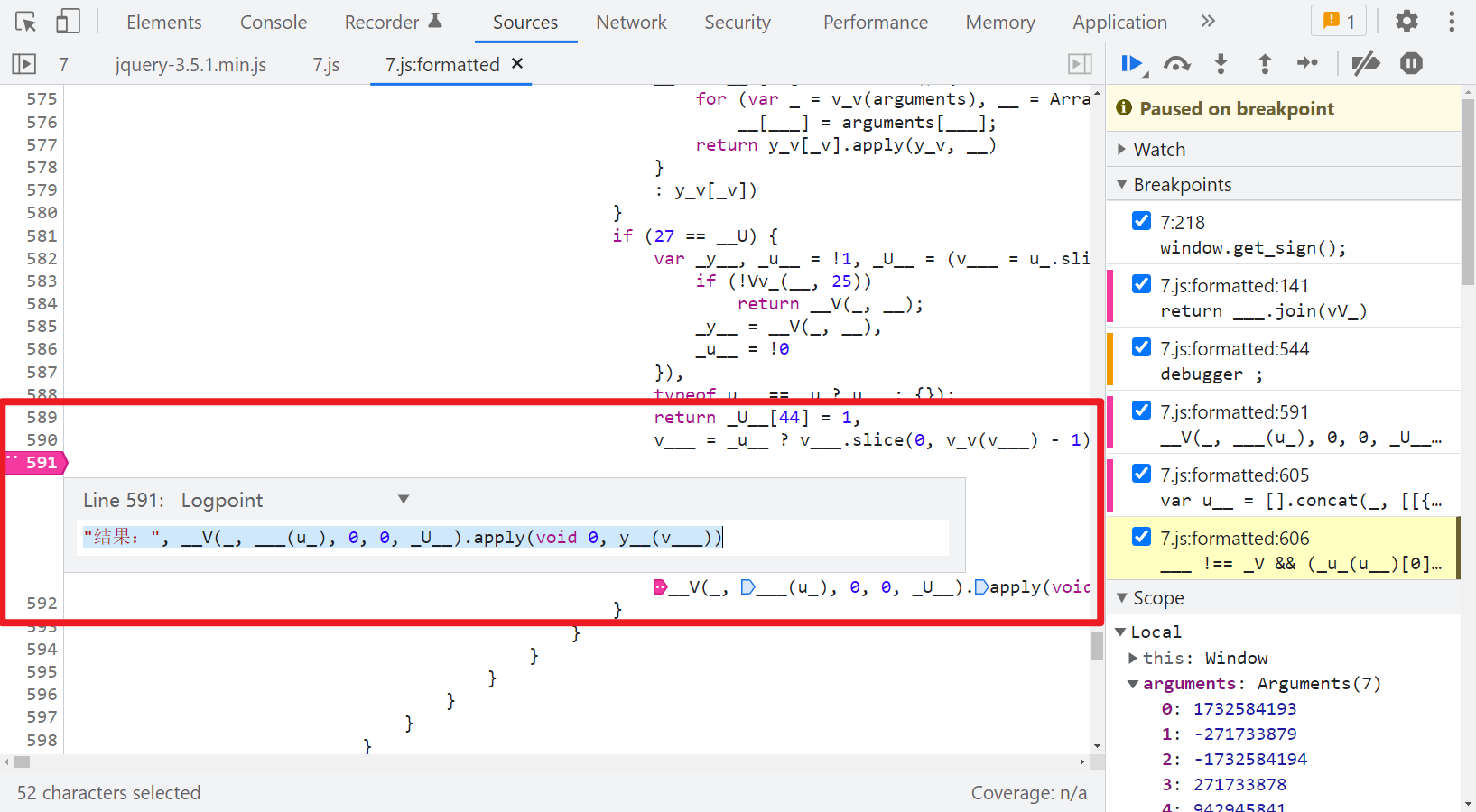
除了这三个地方的日志断点以外,建议还可以在第 606 行打个断点,这样每次执行一个方法就断下,本地就可以跟着同步调试,挨个对比传入的参数和得到的结果,不至于一下子输出的东西太多,不方便查找。
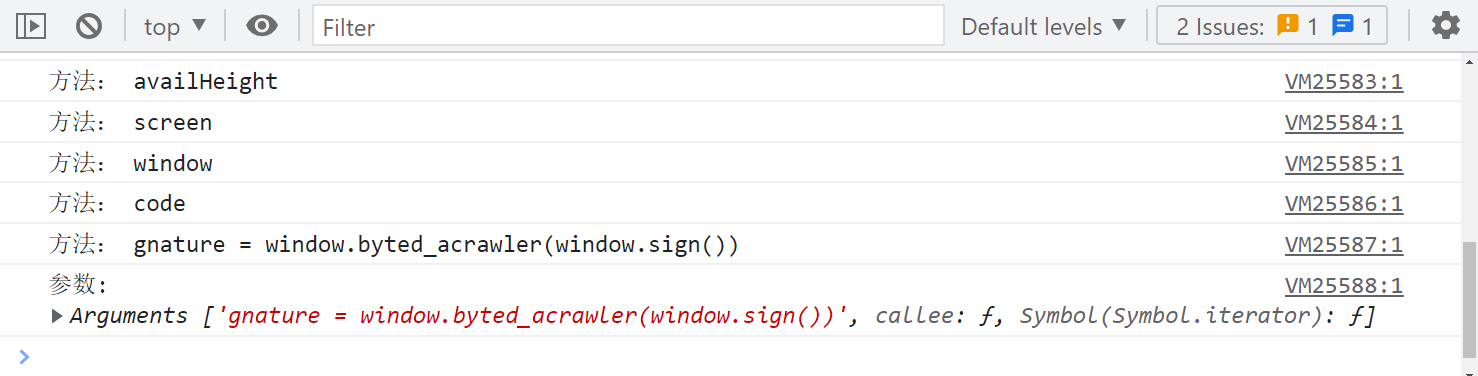
第一步,gnature = window.byted_acrawler(window.sign()):
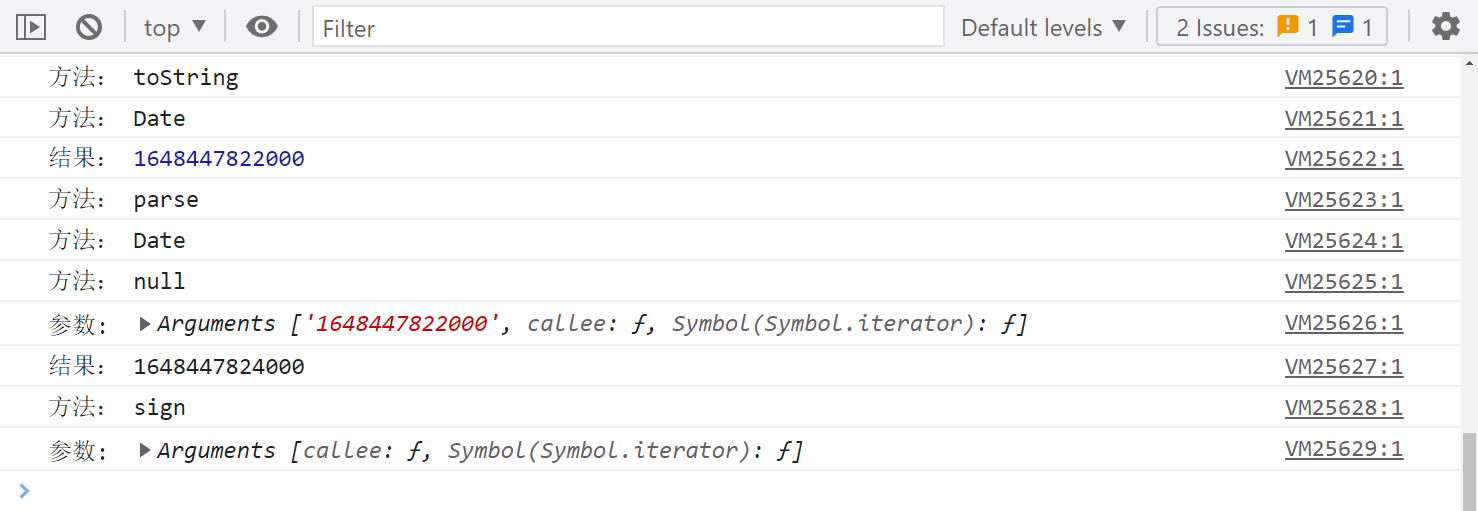
下一步,sign 方法,取时间戳:
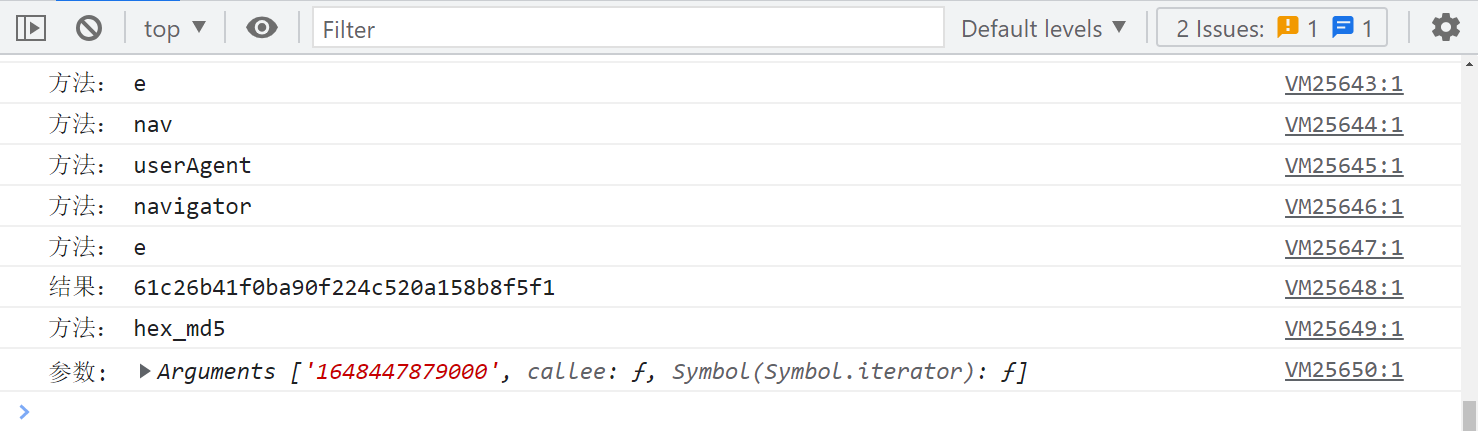
下一步,调用 hex_md5() 方法:
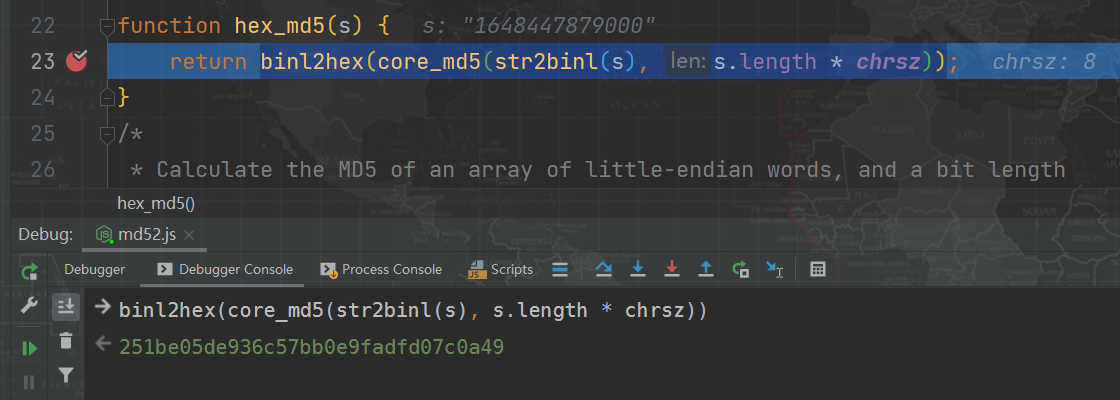
从这里就可以开始本地同步调试了,本地 MD5 下断点调试,可以看到得到的值不一样:
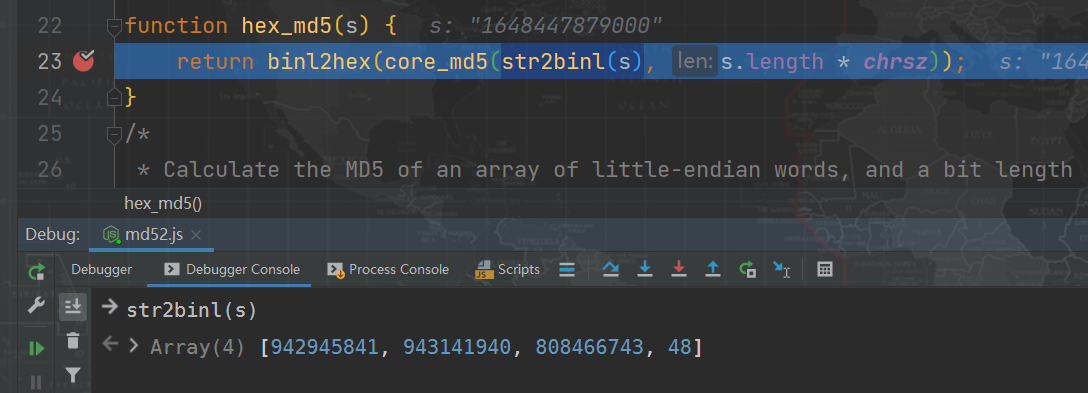
下一步,调用 str2binl() 方法,和本地得到的值是一样的:

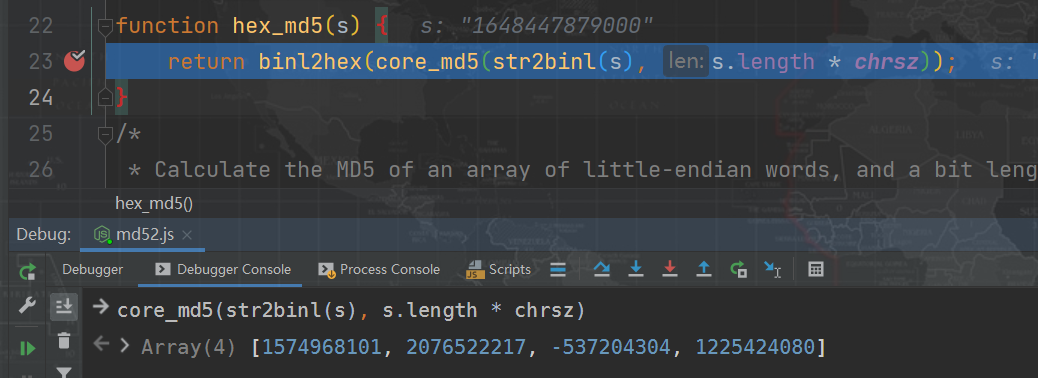
下一步,调用 core_md5() 方法,得到的值和本地就不一样了,这里大致可以确定此方法内部与标准算法有差别了:

下一步,调用 md5_ff() 方法,得到的值是一样的:

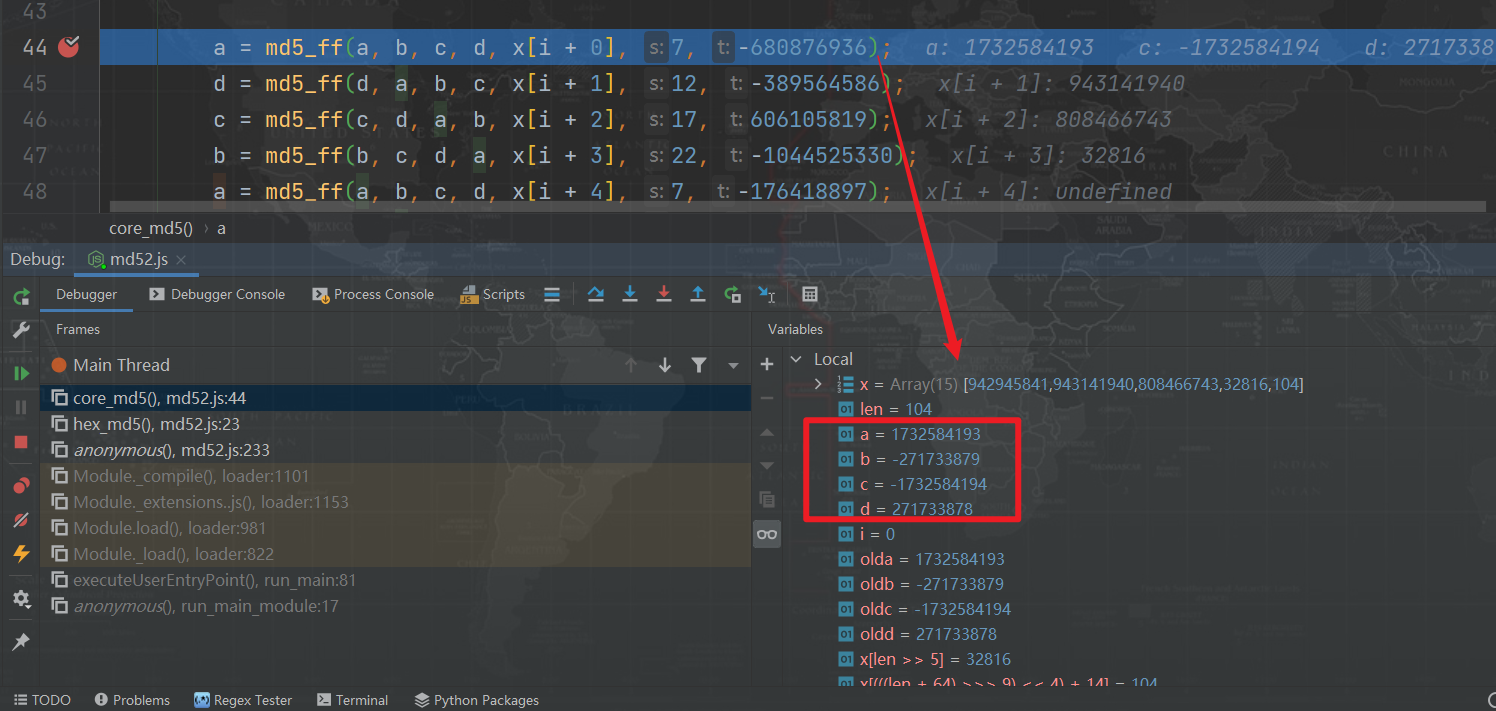
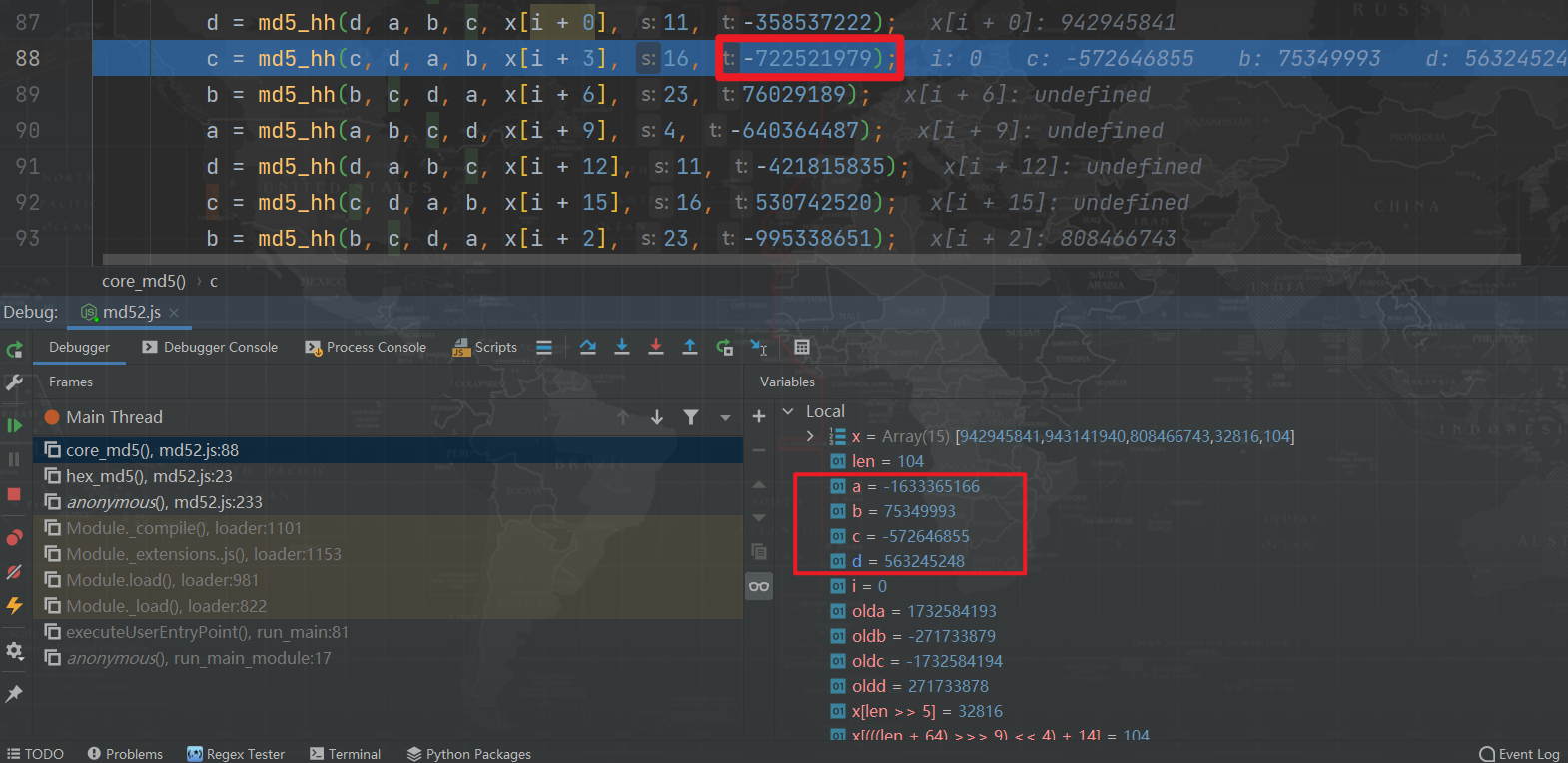
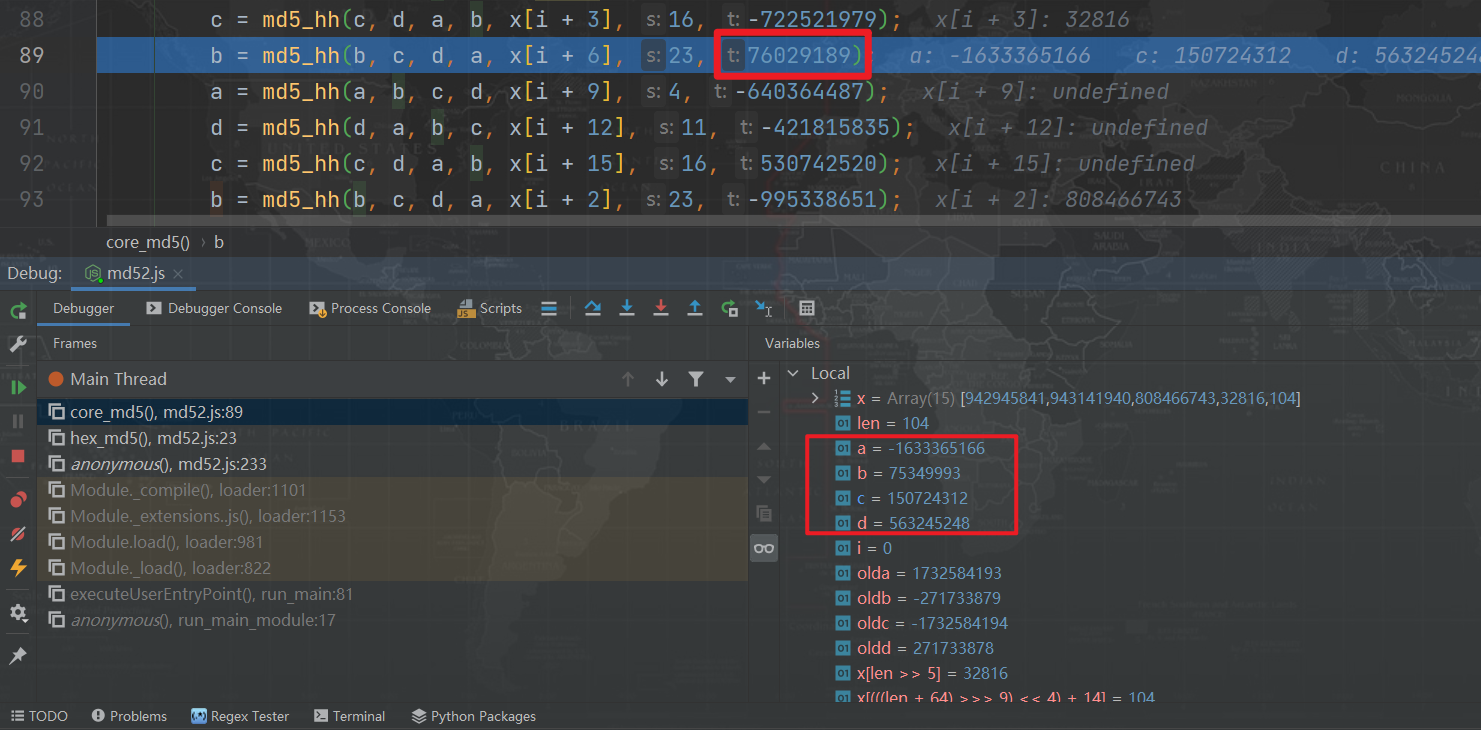
以此类推,最终会找到两个不一样的地方,即 md5_hh() 两个默认参数被修改了。
-722521979 被改成了 -722521939:

76029189 被改成了 76029185:

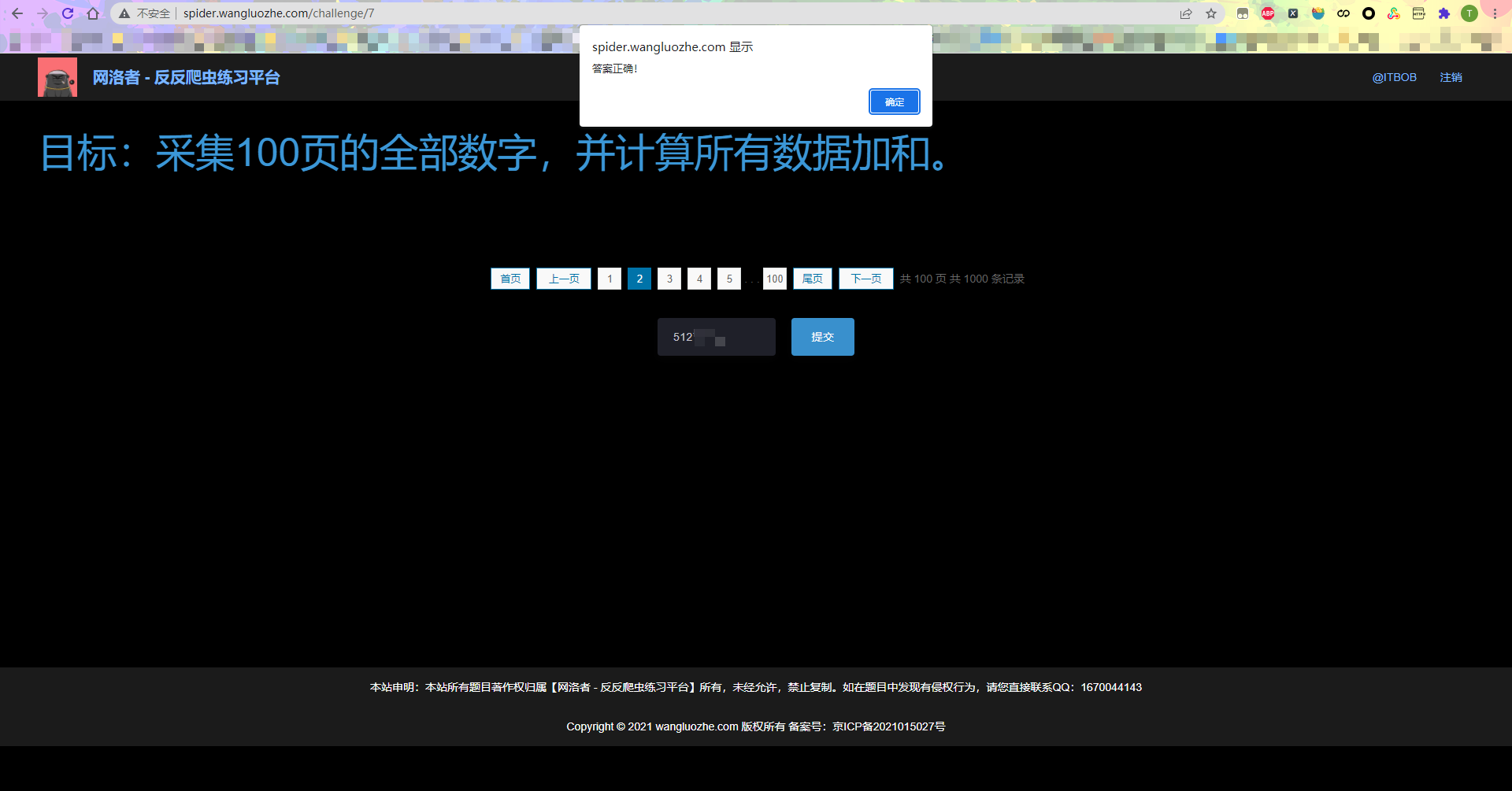
最终提交结果,验证成功:
1.在Python3中,下列关于数学运算结果正确的是:(B)a=10b=3print(a//b)print(a%b)print(a/b)A.3,3,3.3333...B.3,1,3.3333...C.3.3333...,3.3333...,3D.3.3333...,1,3.3333...解析: 在Python中,//表示地板除(向下取整),%表示取余,/表示除(Python2向下取整返回3)2.如下程序Python2会打印多少个数:(D)k=1000whilek>1: print(k)k=k/2A.1000 B.10C.11D.9解析: 按照题意每次循环K/2,直到K值小于等
我开始了一个新的Rails3.2.5项目,Assets管道不再工作了。CSS和Javascript文件不再编译。这是尝试生成Assets时日志的输出:StartedGET"/assets/application.css?body=1"for127.0.0.1at2012-06-1623:59:11-0700Servedasset/application.css-200OK(0ms)[2012-06-1623:59:11]ERRORNoMethodError:undefinedmethod`each'fornil:NilClass/Users/greg/.rbenv/versions/1
rails新手。只是想了解\assests目录中的这两个文件。例如,application.js文件有如下行://=requirejquery//=requirejquery_ujs//=require_tree.我理解require_tree。只是将所有JS文件添加到当前目录中。根据上下文,我可以看出requirejquery添加了jQuery库。但是它从哪里得到这些jQuery库呢?我没有在我的Assets文件夹中看到任何jquery.js文件——或者直接在我的整个应用程序中没有看到任何jquery.js文件?同样,我正在按照一些说明安装TwitterBootstrap(http:
我有一个包含多个组件的存储库,其中大部分是用JavaScript(Node.js)编写的,一个是用Ruby(RubyonRails)编写的。我想要一个.travis.yml文件来触发一个运行每个组件的所有测试的构建。根据thisTravisCIGoogleGroupthread,目前还没有官方支持。我的目录结构是这样的:.├──构建服务器├──核心├──扩展├──网络应用├──流浪文件├──package.json├──.travis.yml└──生成文件我希望能够运行特定版本的Ruby(2.2.2)和Node.js(0.12.2)。我已经有了一个make目标,所以maketest在每
西安华为OD面试体验开始投简历技术面试进展工作进展开始投简历去年一整年一直在考研和工作之间纠结,感觉自己的状态好像当时的疫情一样差劲。之前刚毕业的时候投了个大厂的简历,结果一面写算法的时候太拉跨了,虽然知道时dfs但是代码熟练度不够,放在平时给足时间自己可以调试通过,但是熟练度不够那面试当时就写不出来被刷了。说真的算法学到后期我感觉最重要的是熟练度和背板子(对于我这种普通玩家来说),面试题如果一上来短时间内想不出思路就完蛋了。然后由于当时找的工作不是很理想就又想考研了。但是考研是有风险的,我自我感觉自己可能冲不上那个学校,而找工作一个没成可以继续找嘛。本着抱着试试看的态度在boss上投了简历,
按照目前的情况,这个问题不适合我们的问答形式。我们希望答案得到事实、引用或专业知识的支持,但这个问题可能会引发辩论、争论、投票或扩展讨论。如果您觉得这个问题可以改进并可能重新打开,visitthehelpcenter指导。关闭9年前。多年来,我一直在使用多种语言进行编程,并且认为自己总体上相当擅长。但是,我从未编写过任何自动化测试:没有单元测试,没有TDD,没有BDD,什么都没有。我已经尝试开始为我的项目编写适当的测试套件。我可以看到在进行任何更改后能够自动测试项目中所有代码的理论值(value)。我可以看到像RSpec和Mocha这样的测试框架应该如何使设置和运行所述测试变得相当容易
我需要一些指导来了解如何将Angular整合到rails中。选择Rails的原因:我喜欢他们偏执的做事方式。还有迁移,gem真的很酷。使用angular的原因:我正在研究和寻找最适合SPA的框架。Backbone似乎太抽象了。我不得不在Angular和Ember之间做出选择。我首先开始阅读Angular,它对我来说很有意义。所以我从来没有去读过关于ember的文章。使用Angular和Rails的原因:我研究并尝试使用小型框架,例如grape、slim(是的,我也使用php)。但我觉得需要坚持项目的长期范围。我个人喜欢用Rails的方式做事。这就是我需要帮助的地方,我在Rails4中有
目标:我想从动画GIF中抓取最佳帧并将其用作静态预览图像。我相信最好的帧是显示最多内容的帧-不一定是第一帧或最后一帧。以这张动图为例:--这是第一帧:--这是第28帧:很明显,第28帧很好地代表了整个GIF。我如何以编程方式确定一帧是否比另一帧具有更多像素/内容?如果您能向我指出任何想法、想法、包/模块或文章,我们将不胜感激。 最佳答案 实现此目的的一种直接方法是估计entropy每个图像的帧,并选择具有最大熵的帧。在信息论中,熵可以被认为是图像的“随机性”。单一颜色的图像是非常可预测的,分布越平坦,越随机。这与Arthur-R描述
♥️作者:白日参商🤵♂️个人主页:白日参商主页♥️坚持分析平时学习到的项目以及学习到的软件开发知识,和大家一起努力呀!!!🎈🎈加油!加油!加油!加油🎈欢迎评论💬点赞👍🏻收藏📂加关注+!「想体验ChatGPT中文聊天?」那快进来,你用不上算我输项目场景:项目条件一、那就开始吧1、安装ChatGPT-Desktop2、OpenAPI设置二、使用实例恭喜你!!!配置成功了!!!API和URL都是博主免费提供给大家的!!!恭喜你!!!配置成功了!!!API和URL都是博主免费提供给大家的!!!🎈🎈加油!加油!加油!加油🎈欢迎评论💬点赞👍🏻收藏📂加关注+!项目场景:近几个月可以说ChatGPT是火得一
RTS在阿里云视频直播的基础上进行底层技术优化,通过集成阿里云播放器SDK,支持在千万级并发场景下节点间毫秒级延时直播的能力,弥补了传统直播存在3~6秒延时的问题,确保了超低延时、低卡顿、秒开流畅的直播观看体验。本文介绍了基于RTS超低延迟直播优化强互动场景体验的最佳实践方案,并以阿里云播放器Aliplayer为例,详细介绍RTS超低延迟拉流接入、自动降级、排障信息获取等逻辑的实现,助力企业打造互动直播行业的产品竞争力。适用场景该方案适用于对超低延迟直播有诉求的客户,尤其是业务中存在强互动场景直播的场景。强互动场景直播主要是指对主播和观众存在互动,或观众存在更高实时性观看、画面互动需求的情况,
