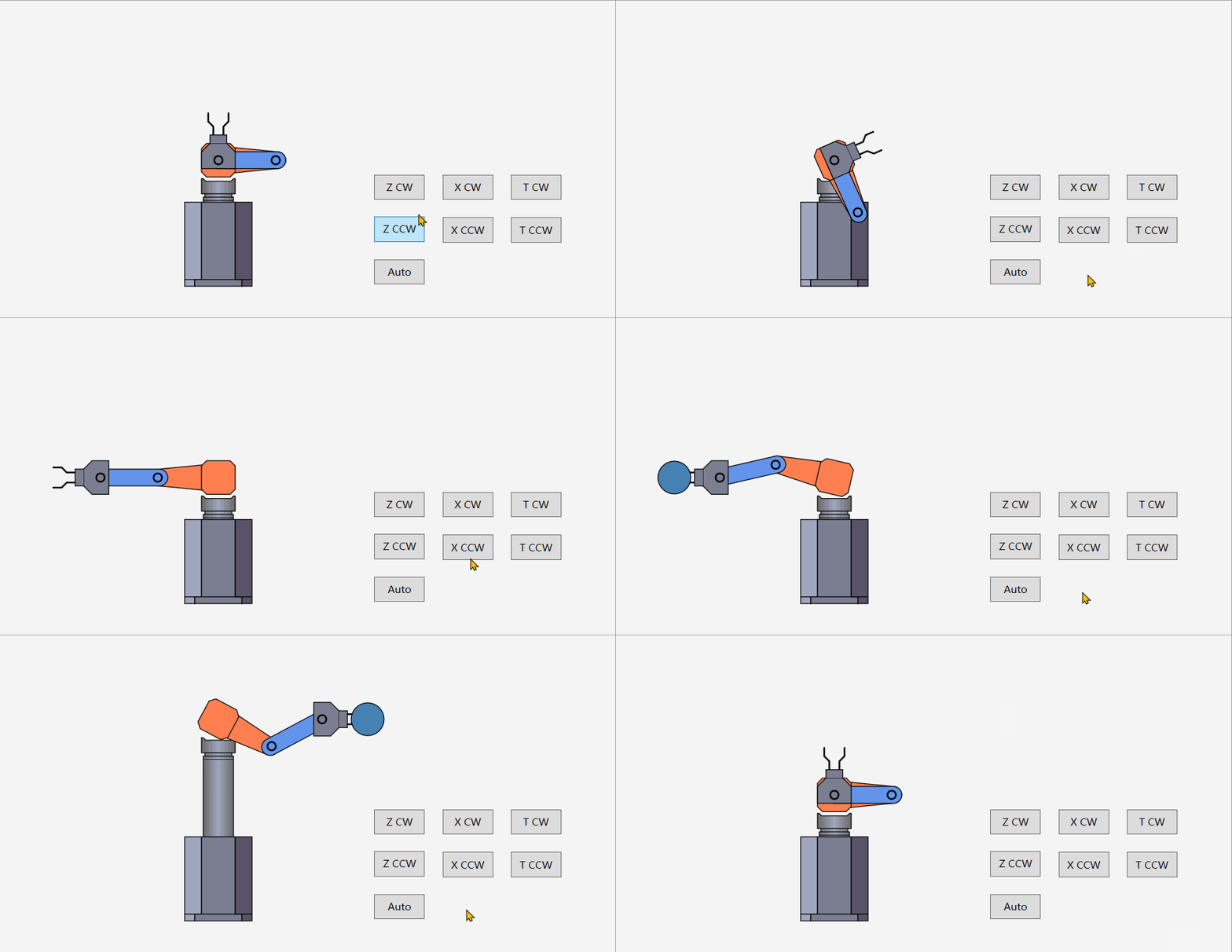
考虑实现一种三轴机器人控件。
三轴机器人用来将某种工件从一个位置运送到另一个位置。
其X轴为手臂轴,可以正向和反向运动,它处于末端,直接接触工件;
其T轴为旋转轴,可以对手臂进行旋转;
其Z轴为升降轴,可以对手臂和旋转部分进行升降。
定义出机器人的轴动作枚举,轴的动作分为回原点,正向运动,反向运动。
public enum WaferRobotZAction
{
    Z_Origin,
    Z_CW,
    Z_CCW
}

public enum WaferRobotXAction
{
    X_Origin,
    X_CW,
    X_CCW
}

public enum WaferRobotTAction
{
    T_Origin,
    T_CW,
    T_CCW
}
声明一个WaferRobotControl的自定义控件,它继承自Control类。
定义一个Wafer属性来表示WaferRobot上的工件。
定义表示X轴动作、T轴动作和Z轴动作的依赖属性,它可以被实际的业务数据源绑定。
当实际的业务数据发生改变时,轴动作属性相应改变,并VisualStateManager来转换控件的状态,以触发样式模板中的动画。
public class WaferRobotControl : Control
{
    static WaferRobotControl()
    {
        DefaultStyleKeyProperty.OverrideMetadata(typeof(WaferRobotControl), new FrameworkPropertyMetadata(typeof(WaferRobotControl)));
    }

    public static readonly DependencyProperty WaferProperty = DependencyProperty.Register("Wafer", typeof(int), typeof(WaferRobotControl));
    public int Wafer { get => (int)GetValue(WaferProperty); set => SetValue(WaferProperty, value); }

    public static readonly DependencyProperty RobotZActionProperty = DependencyProperty.Register(
       "RobotZAction",
       typeof(WaferRobotZAction),
       typeof(WaferRobotControl),
       new PropertyMetadata(WaferRobotZAction.Z_Origin, RobotZActionPropertyChangedCallback));

    public WaferRobotZAction RobotZAction
    {
        get => (WaferRobotZAction)GetValue(RobotZActionProperty);
        set => SetValue(RobotZActionProperty, value);
    }

    private static void RobotZActionPropertyChangedCallback(DependencyObject d, DependencyPropertyChangedEventArgs e)
    {
        var control = d as WaferRobotControl;
        var oldAct = (WaferRobotZAction)e.OldValue;
        var newAct = (WaferRobotZAction)e.NewValue;
        switch (newAct)
        {
            case WaferRobotZAction.Z_Origin:
                VisualStateManager.GoToState(control, newAct.ToString(), true);
                break;
            case WaferRobotZAction.Z_CW:
                if (newAct != oldAct)
                {
                    VisualStateManager.GoToState(control, newAct.ToString(), true);
                }
                break;
            case WaferRobotZAction.Z_CCW:
                if (newAct != oldAct)
                {
                    VisualStateManager.GoToState(control, newAct.ToString(), true);
                }
                break;
            default:
                break;
        }
    }

    public static readonly DependencyProperty RobotXActionProperty = DependencyProperty.Register(
        "RobotXAction",
        typeof(WaferRobotXAction),
        typeof(WaferRobotControl),
        new PropertyMetadata(WaferRobotXAction.X_Origin, RobotXActionPropertyChangedCallback));
    public WaferRobotXAction RobotXAction
    {
        get => (WaferRobotXAction)GetValue(RobotXActionProperty);
        set => SetValue(RobotXActionProperty, value);
    }

    private static void RobotXActionPropertyChangedCallback(DependencyObject d, DependencyPropertyChangedEventArgs e)
    {
        var control = d as WaferRobotControl;
        var oldAct = (WaferRobotXAction)e.OldValue;
        var newAct = (WaferRobotXAction)e.NewValue;
        switch (newAct)
        {
            case WaferRobotXAction.X_Origin:
                VisualStateManager.GoToState(control, newAct.ToString(), true);
                break;
            case WaferRobotXAction.X_CW:
                if (newAct != oldAct)
                {
                    VisualStateManager.GoToState(control, newAct.ToString(), true);
                }
                break;
            case WaferRobotXAction.X_CCW:
                if (newAct != oldAct)
                {
                    VisualStateManager.GoToState(control, newAct.ToString(), true);
                }
                break;
            default:
                break;
        }
    }

    public static readonly DependencyProperty RobotTActionProperty = DependencyProperty.Register(
        "RobotTAction",
        typeof(WaferRobotTAction),
        typeof(WaferRobotControl),
        new PropertyMetadata(WaferRobotTAction.T_Origin, RobotTActionPropertyChangedCallback));

    public WaferRobotTAction RobotTAction
    {
        get => (WaferRobotTAction)GetValue(RobotTActionProperty);
        set => SetValue(RobotTActionProperty, value);
    }

    private static void RobotTActionPropertyChangedCallback(DependencyObject d, DependencyPropertyChangedEventArgs e)
    {
        var control = d as WaferRobotControl;
        var oldAct = (WaferRobotTAction)e.OldValue;
        var newAct = (WaferRobotTAction)e.NewValue;
        switch (newAct)
        {
            case WaferRobotTAction.T_Origin:
                VisualStateManager.GoToState(control, newAct.ToString(), true);
                break;
            case WaferRobotTAction.T_CW:
                if (newAct != oldAct)
                {
                    VisualStateManager.GoToState(control, newAct.ToString(), true);
                }
                break;
            case WaferRobotTAction.T_CCW:
                if (newAct != oldAct)
                {
                    VisualStateManager.GoToState(control, newAct.ToString(), true);
                }
                break;
            default:
                break;
        }
    }

    public override void OnApplyTemplate()
    {
        base.OnApplyTemplate();
        VisualStateManager.GoToState(this, WaferRobotZAction.Z_Origin.ToString(), true);
        VisualStateManager.GoToState(this, WaferRobotXAction.X_Origin.ToString(), true);
        VisualStateManager.GoToState(this, WaferRobotTAction.T_Origin.ToString(), true);
    }
}控件模板的实现思路。
将机器人的样式分为三部分,不动的底座部分,Z轴部分,包含T轴和X轴的手臂部分。
VisualStateGroup中定义出轴动作的VisualState,编写转换动画。
<SolidColorBrush x:Key="robotBorderBrush" Color="#030303" />
<Style TargetType="{x:Type local:WaferRobotControl}" >
<Setter Property="Cursor" Value="Hand" />
<Setter Property="Width" Value="200"/>
<Setter Property="Height" Value="300"/>
<Setter Property="Template">
<Setter.Value>
<ControlTemplate TargetType="{x:Type local:WaferRobotControl}">
<Viewbox x:Name="viewbox" Stretch="Fill">
<VisualStateManager.VisualStateGroups>
<VisualStateGroup Name="RobotActions">
<VisualStateGroup.Transitions>
<VisualTransition To="Z_CW">
<Storyboard FillBehavior="HoldEnd">
<DoubleAnimationUsingKeyFrames Storyboard.TargetName="robotZAct" Storyboard.TargetProperty="Y">
<LinearDoubleKeyFrame Value="-90" KeyTime="0:0:1"/>
</DoubleAnimationUsingKeyFrames>
<DoubleAnimationUsingKeyFrames Storyboard.TargetName="robotUpDownAct" Storyboard.TargetProperty="Y">
<LinearDoubleKeyFrame Value="-90" KeyTime="0:0:1"/>
</DoubleAnimationUsingKeyFrames>
</Storyboard>
</VisualTransition>
<VisualTransition To="Z_CCW">
<Storyboard FillBehavior="HoldEnd">
<DoubleAnimationUsingKeyFrames Storyboard.TargetName="robotZAct" Storyboard.TargetProperty="Y">
<LinearDoubleKeyFrame Value="0" KeyTime="0:0:1"/>
</DoubleAnimationUsingKeyFrames>
<DoubleAnimationUsingKeyFrames Storyboard.TargetName="robotUpDownAct" Storyboard.TargetProperty="Y">
<LinearDoubleKeyFrame Value="0" KeyTime="0:0:1"/>
</DoubleAnimationUsingKeyFrames>
</Storyboard>
</VisualTransition>
</VisualStateGroup.Transitions>
<VisualState Name="Z_Origin">
<Storyboard FillBehavior="HoldEnd">
<DoubleAnimationUsingKeyFrames Storyboard.TargetName="robotZAct" Storyboard.TargetProperty="Y" >
<LinearDoubleKeyFrame Value="0" KeyTime="0:0:0"/>
</DoubleAnimationUsingKeyFrames>
<DoubleAnimationUsingKeyFrames Storyboard.TargetName="robotUpDownAct" Storyboard.TargetProperty="Y" >
<LinearDoubleKeyFrame Value="0" KeyTime="0:0:0"/>
</DoubleAnimationUsingKeyFrames>
</Storyboard>
</VisualState>
<VisualState Name="Z_CW">
<Storyboard FillBehavior="HoldEnd">
<DoubleAnimationUsingKeyFrames Storyboard.TargetName="robotZAct" Storyboard.TargetProperty="Y" Duration="0" >
<LinearDoubleKeyFrame Value="-90" KeyTime="0:0:0"/>
</DoubleAnimationUsingKeyFrames>
<DoubleAnimationUsingKeyFrames Storyboard.TargetName="robotUpDownAct" Storyboard.TargetProperty="Y" >
<LinearDoubleKeyFrame Value="-90" KeyTime="0:0:0"/>
</DoubleAnimationUsingKeyFrames>
</Storyboard>
</VisualState>
<VisualState Name="Z_CCW">
<Storyboard FillBehavior="HoldEnd">
<DoubleAnimationUsingKeyFrames Storyboard.TargetName="robotZAct" Storyboard.TargetProperty="Y" >
<LinearDoubleKeyFrame Value="0" KeyTime="0:0:0"/>
</DoubleAnimationUsingKeyFrames>
<DoubleAnimationUsingKeyFrames Storyboard.TargetName="robotUpDownAct" Storyboard.TargetProperty="Y" >
<LinearDoubleKeyFrame Value="0" KeyTime="0:0:0"/>
</DoubleAnimationUsingKeyFrames>
</Storyboard>
</VisualState>
</VisualStateGroup>
<VisualStateGroup Name="RobotXActions">
<VisualStateGroup.Transitions>
<VisualTransition To="X_CW">
<Storyboard FillBehavior="HoldEnd" SpeedRatio="6">
<DoubleAnimationUsingKeyFrames Storyboard.TargetName="armXT1RotateAct" Storyboard.TargetProperty="Angle">
<LinearDoubleKeyFrame Value="90" KeyTime="0:0:0"/>
<LinearDoubleKeyFrame Value="0" KeyTime="0:0:9"/>
</DoubleAnimationUsingKeyFrames>
<DoubleAnimationUsingKeyFrames Storyboard.TargetName="armXT2ArmRotateAct" Storyboard.TargetProperty="Angle">
<LinearDoubleKeyFrame Value="-90" KeyTime="0:0:0"/>
<LinearDoubleKeyFrame Value="0" KeyTime="0:0:9"/>
</DoubleAnimationUsingKeyFrames>
<DoubleAnimationUsingKeyFrames Storyboard.TargetName="armXT2Act" Storyboard.TargetProperty="X">
<LinearDoubleKeyFrame Value="0" KeyTime="0:0:9"/>
<LinearDoubleKeyFrame Value="2.126" KeyTime="0:0:8"/>
<LinearDoubleKeyFrame Value="8.443" KeyTime="0:0:7"/>
<LinearDoubleKeyFrame Value="18.756" KeyTime="0:0:6"/>
<LinearDoubleKeyFrame Value="32.753" KeyTime="0:0:5"/>
<LinearDoubleKeyFrame Value="50.009" KeyTime="0:0:4"/>
<LinearDoubleKeyFrame Value="70" KeyTime="0:0:3"/>
<LinearDoubleKeyFrame Value="92.117" KeyTime="0:0:2"/>
<LinearDoubleKeyFrame Value="115.689" KeyTime="0:0:1"/>
<LinearDoubleKeyFrame Value="140" KeyTime="0:0:0"/>
</DoubleAnimationUsingKeyFrames>
</Storyboard>
</VisualTransition>
<VisualTransition To="X_CCW">
<Storyboard FillBehavior="HoldEnd" SpeedRatio="6">
<DoubleAnimationUsingKeyFrames Storyboard.TargetName="armXT1RotateAct" Storyboard.TargetProperty="Angle">
<LinearDoubleKeyFrame Value="0" KeyTime="0:0:0"/>
<LinearDoubleKeyFrame Value="90" KeyTime="0:0:9"/>
</DoubleAnimationUsingKeyFrames>
<DoubleAnimationUsingKeyFrames Storyboard.TargetName="armXT2ArmRotateAct" Storyboard.TargetProperty="Angle">
<LinearDoubleKeyFrame Value="0" KeyTime="0:0:0"/>
<LinearDoubleKeyFrame Value="-90" KeyTime="0:0:9"/>
</DoubleAnimationUsingKeyFrames>
<DoubleAnimationUsingKeyFrames Storyboard.TargetName="armXT2Act" Storyboard.TargetProperty="X">
<LinearDoubleKeyFrame Value="0" KeyTime="0:0:0"/>
<LinearDoubleKeyFrame Value="2.126" KeyTime="0:0:1"/>
<LinearDoubleKeyFrame Value="8.443" KeyTime="0:0:2"/>
<LinearDoubleKeyFrame Value="18.756" KeyTime="0:0:3"/>
<LinearDoubleKeyFrame Value="32.753" KeyTime="0:0:4"/>
<LinearDoubleKeyFrame Value="50.009" KeyTime="0:0:5"/>
<LinearDoubleKeyFrame Value="70" KeyTime="0:0:6"/>
<LinearDoubleKeyFrame Value="92.117" KeyTime="0:0:7"/>
<LinearDoubleKeyFrame Value="115.689" KeyTime="0:0:8"/>
<LinearDoubleKeyFrame Value="140" KeyTime="0:0:9"/>
</DoubleAnimationUsingKeyFrames>
</Storyboard>
</VisualTransition>
</VisualStateGroup.Transitions>
<VisualState Name="X_Origin">
<Storyboard FillBehavior="HoldEnd">
<DoubleAnimationUsingKeyFrames Storyboard.TargetName="armXT1RotateAct" Storyboard.TargetProperty="Angle">
<LinearDoubleKeyFrame Value="90" KeyTime="0:0:0"/>
</DoubleAnimationUsingKeyFrames>
<DoubleAnimationUsingKeyFrames Storyboard.TargetName="armXT2ArmRotateAct" Storyboard.TargetProperty="Angle">
<LinearDoubleKeyFrame Value="-90" KeyTime="0:0:0"/>
</DoubleAnimationUsingKeyFrames>
<DoubleAnimationUsingKeyFrames Storyboard.TargetName="armXT2Act" Storyboard.TargetProperty="X">
<LinearDoubleKeyFrame Value="140" KeyTime="0:0:0"/>
</DoubleAnimationUsingKeyFrames>
</Storyboard>
</VisualState>
<VisualState Name="X_CW">
<Storyboard FillBehavior="HoldEnd">
<DoubleAnimationUsingKeyFrames Storyboard.TargetName="armXT1RotateAct" Storyboard.TargetProperty="Angle">
<LinearDoubleKeyFrame Value="0" KeyTime="0:0:0"/>
</DoubleAnimationUsingKeyFrames>
<DoubleAnimationUsingKeyFrames Storyboard.TargetName="armXT2ArmRotateAct" Storyboard.TargetProperty="Angle">
<LinearDoubleKeyFrame Value="0" KeyTime="0:0:0"/>
</DoubleAnimationUsingKeyFrames>
<DoubleAnimationUsingKeyFrames Storyboard.TargetName="armXT2Act" Storyboard.TargetProperty="X">
<LinearDoubleKeyFrame Value="0" KeyTime="0:0:0"/>
</DoubleAnimationUsingKeyFrames>
</Storyboard>
</VisualState>
<VisualState Name="X_CCW">
<Storyboard FillBehavior="HoldEnd">
<DoubleAnimationUsingKeyFrames Storyboard.TargetName="armXT1RotateAct" Storyboard.TargetProperty="Angle">
<LinearDoubleKeyFrame Value="90" KeyTime="0:0:0"/>
</DoubleAnimationUsingKeyFrames>
<DoubleAnimationUsingKeyFrames Storyboard.TargetName="armXT2ArmRotateAct" Storyboard.TargetProperty="Angle">
<LinearDoubleKeyFrame Value="-90" KeyTime="0:0:0"/>
</DoubleAnimationUsingKeyFrames>
<DoubleAnimationUsingKeyFrames Storyboard.TargetName="armXT2Act" Storyboard.TargetProperty="X">
<LinearDoubleKeyFrame Value="140" KeyTime="0:0:0"/>
</DoubleAnimationUsingKeyFrames>
</Storyboard>
</VisualState>
</VisualStateGroup>
<VisualStateGroup Name="RobotTActions">
<VisualStateGroup.Transitions>
<VisualTransition To="T_Origin">
<Storyboard FillBehavior="HoldEnd">
<DoubleAnimationUsingKeyFrames Storyboard.TargetName="robotRotateAct" Storyboard.TargetProperty="Angle">
<LinearDoubleKeyFrame Value="90" KeyTime="0:0:1"/>
</DoubleAnimationUsingKeyFrames>
</Storyboard>
</VisualTransition>
<VisualTransition To="T_CW">
<Storyboard FillBehavior="HoldEnd">
<DoubleAnimationUsingKeyFrames Storyboard.TargetName="robotRotateAct" Storyboard.TargetProperty="Angle">
<LinearDoubleKeyFrame Value="180" KeyTime="0:0:1"/>
</DoubleAnimationUsingKeyFrames>
</Storyboard>
</VisualTransition>
<VisualTransition To="T_CCW">
<Storyboard FillBehavior="HoldEnd">
<DoubleAnimationUsingKeyFrames Storyboard.TargetName="robotRotateAct" Storyboard.TargetProperty="Angle">
<LinearDoubleKeyFrame Value="0" KeyTime="0:0:1"/>
</DoubleAnimationUsingKeyFrames>
</Storyboard>
</VisualTransition>
</VisualStateGroup.Transitions>
<VisualState Name="T_Origin">
<Storyboard FillBehavior="HoldEnd">
<DoubleAnimationUsingKeyFrames Storyboard.TargetName="robotRotateAct" Storyboard.TargetProperty="Angle">
<LinearDoubleKeyFrame Value="90" KeyTime="0:0:0"/>
</DoubleAnimationUsingKeyFrames>
</Storyboard>
</VisualState>
<VisualState Name="T_CCW">
<Storyboard FillBehavior="HoldEnd">
<DoubleAnimationUsingKeyFrames Storyboard.TargetName="robotRotateAct" Storyboard.TargetProperty="Angle">
<LinearDoubleKeyFrame Value="0" KeyTime="0:0:0"/>
</DoubleAnimationUsingKeyFrames>
</Storyboard>
</VisualState>
<VisualState Name="T_CW">
<Storyboard FillBehavior="HoldEnd">
<DoubleAnimationUsingKeyFrames Storyboard.TargetName="robotRotateAct" Storyboard.TargetProperty="Angle">
<LinearDoubleKeyFrame Value="180" KeyTime="0:0:0"/>
</DoubleAnimationUsingKeyFrames>
</Storyboard>
</VisualState>
</VisualStateGroup>
</VisualStateManager.VisualStateGroups>
<Canvas Width="200" Height="300" >
<Canvas x:Name="robotZ" Width="40" Height="120" Canvas.Top="170" Canvas.Left="80" >
<Canvas.RenderTransform>
<TransformGroup>
<TranslateTransform x:Name="robotZAct"></TranslateTransform>
</TransformGroup>
</Canvas.RenderTransform>
<Path Stroke="#030303" StrokeStartLineCap="Round" StrokeEndLineCap="Round">
<Path.Fill>
<LinearGradientBrush EndPoint="1,0.5" StartPoint="0,0.5">
<GradientStop Color="#6B696A" Offset="0" />
<GradientStop Color="#6B696A" Offset="1" />
<GradientStop Color="#A1A7BE" Offset="0.5" />
</LinearGradientBrush>
</Path.Fill>
<Path.Data>
<PathGeometry>
<PathFigure StartPoint="0 20" IsClosed="True">
<LineSegment Point="0 2"/>
<LineSegment Point="2 2"/>
<LineSegment Point="5 5"/>
<LineSegment Point="35 5" />
<LineSegment Point="38 2"/>
<LineSegment Point="40 2"/>
<LineSegment Point="40 20" />
<LineSegment Point="0 20" />
</PathFigure>
<PathFigure StartPoint="4 20" >
<LineSegment Point="4 24"/>
<LineSegment Point="36 24" />
<LineSegment Point="36 20"/>
</PathFigure>
<PathFigure StartPoint="4 24" >
<LineSegment Point="2 24"/>
<LineSegment Point="2 28"/>
<LineSegment Point="4 28"/>
<LineSegment Point="36 28" />
<LineSegment Point="38 28" />
<LineSegment Point="38 24"/>
<LineSegment Point="36 24"/>
</PathFigure>
</PathGeometry>
</Path.Data>
</Path>
<Path Stroke="#030303" StrokeStartLineCap="Round" StrokeEndLineCap="Round">
<Path.Fill>
<LinearGradientBrush EndPoint="1,0.5" StartPoint="0,0.5">
<GradientStop Color="#6B696A" Offset="0" />
<GradientStop Color="#6B696A" Offset="1" />
<GradientStop Color="#A1A7BE" Offset="0.5" />
</LinearGradientBrush>
</Path.Fill>
<Path.Data>
<PathGeometry>
<PathFigure StartPoint="2 28.5" >
<LineSegment Point="2 120"/>
<LineSegment Point="38 120"/>
<LineSegment Point="38 28.5"/>
</PathFigure>
</PathGeometry>
</Path.Data>
</Path>
</Canvas>
<Canvas x:Name="dizuo" Width="80" Height="100" Canvas.Top="200" Canvas.Left="60">
<Path Stroke="#030303" Fill="#A1A7BE" >
<Path.Data>
<PathGeometry>
<PathFigure StartPoint="0 0" IsClosed="True">
<LineSegment Point="20 0"/>
<LineSegment Point="20 92"/>
<LineSegment Point="0 92"/>
</PathFigure>
<PathFigure StartPoint="0 92" IsClosed="True">
<LineSegment Point="12 92"/>
<LineSegment Point="12 100"/>
<LineSegment Point="0 100"/>
</PathFigure>
</PathGeometry>
</Path.Data>
</Path>
<Path Stroke="#030303" Fill="#7A7E90" Canvas.Left="20">
<Path.Data>
<PathGeometry>
<PathFigure StartPoint="0 0" IsClosed="True">
<LineSegment Point="40 0"/>
<LineSegment Point="40 92"/>
<LineSegment Point="0 92"/>
</PathFigure>
<PathFigure StartPoint="0 92" IsClosed="True">
<LineSegment Point="-8 92"/>
<LineSegment Point="-8 100"/>
<LineSegment Point="48 100"/>
<LineSegment Point="48 92"/>
</PathFigure>
</PathGeometry>
</Path.Data>
</Path>
<Path Stroke="#030303" Fill="#585368" Canvas.Left="60">
<Path.Data>
<PathGeometry>
<PathFigure StartPoint="0 0" IsClosed="True">
<LineSegment Point="20 0"/>
<LineSegment Point="20 92"/>
<LineSegment Point="0 92"/>
</PathFigure>
<PathFigure StartPoint="8 92" IsClosed="True">
<LineSegment Point="20 92"/>
<LineSegment Point="20 100"/>
<LineSegment Point="8 100"/>
</PathFigure>
</PathGeometry>
</Path.Data>
</Path>
</Canvas>
<Canvas x:Name="robot" Width="100" Height="150" RenderTransformOrigin="1 1" >
<Canvas.RenderTransform>
<TransformGroup>
<RotateTransform x:Name="robotRotateAct"/>
<TranslateTransform x:Name="robotUpDownAct"></TranslateTransform>
</TransformGroup>
</Canvas.RenderTransform>
<Canvas x:Name="armXT1" Width="200" Height="100" Canvas.Top="100" RenderTransformOrigin="0.5 0.5">
<Canvas.RenderTransform>
<RotateTransform x:Name="armXT1RotateAct"/>
</Canvas.RenderTransform>
<Canvas x:Name="armXT1Arm" Width="70" Height="30" Canvas.Left="30" Canvas.Top="35" RenderTransformOrigin="1 0.5">
<Path Stroke="{StaticResource robotBorderBrush}" Fill="#FF7F50" StrokeThickness="1" StrokeEndLineCap="Round" >
<Path.Data>
<PathGeometry>
<PathFigure StartPoint="0 5" IsClosed="True">
<LineSegment Point="51 0"/>
<LineSegment Point="51 30" IsStroked="False"/>
<LineSegment Point="0 25"/>
<LineSegment Point="0 5" IsStroked="False"/>
</PathFigure>
</PathGeometry>
</Path.Data>
</Path>
<Path Stroke="{StaticResource robotBorderBrush}" StrokeThickness="1" Canvas.Left="0"
StrokeEndLineCap="Round" StrokeStartLineCap="Round" Fill="#FF7F50"
Data="M 0,5 A 10,10 0 0 0 0,25">
</Path>
</Canvas>
<Canvas x:Name="armXT1Center" Width="40" Height="40" Canvas.Left="80" Canvas.Top="30" >
<Path Stroke="{StaticResource robotBorderBrush}" Fill="#FF7F50" StrokeThickness="1" StrokeEndLineCap="Round" >
<Path.Data>
<PathGeometry>
<PathFigure StartPoint="0 6" IsClosed="True">
<LineSegment Point="6 0"/>
<LineSegment Point="34 0"/>
<LineSegment Point="40 6"/>
<LineSegment Point="40 34"/>
<LineSegment Point="34 40"/>
<LineSegment Point="6 40"/>
<LineSegment Point="0 34"/>
</PathFigure>
</PathGeometry>
</Path.Data>
</Path>
</Canvas>
</Canvas>
<Canvas x:Name="armXT2" Width="120" Height="40" Canvas.Left="-90" Canvas.Top="130">
<Canvas.RenderTransform>
<TransformGroup>
<TranslateTransform x:Name="armXT2Act"></TranslateTransform>
</TransformGroup>
</Canvas.RenderTransform>
<Canvas x:Name="armXT2Arm" Width="70" Height="20" Canvas.Left="50" Canvas.Top="10" RenderTransformOrigin="0 0.5" Background="#6495ED">
<Canvas.RenderTransform>
<RotateTransform x:Name="armXT2ArmRotateAct"/>
</Canvas.RenderTransform>
<Path Stroke="{StaticResource robotBorderBrush}" StrokeThickness="1" Canvas.Left="70"
StrokeEndLineCap="Round" StrokeStartLineCap="Round" Fill="#6495ED"
Data="M 0,0 A 10,10 0 0 1 0,20">
</Path>
<Path Stroke="{StaticResource robotBorderBrush}" StrokeThickness="1" Canvas.Left="0"
StrokeEndLineCap="Round" StrokeStartLineCap="Round" Fill="#6495ED"
Data="M 0,0 A 10,10 0 0 0 0,20">
</Path>
<Path Stroke="{StaticResource robotBorderBrush}" Fill="#6495ED" StrokeThickness="1" StrokeEndLineCap="Round" >
<Path.Data>
<PathGeometry>
<PathFigure StartPoint="70 0" >
<LineSegment Point="0 0" />
<LineSegment Point="0 20" IsStroked="False"/>
<LineSegment Point="70 20"/>
<LineSegment Point="70 0" IsStroked="False"/>
</PathFigure>
</PathGeometry>
</Path.Data>
</Path>
<Ellipse Width="12" Height="12" Stroke="#030303" StrokeThickness="2" Fill="Transparent"
Canvas.Top="4" Canvas.Left="62"/>
</Canvas>
<Canvas x:Name="armGripper" Height="40" Width="50" Canvas.Left="0" Canvas.Top="0">
<Path Stroke="{StaticResource robotBorderBrush}" StrokeThickness="2" StrokeEndLineCap="Round" >
<Path.Data>
<PathGeometry>
<PathFigure StartPoint="30 14" >
<LineSegment Point="10 14" />
<LineSegment Point="4 8" />
<LineSegment Point="-6 8" />
</PathFigure>
<PathFigure StartPoint="30 26" >
<LineSegment Point="10 26" />
<LineSegment Point="4 32" />
<LineSegment Point="-6 32" />
</PathFigure>
</PathGeometry>
</Path.Data>
</Path>
<Path Stroke="{StaticResource robotBorderBrush}" Fill="#7A7E90" StrokeThickness="1" StrokeEndLineCap="Round" >
<Path.Data>
<PathGeometry>
<PathFigure StartPoint="40 0" >
<LineSegment Point="60 0" />
<LineSegment Point="60 40" />
<LineSegment Point="40 40" />
<LineSegment Point="30 30" />
<LineSegment Point="30 10" />
<LineSegment Point="40 0" />
</PathFigure>
</PathGeometry>
</Path.Data>
</Path>
<Path Stroke="{StaticResource robotBorderBrush}" Fill="#7A7E90" StrokeThickness="1" StrokeEndLineCap="Round" >
<Path.Data>
<PathGeometry>
<PathFigure StartPoint="30 10" >
<LineSegment Point="20 10" />
<LineSegment Point="20 30" />
<LineSegment Point="30 30" />
<LineSegment Point="30 10" IsStroked="False"/>
</PathFigure>
</PathGeometry>
</Path.Data>
</Path>
<Ellipse Width="12" Height="12" Stroke="#030303" StrokeThickness="2" Fill="Transparent"
Canvas.Top="14" Canvas.Left="44"/>
<Ellipse x:Name="wafer" Width="40" Height="40" StrokeThickness="1" Stroke="Black" Canvas.Left="-24"
Visibility="{Binding Wafer,Converter={StaticResource WaferIntToVisibilityConverter},
RelativeSource={RelativeSource TemplatedParent}}"
Fill="{Binding Wafer,Converter={StaticResource WaferIntToColorConverter},
RelativeSource={RelativeSource TemplatedParent}}"/>
</Canvas>
</Canvas>
</Canvas>
</Canvas>
</Viewbox>
</ControlTemplate>
</Setter.Value>
</Setter>
</Style>
界面代码如下:
<Window x:Class="WpfApp1.MainWindow"
        xmlns="http://schemas.microsoft.com/winfx/2006/xaml/presentation"
        xmlns:x="http://schemas.microsoft.com/winfx/2006/xaml"
        xmlns:d="http://schemas.microsoft.com/expression/blend/2008"
        xmlns:mc="http://schemas.openxmlformats.org/markup-compatibility/2006"
        xmlns:wpfapp1="clr-namespace:WpfApp1"
        mc:Ignorable="d" Background="WhiteSmoke"
        Title="MainWindow" Height="800" Width="1200">
    <Canvas>
        <wpfapp1:WaferRobotControl Canvas.Left="472" Canvas.Top="171" x:Name="robot"/>
        <Button Content="Z CW" Canvas.Left="757" Canvas.Top="338" Width="60" Height="30" Click="ZCWButton_Click"   />
        <Button Content="Z CCW" Canvas.Left="757" Canvas.Top="388" Width="60" Height="30" Click="ZCCWButton_Click"/>
        <Button Content="X CW" Canvas.Left="838" Canvas.Top="338" Width="60" Height="30" Click="XCWButton_Click"/>
        <Button Content="X CCW" Canvas.Left="838" Canvas.Top="389" Width="60" Height="30" Click="XCCWButton_Click"/>
        <Button Content="T CW" Canvas.Left="919" Canvas.Top="338" Width="60" Height="30" Click="TCWButton_Click"/>
        <Button Content="T CCW" Canvas.Left="919" Canvas.Top="389" Width="60" Height="30" Click="TCCWButton_Click"/>
        <Button Content="Auto" Canvas.Left="757" Canvas.Top="439" Width="60" Height="30" Click="AutoButton_Click"/>
    </Canvas>
</Window>
后台代码如下:
public partial class MainWindow : Window
    {
        public MainWindow()
        {
            InitializeComponent();
        }

        private void ZCWButton_Click(object sender, RoutedEventArgs e)
        {
            robot.RobotZAction = WaferRobotZAction.Z_CW;
        }

        private void ZCCWButton_Click(object sender, RoutedEventArgs e)
        {
            robot.RobotZAction = WaferRobotZAction.Z_CCW;
        }

        private void XCWButton_Click(object sender, RoutedEventArgs e)
        {
            robot.RobotXAction = WaferRobotXAction.X_CW;
        }

        private void XCCWButton_Click(object sender, RoutedEventArgs e)
        {
            robot.RobotXAction = WaferRobotXAction.X_CCW;
        }

        private void TCWButton_Click(object sender, RoutedEventArgs e)
        {
            robot.RobotTAction = WaferRobotTAction.T_CW;
        }

        private void TCCWButton_Click(object sender, RoutedEventArgs e)
        {
            robot.RobotTAction = WaferRobotTAction.T_CCW;
        }

        private async void AutoButton_Click(object sender, RoutedEventArgs e)
        {
            robot.RobotTAction = WaferRobotTAction.T_CCW;
            await Task.Delay(1000);

            robot.RobotXAction = WaferRobotXAction.X_CW;
            await Task.Delay(2000);

            robot.Wafer = 1;
            await Task.Delay(200);

            robot.RobotXAction = WaferRobotXAction.X_CCW;
            await Task.Delay(2000);

            robot.RobotZAction = WaferRobotZAction.Z_CW;
            await Task.Delay(1000);

            robot.RobotTAction = WaferRobotTAction.T_CW;
            await Task.Delay(1000);

            robot.RobotXAction = WaferRobotXAction.X_CW;
            await Task.Delay(2000);

            robot.Wafer = 0;
            await Task.Delay(200);

            robot.RobotXAction = WaferRobotXAction.X_CCW;
            await Task.Delay(2000);

            robot.RobotTAction = WaferRobotTAction.T_Origin;
            await Task.Delay(1000);

            robot.RobotZAction = WaferRobotZAction.Z_CCW;
        }
    }
我正在编写一个包含C扩展的gem。通常当我写一个gem时,我会遵循TDD的过程,我会写一个失败的规范,然后处理代码直到它通过,等等......在“ext/mygem/mygem.c”中我的C扩展和在gemspec的“扩展”中配置的有效extconf.rb,如何运行我的规范并仍然加载我的C扩展?当我更改C代码时,我需要采取哪些步骤来重新编译代码?这可能是个愚蠢的问题,但是从我的gem的开发源代码树中输入“bundleinstall”不会构建任何native扩展。当我手动运行rubyext/mygem/extconf.rb时,我确实得到了一个Makefile(在整个项目的根目录中),然后当
我有一个用户工厂。我希望默认情况下确认用户。但是鉴于unconfirmed特征,我不希望它们被确认。虽然我有一个基于实现细节而不是抽象的工作实现,但我想知道如何正确地做到这一点。factory:userdoafter(:create)do|user,evaluator|#unwantedimplementationdetailshereunlessFactoryGirl.factories[:user].defined_traits.map(&:name).include?(:unconfirmed)user.confirm!endendtrait:unconfirmeddoenden
我已经在Sinatra上创建了应用程序,它代表了一个简单的API。我想在生产和开发上进行部署。我想在部署时选择,是开发还是生产,一些方法的逻辑应该改变,这取决于部署类型。是否有任何想法,如何完成以及解决此问题的一些示例。例子:我有代码get'/api/test'doreturn"Itisdev"end但是在部署到生产环境之后我想在运行/api/test之后看到ItisPROD如何实现? 最佳答案 根据SinatraDocumentation:EnvironmentscanbesetthroughtheRACK_ENVenvironm
我们的git存储库中目前有一个Gemfile。但是,有一个gem我只在我的环境中本地使用(我的团队不使用它)。为了使用它,我必须将它添加到我们的Gemfile中,但每次我checkout到我们的master/dev主分支时,由于与跟踪的gemfile冲突,我必须删除它。我想要的是类似Gemfile.local的东西,它将继承从Gemfile导入的gems,但也允许在那里导入新的gems以供使用只有我的机器。此文件将在.gitignore中被忽略。这可能吗? 最佳答案 设置BUNDLE_GEMFILE环境变量:BUNDLE_GEMFI
这似乎非常适得其反,因为太多的gem会在window上破裂。我一直在处理很多mysql和ruby-mysqlgem问题(gem本身发生段错误,一个名为UnixSocket的类显然在Windows机器上不能正常工作,等等)。我只是在浪费时间吗?我应该转向不同的脚本语言吗? 最佳答案 我在Windows上使用Ruby的经验很少,但是当我开始使用Ruby时,我是在Windows上,我的总体印象是它不是Windows原生系统。因此,在主要使用Windows多年之后,开始使用Ruby促使我切换回原来的系统Unix,这次是Linux。Rub
我正在玩HTML5视频并且在ERB中有以下片段:mp4视频从在我的开发环境中运行的服务器很好地流式传输到chrome。然而firefox显示带有海报图像的视频播放器,但带有一个大X。问题似乎是mongrel不确定ogv扩展的mime类型,并且只返回text/plain,如curl所示:$curl-Ihttp://0.0.0.0:3000/pr6.ogvHTTP/1.1200OKConnection:closeDate:Mon,19Apr201012:33:50GMTLast-Modified:Sun,18Apr201012:46:07GMTContent-Type:text/plain
无论您是想搭建桌面端、WEB端或者移动端APP应用,HOOPSPlatform组件都可以为您提供弹性的3D集成架构,同时,由工业领域3D技术专家组成的HOOPS技术团队也能为您提供技术支持服务。如果您的客户期望有一种在多个平台(桌面/WEB/APP,而且某些客户端是“瘦”客户端)快速、方便地将数据接入到3D应用系统的解决方案,并且当访问数据时,在各个平台上的性能和用户体验保持一致,HOOPSPlatform将帮助您完成。利用HOOPSPlatform,您可以开发在任何环境下的3D基础应用架构。HOOPSPlatform可以帮您打造3D创新型产品,HOOPSSDK包含的技术有:快速且准确的CAD
华为OD机试题本篇题目:明明的随机数题目输入描述输出描述:示例1输入输出说明代码编写思路最近更新的博客华为od2023|什么是华为od,od薪资待遇,od机试题清单华为OD机试真题大全,用Python解华为机试题|机试宝典【华为OD机试】全流程解析+经验分享,题型分享,防作弊指南华为o
在应用开发中,有时候我们需要获取系统的设备信息,用于数据上报和行为分析。那在鸿蒙系统中,我们应该怎么去获取设备的系统信息呢,比如说获取手机的系统版本号、手机的制造商、手机型号等数据。1、获取方式这里分为两种情况,一种是设备信息的获取,一种是系统信息的获取。1.1、获取设备信息获取设备信息,鸿蒙的SDK包为我们提供了DeviceInfo类,通过该类的一些静态方法,可以获取设备信息,DeviceInfo类的包路径为:ohos.system.DeviceInfo.具体的方法如下:ModifierandTypeMethodDescriptionstatic StringgetAbiList()Obt
C#实现简易绘图工具一.引言实验目的:通过制作窗体应用程序(C#画图软件),熟悉基本的窗体设计过程以及控件设计,事件处理等,熟悉使用C#的winform窗体进行绘图的基本步骤,对于面向对象编程有更加深刻的体会.Tutorial任务设计一个具有基本功能的画图软件**·包括简单的新建文件,保存,重新绘图等功能**·实现一些基本图形的绘制,包括铅笔和基本形状等,学习橡皮工具的创建**·设计一个合理舒适的UI界面**注明:你可能需要先了解一些关于winform窗体应用程序绘图的基本知识,以及关于GDI+类和结构的知识二.实验环境Windows系统下的visualstudio2017C#窗体应用程序三.
