文章目录
本篇内容以Unity的一个相对较低的版本(2017.4.40)和一个相对较高的版本(2020.3.33),来验证在低版本中是否可以使用高版本中构建的内容,包括如下内容:
在Unity2020.3.33中,我们开启一个携程,使用UnityWebRequest发起网络请求来获取百度知道网页(www.baidu.com)上的内容,代码示例如下:
using UnityEngine;
using System.Collections;
using UnityEngine.Networking;

namespace SKFramework.Test
{
    public class TEST : MonoBehaviour
    {
        private void Start()
        {
            StartCoroutine(TestCoroutine());
        }

        private IEnumerator TestCoroutine()
        {
            string url = "www.baidu.com";
            using (UnityWebRequest request = UnityWebRequest.Get(url))
            {
                yield return request.SendWebRequest();
                Debug.Log(request.downloadHandler.text);
            }
        }
    }
}
运行结果如下:

其中using语句在C# 8.0中有了新的写法(C# 8.0中的新增功能 - C#指南),如下图所示:

我们在示例代码使用新的using声明:
using UnityEngine;
using System.Collections;
using UnityEngine.Networking;

namespace SKFramework.Test
{
    public class TEST : MonoBehaviour
    {
        private void Start()
        {
            StartCoroutine(TestCoroutine());
        }

        private IEnumerator TestCoroutine()
        {
            string url = "www.baidu.com";
            using UnityWebRequest request = UnityWebRequest.Get(url);
            yield return request.SendWebRequest();
            Debug.Log(request.downloadHandler.text);
        }
    }
}
在yield return request.SendWebRequest发起网络请求后,一般会先判断请求是否成功,在以往的API中会通过如下方式判断:
using UnityEngine;
using System.Collections;
using UnityEngine.Networking;

namespace SKFramework.Test
{
    public class TEST : MonoBehaviour
    {
        private void Start()
        {
            StartCoroutine(TestCoroutine());
        }

        private IEnumerator TestCoroutine()
        {
            string url = "www.baidu.com";
            using UnityWebRequest request = UnityWebRequest.Get(url);
            yield return request.SendWebRequest();
            if (request.isNetworkError || request.isHttpError)
            {
                Debug.Log(request.downloadHandler.text);
            }
            else
            {
                Debug.LogError(string.Format("发起网络请求失败:{0}", request.error));
            }
        }
    }
}
但是当我们查看其定义可以发现它已经弃用(Obsolete)了:
//
// 摘要:
//     Returns true after this UnityWebRequest encounters a system error. (Read Only)
[Obsolete("UnityWebRequest.isNetworkError is deprecated. Use (UnityWebRequest.result == UnityWebRequest.Result.ConnectionError) instead.", false)]
public bool isNetworkError => result == Result.ConnectionError;

//
// 摘要:
//     Returns true after this UnityWebRequest receives an HTTP response code indicating
//     an error. (Read Only)
[Obsolete("UnityWebRequest.isHttpError is deprecated. Use (UnityWebRequest.result == UnityWebRequest.Result.ProtocolError) instead.", false)]
public bool isHttpError => result == Result.ProtocolError;
因为在新版本使用新增属性result来判断请求是否成功:
using UnityEngine;
using System.Collections;
using UnityEngine.Networking;

namespace SKFramework.Test
{
    public class TEST : MonoBehaviour
    {
        private void Start()
        {
            StartCoroutine(TestCoroutine());
        }

        private IEnumerator TestCoroutine()
        {
            string url = "www.baidu.com";
            using UnityWebRequest request = UnityWebRequest.Get(url);
            yield return request.SendWebRequest();
            if (request.result == UnityWebRequest.Result.Success)
            {
                Debug.Log(request.downloadHandler.text);
            }
            else
            {
                Debug.LogError(string.Format("发起网络请求失败:{0}", request.error));
            }
        }
    }
}
下面我们将其封装为一个接口并构建dll导入到Unity2017.4.40中去使用,接口代码如下:
using UnityEngine;
using System.Collections;
using UnityEngine.Networking;

namespace SKFramework.Test
{
    public class TEST
    {
        public void Execute(MonoBehaviour executer)
        {
            executer.StartCoroutine(TestCoroutine());
        }

        private IEnumerator TestCoroutine()
        {
            string url = "www.baidu.com";
            using UnityWebRequest request = UnityWebRequest.Get(url);
            yield return request.SendWebRequest();
            if (request.result == UnityWebRequest.Result.Success)
            {
                Debug.Log(request.downloadHandler.text);
            }
            else
            {
                Debug.LogError(string.Format("发起网络请求失败:{0}", request.error));
            }
        }
    }
}
打开Visual Studio创建新项目,模板选择如图所示:

C# 8.0对应框架.Net Framework 4.8(C#版本 与 .NET Framework 对应关系及各版本语法差异)

创建后将我们的示例代码拷入其中,发现UnityEngine的部分报错,因为我们还没有引用UnityEngine.dll

UnityEngine.dll所在文件夹目录如下,需要到Unity Editor的安装目录下去找:

添加引用:

引用添加完成,再次右键项目,点击生成,然后将生成的dll动态库导入到Unity2017.4.40创建的项目中。

在Player Sttings中将Scripting Runtime Version修改为Experimental(.Net 4.6 Equivalent);

在Visual Studio中打开工具 - 选项 - 适用于Unity的工具 - 杂项,将访问项目属性修改为true;
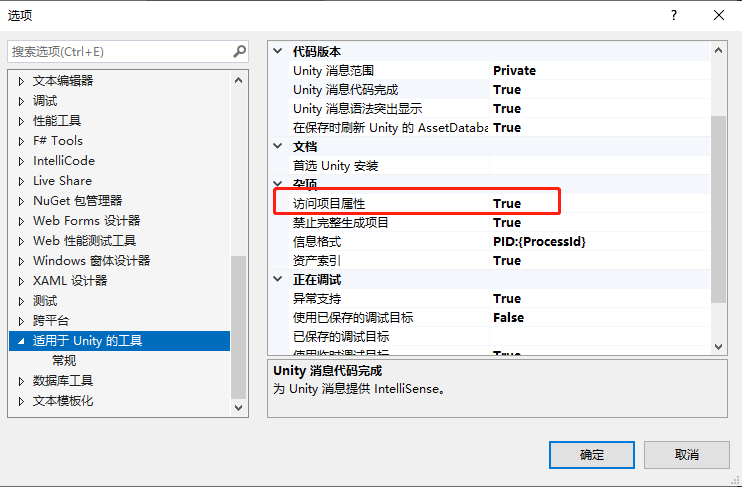
重启再打开属性设置目标框架为.Net Framework 4.6.1,编写测试脚本:
using UnityEngine;
using SKFramework.Test;

public class Example : MonoBehaviour
{
    private void Start()
    {
        new TEST().Execute(this);
    }
}
运行结果:


Assets Bundle:
Assets Bundle,使用工具代码如下:#if UNITY_EDITOR
using System.IO;
using UnityEditor;
using UnityEngine;
namespace SK.Framework.Tools
{
public class SimpleAssetsBundle : EditorWindow
{
[MenuItem("SKFramework/Tools/Simple AssetsBundle")]
public static void Open()
{
var window = GetWindow<SimpleAssetsBundle>();
window.titleContent = new GUIContent("Simple AssetsBundle");
window.minSize = new Vector2(300f, 100f);
window.maxSize = new Vector2(1080f, 100f);
window.Show();
}
//打包路径
private string path;
//打包选项
private BuildAssetBundleOptions options;
//目标平台
private BuildTarget target;
private const float labelWidth = 80f;
private void OnEnable()
{
path = EditorPrefs.HasKey(EditorPrefsKeys.path) ? EditorPrefs.GetString(EditorPrefsKeys.path) : Application.streamingAssetsPath;
options = EditorPrefs.HasKey(EditorPrefsKeys.options) ? (BuildAssetBundleOptions)EditorPrefs.GetInt(EditorPrefsKeys.options) : BuildAssetBundleOptions.None;
target = EditorPrefs.HasKey(EditorPrefsKeys.target) ? (BuildTarget)EditorPrefs.GetInt(EditorPrefsKeys.target) : BuildTarget.StandaloneWindows;
}
private void OnGUI()
{
//路径
GUILayout.BeginHorizontal();
GUILayout.Label("Path", GUILayout.Width(labelWidth));
string newPath = EditorGUILayout.TextField(path);
if (newPath != path)
{
path = newPath;
EditorPrefs.SetString(EditorPrefsKeys.path, path);
}
//浏览 选择路径
if (GUILayout.Button("Browse", GUILayout.Width(60f)))
{
newPath = EditorUtility.OpenFolderPanel("AssetsBundle构建路径", Application.dataPath, string.Empty);
if (!string.IsNullOrEmpty(newPath) && newPath != path)
{
path = newPath;
EditorPrefs.SetString(EditorPrefsKeys.path, path);
}
}
GUILayout.EndHorizontal();
//选项
GUILayout.BeginHorizontal();
GUILayout.Label("Options", GUILayout.Width(labelWidth));
var newOptions = (BuildAssetBundleOptions)EditorGUILayout.EnumPopup(options);
if (newOptions != options)
{
options = newOptions;
EditorPrefs.SetInt(EditorPrefsKeys.options, (int)options);
}
GUILayout.EndHorizontal();
//平台
GUILayout.BeginHorizontal();
GUILayout.Label("Target", GUILayout.Width(labelWidth));
var newTarget = (BuildTarget)EditorGUILayout.EnumPopup(target);
if (newTarget != target)
{
target = newTarget;
EditorPrefs.SetInt(EditorPrefsKeys.target, (int)target);
}
GUILayout.EndHorizontal();
GUILayout.FlexibleSpace();
//构建按钮
if (GUILayout.Button("Build"))
{
//检查路径是否有效
if (!Directory.Exists(path))
{
Debug.LogError(string.Format("无效路径 {0}", path));
return;
}
//提醒
if (EditorUtility.DisplayDialog("提醒", "构建AssetsBundle将花费一定时间,是否确定开始?", "确定", "取消"))
{
//开始构建
BuildPipeline.BuildAssetBundles(path, options, target);
}
}
}
private class EditorPrefsKeys
{
public static string path = "SIMPLEASSETSBUNDLE_PATH";
public static string options = "SIMPLEASSETSBUNDLE_OPTIONS";
public static string target = "SIMPLEASSETSBUNDLE_TARGET";
}
}
}
#endif
Streaming Assets文件夹中:
编写测试脚本:
using UnityEngine;
using SKFramework.Test;
using System.Collections;
using UnityEngine.Networking;

public class Example : MonoBehaviour
{
    private void Start()
    {
        //new TEST().Execute(this);
        StartCoroutine(ExampleCoroutine());
    }

    private IEnumerator ExampleCoroutine()
    {
        string url = Application.streamingAssetsPath + "/player";

        WWW www = new WWW(url);
        yield return www;
        if (www.error == null)
        {
            var ab = www.assetBundle;
            Debug.Log(ab == null);
        }
        else
        {
            Debug.LogError(www.error);
        }
    }
}
运行结果:

以上述的结果来看,在相对较低的版本中,无论是引入相对较高的版本生成的dll,还是加载相对较高版本构建的ab包,都会出现些许问题,是否有相应解决方案尚需确定。
类classAprivatedeffooputs:fooendpublicdefbarputs:barendprivatedefzimputs:zimendprotecteddefdibputs:dibendendA的实例a=A.new测试a.foorescueputs:faila.barrescueputs:faila.zimrescueputs:faila.dibrescueputs:faila.gazrescueputs:fail测试输出failbarfailfailfail.发送测试[:foo,:bar,:zim,:dib,:gaz].each{|m|a.send(m)resc
给定这段代码defcreate@upgrades=User.update_all(["role=?","upgraded"],:id=>params[:upgrade])redirect_toadmin_upgrades_path,:notice=>"Successfullyupgradeduser."end我如何在该操作中实际验证它们是否已保存或未重定向到适当的页面和消息? 最佳答案 在Rails3中,update_all不返回任何有意义的信息,除了已更新的记录数(这可能取决于您的DBMS是否返回该信息)。http://ar.ru
使用带有Rails插件的vim,您可以创建一个迁移文件,然后一次性打开该文件吗?textmate也可以这样吗? 最佳答案 你可以使用rails.vim然后做类似的事情::Rgeneratemigratonadd_foo_to_bar插件将打开迁移生成的文件,这正是您想要的。我不能代表textmate。 关于ruby-使用VimRails,您可以创建一个新的迁移文件并一次性打开它吗?,我们在StackOverflow上找到一个类似的问题: https://sta
我需要读入一个包含数字列表的文件。此代码读取文件并将其放入二维数组中。现在我需要获取数组中所有数字的平均值,但我需要将数组的内容更改为int。有什么想法可以将to_i方法放在哪里吗?ClassTerraindefinitializefile_name@input=IO.readlines(file_name)#readinfile@size=@input[0].to_i@land=[@size]x=1whilex 最佳答案 只需将数组映射为整数:@land边注如果你想得到一条线的平均值,你可以这样做:values=@input[x]
查看Ruby的CSV库的文档,我非常确定这是可能且简单的。我只需要使用Ruby删除CSV文件的前三列,但我没有成功运行它。 最佳答案 csv_table=CSV.read(file_path_in,:headers=>true)csv_table.delete("header_name")csv_table.to_csv#=>ThenewCSVinstringformat检查CSV::Table文档:http://ruby-doc.org/stdlib-1.9.2/libdoc/csv/rdoc/CSV/Table.html
这个问题在这里已经有了答案:Checktoseeifanarrayisalreadysorted?(8个答案)关闭9年前。我只是想知道是否有办法检查数组是否在增加?这是我的解决方案,但我正在寻找更漂亮的方法:n=-1@arr.flatten.each{|e|returnfalseife
我发现ActiveRecord::Base.transaction在复杂方法中非常有效。我想知道是否可以在如下事务中从AWSS3上传/删除文件:S3Object.transactiondo#writeintofiles#raiseanexceptionend引发异常后,每个操作都应在S3上回滚。S3Object这可能吗?? 最佳答案 虽然S3API具有批量删除功能,但它不支持事务,因为每个删除操作都可以独立于其他操作成功/失败。该API不提供任何批量上传功能(通过PUT或POST),因此每个上传操作都是通过一个独立的API调用完成的
我在我的Rails项目中使用Pow和powifygem。现在我尝试升级我的ruby版本(从1.9.3到2.0.0,我使用RVM)当我切换ruby版本、安装所有gem依赖项时,我通过运行railss并访问localhost:3000确保该应用程序正常运行以前,我通过使用pow访问http://my_app.dev来浏览我的应用程序。升级后,由于错误Bundler::RubyVersionMismatch:YourRubyversionis1.9.3,butyourGemfilespecified2.0.0,此url不起作用我尝试过的:重新创建pow应用程序重启pow服务器更新战俘
我正在尝试修改当前依赖于定义为activeresource的gem:s.add_dependency"activeresource","~>3.0"为了让gem与Rails4一起工作,我需要扩展依赖关系以与activeresource的版本3或4一起工作。我不想简单地添加以下内容,因为它可能会在以后引起问题:s.add_dependency"activeresource",">=3.0"有没有办法指定可接受版本的列表?~>3.0还是~>4.0? 最佳答案 根据thedocumentation,如果你想要3到4之间的所有版本,你可以这
我是一个Rails初学者,但我想从我的RailsView(html.haml文件)中查看Ruby变量的内容。我试图在ruby中打印出变量(认为它会在终端中出现),但没有得到任何结果。有什么建议吗?我知道Rails调试器,但更喜欢使用inspect来打印我的变量。 最佳答案 您可以在View中使用puts方法将信息输出到服务器控制台。您应该能够在View中的任何位置使用Haml执行以下操作:-puts@my_variable.inspect 关于ruby-on-rails-如何在我的R
