
安装 npm install weixin-js-sdk
引入
import wx from 'weixin-js-sdk'
<template>
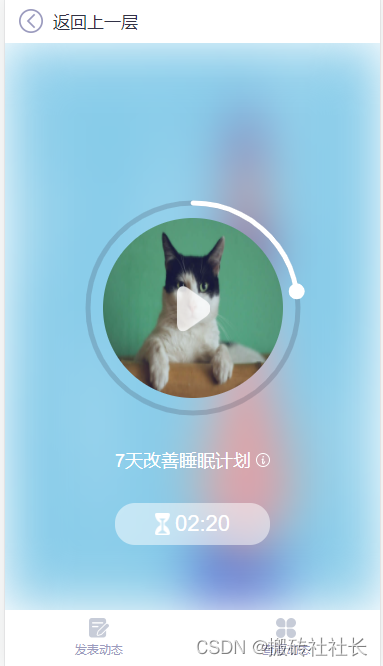
<div class="circle_box">
<div id="content"></div>
<img class="img_0" src="https://img.yzcdn.cn/vant/cat.jpeg" alt="">
<img @click="changeType" class="img_1" v-show="playbool" src="@/assets/decompression/pressure_audio_play.png" alt="">
<img @click="changeType" class="img_1" v-show="!playbool" src="@/assets/decompression/pressure_audio_pause.png" alt="">
<div v-show="false">
<audio ref="audio" controls @timeupdate="updateTime">
<source src="@/assets/decompression/tiankong.mp3" type="audio/mpeg">
</audio>
</div>
</div>
</template>
<script>
import wx from "weixin-js-sdk";
export default {
data(){
return{
value:'',
outColor:'',
playbool:true,
second:0,
than:''
}
},
mounted(){
this.init()
this.main()
},
methods:{
init(){
let that = this
let u = navigator.userAgent;
//ios手机
var isIOS = !!u.match(/\(i[^;]+;( U;)? CPU.+Mac OS X/);
if(isIOS){
this.$nextTick(() => {
this.autoPlayAudio();
})
}else{
this.$nextTick(() => {
let time = setTimeout(function () {
let audio = that.$refs.audio;
//音频总时长 秒
that.second = audio.duration;
that.than = 100/audio.duration;
that.$parent.calculationTime(audio.duration);
clearInterval(time);
}, 500)
})
}
},
autoPlayAudio() {
let ua = window.navigator.userAgent.toLowerCase();
let that = this;
let audio = this.$refs.audio;
if(ua.match(/MicroMessenger/i) == 'micromessenger'){
//微信浏览器
wx.config({
debug: false,
appId: '',
timestamp: 1,
nonceStr: '',
signature: '',
jsApiList: []
});
wx.ready(function() {
audio.play();
audio.pause();
let time = setTimeout(function () {
if(audio.duration>0){
//音频总时长 秒
that.second = audio.duration;
that.than = 100/audio.duration;
that.$parent.calculationTime(audio.duration);
}else{
that.autoPlayAudio();
}
clearInterval(time);
}, 500)
});
}else{
let time = setTimeout(function () {
if(audio.duration>0){
//音频总时长 秒
that.second = audio.duration;
that.than = 100/audio.duration;
that.$parent.calculationTime(audio.duration);
}else{
that.autoPlayAudio();
}
clearInterval(time);
}, 500)
}
},
//监测播放进度
updateTime(){
let audio = this.$refs.audio;
let time = Number(this.second)-Number(audio.currentTime);
this.$parent.calculationTime(time);
this.draw(this.than*audio.currentTime);
},
changeType(){
this.playbool = !this.playbool;
let audio = this.$refs.audio;
if(this.playbool){
//暂停
audio.pause()
}else{
audio.play()
}
},
event(dom) { //事件绑定
if(this.isMobile){
dom.addEventListener("touchstart", this.OnMouseDown.bind(this), false);
dom.addEventListener("touchmove", this.throttle(this.OnMouseMove.bind(this)), false);
dom.addEventListener("touchend", this.OnMouseUp.bind(this), false);
return
}
dom.addEventListener("mousedown", this.OnMouseDown.bind(this), false);
dom.addEventListener("mousemove", this.throttle(this.OnMouseMove.bind(this)), false);
dom.addEventListener("mouseup", this.OnMouseUp.bind(this), false);
},
OnMouseDown(evt) {
let audio = this.$refs.audio;
//暂停音频
audio.pause()
this.clearLocation(evt);
let range = 10;
let X = this.getx(evt);
let Y = this.gety(evt);
let P = this.P
let minX = P.x - this.slider - range;
let maxX = P.x + this.slider + range;
let minY = P.y - this.slider - range;
let maxY = P.y + this.slider + range;
if (minX < X && X < maxX && minY < Y && Y < maxY) { //判断鼠标是否在滑块上
this.isDown = true;
} else {
this.isDown = false;
}
},
main(){
const dom = document.getElementById("content")
const obj = {
el: dom,
startDeg:1.5 ,
endDeg: 3.5,
outColor: 'rgba(50, 50, 70, .2)',
counterclockwise: false
}
this.constructor(obj)
},
constructor(param) {
this.initParam(param)
this.draw(this.value)
},
initParam(param) {
const {
el,
startDeg = 1.5,
endDeg = 3.5,
outColor = "rgba(50, 50, 70, .2)",
innerLineWidth = 1,
outLineWidth = 5,
counterclockwise = true,
slider = 8,
color = ["#ffffff", "#ffffff"],
sliderColor = "#fff",
sliderBorderColor = "#33aaff",
value = 0,
change = (v)=> { },
textShow = true
} = param;
this.el = el;
this.width = el.offsetWidth;
this.height = el.offsetHeight;
this.center = this.width / 2
this.radius = this.width / 2 - 30; //滑动路径半径
this.initCanvas(el);
this.startDeg = startDeg;
this.endDeg = endDeg;
this.outColor = outColor;
this.innerLineWidth = innerLineWidth;
this.outLineWidth = outLineWidth;
this.counterclockwise = counterclockwise;
this.slider = slider;
this.color = color;
this.sliderColor = sliderColor;
this.sliderBorderColor = sliderBorderColor;
this.value = value;
this.textShow = textShow;
this.change = change;
this.isDown = false;
this.event(el)
},
OnMouseMove(evt) {
if (!this.isDown) return;
let evpoint = {};
evpoint.x = this.getx(evt);
evpoint.y = this.gety(evt);
let point = this.spotchangeXY(evpoint);
let deg = this.XYToDeg(point.x, point.y);
deg = this.counterclockwise ? deg : Math.PI * 2 - deg;
let val = (deg/ Math.PI - this.startDeg) / (this.endDeg - this.startDeg) * 100
if(val<0) val = 100 + val;
if(val >= 100) val = 100;
if(val <= 0) val = 0;
if(Math.abs (val - this.value) > 10) return;
//音频定位播放
let time = val/this.than;
let audio = this.$refs.audio;
audio.currentTime = time
this.animate = requestAnimationFrame(this.draw.bind(this,val));
if(this.value != Math.round(val)){
this.value = Math.round(val);
this.change(this.value)
}
},
OnMouseUp(evt) { //鼠标释放
const _this = this
cancelAnimationFrame(_this.animate);
this.isDown = false;
if(this.distance(evt)){
this.playbool = false;
let audio = this.$refs.audio;
//播放音频
audio.play()
}
},
distance(evt){
let x = this.getx(evt);
let y = this.gety(evt);
let distance = Math.abs(Math.sqrt(Math.pow(x - 135, 2) + Math.pow(y - 135, 2)));
if(0<distance && distance<130){
return true
}else{
return false
}
},
//点击定位
clearLocation(evt){
let evpoint = {};
evpoint.x = this.getx(evt);
evpoint.y = this.gety(evt);
let point = this.spotchangeXY(evpoint);
let deg = this.XYToDeg(point.x, point.y);
deg = this.counterclockwise ? deg : Math.PI * 2 - deg;
let val = (deg/ Math.PI - this.startDeg) / (this.endDeg - this.startDeg) * 100
if(val<0) val = 100 + val;
if(val >= 100) val = 100;
if(val <= 0) val = 0;
if(this.distance(evt)){
this.animate = requestAnimationFrame(this.draw.bind(this,val));
//音频定位播放
let time = val/this.than;
let audio = this.$refs.audio;
audio.currentTime = time
audio.play()
audio.pause()
if(this.value != Math.round(val)){
this.value = Math.round(val);
this.change(this.value)
}
}
},
//绘图
draw(value) {
this.ctx.clearRect(0, 0, this.width, this.width);
this.ctx.save();
let startDeg = this.counterclockwise ? Math.PI * (2 - this.startDeg) : Math.PI * this.startDeg
let endDeg = this.counterclockwise ? Math.PI * (2 - this.endDeg) : Math.PI * this.endDeg
// 绘制外侧圆弧
this.ctx.beginPath();
this.ctx.arc(this.center, this.center, this.radius, startDeg, endDeg, this.counterclockwise); // 绘制外侧圆弧
this.ctx.strokeStyle = this.outColor;
this.ctx.lineCap = "round";
this.ctx.lineWidth = this.outLineWidth;
this.ctx.stroke();
let Deg = this.valToDeg(value)
// 绘制可变圆弧
let themeColor = (typeof this.color == 'String') ? this.color : this.setLinearGradient()
this.ctx.beginPath();
this.ctx.arc(this.center, this.center, this.radius, startDeg, Deg, this.counterclockwise); // 可变圆弧
this.ctx.strokeStyle = themeColor;
this.ctx.lineCap = "round";
this.ctx.lineWidth = this.outLineWidth;
this.ctx.stroke();
// 绘制滑块
this.P = this.DegToXY(Deg)
this.ctx.beginPath();
this.ctx.moveTo(this.center, this.center);
this.ctx.arc(this.P.x, this.P.y, this.slider, 0, Math.PI * 2, false); // 绘制滑块
this.ctx.fillStyle = this.sliderColor;;
this.ctx.fill();
},
initCanvas(dom) {
this.canvas = document.createElement("canvas");
this.canvas.setAttribute("id", "dragArc");
this.canvas.setAttribute("width", this.width);
this.canvas.setAttribute("height", this.width);
dom.appendChild(this.canvas);
this.ctx = this.canvas.getContext("2d");
this.isMobile = /Android|webOS|iPhone|iPod|BlackBerry/i.test(navigator.userAgent);
},
//将值转化为弧度
valToDeg(v) {
let range = this.endDeg - this.startDeg;
let val = range / 100 * v;
if(this.counterclockwise && (val !=0) ) val = 2 -val;
let startDeg = this.counterclockwise ? (2 - this.startDeg) : this.startDeg;
return (startDeg + val) * Math.PI;
},
// 弧度转化为对应坐标值
DegToXY(deg) {
let d = 2 * Math.PI - deg;
return this.respotchangeXY({
x: this.radius * Math.cos(d),
y: this.radius * Math.sin(d)
})
},
//canvas坐标转化为中心坐标
spotchangeXY(point) {
const spotchangeX = (i) => {
return i - this.center
}
const spotchangeY = (i) => {
return this.center - i
}
return {
x: spotchangeX(point.x),
y: spotchangeY(point.y)
}
},
//中心坐标转化为canvas坐标
respotchangeXY(point) {
const spotchangeX = (i) => {
return i + this.center
}
const spotchangeY = (i) => {
return this.center - i
}
return {
x: spotchangeX(point.x),
y: spotchangeY(point.y)
}
},
setLinearGradient(){
const grad = this.ctx.createLinearGradient(0,0, 0,this.width);
this.color.forEach((e, i) => {
if(i == 0){
grad.addColorStop(0, e)
}else if(i == this.color.length - 1){
grad.addColorStop(1, e)
}else{
grad.addColorStop(1/this.color.length * (i+1), e);
}
});
return grad;
},
// 将坐标点转化为弧度
XYToDeg(lx, ly) {
let adeg = Math.atan(ly / lx)
let deg;
if (lx >= 0 && ly >= 0) {
deg = adeg ;
}
if (lx <= 0 && ly >= 0) {
deg = adeg + Math.PI;
}
if (lx <= 0 && ly <= 0) {
deg = adeg + Math.PI;
}
if (lx > 0 && ly < 0) {
deg = adeg + Math.PI * 2;
}
return deg
},
//获取鼠标在canvas内坐标x
getx(ev) {
if(!this.isMobile) return ev.clientX - this.el.getBoundingClientRect().left;
if(ev.touches.length){
return ev.touches[0].pageX - this.el.getBoundingClientRect().left;
}else{
return ev.changedTouches[0].pageX - this.el.getBoundingClientRect().left;
}
},
//获取鼠标在canvas内坐标y
gety(ev) {
if(!this.isMobile) return ev.clientY - this.el.getBoundingClientRect().top;
if(ev.touches.length){
return ev.touches[0].pageY - this.el.getBoundingClientRect().top;
}else{
return ev.changedTouches[0].pageY - this.el.getBoundingClientRect().top;
}
},
//节流
throttle(func) {
let previous = 0;
return function() {
let now = Date.now();
let context = this;
let args = arguments;
if (now - previous > 10) {
func.apply(context, args);
previous = now;
}
}
},
}
}
</script>
<style scoped>
.circle_box{
position: relative;
padding-top: 130px;
top: 0;
left: 0;
width: 100%;
height: 245px;
}
#content{
position: absolute;
left: 50%;
transform: translateX(-50%);
height: 240px;
width: 270px;
}
.img_0{
position: absolute;
top: 175px;
left: 50%;
transform: translateX(-50%);
width: 180px;
height: 180px;
border-radius: 50%;
z-index: 5;
}
.img_1{
position: absolute;
left: 50%;
transform: translateX(-50%);
top: 243px;
width: 34px;
height: 46px;
z-index: 10;
}
.posi{
position: absolute;
left: 0;
top: 10px;
z-index: 1000;
}
</style>
我想向我的Controller传递一个参数,它是一个简单的复选框,但我不知道如何在模型的form_for中引入它,这是我的观点:{:id=>'go_finance'}do|f|%>Transferirde:para:Entrada:"input",:placeholder=>"Quantofoiganho?"%>Saída:"output",:placeholder=>"Quantofoigasto?"%>Nota:我想做一个额外的复选框,但我该怎么做,模型中没有一个对象,而是一个要检查的对象,以便在Controller中创建一个ifelse,如果没有检查,请帮助我,非常感谢,谢谢
我正在尝试在Ruby中制作一个cli应用程序,它接受一个给定的数组,然后将其显示为一个列表,我可以使用箭头键浏览它。我觉得我已经在Ruby中看到一个库已经这样做了,但我记不起它的名字了。我正在尝试对soundcloud2000中的代码进行逆向工程做类似的事情,但他的代码与SoundcloudAPI的使用紧密耦合。我知道cursesgem,我正在考虑更抽象的东西。广告有没有人见过可以做到这一点的库或一些概念证明的Ruby代码可以做到这一点? 最佳答案 我不知道这是否是您正在寻找的,但也许您可以使用我的想法。由于我没有关于您要完成的工作
我的主要目标是能够完全理解我正在使用的库/gem。我尝试在Github上从头到尾阅读源代码,但这真的很难。我认为更有趣、更温和的踏脚石就是在使用时阅读每个库/gem方法的源代码。例如,我想知道RubyonRails中的redirect_to方法是如何工作的:如何查找redirect_to方法的源代码?我知道在pry中我可以执行类似show-methodmethod的操作,但我如何才能对Rails框架中的方法执行此操作?您对我如何更好地理解Gem及其API有什么建议吗?仅仅阅读源代码似乎真的很难,尤其是对于框架。谢谢! 最佳答案 Ru
我正在使用RubyonRails3.0.9,我想生成一个传递一些自定义参数的link_toURL。也就是说,有一个articles_path(www.my_web_site_name.com/articles)我想生成如下内容:link_to'Samplelinktitle',...#HereIshouldimplementthecode#=>'http://www.my_web_site_name.com/articles?param1=value1¶m2=value2&...我如何编写link_to语句“alàRubyonRailsWay”以实现该目的?如果我想通过传递一些
有这些railscast。http://railscasts.com/episodes/218-making-generators-in-rails-3有了这个,你就会知道如何创建样式表和脚手架生成器。http://railscasts.com/episodes/216-generators-in-rails-3通过这个,您可以了解如何添加一些文件来修改脚手架View。我想把两者结合起来。我想创建一个生成器,它也可以创建脚手架View。有点像RyanBates漂亮的生成器或web_app_themegem(https://github.com/pilu/web-app-theme)。我
是否有简单的方法来更改默认ISO格式(yyyy-mm-dd)的ActiveAdmin日期过滤器显示格式? 最佳答案 您可以像这样为日期选择器提供额外的选项,而不是覆盖js:=f.input:my_date,as::datepicker,datepicker_options:{dateFormat:"mm/dd/yy"} 关于ruby-on-rails-事件管理员日期过滤器日期格式自定义,我们在StackOverflow上找到一个类似的问题: https://s
我们目前正在为ROR3.2开发自定义cms引擎。在这个过程中,我们希望成为我们的rails应用程序中的一等公民的几个类类型起源,这意味着它们应该驻留在应用程序的app文件夹下,它是插件。目前我们有以下类型:数据源数据类型查看我在app文件夹下创建了多个目录来保存这些:应用/数据源应用/数据类型应用/View更多类型将随之而来,我有点担心应用程序文件夹被这么多目录污染。因此,我想将它们移动到一个子目录/模块中,该子目录/模块包含cms定义的所有类型。所有类都应位于MyCms命名空间内,目录布局应如下所示:应用程序/my_cms/data_source应用程序/my_cms/data_ty
如何使此根路径转到:“/dashboard”而不仅仅是http://example.com?root:to=>'dashboard#index',:constraints=>lambda{|req|!req.session[:user_id].blank?} 最佳答案 您可以通过以下方式实现:root:to=>redirect('/dashboard')match'/dashboard',:to=>"dashboard#index",:constraints=>lambda{|req|!req.session[:user_id].b
Heroku支持人员告诉我,为了在我的Web应用程序中使用自定义字体(未安装在系统中,您可以在bash控制台中使用fc-list查看已安装的字体)我必须部署一个包含所有字体的.fonts文件夹里面的字体。问题是我不知道该怎么做。我的意思是,我不知道文件名是否必须遵循heroku的任何特殊模式,或者我必须在我的代码中做一些事情来考虑这种字体,或者如果我将它包含在文件夹中它是自动的......事实是,我尝试以不同的方式更改字体的文件名,但根本没有使用该字体。为了提供更多详细信息,我们使用字体的过程是将PDF转换为图像,更具体地说,使用rghostgem。并且最终图像根本不使用自定义字体。在
项目介绍随着我国经济迅速发展,人们对手机的需求越来越大,各种手机软件也都在被广泛应用,但是对于手机进行数据信息管理,对于手机的各种软件也是备受用户的喜爱小学生兴趣延时班预约小程序的设计与开发被用户普遍使用,为方便用户能够可以随时进行小学生兴趣延时班预约小程序的设计与开发的数据信息管理,特开发了小程序的设计与开发的管理系统。小学生兴趣延时班预约小程序的设计与开发的开发利用现有的成熟技术参考,以源代码为模板,分析功能调整与小学生兴趣延时班预约小程序的设计与开发的实际需求相结合,讨论了小学生兴趣延时班预约小程序的设计与开发的使用。开发环境开发说明:前端使用微信微信小程序开发工具:后端使用ssm:VU
