Python 是数据科学 (DS) 和机器学习 (ML) 中最常用的脚本语言之一。根据“PopularitY of Programming Languages”,Python 是 Google 上搜索次数最多的语言。除了作为将各种 DS/ML 解决方案连接在一起的出色胶水语言之外,它还有许多库可以对数据进行方便处理。
我们以前也发过文章做过一些3.11 版的测试。因为这个版本的主要特点是速度显着提高。
在这篇文章中,是国外的一个大佬进行的数据分析,通过他的分析可以证明Python 3.14 将比 C++更快。
本文的方法是:使用蒙特卡洛方法估计 Pi。
这个算法的想法很简单,但是在大学的一些数学课程中都会有介绍:有一个大小为 2r 的正方形,在这个正方形中我们拟合一个半径为 r 的圆。采用一个在平面上生成数字的随机数生成器:<-r, r>, <-r, r>。圆上的点与正方形上的点之间的比率(读取:所有点)是面积比的近似值,我们可以用它来近似 Pi。公式如下
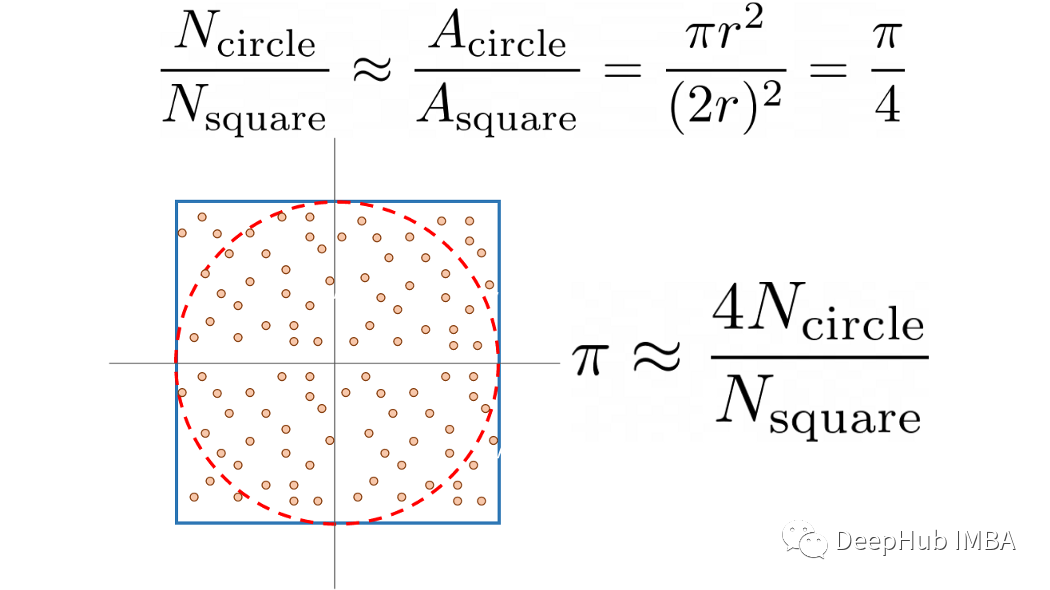
将实际估计与测试脚本分开,这样就可以重复测试并取平均值。这里还是用 Argparse 对脚本进行了参数化,Argparse 是一个用于解析来自命令行界面 (CLI) 的参数的标准库。Python 代码如下所示:
 def estimate_pi(
     n_points: int,
     show_estimate: bool,
 ) -> None:
     """
     Simple Monte Carlo Pi estimation calculation.
     Parameters
     ----------
     n_points
         number of random numbers used to for estimation.
     show_estimate
         if True, will show the estimation of Pi, otherwise
         will not output anything.
     """
     within_circle = 0

     for _ in range(n_points):
         x, y = (random.uniform(-1, 1) for v in range(2))
         radius_squared = x**2 + y**2

         if radius_squared <= 1:
             within_circle += 1

     pi_estimate = 4 * within_circle / n_points

     if not show_estimate:
         print("Final Estimation of Pi=", pi_estimate)


 def run_test(
     n_points: int,
     n_repeats: int,
     only_time: bool,
 ) -> None:
     """
     Perform the tests and measure required time.
     Parameters
     ----------
     n_points
         number of random numbers used to for estimation.
     n_repeats
         number of times the test is repeated.
     only_time
         if True will only print the time, otherwise
         will also show the Pi estimate and a neat formatted
         time.
     """
     start_time = time.time()

     for _ in range(n_repeats):
         estimate_pi(n_points, only_time)

     if only_time:
         print(f"{(time.time() - start_time)/n_repeats:.4f}")
     else:
         print(
             f"Estimating pi took {(time.time() - start_time)/n_repeats:.4f} seconds per run."
         )
测试多个 Python 版本的最简单方法是使用 Docker。 要使用 Docker需要安装它。在 Linux 和 Mac 中它相对容易,在 Windows 中稍微复杂一些。虽然Docker中运行会有一些效率的降低,但是测试都在Docker进行,所以误差就可以忽略了。要在容器化 Python 环境中运行本地脚本,可以使用下面命令:
 docker run -it --rm \
   -v $PWD/your_script.py:/your_script.py \
   python:3.11-rc-slim \
   python /yourscript.py
我们也是用python脚本来自动化这个过程
 def test_version(image: str) -> float:
     """
     Run single_test on Python Docker image.
     Parameter
     ---------
     image
         full name of the the docker hub Python image.
     Returns
     -------
     run_time
         runtime in seconds per test loop.
     """
     output = subprocess.run([
             'docker',
             'run',
             '-it',
             '--rm',
             '-v',
             f'{cwd}/{SCRIPT}:/{SCRIPT}',
             image,
             'python',
             f'/{SCRIPT}',
             '--n_points',
             str(N_POINTS),
             '--n_repeats',
             str(N_REPEATS),
             '--only-time',
         ],
         capture_output=True,
         text=True,
     )

     avg_time = float(output.stdout.strip())

     return avg_time


 # Get test time for current Python version
 base_time = test_version(NEW_IMAGE['image'])
 print(f"The new {NEW_IMAGE['name']} took {base_time} seconds per run.\n")

 # Compare to previous Python versions
 for item in TEST_IMAGES:
     ttime = test_version(item['image'])
     print(
         f"{item['name']} took {ttime} seconds per run."
         f"({NEW_IMAGE['name']} is {(ttime / base_time) - 1:.1%} faster)"
     )
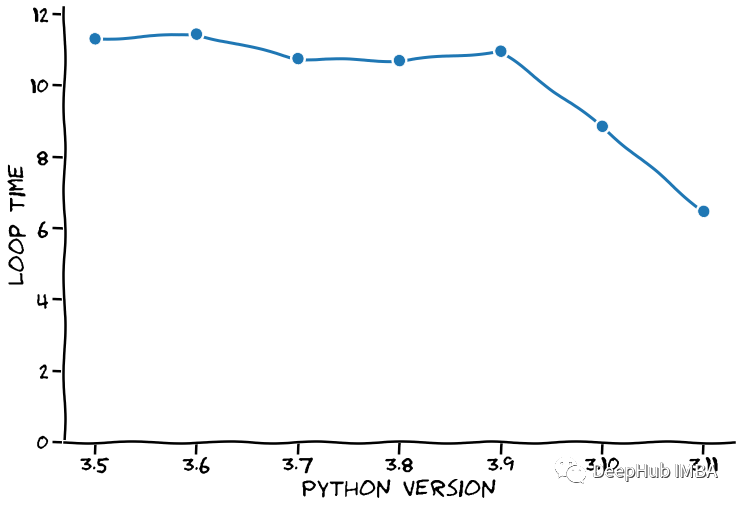
这些测试时的结果具体取决于CPU 。以下是7 个主要 Python 版本的结果:
 The new Python 3.11 took 6.4605 seconds per run.

 Python 3.5 took 11.3014 seconds.(Python 3.11 is 74.9% faster)
 Python 3.6 took 11.4332 seconds.(Python 3.11 is 77.0% faster)
 Python 3.7 took 10.7465 seconds.(Python 3.11 is 66.3% faster)
 Python 3.8 took 10.6904 seconds.(Python 3.11 is 65.5% faster)
 Python 3.9 took 10.9537 seconds.(Python 3.11 is 69.5% faster)
 Python 3.10 took 8.8467 seconds.(Python 3.11 is 36.9% faster)
Python 3.11 的基准测试平均耗时 6.46 秒。与之前的版本 (3.10) 相比,这几乎快了 37%。3.9 版和 3.10 版之间的差异大致相同,在下图中我们进行这个数据的可视化:
在谈论速度时,人们总是说:如果你想要速度,为什么不使用 C。
C 比 Python 快得多!
这里使用了 GNU C++,因为它带有一个不错的时间测量库(chrono),我们的c++代码如下:
 #include <stdlib.h>
 #include <stdio.h>
 #include <chrono>
 #include <array>

 #define N_POINTS 10000000
 #define N_REPEATS 10

 float estimate_pi(int n_points) {
    double x, y, radius_squared, pi;
    int within_circle=0;

    for (int i=0; i < n_points; i++) {
       x = (double)rand() / RAND_MAX;
       y = (double)rand() / RAND_MAX;

       radius_squared = x*x + y*y;
       if (radius_squared <= 1) within_circle++;
    }

    pi=(double)within_circle/N_POINTS * 4;
    return pi;
 }

 int main() {
     double avg_time = 0;

     srand(42);

     for (int i=0; i < N_REPEATS; i++) {
         auto begin = std::chrono::high_resolution_clock::now();
         double pi = estimate_pi(N_POINTS);
         auto end = std::chrono::high_resolution_clock::now();
         auto elapsed = std::chrono::duration_cast<std::chrono::nanoseconds>(end - begin);
         avg_time += elapsed.count() * 1e-9;
         printf("Pi is approximately %g and took %.5f seconds to calculate.\n", pi, elapsed.count() * 1e-9);
     }

     printf("\nEach loop took on average %.5f seconds to calculate.\n", avg_time / N_REPEATS);
 }
C++ 是一种编译语言,我们需要先编译源代码才能使用它:
g++ -o pi_estimate pi_estimate.c
编译后,运行构建的可执行文件。输出如下:
 Pi is approximately 3.14227 and took 0.25728 seconds to calculate.
 Pi is approximately 3.14164 and took 0.25558 seconds to calculate.
 Pi is approximately 3.1423 and took 0.25740 seconds to calculate.
 Pi is approximately 3.14108 and took 0.25737 seconds to calculate.
 Pi is approximately 3.14261 and took 0.25664 seconds to calculate.

 Each loop took on average 0.25685 seconds to calculate.
相同循环只需要 0.257 秒。让我们在之前的图中将其添加为一条线,如下所示。
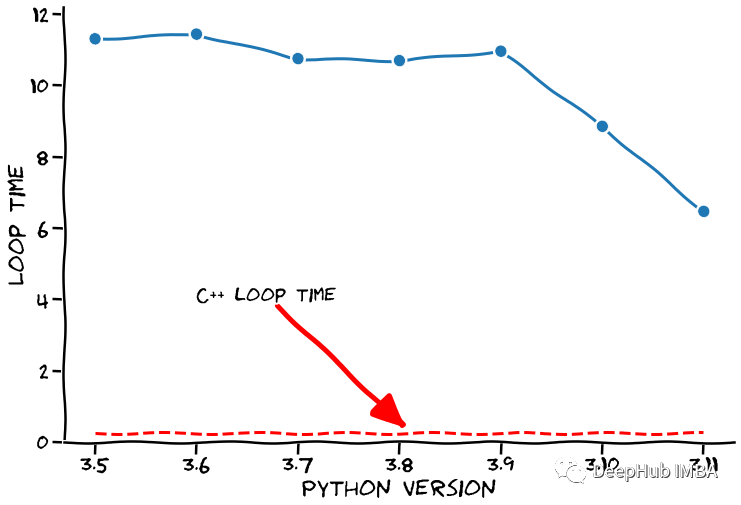
我们清楚地看到了C++很快,但是Python 开发人员提到,接下来的几个版本将会显着提高速度,在这个假设的前提下,我们的绝活就要来了,请大家理清思路注意观看。
我们以假设这个速度会保持下去(是的,超级安全的假设🙃)。在这种势头固定的情况下,Python 何时会超越 C++ 呢。我们当然可以使用外推法来预测下几个 Python 版本的循环时间,见下图
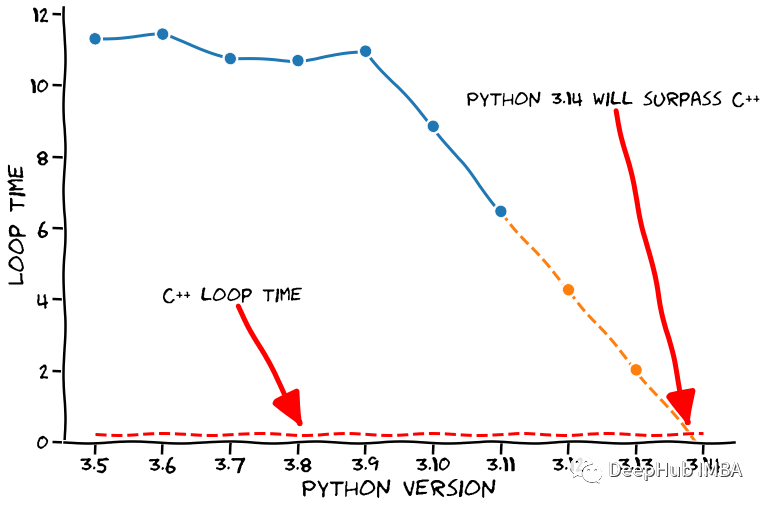
看到了吧,经过我们的严密的分析和预测,如果保持这个速度,Python 3.14 将比 C++ 更快。确切地说,运行完我们测试的时间为 -0.232 秒,它会在我们想要进行计算之前完成(太棒了🤣)。
下面就是免责声明的时间:
python 3.11的速度的有了很大的进步,虽然与编译语言相比还差了很多但是开发团队还在速度优化这个方向努力,所以希望Python的运行速度还有更大的进步。以上只是大佬开的一个玩笑,但上面的代码都可以在下面的链接找到,所以我们的结论还是有根据的😏
https://avoid.overfit.cn/post/a99fac9aad1e4b398e17fa07bf394d3b
作者:Denn·is Bakhuis
关闭。这个问题是opinion-based.它目前不接受答案。想要改进这个问题?更新问题,以便editingthispost可以用事实和引用来回答它.关闭4年前。Improvethisquestion我想在固定时间创建一系列低音和高音调的哔哔声。例如:在150毫秒时发出高音调的蜂鸣声在151毫秒时发出低音调的蜂鸣声200毫秒时发出低音调的蜂鸣声250毫秒的高音调蜂鸣声有没有办法在Ruby或Python中做到这一点?我真的不在乎输出编码是什么(.wav、.mp3、.ogg等等),但我确实想创建一个输出文件。
这个问题在这里已经有了答案:关闭10年前。PossibleDuplicate:Pythonconditionalassignmentoperator对于这样一个简单的问题表示歉意,但是谷歌搜索||=并不是很有帮助;)Python中是否有与Ruby和Perl中的||=语句等效的语句?例如:foo="hey"foo||="what"#assignfooifit'sundefined#fooisstill"hey"bar||="yeah"#baris"yeah"另外,类似这样的东西的通用术语是什么?条件分配是我的第一个猜测,但Wikipediapage跟我想的不太一样。
什么是ruby的rack或python的Java的wsgi?还有一个路由库。 最佳答案 来自Python标准PEP333:Bycontrast,althoughJavahasjustasmanywebapplicationframeworksavailable,Java's"servlet"APImakesitpossibleforapplicationswrittenwithanyJavawebapplicationframeworktoruninanywebserverthatsupportstheservletAPI.ht
华为OD机试题本篇题目:明明的随机数题目输入描述输出描述:示例1输入输出说明代码编写思路最近更新的博客华为od2023|什么是华为od,od薪资待遇,od机试题清单华为OD机试真题大全,用Python解华为机试题|机试宝典【华为OD机试】全流程解析+经验分享,题型分享,防作弊指南华为o
我想解析一个已经存在的.mid文件,改变它的乐器,例如从“acousticgrandpiano”到“violin”,然后将它保存回去或作为另一个.mid文件。根据我在文档中看到的内容,该乐器通过program_change或patch_change指令进行了更改,但我找不到任何在已经存在的MIDI文件中执行此操作的库.他们似乎都只支持从头开始创建的MIDI文件。 最佳答案 MIDIpackage会为您完成此操作,但具体方法取决于midi文件的原始内容。一个MIDI文件由一个或多个音轨组成,每个音轨是十六个channel中任何一个上的
本文主要介绍在使用Selenium进行自动化测试或者任务时,对于使用了iframe的页面,如何定位iframe中的元素文章目录场景描述解决方案具体代码场景描述当我们在使用Selenium进行自动化测试的时候,可能会遇到一些界面或者窗体是使用HTML的iframe标签进行承载的。对于iframe中的标签,如果直接查找是无法找到的,会抛出没有找到元素的异常。比如近在咫尺的例子就是,CSDN的登录窗体就是使用的iframe,大家可以尝试通过F12开发者模式查看到的tag_name,class_name,id或者xpath来定位中的页面元素,会抛出NoSuchElementException异常。解决
2022/8/4更新支持加入水印水印必须包含透明图像,并且水印图像大小要等于原图像的大小pythonconvert_image_to_video.py-f30-mwatermark.pngim_dirout.mkv2022/6/21更新让命令行参数更加易用新的命令行使用方法pythonconvert_image_to_video.py-f30im_dirout.mkvFFMPEG命令行转换一组JPG图像到视频时,是将这组图像视为MJPG流。我需要转换一组PNG图像到视频,FFMPEG就不认了。pyav内置了ffmpeg库,不需要系统带有ffmpeg工具因此我使用ffmpeg的python包装p
ValidPalindromeGivenastring,determineifitisapalindrome,consideringonlyalphanumericcharactersandignoringcases. [#125]Example:"Aman,aplan,acanal:Panama"isapalindrome."raceacar"isnotapalindrome.Haveyouconsiderthatthestringmightbeempty?Thisisagoodquestiontoaskduringaninterview.Forthepurposeofthisproblem
是否可以在PyYAML或Ruby的Psych引擎中禁用创建anchor和引用(并有效地显式列出冗余数据)?也许我在网上搜索时遗漏了一些东西,但在Psych中似乎没有太多可用的选项,而且我也无法确定PyYAML是否允许这样做.基本原理是我必须序列化一些数据并将其以可读的形式传递给一个不是真正的技术同事进行手动验证。有些数据是多余的,但我需要以最明确的方式列出它们以提高可读性(anchor和引用是提高效率的好概念,但不是人类可读性)。Ruby和Python是我选择的工具,但如果有其他一些相当简单的方法来“展开”YAML文档,它可能就可以了。 最佳答案
我很好奇.NET将如何影响Python和Ruby应用程序。用IronPython/IronRuby编写的应用程序是否会非常特定于.NET环境,以至于它们实际上将变得特定于平台?如果他们不使用任何.NET功能,那么IronPython/IronRuby相对于非.NET同类产品的优势是什么? 最佳答案 我不能说任何关于IronRuby的东西,但是大多数Python实现(如IronPython、Jython和PyPy)都试图尽可能忠实于CPython实现。不过,IronPython正在迅速成为这方面的佼佼者之一,并且在PlanetPyth
