随着Android的更新,越新的版本收紧的权限越来越多,伴随着很多曾经可用的接口慢慢地出现了问题。
比如: TelephonyManager.getSubscriberId()
public static void testGetSubId(Context ctx){
        //Android 11:
        // java.lang.SecurityException: getSubscriberId: The user 10125 does not meet the requirements to access device identifiers.
        TelephonyManager telMgr = (TelephonyManager) ctx.getSystemService(TELEPHONY_SERVICE);
        @SuppressLint("MissingPermission")
        String subId = telMgr.getSubscriberId();
        android.util.Log.d(TAG, "testGetSubId subId=" + subId);
    }
在代码注释中已经写得很明白:
The user 10125 does not meet the requirements to access device identifiers
要做的事情很简单, 找到权限检查的地方, 去掉它
权限检查的位置
frameworks/base/telephony/common/com/android/internal/telephony/TelephonyPermissions.java
    public static boolean checkCallingOrSelfReadDeviceIdentifiers(Context context, int subId,
            String callingPackage, @Nullable String callingFeatureId, String message) {
        return true || checkPrivilegedReadPermissionOrCarrierPrivilegePermission(
                context, subId, callingPackage, callingFeatureId, message, true);
    }
    public static boolean checkCallingOrSelfReadSubscriberIdentifiers(Context context, int subId,
            String callingPackage, @Nullable String callingFeatureId, String message) {
        return true || checkPrivilegedReadPermissionOrCarrierPrivilegePermission(
                context, subId, callingPackage, callingFeatureId, message, false);
    }
    private static boolean checkPrivilegedReadPermissionOrCarrierPrivilegePermission(
            Context context, int subId, String callingPackage, @Nullable String callingFeatureId,
            String message, boolean allowCarrierPrivilegeOnAnySub) {
        int uid = Binder.getCallingUid();
        int pid = Binder.getCallingPid();

        // If the calling package has carrier privileges for specified sub, then allow access.
        if (checkCarrierPrivilegeForSubId(context, subId)) return true;

        // If the calling package has carrier privileges for any subscription
        // and allowCarrierPrivilegeOnAnySub is set true, then allow access.
        if (allowCarrierPrivilegeOnAnySub && checkCarrierPrivilegeForAnySubId(context, uid)) {
            return true;
        }

        PermissionManager permissionManager = (PermissionManager) context.getSystemService(
                Context.PERMISSION_SERVICE);
        if (permissionManager.checkDeviceIdentifierAccess(callingPackage, message, callingFeatureId,
                pid, uid) == PackageManager.PERMISSION_GRANTED) {
            return true;
        }

        return reportAccessDeniedToReadIdentifiers(context, subId, pid, uid, callingPackage,
                message);
    }
    /**
     * Reports a failure when the app with the given pid/uid cannot access the requested identifier.
     *
     * @returns false if the caller is targeting pre-Q and does have the READ_PHONE_STATE
     * permission or carrier privileges.
     * @throws SecurityException if the caller does not meet any of the requirements for the
     *                           requested identifier and is targeting Q or is targeting pre-Q
     *                           and does not have the READ_PHONE_STATE permission or carrier
     *                           privileges.
     */
    private static boolean reportAccessDeniedToReadIdentifiers(Context context, int subId, int pid,
            int uid, String callingPackage, String message) {
        ApplicationInfo callingPackageInfo = null;
        try {
            callingPackageInfo = context.getPackageManager().getApplicationInfoAsUser(
                    callingPackage, 0, UserHandle.getUserHandleForUid(uid));
        } catch (PackageManager.NameNotFoundException e) {
            // If the application info for the calling package could not be found then assume the
            // calling app is a non-preinstalled app to detect any issues with the check
            Log.e(LOG_TAG, "Exception caught obtaining package info for package " + callingPackage,
                    e);
        }
        // The current package should only be reported in StatsLog if it has not previously been
        // reported for the currently invoked device identifier method.
        boolean packageReported = sReportedDeviceIDPackages.containsKey(callingPackage);
        if (!packageReported || !sReportedDeviceIDPackages.get(callingPackage).contains(
                message)) {
            Set invokedMethods;
            if (!packageReported) {
                invokedMethods = new HashSet<String>();
                sReportedDeviceIDPackages.put(callingPackage, invokedMethods);
            } else {
                invokedMethods = sReportedDeviceIDPackages.get(callingPackage);
            }
            invokedMethods.add(message);
            TelephonyCommonStatsLog.write(TelephonyCommonStatsLog.DEVICE_IDENTIFIER_ACCESS_DENIED,
                    callingPackage, message, /* isPreinstalled= */ false, false);
        }
        Log.w(LOG_TAG, "reportAccessDeniedToReadIdentifiers:" + callingPackage + ":" + message + ":"
                + subId);
        // if the target SDK is pre-Q then check if the calling package would have previously
        // had access to device identifiers.
        if (callingPackageInfo != null && (
                callingPackageInfo.targetSdkVersion < Build.VERSION_CODES.Q)) {
            if (context.checkPermission(
                    android.Manifest.permission.READ_PHONE_STATE,
                    pid,
                    uid) == PackageManager.PERMISSION_GRANTED) {
                return false;
            }
            if (checkCarrierPrivilegeForSubId(context, subId)) {
                return false;
            }
        }
        throw new SecurityException(message + ": The user " + uid
                + " does not meet the requirements to access device identifiers.");
    }
frameworks/base/services/core/java/com/android/server/pm/permission/PermissionManagerService.java
    @Override
    public int checkDeviceIdentifierAccess(@Nullable String packageName, @Nullable String message,
            @Nullable String callingFeatureId, int pid, int uid) {
        // If the check is being requested by an app then only allow the app to query its own
        // access status.
        int callingUid = mInjector.getCallingUid();
        int callingPid = mInjector.getCallingPid();
        if (UserHandle.getAppId(callingUid) >= Process.FIRST_APPLICATION_UID && (callingUid != uid
                || callingPid != pid)) {
            String response = String.format(
                    "Calling uid %d, pid %d cannot check device identifier access for package %s "
                            + "(uid=%d, pid=%d)",
                    callingUid, callingPid, packageName, uid, pid);
            Log.w(TAG, response);
            throw new SecurityException(response);
        }
        // Allow system and root access to the device identifiers.
        final int appId = UserHandle.getAppId(uid);
        if (appId == Process.SYSTEM_UID || appId == Process.ROOT_UID) {
            return PackageManager.PERMISSION_GRANTED;
        }
        // Allow access to packages that have the READ_PRIVILEGED_PHONE_STATE permission.
        if (mInjector.checkPermission(android.Manifest.permission.READ_PRIVILEGED_PHONE_STATE, pid,
                uid) == PackageManager.PERMISSION_GRANTED) {
            return PackageManager.PERMISSION_GRANTED;
        }
        // If the calling package is not null then perform the appop and device / profile owner
        // check.
        if (packageName != null) {
            // Allow access to a package that has been granted the READ_DEVICE_IDENTIFIERS appop.
            long token = mInjector.clearCallingIdentity();
            AppOpsManager appOpsManager = (AppOpsManager) mInjector.getSystemService(
                    Context.APP_OPS_SERVICE);
            try {
                if (appOpsManager.noteOpNoThrow(AppOpsManager.OPSTR_READ_DEVICE_IDENTIFIERS, uid,
                        packageName, callingFeatureId, message) == AppOpsManager.MODE_ALLOWED) {
                    return PackageManager.PERMISSION_GRANTED;
                }
            } finally {
                mInjector.restoreCallingIdentity(token);
            }
            // Check if the calling packages meets the device / profile owner requirements for
            // identifier access.
            DevicePolicyManager devicePolicyManager =
                    (DevicePolicyManager) mInjector.getSystemService(Context.DEVICE_POLICY_SERVICE);
            if (devicePolicyManager != null && devicePolicyManager.hasDeviceIdentifierAccess(
                    packageName, pid, uid)) {
                return PackageManager.PERMISSION_GRANTED;
            }
        }
        return PackageManager.PERMISSION_DENIED;
    }
从官方文档中已经说明: SDK >= Q 这个接口会直接返回 false,不再生效
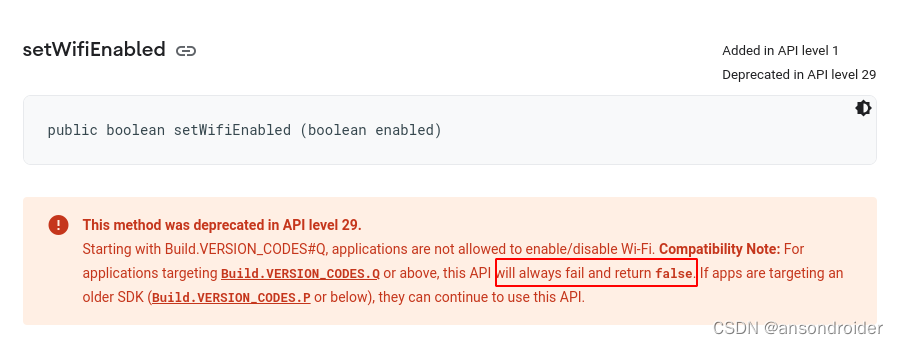
示例
build.gradle 注意targetSdkVersion
    defaultConfig {
        applicationId "com.xxx.apitester"
        minSdkVersion 21
        targetSdkVersion 30
		//...
    }
		WifiManager wifiMgr = (WifiManager) ctx.getApplicationContext().getSystemService(Context.WIFI_SERVICE);
        boolean en = wifiMgr.isWifiEnabled();
        //返回false
        boolean res = wifiMgr.setWifiEnabled(!en);
如果调用了从LOG中可以找到: setWifiEnabled not allowed for uid=xxx
原因
frameworks/opt/net/wifi/service/java/com/android/server/wifi/WifiServiceImpl.java
    /**
     * see {@link android.net.wifi.WifiManager#setWifiEnabled(boolean)}
     * @param enable {@code true} to enable, {@code false} to disable.
     * @return {@code true} if the enable/disable operation was
     *         started or is already in the queue.
     */
    @Override
    public synchronized boolean setWifiEnabled(String packageName, boolean enable) {
        if (enforceChangePermission(packageName) != MODE_ALLOWED) {
            return false;
        }
/*********************************/
//检查APP的SDK版本等信息。
/*********************************/
        boolean isPrivileged = isPrivileged(Binder.getCallingPid(), Binder.getCallingUid());
        if (!isPrivileged && !isDeviceOrProfileOwner(Binder.getCallingUid(), packageName)
                && !mWifiPermissionsUtil.isTargetSdkLessThan(packageName, Build.VERSION_CODES.Q,
                  Binder.getCallingUid())
                && !isSystem(packageName, Binder.getCallingUid())) {
            mLog.info("setWifiEnabled not allowed for uid=%")
                    .c(Binder.getCallingUid()).flush();
            return false;
        }
        // If Airplane mode is enabled, only privileged apps are allowed to toggle Wifi
        if (mSettingsStore.isAirplaneModeOn() && !isPrivileged) {
            mLog.err("setWifiEnabled in Airplane mode: only Settings can toggle wifi").flush();
            return false;
        }

        // If SoftAp is enabled, only privileged apps are allowed to toggle wifi
        if (!isPrivileged && mTetheredSoftApTracker.getState() == WIFI_AP_STATE_ENABLED) {
            mLog.err("setWifiEnabled with SoftAp enabled: only Settings can toggle wifi").flush();
            return false;
        }

        mLog.info("setWifiEnabled package=% uid=% enable=%").c(packageName)
                .c(Binder.getCallingUid()).c(enable).flush();
        long ident = Binder.clearCallingIdentity();
        try {
            if (!mSettingsStore.handleWifiToggled(enable)) {
                // Nothing to do if wifi cannot be toggled
                return true;
            }
        } finally {
            Binder.restoreCallingIdentity(ident);
        }
        if (mWifiPermissionsUtil.checkNetworkSettingsPermission(Binder.getCallingUid())) {
            if (enable) {
                mWifiMetrics.logUserActionEvent(UserActionEvent.EVENT_TOGGLE_WIFI_ON);
            } else {
                WifiInfo wifiInfo = mClientModeImpl.syncRequestConnectionInfo();
                mWifiMetrics.logUserActionEvent(UserActionEvent.EVENT_TOGGLE_WIFI_OFF,
                        wifiInfo == null ? -1 : wifiInfo.getNetworkId());
            }
        }
        mWifiMetrics.incrementNumWifiToggles(isPrivileged, enable);
        mActiveModeWarden.wifiToggled();
        return true;
    }
检查版本低于:Build.VERSION_CODES.Q
frameworks/opt/net/wifi/service/java/com/android/server/wifi/util/WifiPermissionsUtil.java
    /**
     * Checks whether than the target SDK of the package is less than the specified version code.
     */
    public boolean isTargetSdkLessThan(String packageName, int versionCode, int callingUid) {
    	//强制返回,版本检测将不再生效
    	if(true)return true;
        long ident = Binder.clearCallingIdentity();
        try {
            if (mContext.getPackageManager().getApplicationInfoAsUser(
                    packageName, 0,
                    UserHandle.getUserHandleForUid(callingUid)).targetSdkVersion
                    < versionCode) {
                return true;
            }
        } catch (PackageManager.NameNotFoundException e) {
            // In case of exception, assume unknown app (more strict checking)
            // Note: This case will never happen since checkPackage is
            // called to verify validity before checking App's version.
        } finally {
            Binder.restoreCallingIdentity(ident);
        }
        return false;
    }
Android 10 changes the permissions for device identifiers so that all device identifiers are now protected by the READ_PRIVILEGED_PHONE_STATE permission.
Prior to Android 10, persistent device identifiers (IMEI/MEID, IMSI, SIM, and build serial) were protected behind the READ_PHONE_STATE runtime permission.
The READ_PRIVILEGED_PHONE_STATE permission is only granted to apps signed with the platform key and privileged system apps.
在应用开发中,有时候我们需要获取系统的设备信息,用于数据上报和行为分析。那在鸿蒙系统中,我们应该怎么去获取设备的系统信息呢,比如说获取手机的系统版本号、手机的制造商、手机型号等数据。1、获取方式这里分为两种情况,一种是设备信息的获取,一种是系统信息的获取。1.1、获取设备信息获取设备信息,鸿蒙的SDK包为我们提供了DeviceInfo类,通过该类的一些静态方法,可以获取设备信息,DeviceInfo类的包路径为:ohos.system.DeviceInfo.具体的方法如下:ModifierandTypeMethodDescriptionstatic StringgetAbiList()Obt
运行bundleinstall后出现此错误:Gem::Package::FormatError:nometadatafoundin/Users/jeanosorio/.rvm/gems/ruby-1.9.3-p286/cache/libv8-3.11.8.13-x86_64-darwin-12.gemAnerroroccurredwhileinstallinglibv8(3.11.8.13),andBundlercannotcontinue.Makesurethat`geminstalllibv8-v'3.11.8.13'`succeedsbeforebundling.我试试gemin
最近因为项目需要,需要将Android手机系统自带的某个系统软件反编译并更改里面某个资源,并重新打包,签名生成新的自定义的apk,下面我来介绍一下我的实现过程。APK修改,分为以下几步:反编译解包,修改,重打包,修改签名等步骤。安卓apk修改准备工作1.系统配置好JavaJDK环境变量2.需要root权限的手机(针对系统自带apk,其他软件免root)3.Auto-Sign签名工具4.apktool工具安卓apk修改开始反编译本文拿Android系统里面的Settings.apk做demo,具体如何将apk获取出来在此就不过多介绍了,直接进入主题:按键win+R输入cmd,打开命令窗口,并将路
我正在运行Ubuntu11.10并像这样安装Ruby1.9:$sudoapt-getinstallruby1.9rubygems一切都运行良好,但ri似乎有空文档。ri告诉我文档是空的,我必须安装它们。我执行此操作是因为我读到它会有所帮助:$rdoc--all--ri现在,当我尝试打开任何文档时:$riArrayNothingknownaboutArray我搜索的其他所有内容都是一样的。 最佳答案 这个呢?apt-getinstallri1.8编辑或者试试这个:(非rvm)geminstallrdocrdoc-datardoc-da
为了在我的mac上为一个rails项目安装mysql,我遵循了安装Homebrew软件和删除mac端口的在线建议。这是问题开始的地方。rails项目不会构建,我得到这个:[rake--prereqs]rakeaborted!dlopen(/Users/Parker/.rvm/gems/ruby-1.9.3-p448/gems/nokogiri-1.6.0/lib/nokogiri/nokogiri.bundle,9):Librarynotloaded:/opt/local/lib/libiconv.2.dylibReferencedfrom:/Users/Parker/.rvm/gem
我正在使用PostgreSQL9.1.3(x86_64-pc-linux-gnu上的PostgreSQL9.1.3,由gcc-4.6.real(Ubuntu/Linaro4.6.1-9ubuntu3)4.6.1,64位编译)和在ubuntu11.10上运行3.2.2或3.2.1。现在,我可以使用以下命令连接PostgreSQLsupostgres输入密码我可以看到postgres=#我将以下详细信息放在我的config/database.yml中并执行“railsdb”,它工作正常。开发:adapter:postgresqlencoding:utf8reconnect:falsedat
假设我有一个名为Product的模型,其中有一个名为brand的字段。假设brand的值以this_is_a_brand格式存储。我可以在模型(或其他任何地方)中定义一个方法,允许我在调用brand之前修改它的值吗?例如,如果我调用@product.brand,我想得到ThisisaBrand,而不是this_is_a_brand。 最佳答案 我建议使用方括号语法([]和[]=)而不是read_attribute和write_attribute。方括号语法更短并且designedtowraptheprotectedread/writ
在尝试构建Rubygem(使用Bundler)时,我倾向于使用Bundler提供的REPL测试代码——可通过bundleconsole访问。有什么方法可以重新加载整个项目吗?我最终再次加载单个(更改的)文件以测试新更改。 最佳答案 以下hack适用于我的一个相对简单的gem和Ruby2.2.2。我很想看看它是否适合你。它做出以下假设:您具有传统的文件夹结构:一个名为lib/my_gem_name.rb的文件和一个文件夹lib/my_gem_name/,其中包含任何文件/文件夹结构。您要重新加载的所有类都嵌套在您的顶级模块MyGemN
我目前有一个运行Ruby1.8.7和Rails2.3.2的RubyonRails项目我有一些从数据库中读取数据的单元测试,特别是两个连续项目的日期时间列,这两个项目应该相隔24小时。在一项测试中,我将项目2的日期时间设置为与项目1的日期时间相同。当我执行断言以确保两个值相等时,测试在rails2.3.2下工作正常。当我升级到rails2.3.11时,测试失败显示两次之间的差异将关闭并出现以下错误:expectedbutwas.这两个版本的rails中似乎存在浮点转换问题。如何解决float问题? 最佳答案 这也发生在我身上,我最终这
是否有一个SASS扩展可以采用SASS样式表,找到中性属性(例如border-radius)并为其输出所有特定于供应商的属性(例如-webkit-border-radius等)自动?我真的不想手动创建所有混入,也不想手动编写代码。我确定一定有这样的扩展名,但我找不到它。帮忙? 最佳答案 有一个非常好的gem可以满足您的需求。它叫做Bourbon它不会用特定于供应商的css替换您的css,因为它可以像SASS一样工作。它基本上是一个正确生成跨浏览器css的mixin集合。 关于ruby-用
