作者:IT王小二
前面小二介绍过使用Typora+PicGo+LskyPro打造舒适写作环境,那时候需要使用水印功能,但是小二在升级LskyPro2.x版本发现有很多不如人意的东西,遂弃用LskyPro使用MinIO结合代码实现自己需要的图床功能,也适合以后扩展功能。
安装参考MinIO官网,或者参考小二的博客,搜索关键词 → Linux安装MinIO。
安装完成之后使用域名映射好后台服务,小二使用nginx配置域名,配置参考如下。
    server {
        listen 443 ssl;
        server_name minio.itwxe.com;
        include /usr/local/nginx/conf/conf.d/common.conf;
        access_log logs/minioAccess.log;

        location / {
            proxy_pass http://127.0.0.1:9000;
            proxy_set_header Host $host;
            proxy_set_header X-Real-IP $remote_addr;
        }
    }

    server {
        listen 443 ssl;
        server_name minio-console.itwxe.com;
        include /usr/local/nginx/conf/conf.d/common.conf;
        access_log logs/minioAccess.log;

        location / {
            proxy_pass http://127.0.0.1:9020;
            proxy_set_header Host $host;
            proxy_set_header X-Real-IP $remote_addr;
        }
    }
其中common.conf为域名通用配置。
        ssl_certificate /usr/local/nginx/ssl/fullchain.crt;
        ssl_certificate_key /usr/local/nginx/ssl/itwxe.com.key;
        ssl_session_cache shared:SSL:1m;
        ssl_session_timeout 30m;
        ssl_protocols TLSv1 TLSv1.1 TLSv1.2;
        ssl_ciphers HIGH:!aNULL:!MD5:!EXPORT56:!EXP;
        ssl_prefer_server_ciphers on;
        proxy_connect_timeout 500;
        proxy_send_timeout 500;
        proxy_read_timeout 500;
        client_max_body_size 100m;
配置好之后访问https://minio-console.itwxe.com即可访问后台。
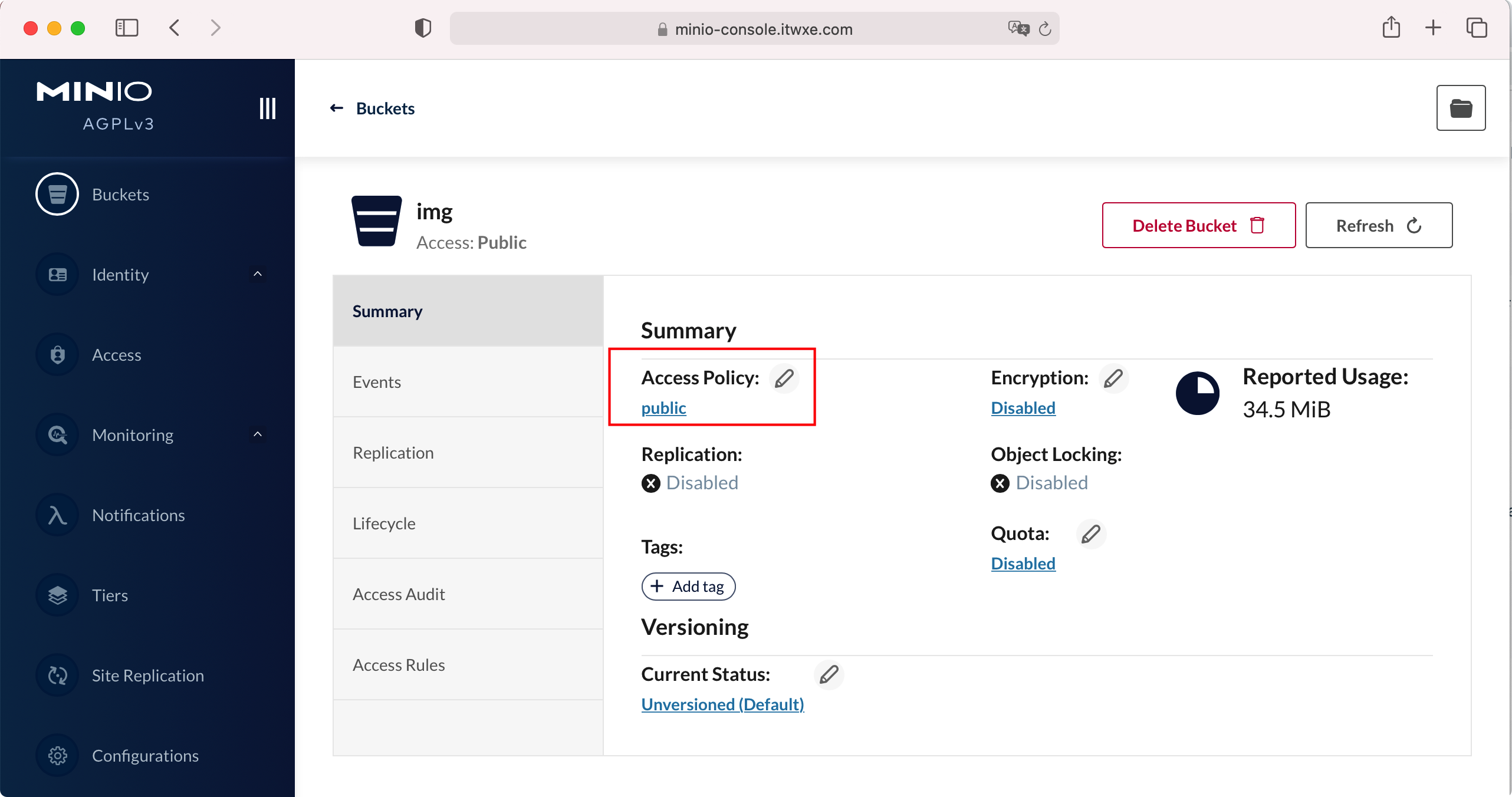
同时为了存储桶图片所有人可以访问,需要将存储桶设置为公开。
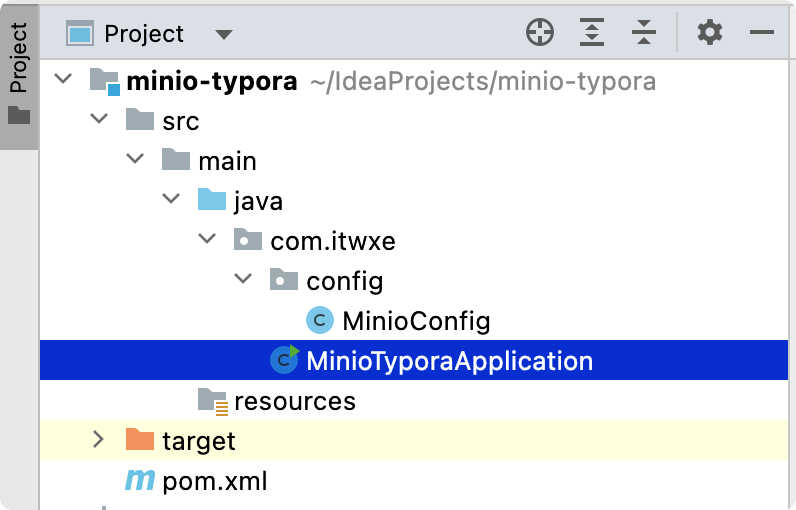
Java代码为个人定制使用,仅供参考,整体项目目录结构。
使用maven搭建Java项目,引入依赖,pom.xml如下。
<?xml version="1.0" encoding="UTF-8"?>
<project xmlns="http://maven.apache.org/POM/4.0.0"
         xmlns:xsi="http://www.w3.org/2001/XMLSchema-instance"
         xsi:schemaLocation="http://maven.apache.org/POM/4.0.0 http://maven.apache.org/xsd/maven-4.0.0.xsd">
    <modelVersion>4.0.0</modelVersion>

    <groupId>com.itwxe</groupId>
    <artifactId>minio-typora</artifactId>
    <version>1.0-SNAPSHOT</version>

    <properties>
        <maven.compiler.source>8</maven.compiler.source>
        <maven.compiler.target>8</maven.compiler.target>
    </properties>

    <dependencies>
        <!-- minio -->
        <dependency>
            <groupId>io.minio</groupId>
            <artifactId>minio</artifactId>
            <version>8.4.4</version>
        </dependency>
    </dependencies>


    <build>
        <finalName>${project.artifactId}</finalName>
        <plugins>
            <plugin>
                <groupId>org.springframework.boot</groupId>
                <artifactId>spring-boot-maven-plugin</artifactId>
                <executions>
                    <execution>
                        <goals>
                            <goal>repackage</goal>
                        </goals>
                    </execution>
                </executions>
            </plugin>
        </plugins>
    </build>
</project>
增加配置类MinioConfig。
package com.itwxe.config;

/**
 * @author itwxe
 * @since 2022/9/29
 **/
public class MinioConfig {

    /**
     * 请求地址,需修改成自己的服务地址
     */
    public static final String ENDPOINT = "https://minio.itwxe.com";
    /**
     * 用户名,需修改为自己的用户名
     */
    public static final String ACCESS_KEY = "admin";
    /**
     * 秘钥,需修改为自己的密码
     */
    public static final String SECRET_KEY = "12345678";
    /**
     * 存储桶名称
     */
    public static final String BUCKET = "img";

}
增加主类进行图片上传。
package com.itwxe;

import com.itwxe.config.MinioConfig;
import io.minio.MinioClient;
import io.minio.UploadObjectArgs;

import java.time.LocalDateTime;
import java.time.ZoneOffset;

/**
 * @author itwxe
 * @since 2022/9/29
 **/
public class MinioTyporaApplication {

    /**
     * 博客图片子路径
     */
    private static final String IMG_DIR = "blog";

    public static void main(String[] args) {
        try {
            // 使用MinIO服务器平台、其访问密钥和密钥创建minioClient。
            MinioClient minioClient = MinioClient.builder()
                    .endpoint(MinioConfig.ENDPOINT)
                    .credentials(MinioConfig.ACCESS_KEY, MinioConfig.SECRET_KEY)
                    .build();
            // 博客文章唯一链接id
            String blogPermalink = args[0];
            if (blogPermalink.length() != 8) {
                System.out.println("文章唯一id未设置!");
                return;
            }
            // 循环上传图片
            for (int i = 1; i < args.length; i++) {
                String arg = args[i];
                // 生成自定义文件名, 规则为博客唯一链接id_时间戳+随机2位数
                String fileSuffix = arg.substring(arg.lastIndexOf("."));
                String fileName = String.format("%s_%s%02d%s", blogPermalink, LocalDateTime.now().toInstant(ZoneOffset.of("+8")).toEpochMilli(), (int) (Math.random() * 100), fileSuffix);
                // 上传图片
                minioClient.uploadObject(UploadObjectArgs.builder()
                        .bucket(MinioConfig.BUCKET)
                        .object(String.format("/%s/%s", IMG_DIR, fileName))
                        .filename(arg)
                        .build());
                // 打印出来的字符会返回给typora
                System.out.println(String.format("%s/%s/%s/%s", MinioConfig.ENDPOINT, MinioConfig.BUCKET, IMG_DIR, fileName));
            }
        } catch (Exception e) {
            e.printStackTrace();
        } finally {
            System.exit(0);
        }
    }

}
为方便使用,使用mvn clean package打包成jar包,打开typora,偏好设置 -> 图像设置。
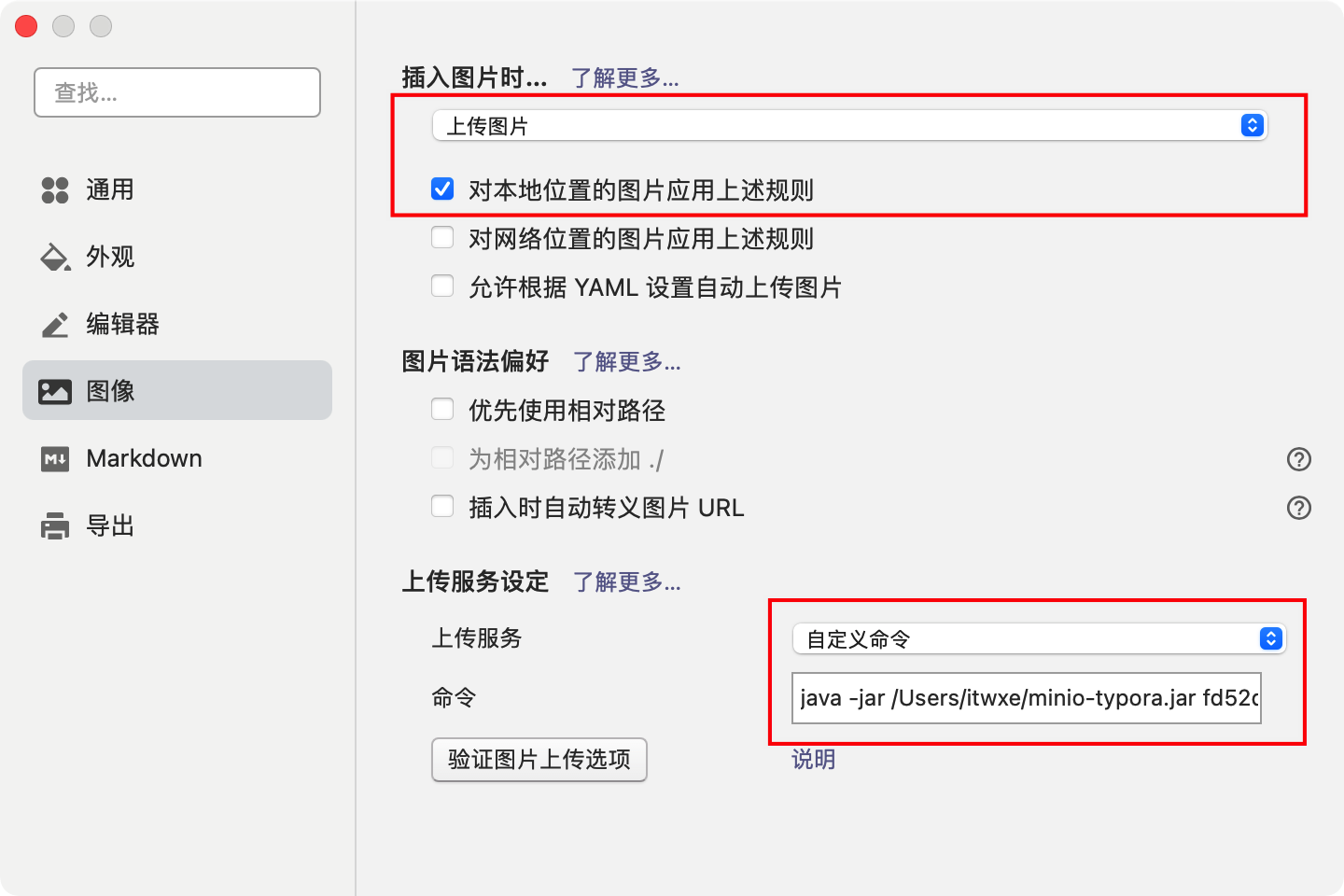
java -jar /Users/itwxe/minio-typora.jar fd52d52a
其中 /Users/itwxe/minio-typora.jar 为jar包路径,fd52d52a为小二个人定制的文章唯一id。
点击验证图片上传选项,正常返回测试路径,同时图片浏览器可以访问则代表成功。
如何在buildr项目中使用Ruby?我在很多不同的项目中使用过Ruby、JRuby、Java和Clojure。我目前正在使用我的标准Ruby开发一个模拟应用程序,我想尝试使用Clojure后端(我确实喜欢功能代码)以及JRubygui和测试套件。我还可以看到在未来的不同项目中使用Scala作为后端。我想我要为我的项目尝试一下buildr(http://buildr.apache.org/),但我注意到buildr似乎没有设置为在项目中使用JRuby代码本身!这看起来有点傻,因为该工具旨在统一通用的JVM语言并且是在ruby中构建的。除了将输出的jar包含在一个独特的、仅限ruby
在rails源中:https://github.com/rails/rails/blob/master/activesupport/lib/active_support/lazy_load_hooks.rb可以看到以下内容@load_hooks=Hash.new{|h,k|h[k]=[]}在IRB中,它只是初始化一个空哈希。和做有什么区别@load_hooks=Hash.new 最佳答案 查看rubydocumentationforHashnew→new_hashclicktotogglesourcenew(obj)→new_has
我真的很习惯使用Ruby编写以下代码:my_hash={}my_hash['test']=1Java中对应的数据结构是什么? 最佳答案 HashMapmap=newHashMap();map.put("test",1);我假设? 关于java-等价于Java中的RubyHash,我们在StackOverflow上找到一个类似的问题: https://stackoverflow.com/questions/22737685/
我的主要目标是能够完全理解我正在使用的库/gem。我尝试在Github上从头到尾阅读源代码,但这真的很难。我认为更有趣、更温和的踏脚石就是在使用时阅读每个库/gem方法的源代码。例如,我想知道RubyonRails中的redirect_to方法是如何工作的:如何查找redirect_to方法的源代码?我知道在pry中我可以执行类似show-methodmethod的操作,但我如何才能对Rails框架中的方法执行此操作?您对我如何更好地理解Gem及其API有什么建议吗?仅仅阅读源代码似乎真的很难,尤其是对于框架。谢谢! 最佳答案 Ru
我的假设是moduleAmoduleBendend和moduleA::Bend是一样的。我能够从thisblog找到解决方案,thisSOthread和andthisSOthread.为什么以及什么时候应该更喜欢紧凑语法A::B而不是另一个,因为它显然有一个缺点?我有一种直觉,它可能与性能有关,因为在更多命名空间中查找常量需要更多计算。但是我无法通过对普通类进行基准测试来验证这一点。 最佳答案 这两种写作方法经常被混淆。首先要说的是,据我所知,没有可衡量的性能差异。(在下面的书面示例中不断查找)最明显的区别,可能也是最著名的,是你的
几个月前,我读了一篇关于rubygem的博客文章,它可以通过阅读代码本身来确定编程语言。对于我的生活,我不记得博客或gem的名称。谷歌搜索“ruby编程语言猜测”及其变体也无济于事。有人碰巧知道相关gem的名称吗? 最佳答案 是这个吗:http://github.com/chrislo/sourceclassifier/tree/master 关于ruby-寻找通过阅读代码确定编程语言的rubygem?,我们在StackOverflow上找到一个类似的问题:
我正在玩HTML5视频并且在ERB中有以下片段:mp4视频从在我的开发环境中运行的服务器很好地流式传输到chrome。然而firefox显示带有海报图像的视频播放器,但带有一个大X。问题似乎是mongrel不确定ogv扩展的mime类型,并且只返回text/plain,如curl所示:$curl-Ihttp://0.0.0.0:3000/pr6.ogvHTTP/1.1200OKConnection:closeDate:Mon,19Apr201012:33:50GMTLast-Modified:Sun,18Apr201012:46:07GMTContent-Type:text/plain
我正在尝试使用boilerpipe来自JRuby。我看过guide从JRuby调用Java,并成功地将它与另一个Java包一起使用,但无法弄清楚为什么同样的东西不能用于boilerpipe。我正在尝试基本上从JRuby中执行与此Java等效的操作:URLurl=newURL("http://www.example.com/some-location/index.html");Stringtext=ArticleExtractor.INSTANCE.getText(url);在JRuby中试过这个:require'java'url=java.net.URL.new("http://www
我目前正在使用以下方法获取页面的源代码:Net::HTTP.get(URI.parse(page.url))我还想获取HTTP状态,而无需发出第二个请求。有没有办法用另一种方法做到这一点?我一直在查看文档,但似乎找不到我要找的东西。 最佳答案 在我看来,除非您需要一些真正的低级访问或控制,否则最好使用Ruby的内置Open::URI模块:require'open-uri'io=open('http://www.example.org/')#=>#body=io.read[0,50]#=>"["200","OK"]io.base_ur
我只想对我一直在思考的这个问题有其他意见,例如我有classuser_controller和classuserclassUserattr_accessor:name,:usernameendclassUserController//dosomethingaboutanythingaboutusersend问题是我的User类中是否应该有逻辑user=User.newuser.do_something(user1)oritshouldbeuser_controller=UserController.newuser_controller.do_something(user1,user2)我
