该案例为了实现效果采用的是随机生成数据,比较适用于偏向展示效果的静态页面如门户网站的首页、登录页等等。颜色样式自调。
需要注意在有些项目中仪表盘可能无法正常显示,这是因为你在项目中引入的 echarts 版本太低,需要引入新版本 echarts5。
目录
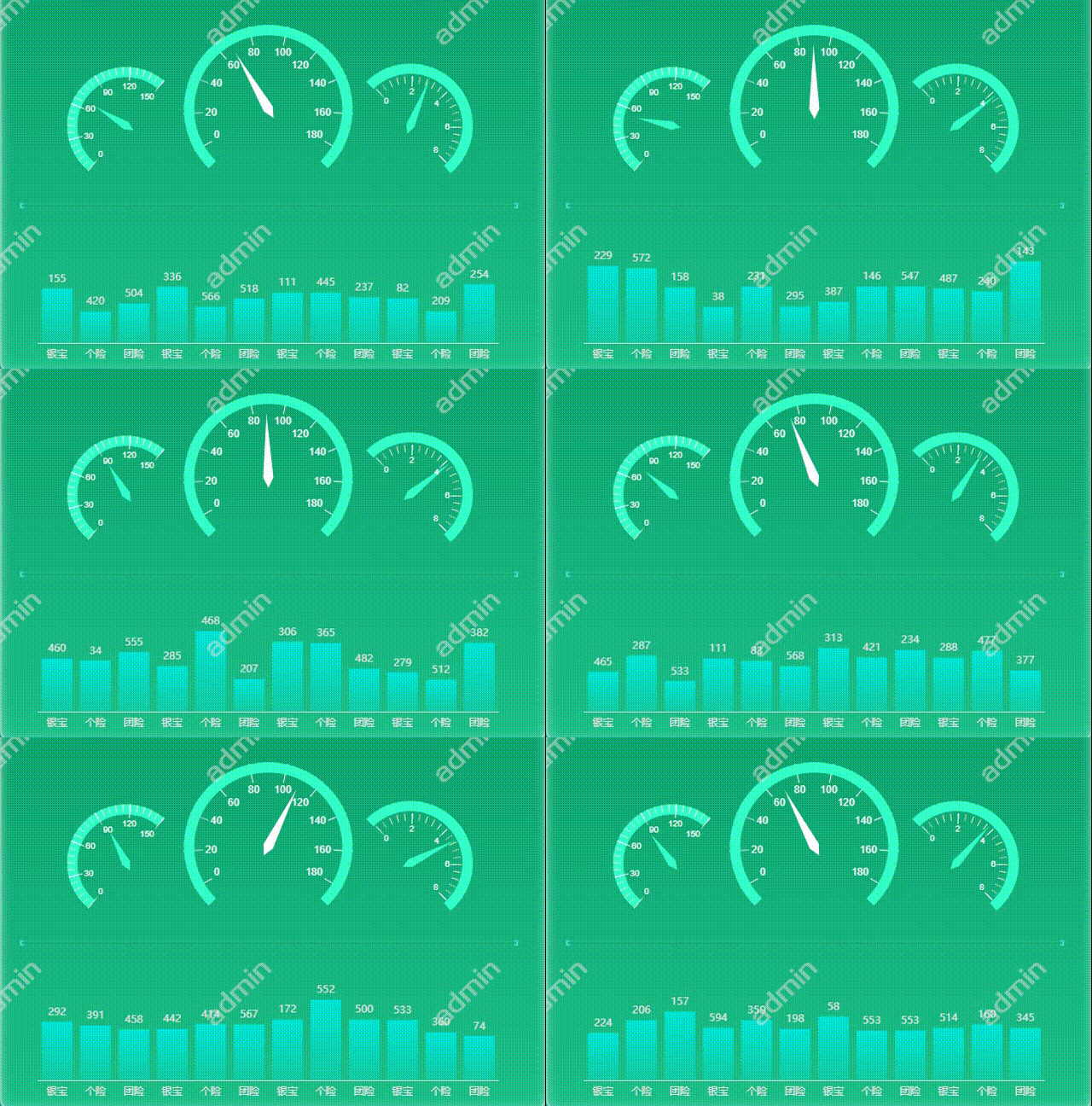
做案例之前正常引入 echarts 图表,echarts 依赖包的下载和安装此处省略,详情可参见文章:
两个带有 id 名的容器,样式自定。
<template>
  <div style="width: 100%;">
      <!--仪表盘-->
      <div id="gauge"></div>
      <!--柱图-->
      <div id="bar"></div>
    </div>
</template>

<style scoped>
  #gauge {
    width: 8rem;
    height: 5.5rem;
    position: absolute;
    top: 2.55rem;
    left: 5.7rem;
  }

  #bar {
    width: 8rem;
    height: 2.2rem;
    position: relative;
    top: 2.8rem;
    left: 5.7rem;
  }
</style>
methods 中分别创建绘制图表的方法 ,然后在挂载阶段 mounted 中分别调用。
<script>
export default {
  data() {
    return {};
  },
  methods: {
    //绘制柱状图
    draw_bar() {
      let myEchart = this.$echarts.init(document.getElementById("bar"));
      var option = {};
      myEchart.setOption(option);
    },

    //绘制仪表盘
    draw_gauge() {
      let myEchart = this.$echarts.init(document.getElementById("gauge"));
      var option = {};
      myEchart.setOption(option);
    },
  },
  mounted() {
    //调用绘制图表的方法
    this.draw_bar();
    this.draw_gauge();
  },
};
</script>
可直接将官网案例的代码复制到 option 处后自行修改。
实现图表动态变化的原理其实就是基于定时器 setInterval() ,它与 setTimeout() 区别是 setInterval() 是周期性的,按照给定的时间周期反复循环的执行包含在它里面的程序,而setTimeout() 是在给定的时间后执行一次程序就结束。
所以我们的做法就是,设置循环定时器,每隔一定的时间便获取一次图表中的数据且数据完全随机,并重新显示图表,然后在设置合适的动画和间隔时间,这样就实现了图表的动态变化。
比如柱状图的定时器设置如下:
setInterval(() => {
   for (let i = 0; i <= 11; i++) {  //定义i确保柱图的每一项都能被刷新
     option.series[0].data[i] = (Math.round(Math.random() * 600) + 1); //数据随机取值1-600,不要为0,如果为0的话该柱就会消失
     }
   myEchart.setOption(option, true); //每刷新一次重新显示图表
}, 200);每隔200毫秒重新定义一次柱状图中的数据(option.series[0].data[i]) ,此处为1-600的随机数,每次数据更新后重新显示图表(myEchart.setOption(option, true)),这样就达到了数据不停变化的效果。
然后就是动画,在echarts官网中配置项文档中有该类属性,可以设置仪表盘指针的变换速度、柱图中的柱变换速度等。
| animation: true | 是否开启动画 |
| animationDuration: 1020 | 初始动画的时长 |
| animationDurationUpdate: 1020 | 数据更新动画的时长 |
| animationEasingUpdate: "quadraticIn" | 数据更新动画的缓动效果 |
最后将动画时长与定时器间隔时长合理搭配即可实现动态效果。
<template>
<div style="width: 100%;">
<!--仪表盘-->
<div id="gauge"></div>
<!--柱图-->
<div id="bar"></div>
</div>
</template>
<script>
export default {
data() {
return {}
},
methods: {
// 绘制柱状图
draw_bar() {
let myEchart = this.$echarts.init(document.getElementById("bar"));
var option = {
xAxis: {
type: 'category',
data: ['银宝', '个险', '团险', '银宝', '个险', '团险', '银宝', '个险', '团险', '银宝', '个险', '团险'],
axisLine: {
show: true,
onZero: true,
symbol: "none",
lineStyle: {
color: "#e5e5e5"
}
},
axisTick: {
show: false
},
},
yAxis: {
show: false,
type: 'value',
axisTick: {
show: false
},
axisLine: {
show: false
},
axisLabel: {
show: false
}
},
//图表与容器的位置关系
grid: {
left: '3%', // 与容器左侧的距离
right: '3%', // 与容器右侧的距离
top: '11%', // 与容器顶部的距离
bottom: '12%', // 与容器底部的距离
},
series: [
{
data: [520, 600, 450, 380, 370, 510, 120, 200, 150, 620, 600, 450,],
type: 'bar',
backgroundStyle: {
color: "rgba(111, 111, 22, 1)"
},
//坐标轴显示器的文本标签
label: {
show: true,
position: 'top',
color: '#e5e5e5'
},
//柱条颜色
itemStyle: {
color: {
type: 'linear',
x: 0,
y: 0,
x2: 0,
y2: 1,
colorStops: [{
offset: 0, color: 'rgba(0,234,223,0.9)' // 0% 处的颜色
}, {
offset: 1, color: 'rgba(0,234,223,0.3)' // 100% 处的颜色
}],
global: false // 缺省为 false
}
},
animationEasing: "linear",
animationEasingUpdate: "quadraticIn", //数据更新时的缓动效果
animationDurationUpdate: 300, //数据更新动画的时长
animation: true //开启动画
}
]
};
//此处使用定时器setInterval循环刷新柱状图的值,每次刷新数据均不同
setInterval(() => {
for (let i = 0; i <= 11; i++) { //定义i确保柱图的每一项都能被刷新
option.series[0].data[i] = (Math.round(Math.random() * 600) + 1); //数据随机取值1-600,不要为0,如果为0的话该柱就会消失
}
myEchart.setOption(option, true); //每刷新一次重新显示图表
}, 200);
},
//绘制仪表盘
draw_gauge() {
let myEchart = this.$echarts.init(document.getElementById("gauge"));
var option = {
series: [
//左侧仪表盘
{
name: 'gauge 1',
type: 'gauge',
min: 0,
max: 150,
startAngle: 230,
endAngle: -310,
splitNumber: 5,
radius: '35%',
center: ['21%', '55%'],
axisLine: {
lineStyle: {
color: [[1, '#34FFCA']],
width: 12,
}
},
splitLine: {
distance: -7,
length: 16,
lineStyle: {
color: '#fff',
width: 1
}
},
axisLabel: {
distance: 2,
fontSize: 10,
fontWeight: 400,
fontFamily: 'Arial',
color: '#fff'
},
anchor: {},
pointer: {
width: 5,
length: '60%',
itemStyle: {
color: '#fff'
}
},
detail: {
show: false
},
data: [
{
value: 20
}
],
animationEasing: "linear",
animationEasingUpdate: "quadraticIn", //数据更新时的缓动效果
animationDurationUpdate: 1000, //数据更新动画的时长
animation: true //开启动画
},
//中间的仪表盘
{
name: 'gauge 2',
type: 'gauge',
min: 0,
max: 180,
z: 10,
startAngle: 210,
endAngle: -30,
splitNumber: 9,
radius: '50%',
center: ['50%', '50%'],
axisLine: {
show: false,
lineStyle: {
width: 2,
color: [
[0.825, '#fff'],
]
}
},
splitLine: {
distance: 35,
length: 22,
lineStyle: {
color: '#fff',
width: 1
}
},
axisLabel: {
distance: 3,
fontSize: 12,
fontWeight: 400,
fontFamily: 'Arial',
color: '#fff'
},
anchor: {},
pointer: {
width: 6,
offsetCenter: [0, '-10%'],
length: '75%',
itemStyle: {
color: '#fff'
}
},
data: [
{
value: 130
// name: '1/min x 1000'
}
],
detail: {
show: false
},
animationEasing: "linear",
animationEasingUpdate: "quadraticIn", //数据更新时的缓动效果
animationDurationUpdate: 1000, //数据更新动画的时长
animation: true //开启动画
},
{
name: 'gauge 3',
type: 'gauge',
min: 0,
max: 8,
z: 10,
splitNumber: 8,
radius: '50%',
axisLine: {
lineStyle: {
width: 12,
color: [[1, '#34FFCA']]
}
},
splitLine: {
show: false,
},
axisTick: {
show: false
},
axisLabel: {
show: false
},
anchor: {},
pointer: {
show: false
},
title: {
show: false
},
detail: {
show: false,
offsetCenter: ['0', '70%'],
color: '#FFF',
fontSize: 18,
formatter: '{value}.00'
},
// value is speed
data: [
{
value: 130,
}
],
animationEasing: "linear",
animationEasingUpdate: "quadraticIn", //数据更新时的缓动效果
animationDurationUpdate: 1000, //数据更新动画的时长
animation: true //开启动画
},
//右侧的仪表盘
{
name: 'gauge 4',
type: 'gauge',
min: 0,
max: 8,
startAngle: 135,
endAngle: -50,
radius: '37%',
center: ['79%', '55%'],
//右侧表盘颜色
axisLine: {
lineStyle: {
color: [[1, '#34FFCA']],
width: 12
}
},
detail: {
show: false
},
splitLine: {
show: false,
length: 6
},
axisTick: {
show: false
},
axisLabel: {
show: false
},
anchor: {},
pointer: {
show: true,
width: 5,
itemStyle: {
color: '#fff'
}
},
data: [
{
value: 6,
name: ''
}
],
animationEasing: "linear",
animationEasingUpdate: "quadraticIn", //数据更新时的缓动效果
animationDurationUpdate: 1000, //数据更新动画的时长
animation: true //开启动画
},
{
name: 'gauge 5',
type: 'gauge',
min: 0,
max: 8,
splitNumber: 4,
startAngle: 132,
endAngle: -45,
radius: '30%',
center: ['79%', '55.3%'],
axisLine: {
lineStyle: {
width: 0,
color: [
[0.15, '#f00'],
[1, 'rgba(255, 0, 0, 0)']
]
}
},
axisLabel: {
distance: 1,
fontSize: 10,
fontWeight: 400,
fontFamily: 'Arial',
color: '#fff',
},
splitLine: {
distance: 35,
length: 12,
lineStyle: {
color: '#fff',
width: 1
}
},
animationEasing: "linear",
animationEasingUpdate: "quadraticIn", //数据更新时的缓动效果
animationDurationUpdate: 1000, //数据更新动画的时长
animation: true //开启动画
},
]
};
//使用定时器setInterval循环刷新仪表盘的值
setInterval(() => {
option.series[0].data[0].value = (Math.random() * 150).toFixed(2) - 0; //表盘1
option.series[1].data[0].value = (Math.random() * 180).toFixed(2) - 0; //表盘2
option.series[3].data[0].value = (Math.random() * 8).toFixed(2) - 0; //表盘3
myEchart.setOption(option, true); //每次刷新后重新显示图表
}, 500);
}
},
mounted() {
//调用绘制图表的方法
this.draw_bar();
this.draw_gauge()
}
}
</script>
<style scoped>
#gauge {
width: 8rem;
height: 5.5rem;
position: absolute;
top: 2.55rem;
left: 5.7rem;
}
#bar {
width: 8rem;
height: 2.2rem;
position: relative;
top: 2.8rem;
left: 5.7rem;
}
</style>
所以我开始关注ruby,很多东西看起来不错,但我对隐式return语句很反感。我理解默认情况下让所有内容返回self或nil但不是语句的最后一个值。对我来说,它看起来非常脆弱(尤其是)如果你正在使用一个不打算返回某些东西的方法(尤其是一个改变状态/破坏性方法的函数!),其他人可能最终依赖于一个返回对方法的目的并不重要,并且有很大的改变机会。隐式返回有什么意义?有没有办法让事情变得更简单?总是有返回以防止隐含返回被认为是好的做法吗?我是不是太担心这个了?附言当人们想要从方法中返回特定的东西时,他们是否经常使用隐式返回,这不是让你组中的其他人更容易破坏彼此的代码吗?当然,记录一切并给出
给定以下方法:defsome_method:valueend以下语句按我的预期工作:some_method||:other#=>:valuex=some_method||:other#=>:value但是下面语句的行为让我感到困惑:some_method=some_method||:other#=>:other它按预期创建了一个名为some_method的局部变量,随后对some_method的调用返回该局部变量的值。但为什么它分配:other而不是:value呢?我知道这可能不是一件明智的事情,并且可以看出它可能有多么模棱两可,但我认为应该在考虑作业之前评估作业的右侧...我已经在R
我在我的Rails3示例应用程序上使用CarrierWave。我想验证远程位置上传,因此当用户提交无效URL(空白或非图像)时,我不会收到标准错误异常:CarrierWave::DownloadErrorinImageController#createtryingtodownloadafilewhichisnotservedoverHTTP这是我的模型:classPaintingtrue,:length=>{:minimum=>5,:maximum=>100}validates:image,:presence=>trueend这是我的Controller:classPaintingsC
电脑0x0000001A蓝屏错误怎么U盘重装系统教学分享。有用户电脑开机之后遇到了系统蓝屏的情况。系统蓝屏问题很多时候都是系统bug,只有通过重装系统来进行解决。那么蓝屏问题如何通过U盘重装新系统来解决呢?来看看以下的详细操作方法教学吧。 准备工作: 1、U盘一个(尽量使用8G以上的U盘)。 2、一台正常联网可使用的电脑。 3、ghost或ISO系统镜像文件(Win10系统下载_Win10专业版_windows10正式版下载-系统之家)。 4、在本页面下载U盘启动盘制作工具:系统之家U盘启动工具。 U盘启动盘制作步骤: 注意:制作期间,U盘会被格式化,因此U盘中的重要文件请注
本文主要介绍在使用Selenium进行自动化测试或者任务时,对于使用了iframe的页面,如何定位iframe中的元素文章目录场景描述解决方案具体代码场景描述当我们在使用Selenium进行自动化测试的时候,可能会遇到一些界面或者窗体是使用HTML的iframe标签进行承载的。对于iframe中的标签,如果直接查找是无法找到的,会抛出没有找到元素的异常。比如近在咫尺的例子就是,CSDN的登录窗体就是使用的iframe,大家可以尝试通过F12开发者模式查看到的tag_name,class_name,id或者xpath来定位中的页面元素,会抛出NoSuchElementException异常。解决
有没有办法在Ruby中动态创建数组?例如,假设我想遍历用户输入的书籍数组:books=gets.chomp用户输入:"TheGreatGatsby,CrimeandPunishment,Dracula,Fahrenheit451,PrideandPrejudice,SenseandSensibility,Slaughterhouse-Five,TheAdventuresofHuckleberryFinn"我把它变成一个数组:books_array=books.split(",")现在,对于用户输入的每一本书,我想用Ruby创建一个数组。伪代码来做到这一点:x=0books_array.
我正在研究使用EventMachine支持的twitter-streamrubygem来跟踪和捕获推文。我对整个事件编程有点陌生。我如何判断我在事件循环中所做的任何处理是否导致我落后?有没有简单的检查方法? 最佳答案 您可以通过使用周期性计时器并打印出耗时来确定延迟。如果您使用的是1秒的计时器,您应该已经过了大约1秒,如果它更长,您就知道您正在减慢react器的速度。@last=Time.now.to_fEM.add_periodic_timer(1)doputs"LATENCY:#{Time.now.to_f-@last}"@
啊,正则表达式有点困惑。我正在尝试删除字符串末尾所有可能的标点符号:ifstr[str.length-1]=='?'||str[str.length-1]=='.'||str[str.length-1]=='!'orstr[str.length-1]==','||str[str.length-1]==';'str.chomp!end我相信有更好的方法来做到这一点。有什么指点吗? 最佳答案 str.sub!(/[?.!,;]?$/,'')[?.!,;]-字符类。匹配这5个字符中的任何一个(注意,。在字符类中并不特殊)?-前一个字符或组
我想在IRB中浏览文件系统并让提示更改以反射(reflect)当前工作目录,但我不知道如何在每个命令后进行提示更新。最终,我想在日常工作中更多地使用IRB,让bash溜走。我在我的.irbrc中试过这个:require'fileutils'includeFileUtilsIRB.conf[:PROMPT][:CUSTOM]={:PROMPT_N=>"\e[1m:\e[m",:PROMPT_I=>"\e[1m#{pwd}>\e[m",:PROMPT_S=>"FOO",:PROMPT_C=>"\e[1m#{pwd}>\e[m",:RETURN=>""}IRB.conf[:PROMPT_MO
首先,我使用的是rails3.1.3和来自master的carrierwavegithub仓库的分支。我使用after_init钩子(Hook)来确定基于属性的字段页面模型实例并为这些字段定义属性访问器将值存储在序列化哈希中(希望它清楚我是什么谈论)。这是我正在做的事情的精简版:classPage省略mount_uploader命令让我可以访问我想要的属性。但是当我安装uploader时出现错误消息说“nil类的未定义新方法”我在源代码中读到有方法read_uploader和扩展模块中的write_uploader。我如何必须覆盖这些来制作mount_uploader命令使用我的“虚拟
