生活在一个信息大爆炸的时代,每天都会接收到大量缤纷繁杂的信息,包括各种图像、视频、语音等等的消息种类,那么如何能够快速的筛选信息从中获得自己有用或者感兴趣的知识呢?针对最复杂的视频这一种类,我们可以通过使用Azure的认知服务,通过视频提取音频、语音转文本、文本翻译、文本摘要生成等多项技术,实现视频理解。
输入视频:
“元宇宙”场景会是怎样?扎克伯格演示“元宇宙”的社交场景
输出视频摘要:
想象一下,你戴上眼镜或耳机,立刻就进入了你的家庭空间,作为虚拟重建的实体家庭的一部分,它有着只有虚拟才能实现的东西,它有着令人难以置信的令人振奋的视角,让你看到最美的东西。马克,怎么了?有一位艺术家在四处走动,所以帮助人们找到隐藏AR作品,和3D街头艺术。
最近CSDN开展了《0元试用微软 Azure人工智能认知服务,精美礼品大放送》,通过添加客服小姐姐申请企业试用的账号,可以白嫖Azure 认知服务,个人的话还得需要visa卡。
申请成功后,可以免费体验Azure人工智能认知服务,包括语音转文本、文本转语音、语音翻译、文本分析、文本翻译、语言理解等功能。
下面我们以语音转文本功能为例子,看看如何试用Azure认知服务吧,首先我们进入:https://portal.azure.cn/并登录。
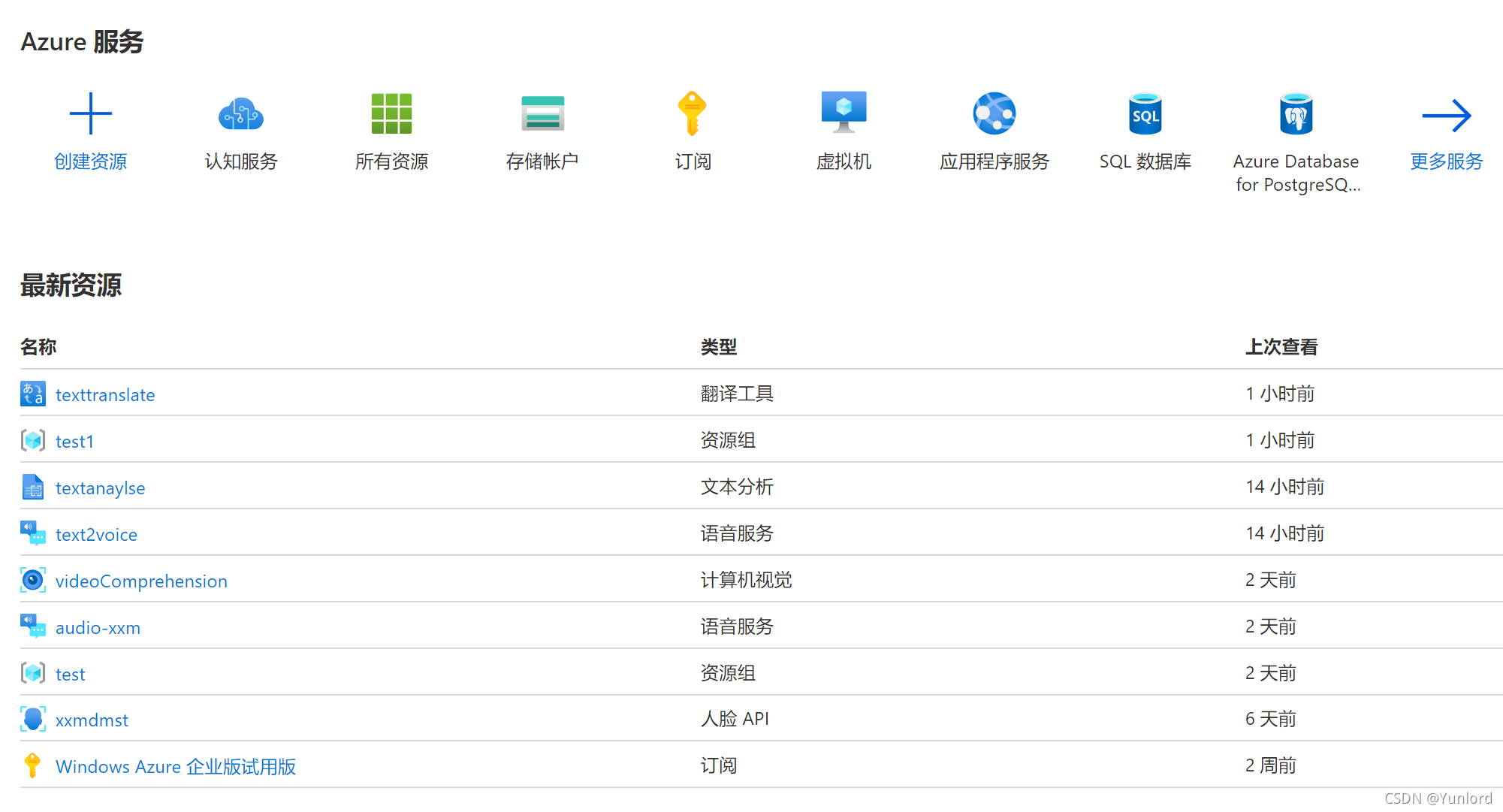
选择认知服务

选择对应的服务进行创建,比如语音转文本,则点击语音服务创建。
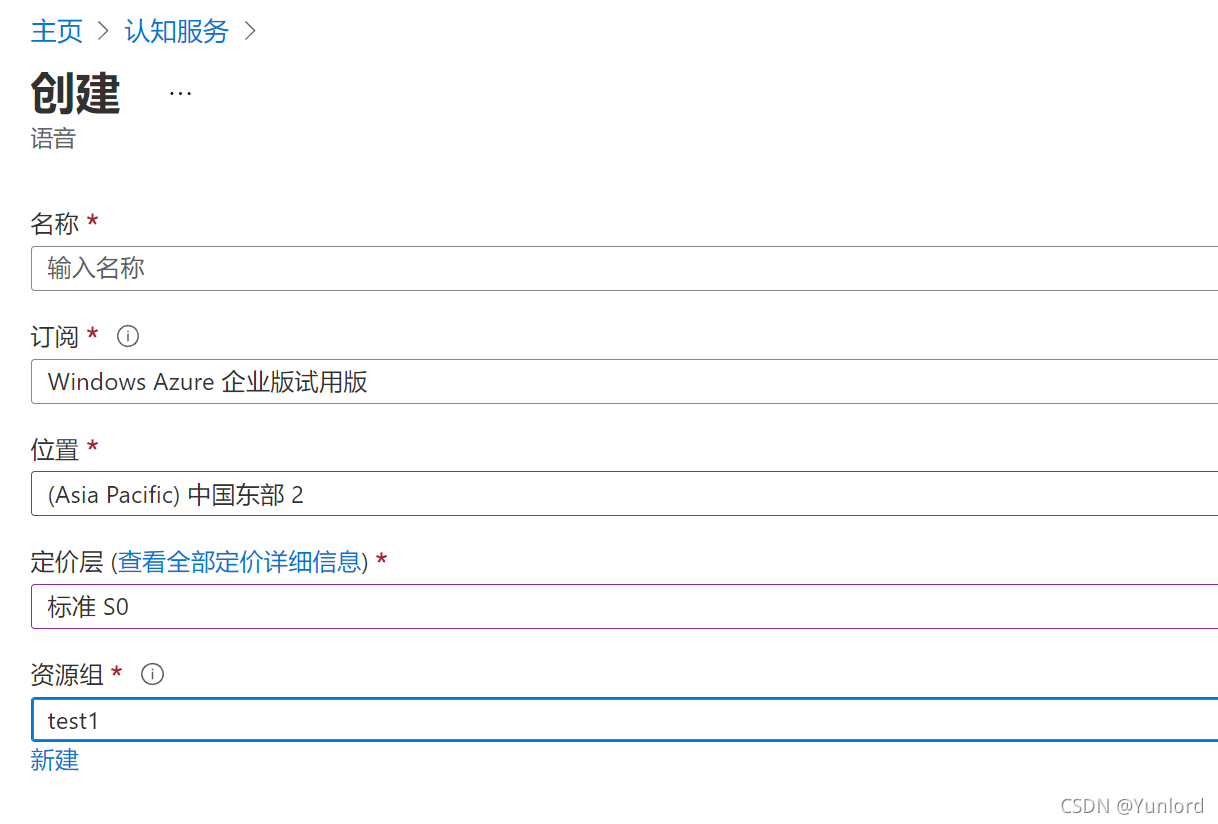
点击页面最下方的创建按钮,就等待资源配置好。
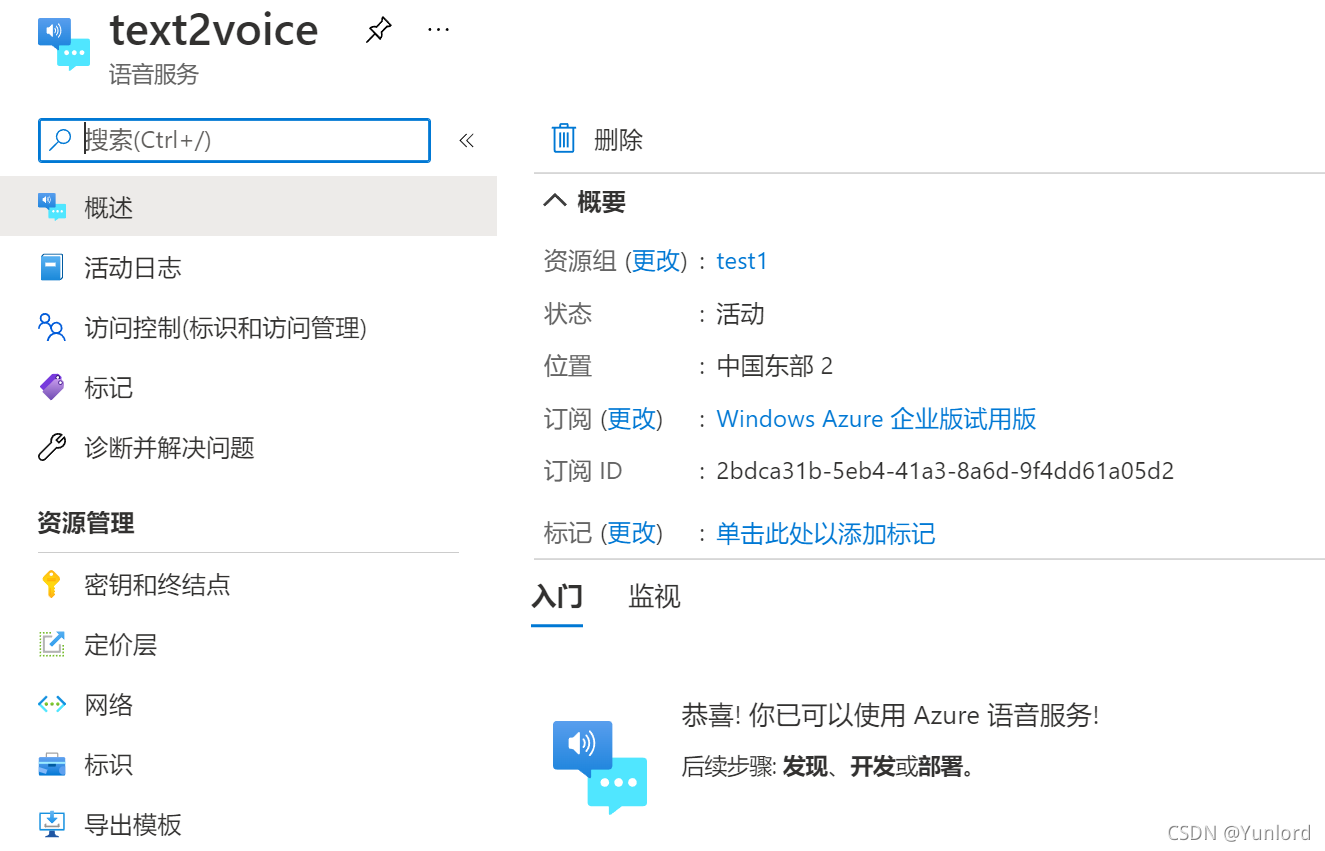 查看密钥和终结点。
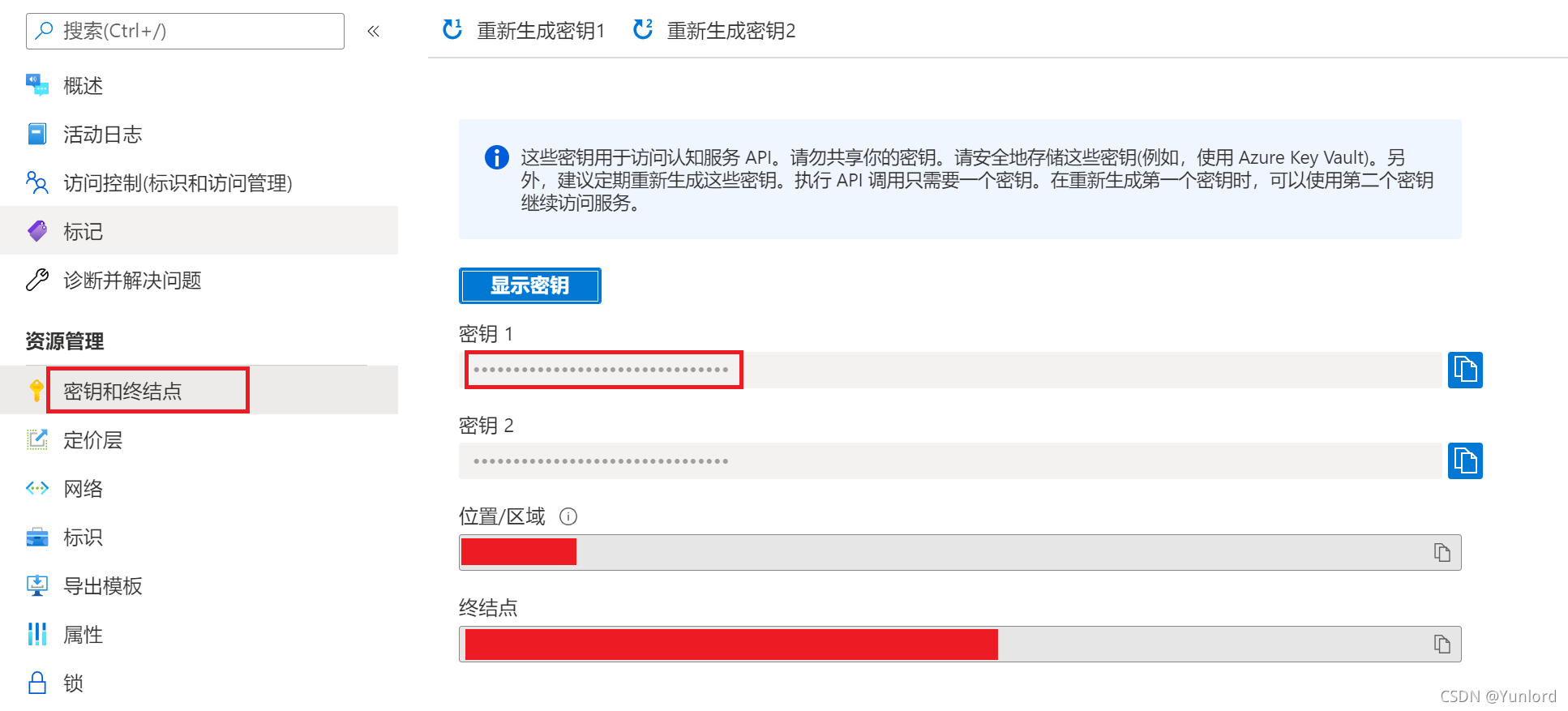
有两个密钥任选一个即可,位置/区域也需要记录下来,后面我们的程序就需要通过密钥和位置来调用。
之后下文涉及到的文本翻译、文本摘要生成等服务开通也按以上步骤进行获得密钥以及位置就可以了。
安装moviepy库:
pip install moviepy提取音频:
from moviepy.editor import AudioFileClip
my_audio_clip = AudioFileClip("data_dst.mp4")
my_audio_clip.write_audiofile("data_dst.wav")
生成wav格式音频:

参考Azure 认知服务文档:语音转文本入门
首先安装和导入语音 SDK:
pip install azure-cognitiveservices-speech
首先从文件识别语音转文本:
import azure.cognitiveservices.speech as speechsdk

def from_file():
    speech_config = speechsdk.SpeechConfig(subscription="<paste-your-speech-key-here>", region="<paste-your-speech-location/region-here>")
    audio_input = speechsdk.AudioConfig(filename="your_file_name.wav")
    speech_recognizer = speechsdk.SpeechRecognizer(speech_config=speech_config, audio_config=audio_input)

    result = speech_recognizer.recognize_once_async().get()
    print(result.text)

from_file()

参考Azure 认知服务文档:文本分析快速入门
安装 Python 后,可使用以下命令安装客户端库:
pip install azure-ai-textanalytics==5.2.0b1
可以使用文本分析来汇总大型文本区块。 创建一个名为 summarization_example() 的新函数,该函数采用客户端作为参数,然后调用 begin_analyze_actions() 函数。 结果将是一个循环操作,将轮询该操作以获得结果。
from azure.ai.textanalytics import TextAnalyticsClient
from azure.core.credentials import AzureKeyCredential

key = ""
endpoint = ""

def authenticate_client():
    ta_credential = AzureKeyCredential(key)
    text_analytics_client = TextAnalyticsClient(
            endpoint=endpoint,
            credential=ta_credential)
    return text_analytics_client

client = authenticate_client()


def sample_extractive_summarization(client):
    from azure.core.credentials import AzureKeyCredential
    from azure.ai.textanalytics import (
        TextAnalyticsClient,
        ExtractSummaryAction
    )

    document = [
        "The extractive summarization feature in Text Analytics uses natural language processing techniques to locate key sentences in an unstructured text document. "
        "These sentences collectively convey the main idea of the document. This feature is provided as an API for developers. "
        "They can use it to build intelligent solutions based on the relevant information extracted to support various use cases. "
        "In the public preview, extractive summarization supports several languages. It is based on pretrained multilingual transformer models, part of our quest for holistic representations. "
        "It draws its strength from transfer learning across monolingual and harness the shared nature of languages to produce models of improved quality and efficiency. "
    ]

    poller = client.begin_analyze_actions(
        document,
        actions=[
            ExtractSummaryAction(MaxSentenceCount=4)
        ],
    )

    document_results = poller.result()
    for result in document_results:
        extract_summary_result = result[0]  # first document, first result
        if extract_summary_result.is_error:
            print("...Is an error with code '{}' and message '{}'".format(
                extract_summary_result.code, extract_summary_result.message
            ))
        else:
            print("Summary extracted: \n{}".format(
                " ".join([sentence.text for sentence in extract_summary_result.sentences]))
            )

sample_extractive_summarization(client)
其中文档内容为:
"The extractive summarization feature in Text Analytics uses natural language processing techniques to locate key sentences in an unstructured text document. "
"These sentences collectively convey the main idea of the document. This feature is provided as an API for developers. "
"They can use it to build intelligent solutions based on the relevant information extracted to support various use cases. "
"In the public preview, extractive summarization supports several languages. It is based on pretrained multilingual transformer models, part of our quest for holistic representations. "
"It draws its strength from transfer learning across monolingual and harness the shared nature of languages to produce models of improved quality and efficiency. "
“文本分析中的提取摘要功能使用自然语言处理技术定位非结构化文本文档中的关键句子。”
“这些句子共同传达了文档的主要思想。此功能作为API提供给开发人员。”
“他们可以使用它根据提取的相关信息构建智能解决方案,以支持各种用例。”
“在公开预览中,摘录摘要支持多种语言。它基于预训练的多语言转换器模型,这是我们寻求整体表示的一部分。”
“它从跨单语的迁移学习中汲取力量,并利用语言的共享性来制作质量和效率更高的模型。”
摘要结果为:
The extractive summarization feature in Text Analytics uses natural language processing techniques to locate key sentences in an unstructured text document. This feature is provided as an API for developers. They can use it to build intelligent solutions based on the relevant information extracted to support various use cases.
文本分析中的提取摘要功能使用自然语言处理技术定位非结构化文本文档中的关键句子。此功能作为API提供给开发人员。他们可以使用它根据提取的相关信息构建智能解决方案,以支持各种用例。
参考Azure 认知服务文档:文本翻译快速入门
import requests, uuid, json

# Add your subscription key and endpoint
subscription_key = "YOUR_SUBSCRIPTION_KEY"
endpoint = "https://api.translator.azure.cn"

# Add your location, also known as region. The default is global.
# This is required if using a Cognitive Services resource.
location = "YOUR_RESOURCE_LOCATION"

path = '/translate'
constructed_url = endpoint + path

params = {
    'api-version': '3.0',
    'from': 'en',
    'to': ['zh']
}
constructed_url = endpoint + path

headers = {
    'Ocp-Apim-Subscription-Key': subscription_key,
    'Ocp-Apim-Subscription-Region': location,
    'Content-type': 'application/json',
    'X-ClientTraceId': str(uuid.uuid4())
}

# You can pass more than one object in body.
body = [{
    'text': ''The extractive summarization feature in Text Analytics uses natural language processing techniques to locate key sentences in an unstructured text document. This feature is provided as an API for developers. They can use it to build intelligent solutions based on the relevant information extracted to support various use cases.'
}]

request = requests.post(constructed_url, params=params, headers=headers, json=body)
response = request.json()

print(json.dumps(response, sort_keys=True, ensure_ascii=False, indent=4, separators=(',', ': ')))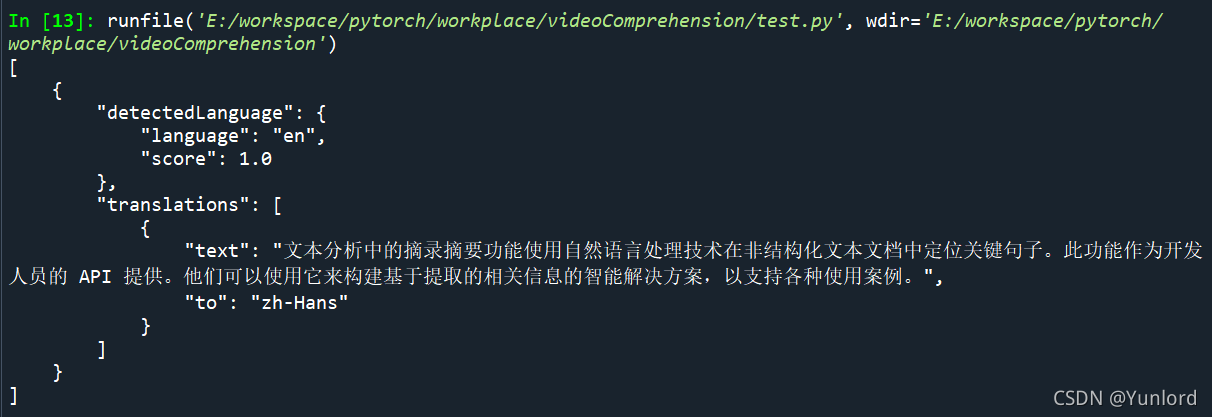
原文:
The extractive summarization feature in Text Analytics uses natural language processing techniques to locate key sentences in an unstructured text document. This feature is provided as an API for developers. They can use it to build intelligent solutions based on the relevant information extracted to support various use cases.
翻译结果:
文本分析中的摘录摘要功能使用自然语言处理技术在非结构化文本文档中定位关键句子。此功能作为开发人员的 API 提供。他们可以使用它来构建基于提取的相关信息的智能解决方案,以支持各种使用案例。
开发流程示意图:

整体的流程如上图所示:
将视频转成音频后输入到语音转文本服务中,输出的文本信息,输入到文本摘要生成服务中,输入摘要信息,再输入到文本翻译服务中,翻译成中文,最后就得到对应视频的中文摘要,帮助快速理解视频信息。
代码实现:
同样分成了四个模块:
视频转音频 video2audio() :
def video2audio(path):
    my_audio_clip = AudioFileClip(path)
    output_path=path[:-3]+"wav"
    my_audio_clip.write_audiofile(output_path)
    print("第一步:视频转语音完成")
    return output_path
连续语音转文本 continuous_recognition() :
def continuous_recognition(path):
    audio_config = speechsdk.audio.AudioConfig(filename=path)
    speech_config = speechsdk.SpeechConfig()

    speech_recognizer = speechsdk.SpeechRecognizer(speech_config=speech_config, audio_config=audio_config)
    done = False

    def stop_cb(evt):

        print('CLOSING on {}'.format(evt))
        speech_recognizer.stop_continuous_recognition()
        nonlocal done

        done = True
    text=[]


    speech_recognizer.recognized.connect(lambda evt: text.append(evt.result.text))
    speech_recognizer.session_started.connect(lambda evt: print('SESSION STARTED: {}'.format(evt['text'])))
    speech_recognizer.session_stopped.connect(lambda evt: print('SESSION STOPPED {}'.format(evt)))
    speech_recognizer.canceled.connect(lambda evt: print(summary))

    speech_recognizer.session_stopped.connect(stop_cb)
    speech_recognizer.canceled.connect(stop_cb)

    speech_recognizer.start_continuous_recognition()
    while not done:
        time.sleep(.5)
    print("第二步:语音转文本完成")
    print(text)
    return text
文本摘要生成 sample_extractive_summarization() :
def sample_extractive_summarization(client,text):
    from azure.core.credentials import AzureKeyCredential
    from azure.ai.textanalytics import (
        TextAnalyticsClient,
        ExtractSummaryAction
    )

    text="".join(text)
    document = [text]

    poller = client.begin_analyze_actions(
        document,
        actions=[
            ExtractSummaryAction(MaxSentenceCount=4)
        ],
    )

    document_results = poller.result()
    for result in document_results:
        extract_summary_result = result[0]  # first document, first result
        if extract_summary_result.is_error:
            summary=("...Is an error with code '{}' and message '{}'".format(
                extract_summary_result.code, extract_summary_result.message
            ))

        else:
            print("第三步:文本摘要生成完成")
            summary=("Summary extracted: \n{}".format(
                " ".join([sentence.text for sentence in extract_summary_result.sentences]))
            )
    print(summary)
    return summary
文本翻译 translate() :
def translate(text):
    import requests, uuid, json
    subscription_key =
    endpoint =
    location =
    path = '/translate'
    constructed_url = endpoint + path

    params = {
        'api-version': '3.0',
        'to': ['zh']
    }
    constructed_url = endpoint + path
    headers = {
        'Ocp-Apim-Subscription-Key': subscription_key,
        'Ocp-Apim-Subscription-Region': location,
        'Content-type': 'application/json',
        'X-ClientTraceId': str(uuid.uuid4())
    }

    # You can pass more than one object in body.
    body = [{
        'text':text
    }]

    request = requests.post(constructed_url, params=params, headers=headers, json=body)
    response = request.json()

    translate_text=response[0]['translations'][0]['text']
    # translate_text=(json.dumps(response, sort_keys=True, ensure_ascii=False, indent=4, separators=(',', ': ')))
    print('第四步:文本翻译完成')
    print(translate_text)
    return translate_text
最终输出结果:
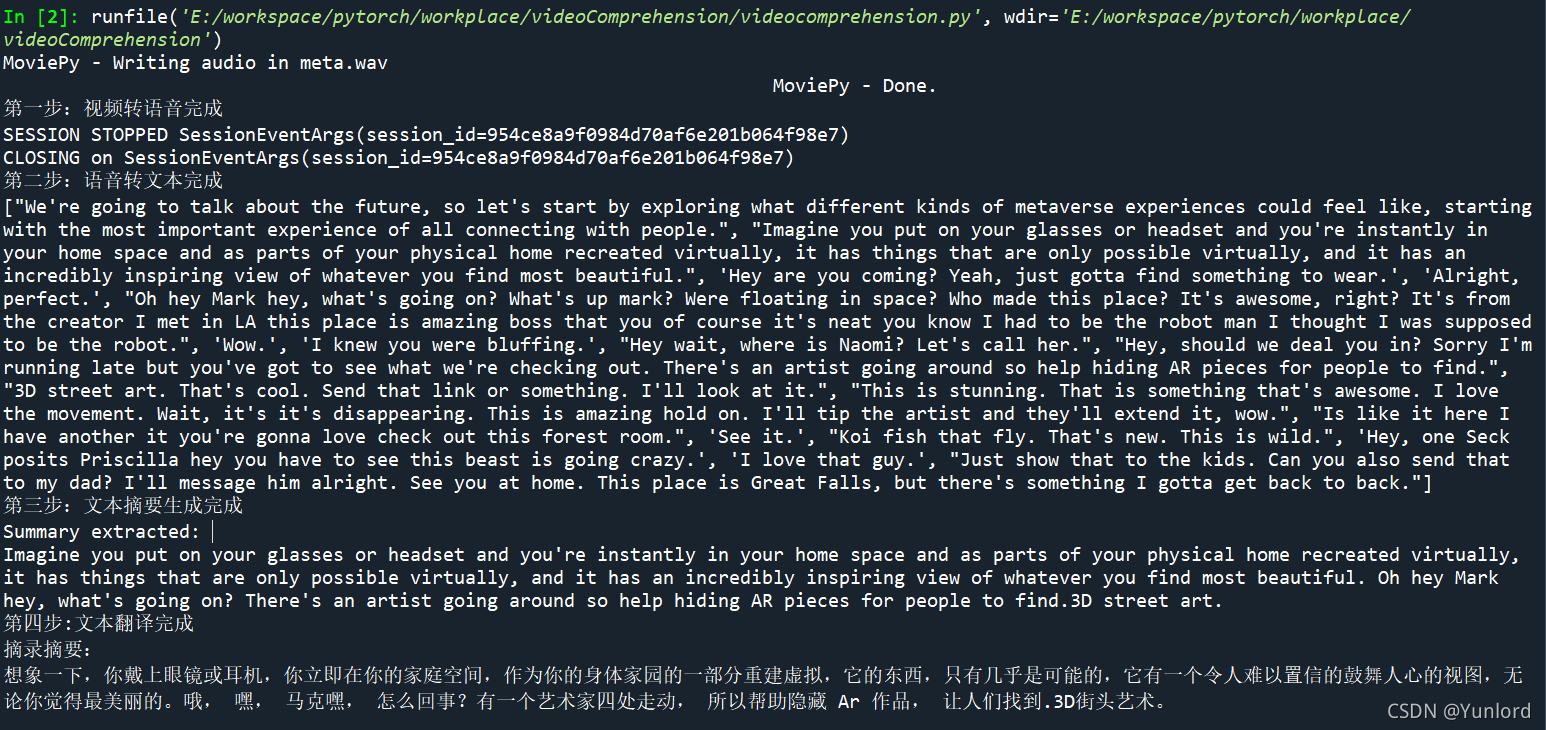 英文摘要结果:
Imagine you put on your glasses or headset and you're instantly in your home space and as parts of your physical home recreated virtually, it has things that are only possible virtually, and it has an incredibly inspiring view of whatever you find most beautiful. Oh hey Mark hey, what's going on? There's an artist going around so help hiding AR pieces for people to find and 3D street art.
中文摘要结果:
想象一下,你戴上眼镜或耳机,立刻就进入了你的家庭空间,作为虚拟重建的实体家庭的一部分,它有着只有虚拟才能实现的东西,它有着令人难以置信的令人振奋的视角,让你看到最美的东西。马克,怎么了?有一位艺术家在四处走动,所以帮助人们找到隐藏AR作品,和3D街头艺术。
在试用过程中,单项服务效果还行,但是其中的摘要生成和文本翻译的准确度还是可以再次提高的。而且一开始使用语音转文本功能只能翻译十五秒,所以之后选择了连续语音识别转文本,才算是基本获取了该视频的所有语音。
总而来说,通过这次Azure认知服务免费试用活动,基本实现了预期设想的视频语义理解功能。
尤其是近两年随着短视频领域的火爆发展,围绕短视频的业务场景应用也在增长,工业界应用场景都对视频内容理解提出了迫切的落地需求。本篇实现的视频语义理解功能基本可以满足以上需求,能够实现个性化推荐以及用户选择建议。
我正在学习如何使用Nokogiri,根据这段代码我遇到了一些问题:require'rubygems'require'mechanize'post_agent=WWW::Mechanize.newpost_page=post_agent.get('http://www.vbulletin.org/forum/showthread.php?t=230708')puts"\nabsolutepathwithtbodygivesnil"putspost_page.parser.xpath('/html/body/div/div/div/div/div/table/tbody/tr/td/div
总的来说,我对ruby还比较陌生,我正在为我正在创建的对象编写一些rspec测试用例。许多测试用例都非常基础,我只是想确保正确填充和返回值。我想知道是否有办法使用循环结构来执行此操作。不必为我要测试的每个方法都设置一个assertEquals。例如:describeitem,"TestingtheItem"doit"willhaveanullvaluetostart"doitem=Item.new#HereIcoulddotheitem.name.shouldbe_nil#thenIcoulddoitem.category.shouldbe_nilendend但我想要一些方法来使用
我有一个Ruby程序,它使用rubyzip压缩XML文件的目录树。gem。我的问题是文件开始变得很重,我想提高压缩级别,因为压缩时间不是问题。我在rubyzipdocumentation中找不到一种为创建的ZIP文件指定压缩级别的方法。有人知道如何更改此设置吗?是否有另一个允许指定压缩级别的Ruby库? 最佳答案 这是我通过查看rubyzip内部创建的代码。level=Zlib::BEST_COMPRESSIONZip::ZipOutputStream.open(zip_file)do|zip|Dir.glob("**/*")d
关闭。这个问题是opinion-based.它目前不接受答案。想要改进这个问题?更新问题,以便editingthispost可以用事实和引用来回答它.关闭4年前。Improvethisquestion我想在固定时间创建一系列低音和高音调的哔哔声。例如:在150毫秒时发出高音调的蜂鸣声在151毫秒时发出低音调的蜂鸣声200毫秒时发出低音调的蜂鸣声250毫秒的高音调蜂鸣声有没有办法在Ruby或Python中做到这一点?我真的不在乎输出编码是什么(.wav、.mp3、.ogg等等),但我确实想创建一个输出文件。
给定这段代码defcreate@upgrades=User.update_all(["role=?","upgraded"],:id=>params[:upgrade])redirect_toadmin_upgrades_path,:notice=>"Successfullyupgradeduser."end我如何在该操作中实际验证它们是否已保存或未重定向到适当的页面和消息? 最佳答案 在Rails3中,update_all不返回任何有意义的信息,除了已更新的记录数(这可能取决于您的DBMS是否返回该信息)。http://ar.ru
我在我的项目目录中完成了compasscreate.和compassinitrails。几个问题:我已将我的.sass文件放在public/stylesheets中。这是放置它们的正确位置吗?当我运行compasswatch时,它不会自动编译这些.sass文件。我必须手动指定文件:compasswatchpublic/stylesheets/myfile.sass等。如何让它自动运行?文件ie.css、print.css和screen.css已放在stylesheets/compiled。如何在编译后不让它们重新出现的情况下删除它们?我自己编译的.sass文件编译成compiled/t
大约一年前,我决定确保每个包含非唯一文本的Flash通知都将从模块中的方法中获取文本。我这样做的最初原因是为了避免一遍又一遍地输入相同的字符串。如果我想更改措辞,我可以在一个地方轻松完成,而且一遍又一遍地重复同一件事而出现拼写错误的可能性也会降低。我最终得到的是这样的:moduleMessagesdefformat_error_messages(errors)errors.map{|attribute,message|"Error:#{attribute.to_s.titleize}#{message}."}enddeferror_message_could_not_find(obje
我正在寻找执行以下操作的正确语法(在Perl、Shell或Ruby中):#variabletoaccessthedatalinesappendedasafileEND_OF_SCRIPT_MARKERrawdatastartshereanditcontinues. 最佳答案 Perl用__DATA__做这个:#!/usr/bin/perlusestrict;usewarnings;while(){print;}__DATA__Texttoprintgoeshere 关于ruby-如何将脚
我主要使用Ruby来执行此操作,但到目前为止我的攻击计划如下:使用gemsrdf、rdf-rdfa和rdf-microdata或mida来解析给定任何URI的数据。我认为最好映射到像schema.org这样的统一模式,例如使用这个yaml文件,它试图描述数据词汇表和opengraph到schema.org之间的转换:#SchemaXtoschema.orgconversion#data-vocabularyDV:name:namestreet-address:streetAddressregion:addressRegionlocality:addressLocalityphoto:i
尝试通过RVM将RubyGems升级到版本1.8.10并出现此错误:$rvmrubygemslatestRemovingoldRubygemsfiles...Installingrubygems-1.8.10forruby-1.9.2-p180...ERROR:Errorrunning'GEM_PATH="/Users/foo/.rvm/gems/ruby-1.9.2-p180:/Users/foo/.rvm/gems/ruby-1.9.2-p180@global:/Users/foo/.rvm/gems/ruby-1.9.2-p180:/Users/foo/.rvm/gems/rub
