今天,我要分享给大家的是Android中常见的一个的登录注册的案例,我这里写的是简易版,如果大家有更精彩的拓展,可以自行发挥哦!
运行过程相信大家都已经心知肚明了,所以我在这里就直接发布代码了,其中有不理解的地方大家可以自行百度,也可以互相学习讨论。如有错误,麻烦大家在评论区留言,谢谢。
AndroidManifest.xml文件:
<application
        android:allowBackup="true"
        android:icon="@mipmap/ic_launcher"
        android:label="@string/app_name"
        android:roundIcon="@mipmap/ic_launcher_round"
        android:supportsRtl="true"
        android:theme="@style/Theme.WeChat">
        <activity android:name=".LoginActivity">
            <intent-filter>
                <action android:name="android.intent.action.MAIN" />

                <category android:name="android.intent.category.LAUNCHER" />
            </intent-filter>
        </activity>
        <activity android:name=".RegisterActivity" />
        <activity android:name=".MainActivity"/>
    </application>
布局代码:
styles.xml
<style name="hLine">
        <item name="android:layout_width">match_parent</item>
        <item name="android:layout_height">1dp</item>
        <item name="android:background">@color/black</item>
    </style>
    <style name="tvTwo">
        <item name="android:layout_width">wrap_content</item>
        <item name="android:layout_height">wrap_content</item>
        <item name="android:layout_marginLeft">20dp</item>
        <item name="android:textColor">@color/black</item>
        <item name="android:textSize">15sp</item>
    </style>
    <style name="etOne">
        <item name="android:layout_width">match_parent</item>
        <item name="android:layout_height">wrap_content</item>
        <item name="android:layout_marginLeft">30dp</item>
        <item name="android:background">@null</item>
        <item name="android:textColor">@color/black</item>
    </style>
activity_login.xml
<?xml version="1.0" encoding="utf-8"?>
<LinearLayout xmlns:android="http://schemas.android.com/apk/res/android"
    android:orientation="vertical"
    android:layout_width="match_parent"
    android:layout_height="match_parent">
    <TextView
        android:layout_width="match_parent"
        android:layout_height="wrap_content"
        android:gravity="center"
        android:text="用户登录/LOGIN"
        android:textSize="30sp"
        android:textStyle="bold"
        android:textColor="@color/black"
        android:layout_marginTop="50dp"
        />
    <View
        style="@style/hLine"
        android:layout_marginTop="40dp"
        />
    <LinearLayout
        android:layout_width="match_parent"
        android:layout_height="wrap_content"
        android:orientation="horizontal"
        android:padding="15dp">
        <TextView
            style="@style/tvTwo"
            android:text="性   名:" />
        <EditText
            android:id="@+id/lg_name"
            style="@style/etOne" />
    </LinearLayout>
    <View style="@style/hLine" />
    <LinearLayout
        android:layout_width="match_parent"
        android:layout_height="wrap_content"
        android:orientation="horizontal"
        android:padding="15dp">
        <TextView
            style="@style/tvTwo"
            android:text="密   码:" />
        <EditText
            android:id="@+id/lg_psw"
            style="@style/etOne"
            android:inputType="textPassword"/>
    </LinearLayout>
    <View style="@style/hLine" />
    <LinearLayout
        android:layout_width="match_parent"
        android:layout_height="wrap_content"
        android:orientation="horizontal"
        android:layout_marginTop="50dp"
        >
        <Button
            android:id="@+id/btn_login"
            android:layout_width="wrap_content"
            android:layout_height="wrap_content"
            android:layout_marginTop="25dp"
            android:layout_marginLeft="50dp"
            android:text="登 录"
            android:background="@color/gray"
            />
        <Button
            android:id="@+id/btn_register"
            android:layout_width="wrap_content"
            android:layout_height="wrap_content"
            android:layout_marginTop="25dp"
            android:layout_marginLeft="120dp"
            android:text="注 册"
            android:background="@color/gray"
            />
    </LinearLayout>
</LinearLayout>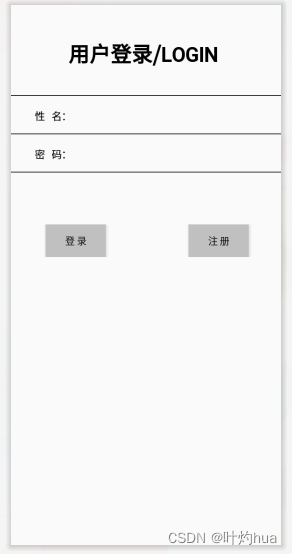
activity_register.xml
<?xml version="1.0" encoding="utf-8"?>
<LinearLayout xmlns:android="http://schemas.android.com/apk/res/android"
    android:orientation="vertical"
    android:layout_width="match_parent"
    android:layout_height="match_parent">
        <TextView
            android:layout_width="match_parent"
            android:layout_height="wrap_content"
            android:gravity="center"
            android:text="用户注册"
            android:textColor="@color/black"
            android:textSize="40sp"
            />
        <View style="@style/hLine" />
        <LinearLayout
            android:layout_width="match_parent"
            android:layout_height="wrap_content"
            android:orientation="horizontal"
            android:padding="15dp">
            <TextView
                style="@style/tvTwo"
                android:text="姓名:" />
            <EditText
                android:id="@+id/rg_name"
                style="@style/etOne" />
        </LinearLayout>
        <View style="@style/hLine" />
        <LinearLayout
            android:layout_width="match_parent"
            android:layout_height="wrap_content"
            android:orientation="horizontal"
            android:padding="15dp">
            <TextView
                style="@style/tvTwo"
                android:text="密码:" />
            <EditText
                android:id="@+id/rg_psw"
                style="@style/etOne"
                android:inputType="textPassword" />
        </LinearLayout>
        <View style="@style/hLine" />
        <Button
            android:id="@+id/btn_submit"
            android:layout_width="match_parent"
            android:layout_height="wrap_content"
            android:layout_marginTop="120dp"
            android:gravity="center"
            android:text="提交"
            android:background="@color/gray"
            android:textSize="18sp" />
</LinearLayout>
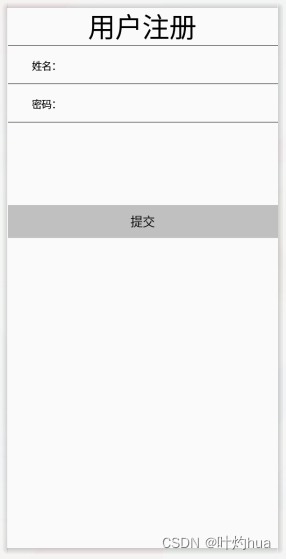
activity_main.xml
<?xml version="1.0" encoding="utf-8"?>
<LinearLayout xmlns:android="http://schemas.android.com/apk/res/android"
    xmlns:tools="http://schemas.android.com/tools"
    android:orientation="horizontal"
    android:layout_width="match_parent"
    android:layout_height="match_parent"
    tools:context=".MainActivity">
    <TextView
        android:layout_width="match_parent"
        android:layout_height="wrap_content"
        android:layout_marginTop="30dp"
        android:text="祝你,登录成功,未来可期!"
        android:textColor="#E53935"
        android:textSize="30sp"/>
</LinearLayout>
Java代码:
LoginActivity.java
package com.example.wechat;

import androidx.appcompat.app.AppCompatActivity;

import android.annotation.SuppressLint;
import android.content.Intent;
import android.os.Bundle;
import android.widget.Button;
import android.widget.EditText;
import android.widget.Toast;
import android.content.SharedPreferences;
import android.database.Cursor;
import android.database.sqlite.SQLiteDatabase;
public class LoginActivity extends AppCompatActivity {
    EditText lg_name,lg_psw;
    Button btn_login;
    Button btn_register;
    SQLiteDatabase db;

    @Override
    protected void onCreate(Bundle savedInstanceState) {
        super.onCreate(savedInstanceState);
        setContentView(R.layout.activity_login);
        lg_name=findViewById(R.id.lg_name);
        lg_psw=findViewById(R.id.lg_psw);
        btn_login=findViewById(R.id.btn_login);
        btn_register=findViewById(R.id.btn_register);
        //登录注册部分数据库
        db=SQLiteDatabase.openOrCreateDatabase(getCacheDir()+"/note",null);
        try {
            db.execSQL("create table user(username varchar(100),password varchar(100))");
        } catch (Exception e){
            e.printStackTrace();
        }
        SharedPreferences sharedPreferences=getSharedPreferences("user",0);
        lg_name.setText(sharedPreferences.getString("lg_name",""));
        lg_psw.setText(sharedPreferences.getString("lg_psw",""));
        btn_login.setOnClickListener(view -> {
            if (lg_name.getText().toString().equals("") || lg_psw.getText().toString().equals("")){
                Toast.makeText(LoginActivity.this, "账号或密码不能为空", Toast.LENGTH_SHORT).show();
                return;
            }
            @SuppressLint("Recycle") Cursor cursor=db.rawQuery("select * from user where username='"+lg_name.getText().toString()+"'",null);
            if (cursor.moveToNext()){
                if (cursor.getString(1).equals(lg_psw.getText().toString())){
                    SharedPreferences.Editor editor=getSharedPreferences("lg_name",0).edit();
                    Toast.makeText(LoginActivity.this,"登录成功",Toast.LENGTH_LONG).show();
                    startActivity(new Intent(LoginActivity.this,MainActivity.class));
                    editor.apply();
                }else {
                    Toast.makeText(LoginActivity.this, "密码错误", Toast.LENGTH_SHORT).show();
                }
            }else {
                Toast.makeText(LoginActivity.this, "账号不存在", Toast.LENGTH_SHORT).show();
            }
        });
        btn_register.setOnClickListener(view -> startActivity(new Intent(LoginActivity.this,RegisterActivity.class)));
    }
}
RegisterActivity.java
package com.example.wechat;

import android.annotation.SuppressLint;
import android.content.ContentValues;
import android.content.Intent;
import android.database.Cursor;
import android.database.sqlite.SQLiteDatabase;
import android.os.Bundle;
import android.widget.Button;
import android.widget.EditText;
import android.widget.Toast;

import androidx.appcompat.app.AppCompatActivity;

public class RegisterActivity extends AppCompatActivity {

    EditText rg_name,rg_psw;
    Button btn_submit;
    SQLiteDatabase db;
    @Override
    protected void onCreate(Bundle savedInstanceState) {
        super.onCreate(savedInstanceState);
        setContentView(R.layout.activity_register);
        db=SQLiteDatabase.openOrCreateDatabase(getCacheDir()+"/note",null);
        rg_psw=findViewById(R.id.rg_psw);
        rg_name=findViewById(R.id.rg_name);
        btn_submit=findViewById(R.id.btn_submit);

        btn_submit.setOnClickListener(view -> {
            if (rg_name.getText().toString().equals("") || rg_psw.getText().toString().equals("")){
                Toast.makeText(RegisterActivity.this, "账号或密码不能为空", Toast.LENGTH_SHORT).show();
                return;
            }
            @SuppressLint("Recycle") Cursor cursor=db.rawQuery("select * from user where username='"+rg_name.getText().toString()+"'",null);
            if (cursor.moveToNext()){
                Toast.makeText(RegisterActivity.this, "账号已存在", Toast.LENGTH_SHORT).show();
            }else {
                ContentValues contentValues = new ContentValues();
                contentValues.put("username", rg_name.getText().toString());
                contentValues.put("password", rg_psw.getText().toString());
                db.insert("user", null, contentValues);
                Toast.makeText(RegisterActivity.this, "注册成功", Toast.LENGTH_LONG).show();
                startActivity(new Intent(RegisterActivity.this, LoginActivity.class));
            }
        });
    }
}
MainActivity.java
package com.example.wechat;

import androidx.appcompat.app.AppCompatActivity;

import android.os.Bundle;

public class MainActivity extends AppCompatActivity {

    @Override
    protected void onCreate(Bundle savedInstanceState) {
        super.onCreate(savedInstanceState);
        setContentView(R.layout.activity_main);
    }
}
像登录注册此类问题的案例,我们要特别注意逻辑性,涉及到数据量比较多、杂的话,我们可以用
笔将它们记录在本子上,世上无难事,只怕有心人,让我们一起加油吧!!!
C#实现简易绘图工具一.引言实验目的:通过制作窗体应用程序(C#画图软件),熟悉基本的窗体设计过程以及控件设计,事件处理等,熟悉使用C#的winform窗体进行绘图的基本步骤,对于面向对象编程有更加深刻的体会.Tutorial任务设计一个具有基本功能的画图软件**·包括简单的新建文件,保存,重新绘图等功能**·实现一些基本图形的绘制,包括铅笔和基本形状等,学习橡皮工具的创建**·设计一个合理舒适的UI界面**注明:你可能需要先了解一些关于winform窗体应用程序绘图的基本知识,以及关于GDI+类和结构的知识二.实验环境Windows系统下的visualstudio2017C#窗体应用程序三.
作为新的阿里云用户,您可以50免费试用多种优惠,价值高达1,700美元(或8,500美元)。这将让您了解和体验阿里云平台上提供的一系列产品和服务。如果您以个人身份注册免费试用,您将获得价值1,700美元的优惠。但是,如果您是注册公司,您可以选择企业免费试用,提交基本信息通过企业实名注册验证,即可开始价值$8,500的免费试用!本教程介绍了如何设置您的帐户并使用您的免费试用版。关于免费试用在我们开始此试用之前,您还必须遵守以下条款和条件才能访问您的免费试用:只有在一年内创建的账户才有资格获得阿里云免费试用。通过此免费试用优惠,用户可以免费试用免费试用活动页面上列出的每种产品一次。如果您有多个帐
最近因为项目需要,需要将Android手机系统自带的某个系统软件反编译并更改里面某个资源,并重新打包,签名生成新的自定义的apk,下面我来介绍一下我的实现过程。APK修改,分为以下几步:反编译解包,修改,重打包,修改签名等步骤。安卓apk修改准备工作1.系统配置好JavaJDK环境变量2.需要root权限的手机(针对系统自带apk,其他软件免root)3.Auto-Sign签名工具4.apktool工具安卓apk修改开始反编译本文拿Android系统里面的Settings.apk做demo,具体如何将apk获取出来在此就不过多介绍了,直接进入主题:按键win+R输入cmd,打开命令窗口,并将路
我在我的项目中有一个用户和一个管理员角色。我使用Devise创建了身份验证。在我的管理员角色中,我没有任何确认。在我的用户模型中,我有以下内容:devise:database_authenticatable,:confirmable,:recoverable,:rememberable,:trackable,:validatable,:timeoutable,:registerable#Setupaccessible(orprotected)attributesforyourmodelattr_accessible:email,:username,:prename,:surname,:
我需要从站点抓取数据,但它需要我先登录。我一直在使用hpricot成功地抓取其他网站,但我是使用mechanize的新手,我真的对如何使用它感到困惑。我看到这个例子经常被引用:require'rubygems'require'mechanize'a=Mechanize.newa.get('http://rubyforge.org/')do|page|#Clicktheloginlinklogin_page=a.click(page.link_with(:text=>/LogIn/))#Submittheloginformmy_page=login_page.form_with(:act
完成这个有困难。我正在使用seed.rb+factory_girl来使用rakedb:seed填充数据库。(我知道固定装置存在,但我想以这种方式完成,这只是一个示例,数据库将填充复杂的关联对象。)我的种子.rb:require'factory_girl_rails'["QM","CDC","SI","QS"].eachdo|n|FactoryGirl.create(:grau,nome:n)end还有我的/factories/graus.rbFactoryGirl.definedofactory:graudonomeendend但是当我运行时:rakedb:seed我得到:rakeab
我为Devise用户和管理员提供了不同的模型。我也在使用Basecamp风格的子域。除了我需要能够以用户或管理员身份进行身份验证的一些Controller和操作外,一切都运行良好。目前我有authenticate_user!在我的application_controller.rb中设置,对于那些只有管理员才能访问的Controller和操作,我使用skip_before_filter跳过它。不幸的是,我不能简单地指定每个Controller的身份验证要求,因为我仍然需要一些Controller和操作才能被用户或管理员访问。我尝试了一些方法都无济于事。看来,如果我移动authentica
我想用一个(自己的)omniauth提供商来衡量每秒可以登录多少次。我需要了解此omniauth/oauth请求的性能如何,以及此身份验证是否具有可扩展性?到目前为止我得到了什么:defperformance_auth(user_count=10)bm=Benchmark.realtimedouser_count.timesdo|n|forkdoclick_on'Logout'omniauth_config_mock(:provider=>"foo",:uid=>n,:email=>"foo#{n}@example.net")visit"/account/auth/foo/"enden
我正在使用carrierwave上传视频然后有一个名为thumb的版本,带有自定义处理器,可以获取视频并使用streamio-ffmpeg创建屏幕截图。视频和文件都已正确上传,但在调用uploader.url(:thumb)时我得到:ArgumentError:Versionthumbdoesn'texist!VideoUploader.rbrequire'carrierwave/processing/mime_types'require'streamio-ffmpeg'classVideoUploader5)File.renamethumb_path,current_pathendd
我正在使用Ruby和Eventmachine库编写一个应用程序。我真的很喜欢非阻塞I/O和事件驱动系统的想法,我遇到的问题是日志记录。我正在使用Ruby的标准记录器库。并不是说日志记录需要永远,但它似乎不应该阻塞,但它确实阻塞了。是否有某个库将Ruby的标准记录器实现扩展为非阻塞的,或者我应该只调用EM::defer进行日志记录调用?有没有办法让eventmachine已经为我做这件事? 最佳答案 我最终将记录器包装在一个启动线程并具有FIFO队列的单例类中。日志记录会将日志信息转储到队列中,线程只是循环,从队列中拉出内容并使用真正
