 在 Spring Boot 出现之前,我们要运行一个 Java Web 应用,首先需要有一个 Web 容器(例如 Tomcat 或 Jetty),然后将我们的 Web 应用打包后放到容器的相应目录下,最后再启动容器。在 IDE 中也需要对 Web 容器进行一些配置,才能够运行或者 Debug。而使用 Spring Boot 我们只需要像运行普通 JavaSE 程序一样,run 一下 main() 方法就可以启动一个 Web 应用了。这是怎么做到的呢?今天我们就一探究竟,分析一下 Spring Boot 的启动流程。
@SpringBootApplication
public class HelloApplication {
public static void main(String[] args) {
SpringApplication.run(HelloApplication.class, args);
}
}public class SpringApplication {
......
public ConfigurableApplicationContext run(String... args) {
// 1 应用启动计时开始
StopWatch stopWatch = new StopWatch();
stopWatch.start();
// 2 声明上下文
DefaultBootstrapContext bootstrapContext = createBootstrapContext();
ConfigurableApplicationContext context = null;
// 3 设置 java.awt.headless 属性
configureHeadlessProperty();
// 4 启动监听器
SpringApplicationRunListeners listeners = getRunListeners(args);
listeners.starting(bootstrapContext, this.mainApplicationClass);
try {
// 5 初始化默认应用参数
ApplicationArguments applicationArguments = new DefaultApplicationArguments(args);
// 6 准备应用环境
ConfigurableEnvironment environment = prepareEnvironment(listeners, bootstrapContext, applicationArguments);
configureIgnoreBeanInfo(environment);
// 7 打印 Banner(Spring Boot 的 LOGO)
Banner printedBanner = printBanner(environment);
// 8 创建上下文实例
context = createApplicationContext();
context.setApplicationStartup(this.applicationStartup);
// 9 构建上下文
prepareContext(bootstrapContext, context, environment, listeners, applicationArguments, printedBanner);
// 10 刷新上下文
refreshContext(context);
// 11 刷新上下文后处理
afterRefresh(context, applicationArguments);
// 12 应用启动计时结束
stopWatch.stop();
if (this.logStartupInfo) {
// 13 打印启动时间日志
new StartupInfoLogger(this.mainApplicationClass).logStarted(getApplicationLog(), stopWatch);
}
// 14 发布上下文启动完成事件
listeners.started(context);
// 15 调用 runners
callRunners(context, applicationArguments);
}
catch (Throwable ex) {
// 16 应用启动发生异常后的处理
handleRunFailure(context, ex, listeners);
throw new IllegalStateException(ex);
}
try {
// 17 发布上下文就绪事件
listeners.running(context);
}
catch (Throwable ex) {
handleRunFailure(context, ex, null);
throw new IllegalStateException(ex);
}
return context;
}
......
}Started AopApplication in 2.732 seconds (JVM running for 3.734)public void start(String taskName) throws IllegalStateException {
if (this.currentTaskName != null) {
throw new IllegalStateException("Can't start StopWatch: it's already running");
}
// 记录启动时间
this.currentTaskName = taskName;
this.startTimeNanos = System.nanoTime();
}public void stop() throws IllegalStateException {
if (this.currentTaskName == null) {
throw new IllegalStateException("Can't stop StopWatch: it's not running");
}
// 计算启动时间
long lastTime = System.nanoTime() - this.startTimeNanos;
this.totalTimeNanos += lastTime;
......
}if (this.logStartupInfo) {
// 打印启动时间
new StartupInfoLogger(this.mainApplicationClass).logStarted(getApplicationLog(), stopWatch);
}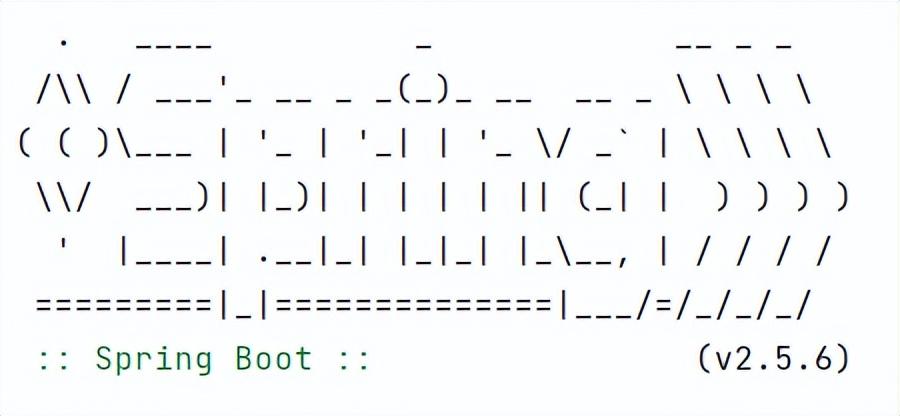 图 8-6 Spring Boot Logo这种做法很常见,像 Redis、Docker 等都会在启动的时候将自己的 LOGO 打印出来。Spring Boot 默认情况下会打印那个标志性的“树叶”和 “Spring” 的字样,下面带着当前的版本。在 run() 中编号 7 的位置调用打印 Banner 的逻辑,最终由 SpringBootBanner 类的 printBanner() 完成。这个图案定义在一个常量数组中,代码如下:
class SpringBootBanner implements Banner {
private static final String[] BANNER = {
"",
" . ____ _ __ _ _",
" /\\\\ / ___'_ __ _ _(_)_ __ __ _ \\ \\ \\ \\",
"( ( )\\___ | '_ | '_| | '_ \\/ _` | \\ \\ \\ \\",
" \\\\/ ___)| |_)| | | | | || (_| | ) ) ) )",
" ' |____| .__|_| |_|_| |_\\__, | / / / /",
" =========|_|==============|___/=/_/_/_/"
};
......
public void printBanner(Environment environment, Class<?> sourceClass, PrintStream printStream) {
for (String line : BANNER) {
printStream.println(line);
}
......
}
}ApplicationContextFactory DEFAULT = (webApplicationType) -> {
try {
switch (webApplicationType) {
case SERVLET:
return new AnnotationConfigServletWebServerApplicationContext();
case REACTIVE:
return new AnnotationConfigReactiveWebServerApplicationContext();
default:
return new AnnotationConfigApplicationContext();
}
}
catch (Exception ex) {
throw new IllegalStateException("Unable create a default ApplicationContext instance, "
+ "you may need a custom ApplicationContextFactory", ex);
}
};private void prepareContext(DefaultBootstrapContext bootstrapContext, ConfigurableApplicationContext context,
ConfigurableEnvironment environment, SpringApplicationRunListeners listeners,
ApplicationArguments applicationArguments, Banner printedBanner) {
......
// 加载资源
load(context, sources.toArray(new Object[0]));
listeners.contextLoaded(context);
}class BeanDefinitionLoader {
......
void load() {
for (Object source : this.sources) {
load(source);
}
}
private void load(Object source) {
Assert.notNull(source, "Source must not be null");
if (source instanceof Class<?>) {
load((Class<?>) source);
return;
}
if (source instanceof Resource) {
load((Resource) source);
return;
}
if (source instanceof Package) {
load((Package) source);
return;
}
if (source instanceof CharSequence) {
load((CharSequence) source);
return;
}
throw new IllegalArgumentException("Invalid source type " + source.getClass());
}
......
}public final void refresh() throws BeansException, IllegalStateException {
try {
super.refresh();
}
catch (RuntimeException ex) {
WebServer webServer = this.webServer;
if (webServer != null) {
webServer.stop();
}
throw ex;
}
}@Override
public void refresh() throws BeansException, IllegalStateException {
synchronized (this.startupShutdownMonitor) {
StartupStep contextRefresh = this.applicationStartup.start("spring.context.refresh");
// 1 准备将要刷新的上下文
prepareRefresh();
// 2 (告诉子类,如:ServletWebServerApplicationContext)刷新内部 bean 工厂
ConfigurableListableBeanFactory beanFactory = obtainFreshBeanFactory();
// 3 为上下文准备 bean 工厂
prepareBeanFactory(beanFactory);
try {
// 4 允许在子类中对 bean 工厂进行后处理
postProcessBeanFactory(beanFactory);
StartupStep beanPostProcess = this.applicationStartup.start("spring.context.beans.post-process");
// 5 调用注册为 bean 的工厂处理器
invokeBeanFactoryPostProcessors(beanFactory);
// 6 注册拦截器创建的 bean 处理器
registerBeanPostProcessors(beanFactory);
beanPostProcess.end();
// 7 初始化国际化相关资源
initMessageSource();
// 8 初始化事件广播器
initApplicationEventMulticaster();
// 9 为具体的上下文子类初始化特定的 bean
onRefresh();
// 10 注册监听器
registerListeners();
// 11 实例化所有非懒加载的单例 bean
finishBeanFactoryInitialization(beanFactory);
// 12 完成刷新发布相应的事件(Tomcat 就是在这里启动的)
finishRefresh();
}
catch (BeansException ex) {
if (logger.isWarnEnabled()) {
logger.warn("Exception encountered during context initialization - " +
"cancelling refresh attempt: " + ex);
}
// 遇到异常销毁已经创建的单例 bean
destroyBeans();
// 充值 active 标识
cancelRefresh(ex);
// 将异常向上抛出
throw ex;
} finally {
// 重置公共缓存,结束刷新
resetCommonCaches();
contextRefresh.end();
}
}
}protected void onRefresh() {
super.onRefresh();
try {
createWebServer();
}
catch (Throwable ex) {
throw new ApplicationContextException("Unable to start web server", ex);
}
}
private void createWebServer() {
......
if (webServer == null && servletContext == null) {
......
// 根据配置获取一个 web server(Tomcat、Jetty 或 Undertow)
ServletWebServerFactory factory = getWebServerFactory();
this.webServer = factory.getWebServer(getSelfInitializer());
......
}
......
}我正在学习如何使用Nokogiri,根据这段代码我遇到了一些问题:require'rubygems'require'mechanize'post_agent=WWW::Mechanize.newpost_page=post_agent.get('http://www.vbulletin.org/forum/showthread.php?t=230708')puts"\nabsolutepathwithtbodygivesnil"putspost_page.parser.xpath('/html/body/div/div/div/div/div/table/tbody/tr/td/div
总的来说,我对ruby还比较陌生,我正在为我正在创建的对象编写一些rspec测试用例。许多测试用例都非常基础,我只是想确保正确填充和返回值。我想知道是否有办法使用循环结构来执行此操作。不必为我要测试的每个方法都设置一个assertEquals。例如:describeitem,"TestingtheItem"doit"willhaveanullvaluetostart"doitem=Item.new#HereIcoulddotheitem.name.shouldbe_nil#thenIcoulddoitem.category.shouldbe_nilendend但我想要一些方法来使用
类classAprivatedeffooputs:fooendpublicdefbarputs:barendprivatedefzimputs:zimendprotecteddefdibputs:dibendendA的实例a=A.new测试a.foorescueputs:faila.barrescueputs:faila.zimrescueputs:faila.dibrescueputs:faila.gazrescueputs:fail测试输出failbarfailfailfail.发送测试[:foo,:bar,:zim,:dib,:gaz].each{|m|a.send(m)resc
我正在尝试设置一个puppet节点,但rubygems似乎不正常。如果我通过它自己的二进制文件(/usr/lib/ruby/gems/1.8/gems/facter-1.5.8/bin/facter)在cli上运行facter,它工作正常,但如果我通过由rubygems(/usr/bin/facter)安装的二进制文件,它抛出:/usr/lib/ruby/1.8/facter/uptime.rb:11:undefinedmethod`get_uptime'forFacter::Util::Uptime:Module(NoMethodError)from/usr/lib/ruby
我想了解Ruby方法methods()是如何工作的。我尝试使用“ruby方法”在Google上搜索,但这不是我需要的。我也看过ruby-doc.org,但我没有找到这种方法。你能详细解释一下它是如何工作的或者给我一个链接吗?更新我用methods()方法做了实验,得到了这样的结果:'labrat'代码classFirstdeffirst_instance_mymethodenddefself.first_class_mymethodendendclassSecond使用类#returnsavailablemethodslistforclassandancestorsputsSeco
如何在buildr项目中使用Ruby?我在很多不同的项目中使用过Ruby、JRuby、Java和Clojure。我目前正在使用我的标准Ruby开发一个模拟应用程序,我想尝试使用Clojure后端(我确实喜欢功能代码)以及JRubygui和测试套件。我还可以看到在未来的不同项目中使用Scala作为后端。我想我要为我的项目尝试一下buildr(http://buildr.apache.org/),但我注意到buildr似乎没有设置为在项目中使用JRuby代码本身!这看起来有点傻,因为该工具旨在统一通用的JVM语言并且是在ruby中构建的。除了将输出的jar包含在一个独特的、仅限ruby
使用带有Rails插件的vim,您可以创建一个迁移文件,然后一次性打开该文件吗?textmate也可以这样吗? 最佳答案 你可以使用rails.vim然后做类似的事情::Rgeneratemigratonadd_foo_to_bar插件将打开迁移生成的文件,这正是您想要的。我不能代表textmate。 关于ruby-使用VimRails,您可以创建一个新的迁移文件并一次性打开它吗?,我们在StackOverflow上找到一个类似的问题: https://sta
我需要从一个View访问多个模型。以前,我的links_controller仅用于提供以不同方式排序的链接资源。现在我想包括一个部分(我假设)显示按分数排序的顶级用户(@users=User.all.sort_by(&:score))我知道我可以将此代码插入每个链接操作并从View访问它,但这似乎不是“ruby方式”,我将需要在不久的将来访问更多模型。这可能会变得很脏,是否有针对这种情况的任何技术?注意事项:我认为我的应用程序正朝着单一格式和动态页面内容的方向发展,本质上是一个典型的网络应用程序。我知道before_filter但考虑到我希望应用程序进入的方向,这似乎很麻烦。最终从任何
我想要做的是有2个不同的Controller,client和test_client。客户端Controller已经构建,我想创建一个test_clientController,我可以使用它来玩弄客户端的UI并根据需要进行调整。我主要是想绕过我在客户端中内置的验证及其对加载数据的管理Controller的依赖。所以我希望test_clientController加载示例数据集,然后呈现客户端Controller的索引View,以便我可以调整客户端UI。就是这样。我在test_clients索引方法中试过这个:classTestClientdefindexrender:template=>
我在我的项目中添加了一个系统来重置用户密码并通过电子邮件将密码发送给他,以防他忘记密码。昨天它运行良好(当我实现它时)。当我今天尝试启动服务器时,出现以下错误。=>BootingWEBrick=>Rails3.2.1applicationstartingindevelopmentonhttp://0.0.0.0:3000=>Callwith-dtodetach=>Ctrl-CtoshutdownserverExiting/Users/vinayshenoy/.rvm/gems/ruby-1.9.3-p0/gems/actionmailer-3.2.1/lib/action_mailer
