
在线视频
接上一篇,闪屏页面跳转到主页,接下来我们详细的说说主页开发涉及的内容,首先我们来看下主页是设计图,如下:

简单来说页面分成上下两部分,上半部分是一个横向滚动的banner,下半部分是电影资源的列表,列表中的一行两列均分,每一个资源信息包括:电影资源的宣传图、电影名称、演员、电影亮点。
硬件平台:DAYU2000 RK3568
系统版本:OpenHarmony 3.2 beta5
SDK:9(3.2.10.6)
IDE:DevEco Studio 3.1 Beta1 Build Version: 3.1.0.200, built on February 13, 2023
import { VideoDataSource } from '../model/VideoDataSource'
import { VideoData } from '../model/VideoData'
import { MockVideoData } from '../model/MockVideoData'
import router from '@ohos.router';
import { VideoListView } from '../view/VideoListView'
const TAG: string = 'Splash Index'
@Entry
@Component
struct Index {
  @State bannerList: Array<VideoData> = []
  @State videoList: Array<VideoData> = []
  private scrollerForScroll: Scroller = new Scroller()
  @State @Watch('scrollChange') scrollIndex: number = 0
  @State opacity1: number = 0
  aboutToAppear() {
    this.initData()
    router.clear()
  }
  scrollChange() {
    if (this.scrollIndex === 0) {
      this.scrollToAnimation(0, 0)
    } else if (this.scrollIndex === 2) {
      this.scrollToAnimation(0, 300)
    }
  }
  scrollToAnimation(xOffset, yOffset) {
    this.scrollerForScroll.scrollTo({
      xOffset: xOffset,
      yOffset: yOffset,
      animation: {
        duration: 3000,
        curve: Curve.FastOutSlowIn
      }
    })
  }
  initData() {
    this.bannerList = MockVideoData.getBannerList()
    this.videoList = MockVideoData.getVideoList()
  }
  build() {
    Column() {
      Scroll(this.scrollerForScroll) {
        Column() {
          // banner
          Swiper() {
            LazyForEach(new VideoDataSource(this.bannerList), (item: VideoData) => {
              Image(item.image)
                .width('100%')
                .height('100%')
                .border({
                  radius: 20
                })
                .onClick(() => {
                  router.pushUrl({ url: 'pages/Playback',
                    params: {
                      video_data: item
                    } })
                })
                .objectFit(ImageFit.Fill)
            }, item => item.id)
          }
          .width('100%')
          .height(240)
          .itemSpace(20)
          .autoPlay(true)
          .indicator(false)
          .cachedCount(3)
          .margin({
            bottom: 20
          })
          VideoListView({
            videoList: $videoList,
            scrollIndex: $scrollIndex,
            isBlackModule: false
          })
        }.width('100%')
      }
      .scrollBar(BarState.Off)
      .scrollable(ScrollDirection.Vertical)
      .scrollBarColor(Color.Gray)
      .scrollBarWidth(30)
      .edgeEffect(EdgeEffect.Spring)
    }
    .width('100%')
    .height('100%')
    .backgroundImage($r('app.media.main_bg'), ImageRepeat.XY)
    .padding(20)
  }
  pageTransition() {
    PageTransitionEnter({ duration: 1500,
      type: RouteType.Push,
      curve: Curve.Linear })
      .opacity(this.opacity1)
      .onEnter((type: RouteType, progress: number) => {
        console.info(`${TAG} PageTransitionEnter onEnter type:${type} progress:${progress}`)
        this.opacity1 = progress
      })
  }
}界面内容需要通过数据进行加载,目前没有相关的电影云端,我们就先在本地mock出一些电影数据,每个电影数据都应该包含以下属性,我们定义了一个类来表示:
export class VideoData {
  id: string
  name: string // 名称
  describe: string // 描述
  resourceType: string // 资源类型 出品年限 类型
  source:string // 来源
  introduction: string // 介绍
  uri: string | Resource // 资源地址
  image: string | Resource // 资源图片
  actors: User[] //参演者
  heat: number // 热度
  directs:User[] // 导演
  grade:string // 评分
  gradeNumber : string // 参与评分人数
}
export class User{
  id: number
  name: string
  role: string
  icon: string | Resource
}温馨提示:电影相关的数据是本地模拟,除了电影名称和电影宣传图相关,其他信息纯属虚构,如果你感兴趣也可以自己构建。
这个很简单,就是根据VideoData所定义的数据,构建出首页需要显示的内容,因为mock的数据都是自定义的,所以这里就帖部分代码,如果你有兴趣可以自行构造,如下所示:
export class MockVideoData {
  static getVideoList(): Array<VideoData> {
    let data: Array<VideoData> = new Array()
    // 电影
    data.push(this.createVideoDataByImage('铁道英雄', $r('app.media.v1')))
    data.push(this.createVideoDataByImage('沙丘', $r('app.media.v2')))
    data.push(this.createVideoDataByImage('那一夜我给你开过车', $r('app.media.v3')))
    data.push(this.createVideoDataByImage('雷神2', $r('app.media.v4')))
    data.push(this.createVideoDataByImage('大圣归来', $r('app.media.v5')))
    data.push(this.createVideoDataByImage('流浪地球', $r('app.media.v6')))
    data.push(this.createVideoDataByImage('狄仁杰', $r('app.media.v7')))
    data.push(this.createVideoDataByImage('独行月球', $r('app.media.v8')))
    data.push(this.createVideoDataByImage('消失的子弹', $r('app.media.v9')))
    data.push(this.createVideoDataByImage('西游降魔篇', $r('app.media.v10')))
    data.push(this.createVideoDataByImage('激战', $r('app.media.v11')))
    data.push(this.createVideoDataByImage('作妖转', $r('app.media.v12')))
    data.push(this.createVideoDataByImage('灭绝', $r('app.media.v13')))
    data.push(this.createVideoDataByImage('独行月球', $r('app.media.v14')))
    data.push(this.createVideoDataByImage('超人·素人特工', $r('app.media.v15')))
    data.push(this.createVideoDataByImage('战狼2', $r('app.media.v16')))
    data.push(this.createVideoDataByImage('四大名捕', $r('app.media.v17')))
    data.push(this.createVideoDataByImage('无人区', $r('app.media.v18')))
    data.push(this.createVideoDataByImage('邪不压正', $r('app.media.v19')))
    return data
  }
  private static createVideoDataByImage(_name, _image, uri?): VideoData {
    if (typeof (uri) === 'undefined') {
      uri = $rawfile('video_4.mp4')
    }
    return this.createVideoData(
      _name,
      '硬汉强力回归',
      '2023 / 动作 / 枪战',
      '爱电影',
      '《邪不压正》是由姜文编剧并执导,姜文、彭于晏、廖凡、周韵、许晴、泽田谦也等主演的动作喜剧电影。该片改编自张北海小说《侠隐》。讲述在1937年\“七七事变\”爆发之前,北平城的“至暗时刻”,一个身负大恨、自美归国的特工李天然,在国难之时涤荡重重阴谋上演的一出终极复仇记。',
      uri,
      _image
    )
  }
  private static createVideoData(_name, _describe, _resourceType, _source, _introduction, _uri, _image,): VideoData {
    let vData: VideoData = new VideoData()
    vData.id = UUIDUtils.getUUID()
    vData.name = _name
    vData.describe = _describe
    vData.resourceType = _resourceType
    vData.source = _source
    vData.introduction = _introduction
    vData.uri = _uri
    vData.image = _image
    vData.actors = []
    let user1: User = new User()
    user1.name = '吴京'
    user1.role = '饰 吴晓晓'
    user1.icon = $r('app.media.actor_02')
    vData.actors.push(user1)
    let user2: User = new User()
    user2.name = '屈楚萧'
    user2.role = '饰 吴晓晓'
    user2.icon = $r('app.media.actor_03')
    vData.actors.push(user2)
    let user3: User = new User()
    user3.name = '吴京'
    user3.role = '饰 吴晓晓'
    user3.icon = $r('app.media.actor_02')
    vData.actors.push(user3)
    vData.heat = 89
    vData.grade = '8.6'
    vData.gradeNumber = '3.6万'
    vData.directs = []
    for (let i = 0; i < 1; i++) {
      let user: User = new User()
      user.name = '戴维'
      user.role = '导演'
      user.icon = $r('app.media.actor_01')
      vData.directs.push(user)
    }
    return vData
  }


 static getBannerList(): Array<VideoData> {
    let data: Array<VideoData> = new Array()
    // 构建banner数据,与构建videoData类似
    return data
    }
}在Index.ets的aboutToAppear()函数中初始化数据,通过MockVideoData.getBannerList()获取到banner列表,使用Swiper滑块组件实现自动轮播显示。在Swiper容器中使用了LazyForEach懒加载的方式进行子项的加载。简单说明下LazyForEach懒加载机制,由于在长列表渲染中会涉及到大量的数据加载,如果处理不当会导致资源占用影响性能,在ArkUI3.0针对这样的情况提供了一种懒加载机制,它会自动根据具体的情况计算出适合渲染的数据,实现数据的按需加载,提升UI刷新效率。
在Index.ets的aboutToAppear()函数中初始化数据,通过MockVideoData.getVideoList()获取到Video列表,因为电影列表的布局在项目中其他模块也会使用到,所以这里将电影列表抽象出一个子组件VideoListView。
/**
 * 视频列表
 */
import { VideoData } from '../model/VideoData'
import { VideoDataSource } from '../model/VideoDataSource'
import { VideoDataUtils } from '../utils/VideoDataUtils'
import router from '@ohos.router';
const TAG: string = 'VideoListView'
@Component
export struct VideoListView {
  private scrollerForGrid: Scroller = new Scroller()
  @Link videoList: Array<VideoData>
  @Link scrollIndex: number
  @Prop isBlackModule: boolean //是否为黑色模式
  build() {
    // 电影列表
    Grid(this.scrollerForGrid) {
      LazyForEach(new VideoDataSource(this.videoList), (item: VideoData) => {
        GridItem() {
          Column() {
            Image(item.image)
              .width(200)
              .height(250)
              .objectFit(ImageFit.Cover)
              .border({
                width: this.isBlackModule ? 0 : 1,
                color: '#5a66b1',
                radius: 10
              })
            Text(item.name)
              .width(200)
              .height(20)
              .fontColor(this.isBlackModule ? Color.Black : Color.White)
              .fontSize(16)
              .maxLines(1)
              .textOverflow({
                overflow: TextOverflow.Ellipsis
              })
              .margin({
                top: 10
              })
            Text(VideoDataUtils.getUser(item.actors))
              .width(200)
              .height(20)
              .fontColor(this.isBlackModule ? $r('app.color.name_black') : $r('app.color.name_grey'))
              .fontSize(12)
              .maxLines(1)
              .textOverflow({
                overflow: TextOverflow.Ellipsis
              })
            Text(item.describe)
              .width(200)
              .height(20)
              .fontColor(this.isBlackModule ? $r('app.color.describe_black') : $r('app.color.describe_grey'))
              .fontSize(12)
              .maxLines(1)
              .textOverflow({
                overflow: TextOverflow.Ellipsis
              })
          }.width('100%')
          .margin({
            bottom: 10
          })
          .onClick(() => {
            router.pushUrl({ url: 'pages/Playback',
              params: {
                video_data: item
              } }, router.RouterMode.Single)
          })
        }
      }, item => item.id)
    }
    .columnsTemplate('1fr 1fr')
    .columnsGap(10)
    .editMode(true)
    .cachedCount(6)
    .width('100%')
    .height('100%')
    .border({
      width: 0,
      color: Color.White
    })
    .onScrollIndex((first: number) => {
      console.info(`${TAG} onScrollIndex ${first}`)
      this.scrollIndex = first
      if (first === 0) {
        this.scrollerForGrid.scrollToIndex(0)
      }
    })
  }
}
使用Grid实现电影列表,由于电影列表属于长列表数据,所以这里也使用了LazyForEach懒加载机制进行item子项的加载,最终通过import的方式引入到Index.ets页面中,并在布局中添加此组件。
首页是电影列表页,需要加载banner和电影列表,所以整体页面都需要可滚动,因此在banner和视频列表容器外添加了Scroll组件。
如下所示:

为了描述清楚这个问题,我们将界面可以触发滑动的区域分为banner部分和VideoList部分,根据滑动的触发区域不同,进行如下说明:
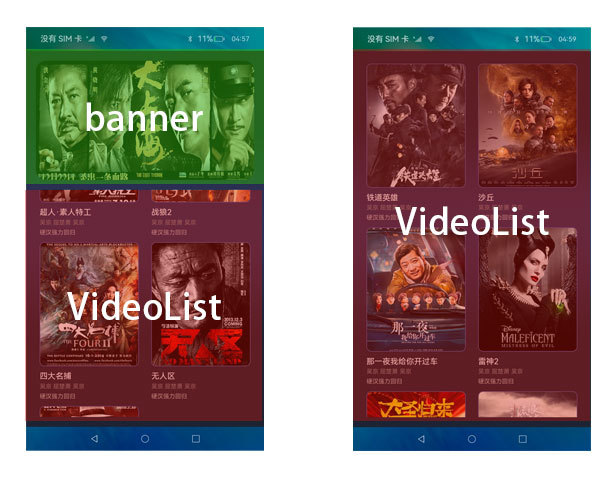
1、触发滑动区域在VideoList,当滑动到VideoList末尾时会出现最后一列的item只显示了部分,滑动区域在VideoList的时候无论怎么向上滑动都无法显示完整;
2、在1的场景下,触发滑动区域在banner,并向上滑动,此时可以看到,页面整体向上移动,VideoList中缺失的item部分可以正常显示,banner划出界面时,VideoList可以显示完整;
3、在2的场景下,整个界面目前都是VideoList区域,VideoList已滑动到的最后,此时向下滑动,因为触发的区域是VideoList,所以整个VideoList向下滑动显示,直到电影列表首项,由于整个页面的可滑动区域都是VideoLIst,无法在触发Scroll的滑动,所以banner无法显示。
这个问题其实就是界面视图高度计算和触发滑动监听被消费后无法再向上层传递导致,解决这个问题有多种方式,下面我介绍其中一种。
解决方案:Scroll组件中可以添加一个Scroller滑动组件的控制器,控制器可以控制组件的滚动,比如滚动的指定高度,或者指定的index,在Grid中也可以添加一个Scroller控制器进行列表高度控制,在Grid还可以通过onScrollIndex()事件监听网格显示的起始位置item发生变化,返回当前的item坐标。当滑动区域在VideoList时,如果item坐标发生了变化,就更新scrollIndex,在Index.ets中监听scrollIndex的变化,当scrollIndex=0时表示已经滑动到VideoList首项,此时再向下滑动时控制Scroll的控制器,让Scroll滑动到(0,0)位置,也就是页面顶部,这样就可以显示banner;当scrollIndex=2时,表示VideoList向上滑动到第二列,此时设置外层Scroll容器的滑动高度,让banner划出界面,使得VideoList可以完整显示。
import { VideoDataSource } from '../model/VideoDataSource'
import { VideoData } from '../model/VideoData'
import { MockVideoData } from '../model/MockVideoData'
import router from '@ohos.router';
import { VideoListView } from '../view/VideoListView'
const TAG: string = 'Splash Index'
@Entry
@Component
struct Index {
  private scrollerForScroll: Scroller = new Scroller()
  @State @Watch('scrollChange') scrollIndex: number = 0

  scrollChange() {
    if (this.scrollIndex === 0) {
      this.scrollToAnimation(0, 0)
    } else if (this.scrollIndex === 2) {
      this.scrollToAnimation(0, 300)
    }
  }
  scrollToAnimation(xOffset, yOffset) {
    this.scrollerForScroll.scrollTo({
      xOffset: xOffset,
      yOffset: yOffset,
      animation: {
        duration: 3000,
        curve: Curve.FastOutSlowIn
      }
    })
  }

  build() {
    Column() {
      Scroll(this.scrollerForScroll) {
        Column() {
          // banner
          VideoListView({
            videoList: $videoList,
            scrollIndex: $scrollIndex,
            isBlackModule: false
          })
        }.width('100%')
      }
      .scrollBar(BarState.Off)
      .scrollable(ScrollDirection.Vertical)
      .scrollBarColor(Color.Gray)
      .scrollBarWidth(30)
      .edgeEffect(EdgeEffect.Spring)
    }
    .width('100%')
    .height('100%')
    .backgroundImage($r('app.media.main_bg'), ImageRepeat.XY)
    .padding(20)
  }

}/**
* 视频列表
*/
import { VideoData } from '../model/VideoData'
import { VideoDataSource } from '../model/VideoDataSource'
import { VideoDataUtils } from '../utils/VideoDataUtils'
import router from '@ohos.router';
const TAG: string = 'VideoListView'
@Component
export struct VideoListView {
private scrollerForGrid: Scroller = new Scroller()
@Link scrollIndex: number
build() {
// 电影列表
Grid(this.scrollerForGrid) {
LazyForEach(new VideoDataSource(this.videoList), (item: VideoData) => {
GridItem() {
// item
}.width('100%')
.margin({
bottom: 10
})
.onClick(() => {
router.pushUrl({ url: 'pages/Playback',
params: {
video_data: item
} }, router.RouterMode.Single)
})
}
}, item => item.id)
}
.columnsTemplate('1fr 1fr')
.columnsGap(10)
.editMode(true)
.cachedCount(6)
.width('100%')
.height('100%')
.border({
width: 0,
color: Color.White
})
.onScrollIndex((first: number) => {
console.info(`${TAG} onScrollIndex ${first}`)
this.scrollIndex = first
if (first === 0) {
this.scrollerForGrid.scrollToIndex(0)
}
})
}
}对于具有离线功能的智能手机应用程序,我正在为Xml文件创建单向文本同步。我希望我的服务器将增量/差异(例如GNU差异补丁)发送到目标设备。这是计划:Time=0Server:hasversion_1ofXmlfile(~800kiB)Client:hasversion_1ofXmlfile(~800kiB)Time=1Server:hasversion_1andversion_2ofXmlfile(each~800kiB)computesdeltaoftheseversions(=patch)(~10kiB)sendspatchtoClient(~10kiBtransferred)Cl
我构建了两个需要相互通信和发送文件的Rails应用程序。例如,一个Rails应用程序会发送请求以查看其他应用程序数据库中的表。然后另一个应用程序将呈现该表的json并将其发回。我还希望一个应用程序将存储在其公共(public)目录中的文本文件发送到另一个应用程序的公共(public)目录。我从来没有做过这样的事情,所以我什至不知道从哪里开始。任何帮助,将不胜感激。谢谢! 最佳答案 无论Rails是什么,几乎所有Web应用程序都有您的要求,大多数现代Web应用程序都需要相互通信。但是有一个小小的理解需要你坚持下去,网站不应直接访问彼此
我尝试运行2.x应用程序。我使用rvm并为此应用程序设置其他版本的ruby:$rvmuseree-1.8.7-head我尝试运行服务器,然后出现很多错误:$script/serverNOTE:Gem.source_indexisdeprecated,useSpecification.Itwillberemovedonorafter2011-11-01.Gem.source_indexcalledfrom/Users/serg/rails_projects_terminal/work_proj/spohelp/config/../vendor/rails/railties/lib/r
刚入门rails,开始慢慢理解。有人可以解释或给我一些关于在application_controller中编码的好处或时间和原因的想法吗?有哪些用例。您如何为Rails应用程序使用应用程序Controller?我不想在那里放太多代码,因为据我了解,每个请求都会调用此Controller。这是真的? 最佳答案 ApplicationController实际上是您应用程序中的每个其他Controller都将从中继承的类(尽管这不是强制性的)。我同意不要用太多代码弄乱它并保持干净整洁的态度,尽管在某些情况下ApplicationContr
我是一个Rails初学者,但我想从我的RailsView(html.haml文件)中查看Ruby变量的内容。我试图在ruby中打印出变量(认为它会在终端中出现),但没有得到任何结果。有什么建议吗?我知道Rails调试器,但更喜欢使用inspect来打印我的变量。 最佳答案 您可以在View中使用puts方法将信息输出到服务器控制台。您应该能够在View中的任何位置使用Haml执行以下操作:-puts@my_variable.inspect 关于ruby-on-rails-如何在我的R
是否可以在应用程序中包含的gem代码中知道应用程序的Rails文件系统根目录?这是gem来源的示例:moduleMyGemdefself.included(base)putsRails.root#returnnilendendActionController::Base.send:include,MyGem谢谢,抱歉我的英语不好 最佳答案 我发现解决类似问题的解决方案是使用railtie初始化程序包含我的模块。所以,在你的/lib/mygem/railtie.rbmoduleMyGemclassRailtie使用此代码,您的模块将在
无论您是想搭建桌面端、WEB端或者移动端APP应用,HOOPSPlatform组件都可以为您提供弹性的3D集成架构,同时,由工业领域3D技术专家组成的HOOPS技术团队也能为您提供技术支持服务。如果您的客户期望有一种在多个平台(桌面/WEB/APP,而且某些客户端是“瘦”客户端)快速、方便地将数据接入到3D应用系统的解决方案,并且当访问数据时,在各个平台上的性能和用户体验保持一致,HOOPSPlatform将帮助您完成。利用HOOPSPlatform,您可以开发在任何环境下的3D基础应用架构。HOOPSPlatform可以帮您打造3D创新型产品,HOOPSSDK包含的技术有:快速且准确的CAD
导读:随着叮咚买菜业务的发展,不同的业务场景对数据分析提出了不同的需求,他们希望引入一款实时OLAP数据库,构建一个灵活的多维实时查询和分析的平台,统一数据的接入和查询方案,解决各业务线对数据高效实时查询和精细化运营的需求。经过调研选型,最终引入ApacheDoris作为最终的OLAP分析引擎,Doris作为核心的OLAP引擎支持复杂地分析操作、提供多维的数据视图,在叮咚买菜数十个业务场景中广泛应用。作者|叮咚买菜资深数据工程师韩青叮咚买菜创立于2017年5月,是一家专注美好食物的创业公司。叮咚买菜专注吃的事业,为满足更多人“想吃什么”而努力,通过美好食材的供应、美好滋味的开发以及美食品牌的孵
在应用开发中,有时候我们需要获取系统的设备信息,用于数据上报和行为分析。那在鸿蒙系统中,我们应该怎么去获取设备的系统信息呢,比如说获取手机的系统版本号、手机的制造商、手机型号等数据。1、获取方式这里分为两种情况,一种是设备信息的获取,一种是系统信息的获取。1.1、获取设备信息获取设备信息,鸿蒙的SDK包为我们提供了DeviceInfo类,通过该类的一些静态方法,可以获取设备信息,DeviceInfo类的包路径为:ohos.system.DeviceInfo.具体的方法如下:ModifierandTypeMethodDescriptionstatic StringgetAbiList()Obt
我们目前正在为ROR3.2开发自定义cms引擎。在这个过程中,我们希望成为我们的rails应用程序中的一等公民的几个类类型起源,这意味着它们应该驻留在应用程序的app文件夹下,它是插件。目前我们有以下类型:数据源数据类型查看我在app文件夹下创建了多个目录来保存这些:应用/数据源应用/数据类型应用/View更多类型将随之而来,我有点担心应用程序文件夹被这么多目录污染。因此,我想将它们移动到一个子目录/模块中,该子目录/模块包含cms定义的所有类型。所有类都应位于MyCms命名空间内,目录布局应如下所示:应用程序/my_cms/data_source应用程序/my_cms/data_ty
