参考资料:
《Spring Microservices in Action》
《Spring Cloud Alibaba 微服务原理与实战》
《B站 尚硅谷 SpringCloud 框架开发教程 周阳》
Spring Cloud 要实现统一配置管理,需要解决两个问题:如何获取远程服务器配置和如何动态更新配置;在这之前,我们先要知道 Spring Cloud 什么时候给我们加载配置文件;
getProperty();@Value 的形式注入业务代码;@EnableDiscoveryClient
@SpringBootApplication
public class ProviderApplication {
public static void main(String[] args) {
//【断点步入】主启动方法
SpringApplication.run(ProviderApplication.class, args);
}
}
SpringApplication.run() 运行方法里会准备 Environment 环境;public ConfigurableApplicationContext run(String... args) {
//初始化StopWatch,调用 start 方法开始计时
StopWatch stopWatch = new StopWatch();
stopWatch.start();
ConfigurableApplicationContext context = null;
Collection<SpringBootExceptionReporter> exceptionReporters = new ArrayList();
//设置系统属性java.awt.headless,这里为true,表示运行在服务器端,在没有显示器和鼠标键盘的模式下工作,模拟输入输出设备功能
this.configureHeadlessProperty();
SpringApplicationRunListeners listeners = this.getRunListeners(args);
//SpringApplicationRunListeners 监听器工作--->发布 ApplicationStartingEvent 事件
listeners.starting();
Collection exceptionReporters;
try {
//持有着 args 参数
ApplicationArguments applicationArguments = new DefaultApplicationArguments(args);
//【断点步入 2.】准备 Environment 环境--->发布 ApplicationEnvironmentPreparedEvent 事件
ConfigurableEnvironment environment = this.prepareEnvironment(listeners, applicationArguments);
this.configureIgnoreBeanInfo(environment);
//打印 banner
Banner printedBanner = this.printBanner(environment);
//创建 SpringBoot 上下文
context = this.createApplicationContext();
exceptionReporters = this.getSpringFactoriesInstances(SpringBootExceptionReporter.class, new Class[]{ConfigurableApplicationContext.class}, context);
//【断点步入 3.】准备应用上下文--->发布 ApplicationEnvironmentPreparedEvent 事件
this.prepareContext(context, environment, listeners, applicationArguments, printedBanner);
//刷新上下文--->发布 ContextRefreshedEvent 事件
this.refreshContext(context);
//在容器完成刷新后,依次调用注册的Runners
this.afterRefresh(context, applicationArguments);
//停止计时
stopWatch.stop();
if (this.logStartupInfo) {
(new StartupInfoLogger(this.mainApplicationClass)).logStarted(this.getApplicationLog(), stopWatch);
}
//SpringApplicationRunListeners 监听器工作--->发布 ApplicationStartedEvent 事件
listeners.started(context);
this.callRunners(context, applicationArguments);
} catch (Throwable var10) {
this.handleRunFailure(context, var10, exceptionReporters, listeners);
throw new IllegalStateException(var10);
}
try {
//【断点步入 4.】SpringApplicationRunListeners 监听程序运行事件--->发布ApplicationReadyEvent事件
listeners.running(context);
return context;
} catch (Throwable var9) {
this.handleRunFailure(context, var9, exceptionReporters, (SpringApplicationRunListeners)null);
throw new IllegalStateException(var9);
}
}
<dependency>
    <groupId>org.springframework.boot</groupId>
    <artifactId>spring-boot-devtools</artifactId>
    <scope>runtime</scope>
    <optional>true</optional>
</dependency>
SpringApplication.prepareEnvironment() 方法里,该方法主要是根据一些信息配置 Environment 环境,然后调用 SpringApplicationRunListeners(Spring 应用运行监听器) 监听器工作;private ConfigurableEnvironment prepareEnvironment(SpringApplicationRunListeners listeners, ApplicationArguments applicationArguments) {
//获取可配置的环境
ConfigurableEnvironment environment = this.getOrCreateEnvironment();
//根据可配置的环境,配置 Environment 环境
this.configureEnvironment((ConfigurableEnvironment)environment, applicationArguments.getSourceArgs());
//【断点步入】告诉监听者 Environment 环境已经准备完毕
listeners.environmentPrepared((ConfigurableEnvironment)environment);
this.bindToSpringApplication((ConfigurableEnvironment)environment);
if (!this.isCustomEnvironment) {
environment = (new EnvironmentConverter(this.getClassLoader())).convertEnvironmentIfNecessary((ConfigurableEnvironment)environment, this.deduceEnvironmentClass());
}
SpringApplicationRunListeners.environmentPrepared() 方法,该方法的作用是遍历每一个监听者,并对这些监听者进行操作;public void environmentPrepared(ConfigurableEnvironment environment) {
//使用迭代器遍历监听者
Iterator var2 = this.listeners.iterator();
while(var2.hasNext()) {
SpringApplicationRunListener listener = (SpringApplicationRunListener)var2.next();
//【断点步入】对每一个监听者进行操作
listener.environmentPrepared(environment);
}
}
EventPublishingRunListener.environmentPrepared() 方法,发现对每一个监听者实现的操作是:使用 SimpleApplicationEventMulticaster(事件主控器) 发布了一个 ApplicationEnvironmentPreparedEvent(应用程序环境准备完成事件);public void environmentPrepared(ConfigurableEnvironment environment) {
//【断点步入】使用事件主控器发布事件
this.initialMulticaster.multicastEvent(new ApplicationEnvironmentPreparedEvent(this.application, this.args, environment));
}
SimpleApplicationEventMulticaster.multicastEvent() 方法public void multicastEvent(ApplicationEvent event, @Nullable ResolvableType eventType) {
//解析出事件类型
ResolvableType type = eventType != null ? eventType : this.resolveDefaultEventType(event);
//获得事件执行者
Executor executor = this.getTaskExecutor();
//获得监听者迭代器
Iterator var5 = this.getApplicationListeners(event, type).iterator();
while(var5.hasNext()) {
ApplicationListener<?> listener = (ApplicationListener)var5.next();
//如果有执行者,就通过执行者发布事件
if (executor != null) {
executor.execute(() -> {
this.invokeListener(listener, event);
});
} else {
//【断点步入 1.2】没有执行者就直接发事件
this.invokeListener(listener, event);
}
}
}
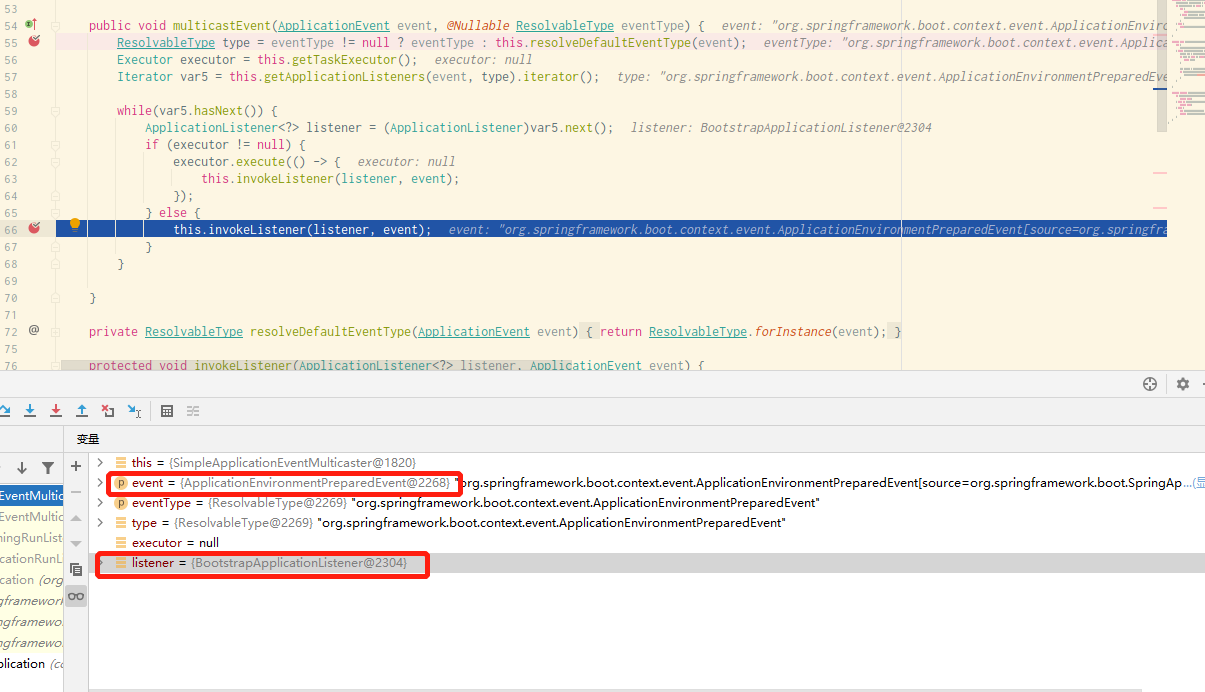
BootstrapApplicationListener.onApplicationEvent() 方法处理事件:public void onApplicationEvent(ApplicationEnvironmentPreparedEvent event) {
//获取当前 Environment 环境
ConfigurableEnvironment environment = event.getEnvironment();
//如果环境可用
if ((Boolean)environment.getProperty("spring.cloud.bootstrap.enabled", Boolean.class, true)) {
//如果环境来源不包含 bootstrap
if (!environment.getPropertySources().contains("bootstrap")) {
ConfigurableApplicationContext context = null;
String configName = environment.resolvePlaceholders("${spring.cloud.bootstrap.name:bootstrap}");
Iterator var5 = event.getSpringApplication().getInitializers().iterator();
while(var5.hasNext()) {
ApplicationContextInitializer<?> initializer = (ApplicationContextInitializer)var5.next();
if (initializer instanceof ParentContextApplicationContextInitializer) {
context = this.findBootstrapContext((ParentContextApplicationContextInitializer)initializer, configName);
}
}
if (context == null) {
//【断点步入】将不是 bootstrap 来源的配置添加进 bootstrap 上下文
context = this.bootstrapServiceContext(environment, event.getSpringApplication(), configName);
event.getSpringApplication().addListeners(new ApplicationListener[]{new BootstrapApplicationListener.CloseContextOnFailureApplicationListener(context)});
}
this.apply(context, event.getSpringApplication(), environment);
}
}
}
BootstrapApplicationListener.bootstrapServiceContext() 方法,发现其主要做的是配置自动导入的实现;private ConfigurableApplicationContext bootstrapServiceContext(ConfigurableEnvironment environment, final SpringApplication application, String configName) {
//省略其他代码
//配置自动装配的实现
builder.sources(new Class[]{BootstrapImportSelectorConfiguration.class});
return context;
}
@Configuration
@Import({BootstrapImportSelector.class}) //使用BootstrapImportSelector类进行自动配置
public class BootstrapImportSelectorConfiguration {
    public BootstrapImportSelectorConfiguration() {
    }
}
selectImports() 方法使用 Spring 中的 SPI 机制;public String[] selectImports(AnnotationMetadata annotationMetadata) {
//省略其他代码
List<String> names = new ArrayList(SpringFactoriesLoader.loadFactoryNames(BootstrapConfiguration.class, classLoader));
}
SpringApplication.run() 方法里,在准备完 Environment 环境后,会调用 SpringApplication.prepareContext() 方法刷新应用上下文。我们进入该方法;private void prepareContext(ConfigurableApplicationContext context, ConfigurableEnvironment environment, SpringApplicationRunListeners listeners, ApplicationArguments applicationArguments, Banner printedBanner) {
//设置上下文的 Environment 环境
context.setEnvironment(environment);
this.postProcessApplicationContext(context);
//【断点步入 3.2】初始化上下文
this.applyInitializers(context);
//【断点步入 3.4】发布上下文初始化完毕事件 ApplicationContextInitializedEvent
listeners.contextPrepared(context);
//后面代码省略
//【断点步入 3.5】这是该方法的最后一条语句,发布
listeners.contextLoaded(context);
}
SpringApplication.applyInitializers() 方法,在应用程序上下文初始化时做一些额外操作;protected void applyInitializers(ConfigurableApplicationContext context) {
Iterator var2 = this.getInitializers().iterator();
while(var2.hasNext()) {
ApplicationContextInitializer initializer = (ApplicationContextInitializer)var2.next();
Class<?> requiredType = GenericTypeResolver.resolveTypeArgument(initializer.getClass(), ApplicationContextInitializer.class);
Assert.isInstanceOf(requiredType, context, "Unable to call initializer.");
//【断点步入】遍历迭代器,初始化上下文
initializer.initialize(context);
}
}
.initialize() 方法最终调用的是 PropertySourceBootstrapConfiguration(Bootstrap 属性源配置类) ,而这个类就是 1.2 里准备 Environment 环境时给我们自动导入的。我们进入 PropertySourceBootstrapConfiguration.initialize() 方法,得出最后结论:public void initialize(ConfigurableApplicationContext applicationContext) {
//省略其他代码
Iterator var5 = this.propertySourceLocators.iterator();
while(var5.hasNext()) {
//PropertySourceLocator 接口的主要作用是实现应用外部化配置可动态加载
PropertySourceLocator locator = (PropertySourceLocator)var5.next();
PropertySource<?> source = null;
//【断点步入】读取 Nacos 服务器里的配置
source = locator.locate(environment);
}
}
NacosPropertySourceLocator.locate() 方法;NacosPropertySourceLocator.locate() 方法源码如下:@Override
public PropertySource<?> locate(Environment env) {
//获取配置服务器实例,这是Nacos客户端提供的用于访问实现配置中心基本操作的类
ConfigService configService = nacosConfigProperties.configServiceInstance();
if (null == configService) {
log.warn("no instance of config service found, can't load config from nacos");
return null;
}
long timeout = nacosConfigProperties.getTimeout();
//Nacos 属性源生成器
nacosPropertySourceBuilder = new NacosPropertySourceBuilder(configService, timeout);
String name = nacosConfigProperties.getName();
//DataId 前缀
String dataIdPrefix = nacosConfigProperties.getPrefix();
if (StringUtils.isEmpty(dataIdPrefix)) {
dataIdPrefix = name;
}
//没有配置 DataId 前缀则用 spring.application.name 属性的值
if (StringUtils.isEmpty(dataIdPrefix)) {
dataIdPrefix = env.getProperty("spring.application.name");
}
//创建复合属性源
CompositePropertySource composite = new CompositePropertySource(NACOS_PROPERTY_SOURCE_NAME);
//加载共享配置
loadSharedConfiguration(composite);
//加载外部配置
loadExtConfiguration(composite);
//加载 Nacos 服务器上应用程序名对应的的配置
loadApplicationConfiguration(composite, dataIdPrefix, nacosConfigProperties, env);
return composite;
}
SpringApplicationRunListeners.contextPrepared() 发布事件;public void contextPrepared(ConfigurableApplicationContext context) {
//构造迭代器
Iterator var2 = this.listeners.iterator();
while(var2.hasNext()) {
SpringApplicationRunListener listener = (SpringApplicationRunListener)var2.next();
//【断点步入】发布事件
listener.contextPrepared(context);
}
}
EventPublishingRunListener.contextPrepared(),通过 multicastEvent 发布事件;public void contextPrepared(ConfigurableApplicationContext context) {
//发布 ApplicationContextInitializedEvent 事件
this.initialMulticaster.multicastEvent(new ApplicationContextInitializedEvent(this.application, this.args, context));
}
SpringApplicationRunListeners.contextLoaded() 配置加载完成;public void contextLoaded(ConfigurableApplicationContext context) {
Iterator var2 = this.listeners.iterator();
while(var2.hasNext()) {
SpringApplicationRunListener listener = (SpringApplicationRunListener)var2.next();
//【断点步入】
listener.contextLoaded(context);
}
}
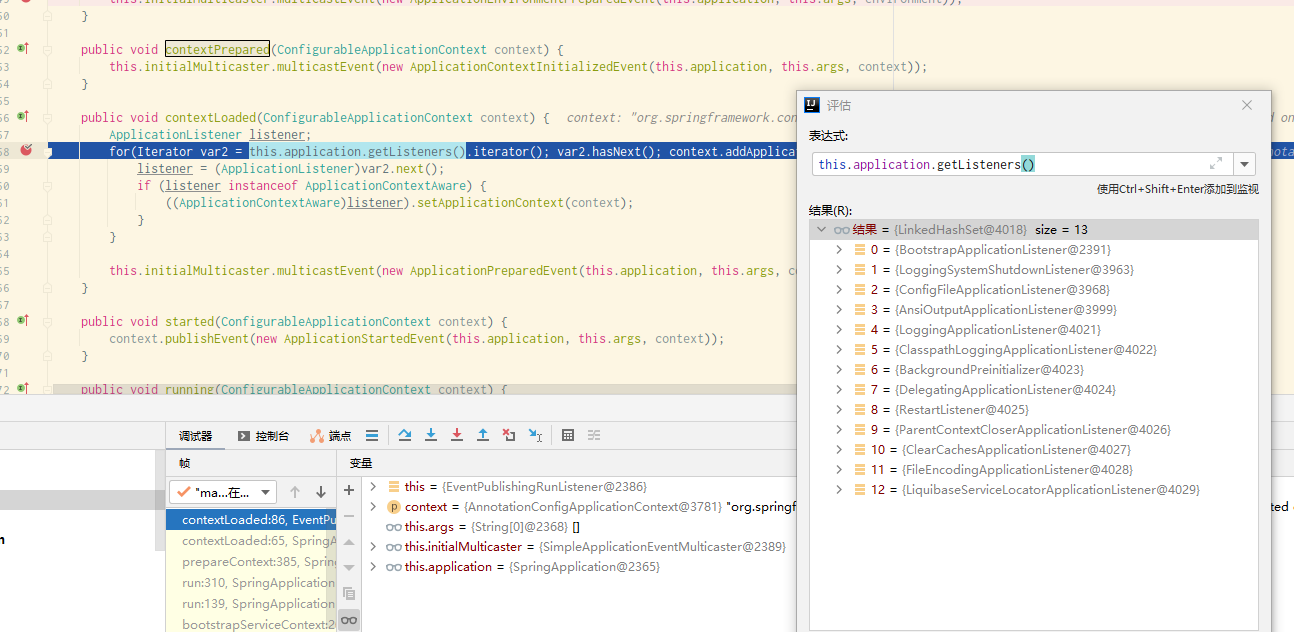
EventPublishingRunListener.contextLoaded() 将监听器添加进上下文环境;public void contextLoaded(ConfigurableApplicationContext context) {
ApplicationListener listener;
//遍历每一个监听器(一共有13个,如下图),将除最后一个监听器外的监听器添加进 context 上下文
for(Iterator var2 = this.application.getListeners().iterator(); var2.hasNext(); context.addApplicationListener(listener)) {
listener = (ApplicationListener)var2.next();
if (listener instanceof ApplicationContextAware) {
//第10个 ParentContextCloseApplicationListener 会进来
((ApplicationContextAware)listener).setApplicationContext(context);
}
}
//发布 ApplicationPreparedEvent 事件
this.initialMulticaster.multicastEvent(new ApplicationPreparedEvent(this.application, this.args, context));
}
SpringApplicationRunListeners.running() 方法,它对每一个监听器操作;public void running(ConfigurableApplicationContext context) {
Iterator var2 = this.listeners.iterator();
while(var2.hasNext()) {
SpringApplicationRunListener listener = (SpringApplicationRunListener)var2.next();
//【断点步入】操作监听器,其中就有 EventPublishingRunListener
listener.running(context);
}
}
EventPublishingRunListener.running() 方法,发布 ApplicationReadyEvent 事件;public void running(ConfigurableApplicationContext context) {
context.publishEvent(new ApplicationReadyEvent(this.application, this.args, context));
}
ApplicationStartingEvent 事件;ApplicationEnvironmentPreparedEvent 事件;ApplicationContextInitializedEvent 事件;ApplicationReadyEvent 事件;
我有一个Ruby程序,它使用rubyzip压缩XML文件的目录树。gem。我的问题是文件开始变得很重,我想提高压缩级别,因为压缩时间不是问题。我在rubyzipdocumentation中找不到一种为创建的ZIP文件指定压缩级别的方法。有人知道如何更改此设置吗?是否有另一个允许指定压缩级别的Ruby库? 最佳答案 这是我通过查看rubyzip内部创建的代码。level=Zlib::BEST_COMPRESSIONZip::ZipOutputStream.open(zip_file)do|zip|Dir.glob("**/*")d
我试图在一个项目中使用rake,如果我把所有东西都放到Rakefile中,它会很大并且很难读取/找到东西,所以我试着将每个命名空间放在lib/rake中它自己的文件中,我添加了这个到我的rake文件的顶部:Dir['#{File.dirname(__FILE__)}/lib/rake/*.rake'].map{|f|requiref}它加载文件没问题,但没有任务。我现在只有一个.rake文件作为测试,名为“servers.rake”,它看起来像这样:namespace:serverdotask:testdoputs"test"endend所以当我运行rakeserver:testid时
我的目标是转换表单输入,例如“100兆字节”或“1GB”,并将其转换为我可以存储在数据库中的文件大小(以千字节为单位)。目前,我有这个:defquota_convert@regex=/([0-9]+)(.*)s/@sizes=%w{kilobytemegabytegigabyte}m=self.quota.match(@regex)if@sizes.include?m[2]eval("self.quota=#{m[1]}.#{m[2]}")endend这有效,但前提是输入是倍数(“gigabytes”,而不是“gigabyte”)并且由于使用了eval看起来疯狂不安全。所以,功能正常,
Rails2.3可以选择随时使用RouteSet#add_configuration_file添加更多路由。是否可以在Rails3项目中做同样的事情? 最佳答案 在config/application.rb中:config.paths.config.routes在Rails3.2(也可能是Rails3.1)中,使用:config.paths["config/routes"] 关于ruby-on-rails-Rails3中的多个路由文件,我们在StackOverflow上找到一个类似的问题
对于具有离线功能的智能手机应用程序,我正在为Xml文件创建单向文本同步。我希望我的服务器将增量/差异(例如GNU差异补丁)发送到目标设备。这是计划:Time=0Server:hasversion_1ofXmlfile(~800kiB)Client:hasversion_1ofXmlfile(~800kiB)Time=1Server:hasversion_1andversion_2ofXmlfile(each~800kiB)computesdeltaoftheseversions(=patch)(~10kiB)sendspatchtoClient(~10kiBtransferred)Cl
我正在寻找执行以下操作的正确语法(在Perl、Shell或Ruby中):#variabletoaccessthedatalinesappendedasafileEND_OF_SCRIPT_MARKERrawdatastartshereanditcontinues. 最佳答案 Perl用__DATA__做这个:#!/usr/bin/perlusestrict;usewarnings;while(){print;}__DATA__Texttoprintgoeshere 关于ruby-如何将脚
使用带有Rails插件的vim,您可以创建一个迁移文件,然后一次性打开该文件吗?textmate也可以这样吗? 最佳答案 你可以使用rails.vim然后做类似的事情::Rgeneratemigratonadd_foo_to_bar插件将打开迁移生成的文件,这正是您想要的。我不能代表textmate。 关于ruby-使用VimRails,您可以创建一个新的迁移文件并一次性打开它吗?,我们在StackOverflow上找到一个类似的问题: https://sta
鉴于我有以下迁移:Sequel.migrationdoupdoalter_table:usersdoadd_column:is_admin,:default=>falseend#SequelrunsaDESCRIBEtablestatement,whenthemodelisloaded.#Atthispoint,itdoesnotknowthatusershaveais_adminflag.#Soitfails.@user=User.find(:email=>"admin@fancy-startup.example")@user.is_admin=true@user.save!ende
好的,所以我的目标是轻松地将一些数据保存到磁盘以备后用。您如何简单地写入然后读取一个对象?所以如果我有一个简单的类classCattr_accessor:a,:bdefinitialize(a,b)@a,@b=a,bendend所以如果我从中非常快地制作一个objobj=C.new("foo","bar")#justgaveitsomerandomvalues然后我可以把它变成一个kindaidstring=obj.to_s#whichreturns""我终于可以将此字符串打印到文件或其他内容中。我的问题是,我该如何再次将这个id变回一个对象?我知道我可以自己挑选信息并制作一个接受该信
我正在编写一个小脚本来定位aws存储桶中的特定文件,并创建一个临时验证的url以发送给同事。(理想情况下,这将创建类似于在控制台上右键单击存储桶中的文件并复制链接地址的结果)。我研究过回形针,它似乎不符合这个标准,但我可能只是不知道它的全部功能。我尝试了以下方法:defauthenticated_url(file_name,bucket)AWS::S3::S3Object.url_for(file_name,bucket,:secure=>true,:expires=>20*60)end产生这种类型的结果:...-1.amazonaws.com/file_path/file.zip.A
