Apache HTTP Server(简称Apache),中文名:阿帕奇,是Apache软件基金会的一个开放源码的网页服务器
Apache HTTP服务器是一个模块化的服务器,源于NCSAhttpd服务器,经过多次修改,成为世界使用排名第一的Web服务器软件
它快速、可靠并且可通过简单的API扩展,将Perl/Python等解释器编译到服务器中,可以在大多数计算机操作系统中运行,由于其跨平台和安全性被广泛使用,是最流行的Web服务器端软件之一
为了避免不必要的麻烦,我们先关闭防火墙和selinux,等搭建成功之后再开启防火墙和相应的端口
[root@centos7 ~]# systemctl status firewalld.service        # 查看防火墙状态
[root@centos7 ~]# systemctl stop firewalld.service          # 停止防火墙服务
[root@centos7 ~]# systemctl disable firewalld.service       # 关闭防火墙开启自启动
# 把文件中的SELINUX=enforcing 改为SELINUX=disabled
[root@centos7 ~]# vim /etc/selinux/config
[root@centos7 ~]# setenforce 0                              # 使修改马上生效
查看一下系统版本
[root@centos7 ~]# rpm -q centos-release
centos-release-7-9.2009.0.el7.centos.x86_64
查看是否已经安装了http服务器
# 如果没有返回任何结果,表示没有安装;如果返回文件包名,这表示已经安装了该服务;
[root@centos7 ~]# httpd -version
Server version: Apache/2.4.6 (CentOS)
Server built:   Oct  1 2020 16:52:05            # 代表已安装
[root@centos7 ~]# rpm -qa|grep httpd
httpd-manual-2.4.6-95.el7.centos.noarch
httpd-tools-2.4.6-95.el7.centos.x86_64
httpd-2.4.6-95.el7.centos.x86_64                # 代表已安装
[root@centos7 ~]# rpm -e httpd-manual-2.4.6-95.el7.centos.noarch    # 卸载httpd
[root@centos7 ~]# rpm -e httpd-2.4.6-95.el7.centos.x86_64
[root@centos7 ~]# rpm -e httpd-tools-2.4.6-95.el7.centos.x86_64
# 再次检查
[root@centos7 ~]# rpm -qa|grep httpd
[root@centos7 ~]# httpd -version
-bash: /usr/sbin/httpd: 没有那个文件或目录.
开始安装
yum在线安装方式[root@centos7 ~]# yum install -y mod_ssl openssl httpd

rpm离线安装方式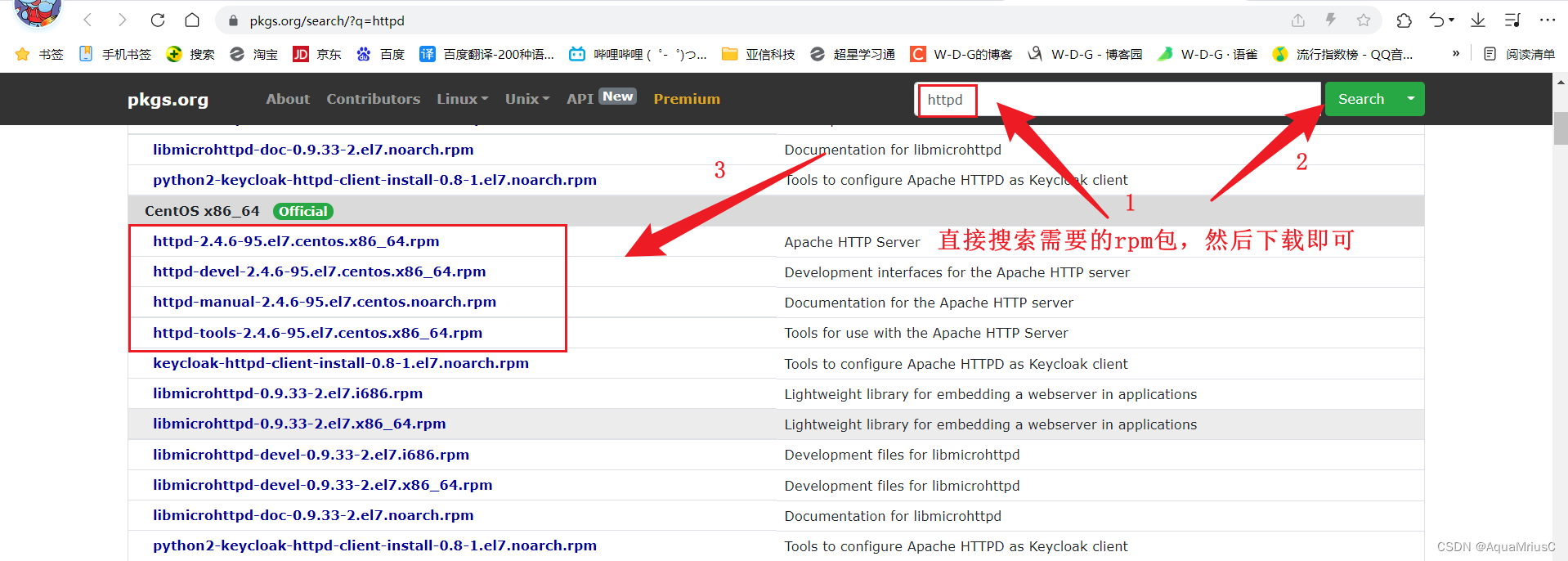
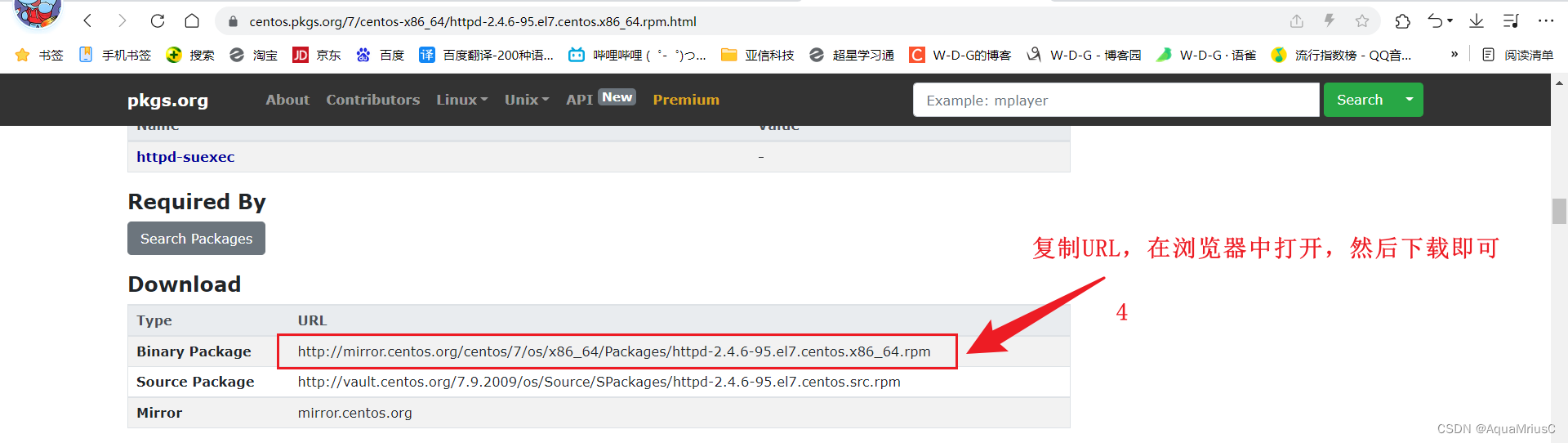
# 进入准备好httpd服务所需要依赖的目录
[root@centos7 ~]# cd /data/http/httpuser/
[root@centos7 httpuser]# ll
总用量 4740
-rw-r--r-- 1 sftpuser sftp  106124 8月  12 23:55 apr-1.4.8-7.el7.x86_64.rpm
-rw-r--r-- 1 sftpuser sftp   94132 8月  12 23:55 apr-util-1.5.2-6.el7.x86_64.rpm
-rw-r--r-- 1 sftpuser sftp   18976 8月  12 23:55 apr-util-ldap-1.5.2-6.el7.x86_64.rpm
-rw-r--r-- 1 sftpuser sftp 2846172 8月  12 23:55 httpd-2.4.6-95.el7.centos.x86_64.rpm
-rw-r--r-- 1 sftpuser sftp 1409564 8月  13 10:21 httpd-manual-2.4.6-95.el7.centos.noarch.rpm
-rw-r--r-- 1 sftpuser sftp   95136 8月  12 23:55 httpd-tools-2.4.6-95.el7.centos.x86_64.rpm
-rw-r--r-- 1 sftpuser sftp   31264 8月  12 23:55 mailcap-2.1.41-2.el7.noarch.rpm
-rw-r--r-- 1 sftpuser sftp  116812 8月  12 23:55 mod_ssl-2.4.6-95.el7.centos.x86_64.rpm
-rw-r--r-- 1 sftpuser sftp  239900 8月  12 23:55 postgresql-libs-9.2.24-4.el7_8.x86_64.rpm

# 开始安装
- 安装依赖的顺序按照以下先后顺序进行
- 安装rpm包的命令:rpm -ivh 包名
[root@centos7 httpuser]# rpm -ivh apr-1.4.8-7.el7.x86_64.rpm
[root@centos7 httpuser]# rpm -ivh apr-util-1.5.2-6.el7.x86_64.rpm
[root@centos7 httpuser]# rpm -ivh apr-util-ldap-1.5.2-6.el7.x86_64.rpm
[root@centos7 httpuser]# rpm -ivh mailcap-2.1.41-2.el7.noarch.rpm
[root@centos7 httpuser]# rpm -ivh postgresql-libs-9.2.24-4.el7_8.x86_64.rpm
[root@centos7 httpuser]# rpm -ivh httpd-tools-2.4.6-95.el7.centos.x86_64.rpm
[root@centos7 httpuser]# rpm -ivh httpd-2.4.6-95.el7.centos.x86_64.rpm
[root@centos7 httpuser]# rpm -ivh httpd-manual-2.4.6-95.el7.centos.noarch.rpm
[root@centos7 httpuser]# rpm -ivh mod_ssl-2.4.6-95.el7.centos.x86_64.rpm
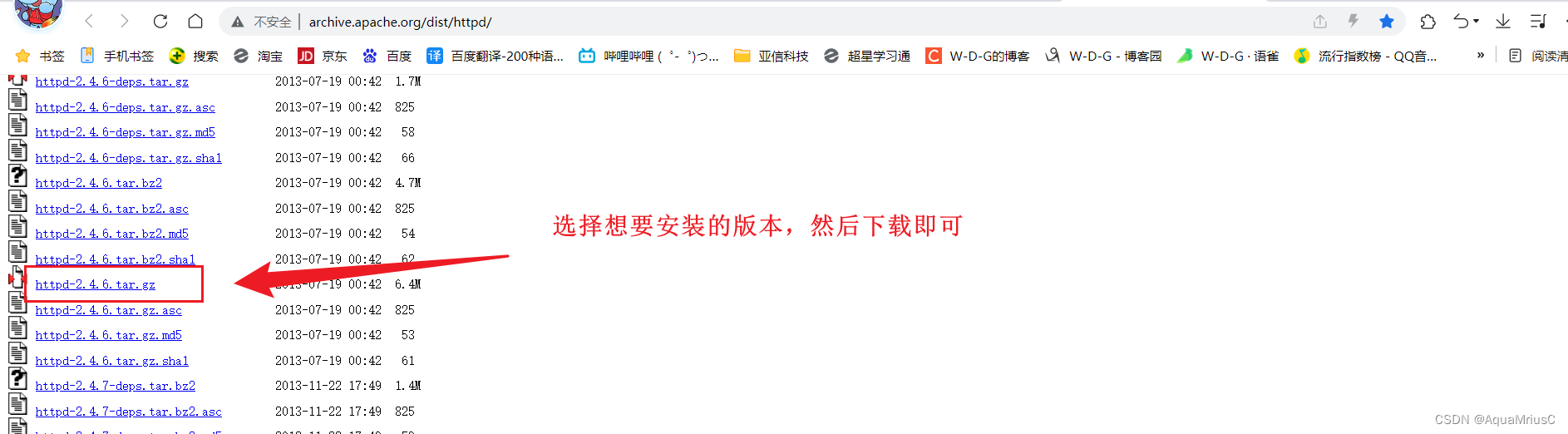
tar.gz编译安装方式*.tar.gz下载 此方法的安装过程自行百度,此处不在做介绍
设置为开机自动启动服务
[root@centos7 ~]# systemctl enable httpd.service
启动httpd服务
# http服务器的服务名是httpd,相关的操作如下:
[root@centos7 ~]# systemctl start  httpd.service      # 启动服务
systemctl stop  httpd.service                         # 停止服务
systemctl restart httpd.service                       # 重启服务
systemctl status httpd.service                        # 查看服务状态
systemctl enable httpd.service                        # 设置开机自启动httpd服务
systemctl disable httpd.service                       # 禁用开机自启动httpd服务
备份配置文件
# Apache默认将网站的根目录指向/var/www/html
# 默认的主配置文件/etc/httpd/conf/httpd.conf
# 配置存储在的/etc/httpd/conf.d/目录

# 防止后期配置文件出错后无法还原
[root@centos7 ~]# cp /etc/httpd/conf/httpd.conf /etc/httpd/conf/httpd.conf.backup
[root@centos7 ~]# cd /etc/httpd/conf/
[root@centos7 ssh]# ll
......
-rw-r--r-- 1 root root 11752 8月  13 12:02 httpd.conf
-rw-r--r-- 1 root root 11752 8月  16 22:10 httpd.conf.backup
......
其余配置默认就好
新建一个测试文件
# 先新建一个存放文件的文件夹并授权
[root@centos7 ~]# mkdir -p /var/www/html/upload
[root@centos7 ~]# chmod 755 /var/www/html/upload
# 进入文件夹
[root@centos7 ~]# cd /var/www/html/upload
# 新建测试文件,然后保存退出
[root@centos7 ~]# vim 测试_20220712.txt
[root@centos7 upload]#
systemctl enable firewalld.service                   # 重启防火墙开机自启动
systemctl restart firewalld.service                  # 重启防火墙服务
firewall-cmd --version                               # 查看防火墙版本
firewall-cmd --list-all       					     # 查看已开放的端口
firewall-cmd --query-port=80/tcp                     # 查询TCP的80端口占用情况
firewall-cmd --permanent --zone=public --add-port=80/tcp     # 开通http服务80端口
firewall-cmd --reload                                # 刷新防火墙,重新载入
# 设置关闭SELinux对ftp的限制
setsebool -P ftpd_full_access on
sed -i s#enforcing#disabled#g /etc/sysconfig/selinux
setenforce 0 && getenforce
getenforce
systemctl restart httpd.service
至此,HTTP其实就已经搭建成功,可以登录了!
查看IP地址
ip addr
注意:
公网ip地址固定ip地址,下图用的就是固定ip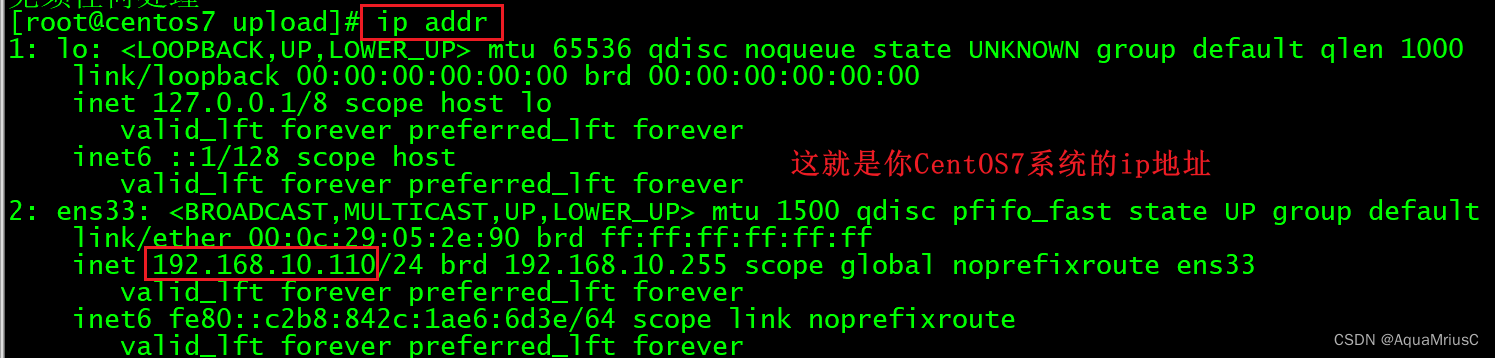
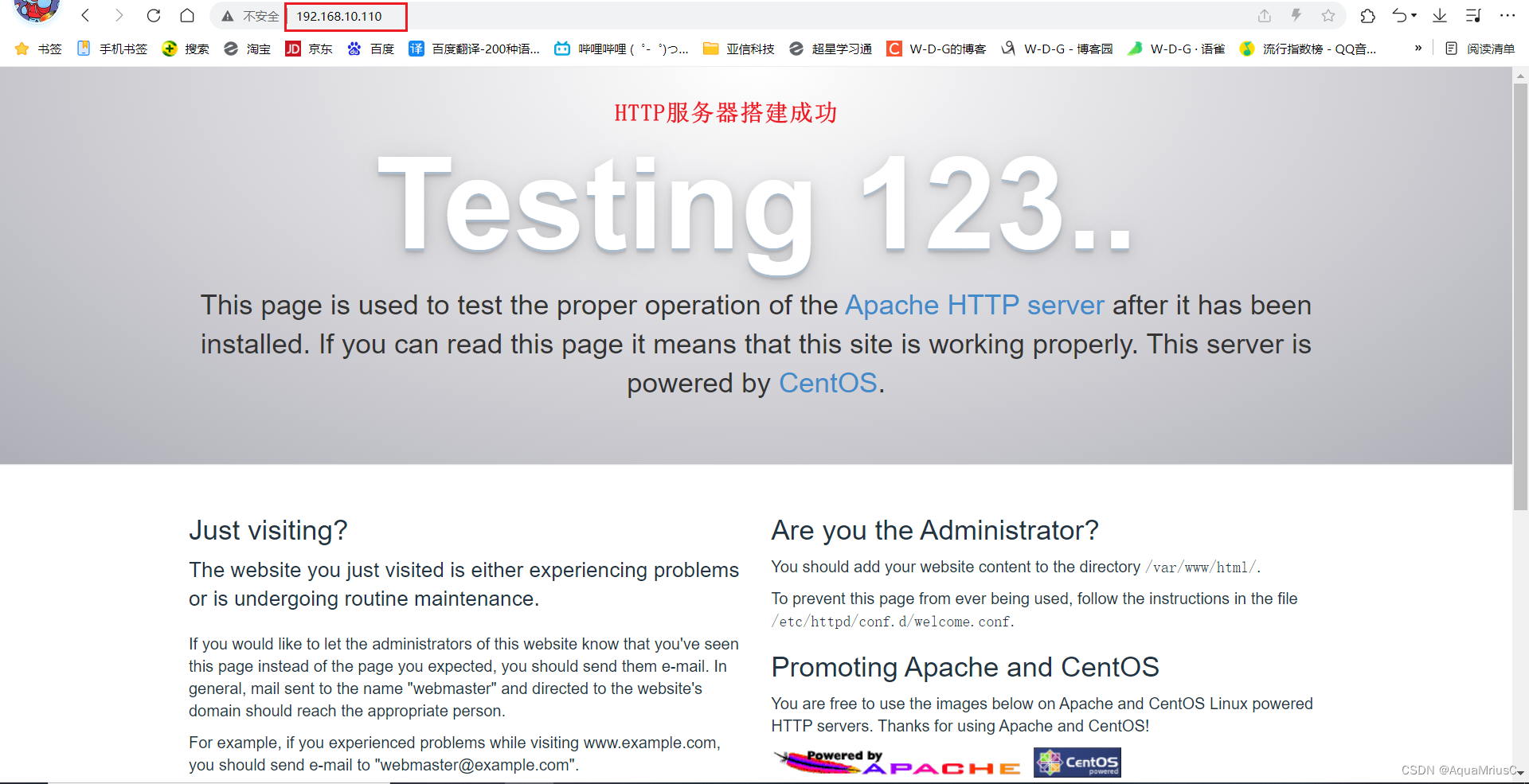
浏览器访问测试
在浏览器中输入:http://你的ip地址,显示如下
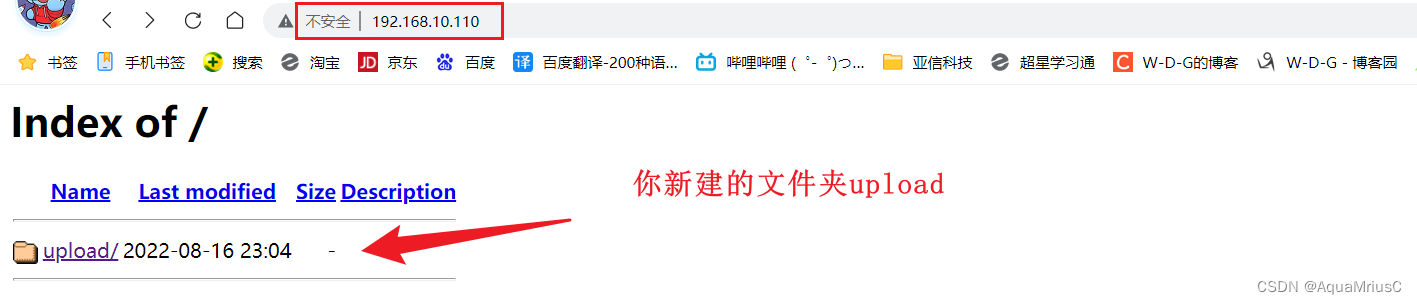
文件目录列表访问问题
vim /etc/httpd/conf.d/welcome.conf
# 修改/etc/httpd/conf.d/welcome.conf配置文件
# 把Options -Indexes中的减号改为加号
......
<LocationMatch "^/+$">
    Options +Indexes
    ErrorDocument 403 /.noindex.html
</LocationMatch>
......
# 重启httpd服务
[root@centos7 ~]# systemctl restart httpd.service
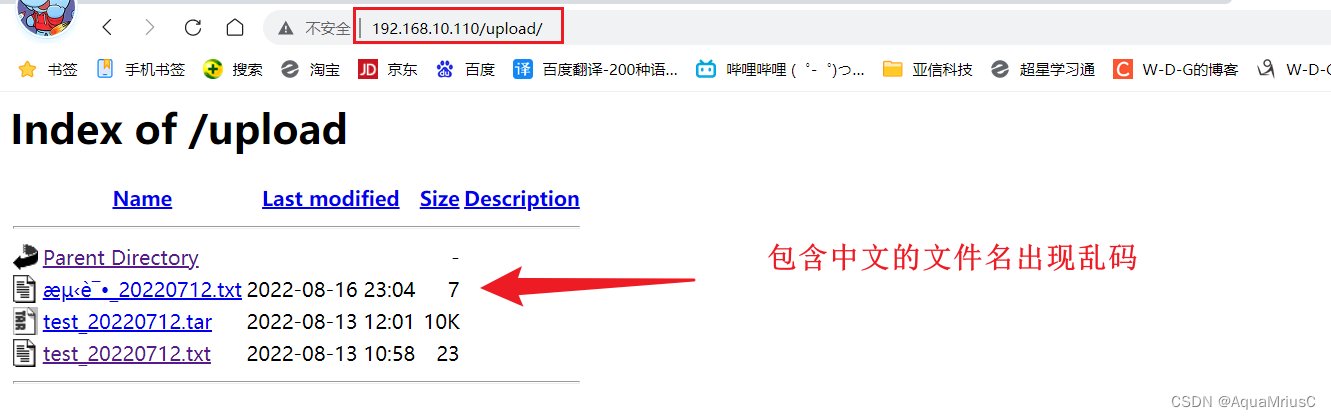
静态资源名称乱码问题
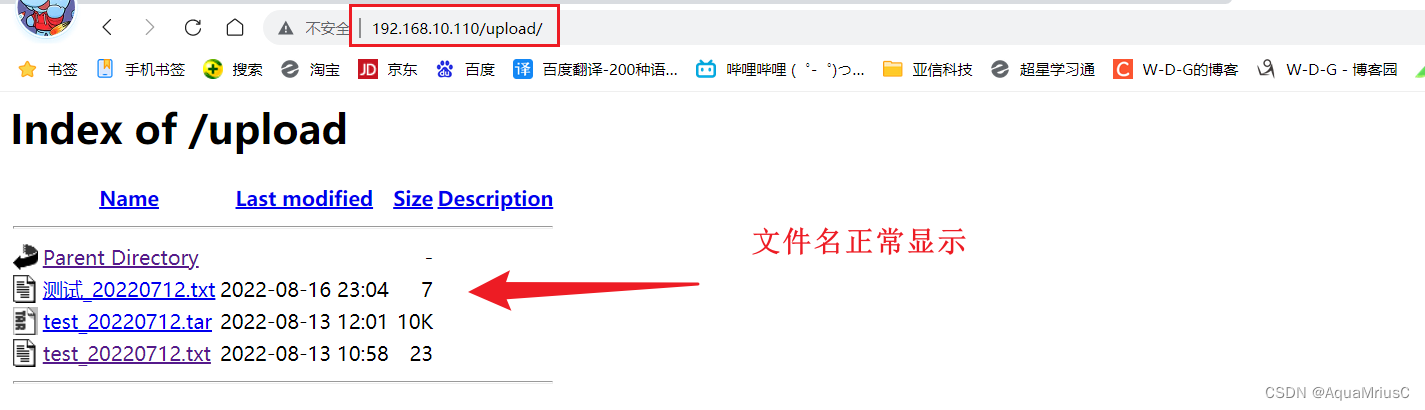
vim /etc/httpd/conf/httpd.conf
# 编辑httpd配置文件,增加(或修改)页面的默认编码类型为UTF-8
......
IndexOptions Charset=UTF-8
......
# 重启httpd服务
[root@centos7 ~]# systemctl restart httpd.service
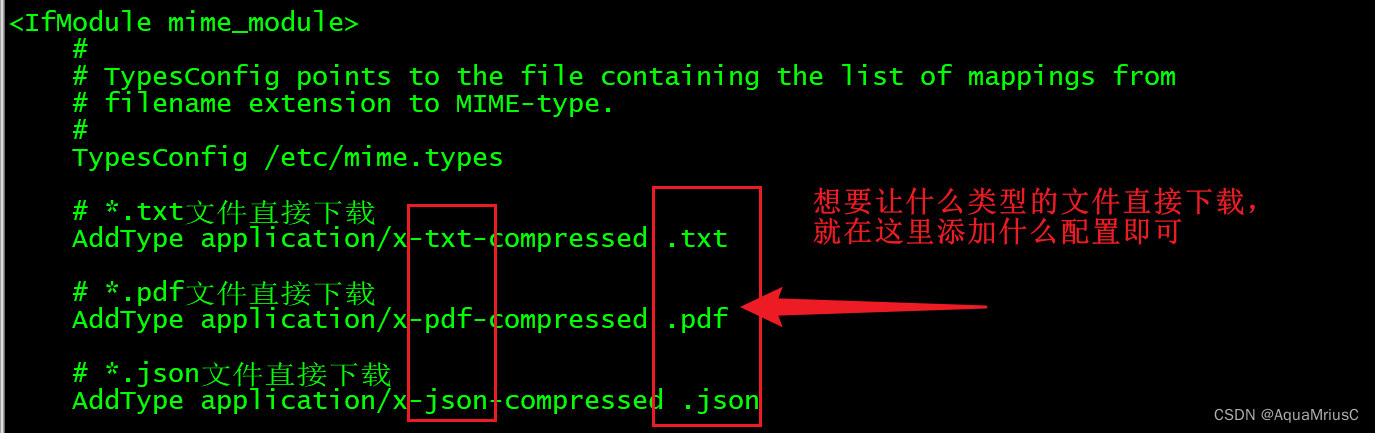
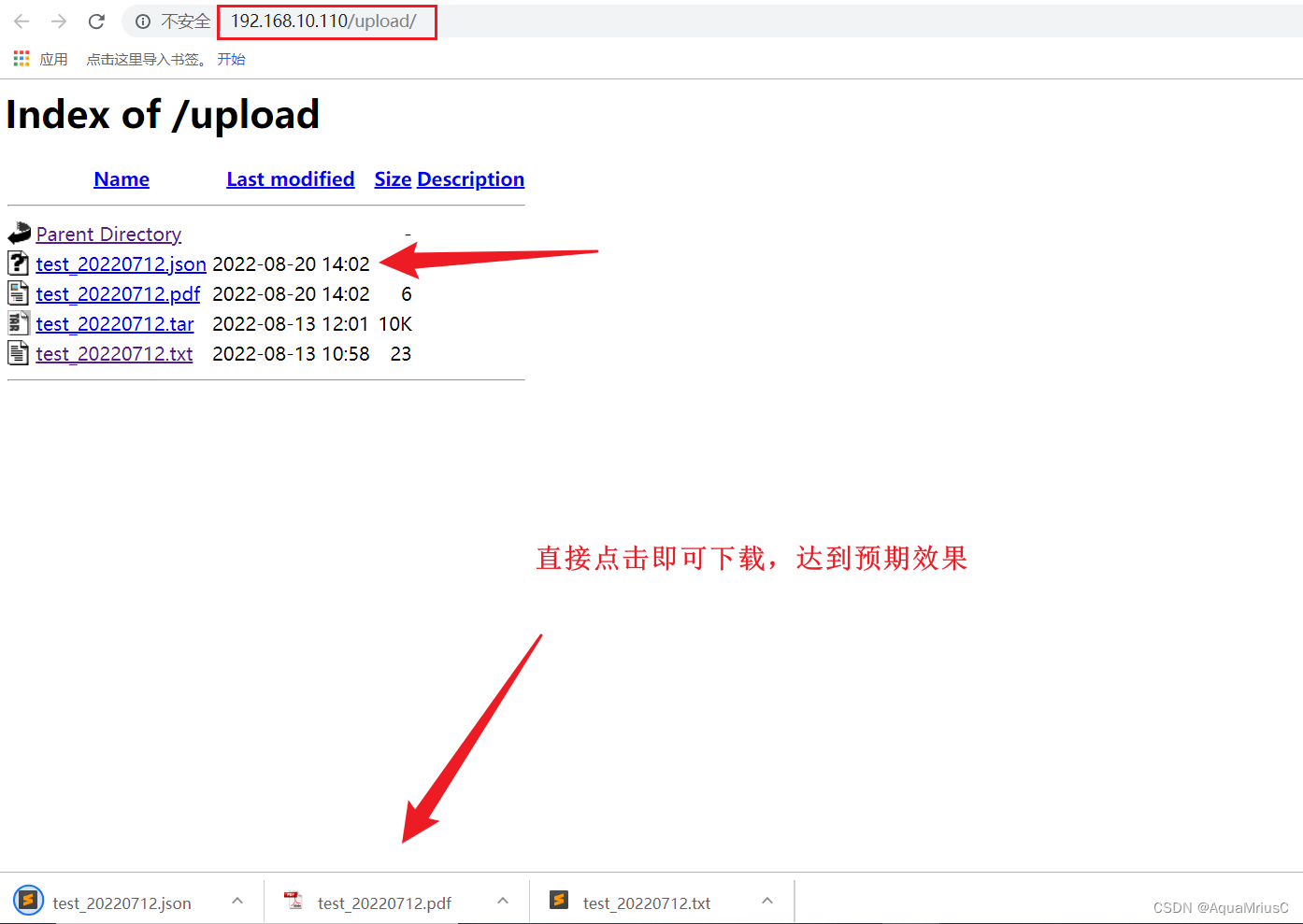
点击链接直接在浏览器中打开的问题

vim /etc/httpd/conf/httpd.conf
# 编辑本地配置文件,将预期直接下载的文件扩展名配置上
# *.txt文件直接下载
AddType application/x-txt-compressed .txt
# *.pdf文件直接下载
AddType application/x-pdf-compressed .pdf
# *.json文件直接下载
AddType application/x-json-compressed .json

# 重启httpd服务
[root@centos7 ~]# systemctl restart httpd.service
# 清理浏览器缓存
注意:
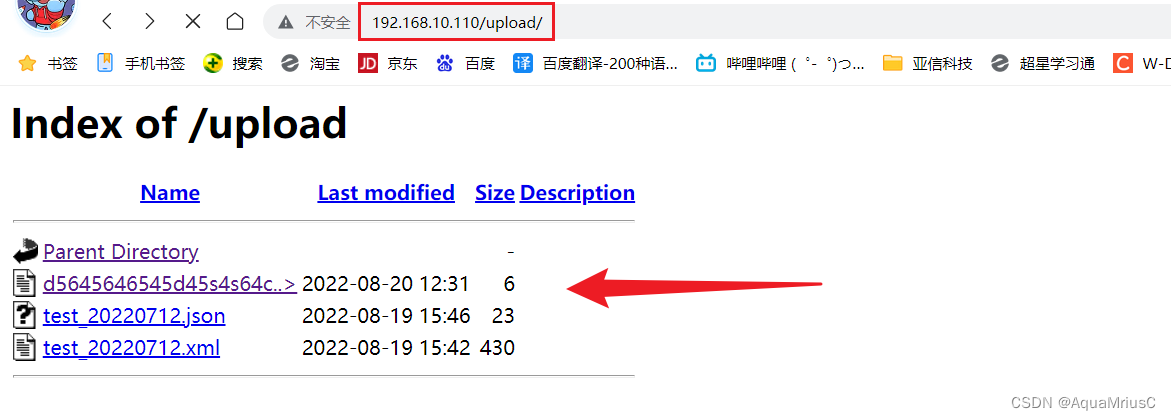
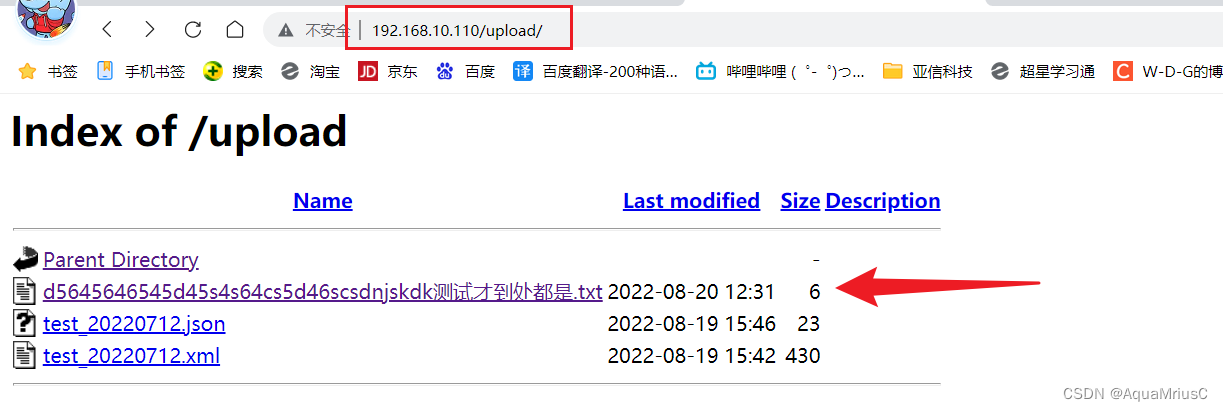
文件名较长显示不全的问题
vim /etc/httpd/conf.d/autoindex.conf
# 编辑httpd配置文件,增加(或修改)索引名长度限制为*(任意长度,不作限制)
......
IndexOptions FancyIndexing HTMLTable VersionSort NameWidth=*
......
# 重启httpd服务
[root@centos7 ~]# systemctl restart httpd.service
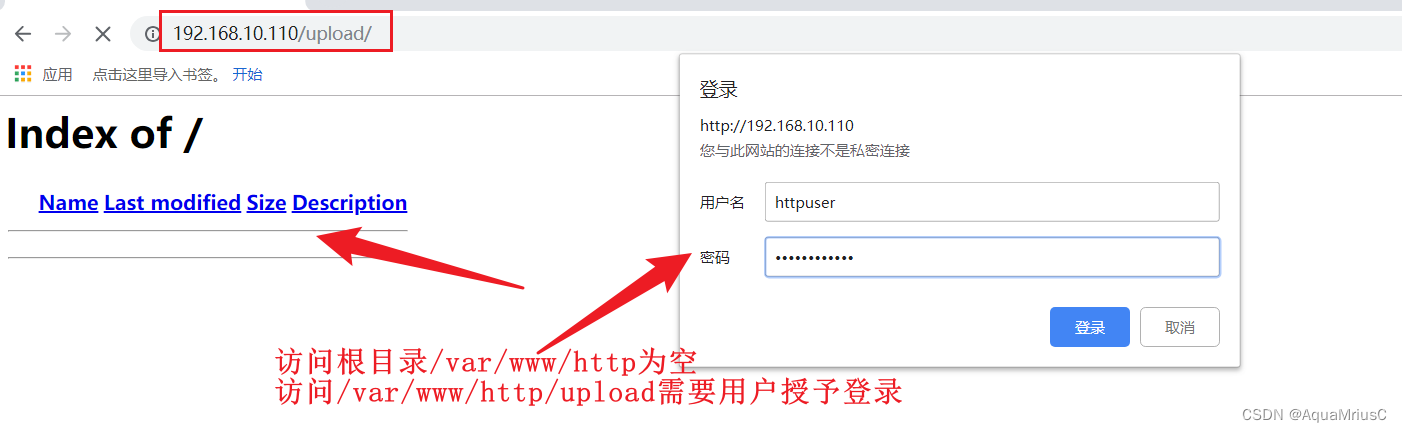
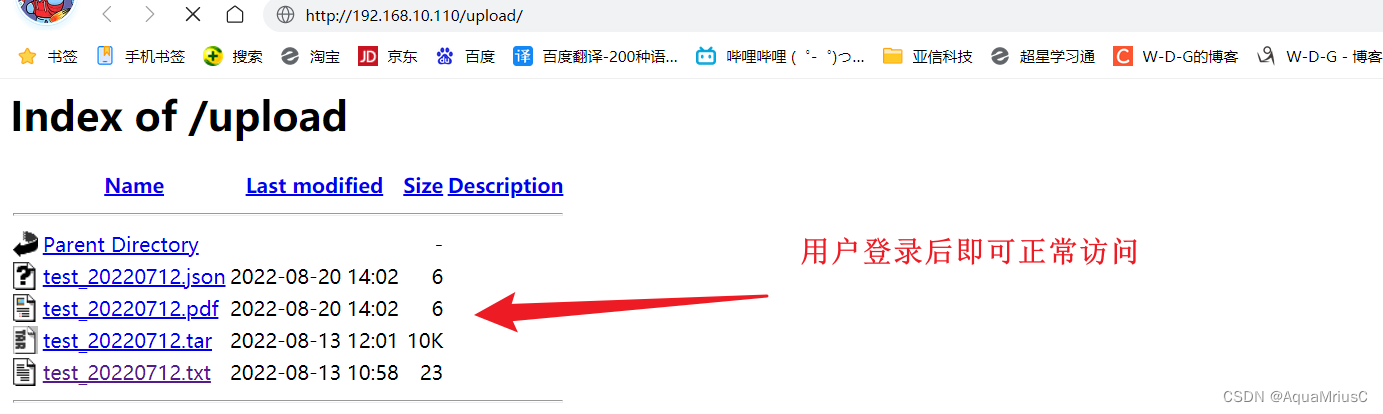
指定目录启用用户授权的问题
# 添加访问用户并设置密码
[root@centos7 ~]# htpasswd -c /etc/httpd/auth.pwd httpuser
New password:            # 密码输入不显示,正常输入后直接按回车就行
Re-type new password:
Adding password for user httpuser
[root@centos7 ~]#

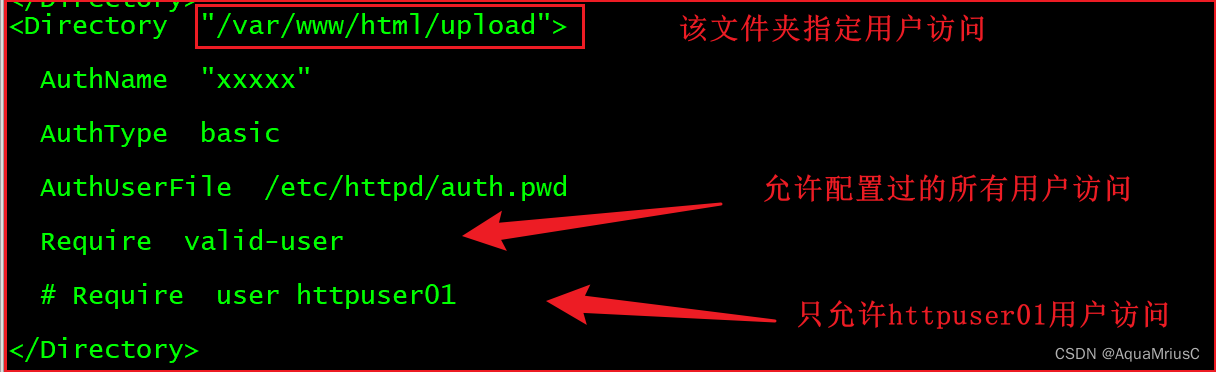
# 添加用户访问权限配置,直接在配置文件中新增以下内容即可
[root@centos7 ~]# vim /etc/httpd/conf/httpd.conf
<Directory  "/var/www/html/upload">
  AuthName  "xxxxx"
  AuthType  basic
  AuthUserFile  /etc/httpd/auth.pwd
  Require  valid-user
  # Require  user httpuser01
</Directory>

# 重启httpd服务
[root@centos7 ~]# systemctl restart httpd.service
参考网址:
我正在尝试使用ruby和Savon来使用网络服务。测试服务为http://www.webservicex.net/WS/WSDetails.aspx?WSID=9&CATID=2require'rubygems'require'savon'client=Savon::Client.new"http://www.webservicex.net/stockquote.asmx?WSDL"client.get_quotedo|soap|soap.body={:symbol=>"AAPL"}end返回SOAP异常。检查soap信封,在我看来soap请求没有正确的命名空间。任何人都可以建议我
我想安装一个带有一些身份验证的私有(private)Rubygem服务器。我希望能够使用公共(public)Ubuntu服务器托管内部gem。我读到了http://docs.rubygems.org/read/chapter/18.但是那个没有身份验证-如我所见。然后我读到了https://github.com/cwninja/geminabox.但是当我使用基本身份验证(他们在他们的Wiki中有)时,它会提示从我的服务器获取源。所以。如何制作带有身份验证的私有(private)Rubygem服务器?这是不可能的吗?谢谢。编辑:Geminabox问题。我尝试“捆绑”以安装新的gem..
我想为Heroku构建一个Rails3应用程序。他们使用Postgres作为他们的数据库,所以我通过MacPorts安装了postgres9.0。现在我需要一个postgresgem并且共识是出于性能原因你想要pggem。但是我对我得到的错误感到非常困惑当我尝试在rvm下通过geminstall安装pg时。我已经非常明确地指定了所有postgres目录的位置可以找到但仍然无法完成安装:$envARCHFLAGS='-archx86_64'geminstallpg--\--with-pg-config=/opt/local/var/db/postgresql90/defaultdb/po
我打算为ruby脚本创建一个安装程序,但我希望能够确保机器安装了RVM。有没有一种方法可以完全离线安装RVM并且不引人注目(通过不引人注目,就像创建一个可以做所有事情的脚本而不是要求用户向他们的bash_profile或bashrc添加一些东西)我不是要脚本本身,只是一个关于如何走这条路的快速指针(如果可能的话)。我们还研究了这个很有帮助的问题:RVM-isthereawayforsimpleofflineinstall?但有点误导,因为答案只向我们展示了如何离线在RVM中安装ruby。我们需要能够离线安装RVM本身,并查看脚本https://raw.github.com/wayn
我有一个奇怪的问题:我在rvm上安装了rubyonrails。一切正常,我可以创建项目。但是在我输入“railsnew”时重新启动后,我有“程序'rails'当前未安装。”。SystemUbuntu12.04ruby-v"1.9.3p194"gemlistactionmailer(3.2.5)actionpack(3.2.5)activemodel(3.2.5)activerecord(3.2.5)activeresource(3.2.5)activesupport(3.2.5)arel(3.0.2)builder(3.0.0)bundler(1.1.4)coffee-rails(
我刚刚为fedora安装了emacs。我想用emacs编写ruby。为ruby提供代码提示、代码完成类型功能所需的工具、扩展是什么? 最佳答案 ruby-mode已经包含在Emacs23之后的版本中。不过,它也可以通过ELPA获得。您可能感兴趣的其他一些事情是集成RVM、feature-mode(Cucumber)、rspec-mode、ruby-electric、inf-ruby、rinari(用于Rails)等。这是我当前用于Ruby开发的Emacs配置:https://github.com/citizen428/emacs
是的,我知道最好使用webmock,但我想知道如何在RSpec中模拟此方法:defmethod_to_testurl=URI.parseurireq=Net::HTTP::Post.newurl.pathres=Net::HTTP.start(url.host,url.port)do|http|http.requestreq,foo:1endresend这是RSpec:let(:uri){'http://example.com'}specify'HTTPcall'dohttp=mock:httpNet::HTTP.stub!(:start).and_yieldhttphttp.shou
我正在尝试在我的centos服务器上安装therubyracer,但遇到了麻烦。$geminstalltherubyracerBuildingnativeextensions.Thiscouldtakeawhile...ERROR:Errorinstallingtherubyracer:ERROR:Failedtobuildgemnativeextension./usr/local/rvm/rubies/ruby-1.9.3-p125/bin/rubyextconf.rbcheckingformain()in-lpthread...yescheckingforv8.h...no***e
我有一个在Linux服务器上运行的ruby脚本。它不使用rails或任何东西。它基本上是一个命令行ruby脚本,可以像这样传递参数:./ruby_script.rbarg1arg2如何将参数抽象到配置文件(例如yaml文件或其他文件)中?您能否举例说明如何做到这一点?提前谢谢你。 最佳答案 首先,您可以运行一个写入YAML配置文件的独立脚本:require"yaml"File.write("path_to_yaml_file",[arg1,arg2].to_yaml)然后,在您的应用中阅读它:require"yaml"arg
我的最终目标是安装当前版本的RubyonRails。我在OSXMountainLion上运行。到目前为止,这是我的过程:已安装的RVM$\curl-Lhttps://get.rvm.io|bash-sstable检查已知(我假设已批准)安装$rvmlistknown我看到当前的稳定版本可用[ruby-]2.0.0[-p247]输入命令安装$rvminstall2.0.0-p247注意:我也试过这些安装命令$rvminstallruby-2.0.0-p247$rvminstallruby=2.0.0-p247我很快就无处可去了。结果:$rvminstall2.0.0-p247Search
