前面我们编写的规则文件都是drl形式的文件,Drools除了支持drl形式的文件外还支持xls格式的文件(即Excel文件)。这种xls格式的文件通常称为决策表(decision table)。
决策表(decision table)是一个“精确而紧凑的”表示条件逻辑的方式,非常适合商业级别的规则。决策表与现有的drl文件可以无缝替换。Drools提供了相应的API可以将xls文件编译为drl格式的字符串。
一个决策表的例子如下:
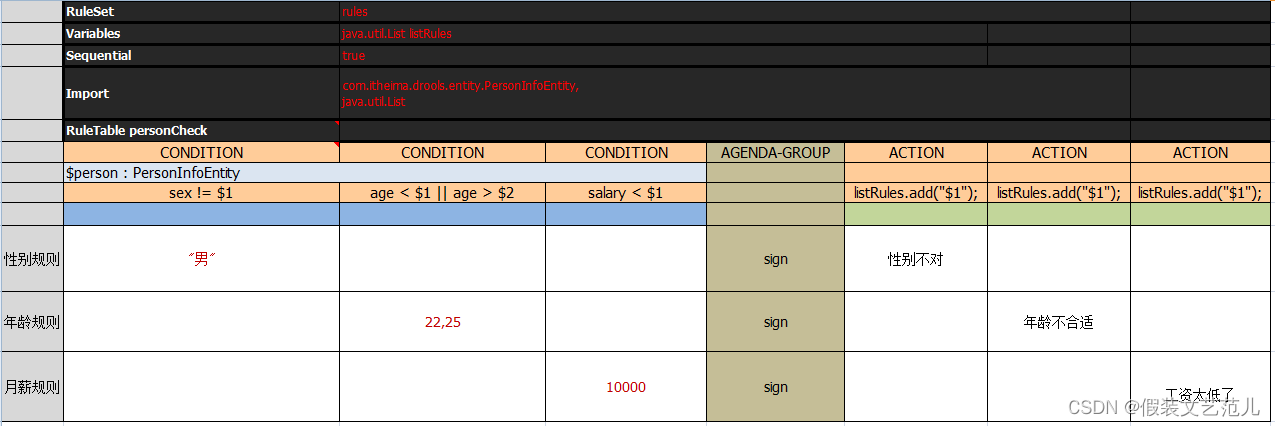
决策表语法:
| 关键字 | 说明 | 是否必须 |
|---|---|---|
| RuleSet | 相当于drl文件中的package | 必须,只能有一个。如果没有设置RuleSet对应的值则使用默认值rule_table |
| Sequential | 取值为Boolean类型。true表示规则按照表格自上到下的顺序执行,false表示乱序 | 可选 |
| Import | 相当于drl文件中的import,如果引入多个类则类之间用逗号分隔 | 可选 |
| Variables | 相当于drl文件中的global,用于定义全局变量,如果有多个全局变量则中间用逗号分隔 | 可选 |
| RuleTable | 它指示了后面将会有一批rule,RuleTable的名称将会作为以后生成rule的前缀 | 必须 |
| CONDITION | 规则条件关键字,相当于drl文件中的when。下面两行则表示 LHS 部分,第三行则为注释行,不计为规则部分,从第四行开始,每一行表示一条规则 | 每个规则表至少有一个 |
| ACTION | 规则结果关键字,相当于drl文件中的then | 每个规则表至少有一个 |
| NO-LOOP | 相当于drl文件中的no-loop | 可选 |
| AGENDA-GROUP | 相当于drl文件中的agenda-group | 可选 |
在决策表中还经常使用到占位符,语法为$后面加数字,用于替换每条规则中设置的具体值。
上面的决策表例子转换为drl格式的规则文件内容如下:
package rules;

import com.itheima.drools.entity.PersonInfoEntity;
import java.util.List;
global java.util.List listRules;

rule "personCheck_10"
	salience 65535
	agenda-group "sign"
	when
		$person : PersonInfoEntity(sex != "男")
	then
		listRules.add("性别不对");
end

rule "personCheck_11"
	salience 65534
	agenda-group "sign"
	when
		$person : PersonInfoEntity(age < 22 || age > 25)
	then
		listRules.add("年龄不合适");
end

rule "personCheck_12"
	salience 65533
	agenda-group "sign"
	when
		$person : PersonInfoEntity(salary < 10000)
	then
		listRules.add("工资太低了");
end
要进行决策表相关操作,需要导入如下maven坐标:
<dependency>
    <groupId>org.drools</groupId>
    <artifactId>drools-decisiontables</artifactId>
    <version>7.10.0.Final</version>
</dependency>
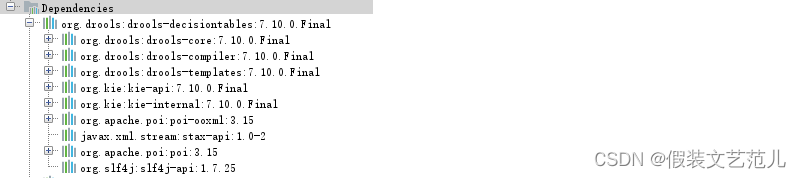
通过下图可以发现,由于maven的依赖传递特性在导入drools-decisiontables坐标后,drools-core和drools-compiler等坐标也被传递了过来
Drools提供的将xls文件编译为drl格式字符串的API如下:
String realPath = "C:\\testRule.xls";//指定决策表xls文件的磁盘路径
File file = new File(realPath);
InputStream is = new FileInputStream(file);
SpreadsheetCompiler compiler = new SpreadsheetCompiler();
String drl = compiler.compile(is, InputType.XLS);
Drools还提供了基于drl格式字符串创建KieSession的API:
KieHelper kieHelper = new KieHelper();
kieHelper.addContent(drl, ResourceType.DRL);
KieSession session = kieHelper.build().newKieSession();
基于决策表的入门案例:
第一步:创建maven工程drools_decisiontable_demo并配置pom.xml文件
<dependency>
    <groupId>org.drools</groupId>
    <artifactId>drools-decisiontables</artifactId>
    <version>7.10.0.Final</version>
</dependency>
<dependency>
    <groupId>junit</groupId>
    <artifactId>junit</artifactId>
    <version>4.12</version>
</dependency>
第二步:创建实体类PersonInfoEntity
package com.itheima.drools.entity;

public class PersonInfoEntity {
    private String sex;
    private int age;
    private double salary;

    public String getSex() {
        return sex;
    }

    public void setSex(String sex) {
        this.sex = sex;
    }

    public int getAge() {
        return age;
    }

    public void setAge(int age) {
        this.age = age;
    }

    public double getSalary() {
        return salary;
    }

    public void setSalary(double salary) {
        this.salary = salary;
    }
}
第三步:创建xls规则文件(可以直接使用资料中提供的testRule.xls文件)
第四步:创建单元测试
@Test
public void test1() throws Exception{
    String realPath = "d:\\testRule.xls";//指定决策表xls文件的磁盘路径
    File file = new File(realPath);
    InputStream is = new FileInputStream(file);
    SpreadsheetCompiler compiler = new SpreadsheetCompiler();
    String drl = compiler.compile(is, InputType.XLS);

    System.out.println(drl);
    KieHelper kieHelper = new KieHelper();
    kieHelper.addContent(drl, ResourceType.DRL);
    KieSession session = kieHelper.build().newKieSession();

    PersonInfoEntity personInfoEntity = new PersonInfoEntity();
    personInfoEntity.setSex("男");
    personInfoEntity.setAge(35);
    personInfoEntity.setSalary(1000);

    List<String> list = new ArrayList<String>();
    session.setGlobal("listRules",list);

    session.insert(personInfoEntity);

    session.getAgenda().getAgendaGroup("sign").setFocus();

    session.fireAllRules();

    for (String s : list) {
        System.out.println(s);
    }
    session.dispose();
}
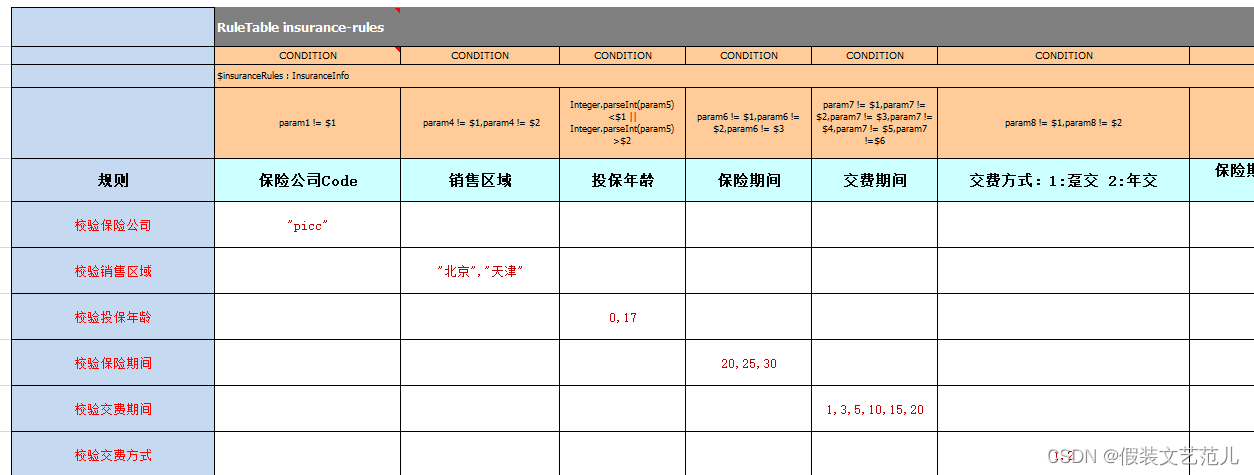
各保险公司针对人身、财产推出了不同的保险产品,作为商业保险公司,筛选出符合公司利益最大化的客户是非常重要的,即各保险产品的准入人群是不同的,也就是说保险公司会针对不同的人群特征,制定不同的产品缴费和赔付规则。
我们来看一下某保险产品准入规则的简化版,当不满足以下规则时,系统模块需要返回准入失败标识和失败原因
规则1:  保险公司是:PICC
规则2:  销售区域是:北京、天津
规则3:  投保人年龄:0 ~ 17岁
规则4:  保险期间是:20年、25年、30年
规则5:  缴费方式是:趸交(一次性交清)或年交
规则6:  保险期与交费期规则一:保险期间为20年期交费期间最长10年交且不能选择[趸交]
规则7:  保险期与交费期规则二:保险期间为25年期交费期间最长15年交且不能选择[趸交]
规则8:  保险期与交费期规则三:保险期间为30年期交费期间最长20年交且不能选择[趸交]
规则9:  被保人要求:(投保年龄+保险期间)不得大于40周岁
规则10: 保险金额规则:投保时约定,最低为5万元,超过部分必须为1000元的整数倍
规则11: 出单基本保额限额规则:线上出单基本保额限额62.5万元,超62.5万元需配合契调转线下出单
在本案例中规则文件是一个Excel文件,业务人员可以直接更改这个文件中指标的值,系统不需要做任何变更。
本案例还是基于Spring Boot整合Drools的架构来实现。

第一步:创建maven工程insuranceInfoCheck并配置pom.xml文件
<?xml version="1.0" encoding="UTF-8"?>
<project xmlns="http://maven.apache.org/POM/4.0.0"
         xmlns:xsi="http://www.w3.org/2001/XMLSchema-instance"
         xsi:schemaLocation="http://maven.apache.org/POM/4.0.0
                             http://maven.apache.org/xsd/maven-4.0.0.xsd">
    <modelVersion>4.0.0</modelVersion>
    <parent>
        <groupId>org.springframework.boot</groupId>
        <artifactId>spring-boot-starters</artifactId>
        <version>2.0.6.RELEASE</version>
    </parent>
    <groupId>com.itheima</groupId>
    <artifactId>insuranceInfoCheck</artifactId>
    <version>1.0-SNAPSHOT</version>
    <dependencies>
        <dependency>
            <groupId>org.springframework.boot</groupId>
            <artifactId>spring-boot-starter-web</artifactId>
        </dependency>
        <dependency>
            <groupId>org.springframework.boot</groupId>
            <artifactId>spring-boot-starter-aop</artifactId>
        </dependency>
        <dependency>
            <groupId>org.springframework.boot</groupId>
            <artifactId>spring-boot-starter-test</artifactId>
        </dependency>
        <dependency>
            <groupId>commons-lang</groupId>
            <artifactId>commons-lang</artifactId>
            <version>2.6</version>
        </dependency>
        <!--drools规则引擎-->
        <dependency>
            <groupId>org.drools</groupId>
            <artifactId>drools-core</artifactId>
            <version>7.6.0.Final</version>
        </dependency>
        <dependency>
            <groupId>org.drools</groupId>
            <artifactId>drools-compiler</artifactId>
            <version>7.6.0.Final</version>
        </dependency>
        <dependency>
            <groupId>org.drools</groupId>
            <artifactId>drools-templates</artifactId>
            <version>7.6.0.Final</version>
        </dependency>
        <dependency>
            <groupId>org.kie</groupId>
            <artifactId>kie-api</artifactId>
            <version>7.6.0.Final</version>
        </dependency>
        <dependency>
            <groupId>org.kie</groupId>
            <artifactId>kie-spring</artifactId>
            <exclusions>
                <exclusion>
                    <groupId>org.springframework</groupId>
                    <artifactId>spring-tx</artifactId>
                </exclusion>
                <exclusion>
                    <groupId>org.springframework</groupId>
                    <artifactId>spring-beans</artifactId>
                </exclusion>
                <exclusion>
                    <groupId>org.springframework</groupId>
                    <artifactId>spring-core</artifactId>
                </exclusion>
                <exclusion>
                    <groupId>org.springframework</groupId>
                    <artifactId>spring-context</artifactId>
                </exclusion>
            </exclusions>
            <version>7.6.0.Final</version>
        </dependency>
    </dependencies>
    <build>
        <finalName>${project.artifactId}</finalName>
        <resources>
            <resource>
                <directory>src/main/java</directory>
                <includes>
                    <include>**/*.xml</include>
                </includes>
                <filtering>false</filtering>
            </resource>
            <resource>
                <directory>src/main/resources</directory>
                <includes>
                    <include>**/*.*</include>
                </includes>
                <filtering>false</filtering>
            </resource>
        </resources>
        <plugins>
            <plugin>
                <groupId>org.apache.maven.plugins</groupId>
                <artifactId>maven-compiler-plugin</artifactId>
                <version>2.3.2</version>
                <configuration>
                    <source>1.8</source>
                    <target>1.8</target>
                </configuration>
            </plugin>
        </plugins>
    </build>
</project>
第二步:创建/resources/application.yml文件
server:
  port: 8080
spring:
  application:
    name: insuranceInfoCheck
第三步:创建实体类InsuranceInfo
package com.itheima.drools.entity;

/**
 * 保险信息
 */
public class InsuranceInfo {
    private String param1;//保险公司
    private String param2;//方案代码
    private String param3;//渠道号
    private String param4;//销售区域
    private String param5;//投保年龄
    private String param6;//保险期间
    private String param7;//缴费期间
    private String param8;//缴费方式
    private String param9;//保障类型
    private String param10;//等待期
    private String param11;//犹豫期
    private String param12;//职业类型
    private String param13;//保额限制
    private String param14;//免赔额
    private String param15;//主险保额
    private String param16;//主险保费
    private String param17;//附加险保额
    private String param18;//附加险保费
    private String param19;//与投保人关系
    private String param20;//与被保人关系
    private String param21;//性别
    private String param22;//证件
    private String param23;//保费
    private String param24;//保额

    //getter setter省略
}
第四步:创建决策表文件(也可以直接使用实战资料中提供的insuranceInfoCheck.xls文件)
第五步:封装工具类KieSessionUtils
package com.itheima.drools.utils;

import com.itheima.drools.entity.InsuranceInfo;
import com.itheima.drools.entity.PersonInfoEntity;
import org.drools.decisiontable.InputType;
import org.drools.decisiontable.SpreadsheetCompiler;
import org.kie.api.builder.Message;
import org.kie.api.builder.Results;
import org.kie.api.io.ResourceType;
import org.kie.api.runtime.KieSession;
import org.kie.internal.utils.KieHelper;
import java.io.File;
import java.io.FileInputStream;
import java.io.FileNotFoundException;
import java.io.InputStream;
import java.util.ArrayList;
import java.util.List;

public class KieSessionUtils {
    private KieSessionUtils() {

    }
    // 把xls文件解析为String
    public static String getDRL (String realPath) throws FileNotFoundException {
        File file = new File(realPath); // 例如:C:\\abc.xls
        InputStream is = new FileInputStream(file);
        SpreadsheetCompiler compiler = new SpreadsheetCompiler();
        String drl = compiler.compile(is, InputType.XLS);
        System.out.println(drl);
        return drl;
    }

    // drl为含有内容的字符串
    public static KieSession createKieSessionFromDRL(String drl) throws Exception{
        KieHelper kieHelper = new KieHelper();
        kieHelper.addContent(drl, ResourceType.DRL);
        Results results = kieHelper.verify();
        if (results.hasMessages(Message.Level.WARNING, Message.Level.ERROR)) {
            List<Message> messages = results.getMessages(Message.Level.WARNING, Message.Level.ERROR);
            for (Message message : messages) {
                System.out.println("Error: "+message.getText());
            }
            // throw new IllegalStateException("Compilation errors were found. Check the logs.");
        }
        return kieHelper.build().newKieSession();
    }

    // realPath为Excel文件绝对路径
    public static KieSession getKieSessionFromXLS(String realPath) throws Exception {
        return createKieSessionFromDRL(getDRL(realPath));
    }
}
第六步:创建RuleService类
package com.itheima.drools.service;

import com.itheima.drools.entity.InsuranceInfo;
import com.itheima.drools.utils.KieSessionUtils;
import org.kie.api.runtime.KieSession;
import org.springframework.stereotype.Service;
import java.util.ArrayList;
import java.util.List;

@Service
public class RuleService {
    public List<String> insuranceInfoCheck(InsuranceInfo insuranceInfo) throws Exception{
        KieSession session = KieSessionUtils.getKieSessionFromXLS("D:\\rules.xls");
        session.getAgenda().getAgendaGroup("sign").setFocus();

        session.insert(insuranceInfo);

        List<String> listRules = new ArrayList<>();
        session.setGlobal("listRules", listRules);

        session.fireAllRules();

        return listRules;
    }
}
第七步:创建RuleController类
package com.itheima.drools.controller;

import com.itheima.drools.entity.InsuranceInfo;
import com.itheima.drools.service.RuleService;
import org.springframework.beans.factory.annotation.Autowired;
import org.springframework.web.bind.annotation.RequestMapping;
import org.springframework.web.bind.annotation.RestController;
import java.util.HashMap;
import java.util.List;
import java.util.Map;

@RestController
@RequestMapping("/rule")
public class RuleController {
    @Autowired
    private RuleService ruleService;

    @RequestMapping("/insuranceInfoCheck")
    public Map insuranceInfoCheck(){
        Map map = new HashMap();

        //模拟数据,实际应为页面传递过来
        InsuranceInfo insuranceInfo = new InsuranceInfo();
        insuranceInfo.setParam1("picc");
        insuranceInfo.setParam4("上海");
        insuranceInfo.setParam5("101");
        insuranceInfo.setParam6("12");
        insuranceInfo.setParam7("222");
        insuranceInfo.setParam8("1");
        insuranceInfo.setParam13("3");

        try {
            List<String> list = ruleService.insuranceInfoCheck(insuranceInfo);
            if(list != null && list.size() > 0){
                map.put("checkResult",false);
                map.put("msg","准入失败");
                map.put("detail",list);
            }else{
                map.put("checkResult",true);
                map.put("msg","准入成功");
            }
            return map;
        } catch (Exception e) {
            e.printStackTrace();
            map.put("checkResult",false);
            map.put("msg","未知错误");
            return map;
        }
    }
}
第八步:创建启动类DroolsApplication
package com.itheima.drools;

import org.springframework.boot.SpringApplication;
import org.springframework.boot.autoconfigure.SpringBootApplication;

@SpringBootApplication
public class DroolsApplication {
    public static void main(String[] args) {
        SpringApplication.run(DroolsApplication.class);
    }
}
我想在一个没有Sass引擎的类中使用Sass颜色函数。我已经在项目中使用了sassgem,所以我认为搭载会像以下一样简单:classRectangleincludeSass::Script::FunctionsdefcolorSass::Script::Color.new([0x82,0x39,0x06])enddefrender#hamlengineexecutedwithcontextofself#sothatwithintemlateicouldcall#%stop{offset:'0%',stop:{color:lighten(color)}}endend更新:参见上面的#re
我想为我的Rails网络应用程序提供推荐功能。特别是,我想向新注册的用户推荐他可能想要关注的其他用户。Rails中是否有用于此目的的引擎/gem?如果没有,我应该从哪里开始构建它?谢谢。 最佳答案 有Coletivogemhttps://github.com/diogenes/coletivo我试了一下。在MySQL上运行。Neo4jhttp://neo4j.org真的很容易实现一个“跟随谁”。事实上,大多数展示其能力的样本都涉及“跟随谁”。快速提示-只有在JRuby上运行时,Neo4j.rb才会很酷。如果不是-使用Neograph
无论您是想搭建桌面端、WEB端或者移动端APP应用,HOOPSPlatform组件都可以为您提供弹性的3D集成架构,同时,由工业领域3D技术专家组成的HOOPS技术团队也能为您提供技术支持服务。如果您的客户期望有一种在多个平台(桌面/WEB/APP,而且某些客户端是“瘦”客户端)快速、方便地将数据接入到3D应用系统的解决方案,并且当访问数据时,在各个平台上的性能和用户体验保持一致,HOOPSPlatform将帮助您完成。利用HOOPSPlatform,您可以开发在任何环境下的3D基础应用架构。HOOPSPlatform可以帮您打造3D创新型产品,HOOPSSDK包含的技术有:快速且准确的CAD
导读:随着叮咚买菜业务的发展,不同的业务场景对数据分析提出了不同的需求,他们希望引入一款实时OLAP数据库,构建一个灵活的多维实时查询和分析的平台,统一数据的接入和查询方案,解决各业务线对数据高效实时查询和精细化运营的需求。经过调研选型,最终引入ApacheDoris作为最终的OLAP分析引擎,Doris作为核心的OLAP引擎支持复杂地分析操作、提供多维的数据视图,在叮咚买菜数十个业务场景中广泛应用。作者|叮咚买菜资深数据工程师韩青叮咚买菜创立于2017年5月,是一家专注美好食物的创业公司。叮咚买菜专注吃的事业,为满足更多人“想吃什么”而努力,通过美好食材的供应、美好滋味的开发以及美食品牌的孵
一、引擎主循环UE版本:4.27一、引擎主循环的位置:Launch.cpp:GuardedMain函数二、、GuardedMain函数执行逻辑:1、EnginePreInit:加载大多数模块int32ErrorLevel=EnginePreInit(CmdLine);PreInit模块加载顺序:模块加载过程:(1)注册模块中定义的UObject,同时为每个类构造一个类默认对象(CDO,记录类的默认状态,作为模板用于子类实例创建)(2)调用模块的StartUpModule方法2、FEngineLoop::Init()1、检查Engine的配置文件找出使用了哪一个GameEngine类(UGame
注意:本文主要掌握DCN自研无线产品的基本配置方法和注意事项,能够进行一般的项目实施、调试与运维AP基本配置命令AP登录用户名和密码均为:adminAP默认IP地址为:192.168.1.10AP默认情况下DHCP开启AP静态地址配置:setmanagementstatic-ip192.168.10.1AP开启/关闭DHCP功能:setmanagementdhcp-statusup/downAP设置默认网关:setstatic-ip-routegeteway192.168.10.254查看AP基本信息:getsystemgetmanagementgetmanaged-apgetrouteAP配
@作者:SYFStrive @博客首页:HomePage📜:微信小程序📌:个人社区(欢迎大佬们加入)👉:社区链接🔗📌:觉得文章不错可以点点关注👉:专栏连接🔗💃:感谢支持,学累了可以先看小段由小胖给大家带来的街舞👉微信小程序(🔥)目录自定义组件-behaviors 1、什么是behaviors 2、behaviors的工作方式 3、创建behavior 4、导入并使用behavior 5、behavior中所有可用的节点 6、同名字段的覆盖和组合规则总结最后自定义组件-behaviors 1、什么是behaviorsbehaviors是小程序中,用于实现
基础版云数据库RDS的产品系列包括基础版、高可用版、集群版、三节点企业版,本文介绍基础版实例的相关信息。RDS基础版实例也称为单机版实例,只有单个数据库节点,计算与存储分离,性价比超高。说明RDS基础版实例只有一个数据库节点,没有备节点作为热备份,因此当该节点意外宕机或者执行重启实例、变更配置、版本升级等任务时,会出现较长时间的不可用。如果业务对数据库的可用性要求较高,不建议使用基础版实例,可选择其他系列(如高可用版),部分基础版实例也支持升级为高可用版。基础版与高可用版的对比拓扑图如下所示。优势 性能由于不提供备节点,主节点不会因为实时的数据库复制而产生额外的性能开销,因此基础版的性能相对于
我刚刚安装了带有RVM的Ruby2.2.0,并尝试使用它得到了这个:$rvmuse2.2.0--defaultUsing/Users/brandon/.rvm/gems/ruby-2.2.0dyld:Librarynotloaded:/usr/local/lib/libgmp.10.dylibReferencedfrom:/Users/brandon/.rvm/rubies/ruby-2.2.0/bin/rubyReason:Incompatiblelibraryversion:rubyrequiresversion13.0.0orlater,butlibgmp.10.dylibpro
我正在运行Ubuntu11.10并像这样安装Ruby1.9:$sudoapt-getinstallruby1.9rubygems一切都运行良好,但ri似乎有空文档。ri告诉我文档是空的,我必须安装它们。我执行此操作是因为我读到它会有所帮助:$rdoc--all--ri现在,当我尝试打开任何文档时:$riArrayNothingknownaboutArray我搜索的其他所有内容都是一样的。 最佳答案 这个呢?apt-getinstallri1.8编辑或者试试这个:(非rvm)geminstallrdocrdoc-datardoc-da
