大家好,我是杰森。GitHub 对大家来说一定不陌生,无论是学习还是交(爬)朋(项)友(目)。但是今天,我好像和它失联了……

当我像往常一样clone项目时,却得到了这样的报错
$ git clone git@github.com:appletdevelop/full-stack.git
Cloning into ‘full-stack’...
ssh: connect to host github.com port 22: Connection refused
fatal: Could not read from remote repository.

Please make sure you have the correct access rights and the repository exists.
什么都不能阻止打工人搬砖,必须要解决。经过一番排查,终于找到了问题的根源。分享两种解决方案,大家注意避坑。
因为错误信息显示 Connection refused ,所以我们需要去看看建立连接时发生了什么,为什么会出错。查看日志,果然发现端倪
$ ssh -vT git@github.com
OpenSSH_9.0p1, OpenSSL 1.1.1o  5 July 2022
debug1: Reading configuration data /c/Users/jason/.ssh/config
debug1: Reading configuration data /etc/ssh/ssh_config
debug1: Connecting to github.com [::1] port 22.
debug1: connect to address ::1 port 22: Connection refused
debug1: Connecting to github.com [127.0.0.1] port 22.
debug1: connect to address 127.0.0.1 port 22: Connection refused
ssh: connect to host github.com port 22: Connection refused
日志显示,IPv6 和 IPv4 的 localhost 地址分别为 ::1 和 127.0.0.1,这意味着我们在连接 github 时,其域名将会被解析为 localhost 地址,当然也就无法连接。
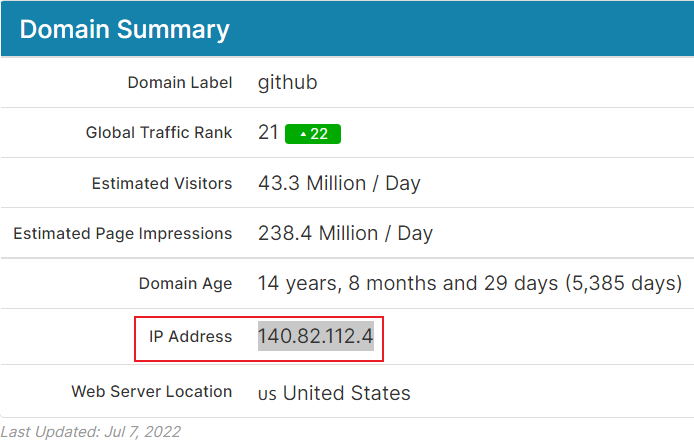
打开查询网站,找到 github.com 的 IP 地址
Windows 下,打开本机 hosts 文件
C:\Windows\System32\drivers\etc
添加域名映射,并在 cmd 窗口刷新 DNS 配置
140.82.112.4 github.com
# Refreshing DNS configurations
$ ipconfig /flushdns
重新拉取,成功。
从上面的报错信息中可以发现,重点在这一句
ssh: connect to host github.com port 22: Connection refused
ssh 连接 GitHub 的 22 号端口被拒绝。但是 ping 一下 github.com 能通,浏览器访问也没有问题,那有可能是该端口被防火墙蔽掉了。既然 22 端口拒绝访问,我们不妨尝试使用 443 端口进行连接。
使用 vim 指令编辑 ssh 配置文件,添加以下端口信息
$ vim ~/.ssh/config
# Add the following configuration information
Host github.com
  Hostname ssh.github.com
  Port 443
测试访问是否成功,通常不出意外的话意外就来了……
$ ssh -T git@github.com
The authenticity of host ‘[ssh.github.com]:443([unknown ip address]:443)’ can’t be established.
xxx key fingerprint is xxx:xxx.
This host key is known by the following other names/addresses:
    # Delete the RSA information in line 8
    ~/.ssh/known_hosts:8: github.com
Host key verification failed.
这与 ssh 的运行机制有关,ssh 会将本机访问过的计算机的 public key 记录在 ~/.ssh/known_hosts 下。当下次访问相同计算机时,若公钥不同则会发出警告,避免受到攻击。这里只需要找到 known_hosts 文件中对应 ip 的 RSA 并删除便可解决。
再次测试,看到以下信息则表示访问成功
$ ssh -T git@github.com
Hi xxx! You’ve successfully authenticated, but GitHub does not provide shell access.
这样访问 GitHub 时,ssh 就会连接 443 端口,不会报错。

总结下本次踩坑的原因,主要有两点:
DNS 解析;总之:“网上冲浪也要注意暗礁,低头走路也要抬头看路”,以上就是本期分享啦,希望可以帮到您!
这里有一个很好的答案解释了如何在Ruby中下载文件而不将其加载到内存中:https://stackoverflow.com/a/29743394/4852737require'open-uri'download=open('http://example.com/image.png')IO.copy_stream(download,'~/image.png')我如何验证下载文件的IO.copy_stream调用是否真的成功——这意味着下载的文件与我打算下载的文件完全相同,而不是下载一半的损坏文件?documentation说IO.copy_stream返回它复制的字节数,但是当我还没有下
我使用Jekyll运行博客,并认为我会解决RedcarpetMarkdown解释器,因为它是developedandusedbyGitHub.好吧,我只是碰巧遇到了一个错误,去检查问题,然后foundthis.Maintainersays,"Asyouprobablyhavenoticed(harharharhar)Idon'thavetimetomaintainRedcarpetanymore.It'snotapriorityforme(IfindMarkdownthoroughlyboring)andit'snotapriorityforGitHub,becausewenolong
我们正在使用Vagrant进行部署,我们最终希望将此集群部署在Rackspace上。vagrant-rackspace插件是一个自然的选择,但它有一些错误,这些错误未包含在最新的0.1.1版本中(notablythatvagrantprovisiondoesn'twork)。我已经在我的personalfork中解决了这个问题通过合并其他人的工作来对存储库进行改造。是否可以从github安装vagrant插件?显而易见的事情没有奏效:[unix]$vagrantplugininstallvagrant-rackspace--plugin-sourcehttps://github.com
我有一个使用Jekyll托管在GitHub上的静态网站。问题是,我真的不需要master分支,因为存储库唯一包含的是网站。这样我就必须gitcheckoutgh-pages,然后gitmergemaster,然后gitpushorigingh-pages。有什么简单的方法可以摆脱gh-pages分支并直接从master推送? 最佳答案 Theproblemis,Idon'treallyneedthemasterbranch,astheonlythingtherepositorycontainsisthewebsite.Isthere
我每次打开终端时都会收到这个错误:警告:PATH设置为RVMruby但未设置GEM_HOME和/或GEM_PATH,请参阅:https://github.com/wayneeseguin/rvm/issues/3212这是在我最近安装zsh(oh-my-zsh)后开始发生的我不知道如何设置GEM_HOME和/或GEM_PATH的路径。 最佳答案 我也面临同样的问题,更改.zshrc中的以下行,exportPATH="/usr/local/heroku/bin:.........."到exportPATH="$PATH:/usr/
当我尝试创建一个github问题时,它给出消息未找到回复。以及如何发送身份验证header。因为创建问题需要用户登录或验证curl-XPOST-i-d'{"title":"my-new-repo","body":"mynewissuedescription"}'https://api.github.com/repos/barterli/barter.li/issuesHTTP/1.1404NotFoundServer:GitHub.comDate:Wed,19Feb201407:11:33GMTContent-Type:application/json;charset=utf-8Sta
我想通过github操作在gem上运行rspec(称之为priv_gem_a)。priv_gem_a依赖于私有(private)存储库中的另一个gem(称之为priv_gem_b)。但是,由于权限无效,我无法捆绑安装priv_gem_b。错误:Fetchinggemmetadatafromhttps://rubygems.org/..........Fetchinggit@github.com:myorg/priv_gem_bHostkeyverificationfailed.fatal:Couldnotreadfromremoterepository.Pleasemakesureyo
如果我只能找到正确的手册,我的Google-fu就会让我失望,因为这看起来很明显。我有一个由我们的托管服务提供商安装的Gitlab服务器Gitlab服务器有很多项目。对于其中一些项目,我希望Gitlab每次从本地客户端推送到Gitlab时自动推送到远程存储库(在本例中为Github)。像这样:客户端-->gitlab-->github任何标签和分支也应该被推送。AFAICT我有3个选择:用两个Remote配置本地客户端,同时推送到Gitlab和Github。我想避免这种情况,因为开发人员。在Gitlab服务器上的存储库中添加一个gitpost-receiveHook。这将是最灵活的(我
我在我的项目中使用过度使用gem(https://github.com/brigade/overcommit),当我使用GithubDesktopforosx时,我得到这些错误:ThisrepositorycontainshooksinstalledbyOvercommit,buttheovercommitgemisnotinstalled.Installitwithgeminstallovercommit.(1)gem已安装,它可以在终端中运行。我想这是因为我使用rvm而GithubDesktop不知道rvm。有人知道如何解决这个问题吗? 最佳答案
事实证明,由于securityconcerns,自定义ruby插件在GitHub页面上不起作用。.我正在尝试将插件(thisone)添加到我的Jekyll项目的_plugins文件夹中,但是当我将它部署到GitHub时,它会被忽略。问题:有没有办法解决这个问题?有没有人找到解决办法?注意:显然我可以在本地生成html文件并将它们提交到我的存储库。但这不是我想要的。 最佳答案 如果你想让Jekyll站点像在本地一样运行,比如让自定义插件正常工作,这里有一种非常方便的方式来构建和部署Jekyll站点到GithubPages。?AGi
