视频教程:https://www.bilibili.com/video/BV15m4y1d7ZP
5.6及以上版本的MySQL要求Linux系统虚拟内存不能小于1G,否则MySQL可能无法运行。
[root@localhost ~]# rpm -qa | grep mariadb
mariadb-libs-5.5.60-1.el7_5.x86_64
[root@localhost ~]# rpm -e --nodeps mariadb-libs-5.5.60-1.el7_5.x86_64
[root@localhost ~]#
下载地址:https://mirrors.aliyun.com/mysql/MySQL-8.0,这里下载mysql-8.0.28-el7-x86_64.tar.gz
将mysql-5.7.30-el7-x86_64.tar.gz压缩文件上传至/opt目录;
将MySQL压缩文件解压至/usr/local目录
[root@localhost ~]# tar -zxvf /opt/mysql-8.0.28-el7-x86_64.tar.gz -C /usr/local
将MySQL根目录重命名为mysql
[root@localhost ~]# mv /usr/local/mysql-8.0.28-el7-x86_64 /usr/local/mysql
注意:必须重命名为mysql,否则无法启动
删除压缩文件
[root@localhost ~]# rm -f /opt/mysql-8.0.28-el7-x86_64.tar.gz
/usr/local/mysql根目录下创建data文件夹
[root@localhost ~]# mkdir /usr/local/mysql/data
a、编辑/etc/profile文件,内容如下:
export PATH=/usr/local/mysql/bin:$PATH
b、重载/etc/profile文件:source /etc/profile
c、查看PATH值:echo $PATH
a、查找mysql配置路径
[root@localhost ~]# mysql --help | grep 'my.cnf'
                      order of preference, my.cnf, $MYSQL_TCP_PORT,
/etc/my.cnf /etc/mysql/my.cnf /usr/local/mysql/etc/my.cnf ~/.my.cnf
[root@localhost ~]#
b、执行vi /etc/my.cnf
c、点击I键,复制并粘贴如下配置:
[mysql]
# 设置mysql客户端默认字符集
default-character-set=utf8

[mysqld]
#设置端口
port=3306
socket=/tmp/mysql.sock
#设置mysql根目录
basedir=/usr/local/mysql
#设置数据库的数据存放目录
datadir=/usr/local/mysql/data
#设置最大连接数
max_connections=200
#设置mysql服务端字符集,默认为latin1
character-set-server=UTF8MB4
#设置默认存储引擎
default-storage-engine=INNODB
#设置密码永不过期
default_password_lifetime=0
#设置 server接受的数据包大小
max_allowed_packet=16M
a、添加 mysql 组
[root@localhost ~]# groupadd mysql
b、添加 mysql 用户
[root@localhost ~]# useradd -r -g mysql mysql
c、变更用户和用户组
[root@localhost ~]# chown -R mysql:mysql /usr/local/mysql
[root@localhost ~]# mysqld --initialize --user=mysql
2022-11-17T03:34:13.745049Z 0 [System] [MY-013169] [Server] /usr/local/mysql/bin/mysqld (mysqld 8.0.28) initializing of server in progress as process 20052
2022-11-17T03:34:13.868756Z 1 [System] [MY-013576] [InnoDB] InnoDB initialization has started.
2022-11-17T03:34:15.109952Z 1 [System] [MY-013577] [InnoDB] InnoDB initialization has ended.
2022-11-17T03:34:16.778334Z 6 [Note] [MY-010454] [Server] A temporary password is generated for root@localhost: pH6T0ltJ6y,N
[root@localhost ~]#
说明:pH6T0ltJ6y,N 为临时密码
# 安装SSL
[root@localhost ~]# mysql_ssl_rsa_setup --datadir=/usr/local/mysql/data
# 添加权限
[root@localhost ~]# chmod -R a+r /usr/local/mysql/data/server-key.pem
a、复制启动脚本到资源目录
[root@localhost ~]# cp /usr/local/mysql/support-files/mysql.server /etc/rc.d/init.d/mysqld
b、mysqld文件添加执行权限
[root@localhost ~]# chmod +x /etc/rc.d/init.d/mysqld
c、mysqld服务添加至系统服务
[root@localhost ~]# chkconfig --add mysqld
d、查询mysqld服务
[root@localhost ~]# chkconfig --list mysqld

注:该输出结果只显示 SysV 服务,并不包含
原生 systemd 服务。SysV 配置数据
可能被原生 systemd 配置覆盖。

      要列出 systemd 服务,请执行 'systemctl list-unit-files'。
      查看在具体 target 启用的服务请执行
      'systemctl list-dependencies [target]'。

mysqld          0:关    1:关    2:开    3:开    4:开    5:开    6:关
[root@localhost ~]#
e、启动 mysqld服务
[root@localhost ~]# service mysqld start
a、添加端口
[root@localhost ~]# firewall-cmd --zone=public --add-port=3306/tcp --permanent
b、重新加载
[root@localhost ~]# firewall-cmd --reload
初次登录MySQL数据库需要重置密码才能继续后面的数据库操作,步骤如下:
[root@localhost ~]# mysql -uroot -p
Enter password: 输入临时密码
Welcome to the MySQL monitor.  Commands end with ; or \g.
Your MySQL connection id is 8
Server version: 8.0.28

Copyright (c) 2000, 2022, Oracle and/or its affiliates.

Oracle is a registered trademark of Oracle Corporation and/or its
affiliates. Other names may be trademarks of their respective
owners.

Type 'help;' or '\h' for help. Type '\c' to clear the current input statement.

mysql> alter user 'root'@'localhost' identified by '123456';
Query OK, 0 rows affected (0.01 sec)

mysql> quit
Bye
[root@localhost ~]#
MySQL数据库默认不允许远程连接,可通过如下步骤允许远程连接:
[root@localhost ~]# mysql -uroot -p
Enter password: 输入密码
Welcome to the MySQL monitor.  Commands end with ; or \g.
Your MySQL connection id is 9
Server version: 8.0.28 MySQL Community Server - GPL

Copyright (c) 2000, 2022, Oracle and/or its affiliates.

Oracle is a registered trademark of Oracle Corporation and/or its
affiliates. Other names may be trademarks of their respective
owners.

Type 'help;' or '\h' for help. Type '\c' to clear the current input statement.

mysql> use mysql;
Reading table information for completion of table and column names
You can turn off this feature to get a quicker startup with -A

Database changed
mysql> update user set host = '%' where user = 'root';
Query OK, 1 row affected (0.00 sec)
Rows matched: 1  Changed: 1  Warnings: 0

mysql> flush privileges;
Query OK, 0 rows affected (0.00 sec)

mysql> quit
Bye
[root@localhost ~]#
问题:使用mysql -u root -p命令登陆MySQL数据库时提示如下错误:
SQLyog远程连接MySQL,提示如下错误:
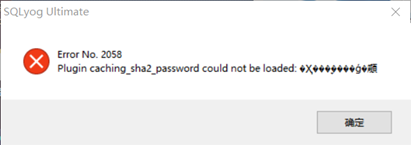
方案:
[root@localhost ~]# mysql -uroot -p
Enter password:
Welcome to the MySQL monitor.  Commands end with ; or \g.
Your MySQL connection id is 12
Server version: 8.0.28 MySQL Community Server - GPL

Copyright (c) 2000, 2022, Oracle and/or its affiliates.

Oracle is a registered trademark of Oracle Corporation and/or its
affiliates. Other names may be trademarks of their respective
owners.

Type 'help;' or '\h' for help. Type '\c' to clear the current input statement.

mysql> alter user 'root'@'%' identified with mysql_native_password by '123456';
Query OK, 0 rows affected (0.01 sec)

mysql> quit
Bye
[root@localhost ~]#
出于纯粹的兴趣,我很好奇如何按顺序创建PI,而不是在过程结果之后生成数字,而是让数字在过程本身生成时显示。如果是这种情况,那么数字可以自行产生,我可以对以前看到的数字实现垃圾收集,从而创建一个无限系列。结果只是在Pi系列之后每秒生成一个数字。这是我通过互联网筛选的结果:这是流行的计算机友好算法,类机器算法:defarccot(x,unity)xpow=unity/xn=1sign=1sum=0loopdoterm=xpow/nbreakifterm==0sum+=sign*(xpow/n)xpow/=x*xn+=2sign=-signendsumenddefcalc_pi(digits
如何在buildr项目中使用Ruby?我在很多不同的项目中使用过Ruby、JRuby、Java和Clojure。我目前正在使用我的标准Ruby开发一个模拟应用程序,我想尝试使用Clojure后端(我确实喜欢功能代码)以及JRubygui和测试套件。我还可以看到在未来的不同项目中使用Scala作为后端。我想我要为我的项目尝试一下buildr(http://buildr.apache.org/),但我注意到buildr似乎没有设置为在项目中使用JRuby代码本身!这看起来有点傻,因为该工具旨在统一通用的JVM语言并且是在ruby中构建的。除了将输出的jar包含在一个独特的、仅限ruby
我正在使用的第三方API的文档状态:"[O]urAPIonlyacceptspaddedBase64encodedstrings."什么是“填充的Base64编码字符串”以及如何在Ruby中生成它们。下面的代码是我第一次尝试创建转换为Base64的JSON格式数据。xa=Base64.encode64(a.to_json) 最佳答案 他们说的padding其实就是Base64本身的一部分。它是末尾的“=”和“==”。Base64将3个字节的数据包编码为4个编码字符。所以如果你的输入数据有长度n和n%3=1=>"=="末尾用于填充n%
我主要使用Ruby来执行此操作,但到目前为止我的攻击计划如下:使用gemsrdf、rdf-rdfa和rdf-microdata或mida来解析给定任何URI的数据。我认为最好映射到像schema.org这样的统一模式,例如使用这个yaml文件,它试图描述数据词汇表和opengraph到schema.org之间的转换:#SchemaXtoschema.orgconversion#data-vocabularyDV:name:namestreet-address:streetAddressregion:addressRegionlocality:addressLocalityphoto:i
exe应该在我打开页面时运行。异步进程需要运行。有什么方法可以在ruby中使用两个参数异步运行exe吗?我已经尝试过ruby命令-system()、exec()但它正在等待过程完成。我需要用参数启动exe,无需等待进程完成是否有任何rubygems会支持我的问题? 最佳答案 您可以使用Process.spawn和Process.wait2:pid=Process.spawn'your.exe','--option'#Later...pid,status=Process.wait2pid您的程序将作为解释器的子进程执行。除
鉴于我有以下迁移:Sequel.migrationdoupdoalter_table:usersdoadd_column:is_admin,:default=>falseend#SequelrunsaDESCRIBEtablestatement,whenthemodelisloaded.#Atthispoint,itdoesnotknowthatusershaveais_adminflag.#Soitfails.@user=User.find(:email=>"admin@fancy-startup.example")@user.is_admin=true@user.save!ende
我正在为一个项目制作一个简单的shell,我希望像在Bash中一样解析参数字符串。foobar"helloworld"fooz应该变成:["foo","bar","helloworld","fooz"]等等。到目前为止,我一直在使用CSV::parse_line,将列分隔符设置为""和.compact输出。问题是我现在必须选择是要支持单引号还是双引号。CSV不支持超过一个分隔符。Python有一个名为shlex的模块:>>>shlex.split("Test'helloworld'foo")['Test','helloworld','foo']>>>shlex.split('Test"
我实际上是在尝试使用RVM在我的OSX10.7.5上更新ruby,并在输入以下命令后:rvminstallruby我得到了以下回复:Searchingforbinaryrubies,thismighttakesometime.Checkingrequirementsforosx.Installingrequirementsforosx.Updatingsystem.......Errorrunning'requirements_osx_brew_update_systemruby-2.0.0-p247',pleaseread/Users/username/.rvm/log/138121
这可能是个愚蠢的问题。但是,我是一个新手......你怎么能在交互式rubyshell中有多行代码?好像你只能有一条长线。按回车键运行代码。无论如何我可以在不运行代码的情况下跳到下一行吗?再次抱歉,如果这是一个愚蠢的问题。谢谢。 最佳答案 这是一个例子:2.1.2:053>a=1=>12.1.2:054>b=2=>22.1.2:055>a+b=>32.1.2:056>ifa>b#Thecode‘if..."startsthedefinitionoftheconditionalstatement.2.1.2:057?>puts"f
我是一个Rails初学者,但我想从我的RailsView(html.haml文件)中查看Ruby变量的内容。我试图在ruby中打印出变量(认为它会在终端中出现),但没有得到任何结果。有什么建议吗?我知道Rails调试器,但更喜欢使用inspect来打印我的变量。 最佳答案 您可以在View中使用puts方法将信息输出到服务器控制台。您应该能够在View中的任何位置使用Haml执行以下操作:-puts@my_variable.inspect 关于ruby-on-rails-如何在我的R
