pytorch2.0 相对1.x进行了大版本更新,向下兼容!!!!通过官网阅读可知他最大的更新是torch.compile(),通过编译的方式,用一行代码实现模型的稳定加速。
compiled_model = torch.compile(model)
这个语句返回一个原来模型的引用,但是将forward函数编译成了一个更优化的版本。
官方同时提供一些参数可以使用:
def torch.compile(model: Callable,
*,
mode: Optional[str] = "default",
dynamic: bool = False,
fullgraph:bool = False,
backend: Union[str, Callable] = "inductor",
# advanced backend options go here as kwargs
**kwargs
) -> torch._dynamo.NNOptimizedModule
可以用来做一些更加细节的指定。
reduce-overhead max-autotunenopythonPyTorch 2.0 中支撑 torch.compile 的最新技术包括:
TorchDynamo、AOTAutograd、PrimTorch 以及 TorchInductor。
为了验证这些技术,PyTorch 官方使用了机器学习领域的 163 个开源模型,包括图像分类、目标检测、图像生成等任务,以及各种 NLP 任务,如语言建模、问答、序列分类、推荐系统和强化学习。这些 Benchmark 分为三类:
* 来自 HuggingFace Transformers 的 46 个模型
* 来自 TIMM 的 61 个模型:由 Ross Wightman 收集的 SoTA PyTorch 图像模型
* 来自 TorchBench 的 56 个模型:GitHub 上收集的一组流行代码库。
对于开源模型,PyTorch 官方没有进行修改,只是增加了一个 torch.compile 调用来进行封装。
接下来 PyTorch 工程师在这些模型中测量速度并验证精度,由于提速可能取决于数据类型,因此官方在 float32 和自动混合精度(AMP) 上都测量了提速。由于 AMP 在实践中更常见,测试比例设定为:0.75 * AMP + 0.25 * float32 的。
在这 163 个开源模型中,torch.compile 可以在 93% 模型上正常运行,运行过后,模型在 NVIDIA A100 GPU 上的运行速度达到了 43% 的提升。在 Float32 精度下,运行速度平均提升 21%;在 AMP 精度下,运行速度平均提升 51%。
注意:在桌面级 GPU(如 NVIDIA 3090)上,测得的速度比在服务器级 GPU(如 A100)上要低。截至目前,PyTorch 2.0 默认后端 TorchInductor 已经支持 CPU 和 NVIDIA Volta 和 Ampere GPU,暂不支持其他 GPU、xPU 或更老的 NVIDIA GPU。
TorchDynamo使用Python Frame Evaluation Hooks,安全地捕获PyTorch程序,这是我们5年来在安全图形捕获方面研发的一项重大创新。
AOTAutograd重载了PyTorch的autograd引擎,作为一个追踪的autodiff,用于生成ahead-of-time的backward追踪。
PrimTorch将约2000多个PyTorch运算符归纳为约250个原始运算符的封闭集,开发人员可以针对这些运算符建立一个完整的PyTorch后端。这大大降低了编写PyTorch功能或后端的障碍。
TorchInductor是一个深度学习编译器,可以为多个加速器和后端生成快速代码。对于英伟达GPU,它使用OpenAI Triton作为关键构建模块。
1. TorchDynamo
TorchDynamo 使用了PEP-0523中引入的CPython 功能,称为框架评估 API (Frame Evaluation API)。官方采取了一种数据驱动的方法来验证其在 Graph Capture 上的有效性,使用 7000 多个用 PyTorch 编写的 Github 项目作为验证集。
实验表明,TorchDynamo 在 99% 的时间里都能正确、安全地获取图结构,而且开销可以忽略不计,因为它无需对原始代码做任何修改。
2. AOTAutograd
PyTorch 2.0 要想加速训练,不仅要捕获用户级代码,而且要捕获反向传播算法(backpropagation)。如果能用上经过验证的 PyTorch autograd system就更好了。
AOTAutograd 利用 PyTorch torch_dispatch 扩展机制来追踪 Autograd engine,使开发者得以「ahead-of-time」捕获反向传播 (backwards pas),从而使开发者得以使用 TorchInductor 加速 forwards 和 backwards pass。
3. PrimTorch
为 PyTorch 写一个后端并不容易,PyTorch 有 1200+ 算子,如果考虑到每个算子的各种重载 (overload),数量高达 2000+。
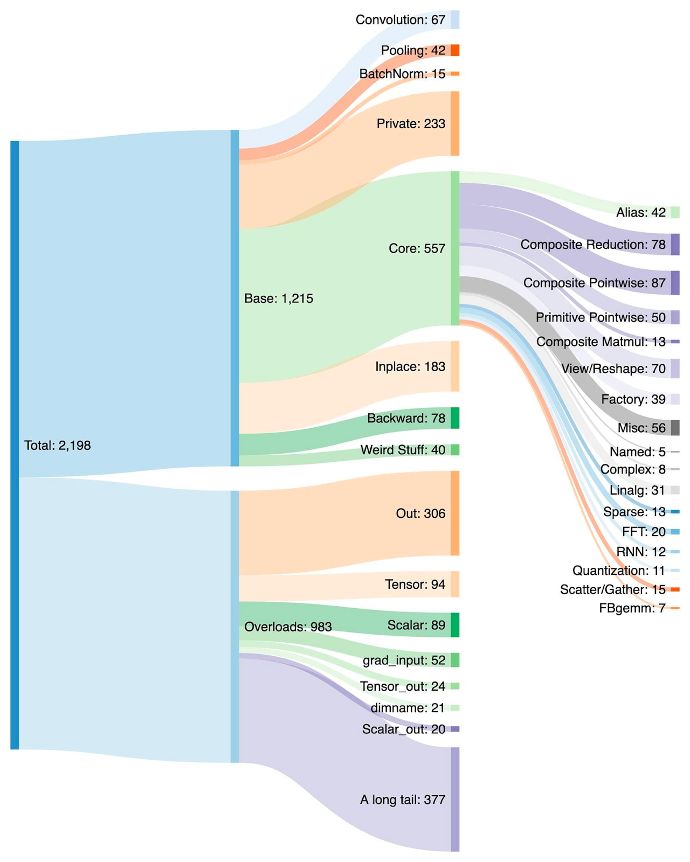
因此,编写后端或交叉功能(cross-cutting feature) 成为一项耗费精力的工作。PrimTorch 致力于定义更小更稳定的算子集。PyTorch 程序可以持续降级 (lower) 到这些算子集。官方的目标是定义两个算子集:
* Prim ops 包含约 250 个相对底层的算子,因为足够底层,所以这些算子更适用于编译器,开发者需要将这些算子进行融合,才能获得良好的性能。
* ATen ops 包含约 750 个典型算子 (canonical operator),适合于直接输出。这些算子适用于已经在 ATen 级别上集成的后端,或者没有经过编译的后端,才能从底层算子集(如 Prim ops) 恢复性能。
4. TorchInductor
越来越多的开发者在编写高性能自定义内核时,会使用 Triton 语言。此外,对于 PyTorch 2.0 全新的编译器后端,官方还希望能够使用与 PyTorch eager 类似的抽象,并且具有足够的通用性能支持 PyTorch 中广泛的功能。
TorchInductor 使用 Pythonic define-by-run loop level IR,自动将 PyTorch 模型映射到 GPU 上生成的 Triton 代码以及 CPU 上的 C++/OpenMP。
TorchInductor 的 core loop level IR 只包含大约 50 个算子,而且是用 Python 实现的,这使得它具有很强的 hackability 和扩展性。
TorchDynamo、AOTAutograd、PrimTorch和 TorchInductor 是用 Python 编写的,并且支持 dynamic shape(无需重新编译就能发送不同大小的向量),这使得它们灵活且易学,降低了开发者和供应商的准入门槛。
因为之前在conda装过pytorch_1.x所以cuda也有是11.7版本
这次只需要在conda直接创建一个环境安装pytorch2.0-cuda11.7版本
官方给出的安装命令
cuda11.6
pip3 install numpy --pre torch[dynamo] torchvision torchaudio --force-reinstall --extra-index-url https://download.pytorch.org/whl/nightly/cu116
cuda11.7
pip3 install numpy --pre torch[dynamo] torchvision torchaudio --force-reinstall --extra-index-url https://download.pytorch.org/whl/nightly/cu117
cpu
pip3 install numpy --pre torch torchvision torchaudio --force-reinstall --extra-index-url https://download.pytorch.org/whl/nightly/cpu
具体的安装步骤:
创建新环境
conda create -n pytorch2 python=3.8
切换到pytorch2
conda activate pytorch2
安装pytorch2.0 使用上面的对应命令
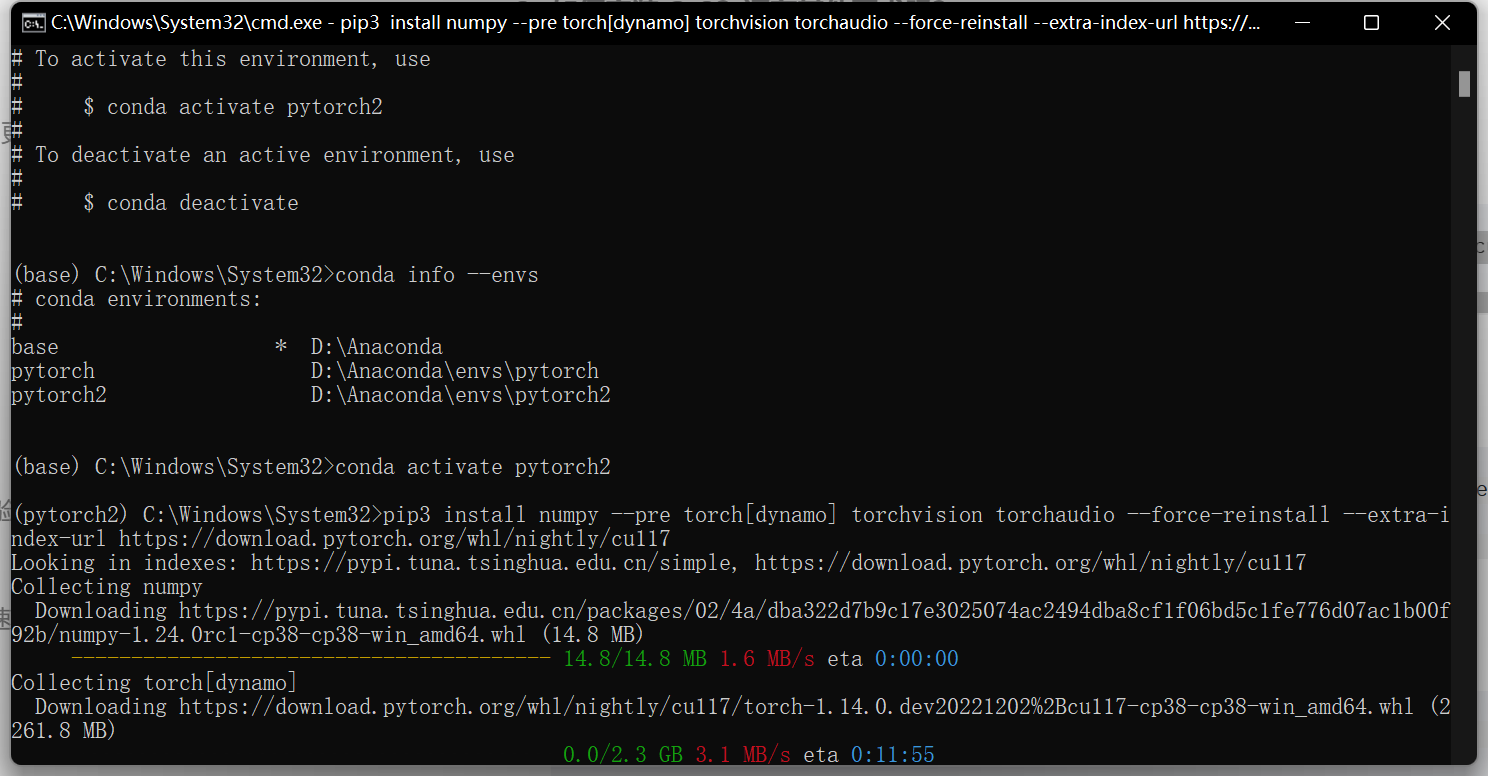
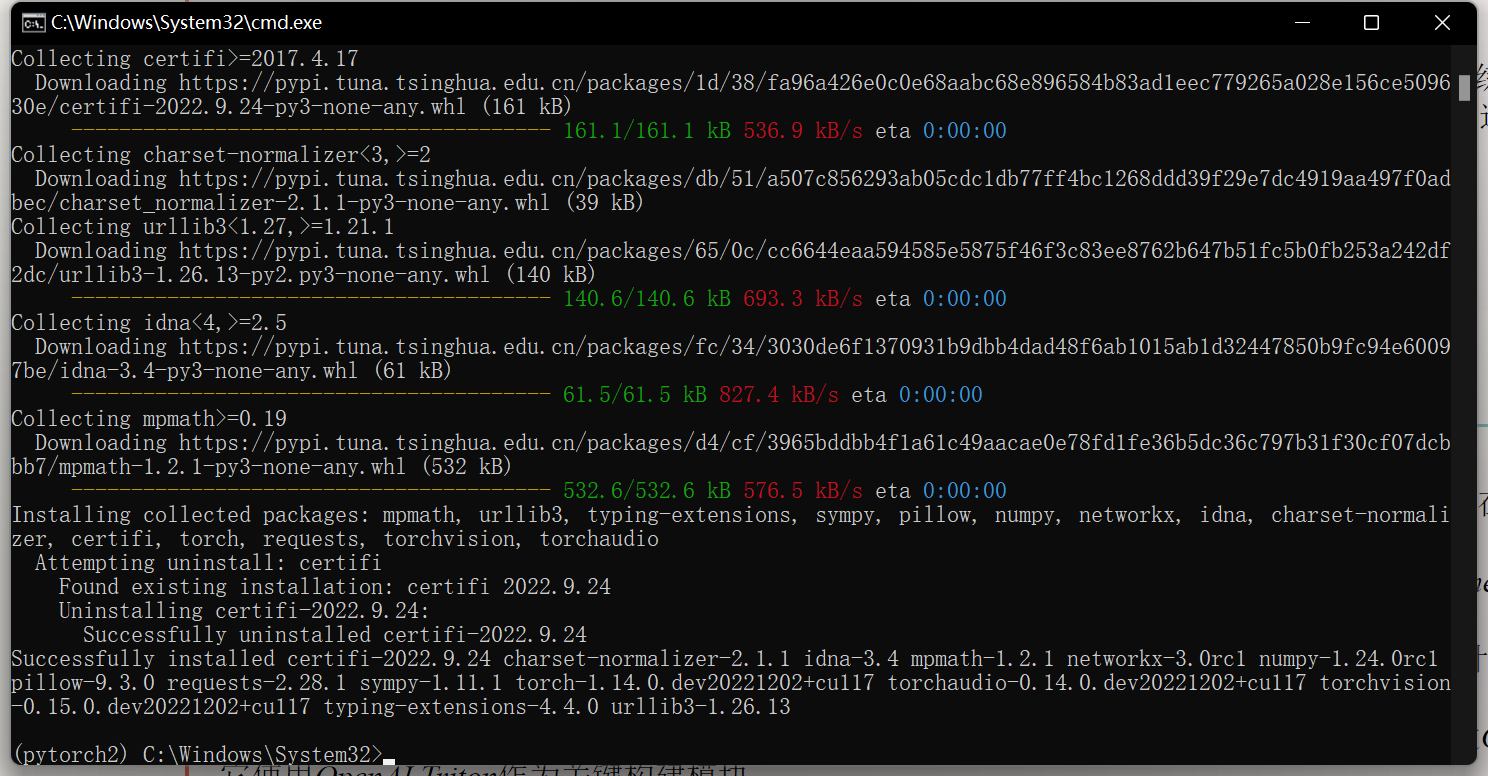
这里的使用主要是使用呢一行代码
现在,让我们看一个编译真实模型并运行它的完整示例(使用随机数据)
import torch
import torchvision.models as models

model = models.resnet18().cuda()
optimizer = torch.optim.SGD(model.parameters(), lr=0.01)
compiled_model = torch.compile(model)

x = torch.randn(16, 3, 224, 224).cuda()
optimizer.zero_grad()
out = compiled_model(x)
out.sum().backward()
optimizer.step()
第一次运行时,它会编译模型。因此,运行时间更长。后续运行速度很快。compiled_model(x)
编译器具有一些预设,这些预设以不同的方式调整已编译的模型。 您可能正在运行的小型模型由于框架开销而运行缓慢。或者,您可能正在运行一个几乎不适合内存的大型模型。根据您的需要,您可能需要使用其他模式。
# API NOT FINAL
# default: optimizes for large models, low compile-time
#默认值:针对大型模型进行优化,编译时间短
#          and no extra memory usage
#	  并且没有额外的内存使用
torch.compile(model)

# reduce-overhead: optimizes to reduce the framework overhead
#减少开销:优化以减少框架开销
#                and uses some extra memory. Helps speed up small models
#	        并且使用一些额外的内存。有助于加快小型模型的速度
torch.compile(model, mode="reduce-overhead")

# max-autotune: optimizes to produce the fastest model,
#最大自动调谐:优化以产生最快的模型,
#               but takes a very long time to compile
#	        但编译需要很长时间
torch.compile(model, mode="max-autotune")
我想为Heroku构建一个Rails3应用程序。他们使用Postgres作为他们的数据库,所以我通过MacPorts安装了postgres9.0。现在我需要一个postgresgem并且共识是出于性能原因你想要pggem。但是我对我得到的错误感到非常困惑当我尝试在rvm下通过geminstall安装pg时。我已经非常明确地指定了所有postgres目录的位置可以找到但仍然无法完成安装:$envARCHFLAGS='-archx86_64'geminstallpg--\--with-pg-config=/opt/local/var/db/postgresql90/defaultdb/po
我打算为ruby脚本创建一个安装程序,但我希望能够确保机器安装了RVM。有没有一种方法可以完全离线安装RVM并且不引人注目(通过不引人注目,就像创建一个可以做所有事情的脚本而不是要求用户向他们的bash_profile或bashrc添加一些东西)我不是要脚本本身,只是一个关于如何走这条路的快速指针(如果可能的话)。我们还研究了这个很有帮助的问题:RVM-isthereawayforsimpleofflineinstall?但有点误导,因为答案只向我们展示了如何离线在RVM中安装ruby。我们需要能够离线安装RVM本身,并查看脚本https://raw.github.com/wayn
我有一个奇怪的问题:我在rvm上安装了rubyonrails。一切正常,我可以创建项目。但是在我输入“railsnew”时重新启动后,我有“程序'rails'当前未安装。”。SystemUbuntu12.04ruby-v"1.9.3p194"gemlistactionmailer(3.2.5)actionpack(3.2.5)activemodel(3.2.5)activerecord(3.2.5)activeresource(3.2.5)activesupport(3.2.5)arel(3.0.2)builder(3.0.0)bundler(1.1.4)coffee-rails(
我刚刚为fedora安装了emacs。我想用emacs编写ruby。为ruby提供代码提示、代码完成类型功能所需的工具、扩展是什么? 最佳答案 ruby-mode已经包含在Emacs23之后的版本中。不过,它也可以通过ELPA获得。您可能感兴趣的其他一些事情是集成RVM、feature-mode(Cucumber)、rspec-mode、ruby-electric、inf-ruby、rinari(用于Rails)等。这是我当前用于Ruby开发的Emacs配置:https://github.com/citizen428/emacs
我正在尝试在我的centos服务器上安装therubyracer,但遇到了麻烦。$geminstalltherubyracerBuildingnativeextensions.Thiscouldtakeawhile...ERROR:Errorinstallingtherubyracer:ERROR:Failedtobuildgemnativeextension./usr/local/rvm/rubies/ruby-1.9.3-p125/bin/rubyextconf.rbcheckingformain()in-lpthread...yescheckingforv8.h...no***e
我的最终目标是安装当前版本的RubyonRails。我在OSXMountainLion上运行。到目前为止,这是我的过程:已安装的RVM$\curl-Lhttps://get.rvm.io|bash-sstable检查已知(我假设已批准)安装$rvmlistknown我看到当前的稳定版本可用[ruby-]2.0.0[-p247]输入命令安装$rvminstall2.0.0-p247注意:我也试过这些安装命令$rvminstallruby-2.0.0-p247$rvminstallruby=2.0.0-p247我很快就无处可去了。结果:$rvminstall2.0.0-p247Search
我实际上是在尝试使用RVM在我的OSX10.7.5上更新ruby,并在输入以下命令后:rvminstallruby我得到了以下回复:Searchingforbinaryrubies,thismighttakesometime.Checkingrequirementsforosx.Installingrequirementsforosx.Updatingsystem.......Errorrunning'requirements_osx_brew_update_systemruby-2.0.0-p247',pleaseread/Users/username/.rvm/log/138121
由于fast-stemmer的问题,我很难安装我想要的任何rubygem。我把我得到的错误放在下面。Buildingnativeextensions.Thiscouldtakeawhile...ERROR:Errorinstallingfast-stemmer:ERROR:Failedtobuildgemnativeextension./System/Library/Frameworks/Ruby.framework/Versions/2.0/usr/bin/rubyextconf.rbcreatingMakefilemake"DESTDIR="cleanmake"DESTDIR=
当我尝试安装Ruby时遇到此错误。我试过查看this和this但无济于事➜~brewinstallrubyWarning:YouareusingOSX10.12.Wedonotprovidesupportforthispre-releaseversion.Youmayencounterbuildfailuresorotherbreakages.Pleasecreatepull-requestsinsteadoffilingissues.==>Installingdependenciesforruby:readline,libyaml,makedepend==>Installingrub
当我执行>rvminstall1.9.2时一切顺利。然后我做>rvmuse1.9.2也很顺利。但是当涉及到ruby-v时..sam@sjones:~$rvminstall1.9.2/home/sam/.rvm/rubies/ruby-1.9.2-p136,thismaytakeawhiledependingonyourcpu(s)...ruby-1.9.2-p136-#fetchingruby-1.9.2-p136-#downloadingruby-1.9.2-p136,thismaytakeawhiledependingonyourconnection...%Total%Rece
