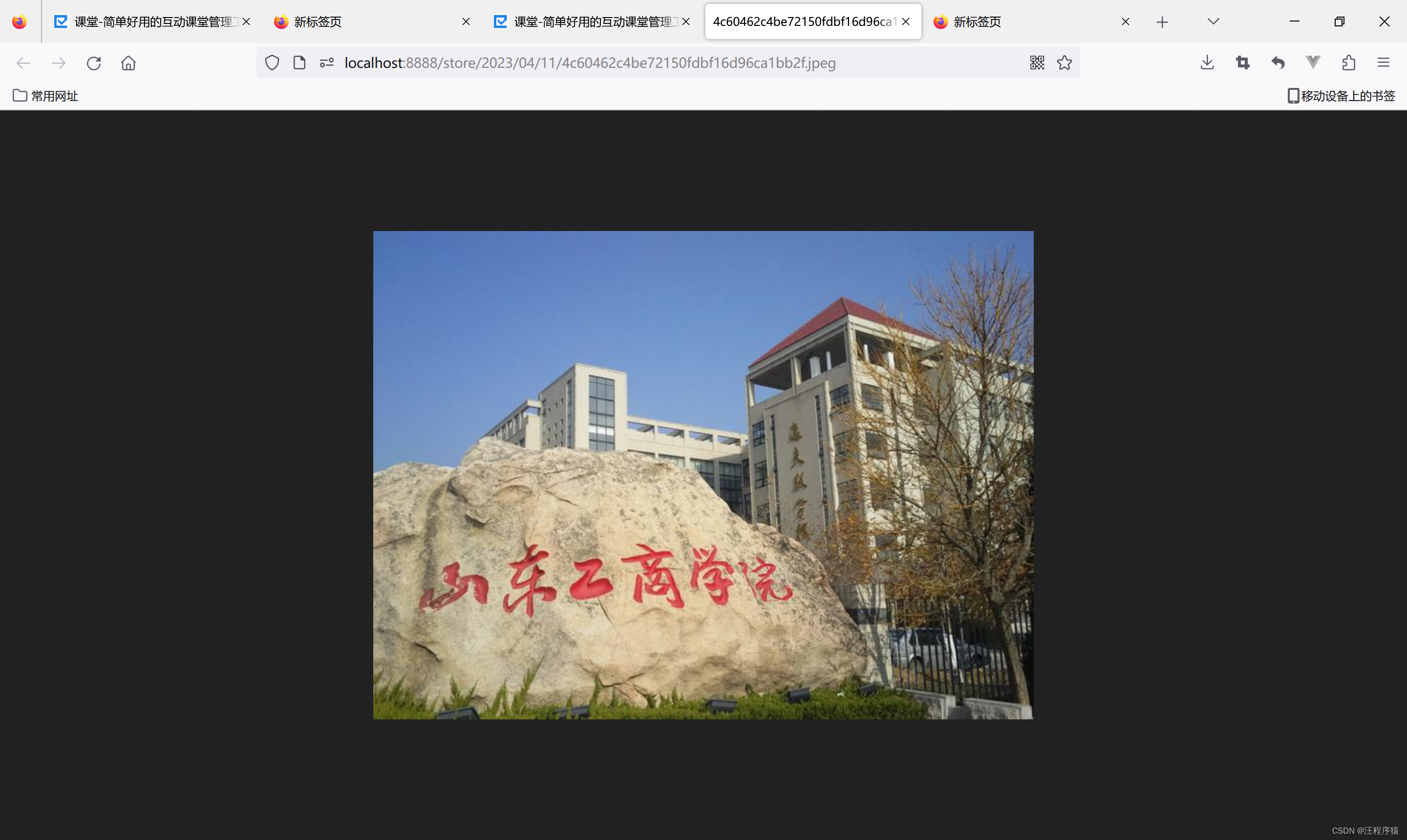
预览:
视频:
       <div class="right-pannel">
                    <div class="data-box">
                        <!--上传的作业-->
                        <div style="display: block" id="">
                            <div class="title clearfix">
                                <div class="all fl" data-folderid="0">
                                    <a class="here">上传附件(上传项目演示视频应为mp4格式)</a>
                                </div>
                            </div>
                            <div class="container_con">
                                <!--作业超时提示-->
                                <el-dialog
                                        title="提示"
                                        :visible.sync="workLateTip"
                                        width="30%">
                                    <span>作业已截止,禁止提交,请联系任课老师</span>
                                    <span slot="footer" class="dialog-footer">
                            <el-button @click="workLateTip = false">取 消</el-button>
                            <el-button type="primary" @click="workLateTip = false">确 定</el-button>
                          </span>
                                </el-dialog>
                                <!--展示如下界面-->
                                <div>
                                    <div class="operation" id="submit-display">

                                        <div class="add-resource-btn fl" @click="choiceImg">
                                            <span class="tips"><i class="iconfont"></i>上传文件</span>
                                            <input type="file" name="file" class="webuploader-element-invisible"
                                                   @change="getFile" ref="filElem" id="submitFile">
                                        </div>

                                        <div class="multidelete fl" style="display: none;" id="piliang-delete"
                                             @click="deleteZiYuan"><i
                                                class="iconfont iconshanchu1"></i>批量删除
                                        </div>
                                    </div>

                                    <el-progress id="showProgress" style="display:none;" :stroke-width="16"
                                                 :percentage="progressPercent"></el-progress>

                                    <el-table
                                            ref="multipleTable"
                                            :data="tableFileList"
                                            tooltip-effect="dark"
                                            style="width: 100%"
                                            @selection-change="handleSelectionChange">
                                        <el-table-column
                                                type="selection"
                                                width="55">
                                        </el-table-column>
                                        <el-table-column
                                                prop="submitHomeworkFileName"
                                                label="文件名"
                                                width="350">
                                        </el-table-column>
                                        <el-table-column
                                                prop="submitHomeworkFileSize"
                                                label="大小"
                                                width="150">
                                        </el-table-column>
                                        <el-table-column
                                                prop="submitHomeworkGrade"
                                                label="成绩状态"
                                                width="100">
                                        </el-table-column>

                                        <el-table-column
                                                prop="submitHomeworkCreateTime"
                                                label="上传时间"
                                                width="220">
                                        </el-table-column>

                                        <el-table-column
                                                width="300">
                                            <template slot-scope="scope">
                                                <a @click="preview(scope.row.submitHomeworkFilePath)"
                                                   class="homework-operation"
                                                   style="margin-left: 50px">预览</a>
                                                <a class="homework-operation"
                                                   @click="saveFile(scope.row.submitHomeworkId)">下载</a>
                                                <a @click="deleteOne(scope.row.submitHomeworkId)"
                                                   class="homework-operation">删除</a>
                                            </template>
                                        </el-table-column>
                                    </el-table>
                                </div>
                            </div>

                        </div>
                    </div>
                </div>
 //上传本地文件
            choiceImg() {
                this.$refs.filElem.dispatchEvent(new MouseEvent('click'))
            },


            getFile() {
                const inputFile = this.$refs.filElem.files[0];
                //如果大于1G,提示用户
                if (inputFile.size > 1048576000) {
                    this.$message({
                        message: '上传文件应小于1G',
                        type: 'error',
                        duration: 3000
                    });
                    return
                }
                //初始化为0,表示不是项目介绍视频
                this.submitWork.submitHomeworkIntroduceVideo = "0"
                // console.log(inputFile)
                //视频类型:video/mp4
                if (inputFile.type === "video/mp4") {
                    this.$message({
                        message: '上传视频将作为视频介绍',
                        type: 'info',
                        duration: 5000
                    });
                    //设置 1,表示标记为项目介绍视频
                    this.submitWork.submitHomeworkIntroduceVideo = "1"

                }
                let fileSize = inputFile.size / 1000;
                let finalSize = 0;
                if (fileSize > 1000) {
                    finalSize = fileSize / 1000;
                    this.fileSizeType = "MB"
                } else {
                    finalSize = fileSize;
                    this.fileSizeType = "KB"
                }
                this.tempFileSize = finalSize;
                this.fileName = inputFile.fileName

                this.upload()
            },
            //上传一个新的资源
            upload() {
                this.submitWork.homeworkId = sessionStorage.getItem("homeworkId")
                this.submitWork.studentId = sessionStorage.getItem("studentId")
                this.submitWork.submitHomeworkFileSize = this.tempFileSize + "" + this.fileSizeType
                // console.log(this.submitWork)
                homeworkApi.submitHomework(this.submitWork)
                    .then(res => {
                        this.$message({
                            message: '作业信息提交成功',
                            type: 'success'
                        });
                        this.addZiYuanDis = false;
                        //提交作业的id存储在会话中
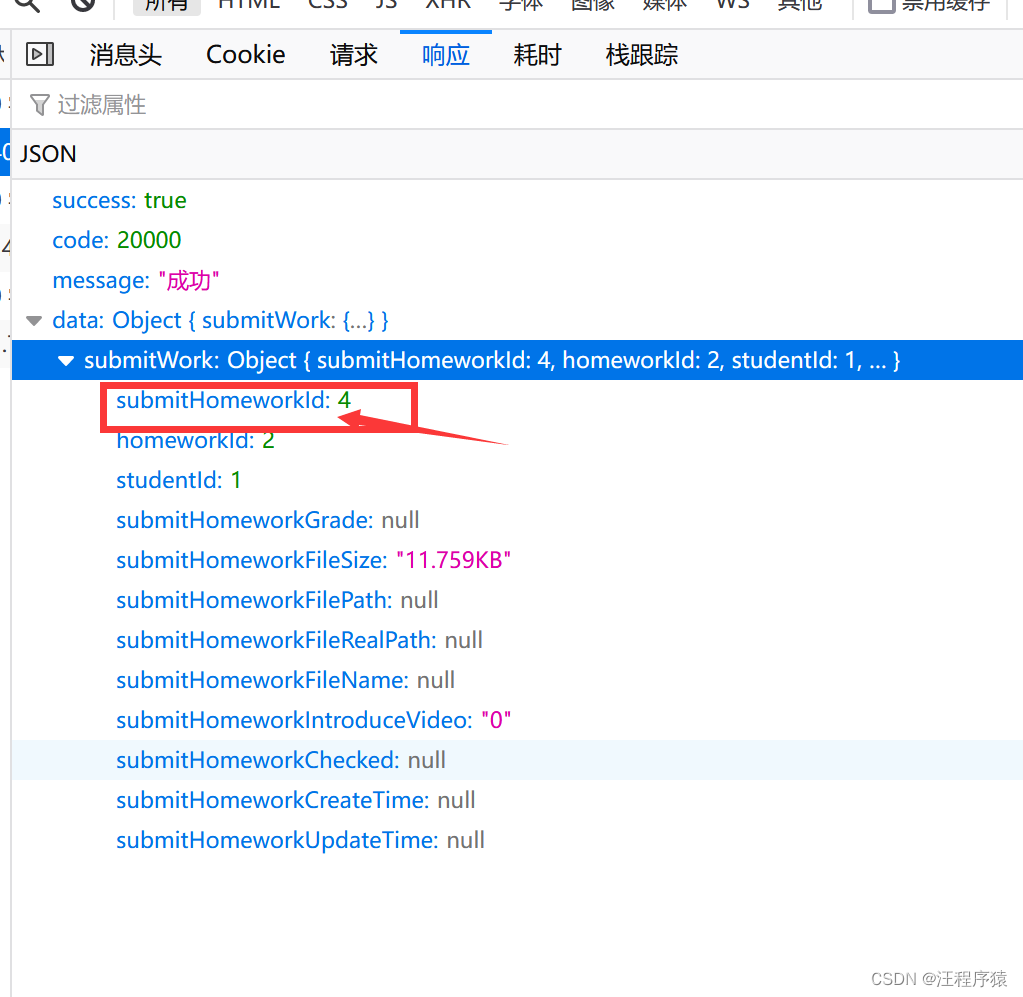
                        sessionStorage.setItem("finishWorkId", res.data.submitWork.submitHomeworkId)
                        //当已经存进数据库之后再进行修改
                        this.submit();
                    }).catch(
                    () => {
                        this.$message({
                            message: '作业信息提交失败!请重试!',
                            type: 'error'
                        });
                    }
                )

            },

            //文件提交到本地云端存储
            submit() {
                var formData = new FormData();
                const submitHomeworkId = sessionStorage.getItem("finishWorkId")
                let file = this.$refs.filElem.files[0]
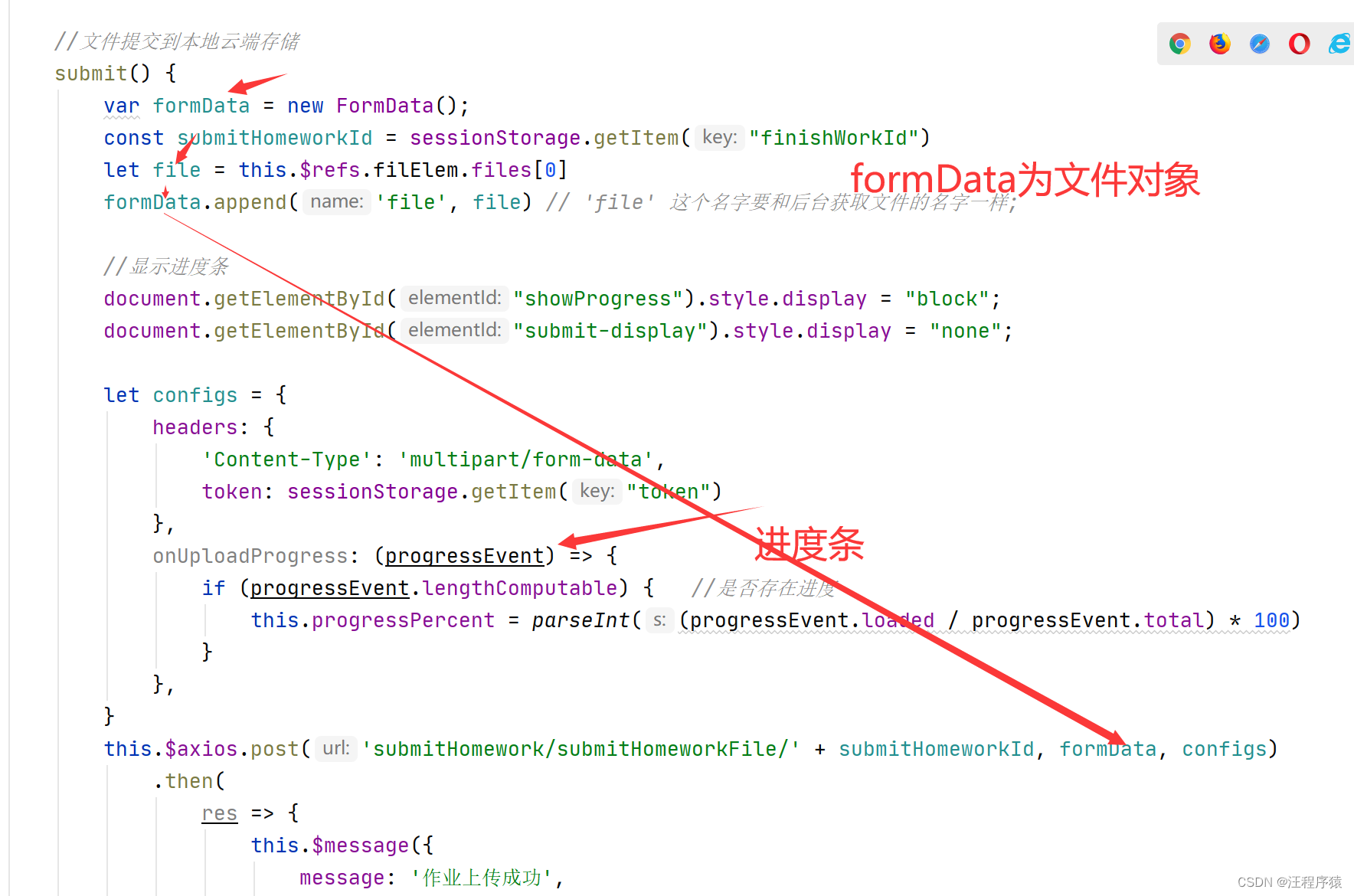
                formData.append('file', file) // 'file' 这个名字要和后台获取文件的名字一样;

                //显示进度条
                document.getElementById("showProgress").style.display = "block";
                document.getElementById("submit-display").style.display = "none";

                let configs = {
                    headers: {
                        'Content-Type': 'multipart/form-data',
                        token: sessionStorage.getItem("token")
                    },
                    onUploadProgress: (progressEvent) => {
                        if (progressEvent.lengthComputable) {   //是否存在进度
                            this.progressPercent = parseInt((progressEvent.loaded / progressEvent.total) * 100)
                        }
                    },
                }
                this.$axios.post('submitHomework/submitHomeworkFile/' + submitHomeworkId, formData, configs)
                    .then(
                        res => {
                            this.$message({
                                message: '作业上传成功',
                                type: 'success'
                            });
                            document.getElementById("showProgress").style.display = "none";
                            document.getElementById("submit-display").style.display = "block";
                            this.getAllZiYuan();

                        }).catch(error => {
                    this.$message({
                        message: '作业上传失败!请重试!',
                        type: 'error'
                    });
                    document.getElementById("showProgress").style.display = "none";
                    document.getElementById("submit-display").style.display = "block";
                })

            },
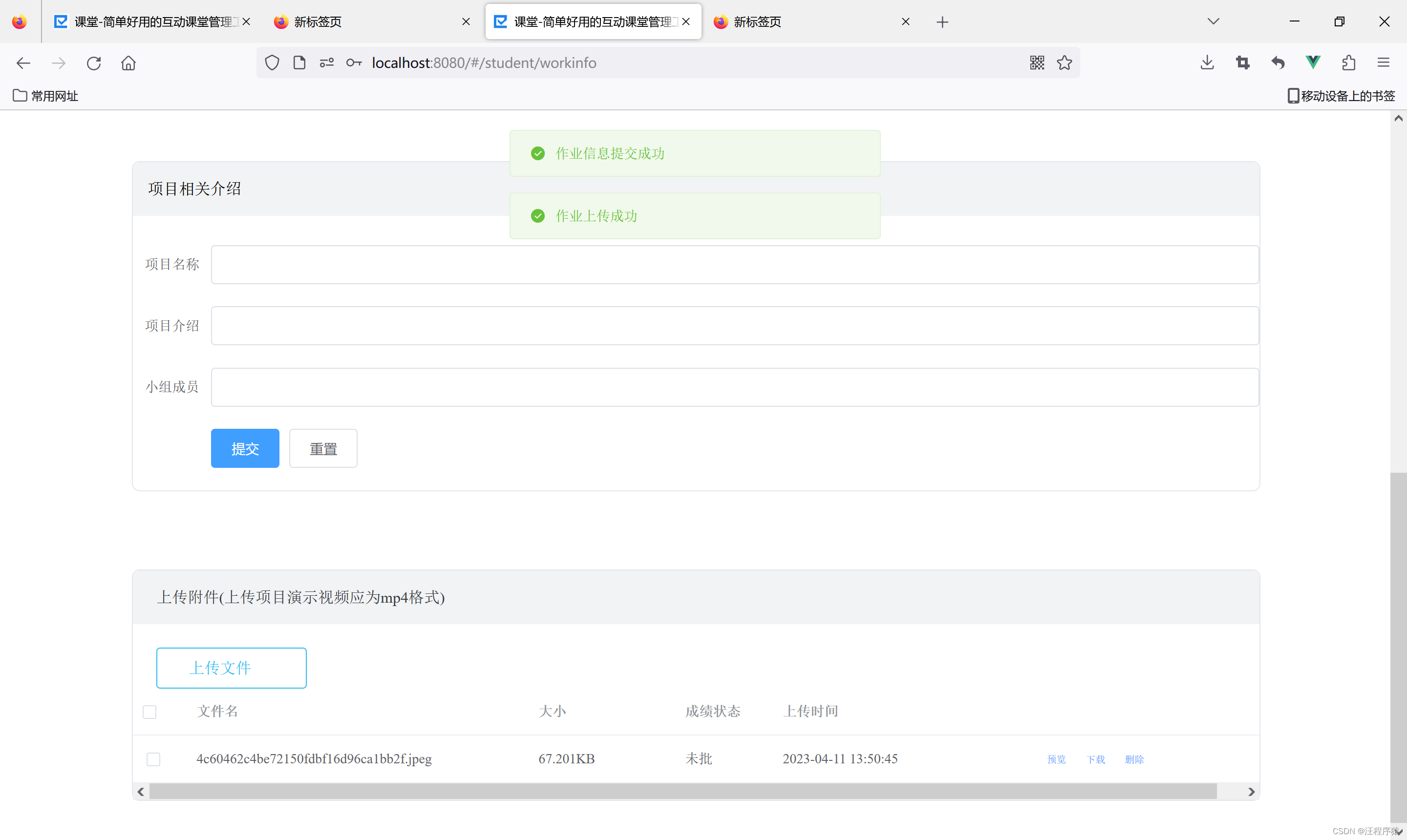
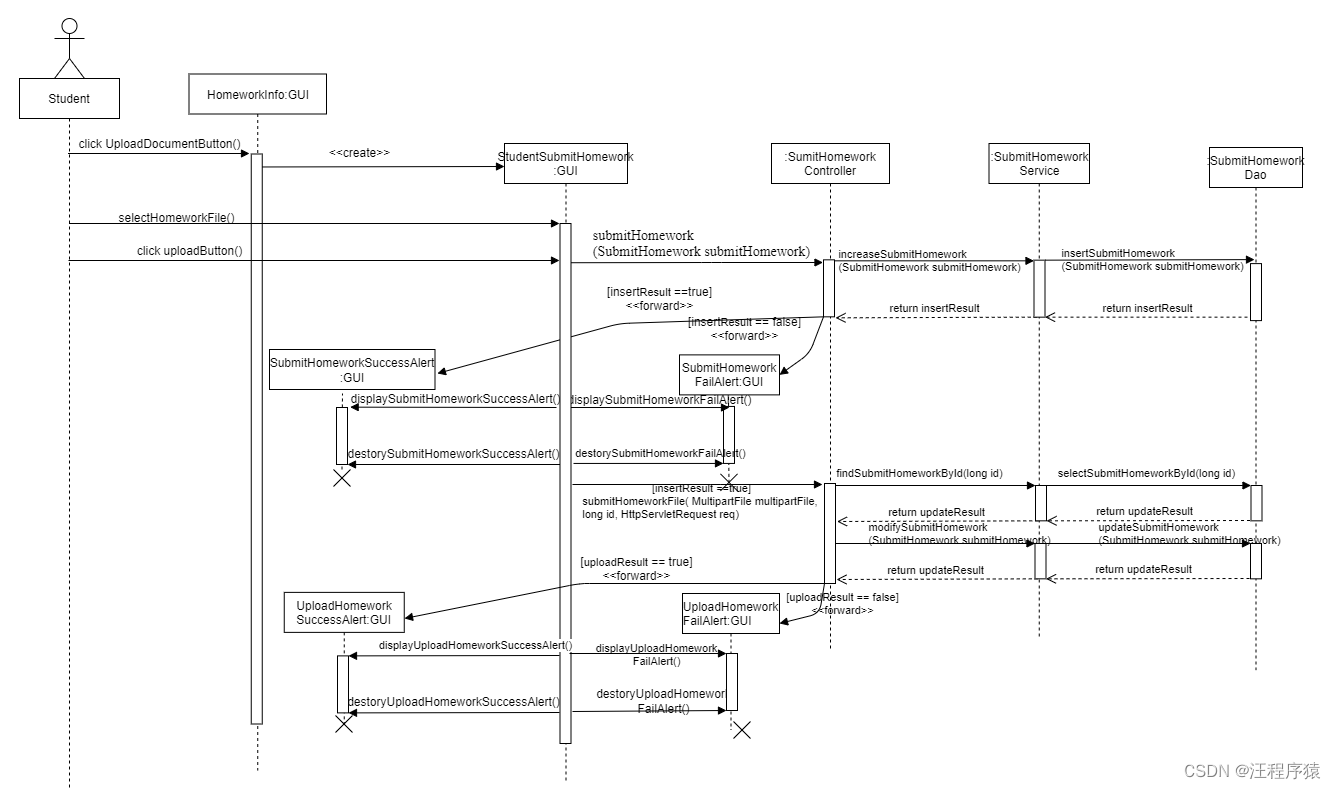
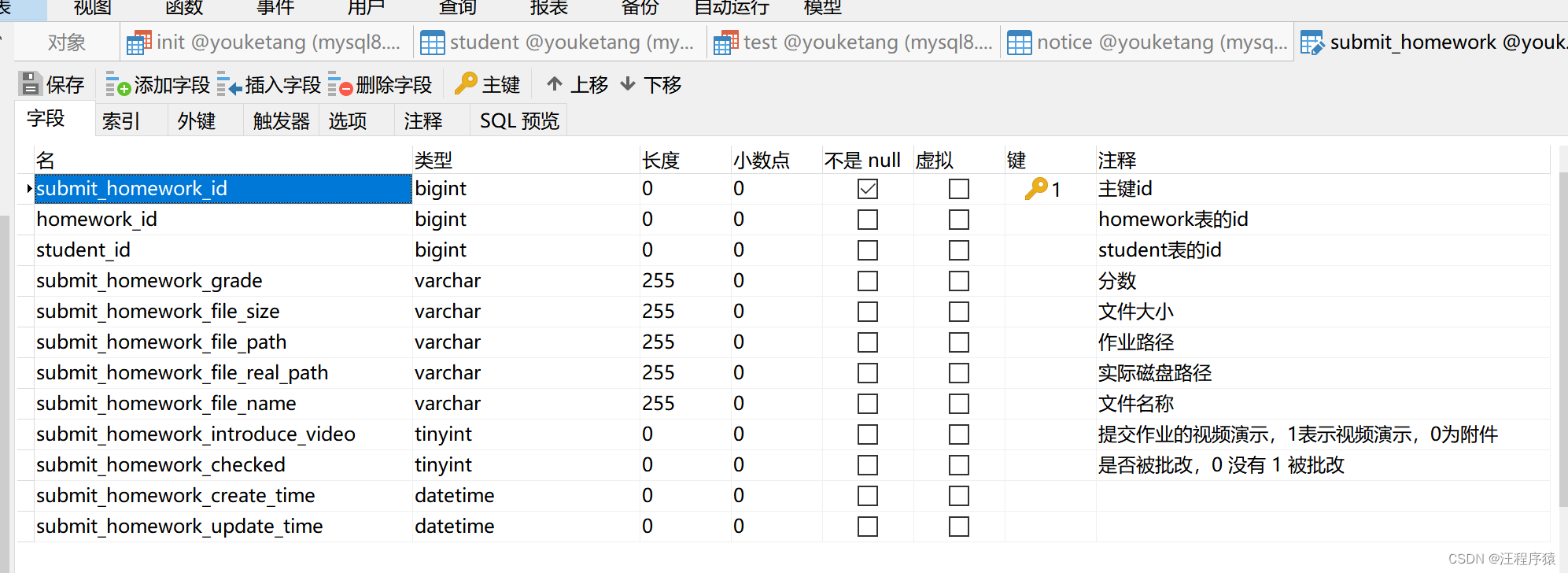
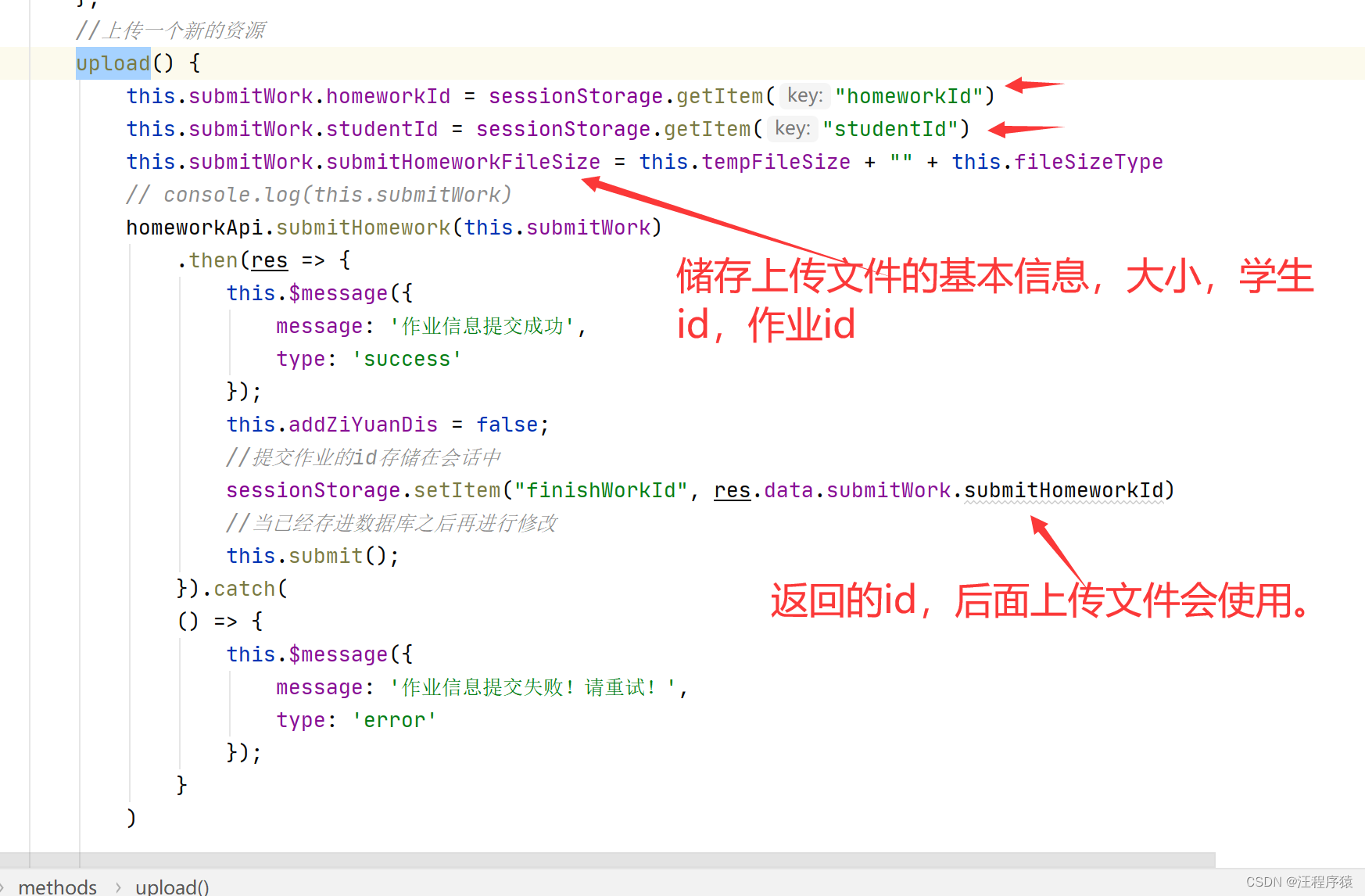
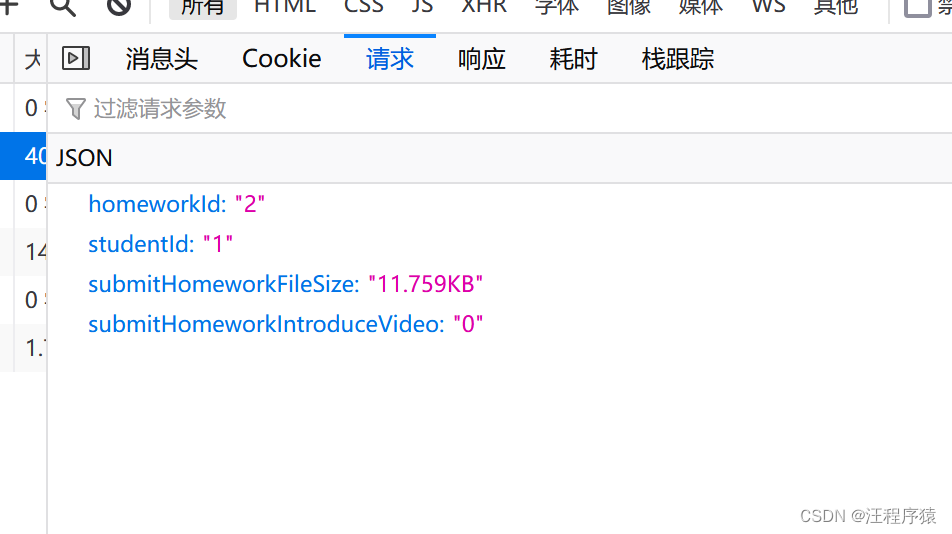
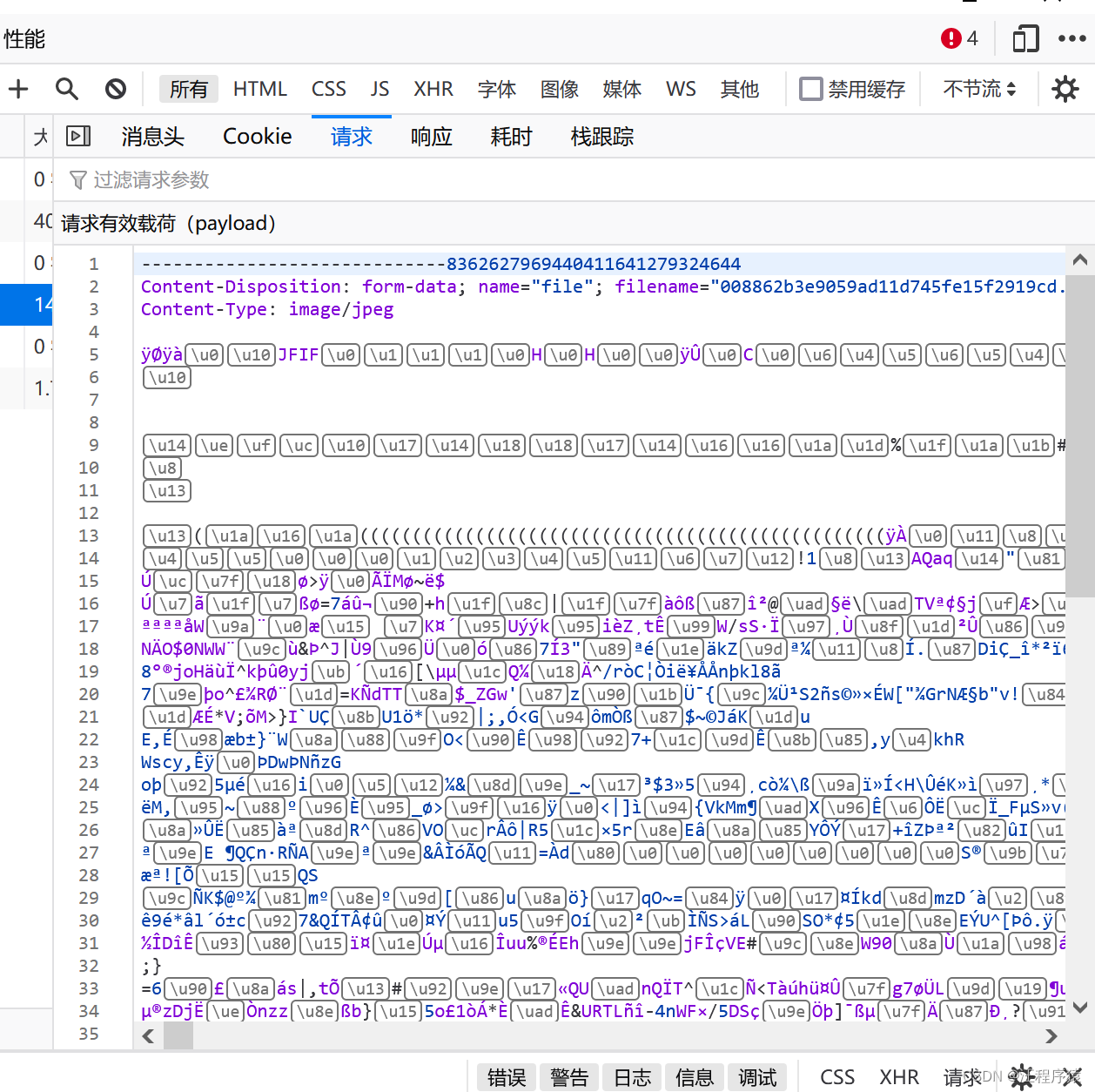
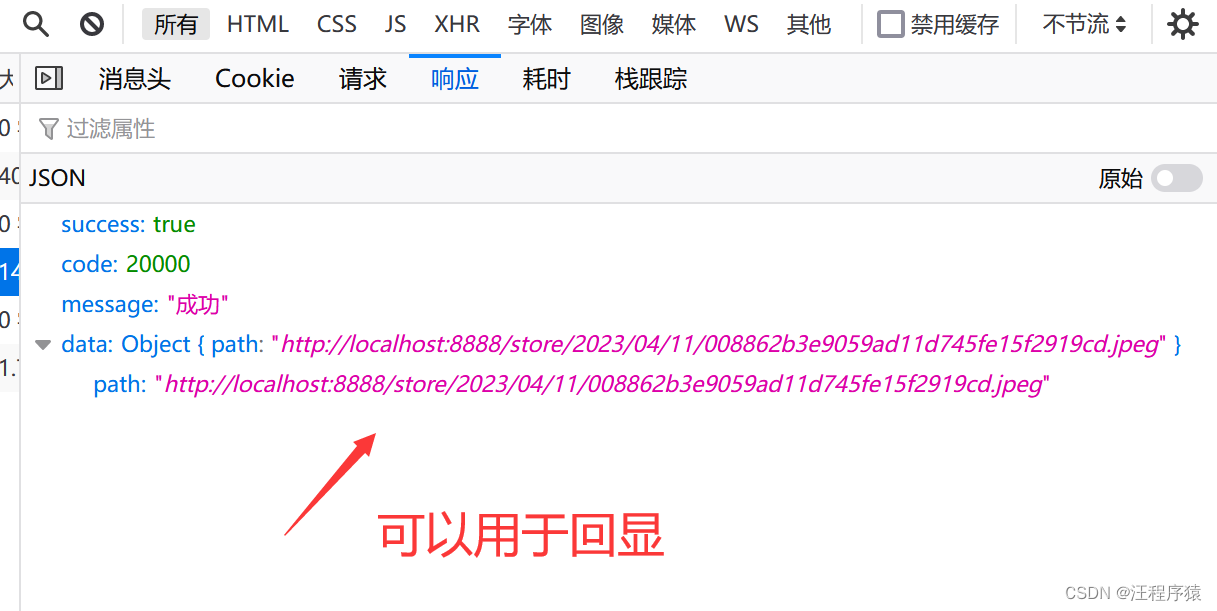
分成两部,1.通过前端将文件的基本信息传送到后端进行储存,返回已储存的文件id,2.再将文件发送到后端储存。
  @RequestMapping("/submitHomeworkFile/{submitHomeworkId}")
    public R submitHomeworkFile(@RequestParam("file") MultipartFile multipartFile, @PathVariable long submitHomeworkId, HttpServletRequest req) throws IOException {
        System.out.println("id___________________"+submitHomeworkId);
        SimpleDateFormat sdf = new SimpleDateFormat("/yyyy/MM/dd/");
        String format = sdf.format(new Date());//时间

//       获得项目在磁盘的地址,如:D:/eclipse-workspace/studyProject/youketangV0.0/youketang_ssm/target/classes//store/2023/02/19/
//        String realPath = ResourceUtils.getURL("classpath:").getPath() + "/store" + format;
//        /www/wwwroot/resource
        String realPath = "D:" + "/store" + format;
//        String realPath = "/www/wwwroot/resource" + "/store" + format;
// String realPath = req.getServletContext().getRealPath("/")+"/store"+format;
// getRealPath("/")方法返回的是项目在服务器的绝对路径(C:\Users\29395\AppData\Local\Temp\tomcat-docbase.4782946598994668439.8888\/store/2023/02/19/)
//由于是在temp临时文件,每次重启服务器,都找不到之前的文件url.

        File fileDir = new File(realPath);
        if (!fileDir.exists()) {
            fileDir.mkdirs();
        }
        if (multipartFile != null) {
            String fileName = multipartFile.getOriginalFilename();//获取名字
//            172.17.160.1为服务器的IP地址
//            String url = req.getScheme() + "://" + "47.94.255.44" + ":" + req.getServerPort() + "/store" + format + fileName;
            String url = req.getScheme() + "://" + "localhost" + ":" + req.getServerPort() + "/store" + format + fileName;
//          transferTo(File dest) 将接收到的文件传输到给定的目标文件。
            multipartFile.transferTo(new File(realPath, fileName));

            String fileReal = fileDir + "//" + fileName;
//            System.out.println(fileReal);
            SubmitHomework submitHomework = submitHomeworkService.findSubmitHomeworkById(submitHomeworkId);
            submitHomework.setSubmitHomeworkFileRealPath(fileReal);
            submitHomework.setSubmitHomeworkFilePath(url);
            submitHomework.setSubmitHomeworkFileName(multipartFile.getOriginalFilename());
            submitHomeworkService.modifySubmitHomework(submitHomework);

            return R.ok().data("path", url);
        } else {
            return R.ok().message("请选中文件");
        }
    }

    @GetMapping("/downloadSubmitHomeworkFile/{submitHomeworkId}")
    public void downloadSubmitHomeworkFile(@PathVariable("submitHomeworkId") long submitHomeworkId,
                         HttpServletResponse response) {
        SubmitHomework submitHomework = submitHomeworkService.findSubmitHomeworkById(submitHomeworkId);
        String fileRealPath = submitHomework.getSubmitHomeworkFileRealPath();
        String fileName = submitHomework.getSubmitHomeworkFileName();
        File file = new File(fileRealPath);
        byte[] buffer = new byte[1024];
        BufferedInputStream bis = null;
        OutputStream os = null;
        try {
            //文件是否存在
            if (file.exists()) {
                response.setHeader("Access-Control-Allow-Origin", "*"); // 允许所有
                //设置响应
                response.setContentType("application/octet-stream;charset=UTF-8");
                // 将响应头中的Content-Disposition暴露出来,不然前端获取不到
                response.setHeader("Access-Control-Expose-Headers", "Content-Disposition");
                // 在响应头中的Content-Disposition里设置文件名称
                response.setHeader("Content-Disposition", "attachment;filename=" + URLEncoder.encode(fileName, "UTF-8"));
//                response.setHeader("Content-Disposition", "attachment;filename=" + fileName);
                os = response.getOutputStream();
                bis = new BufferedInputStream(new FileInputStream(file));
                while (bis.read(buffer) != -1) {
                    os.write(buffer);
                }
            }
        } catch (Exception e) {
            e.printStackTrace();
        } finally {
            try {
                if (bis != null) {
                    bis.close();
                }
                if (os != null) {
                    os.flush();
                    os.close();
                }
            } catch (IOException e) {
                e.printStackTrace();
            }
        }
    }
这个我放在d盘下面,需要修改映射路径
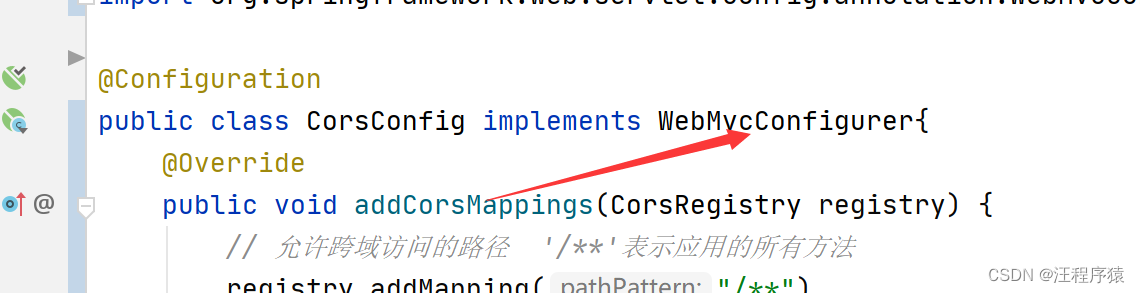
    @Override
    public void addResourceHandlers(ResourceHandlerRegistry registry) {
        //   访问相对路径
        // PS:注意文件路径最后的斜杠(文件分隔符),如果缺少了,就不能够正确的映射到相应的目录
        String baseDocumentPath = "file:D:/document/";
        String baseStorePath = "file:D:/store/";
//        String baseDocumentPath = "file:/www/wwwroot/resource/document/";
//        String baseStorePath = "file:/www/wwwroot/resource/store/";
        //        /www/wwwroot/resource
        registry.addResourceHandler("/document/**").addResourceLocations(baseDocumentPath);
        registry.addResourceHandler("/store/**").addResourceLocations(baseStorePath);
        WebMvcConfigurer.super.addResourceHandlers(registry);
    }
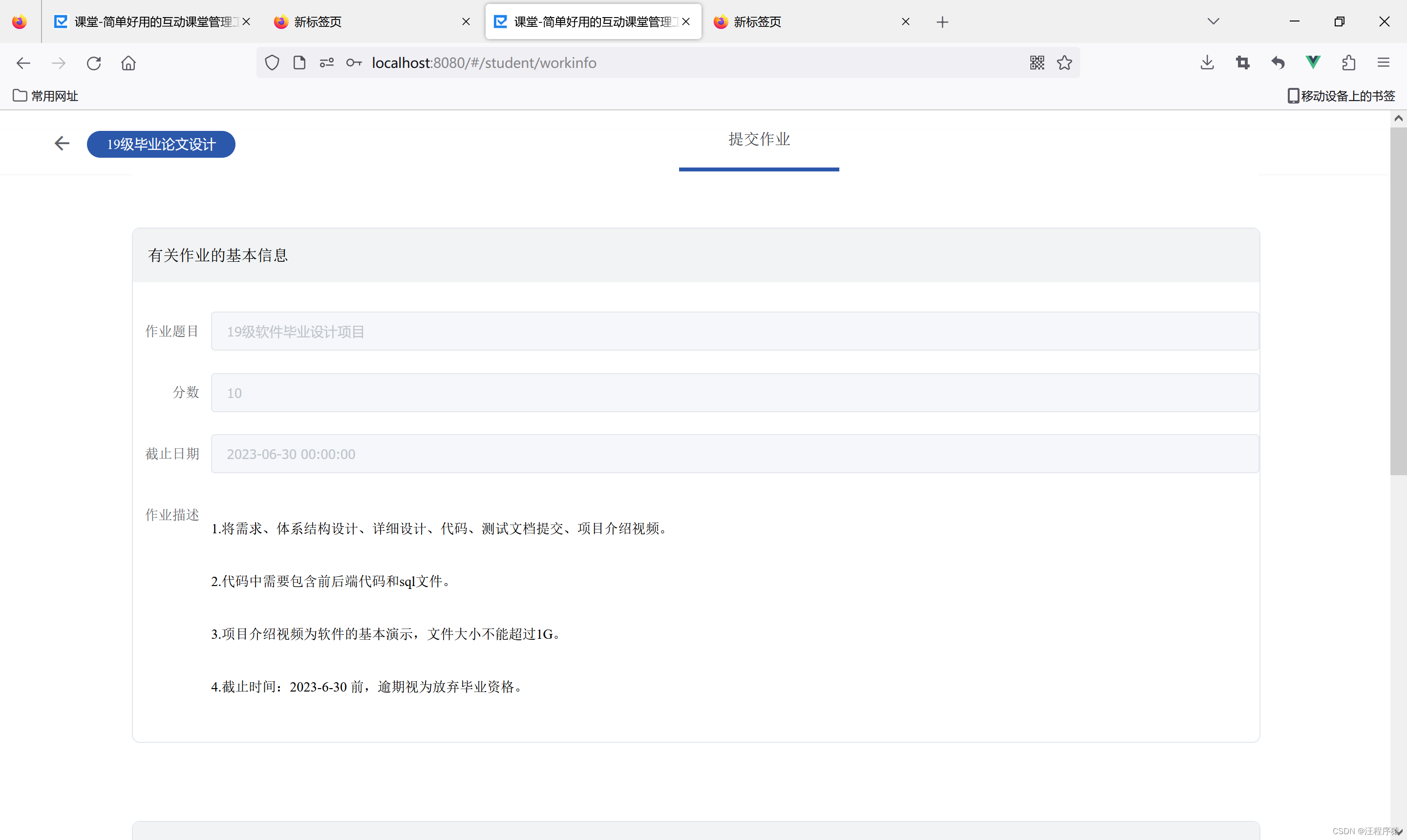
<template>
<div>
<!--头部-->
<div class="header">
<div class="header-left">
<span class="header-icon" @click="jumpToHomework"><i class="iconfont iconfanhui"
style="font-size:38px;color:#5F6368;"></i></span>
<span class="courseName" @click="jumpToHomework">{{ courseName }}</span>
</div>
<div class="header-center">
<span style="border-bottom: 4px solid #2C58AB;">提交作业</span>
</div>
<div class="header-right">
<ul class="nav-menu-right">
</ul>
</div>
</div>
<div class="data-page cWidth-new" style="width: 81%; padding: 0;">
<div class="resources-area">
<div class="right-pannel">
<div class="introduce" style=" height: 55px; line-height: 55px; border-radius: 8px 8px 0 0; background: #F1F3F4;padding-left: 15px;
"> 有关作业的基本信息
</div>
<!--在这里加入一个表单-->
<el-form :model="homeworkForm" ref="homeworkForm"
class="demo-dynamic" :rules="rules"
label-width="80px" style="margin-top: 30px;">
<el-form-item prop="title"
label="作业题目" style="color: #34373D;">
<el-input v-model="homeworkForm.homeworkTitle" disabled></el-input>
</el-form-item>
<el-form-item prop="fullScore"
label="分数">
<el-input v-model="homeworkForm.homeworkFullScore" disabled></el-input>
</el-form-item>
<el-form-item prop="deadline"
label="截止日期">
<el-input style="color: black" v-model="homeworkForm.homeworkDeadline" disabled></el-input>
</el-form-item>
<el-form-item prop="description"
label="作业描述">
<!--渲染-->
<span> <p v-html="homeworkForm.homeworkDescription"></p></span>
</el-form-item>
</el-form>
</div>
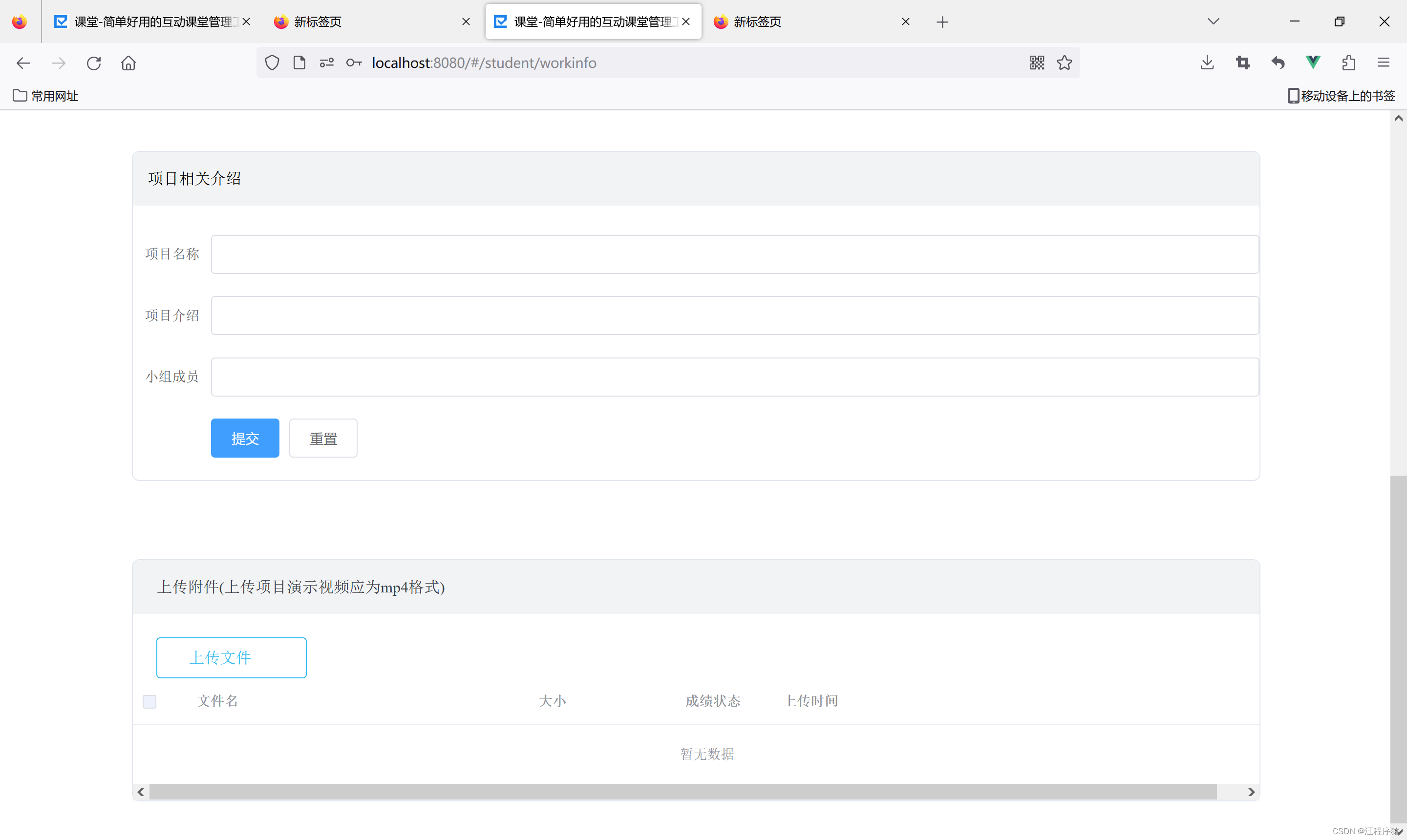
<div class="right-pannel">
<div class="introduce" style=" height: 55px; line-height: 55px; border-radius: 8px 8px 0 0; background: #F1F3F4;padding-left: 15px;
"> 项目相关介绍
</div>
<!-- 在这里加入一个表单-->
<el-form :model="dynamicValidateForm" ref="dynamicValidateForm"
class="demo-dynamic" :rules="rules"
label-width="80px" style="margin-top: 30px;">
<el-form-item prop="projectHomeworkName"
label="项目名称">
<el-input v-model="dynamicValidateForm.projectHomeworkName"></el-input>
</el-form-item>
<el-form-item prop="projectHomeworkIntroduceText"
label="项目介绍">
<el-input v-model="dynamicValidateForm.projectHomeworkIntroduceText"></el-input>
</el-form-item>
<el-form-item prop="projectHomeworkTeamNumber"
label="小组成员">
<el-input v-model="dynamicValidateForm.projectHomeworkTeamNumber"></el-input>
</el-form-item>
<el-form-item>
<el-button type="primary" @click="submitForm('dynamicValidateForm')" v-preventReClick>提交
</el-button>
<el-button @click="resetForm('dynamicValidateForm')">重置</el-button>
</el-form-item>
</el-form>
</div>
<div style="display: none" id="video">
<video
id="my-video"
class="video-js"
controls
preload="auto"
width="1152"
height="680"
data-setup="{}"
:src=vedioSrc>
</video>
</div>
<div class="right-pannel">
<div class="data-box">
<!--上传的作业-->
<div style="display: block" id="">
<div class="title clearfix">
<div class="all fl" data-folderid="0">
<a class="here">上传附件(上传项目演示视频应为mp4格式)</a>
</div>
</div>
<div class="container_con">
<!--作业超时提示-->
<el-dialog
title="提示"
:visible.sync="workLateTip"
width="30%">
<span>作业已截止,禁止提交,请联系任课老师</span>
<span slot="footer" class="dialog-footer">
<el-button @click="workLateTip = false">取 消</el-button>
<el-button type="primary" @click="workLateTip = false">确 定</el-button>
</span>
</el-dialog>
<!--展示如下界面-->
<div>
<div class="operation" id="submit-display">
<div class="add-resource-btn fl" @click="choiceImg">
<span class="tips"><i class="iconfont"></i>上传文件</span>
<input type="file" name="file" class="webuploader-element-invisible"
@change="getFile" ref="filElem" id="submitFile">
</div>
<div class="multidelete fl" style="display: none;" id="piliang-delete"
@click="deleteZiYuan"><i
class="iconfont iconshanchu1"></i>批量删除
</div>
</div>
<el-progress id="showProgress" style="display:none;" :stroke-width="16"
:percentage="progressPercent"></el-progress>
<el-table
ref="multipleTable"
:data="tableFileList"
tooltip-effect="dark"
style="width: 100%"
@selection-change="handleSelectionChange">
<el-table-column
type="selection"
width="55">
</el-table-column>
<el-table-column
prop="submitHomeworkFileName"
label="文件名"
width="350">
</el-table-column>
<el-table-column
prop="submitHomeworkFileSize"
label="大小"
width="150">
</el-table-column>
<el-table-column
prop="submitHomeworkGrade"
label="成绩状态"
width="100">
</el-table-column>
<el-table-column
prop="submitHomeworkCreateTime"
label="上传时间"
width="220">
</el-table-column>
<el-table-column
width="300">
<template slot-scope="scope">
<a @click="preview(scope.row.submitHomeworkFilePath)"
class="homework-operation"
style="margin-left: 50px">预览</a>
<a class="homework-operation"
@click="saveFile(scope.row.submitHomeworkId)">下载</a>
<a @click="deleteOne(scope.row.submitHomeworkId)"
class="homework-operation">删除</a>
</template>
</el-table-column>
</el-table>
</div>
</div>
</div>
</div>
</div>
</div>
</div>
</div>
</template>
<script>
import homeworkApi from "@/api/homework";
var formData = new window.FormData() // vue 中使用此方法创建FromData对象 window.FormData(),否则会报 'FormData isn't definded'
export default {
data() {
var validateName = (rule, value, callback) => {
if (!value) {
return callback(new Error("项目名称不能为空"));
} else {
callback();
}
};
var validateTeamNumber = (rule, value, callback) => {
if (!value) {
return callback(new Error("小组成员不能为空"));
} else {
callback();
}
};
var validateIntroduce = (rule, value, callback) => {
if (!value) {
return callback(new Error("项目介绍不能为空"));
} else {
callback();
}
};
return {
vedioSrc: '',//项目视频的src
finishWorkId: '', //用于更新提交时传递到后台覆盖原纪录
isLiuYanEmpty: true, //留言是否为空,默认都是空
isUpload: false, //是否提交了该作业
workLateTip: false, //作业提交超时提醒
fileSize: [], //上传的文件大小
readWorkTipDisplay: false, //定义批阅作业的提醒弹框
tableData: [], //定义作业提交详情总览
introduceVideo: '', //标记是否为视频
input1: '',
hide: '',
gradeList: [],
similarityList: [],
submitList: [],
shareList: [],
selected: false,
givePoints: '',
managecheck: false,
courseName: sessionStorage.getItem("courseName"),
homeworkId: '',
submitWorkId: '',//提交作业后端返回的id
course: {
id: '',
courseName: '',
className: '',
year: '',
semester: ''
},
homework: {},
classmateCount: '',
submitCount: '',
submittedList: [], //定义提交详情所有学生的信息展示 包括 已批 未批 未交
submitInfo: {
score: '',
id: '',
name: '',
number: '',
bestScore: '',
publishTime: '',
fileAddress: ''
},
submitWork: {},
read: '未阅',
score: '',
beginScore: [],
state: '',
tempFileSize: '', //暂时存的文件大小
fileSizeType: '', //文件大小类型 MB KB
fileName: '',
multipleSelection: [],//选中的文件
addZiYuanDis: false,
tableFileList: [],
deleteIdList: [], //每次删除完以后记得赋空值
dynamicValidateForm: {
projectHomeworkName: '',
projectHomeworkIntroduceText: '',
projectHomeworkTeamNumber: ''
},
homeworkForm: {
title: '',
description: '',
fullScore: '',
deadline: ''
},
rules: {
projectHomeworkName: [{validator: validateName, trigger: 'blur'}],
projectHomeworkTeamNumber: [{validator: validateTeamNumber, trigger: 'blur'}],
projectHomeworkIntroduceText: [{validator: validateIntroduce, trigger: 'blur'}],
},
dialogImageUrl: '',
dialogVisible: false,
progressPercent: 0
}
},
//进入页面内容全部渲染完成后自动引函数
mounted() {
this.getProjectHomeworkInfo();
this.getAllZiYuan();
},
methods: {
getProjectHomeworkInfo() {
let homeworkId = sessionStorage.getItem("homeworkId");
let studentId = sessionStorage.getItem("studentId");
//获取作业的基本信息
homeworkApi.getHomeworkById(homeworkId).then(
res => {
// console.log(res.data)
this.homeworkForm = res.data.homework
}
)
homeworkApi.getProjectHomeworkInfo(homeworkId, studentId).then(res => {
this.dynamicValidateForm.projectHomeworkIntroduceText = res.data.projectHomework.projectHomeworkIntroduceText
this.dynamicValidateForm.projectHomeworkTeamNumber = res.data.projectHomework.projectHomeworkTeamNumber
this.dynamicValidateForm.projectHomeworkName = res.data.projectHomework.projectHomeworkName
})
},
//获取所有资源
getAllZiYuan() {
let homeworkId = sessionStorage.getItem("homeworkId");
let studentId = sessionStorage.getItem("studentId");
homeworkApi.getSubmitHomework(homeworkId, studentId).then(res => {
//赋值给文件表格
this.tableFileList = res.data.submitHomeworkList
//对项目视频介绍标记,判断introduceVideo是否为1,如果为1,则为视频介绍,赋值videoSrc,并显示视频标签.
for (var i = 0; i < this.tableFileList.length; i++) {
if (this.tableFileList[i].introduceVideo === 1) {
this.vedioSrc = this.tableFileList[i].filePath;
document.getElementById("video").style.display = "block";
}
}
})
},
//学生端预览文件
preview(url) {
//console.log(indexurl);
//要预览文件的访问地址
window.open(url);
},
//单个删除
deleteOne(id) {
console.log(id)
this.deleteIdList.push(id)
this.$confirm('此操作将删除该资料, 是否继续?', '提示', {
confirmButtonText: '确定',
cancelButtonText: '取消',
type: 'warning'
}).then(() => {
//异步请求删除
homeworkApi.removeSubmitHomework(this.deleteIdList)
.then(res => {
this.deleteIdList = [] //进行置空
this.$message({
message: '删除成功',
type: 'success'
});
this.getAllZiYuan()
})
}).catch(() => {
this.$message({
type: 'info',
message: '已取消删除'
});
});
},
//删除资源(点击批量删除)
deleteZiYuan() {
let list = this.multipleSelection;
for (let i = 0; i < list.length; i++) {
this.deleteIdList.push(list[i].id);
}
this.$confirm('此操作将删除该资料, 是否继续?', '提示', {
confirmButtonText: '确定',
cancelButtonText: '取消',
type: 'warning'
}).then(() => {
//异步请求删除
homeworkApi.removeSubmitHomework(this.deleteIdList)
.then(res => {
this.deleteIdList = [] //进行置空
this.$message({
message: '删除成功',
type: 'success'
});
//重新加载界面
this.$router.go(0)
})
}).catch(() => {
this.$message({
type: 'info',
message: '已取消删除'
});
});
},
handleEdit(index, row) {
console.log(index, row);
},
handleSelectionChange(val) {
//console.log("选中值发生了改变")
this.multipleSelection = val;
if (this.multipleSelection.length !== 0) {
document.getElementById("piliang-delete").style.display = "block";
} else {
document.getElementById("piliang-delete").style.display = "none";
}
},
//上传本地文件
choiceImg() {
this.$refs.filElem.dispatchEvent(new MouseEvent('click'))
},
getFile() {
const inputFile = this.$refs.filElem.files[0];
//如果大于1G,提示用户
if (inputFile.size > 1048576000) {
this.$message({
message: '上传文件应小于1G',
type: 'error',
duration: 3000
});
return
}
//初始化为0,表示不是项目介绍视频
this.submitWork.submitHomeworkIntroduceVideo = "0"
// console.log(inputFile)
//视频类型:video/mp4
if (inputFile.type === "video/mp4") {
this.$message({
message: '上传视频将作为视频介绍',
type: 'info',
duration: 5000
});
//设置 1,表示标记为项目介绍视频
this.submitWork.submitHomeworkIntroduceVideo = "1"
}
let fileSize = inputFile.size / 1000;
let finalSize = 0;
if (fileSize > 1000) {
finalSize = fileSize / 1000;
this.fileSizeType = "MB"
} else {
finalSize = fileSize;
this.fileSizeType = "KB"
}
this.tempFileSize = finalSize;
this.fileName = inputFile.fileName
this.upload()
},
//上传一个新的资源
upload() {
this.submitWork.homeworkId = sessionStorage.getItem("homeworkId")
this.submitWork.studentId = sessionStorage.getItem("studentId")
this.submitWork.submitHomeworkFileSize = this.tempFileSize + "" + this.fileSizeType
// console.log(this.submitWork)
homeworkApi.submitHomework(this.submitWork)
.then(res => {
this.$message({
message: '作业信息提交成功',
type: 'success'
});
this.addZiYuanDis = false;
//提交作业的id存储在会话中
sessionStorage.setItem("finishWorkId", res.data.submitWork.submitHomeworkId)
//当已经存进数据库之后再进行修改
this.submit();
}).catch(
() => {
this.$message({
message: '作业信息提交失败!请重试!',
type: 'error'
});
}
)
},
//文件提交到本地云端存储
submit() {
var formData = new FormData();
const submitHomeworkId = sessionStorage.getItem("finishWorkId")
let file = this.$refs.filElem.files[0]
formData.append('file', file) // 'file' 这个名字要和后台获取文件的名字一样;
//显示进度条
document.getElementById("showProgress").style.display = "block";
document.getElementById("submit-display").style.display = "none";
let configs = {
headers: {
'Content-Type': 'multipart/form-data',
token: sessionStorage.getItem("token")
},
onUploadProgress: (progressEvent) => {
if (progressEvent.lengthComputable) { //是否存在进度
this.progressPercent = parseInt((progressEvent.loaded / progressEvent.total) * 100)
}
},
}
this.$axios.post('submitHomework/submitHomeworkFile/' + submitHomeworkId, formData, configs)
.then(
res => {
this.$message({
message: '作业上传成功',
type: 'success'
});
document.getElementById("showProgress").style.display = "none";
document.getElementById("submit-display").style.display = "block";
this.getAllZiYuan();
}).catch(error => {
this.$message({
message: '作业上传失败!请重试!',
type: 'error'
});
document.getElementById("showProgress").style.display = "none";
document.getElementById("submit-display").style.display = "block";
})
},
//跳转到作业
jumpToHomework() {
sessionStorage.setItem("homeworkId", '');
this.$router.push({name: 'SHomework'});
},
saveFile(submitHomeworkId) {
this.$axios.get('submitHomework/downloadSubmitHomeworkFile/' + submitHomeworkId,
{
responseType: 'blob'
, headers:
{
'token':
sessionStorage.getItem("token")
}
})
.then((res) => {
// console.log('文件下载成功');
const blob = new Blob([res.data]);
// 获取文件名称, res.headers['content-disposition']: attachment;filename=???????.docx
const fileNameUtf8 = res.headers['content-disposition'].split(";")[1].split("filename=")[1];
//%E8%BD%AF%E4%BB%B6%E9%A1%B9%E7%9B%AE%E8%AE%A1%E5%88%92%E8%A1%A8.docx 解码后:软件项目计划表.docx
var fileName = decodeURIComponent(fileNameUtf8)
console.log("res:" + res.headers['content-disposition'])
console.log("fileName:" + fileName)
//对于<a>标签,只有 Firefox 和 Chrome(内核) 支持 download 属性
//IE10以上支持blob,但是依然不支持download
//支持a标签download的浏览器
const link = document.createElement('a');//创建a标签
link.download = fileName;//a标签添加属性
link.style.display = 'none';
link.href = URL.createObjectURL(blob);
document.body.appendChild(link);
link.click();//执行下载
URL.revokeObjectURL(link.href); //释放url
document.body.removeChild(link);//释放标签
this.$message.success("作业下载成功!")
}).catch((res) => {
this.$message.error("作业下载失败!请重试!")
});
},
//提交表单
submitForm(formName) {
//进行校验
this.$refs[formName].validate((valid) => {
if (valid) {
let homeworkId = sessionStorage.getItem("homeworkId")
let studentId = sessionStorage.getItem("studentId")
let projectData = {
homeworkId: homeworkId,
studentId: studentId,
projectHomeworkTeamNumber: this.dynamicValidateForm.projectHomeworkTeamNumber,
projectHomeworkIntroduceText: this.dynamicValidateForm.projectHomeworkIntroduceText,
projectHomeworkName: this.dynamicValidateForm.projectHomeworkName
}
homeworkApi.saveProjectHomework(projectData)
.then(res => {
this.$message({
message: '提交成功',
type: 'success'
});
this.dynamicValidateForm.projectHomeworkTeamNumber = res.data.projectHomework.projectHomeworkTeamNumber
this.dynamicValidateForm.projectHomeworkIntroduceText = res.data.projectHomework.projectHomeworkIntroduceText
this.dynamicValidateForm.projectHomeworkName = res.data.projectHomework.projectHomeworkName
})
} else {
this.$message({
message: '请检查格式,再提交!',
type: 'error'
});
}
});
},
//重制表单
resetForm(formName) {
this.$refs[formName].resetFields();
this.dynamicValidateForm.projectHomeworkName = ""
this.dynamicValidateForm.projectHomeworkIntroduceText = ""
this.dynamicValidateForm.projectHomeworkTeamNumber = ""
},
}
}
</script>
<style scoped src="../../assets/discuss_css/coursewarev3.css"></style>
<style scoped>
a {
text-decoration: none;
}
li {
list-style-type: none;
}
.right-pannel .operation {
padding: 24px 24px 0;
height: 42px;
}
.right-pannel .operation > div {
width: 130px;
height: 40px;
line-height: 40px;
color: #32BAF0;
border: 1px solid #32BAF0;
border-radius: 4px;
padding-left: 22px;
margin-right: 15px;
cursor: pointer;
}
.fl {
float: left;
}
.right-pannel .operation div i {
font-size: 14px;
padding-right: 10px;
}
.homework-operation {
color: #4d90fe;
font-size: 10px;
margin-left: 20px;
cursor: pointer;
}
</style>
<style scoped>
@import url('../../assets/file/iconfont.css');
.header {
box-shadow: 0px 1px 3px 0px rgba(0, 0, 0, 0.04);
background: none repeat scroll 0% 0% #fff;
display: flex;
justify-content: space-between;
margin-top: 20px;
height: 45px;
}
.header-icon {
cursor: pointer;
}
.courseName {
background: #2c58ab;
color: white;
padding: 6px 20px;
border-radius: 16px;
font-size: 14px;
font-family: PingFangSC-Medium;
font-weight: 500;
position: relative;
bottom: 16px;
right: 45px;
}
.header-left {
position: relative;
left: 50px;
}
.header-right {
position: relative;
right: 100px;
}
.header-center span {
height: 74px;
padding-left: 50px;
padding-right: 50px;
font-size: 16px;
font-weight: 500;
color: rgba(59, 61, 69, 1);
padding-bottom: 20px;
cursor: pointer;
}
.header-center span:hover {
border-bottom: 4px solid #2C58AB;
}
.head-title h2 {
font-size: 18px;
color: #2d2d2d;
font-weight: 400;
display: inline-block;
}
.head-title .togsh p {
padding: 5px 20px;
margin-right: 10px;
background: rgba(0, 0, 0, .1);
}
.head-title .togsh p {
padding: 5px 20px;
margin-right: 10px;
background: rgba(0, 0, 0, .1);
font-size: 14px;
width: 175px;
margin-top: -5px;
}
.classify dt {
color: #5A5A5A;
line-height: 46px;
height: 46px;
width: 150px;
border-right: 1px solid #DCDCDC;
background: #F2F2F2;
text-indent: 30px;
font-size: 12px;
margin-right: 36px;
border-bottom: 1px dashed #eaeaea;
margin-bottom: -1px;
}
.classify li {
width: 48px;
height: 20px;
line-height: 20px;
margin-right: 30px;
border: 1px solid transparent;
cursor: pointer;
font-size: 12px;
text-align: center;
}
.classify el-checkbox {
padding-left: 25px;
font-size: 12px;
color: #5a5a5a;
border-radius: 3px;
height: 33px;
line-height: 33px;
width: 83px;
cursor: pointer;
}
li {
list-style: none;
}
.typehead li {
display: inline-block;
float: left;
vertical-align: middle;
}
.typehead li div {
display: block;
width: 100px;
line-height: 38px;
border: 1px solid transparent;
margin-left: -1px;
color: #595959;
font-size: 12px;
}
.backwork /deep/ span {
position: relative;
bottom: 3px;
right: 4px;
font-size: 12px;
}
.nav-menu-right {
float: right;
margin-right: 65px;
margin-top: -4px;
}
.iconfont {
font-family: iconfont !important;
font-size: 16px;
font-style: normal;
-webkit-font-smoothing: antialiased;
-moz-osx-font-smoothing: grayscale;
}
.cWidth-new {
width: 1224px;
margin-left: auto;
margin-right: auto;
}
.cWidth-new {
width: 1224px;
margin-left: auto;
margin-right: auto;
}
.clearfix {
zoom: 1;
}
</style>
package com.wang.youketang.controller;


import com.wang.youketang.common.result.R;
import com.wang.youketang.entity.SubmitHomework;
import com.wang.youketang.service.SubmitHomeworkService;
import io.swagger.annotations.ApiOperation;
import org.springframework.transaction.annotation.Transactional;
import org.springframework.util.ResourceUtils;
import org.springframework.web.bind.annotation.*;
import org.springframework.web.multipart.MultipartFile;

import javax.annotation.Resource;
import javax.servlet.http.HttpServletRequest;
import javax.servlet.http.HttpServletResponse;
import java.io.*;
import java.net.URLEncoder;
import java.text.SimpleDateFormat;
import java.util.Date;
import java.util.List;

/**
 * (SubmitHomework)表控制层
 */
@RestController
@RequestMapping("/submitHomework")
@CrossOrigin
public class SubmitHomeworkController {
    /**
     * 服务对象
     */
    @Resource
    private SubmitHomeworkService submitHomeworkService;

    //根据课程号和人员id获取交的作业
    @GetMapping("/getSubmitHomework")
    public R getSubmitHomework(@RequestParam long homeworkId, @RequestParam long studentId) {
        List<SubmitHomework> submitHomeWork = submitHomeworkService.selectHWByIds(homeworkId, studentId);
        return R.ok().data("submitHomeworkList", submitHomeWork);
    }


    //    @ApiOperation(value = "提交作业")
    @PostMapping("/submitHomework")
    public R submitHomework(@RequestBody SubmitHomework submitHomework) {
        SubmitHomework submitWork = submitHomeworkService.increaseSubmitHomework(submitHomework);
        return R.ok().data("submitWork", submitWork);
    }

    //    @ApiOperation(value = "根据课程号和用户id获取交的所有作业")
    @GetMapping("/getSubmitHomeworkList")
    public R getSubmitHomeworkList(@RequestParam long courseId, @RequestParam long studentId) {
        List<SubmitHomework> submitHomeworkList = submitHomeworkService.getSubmitHomeworkList(courseId, studentId);
        return R.ok().data("submitHomeworkList", submitHomeworkList);
    }

    //    删除
    @PostMapping("/removeSubmitHomework")
    @Transactional
    public R removeSubmitHomework(@RequestBody long[] submitHomeworkIds) {
        boolean removeResult = false;
        for (long submitHomeworkId : submitHomeworkIds) {
            //通过id获取文件的物理地址,并对其删除。
            // 将"\"替换成"/",java将“\”当成转义符。转化为:“C:/Users/29395/AppData/Local/...”
            String filePath = this.submitHomeworkService.findFileRealPathById(submitHomeworkId);
            if(filePath == null){
//               当路径为空
                removeResult = submitHomeworkService.dropSubmitHomeworkById(submitHomeworkId);
            }else{
//                不为空的时候
                File file = new File(filePath.replace("\\", "/"));
                removeResult =  submitHomeworkService.dropSubmitHomeworkById(submitHomeworkId) && file.delete() ;
            }
        }
        return removeResult ? R.ok() : R.error().message("删除失败!若视频为项目介绍,请先上传新的视频,才能删除旧视频。");
    }

    //  根据id获取提交的作业打分
    @PostMapping("/markSubmitHomework")
    public R markSubmitHomework(@RequestParam long studentId, @RequestParam String grade) {
       boolean updateResult =  submitHomeworkService.modifyGradeByStudentId(studentId,grade);
        return updateResult?R.ok():R.error().message("打分失败!!!");
    }

//   "打回作业"
    @PostMapping("/backSubmitHomework/{studentId}")
    public R backSubmitHomework(@PathVariable long studentId) {
        boolean updateResult = submitHomeworkService.modifyGradeBackByStudentId(studentId);
        return updateResult?R.ok():R.error().message("打回作业失败!!!");
    }


    @RequestMapping("/submitHomeworkFile/{submitHomeworkId}")
    public R submitHomeworkFile(@RequestParam("file") MultipartFile multipartFile, @PathVariable long submitHomeworkId, HttpServletRequest req) throws IOException {
        System.out.println("id___________________"+submitHomeworkId);
        SimpleDateFormat sdf = new SimpleDateFormat("/yyyy/MM/dd/");
        String format = sdf.format(new Date());//时间

//       获得项目在磁盘的地址,如:D:/eclipse-workspace/studyProject/youketangV0.0/youketang_ssm/target/classes//store/2023/02/19/
//        String realPath = ResourceUtils.getURL("classpath:").getPath() + "/store" + format;
//        /www/wwwroot/resource
        String realPath = "D:" + "/store" + format;
//        String realPath = "/www/wwwroot/resource" + "/store" + format;
// String realPath = req.getServletContext().getRealPath("/")+"/store"+format;
// getRealPath("/")方法返回的是项目在服务器的绝对路径(C:\Users\29395\AppData\Local\Temp\tomcat-docbase.4782946598994668439.8888\/store/2023/02/19/)
//由于是在temp临时文件,每次重启服务器,都找不到之前的文件url.

        File fileDir = new File(realPath);
        if (!fileDir.exists()) {
            fileDir.mkdirs();
        }
        if (multipartFile != null) {
            String fileName = multipartFile.getOriginalFilename();//获取名字
//            172.17.160.1为服务器的IP地址
//            String url = req.getScheme() + "://" + "47.94.255.44" + ":" + req.getServerPort() + "/store" + format + fileName;
            String url = req.getScheme() + "://" + "localhost" + ":" + req.getServerPort() + "/store" + format + fileName;
//          transferTo(File dest) 将接收到的文件传输到给定的目标文件。
            multipartFile.transferTo(new File(realPath, fileName));

            String fileReal = fileDir + "//" + fileName;
//            System.out.println(fileReal);
            SubmitHomework submitHomework = submitHomeworkService.findSubmitHomeworkById(submitHomeworkId);
            submitHomework.setSubmitHomeworkFileRealPath(fileReal);
            submitHomework.setSubmitHomeworkFilePath(url);
            submitHomework.setSubmitHomeworkFileName(multipartFile.getOriginalFilename());
            submitHomeworkService.modifySubmitHomework(submitHomework);

            return R.ok().data("path", url);
        } else {
            return R.ok().message("请选中文件");
        }
    }

    @GetMapping("/downloadSubmitHomeworkFile/{submitHomeworkId}")
    public void downloadSubmitHomeworkFile(@PathVariable("submitHomeworkId") long submitHomeworkId,
                         HttpServletResponse response) {
        SubmitHomework submitHomework = submitHomeworkService.findSubmitHomeworkById(submitHomeworkId);
        String fileRealPath = submitHomework.getSubmitHomeworkFileRealPath();
        String fileName = submitHomework.getSubmitHomeworkFileName();
        File file = new File(fileRealPath);
        byte[] buffer = new byte[1024];
        BufferedInputStream bis = null;
        OutputStream os = null;
        try {
            //文件是否存在
            if (file.exists()) {
                response.setHeader("Access-Control-Allow-Origin", "*"); // 允许所有
                //设置响应
                response.setContentType("application/octet-stream;charset=UTF-8");
                // 将响应头中的Content-Disposition暴露出来,不然前端获取不到
                response.setHeader("Access-Control-Expose-Headers", "Content-Disposition");
                // 在响应头中的Content-Disposition里设置文件名称
                response.setHeader("Content-Disposition", "attachment;filename=" + URLEncoder.encode(fileName, "UTF-8"));
//                response.setHeader("Content-Disposition", "attachment;filename=" + fileName);
                os = response.getOutputStream();
                bis = new BufferedInputStream(new FileInputStream(file));
                while (bis.read(buffer) != -1) {
                    os.write(buffer);
                }
            }
        } catch (Exception e) {
            e.printStackTrace();
        } finally {
            try {
                if (bis != null) {
                    bis.close();
                }
                if (os != null) {
                    os.flush();
                    os.close();
                }
            } catch (IOException e) {
                e.printStackTrace();
            }
        }
    }

}
package com.wang.youketang.common.config;


import com.wang.youketang.common.interceptor.JWTInterceptor;
import org.springframework.context.annotation.Bean;
import org.springframework.context.annotation.Configuration;
import org.springframework.util.ResourceUtils;
import org.springframework.web.servlet.config.annotation.CorsRegistry;
import org.springframework.web.servlet.config.annotation.InterceptorRegistry;
import org.springframework.web.servlet.config.annotation.ResourceHandlerRegistry;
import org.springframework.web.servlet.config.annotation.WebMvcConfigurer;

@Configuration
public class CorsConfig implements WebMvcConfigurer{
    @Override
    public void addCorsMappings(CorsRegistry registry) {
        // 允许跨域访问的路径  '/**'表示应用的所有方法
        registry.addMapping("/**")

                .allowedOrigins("*")
//                .allowedOrigins("http://172.17.160.1:8080") //ip地址+端口号
//                .allowedOrigins("http://172.18.29.108:8080") //前端vue的ip
//                .allowedOrigins("http://172.17.160.1:8080")  //本机的ip
                // 允许跨域访问的来源 '*'表示所有域名来源

                .allowedMethods("GET", "HEAD", "POST", "PUT", "DELETE", "OPTIONS")
                // 是否允许发送cookie true-允许 false-不允许 默认false。对服务器有特殊要求的请求,比如请求方法是PUT或DELETE,或者Content-Type字段的类型是application/json,这个值只能设为true
                .allowCredentials(true)
                // 预检间隔时间1小时,单位为秒。指定本次预检请求的有效期,在有效期间,不用发出另一条预检请求。
                // 浏览器发出CORS简单请求,只需要在头信息之中增加一个Origin字段
                // 浏览器发出CORS非简单请求,会在正式通信之前,增加一次OPTIONS查询请求,称为"预检"请求(preflight)。浏览器先询问服务器,当前网页所在的域名是否在服务器的许可名单之中,以及可以使用哪些HTTP动词和头信息字段。只有得到肯定答复,浏览器才会发出正式的XMLHttpRequest请求,否则就报错。
                .maxAge(3600)
                // 允许跨域请求可携带的header,'*'表所有header头。CORS请求时,XMLHttpRequest对象的getResponseHeader()方法只能拿到6个基本字段:Cache-Control、Content-Language、Content-Type、Expires、Last-Modified、Pragma。如果想拿到其他字段,就必须在Access-Control-Expose-Headers里面指定
                .allowedHeaders("*");
    }
    @Override
    public void addResourceHandlers(ResourceHandlerRegistry registry) {
        //   访问相对路径
        // PS:注意文件路径最后的斜杠(文件分隔符),如果缺少了,就不能够正确的映射到相应的目录
        String baseDocumentPath = "file:D:/document/";
        String baseStorePath = "file:D:/store/";
//        String baseDocumentPath = "file:/www/wwwroot/resource/document/";
//        String baseStorePath = "file:/www/wwwroot/resource/store/";
        //        /www/wwwroot/resource
        registry.addResourceHandler("/document/**").addResourceLocations(baseDocumentPath);
        registry.addResourceHandler("/store/**").addResourceLocations(baseStorePath);
        WebMvcConfigurer.super.addResourceHandlers(registry);
    }

    //注册拦截器
    public void addInterceptors(InterceptorRegistry registry) {
        registry.addInterceptor(new JWTInterceptor())
                .addPathPatterns("/**")    //需要token验证的接口 一般是全部接口
                .excludePathPatterns("/student/**","/teacher/**","/document/**","/store/**");  //
    }

}
我有一个Ruby程序,它使用rubyzip压缩XML文件的目录树。gem。我的问题是文件开始变得很重,我想提高压缩级别,因为压缩时间不是问题。我在rubyzipdocumentation中找不到一种为创建的ZIP文件指定压缩级别的方法。有人知道如何更改此设置吗?是否有另一个允许指定压缩级别的Ruby库? 最佳答案 这是我通过查看rubyzip内部创建的代码。level=Zlib::BEST_COMPRESSIONZip::ZipOutputStream.open(zip_file)do|zip|Dir.glob("**/*")d
我试图在一个项目中使用rake,如果我把所有东西都放到Rakefile中,它会很大并且很难读取/找到东西,所以我试着将每个命名空间放在lib/rake中它自己的文件中,我添加了这个到我的rake文件的顶部:Dir['#{File.dirname(__FILE__)}/lib/rake/*.rake'].map{|f|requiref}它加载文件没问题,但没有任务。我现在只有一个.rake文件作为测试,名为“servers.rake”,它看起来像这样:namespace:serverdotask:testdoputs"test"endend所以当我运行rakeserver:testid时
我的目标是转换表单输入,例如“100兆字节”或“1GB”,并将其转换为我可以存储在数据库中的文件大小(以千字节为单位)。目前,我有这个:defquota_convert@regex=/([0-9]+)(.*)s/@sizes=%w{kilobytemegabytegigabyte}m=self.quota.match(@regex)if@sizes.include?m[2]eval("self.quota=#{m[1]}.#{m[2]}")endend这有效,但前提是输入是倍数(“gigabytes”,而不是“gigabyte”)并且由于使用了eval看起来疯狂不安全。所以,功能正常,
Rails2.3可以选择随时使用RouteSet#add_configuration_file添加更多路由。是否可以在Rails3项目中做同样的事情? 最佳答案 在config/application.rb中:config.paths.config.routes在Rails3.2(也可能是Rails3.1)中,使用:config.paths["config/routes"] 关于ruby-on-rails-Rails3中的多个路由文件,我们在StackOverflow上找到一个类似的问题
对于具有离线功能的智能手机应用程序,我正在为Xml文件创建单向文本同步。我希望我的服务器将增量/差异(例如GNU差异补丁)发送到目标设备。这是计划:Time=0Server:hasversion_1ofXmlfile(~800kiB)Client:hasversion_1ofXmlfile(~800kiB)Time=1Server:hasversion_1andversion_2ofXmlfile(each~800kiB)computesdeltaoftheseversions(=patch)(~10kiB)sendspatchtoClient(~10kiBtransferred)Cl
我正在寻找执行以下操作的正确语法(在Perl、Shell或Ruby中):#variabletoaccessthedatalinesappendedasafileEND_OF_SCRIPT_MARKERrawdatastartshereanditcontinues. 最佳答案 Perl用__DATA__做这个:#!/usr/bin/perlusestrict;usewarnings;while(){print;}__DATA__Texttoprintgoeshere 关于ruby-如何将脚
使用带有Rails插件的vim,您可以创建一个迁移文件,然后一次性打开该文件吗?textmate也可以这样吗? 最佳答案 你可以使用rails.vim然后做类似的事情::Rgeneratemigratonadd_foo_to_bar插件将打开迁移生成的文件,这正是您想要的。我不能代表textmate。 关于ruby-使用VimRails,您可以创建一个新的迁移文件并一次性打开它吗?,我们在StackOverflow上找到一个类似的问题: https://sta
好的,所以我的目标是轻松地将一些数据保存到磁盘以备后用。您如何简单地写入然后读取一个对象?所以如果我有一个简单的类classCattr_accessor:a,:bdefinitialize(a,b)@a,@b=a,bendend所以如果我从中非常快地制作一个objobj=C.new("foo","bar")#justgaveitsomerandomvalues然后我可以把它变成一个kindaidstring=obj.to_s#whichreturns""我终于可以将此字符串打印到文件或其他内容中。我的问题是,我该如何再次将这个id变回一个对象?我知道我可以自己挑选信息并制作一个接受该信
我正在编写一个小脚本来定位aws存储桶中的特定文件,并创建一个临时验证的url以发送给同事。(理想情况下,这将创建类似于在控制台上右键单击存储桶中的文件并复制链接地址的结果)。我研究过回形针,它似乎不符合这个标准,但我可能只是不知道它的全部功能。我尝试了以下方法:defauthenticated_url(file_name,bucket)AWS::S3::S3Object.url_for(file_name,bucket,:secure=>true,:expires=>20*60)end产生这种类型的结果:...-1.amazonaws.com/file_path/file.zip.A
我注意到像bundler这样的项目在每个specfile中执行requirespec_helper我还注意到rspec使用选项--require,它允许您在引导rspec时要求一个文件。您还可以将其添加到.rspec文件中,因此只要您运行不带参数的rspec就会添加它。使用上述方法有什么缺点可以解释为什么像bundler这样的项目选择在每个规范文件中都需要spec_helper吗? 最佳答案 我不在Bundler上工作,所以我不能直接谈论他们的做法。并非所有项目都checkin.rspec文件。原因是这个文件,通常按照当前的惯例,只
