基于Ecplise,jsp的学生成绩管理系统
目录

分为以下四大板块:
系统用户管理: 包含管理员账号管理,教师添加,教师查询,学生添加,学生查询,修改密码等模块。
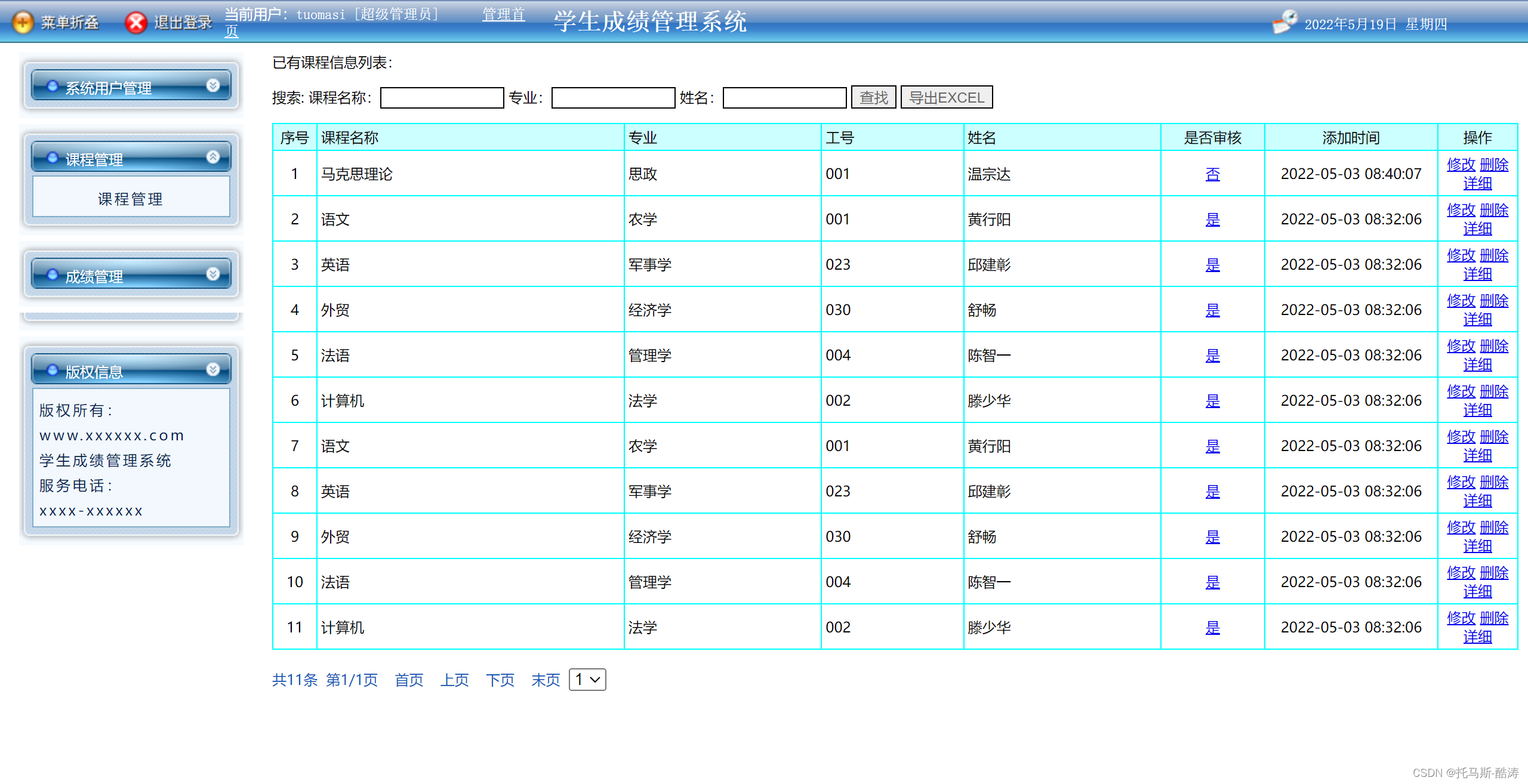
课程管理:对课程信息列表的curd,模糊查询,导出excel等操作。
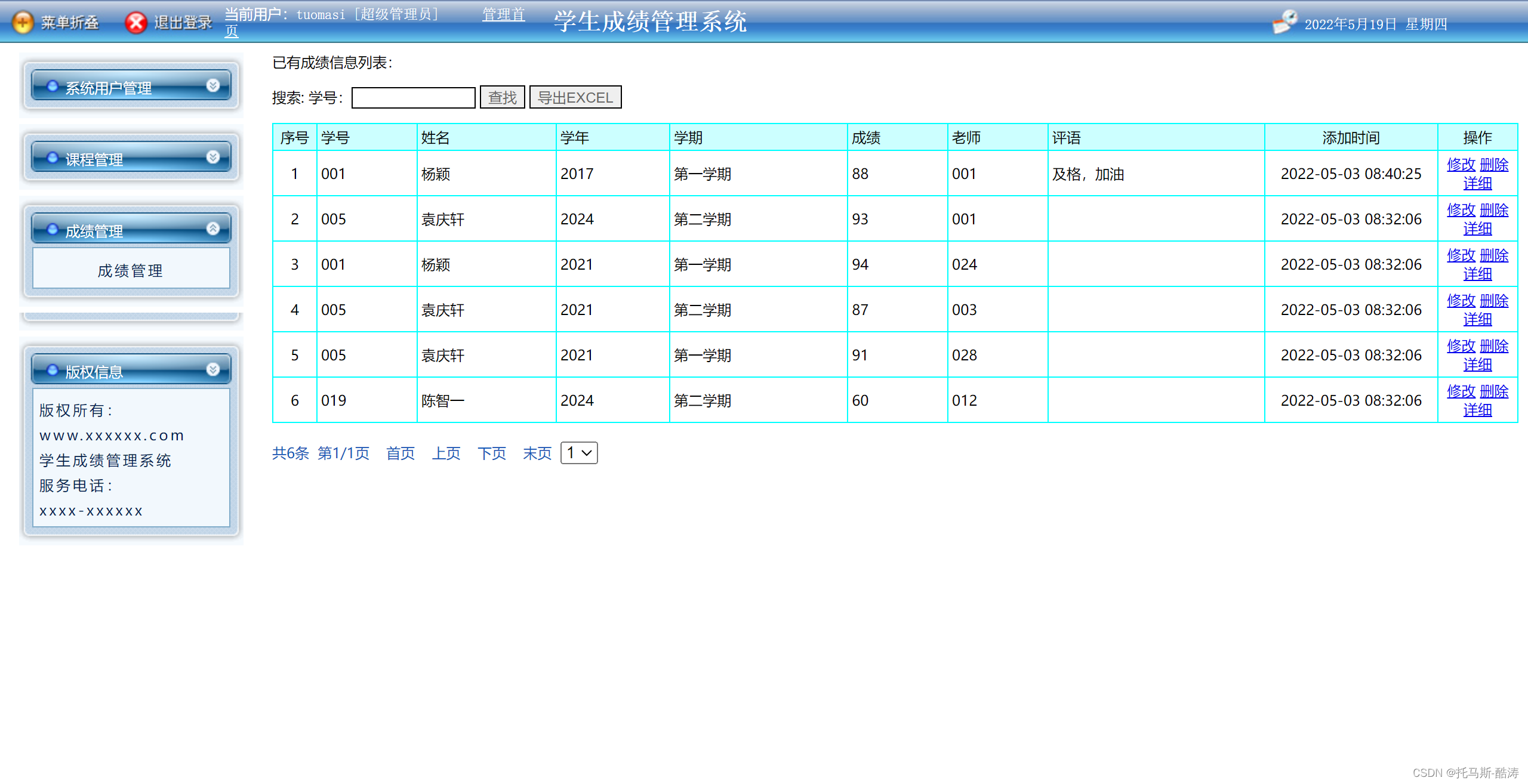
成绩管理:对学生成绩的curd,模糊查询,导出excel等操作。
版权信息:版权所属信息。
管理员登录:具有最高权限,所有功能均具备。
教师登录:教师有个人资料管理,学生管理,课程管理,成绩管理,,版权信息五大板块。
学生登录:学生有个人资料管理,课程管理,成绩管理,版权信息四大板块。
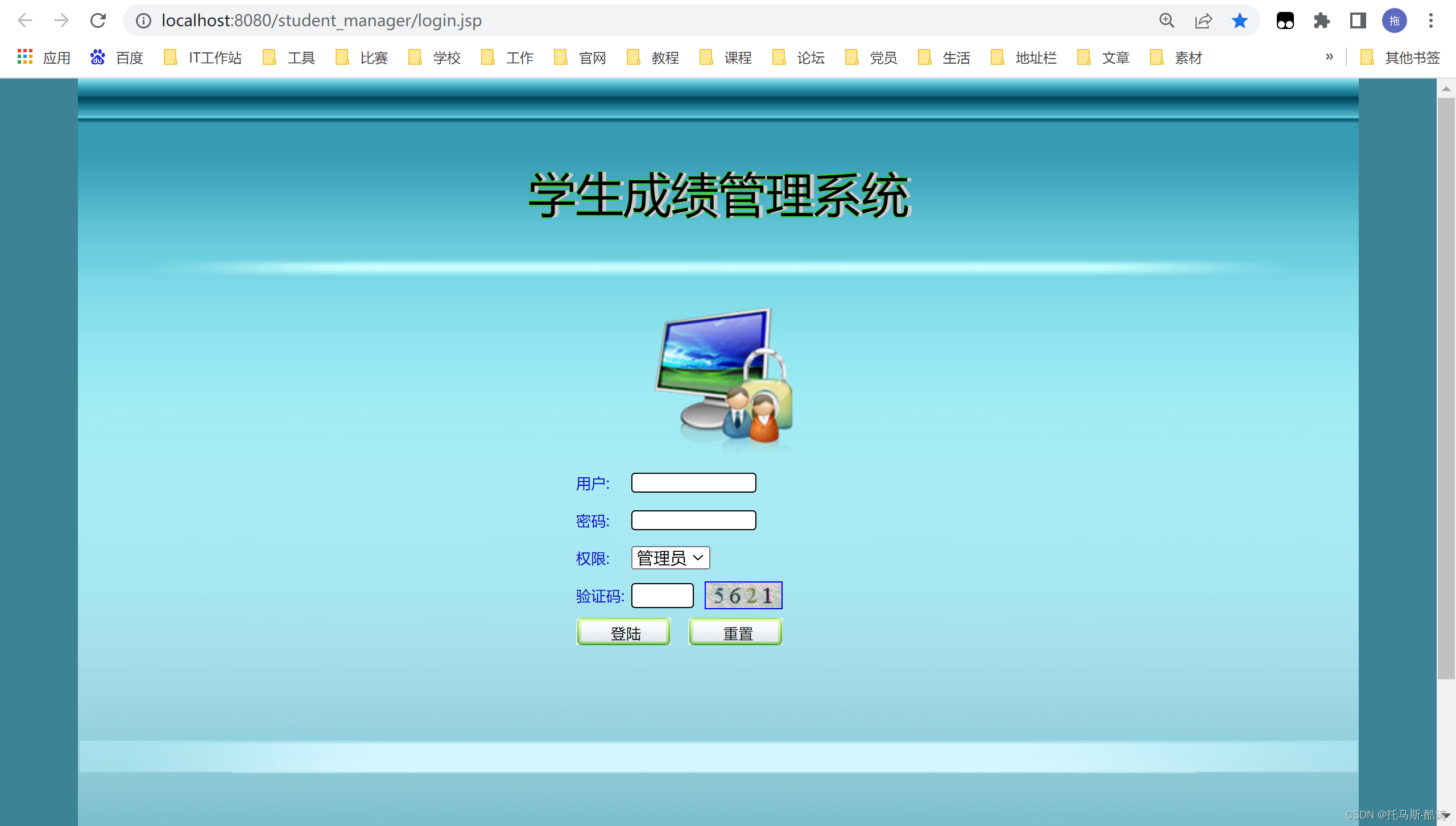
<%@ page language="java" import="java.util.*" pageEncoding="gb2312"%>
<%@page import="util.Info"%>
<%@page import="dao.CommDAO"%>
<%@page import="util.PageManager"%>
<html>
<head>
<title>学生成绩管理系统</title>
<meta http-equiv="Content-Type" content="text/html; charset=gb2312">
<style type="text/css">
<!--
body {
margin-left: 0px;
margin-top: 0px;
margin-right: 0px;
margin-bottom: 0px;
background-repeat: repeat-x;
background-color: #3C8395;
}
.STYLE9 {
color: #0000CC;
font-size: 12px
}
.STYLE8 {
color: #0033CC
}
input {
border-radius: 3px;
border: 1px solid #000;
}
-->
</style>
</head>
<script type="text/javascript">
<%
String error = (String)request.getAttribute("error");
if(error!=null)
{
%>
alert("用户名或密码错误");
<%}%>
<%
String random = (String)request.getAttribute("random");
if(random!=null)
{
%>
alert("验证码错误");
<%}%>
popheight = 39;
function check() {
if (document.form1.username.value == ""
|| document.form1.pwd.value == ""
|| document.form1.pagerandom.value == "") {
alert('请输入完整');
return false;
}
}
function loadimage() {
document.getElementById("randImage").src = "image.jsp?" + Math.random();
}
</script>
<body leftmargin="0" topmargin="0" marginwidth="0" marginheight="0">
<table width="1024" height="728" border="0" align="center"
cellpadding="0" cellspacing="0" background="images/login.jpg"
id="__01">
<tr>
<td height="183" colspan="3"><table width="64%" height="56"
border="0" align="center" cellpadding="0" cellspacing="0">
<tr>
<td height="56"><div
style="text-shadow: #CCCCCC 3px 0 0, #33CC33 0 1px 0, #33CC33 1px 0 0, #33CC33 0 -1px 0; font-size: 38px;"
align="center">学生成绩管理系统</div></td>
</tr>
</table></td>
</tr>
<tr>
<td width="314" rowspan="2"> </td>
<td width="352" height="275" valign="bottom"><form
action="jspmxscjglxthsg3858A9?ac=adminlogin&a=a" method="post"
name="form1" style="display: inline">
<table width="205" border="0" align="center" cellpadding="0"
cellspacing="0">
<tr>
<td width="44" height="30"><span class="STYLE9">用户:</span></td>
<td height="30" colspan="2"><input name="username"
type="text" id="username"
style="width: 100px; height: 16px; border: solid 1px #000000; color: #666666"></td>
</tr>
<tr>
<td height="30"><span class="STYLE9">密码:</span></td>
<td height="30" colspan="2"><input name="pwd"
type="password" id="pwd"
style="width: 100px; height: 16px; border: solid 1px #000000; color: #666666"></td>
</tr>
<tr>
<td height="30"><span class="STYLE9">权限:</span></td>
<td height="30" colspan="2"><select name="cx" id="cx">
<option value="管理员">管理员</option>
<option value="学生">学生</option>
<option value="教师">教师</option>
<!--quxanxiaxndexnglxu-->
</select></td>
</tr>
<tr>
<td height="30"><span class="STYLE9">验证码:</span></td>
<td width="59" height="30"><input name="pagerandom"
type="text" id="pagerandom"
style="height: 20px; border: solid 1px #000000; color: #666666; width: 50px" />
<td width="102"><a href="javascript:loadimage();"><img
alt="看不清请点我!" name="randImage" id="randImage" src="image.jsp"
width="60" height="20" border="1" align="absmiddle"> </a></td>
</tr>
<tr>
<td height="30" colspan="3"><input type="submit"
name="Submit" value="登陆" onClick="return check();"
style="background: url(images/the_formbtn.gif) no-repeat; color: #000000; width: 80px; height: 24px; border: 0px; line-height: 24px; font-size: 12px; margin-right: 5px; cursor: pointer">
<input type="reset" name="Submit2" value="重置"
style="background: url(images/the_formbtn.gif) no-repeat; color: #000000; width: 80px; height: 24px; border: 0px; line-height: 24px; font-size: 12px; margin-right: 5px; cursor: pointer"></td>
</tr>
</table>
</form></td>
<td width="336" rowspan="2"> </td>
</tr>
<tr>
<td> </td>
</tr>
</table>
</body>
</html>
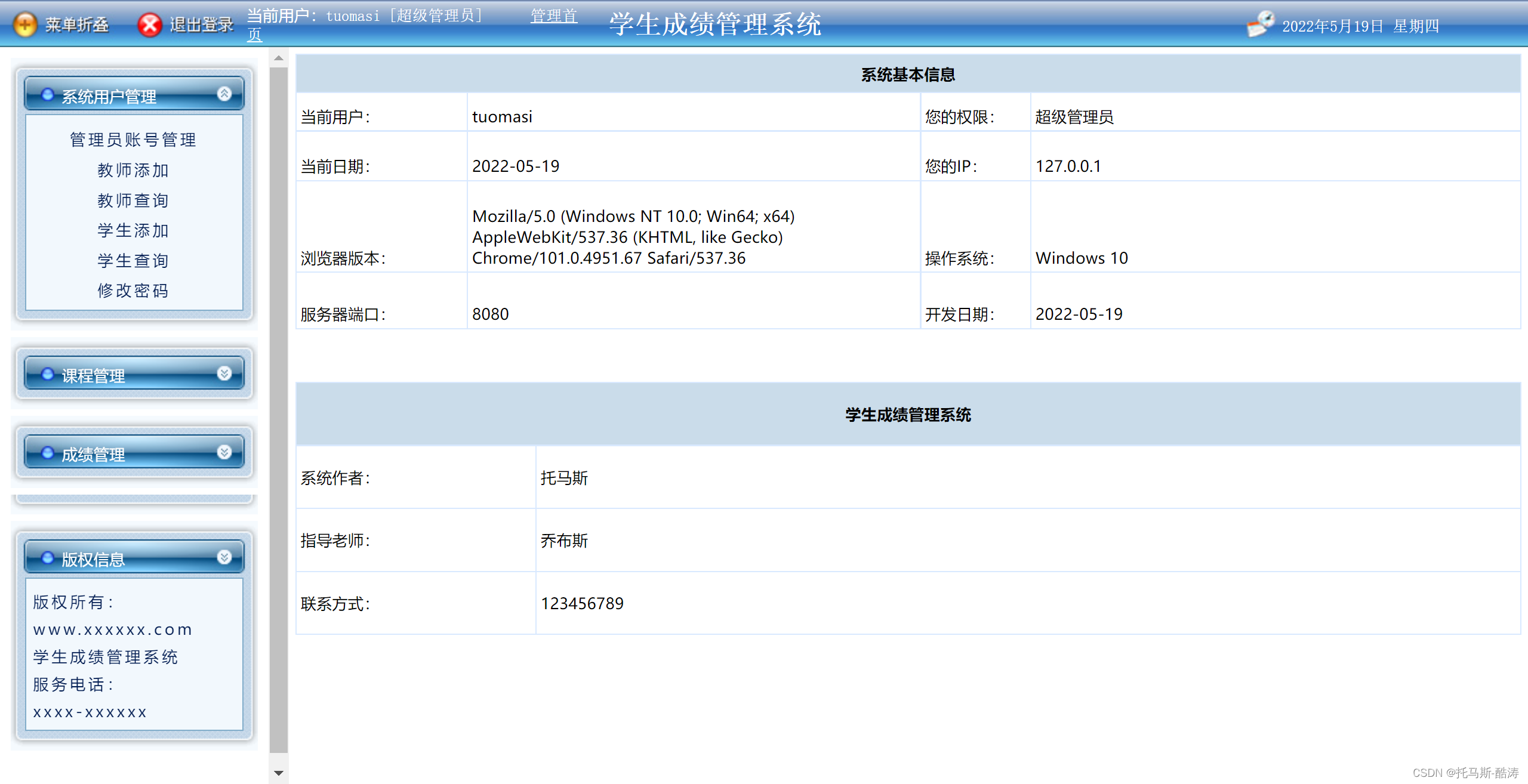
<%@ page language="java" pageEncoding="gb2312"%>

<html>
<head>
<title>学生成绩管理系统--管理中心</title>
</head>

<frameset rows="36,*" cols="*" framespacing="0" frameborder="no"
	border="0">
	<frame src="top.jsp" name="topFrame" id="topFrame" title="topFrame"
		scrolling="NO" noresize />
	<frameset rows="*" cols="220,*" framespacing="0" frameborder="no"
		border="0" id="mainframe">
		<frame src="mygo.jsp" name="left" id="left" title="left" />
		<frame src="sy.jsp" name="right" id="right" title="right" />
	</frameset>
</frameset>

<noframes>
</noframes>
</html>
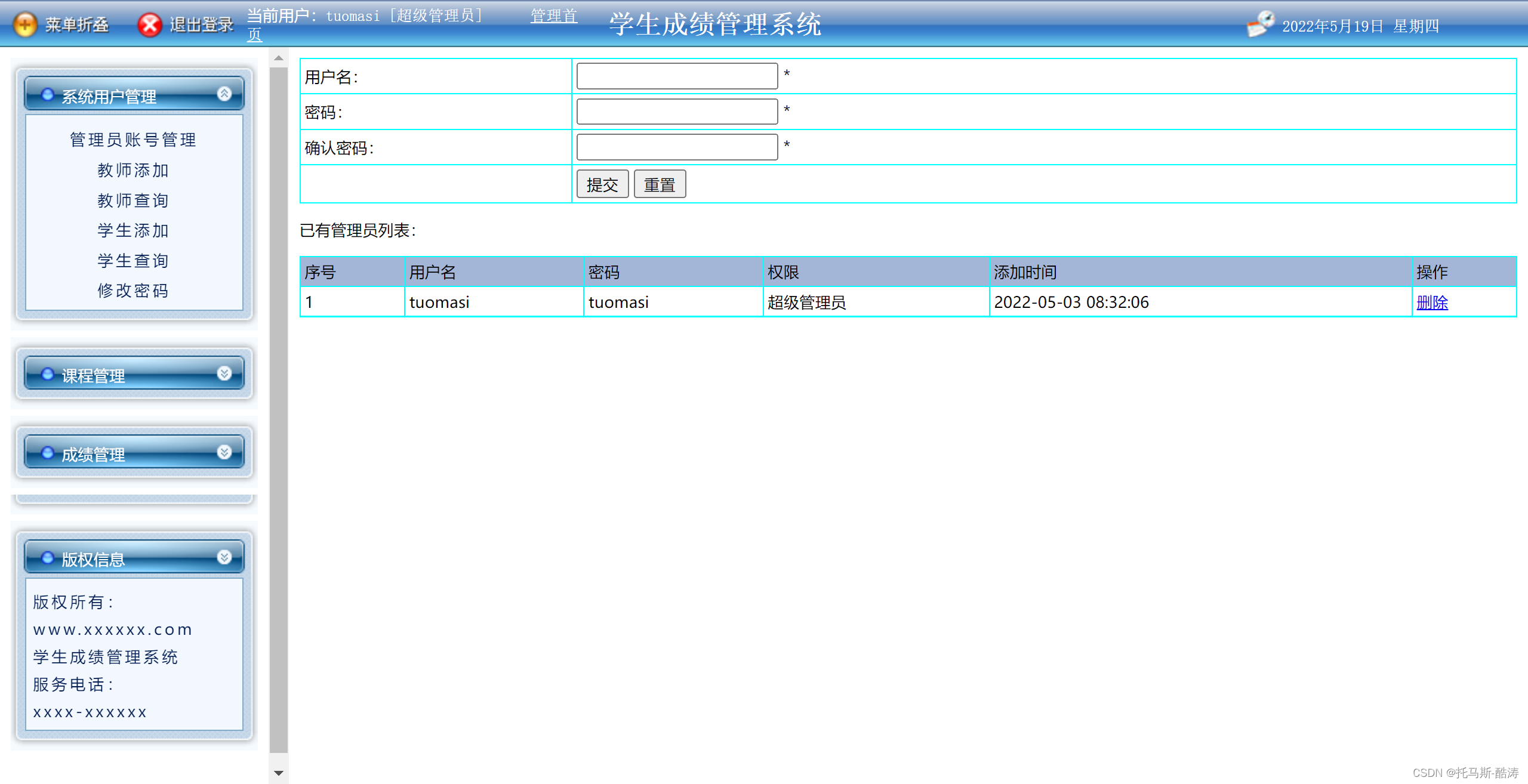
<%@ page language="java" import="java.util.*" pageEncoding="gb2312"%>
<%@page import="util.Info"%>
<%@page import="dao.CommDAO"%>
<%@page import="util.PageManager"%>
<%
if (request.getSession().getAttribute("username") == null) {
out.print("<script>javascript:alert('对不起,您已超时或未登陆,请重新进行登陆!');window.close();</script>");
out.close();
} else {
if (request.getSession().getAttribute("cx").equals("超级管理员")) {
} else {
out.print("<script>javascript:alert('对不起,您无权操作此模块!');history.back();</script>");
out.close();
}
}
%>
<html>
<head>
<title>管理员用户管理</title>
<link rel="stylesheet" href="css.css" type="text/css">
</head>
<%
new CommDAO().delete(request, "allusers");
HashMap ext = new HashMap();
ext.put("cx", "普通管理员");
new CommDAO().insert(request, response, "allusers", ext, true, false, "");
%>
<body>
<form action="yhzhgl.jsp?f=f" method="post" name="f1"
onsubmit="return checkform();">
<table width="100%" border="1" align="center" cellpadding="3"
cellspacing="1" bordercolor="#00FFFF"
style="border-collapse: collapse">
<tr>
<td width="200">用户名:</td>
<td><input name="username" type="text" id="username"
onblur='checkform()' /> <label id='clabelusername' /> *</td>
</tr>
<tr>
<td width="200">密码:</td>
<td><input name="pwd" type="password" id="pwd"
onblur='checkform()' /> <label id='clabelpwd' /> *</td>
</tr>
<tr>
<td width="200">确认密码:</td>
<td><input name="pwd2" type="password" id="pwd2"
onblur='checkform()' /> <label id='clabelpwd2' /> *</td>
</tr>
<tr>
<td width="200"> </td>
<td><input name="Submit" type="submit" value="提交" /> <input
name="Submit2" type="reset" value="重置" /></td>
</tr>
</table>
</form>
<p>已有管理员列表:</p>
<table width="100%" border="1" align="center" cellpadding="3"
cellspacing="1" bordercolor="#00FFFF"
style="border-collapse: collapse">
<tr>
<td bgcolor="A4B6D7">序号</td>
<td bgcolor="A4B6D7">用户名</td>
<td bgcolor="A4B6D7">密码</td>
<td bgcolor="A4B6D7">权限</td>
<td bgcolor="A4B6D7">添加时间</td>
<td bgcolor="A4B6D7">操作</td>
</tr>
<%
int i = 0;
for (HashMap map : new CommDAO().select("select * from allusers order by id desc ")) {
i++;
%>
<tr>
<td><%=i%></td>
<td><%=map.get("username")%></td>
<td><%=map.get("pwd")%></td>
<td><%=map.get("cx")%></td>
<td><%=map.get("addtime")%></td>
<td><a href="yhzhgl.jsp?scid=<%=map.get("id")%>"
onClick="return confirm('真的要删除?')">删除</a></td>
</tr>
<%
}
%>
</table>
</body>
</html>
<script language=javascript src='js/My97DatePicker/WdatePicker.js'></script>
<script language=javascript src='js/popup.js'></script>
<script language=javascript src='js/ajax.js'></script>
<%@page import="java.util.ArrayList"%>
<%@page import="java.util.HashMap"%>
<script language=javascript>
function checkform(){
var usernameobj = document.getElementById("username");
if(usernameobj.value==""){
document.getElementById("clabelusername").innerHTML=" <font color=red>请输入用户名</font>";
return false;
}else{
document.getElementById("clabelusername").innerHTML=" ";
}
var usernameobj = document.getElementById("username");
if(usernameobj.value!=""){
var ajax = new AJAX();
ajax.post("factory/checkno.jsp?table=allusers&col=username&value="+usernameobj.value+"&checktype=insert&ttime=<%=Info.getDateStr()%>
")
var msg = ajax.getValue();
if (msg.indexOf('Y') > -1) {
document.getElementById("clabelusername").innerHTML = " <font color=red>用户名已存在</font>";
return false;
} else {
document.getElementById("clabelusername").innerHTML = " ";
}
}
var pwdobj = document.getElementById("pwd");
if (pwdobj.value == "") {
document.getElementById("clabelpwd").innerHTML = " <font color=red>请输入密码</font>";
return false;
} else {
document.getElementById("clabelpwd").innerHTML = " ";
}
var pwd2obj = document.getElementById("pwd2");
if (pwd2obj.value == "") {
document.getElementById("clabelpwd2").innerHTML = " <font color=red>请再次输入密码</font>";
return false;
} else {
document.getElementById("clabelpwd2").innerHTML = " ";
}
if (pwd2obj.value != pwdobj.value) {
document.getElementById("clabelpwd2").innerHTML = " <font color=red>两次密码输入不一致</font>";
return false;
} else {
document.getElementById("clabelpwd2").innerHTML = " ";
}
return true;
}
popheight = 450;
</script>
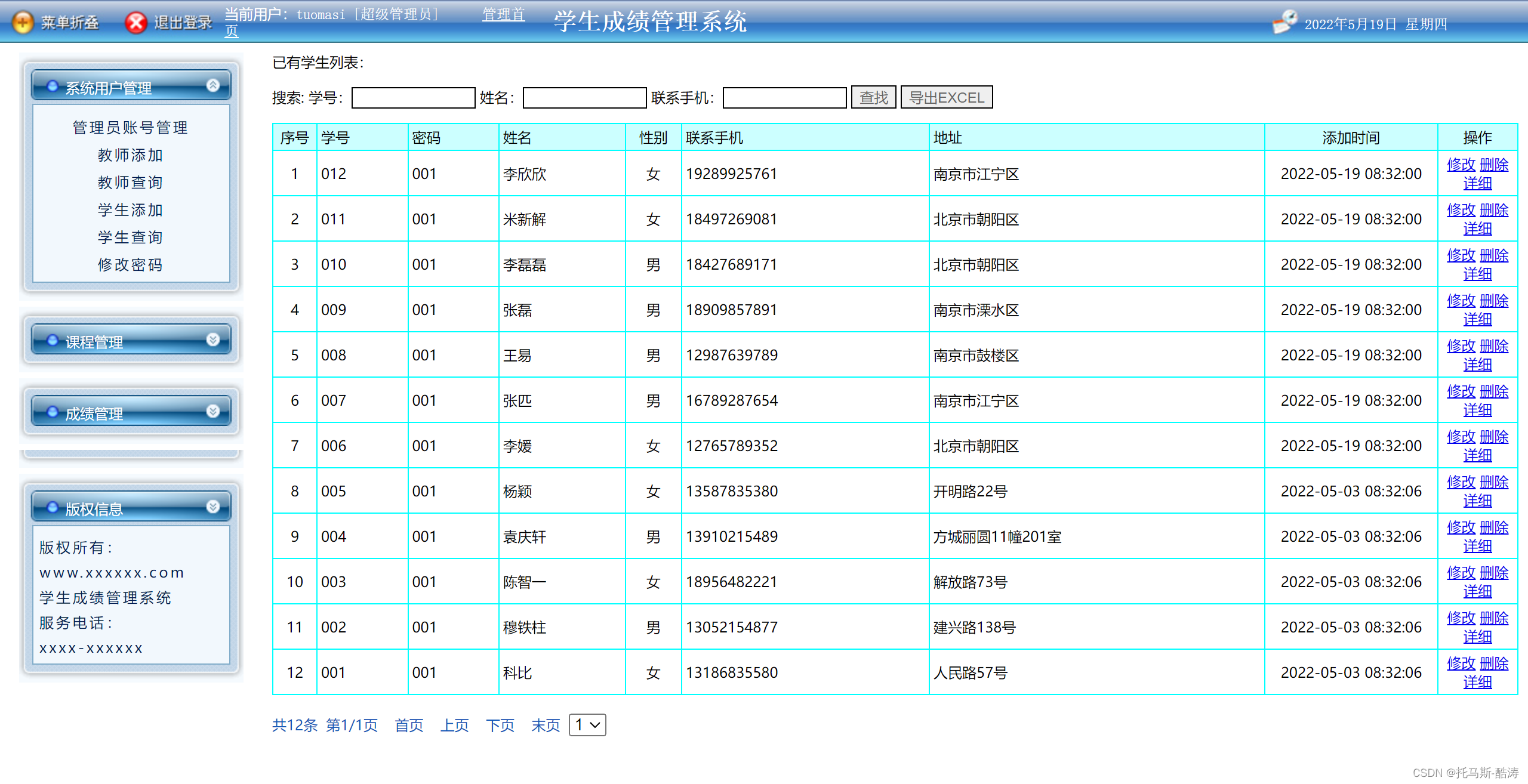
<%@ page language="java" import="java.util.*" pageEncoding="gb2312"%>
<%@page import="util.Info"%>
<%@page import="dao.CommDAO"%>
<%@page import="util.PageManager"%>
<html>
<head>
<title>学生</title>
<LINK href="css.css" type=text/css rel=stylesheet>
<script type="text/javascript" src="js/My97DatePicker/WdatePicker.js"
	charset="gb2312"></script>
</head>


<body>
	<p>已有学生列表:</p>
	<form name="form1" id="form1" method="post" action="">
		搜索: 学号:<input name="xuehao" type="text" id="xuehao"
			style='border: solid 1px #000000; color: #666666' size="12" /> 姓名:<input
			name="xingming" type="text" id="xingming"
			style='border: solid 1px #000000; color: #666666' size="12" /> 联系手机:<input
			name="lianxishouji" type="text" id="lianxishouji"
			style='border: solid 1px #000000; color: #666666' size="12" /> <input
			type="submit" name="Submit" value="查找"
			style='border: solid 1px #000000; color: #666666' /> <input
			type="button" name="Submit2" value="导出EXCEL"
			style='border: solid 1px #000000; color: #666666'
			onClick="javascript:location.href='xuesheng_listxls.jsp';" />
	</form>

	<table width="100%" border="1" align="center" cellpadding="3"
		cellspacing="1" bordercolor="00FFFF" style="border-collapse: collapse">
		<tr>
			<td width="30" align="center" bgcolor="CCFFFF">序号</td>
			<td bgcolor='#CCFFFF'>学号</td>
			<td bgcolor='#CCFFFF'>密码</td>
			<td bgcolor='#CCFFFF'>姓名</td>
			<td bgcolor='#CCFFFF' width='40' align='center'>性别</td>
			<td bgcolor='#CCFFFF'>联系手机</td>
			<td bgcolor='#CCFFFF'>地址</td>


			<td width="138" align="center" bgcolor="CCFFFF">添加时间</td>

			<td width="60" align="center" bgcolor="CCFFFF">操作</td>
		</tr>
		<%
		new CommDAO().delete(request, "xuesheng");
		String url = "xuesheng_list.jsp?1=1";
		String sql = "select * from xuesheng where 1=1";

		if (request.getParameter("xuehao") == "" || request.getParameter("xuehao") == null) {
		} else {
			sql = sql + " and xuehao like '%" + request.getParameter("xuehao") + "%'";
		}
		if (request.getParameter("xingming") == "" || request.getParameter("xingming") == null) {
		} else {
			sql = sql + " and xingming like '%" + request.getParameter("xingming") + "%'";
		}
		if (request.getParameter("lianxishouji") == "" || request.getParameter("lianxishouji") == null) {
		} else {
			sql = sql + " and lianxishouji like '%" + request.getParameter("lianxishouji") + "%'";
		}
		sql += " order by id desc";
		ArrayList<HashMap> list = PageManager.getPages(url, 15, sql, request);
		int i = 0;
		for (HashMap map : list) {
			i++;
		%>
		<tr>
			<td width="30" align="center"><%=i%></td>
			<td><%=map.get("xuehao")%></td>
			<td><%=map.get("mima")%></td>
			<td><%=map.get("xingming")%></td>
			<td align='center'><%=map.get("xingbie")%></td>
			<td><%=map.get("lianxishouji")%></td>
			<td><%=map.get("dizhi")%></td>


			<td width="138" align="center"><%=map.get("addtime")%></td>
			<td width="60" align="center"><a
				href="xuesheng_updt.jsp?id=<%=map.get("id")%>">修改</a> <a
				href="xuesheng_list.jsp?scid=<%=map.get("id")%>"
				onClick="return confirm('真的要删除?')">删除</a> <a
				href="xuesheng_detail.jsp?id=<%=map.get("id")%>">详细</a></td>
		</tr>
		<%
		}
		%>
	</table>
	<br> ${page.info }


</body>
</html>

https://blog.csdn.net/m0_54925305/category_11702151.html?spm=1001.2014.3001.5482
我正在使用i18n从头开始构建一个多语言网络应用程序,虽然我自己可以处理一大堆yml文件,但我说的语言(非常)有限,最终我想寻求外部帮助帮助。我想知道这里是否有人在使用UI插件/gem(与django上的django-rosetta不同)来处理多个翻译器,其中一些翻译器不愿意或无法处理存储库中的100多个文件,处理语言数据。谢谢&问候,安德拉斯(如果您已经在rubyonrails-talk上遇到了这个问题,我们深表歉意) 最佳答案 有一个rails3branchofthetolkgem在github上。您可以通过在Gemfi
如何在buildr项目中使用Ruby?我在很多不同的项目中使用过Ruby、JRuby、Java和Clojure。我目前正在使用我的标准Ruby开发一个模拟应用程序,我想尝试使用Clojure后端(我确实喜欢功能代码)以及JRubygui和测试套件。我还可以看到在未来的不同项目中使用Scala作为后端。我想我要为我的项目尝试一下buildr(http://buildr.apache.org/),但我注意到buildr似乎没有设置为在项目中使用JRuby代码本身!这看起来有点傻,因为该工具旨在统一通用的JVM语言并且是在ruby中构建的。除了将输出的jar包含在一个独特的、仅限ruby
我主要使用Ruby来执行此操作,但到目前为止我的攻击计划如下:使用gemsrdf、rdf-rdfa和rdf-microdata或mida来解析给定任何URI的数据。我认为最好映射到像schema.org这样的统一模式,例如使用这个yaml文件,它试图描述数据词汇表和opengraph到schema.org之间的转换:#SchemaXtoschema.orgconversion#data-vocabularyDV:name:namestreet-address:streetAddressregion:addressRegionlocality:addressLocalityphoto:i
在rails源中:https://github.com/rails/rails/blob/master/activesupport/lib/active_support/lazy_load_hooks.rb可以看到以下内容@load_hooks=Hash.new{|h,k|h[k]=[]}在IRB中,它只是初始化一个空哈希。和做有什么区别@load_hooks=Hash.new 最佳答案 查看rubydocumentationforHashnew→new_hashclicktotogglesourcenew(obj)→new_has
我的主要目标是能够完全理解我正在使用的库/gem。我尝试在Github上从头到尾阅读源代码,但这真的很难。我认为更有趣、更温和的踏脚石就是在使用时阅读每个库/gem方法的源代码。例如,我想知道RubyonRails中的redirect_to方法是如何工作的:如何查找redirect_to方法的源代码?我知道在pry中我可以执行类似show-methodmethod的操作,但我如何才能对Rails框架中的方法执行此操作?您对我如何更好地理解Gem及其API有什么建议吗?仅仅阅读源代码似乎真的很难,尤其是对于框架。谢谢! 最佳答案 Ru
有时我需要处理键/值数据。我不喜欢使用数组,因为它们在大小上没有限制(很容易不小心添加超过2个项目,而且您最终需要稍后验证大小)。此外,0和1的索引变成了魔数(MagicNumber),并且在传达含义方面做得很差(“当我说0时,我的意思是head...”)。散列也不合适,因为可能会不小心添加额外的条目。我写了下面的类来解决这个问题:classPairattr_accessor:head,:taildefinitialize(h,t)@head,@tail=h,tendend它工作得很好并且解决了问题,但我很想知道:Ruby标准库是否已经带有这样一个类? 最佳
我的假设是moduleAmoduleBendend和moduleA::Bend是一样的。我能够从thisblog找到解决方案,thisSOthread和andthisSOthread.为什么以及什么时候应该更喜欢紧凑语法A::B而不是另一个,因为它显然有一个缺点?我有一种直觉,它可能与性能有关,因为在更多命名空间中查找常量需要更多计算。但是我无法通过对普通类进行基准测试来验证这一点。 最佳答案 这两种写作方法经常被混淆。首先要说的是,据我所知,没有可衡量的性能差异。(在下面的书面示例中不断查找)最明显的区别,可能也是最著名的,是你的
几个月前,我读了一篇关于rubygem的博客文章,它可以通过阅读代码本身来确定编程语言。对于我的生活,我不记得博客或gem的名称。谷歌搜索“ruby编程语言猜测”及其变体也无济于事。有人碰巧知道相关gem的名称吗? 最佳答案 是这个吗:http://github.com/chrislo/sourceclassifier/tree/master 关于ruby-寻找通过阅读代码确定编程语言的rubygem?,我们在StackOverflow上找到一个类似的问题:
我安装了ruby版本管理器,并将RVM安装的ruby实现设置为默认值,这样'哪个ruby'显示'~/.rvm/ruby-1.8.6-p383/bin/ruby'但是当我在emacs中打开inf-ruby缓冲区时,它使用安装在/usr/bin中的ruby。有没有办法让emacs像shell一样尊重ruby的路径?谢谢! 最佳答案 我创建了一个emacs扩展来将rvm集成到emacs中。如果您有兴趣,可以在这里获取:http://github.com/senny/rvm.el
我目前正在使用以下方法获取页面的源代码:Net::HTTP.get(URI.parse(page.url))我还想获取HTTP状态,而无需发出第二个请求。有没有办法用另一种方法做到这一点?我一直在查看文档,但似乎找不到我要找的东西。 最佳答案 在我看来,除非您需要一些真正的低级访问或控制,否则最好使用Ruby的内置Open::URI模块:require'open-uri'io=open('http://www.example.org/')#=>#body=io.read[0,50]#=>"["200","OK"]io.base_ur
