环境:
python3.6.4
opencv3.4.1.15
运行目标跟踪object_tracking文件夹中的mean函数时报错且不显示视频结果
Traceback (most recent call last):
  File "F:\pycharm_python\projects\project_python_test\object_tracking\main.py", line 15, in <module>
    height, width, _ = frame.shape
AttributeError: 'NoneType' object has no attribute 'shape'
查找原因基本上看见三个
1.图片不存在(路径不存在, 路径包含中文无法识别) 2.读取的图片内容和默认读取时参数匹配不匹配。(默认读取的是3通道的彩色图)例如读取到的图片是灰度图,就会返回None。3.也可能是路径中有中文(59条消息) AttributeError: 'NoneType' object has no attribute 'shape'_旅人_Eric的博客-CSDN博客
自己分析了一下,肯因为程序中是相对路径,
cap =cv2.VideoCapture("highway.mp4")改成绝对路径
cap = cv2.VideoCapture("F:\pycharm_python\projects\project_python_test\object_tracking\highway.mp4")再次尝试运行main函数,可以显示视频窗口和结果,单依旧报错:
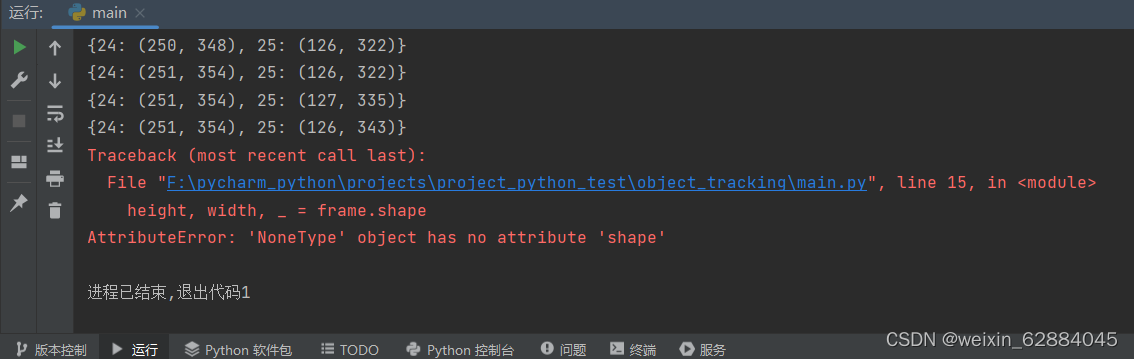
结果大概这样

再继续找别人踩过的坑:
图片路径前加 r ,可以解决部分问题——对我没用。
看到这篇文章写了一个解决办法,但是是针对图片的,俺纯小白不知道视频的能不能这么改。(主要是不知道怎么改)这坑先留着以后再说吧。
(59条消息) 解决easyocr不识别中文路径问题AttributeError: ‘NoneType‘ object has no attribute ‘shape‘_江河的江的博客-CSDN博客
附上有结果的main.py文件
import cv2
from tracker import *

# Create tracker object
tracker = EuclideanDistTracker()

cap = cv2.VideoCapture("F:\pycharm_python\projects\project_python_test\object_tracking\highway.mp4")

# Object detection from Stable camera 来自稳定相机的物体检测
object_detector = cv2.createBackgroundSubtractorMOG2(history=100, varThreshold=40)
# 函数cv2.createBackgroundSubtractorMOG2返回背景比率(background ratio),
#因为相机是固定的所以history=100,varthreshold的值越低,误报的可行就越大
while True:
    ret, frame = cap.read()
    height, width, _ = frame.shape

    # Extract Region of interest提取感兴趣区域
    roi = frame[340: 720, 500: 800]

    # 1. Object Detection 物体检测
    mask = object_detector.apply(roi)
    _, mask = cv2.threshold(mask, 254, 255, cv2.THRESH_BINARY)
    #245.255表示只想显示254和255之间的值,即只想显示白色或黑色值
    image, contours, _ = cv2.findContours(mask, cv2.RETR_TREE, cv2.CHAIN_APPROX_SIMPLE)
    detections = []
    for cnt in contours:
        # Calculate area and remove small elements 计算面积,去除小元素
        area = cv2.contourArea(cnt)
        if area > 1000:
            #cv2.drawContours(roi, [cnt], -1, (0, 255, 0), 2)    #绘制轮廓
            x, y, w, h = cv2.boundingRect(cnt)                   #找到对象的坐标


            detections.append([x, y, w, h])
            #一旦创建了对象,我们必须获得边界框的每个位置并将他们插入到单个数组中

    # 2. Object Tracking目标跟踪
    #将唯一ID关联到对象
    boxes_ids = tracker.update(detections)#将带有位置的数组传递给tracker.update()
    for box_id in boxes_ids:  #为每个对象分配一个唯一的ID
        x, y, w, h, id = box_id
        cv2.putText(roi, str(id), (x, y - 15), cv2.FONT_HERSHEY_PLAIN, 2, (255, 0, 0), 2)
        cv2.rectangle(roi, (x, y), (x + w, y + h), (0, 255, 0), 3) #绘制矩形框

    cv2.imshow("roi", roi)
    cv2.imshow("Frame", frame)
    cv2.imshow("Mask", mask)

    key = cv2.waitKey(30)
    if key == 27:
        break

cap.release()
cv2.destroyAllWindows()
和tracker.py文件
import math


class EuclideanDistTracker:
    def __init__(self):
        # Store the center positions of the objects存储对象的中心位置
        self.center_points = {}
        # Keep the count of the IDs保持ID计数
        # each time a new object id detected, the count will increase by one每检测到新的对象ID是我技术加1
        self.id_count = 0


    def update(self, objects_rect):
        # Objects boxes and ids对象框和ID
        objects_bbs_ids = []

        # Get center point of new object获取新对象的中心点
        for rect in objects_rect:
            x, y, w, h = rect
            cx = (x + x + w) // 2
            cy = (y + y + h) // 2

            # Find out if that object was detected already查明是否已经检测到该对象
            same_object_detected = False
            for id, pt in self.center_points.items():
                #计算中心点之间的欧式距离
                dist = math.hypot(cx - pt[0], cy - pt[1])
                #如果欧式距离小于25则表明是同一个目标
                if dist < 25:
                    self.center_points[id] = (cx, cy)
                    print(self.center_points)
                    objects_bbs_ids.append([x, y, w, h, id])
                    same_object_detected = True
                    break

            # New object is detected we assign the ID to that object检测到新对象时我们将ID分配该该对象
            if same_object_detected is False:
                self.center_points[self.id_count] = (cx, cy)
                objects_bbs_ids.append([x, y, w, h, self.id_count])
                self.id_count += 1

        # Clean the dictionary by center points to remove IDS not used anymore按中心点清理字典以删除不再使用的IDS
        new_center_points = {}
        for obj_bb_id in objects_bbs_ids:
            _, _, _, _, object_id = obj_bb_id
            center = self.center_points[object_id]
            new_center_points[object_id] = center

        # Update dictionary with IDs not used removed更新字典
        self.center_points = new_center_points.copy()
        return objects_bbs_ids
以及原视频:
highway
深度学习部署:Windows安装pycocotools报错解决方法1.pycocotools库的简介2.pycocotools安装的坑3.解决办法更多Ai资讯:公主号AiCharm本系列是作者在跑一些深度学习实例时,遇到的各种各样的问题及解决办法,希望能够帮助到大家。ERROR:Commanderroredoutwithexitstatus1:'D:\Anaconda3\python.exe'-u-c'importsys,setuptools,tokenize;sys.argv[0]='"'"'C:\\Users\\46653\\AppData\\Local\\Temp\\pip-instal
我正在尝试在我的SnowLeopard10.6.8上安装RVM,方法是:\curl-Lhttps://get.rvm.io|bash-sstable--ruby我得到这个错误:InstallingRubyfromsourceto:/Users/Villa/.rvm/rubies/ruby-2.0.0-p0,thismaytakeawhiledependingonyourcpu(s)...ruby-2.0.0-p0-#downloadingruby-2.0.0-p0,thismaytakeawhiledependingonyourconnection...ruby-2.0.0-p0-#e
亲测可用。Anerroroccurredwhileresolvingpackages:Projecthasinvaliddependencies: com.unity.xxx:No'git'executablewasfound.PleaseinstallGitonyour systemthenrestartUnityandUnityHub在我们使用PackageManager时,Unity允许我们使用Git上的package(点击加号,选择addpackagefromgitURL,或者是直接在Asset/Packages/manifest.json中添加包名)。但是这种操作需要我们事先装好g
更新:eventmachinegem已安装并在我的gemfile中:eventmachine(1.0.0,0.12.10)请帮忙!尝试使用以下内容创建数据库:Fitzs-MacBook-Pro:twilio_insanityFitz$rakedb:create'返回以下错误:UnabletoloadtheEventMachineCextension;Tousethepure-rubyreactor,require'em/pure_ruby'rakeaborted!cannotloadsuchfile--rubyeventmachine/Users/Fitz/.rvm/gems/ruby
一、前言最近,在测试环境的nginx里增加了一个https配置:location/api-meeting-qq/{proxy_passhttps://api.meeting.qq.com/;}然后,执行命令://这个是nginx启动文件的路径,根据实际情况自行更改sudo/home/useradmin/nginx/sbin/nginx-sreload结果,nginx就报错了:nginx:[emerg]httpsprotocolrequiresSSLsupportin/home/useradmin/nginx/conf.d/trainNginx.conf:9二、解决方法百度发现,是之前安装ngi
nvm报错Nowusingnodev版本号(64-bit)解决方法先上报错(安装后的一些问题请直接跳到尾部查看)安装NVM的原因是使用React时addreact-redux时提示我node版本问题,遂打算安装一Node版本管理工具因为我电脑上很早就安装了Node,安装NVM时提示我是否覆盖并管理本地已有版本,我选了Yes之后安装成功(后来检查发现和版本没关系,是因为我在node里去ADD真离谱自己这操作)安装NVM注意问题1.若修改安装路径一定补上nodejs2.打开安装文件位置3.增加以下映射node_mirror:npm.taobao.org/mirrors/node/npm_mirro
第一次用git传代码到GitHub时,填写用户名和密码出现报错:fatal:Authenticationfailedfor'https://github.com/试了下面的没用😢gitconfig-–globaluser.name"xxx"gitconfig--globaluser.email"xxx@xx.com"查看报错原因发现是因为git更新了认证方式在错误提示(糟糕忘截图)的网站里有说明-->https://docs.github.com/en/get-started/getting-started-with-git/about-remote-repositories#cloning-
在Ruby1.8.7和1.9.2中相同:$irbruby-1.8.7-p302>foo.nil?NameError:undefinedlocalvariableormethod`foo'for#from(irb):1ruby-1.8.7-p302>@bar.nil?=>trueruby-1.8.7-p302>@@wah.nil?NameError:uninitializedclassvariable@@wahinObjectfrom(irb):3为什么实例变量与局部变量和类变量的处理方式不同? 最佳答案 在Ruby中,大多数未初始化
首先打开fiddler,点击Tools-Options-Connections一、这里有两个注意点点击HTTPS,左边选项选择如图,右边Actions点击如图第二项会提示Success,点击确定点击Connections,这里注意Fiddlerlistensonport这里面填写默认8888即可,左边三个选项选择如图,以上操作完成后,重启Fiddler二、手机打开WiFi1.长按或者点击Wifi进行修改网络(如不会操作,此处根据具体机型自行百度)修改代理为手动,服务器主机名两种方式可以查到:①win+R,在输入框输入cmd,在弹窗中输入ipconfig,此时IPv4后面的地址就是你的主机ip,
ruby2.0.0p247(2013-06-27修订版41674)[x86_64-linux]gem2.0.3sudogeminstalltravisBuildingnativeextensions.Thiscouldtakeawhile...ERROR:Errorinstallingtravis:ERROR:Failedtobuildgemnativeextension./usr/bin/ruby1.9.1extconf.rb/usr/lib/ruby/1.9.1/rubygems/custom_require.rb:36:in`require':cannotloadsuchfile
