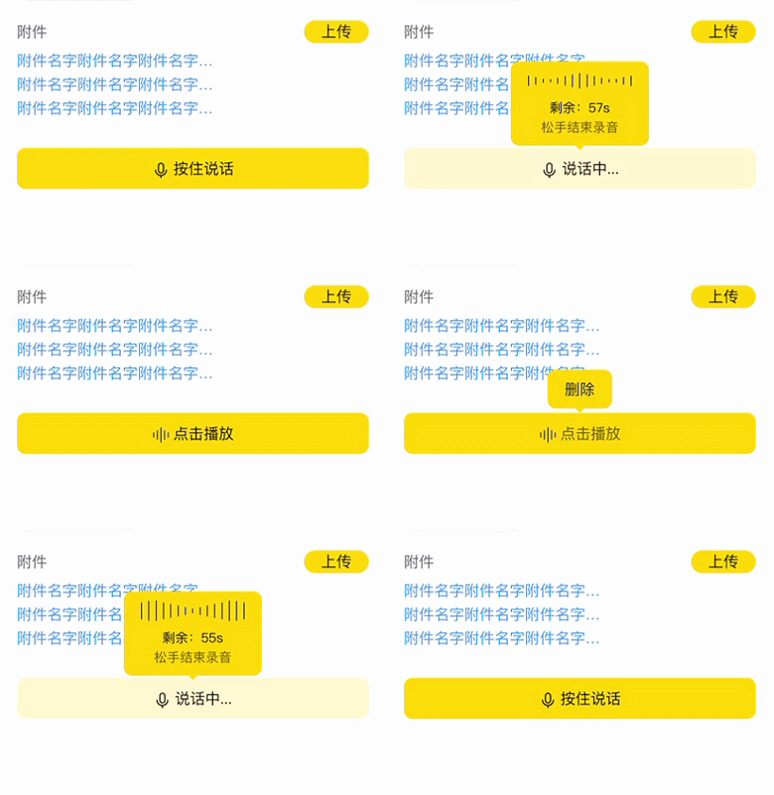
最近项目使用uniapp开发微信小程序,需要实现一个长按时进行语音录制,限制录制时间最大为60秒,录制完成后,可点击播放,播放时再次点击停止播放,录制完成长按实现删除功能,删除后又可重新录制(如上图所示)。
<template>
    <view class="record-layer">
    	<view class="record-box">
    		<view class="record-btn-layer" v-if="tempFilePath == ''">
    			<button class="record-btn" :class="longPress == '1' ? 'record-btn-1' : 'record-btn-2'"  @longpress="longpressBtn()" @touchend="touchendBtn()">
    				<image src="../../static/img/record-ico.png"/>
    				<text>{{longPress == '1' ? '按住说话' : '说话中...'}}</text>
    			</button>
    		</view>
    		<view class="record-btn-layer" v-else>
    			<button class="record-btn" @longpress="delShow = true" @click="playBtn()" :class="playStatus == '1' ? 'record-btn-2' : 'record-btn-1'">
    				<image src="../../static/img/scale-ico.png"/>
    				<text>{{playStatus == '1' ? (count+'s') : '点击播放'}}</text>
    			</button>
    		</view>
    		<!-- 语音音阶动画 -->
    		<view class="prompt-layer prompt-layer-1" v-if="longPress == '2'">
    			<view class="prompt-loader">
    				<view class="em" v-for="(item,index) in 15" :key="index"></view>
    			</view>
    			<text class="p">{{'剩余:' + count + 's'}}</text>
    			<text class="span">松手结束录音</text>
    		</view>
    		<!-- 删除 -->
    		<view class="prompt-layer prompt-layer-2" v-if="delShow" @click.stop="delBtn()">
    			<text>删除</text>
    		</view>
    	</view>
    </view>
</template>
<script>
	const recorderManager = uni.getRecorderManager()
    const innerAudioContext = uni.createInnerAudioContext()
	var init // 录制时长计时器
	var timer // 播放 录制倒计时
    export default {
        data() {
            return {
				count: null, // 录制倒计时
				longPress: '1', // 1显示 按住说话 2显示 说话中
				delShow: false, // 删除提示框显示隐藏
				time: 0, //录音时长
				duration: 60000, //录音最大值ms 60000/1分钟
				tempFilePath: '', //音频路径
				playStatus: 0, //录音播放状态 0:未播放 1:正在播放
            }
        },
        methods: {
			// 倒计时
			countdown(val){
				let _then = this;
				_then.count = Number(val);
				timer = setInterval(function() {
					if(_then.count > 0){
						_then.count--
					} else {
						_then.longPress = '1';
						clearInterval(timer);
					}
				}, 1000);
			},
			// 长按录音事件
			longpressBtn(){
				this.longPress = '2';
				this.countdown(60); // 倒计时
				clearInterval(init) // 清除定时器
				recorderManager.onStop((res) => {
			        this.tempFilePath = res.tempFilePath;
			        this.recordingTimer(this.time);
				})
				const options = {
					duration: this.duration, // 指定录音的时长,单位 ms
					sampleRate: 16000, // 采样率
					numberOfChannels: 1, // 录音通道数
					encodeBitRate: 96000, // 编码码率
					format: 'mp3', // 音频格式,有效值 aac/mp3
					frameSize: 10, // 指定帧大小,单位 KB
				}
			    this.recordingTimer();
				recorderManager.start(options);
				// 监听音频开始事件
				recorderManager.onStart((res) => {
					console.log(res)
				})
			},
			// 长按松开录音事件
			touchendBtn(){
				this.longPress = '1';
			    recorderManager.onStop((res) => {
			        this.tempFilePath = res.tempFilePath
			    })
			    this.recordingTimer(this.time)
			    recorderManager.stop()
			},
			recordingTimer(time){
				var that = this;
				if (time == undefined) {
					// 将计时器赋值给init
					init = setInterval(function() {
						that.time++
					}, 1000);
				} else {
					clearInterval(init)
				}
			},
			// 删除录音
			delBtn(){
				this.delShow = false;
				this.time = 0
				this.tempFilePath = ''
				this.playStatus = 0
				innerAudioContext.stop()
			},
			// 播放
			playBtn(){
			    innerAudioContext.src = this.tempFilePath
			    //在ios下静音时播放没有声音,默认为true,改为false就好了。
			    // innerAudioContext.obeyMuteSwitch = false
			    //点击播放
			    if (this.playStatus == 0) {
			        this.playStatus = 1;
			        innerAudioContext.play();
					this.countdown(this.time); // 倒计时
			    } else {
			        this.playStatus = 0;
					innerAudioContext.pause()
				}
			    // //播放结束
			    innerAudioContext.onEnded(() => {
			        this.playStatus = 0;
			        innerAudioContext.stop();
			    })
			},
        }
    }
</script>
<style>
	/* 语音录制开始--------------------------------------------------------------------- */
	.record-layer{
		width: 100%;
		padding: 300px 0;
		box-sizing: border-box;
	}
	.record-box{
		width: 100%;
		position: relative;
	}
	.record-btn-layer{
		width: 100%;
	}
	.record-btn-layer button::after {
		border: none;
	}
	.record-btn-layer button{
		font-size: 14px;
		line-height: 38px;
		width: 100%;
		height: 38px;
		border-radius: 8px;
		text-align: center;
		background: #FFD300;
	}
	.record-btn-layer button image{
		width: 16px;
		height: 16px;
		margin-right: 4px;
		vertical-align: middle;
	}
	.record-btn-layer .record-btn-2{
		background: rgba(255, 211, 0, 0.2);
	}
	/* 提示小弹窗 */
	.prompt-layer{
		border-radius: 8px;
		background: #FFD300;
		padding: 8px 16px;
		box-sizing: border-box;
		position: absolute;
		left: 50%;
		transform: translateX(-50%);
	}
	.prompt-layer::after{
		content: '';
		display: block;
		border: 6px solid rgba(0,0,0,0);
		border-top-color: rgba(255, 211, 0, 1);
		position: absolute;
		bottom: -10px;
		left: 50%;
		transform: translateX(-50%);
	}
	.prompt-layer-1{
		font-size: 12px;
		width: 128px;
		text-align: center;
		display: flex;
		flex-direction: column;
		align-items: center;
		justify-content: center;
		top: -80px;
	}
	.prompt-layer-1 .p{
		color: #000000;
	}
	.prompt-layer-1 .span{
		color: rgba(0,0,0,.6);
	}
	.prompt-loader .em{

	}
	/* 语音音阶------------- */
	.prompt-loader {
		width: 96px;
		height: 20px;
		display: flex;
		align-items: center;
		justify-content: space-between;
		margin-bottom: 6px;
	}
	.prompt-loader .em {
		display: block;
		background: #333333;
		width: 1px;
		height: 10%;
		margin-right: 2.5px;
		float: left;
	}
	.prompt-loader .em:last-child {
		margin-right: 0px;
	}
	.prompt-loader .em:nth-child(1) {
	 animation: load 2.5s 1.4s infinite linear;
	}
	.prompt-loader .em:nth-child(2) {
	 animation: load 2.5s 1.2s infinite linear;
	}
	.prompt-loader .em:nth-child(3) {
	 animation: load 2.5s 1s infinite linear;
	}
	.prompt-loader .em:nth-child(4) {
	 animation: load 2.5s 0.8s infinite linear;
	}
	.prompt-loader .em:nth-child(5) {
	 animation: load 2.5s 0.6s infinite linear;
	}
	.prompt-loader .em:nth-child(6) {
	 animation: load 2.5s 0.4s infinite linear;
	}
	.prompt-loader .em:nth-child(7) {
	 animation: load 2.5s 0.2s infinite linear;
	}
	.prompt-loader .em:nth-child(8) {
	 animation: load 2.5s 0s infinite linear;
	}
	.prompt-loader .em:nth-child(9) {
	 animation: load 2.5s 0.2s infinite linear;
	}
	.prompt-loader .em:nth-child(10) {
	 animation: load 2.5s 0.4s infinite linear;
	}
	.prompt-loader .em:nth-child(11) {
	 animation: load 2.5s 0.6s infinite linear;
	}
	.prompt-loader .em:nth-child(12) {
	 animation: load 2.5s 0.8s infinite linear;
	}
	.prompt-loader .em:nth-child(13) {
	 animation: load 2.5s 1s infinite linear;
	}
	.prompt-loader .em:nth-child(14) {
	 animation: load 2.5s 1.2s infinite linear;
	}
	.prompt-loader .em:nth-child(15) {
	 animation: load 2.5s 1.4s infinite linear;
	}
	@keyframes load {
		0% {
			height: 10%;
		}
		50% {
			height: 100%;
		}
		100% {
			height: 10%;
		}
	}
	/* 语音音阶-------------------- */
	.prompt-layer-2{
		top: -40px;
	}
	.prompt-layer-2 .text{
		color: rgba(0, 0, 0, 1);
		font-size: 12px;
	}
	/* 语音录制结束---------------------------------------------------------------- */
</style>
以上部分是整体代码,没有想象中的那么流利,但是功能都有实现,欢迎借鉴(其中包含CSS实现语音音阶动画效果,自行复制即可获取)。
<template>
    <view class="sound-recording">
        <view class="time">{{status==0?'录音时长':(status==3?'录音已完成':'正在录音中')}}:{{time}} 秒</view>
        <view class="btn">
            <view :class="status==3?'show':'hide'" @click="reset" hover-class="jump-hover">重新录制</view>
            <view :class="status==3 && playStatus==0?'show':'hide'" @click="bofang" hover-class="jump-hover">{{playStatus==1?'录音播放中':'播放录音'}}</view>
        </view>
        <view class="progress">
            <text class="txt">最大录音时长({{duration/1000}}秒 = {{duration/60000}}分钟)</text>
            <progress :percent="time*(100/(duration/1000))" border-radius="10" color="green" stroke-width="10" backgroundColor="#fff" />
        </view>
        <view class="anniu">
            <view :class="status==0?'row':'no-clicking'" @click="kaishi" hover-class="jump-hover">开始</view>
            <view :class="status==1?'row':'no-clicking'" @click="zanting" hover-class="jump-hover">暂停</view>
            <view :class="status==2?'row':'no-clicking'" @click="jixu" hover-class="jump-hover">继续</view>
            <view :class="status==1 || status==2?'row':'no-clicking'" @click="tingzhi" hover-class="jump-hover">停止</view>
        </view>
    </view>
</template>

<script>
    const recorderManager = uni.getRecorderManager()
    const innerAudioContext = uni.createInnerAudioContext()
    var init
    export default {
        data() {
            return {
                time: 0, //录音时长
                duration: 600000, //录音最大值ms 600000/10分钟
                tempFilePath: "", //音频路径
                status: 0, //录音状态 0:未开始录音 1:正在录音 2:暂停录音 3:已完成录音
                playStatus: 0, //录音播放状态 0:未播放 1:正在播放
            }
        },
        methods: {
            kaishi: function() {
                clearInterval(init) //清除定时器
                //监听录音自动结束事件(如果不加,录音时间到最大值自动结束后,没获取到录音路径将无法正常进行播放)
                recorderManager.onStop((res) => {
                    console.log('recorder stop', res)
                    this.tempFilePath = res.tempFilePath
                    this.status = 3
                    this.recordingTimer(this.time)
                })

                const options = {
                    duration: this.duration, //指定录音的时长,单位 ms
                    sampleRate: 16000, //采样率
                    numberOfChannels: 1, //录音通道数
                    encodeBitRate: 96000, //编码码率
                    format: 'mp3', //音频格式,有效值 aac/mp3
                    frameSize: 10, //指定帧大小,单位 KB
                }
                this.recordingTimer()
                recorderManager.start(options)
                // 监听音频开始事件
                recorderManager.onStart((res) => {
                    console.log('recorder start')
                    this.status = 1
                })
                console.log(this.status);
            },

            /**
             * 暂停录音
             */
            zanting: function() {
                console.log('zanting');
                recorderManager.onPause(() => {
                    console.log('recorder pause')
                    this.status = 2
                })
                this.recordingTimer(this.time)
                recorderManager.pause()
            },

            /**
             * 继续录音
             */
            jixu: function() {
                this.status = 1
                this.recordingTimer()
                recorderManager.resume()
            },

            /**
             * 停止录音
             */
            tingzhi: function() {
					debugger
                recorderManager.onStop((res) => {
                    console.log('recorder stop', res)
                    this.tempFilePath = res.tempFilePath
                    this.status = 3
                })
                this.recordingTimer(this.time)
                recorderManager.stop()

            },

            /**
             * 播放录音
             */
            bofang: function() {
                //音频地址
                console.log(this.tempFilePath);
                innerAudioContext.src = this.tempFilePath
                //在ios下静音时播放没有声音,默认为true,改为false就好了。
                // innerAudioContext.obeyMuteSwitch = false

                //点击播放
                if (this.playStatus == 0) {
                    this.playStatus = 1
                    innerAudioContext.play()
                }
                // //播放结束
                innerAudioContext.onEnded(() => {
                    innerAudioContext.stop()
                    this.playStatus = 0
                })
            },
            recordingTimer: function(time) {
                var that = this
                if (time == undefined) {
                    //将计时器赋值给init
                    init = setInterval(function() {
                        var time = that.time + 1;
                        that.time = time
                    }, 1000);
                } else {
                    clearInterval(init)
                    console.log("暂停计时")
                }
            },

            /**
             * 重新录制
             */
            reset: function() {
                var that = this
                wx.showModal({
                    title: "重新录音",
                    content: "是否重新录制?",
                    success(res) {
                        if (res.confirm) {
                            that.time = 0
                            that.tempFilePath = ''
                            that.status = 0
                            that.playStatus = 0
                            innerAudioContext.stop()
                        }
                    }
                })
            }
        }
    }
</script>

<style>
    .sound-recording {
        background-color: rgb(234, 234, 234);
        margin: 10rpx 30rpx;
        border-radius: 20rpx;
        padding: 5rpx 0rpx;
    }

    .btn {
        margin: 0rpx 100rpx;
        display: flex;
        justify-content: space-between;
        align-items: center;
    }

    .btn .show {
        padding: 10rpx;
        width: 200rpx;
        font-size: 25rpx;
        display: flex;
        justify-content: center;
        align-items: center;
        background-color: rgb(178, 228, 228);
        border-radius: 20rpx;
        border: 5rpx solid rgb(127, 204, 214);
    }

    .btn .hide {
        padding: 10rpx;
        width: 200rpx;
        font-size: 25rpx;
        display: flex;
        justify-content: center;
        align-items: center;
        border-radius: 20rpx;
        border: 5rpx solid #eee;
        pointer-events: none;
        background-color: rgba(167, 162, 162, 0.445);
    }

    .time {
        line-height: 70rpx;
        text-align: center;
        font-size: 30rpx;
    }

    .progress {
        margin: 20rpx;
    }

    .play {
        margin: 0rpx 20rpx;
    }

    .txt {
        display: flex;
        justify-content: center;
        line-height: 60rpx;
        font-size: 25rpx;
    }

    .anniu {
        margin: 10rpx 50rpx;
        display: flex;
        justify-content: space-between;
    }

    .row {
        display: flex;
        justify-content: center;
        align-items: center;
        border-radius: 50%;
        font-size: 25rpx;
        width: 80rpx;
        height: 80rpx;
        background-color: rgb(178, 228, 228);
        border: 5rpx solid rgb(127, 204, 214);
    }

    .jump-hover {
        transform: scale(0.9);
    }

    /*禁止点击*/

    .anniu .no-clicking {
        pointer-events: none;
        background-color: rgba(167, 162, 162, 0.445);
        display: flex;
        justify-content: center;
        align-items: center;
        border-radius: 50%;
        font-size: 25rpx;
        width: 80rpx;
        height: 80rpx;
        border: 5rpx solid rgb(241, 244, 245);
    }
</style>
我需要在客户计算机上运行Ruby应用程序。通常需要几天才能完成(复制大备份文件)。问题是如果启用sleep,它会中断应用程序。否则,计算机将持续运行数周,直到我下次访问为止。有什么方法可以防止执行期间休眠并让Windows在执行后休眠吗?欢迎任何疯狂的想法;-) 最佳答案 Here建议使用SetThreadExecutionStateWinAPI函数,使应用程序能够通知系统它正在使用中,从而防止系统在应用程序运行时进入休眠状态或关闭显示。像这样的东西:require'Win32API'ES_AWAYMODE_REQUIRED=0x0
Rackup通过Rack的默认处理程序成功运行任何Rack应用程序。例如:classRackAppdefcall(environment)['200',{'Content-Type'=>'text/html'},["Helloworld"]]endendrunRackApp.new但是当最后一行更改为使用Rack的内置CGI处理程序时,rackup给出“NoMethodErrorat/undefinedmethod`call'fornil:NilClass”:Rack::Handler::CGI.runRackApp.newRack的其他内置处理程序也提出了同样的反对意见。例如Rack
我在MiniTest::Spec和Capybara中使用以下规范:find_field('Email').must_have_css('[autofocus]')检查名为“电子邮件”的字段是否具有autofocus属性。doc说如下:has_css?(path,options={})ChecksifagivenCSSselectorisonthepageorcurrentnode.据我了解,字段“Email”是一个节点,因此调用must_have_css绝对有效!我做错了什么? 最佳答案 通过JonasNicklas得到了答案:No
我想用ruby编写一个小的命令行实用程序并将其作为gem分发。我知道安装后,Guard、Sass和Thor等某些gem可以从命令行自行运行。为了让gem像二进制文件一样可用,我需要在我的gemspec中指定什么。 最佳答案 Gem::Specification.newdo|s|...s.executable='name_of_executable'...endhttp://docs.rubygems.org/read/chapter/20 关于ruby-在Ruby中编写命令行实用程序
我构建了两个需要相互通信和发送文件的Rails应用程序。例如,一个Rails应用程序会发送请求以查看其他应用程序数据库中的表。然后另一个应用程序将呈现该表的json并将其发回。我还希望一个应用程序将存储在其公共(public)目录中的文本文件发送到另一个应用程序的公共(public)目录。我从来没有做过这样的事情,所以我什至不知道从哪里开始。任何帮助,将不胜感激。谢谢! 最佳答案 无论Rails是什么,几乎所有Web应用程序都有您的要求,大多数现代Web应用程序都需要相互通信。但是有一个小小的理解需要你坚持下去,网站不应直接访问彼此
我尝试运行2.x应用程序。我使用rvm并为此应用程序设置其他版本的ruby:$rvmuseree-1.8.7-head我尝试运行服务器,然后出现很多错误:$script/serverNOTE:Gem.source_indexisdeprecated,useSpecification.Itwillberemovedonorafter2011-11-01.Gem.source_indexcalledfrom/Users/serg/rails_projects_terminal/work_proj/spohelp/config/../vendor/rails/railties/lib/r
刚入门rails,开始慢慢理解。有人可以解释或给我一些关于在application_controller中编码的好处或时间和原因的想法吗?有哪些用例。您如何为Rails应用程序使用应用程序Controller?我不想在那里放太多代码,因为据我了解,每个请求都会调用此Controller。这是真的? 最佳答案 ApplicationController实际上是您应用程序中的每个其他Controller都将从中继承的类(尽管这不是强制性的)。我同意不要用太多代码弄乱它并保持干净整洁的态度,尽管在某些情况下ApplicationContr
我是一个Rails初学者,但我想从我的RailsView(html.haml文件)中查看Ruby变量的内容。我试图在ruby中打印出变量(认为它会在终端中出现),但没有得到任何结果。有什么建议吗?我知道Rails调试器,但更喜欢使用inspect来打印我的变量。 最佳答案 您可以在View中使用puts方法将信息输出到服务器控制台。您应该能够在View中的任何位置使用Haml执行以下操作:-puts@my_variable.inspect 关于ruby-on-rails-如何在我的R
我有一个用户工厂。我希望默认情况下确认用户。但是鉴于unconfirmed特征,我不希望它们被确认。虽然我有一个基于实现细节而不是抽象的工作实现,但我想知道如何正确地做到这一点。factory:userdoafter(:create)do|user,evaluator|#unwantedimplementationdetailshereunlessFactoryGirl.factories[:user].defined_traits.map(&:name).include?(:unconfirmed)user.confirm!endendtrait:unconfirmeddoenden
只是想确保我理解了事情。据我目前收集到的信息,Cucumber只是一个“包装器”,或者是一种通过将事物分类为功能和步骤来组织测试的好方法,其中实际的单元测试处于步骤阶段。它允许您根据事物的工作方式组织您的测试。对吗? 最佳答案 有点。它是一种组织测试的方式,但不仅如此。它的行为就像最初的Rails集成测试一样,但更易于使用。这里最大的好处是您的session在整个Scenario中保持透明。关于Cucumber的另一件事是您(应该)从使用您的代码的浏览器或客户端的角度进行测试。如果您愿意,您可以使用步骤来构建对象和设置状态,但通常您
