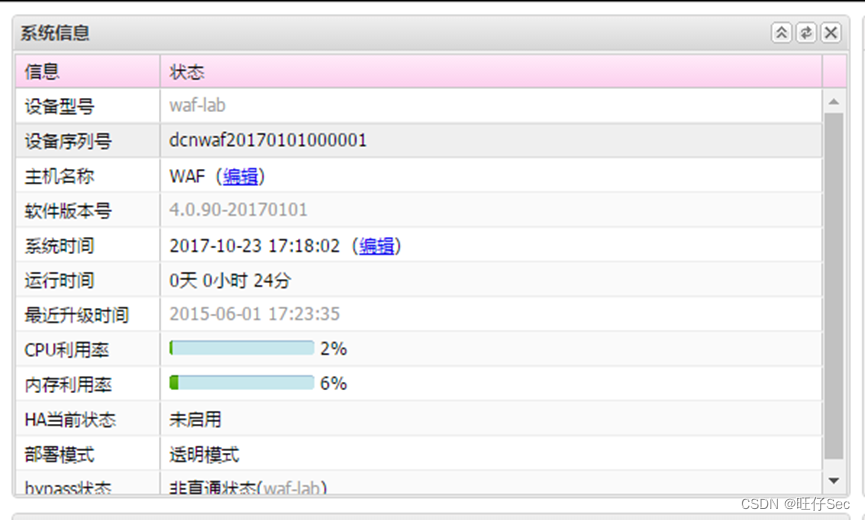
1. 根据网络拓扑图所示,按照IP地址规划表,对WAF的名称进行配置。(20分)
2. 根据网络拓扑图所示,按照IP地址规划表,对DCRS的名称、各接口IP地址进行配置,在DCRS交换机上创建相应的VLAN,并将相应接口划入VLAN。(56分,没错一处扣5分,扣完为止)
DCRS#sh run
hostname DCRS (5分)
vlan 1-2;10;20;30;66 (5分)
!
Interface Ethernet1/0/1
!
Interface Ethernet1/0/2
switchport access vlan 2 (5分)
!
Interface Ethernet1/0/3
switchport access vlan 10 (5分)
!
Interface Ethernet1/0/4
switchport access vlan 20 (5分)
!
Interface Ethernet1/0/5
switchport access vlan 30 (5分)
!
Interface Ethernet1/0/6
switchport access vlan 66 (5分)
!
interface Vlan1
ip address 192.168.1.254 255.255.255.0 (5分)
!
interface Vlan2
ip address 192.168.2.1 255.255.255.0 (5分)
!
interface Vlan10
ip address 192.168.10.254 255.255.255.0 (5分)
!
interface Vlan20
ip address 192.168.20.254 255.255.255.0 (5分)
!
interface Vlan30
ip address 192.168.30.254 255.255.255.0 (5分)
!
interface Vlan66
ip address 192.168.66.254 255.255.255.0
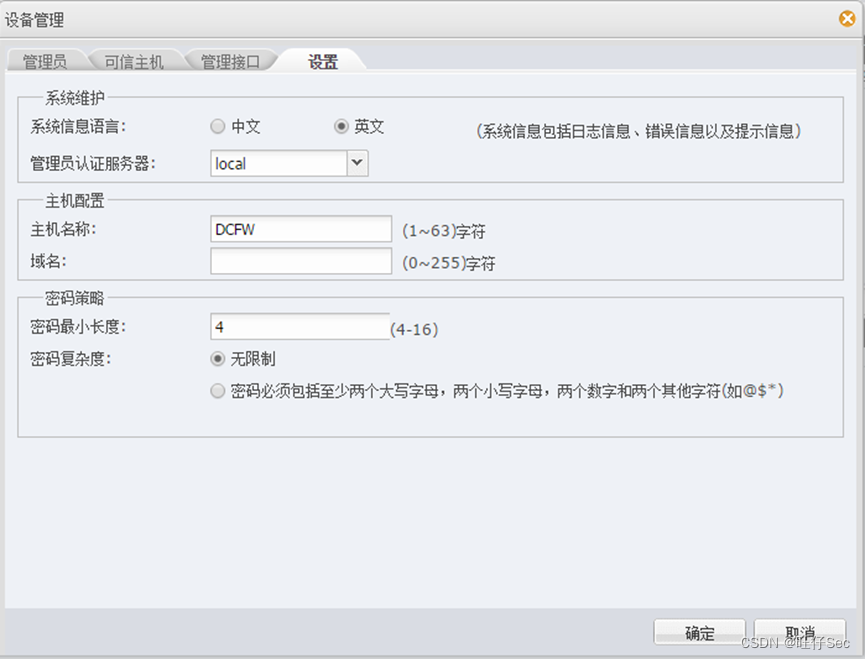
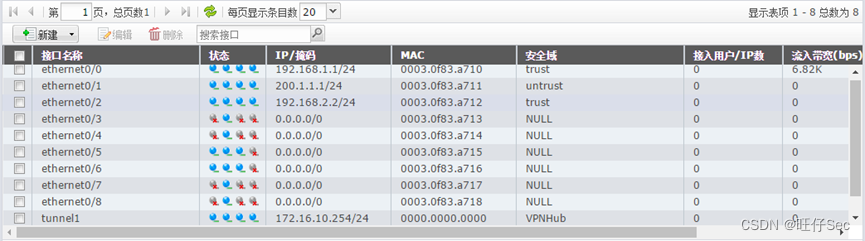
3. 根据网络拓扑图所示,按照IP地址规划表,对DCFW的名称、各接口IP地址进行配置。(20分,每错一处扣7分)
4. 根据网络拓扑图所示,按照IP地址规划表,在DCWS上创建相应的VLAN,并将相应接口划入VLAN,对DCWS的管理IP地址进行配置。(26分,每错一处扣4分)
DCWS#sh run
hostname DCWS (4分)
vlan 1;66 (4分)
!
Interface Ethernet1/0/16
switchport access vlan 66 (4分)
interface Vlan66 (4分)
ip address 192.168.66.253 255.255.255.0
!
interface Vlan110(4分)
ip address 192.168.110.254 255.255.255.0
!
interface Vlan111(4分)
ip address 192.168.111.254 255.255.255.0
!
interface Vlan222(4分)
ip address 192.168.222.254 255.255.255.0
!
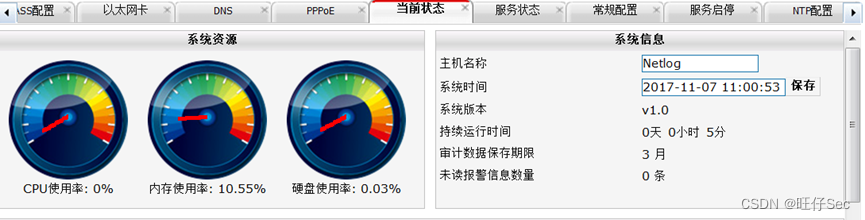
5. 根据网络拓扑图所示,按照IP地址规划表,对DCBI的名称、各接口IP地址进行配置。(20分,每错一处扣10分)
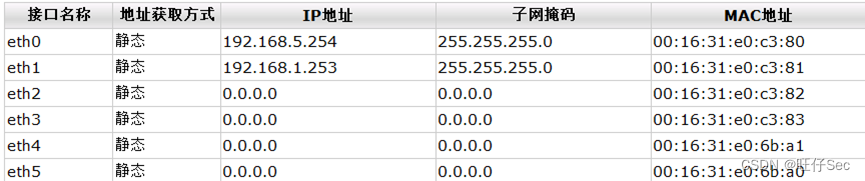
6.内部网络采用静态路由实现全网互联互通。(18分)
交换机: (8分)
ip route 0.0.0.0/0 192.168.2.2
ip route 192.168.110.0/24 192.168.66.253
ip route 192.168.111.0/24 192.168.66.253
ip route 192.168.222.0/24 192.168.66.253
!
AC:
ip route 0.0.0.0 0.0.0.0 192.168.66.254 (4分)
防火墙: (8分)
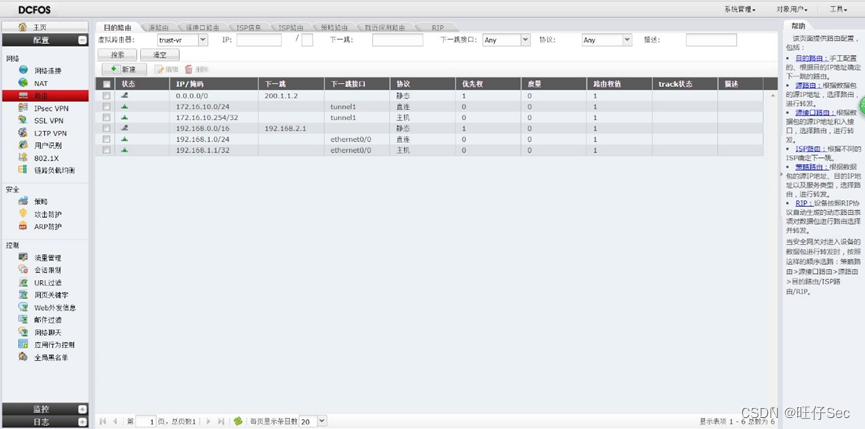
WAF部分

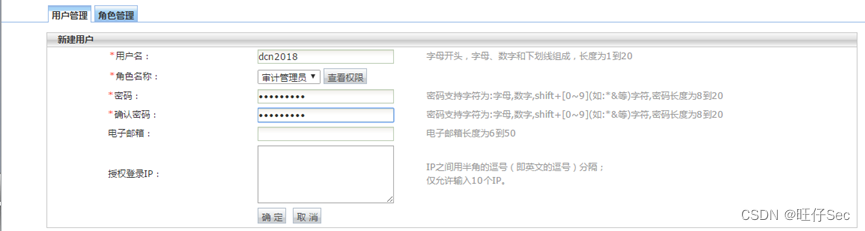
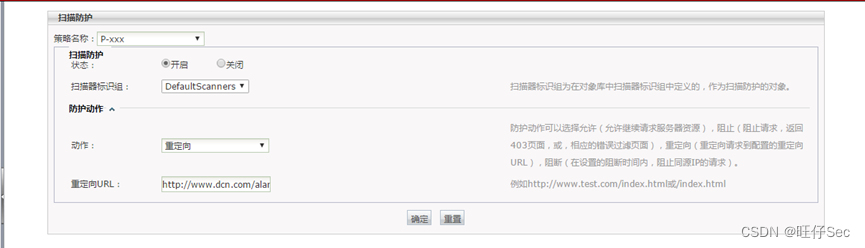
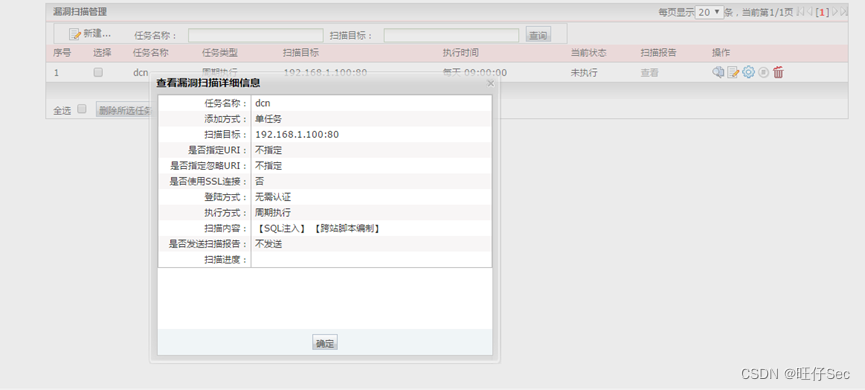
DCWS部分
service dhcp(2分)
!
ip dhcp excluded-address 192.168.111.254
ip dhcp excluded-address 192.168.222.254(2分)
!
ip dhcp pool 110
network-address 192.168.110.0 255.255.255.0
option 43 hex 0104C0A86EFE
option 60 ascii udhcp1.18.2(2分)
!
ip dhcp pool 111
network-address 192.168.111.0 255.255.255.0
default-router 192.168.111.254
lease 2 0 0
dns-server 8.8.8.8(2分)
!
ip dhcp pool 222
network-address 192.168.222.0 255.255.255.0
default-router 192.168.222.254
lease 2 0 0
dns-server 8.8.8.8(2分)
!
interface Vlan66
ip address 192.168.66.253 255.255.255.0(2分)
!
interface Vlan110
ip address 192.168.110.254 255.255.255.0(2分)
!
interface Vlan111
ip address 192.168.111.254 255.255.255.0(2分)
!
interface Vlan222
ip address 192.168.222.254 255.255.255.0(2分)
!
ip route 0.0.0.0/0 192.168.66.254 (2分)
!
Interface Ethernet1/0/15 (2分)
switchport mode trunk
switchport trunk native vlan 110
!
Interface Ethernet1/0/16 (2分)
switchport access vlan 66
wireless
no auto-ip-assign
enable
ap authentication none
static-ip 192.168.110.254(2分)
network 1 (2分)
ssid GUEST
vlan 111
network 2 (2分)
ssid DCN
vlan 222
ap profile 1
name Default
hwtype 29(或59)(2分)
radio 1
vap 1
enable (2分)
radio 2
vap 1
enable (2分)
wireless
ap profile 1
ap escape (4分)
radio 1
mode g (4分)
network 1
security mode wpa-personal(3分)
ssid GUEST(3分)
vlan 111(3分)
wpa key xxxxxx(3分)
network 2
client-qos enable(3分)
client-qos bandwidth-limit down 2048(3分)
client-qos bandwidth-limit up 1024(3分)
station-isolation (3分)
ap profile 1
radio 1
schedule-mode preferred (3分)
radio 2
schedule-mode preferred (3分)
路由器部分
ip route 0.0.0.0/0 192.168.2.2
monitor session 1 source interface Ethernet1/0/2 tx(2分)
monitor session 1 source interface Ethernet1/0/2 rx(2分)
monitor session 1 destination interface Ethernet1/0/1(2分)
anti-arpscan enable(2分)
anti-arpscan port-based threshold 50(2分)
Interface Ethernet1/0/4
switchport access vlan 20
loopback-detection specified-vlan 20 (2分)
loopback-detection control block
!
loopback-detection interval-time 30 10 (2分)
radius-server key 0 dcn2018(2分)
radius-server authentication host 192.168.2.100(2分)
aaa enable(2分)
!
dot1x enable (2分)
!
Interface Ethernet1/0/10 (2分)
dot1x enable
dot1x port-method portbased
!
ssh-server enable (2分)
username 5(组号) privilege 15 password 0 123456 (2分)
service dhcp (2分)
ip forward-protocol udp bootps
interface Vlan20
ip address 192.168.20.254 255.255.255.0
ip helper-address 192.168.66.253 (2分)
Firewall enable
!
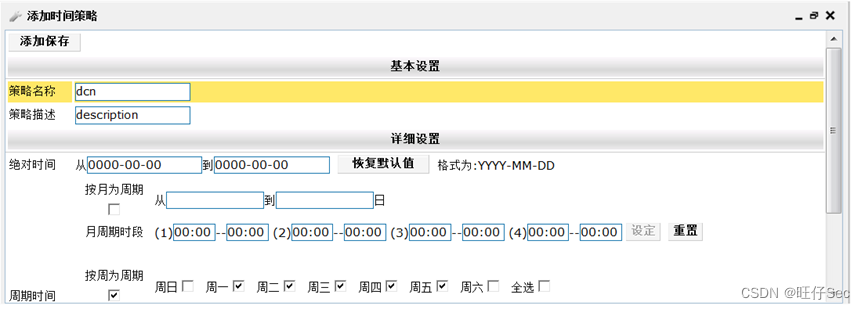
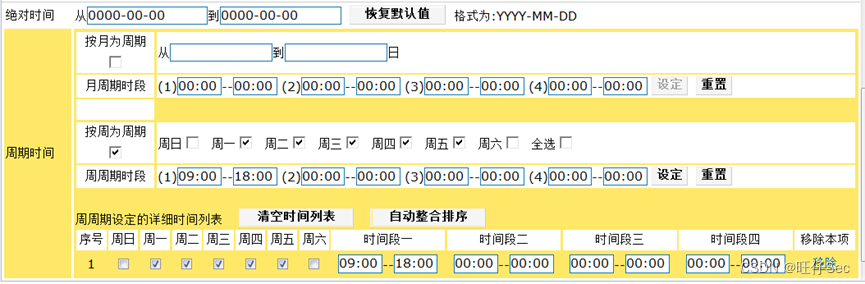
time-range time2 (2分)
periodic weekdays 00:00:00 to 09:00:00
periodic weekdays 18:00:00 to 23:59:59
periodic weekend 00:00:00 to 23:59:59
!
ip access-list extended acl (2分)
deny ip 192.168.30.0 0.0.0.255 192.168.110.0 0.0.0.255 time-range time2
permit ip any-source any-destination
exit
!
Interface Ethernet1/0/5 (2分)
switchport access vlan 30
ip access-group acl in
interface Vlan30
ip address 192.168.30.254 255.255.255.0
ip arp dynamic maximum 50
防火墙部分
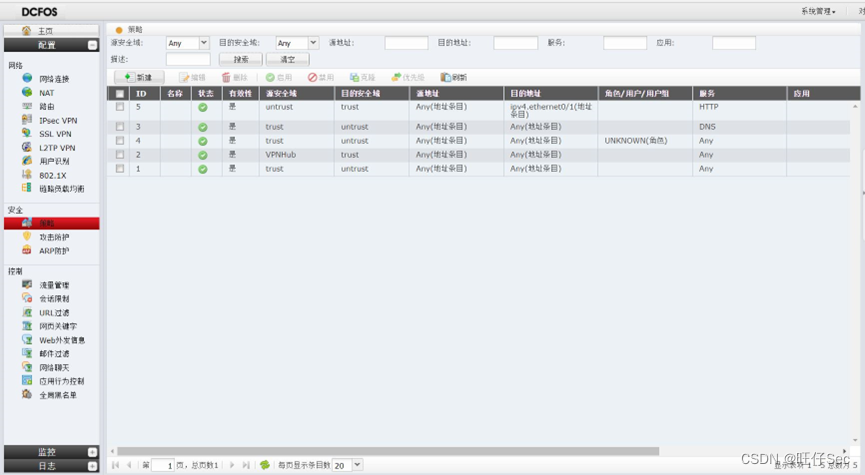
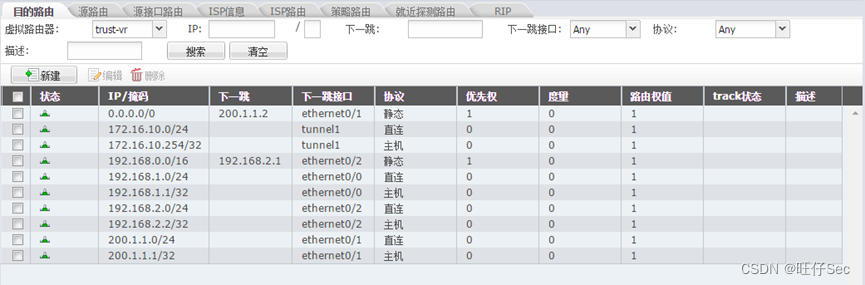
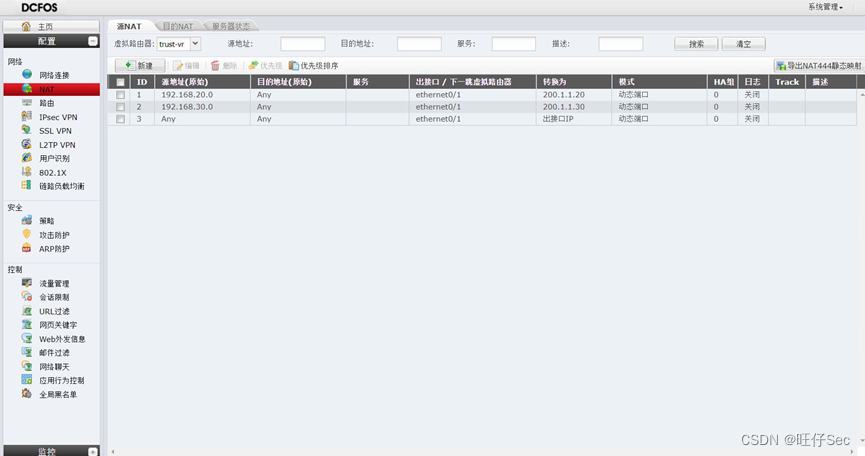
VLAN20用户映射为200.1.1.20;
VLAN30用户映射为200.1.1.30;
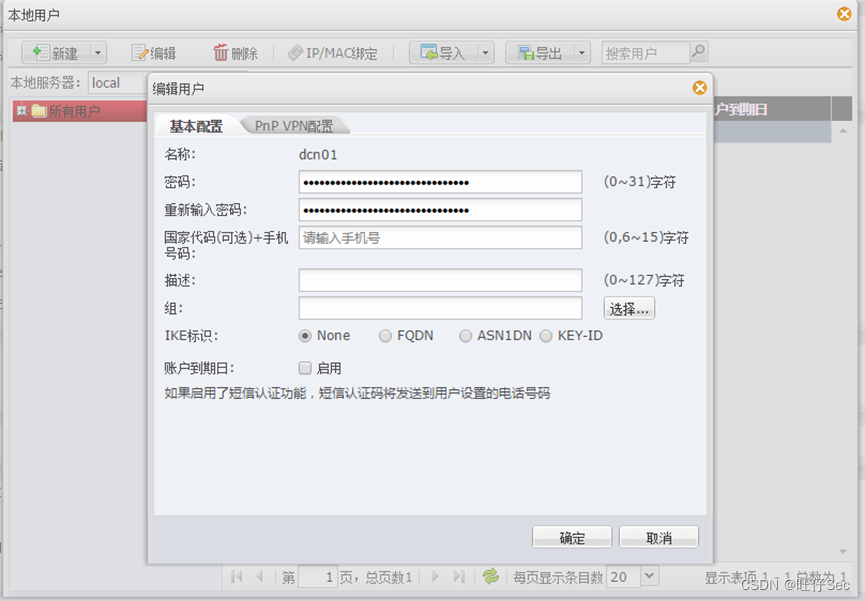
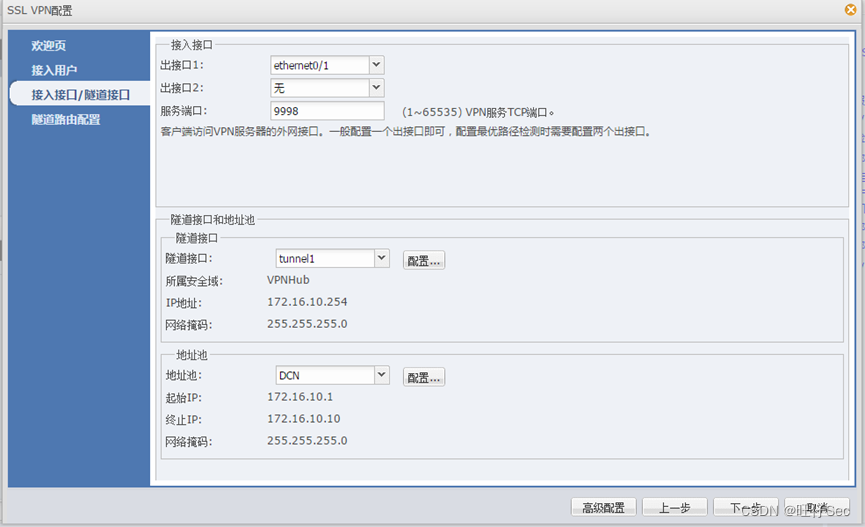
5、内网无线用户访问因特网需要通过实名认证,采用出口本地认证,账号为该组组号,密码为123。(8分,每错一处扣4分,扣完为止)
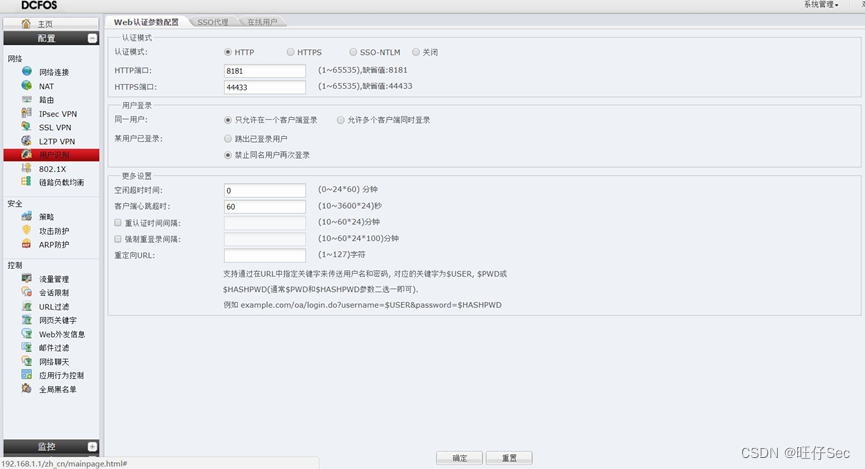

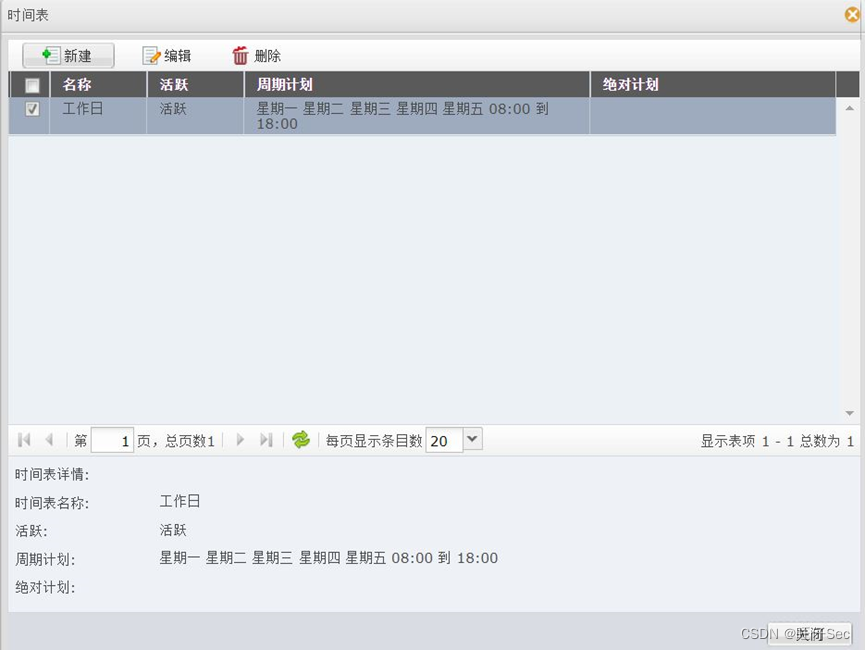
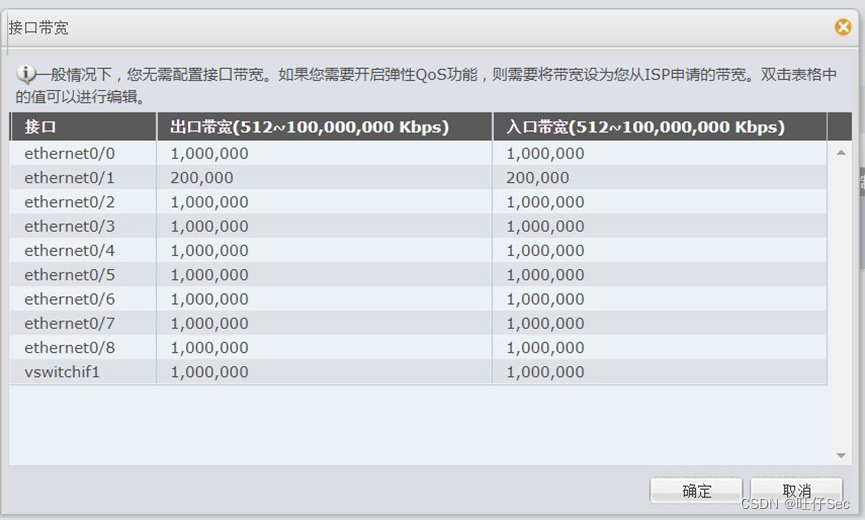
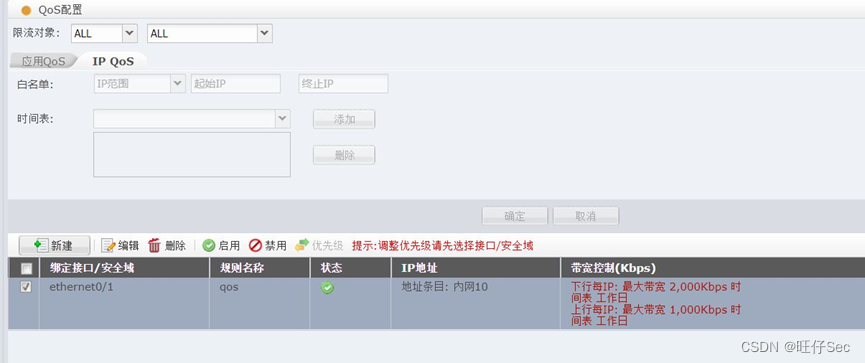
7、为了响应网监处净网行动,要求对内网有线用户web外发内容进行控制,禁止到外网网页上发送关键字“反动”并进行记录相关日志。(6分,每错一处扣3分,扣完为止)
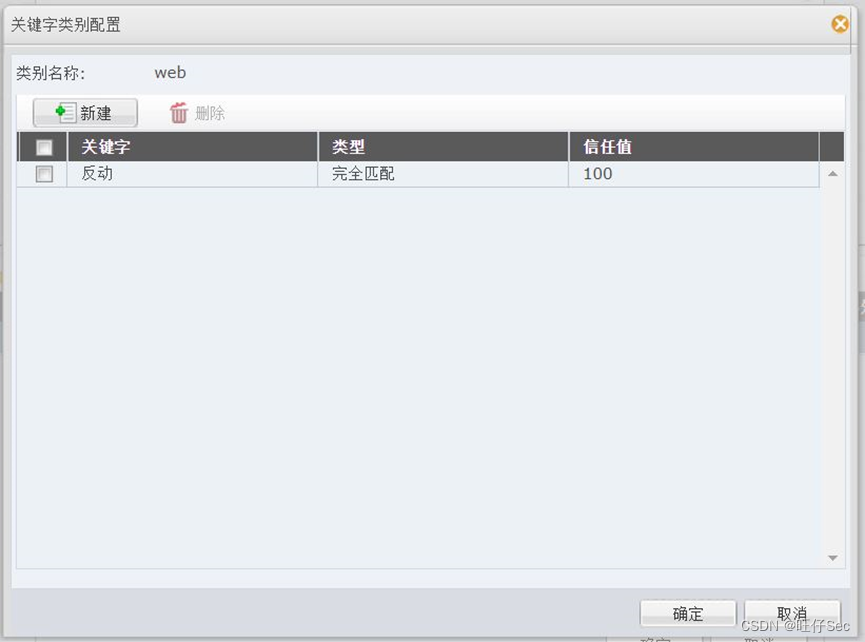
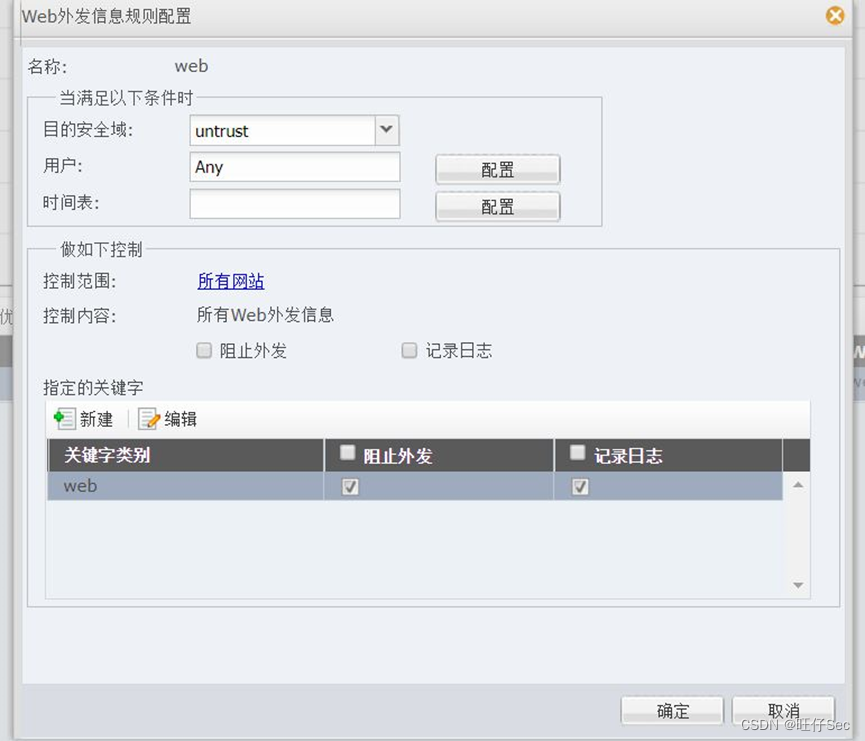
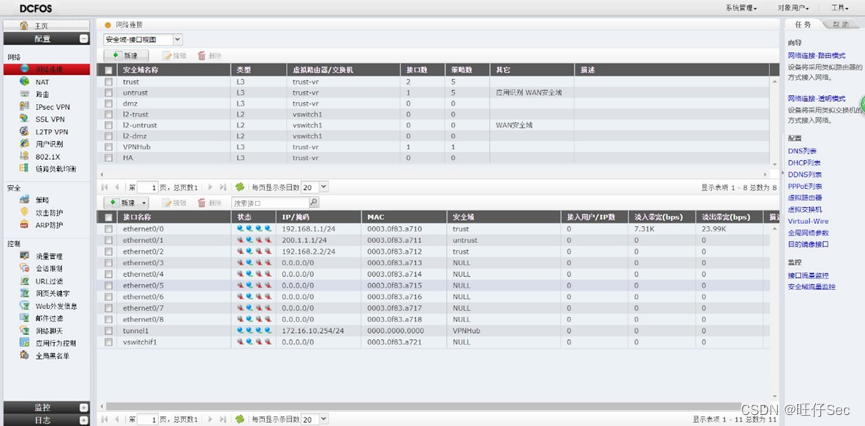
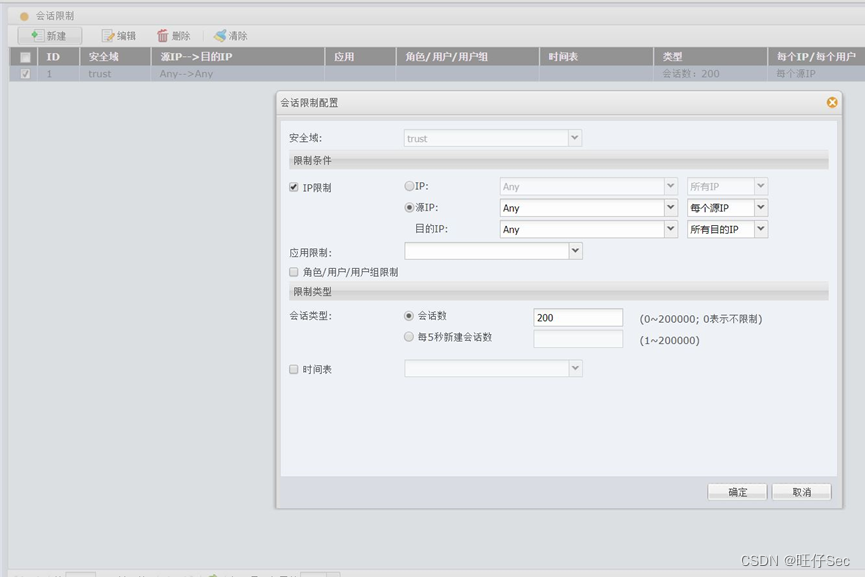
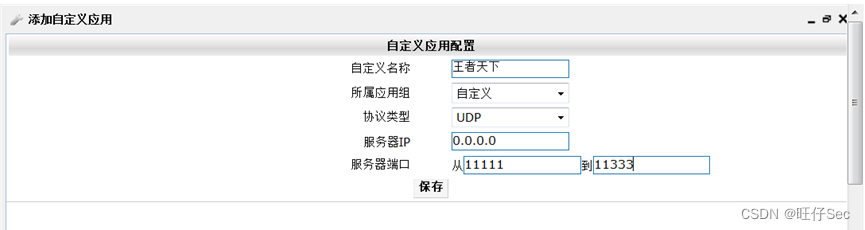
8、先发现内部VLAN20和VLAN30有用户被挂马发送大量连接到外网,导致内网用户打开外网网页很慢有时还打不开,要求在防火墙上做相应设置,控制该问题。(6分,每错一处扣3分,扣完为止)
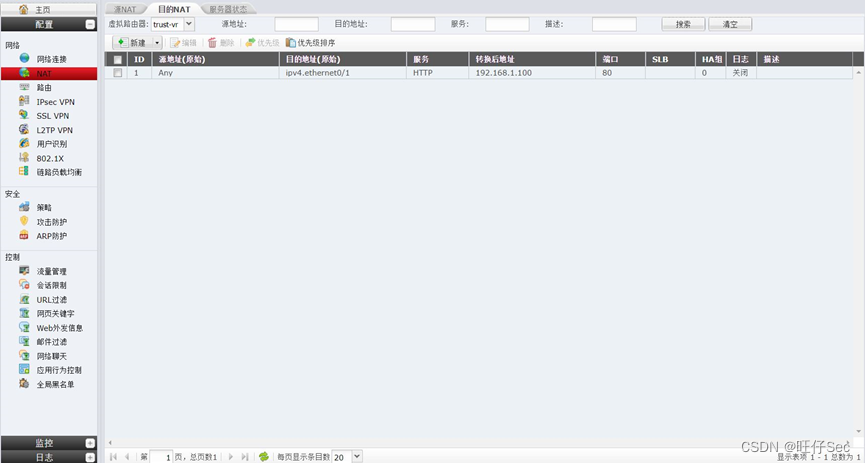
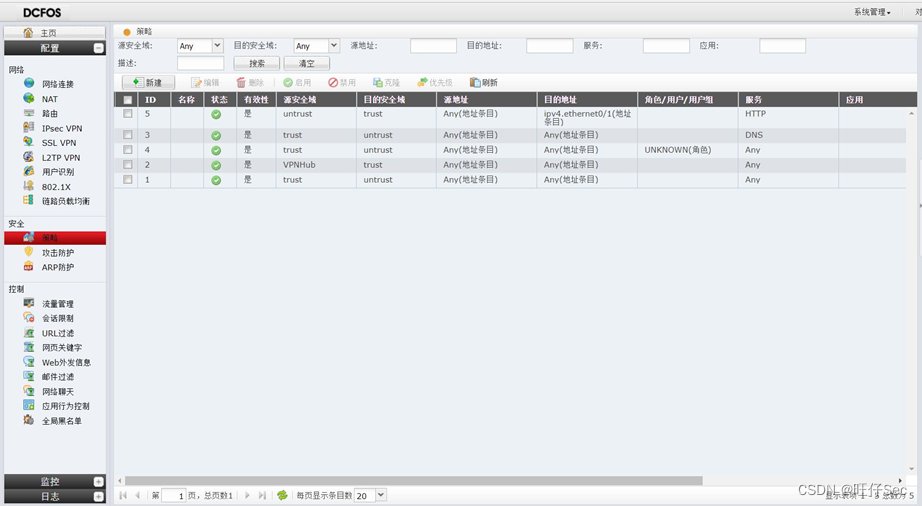
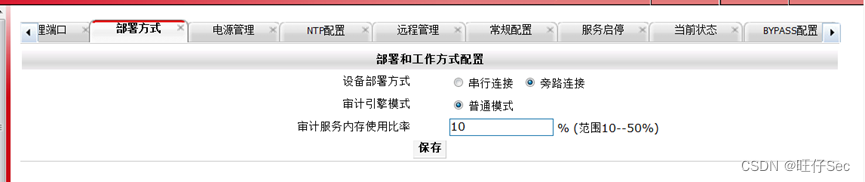
9、PC2能够通过防火墙外网口地址方位DCST的80端口。(4分,每错一处扣2分,扣完为止)
DCBI部分

1.回顾.TransportServicepublicclassTransportServiceextendsAbstractLifecycleComponentTransportService:方法:1publicfinalTextendsTransportResponse>voidsendRequest(finalTransport.Connectionconnection,finalStringaction,finalTransportRequestrequest,finalTransportRequestOptionsoptions,TransportResponseHandlerT>
在Xcode之外,我使用特定版本的Ruby,使用RVM管理多个Ruby安装。Apple的命令行开发工具将Ruby安装在/usr/bin/ruby并且版本为1.8.7。我通过RVM使用1.9.3。有没有办法强制Xcode在运行其运行脚本构建阶段时使用我的1.9.3安装?我已经尝试将Shell路径设置为我的特定Ruby的完整路径,但这似乎没有什么不同,我的意思是我在1.9.3中安装的特定Gems不可用/在Xcode中运行时对脚本可见。如果我在命令行上通过xcodebuild运行我的项目,运行脚本阶段会使用我的特定Ruby,因为它是从我的shell环境中运行的(即使项目文件中的Shell路径
我在irb中尝试计算3**557时遇到了这个问题。Ruby和MacRuby都安装在我的Mac(OSX10.8)中。而ruby的版本是1.8.7,MacRuby0.12(ruby1.9.2)。rib和macirb在计算3**557时给了我两个不同的答案。(macirb是对的。)$irb>>3**557=>547557021793427620635514407889455410079268087653269511938101071654296104237032917607402447243260999931319131042725875729185204428725368897246765
我的问题基于这个问题:RubyKoan:Constantsbecomesymbols.我有以下代码:in_ruby_version("mri")doRubyConstant="Whatisthesoundofonehandclapping?"deftest_constants_become_symbolsall_symbols=Symbol.all_symbolsassert_equal__,all_symbols.include?(__)endend正确答案应该是下面的吗?assert_equaltrue,all_symbols.include?("RubyConstant".to_
2022年山东省职业院校技能大赛高职组“信息安全管理与评估”赛项竞赛规程一、赛项名称赛项名称:信息安全管理与评估英文名称:InformationSecurityManagementandEvaluation赛项组别:高职组赛项归属:电子与信息大类二、竞赛目的(一)引领教学改革通过大赛引领专业教学改革,实现以赛促教、以赛促学、以赛促改的产教结合格局,提升专业培养服务社会和行业发展的能力,为国家信息安全行业培养选拔技术技能型人才。2022年信息安全管理与评估赛项延续历届赛项的竞赛内容,通过赛项检验参赛选手安全网络组建、按照等保要求加固网络系统、安全架构、渗透测试、攻防实战等技术能力,检验参赛队计划
我有两个LWRP。第一个涉及创建磁盘卷、对其进行格式化并将其安装到虚拟机上,我们将此资源称为cloud_volume。第二个资源(它的作用并不重要)需要新格式化卷的UUID,这是必需的属性,我们将此资源称为foobar。资源cloud_volume和foobar被用在类似下面的配方中。volumes.eachdo|mount_point,volume|cloud_volume"#{mount_point}"dosizevolume['size']labelvolume['label']action[:create,:initialize]endfoobar"#{mount_point}
我从一些书中了解到,PhusionPassenger是轻松部署RubyonRails的答案。但是我friend说先是Apache+一堆Mongrels,然后是lighttpd,然后是nginx,现在是Passenger,好像没完没了...他还说他使用dreamhost,而dreamhost使用Passenger,有时他会看到他的请求没有被处理。所以我想知道Passenger是否是RoR部署的最终答案?您是否使用它并使用“ab”命令来测试站点是否运行良好? 最佳答案 简短的回答:是的。长答案:yeeeeeeeeeeeeeeeeesss
我有一个从数据库调用创建的赋值对象数组:@assignments=@player.assignments我想用这个来计算它们:@assignments.count{|x|x.sets==0.0}这应该计算0.0组的作业数。但是,这总是返回@assignments中的对象总数。我查过了@assignments.each{|x|putsx.sets==0.0}并非在所有情况下都返回true。有什么线索吗?编辑>@assignments.map(&:sets)=>[35.0,120.0,0.0,0.0,0.0,0.0,0.0,12.0,75.0,0.0,0.0,0.0,0.0]
前言以下为网络安全各个方向涉及的面试题,星数越多代表问题出现的几率越大,祝各位都能找到满意的工作。注:本套面试题,已整理成pdf文档,但内容还在持续更新中,因为无论如何都不可能覆盖所有的面试问题,更多的还是希望由点达面,查漏补缺。一、渗透测试方向:如何绕过CDN找到真实IP,请列举五种方法(★★★)redis未授权访问如何利用,利用的前提条件是?(★★★)mysql提权方式有哪些?利用条件是什么?(★)windows+mysql,存在sql注入,但是机器无外网权限,可以利用吗?(★)常用的信息收集手段有哪些,除去路径扫描,子域名爆破等常见手段,有什么猥琐的方法收集企业信息?(★★)SRC挖掘与
本代码详情及用法已上传到Github上:https://github.com/edisonwong520/zhihuSpider如果觉得有用的,欢迎Star收藏,感谢~本人菜鸟一名,闲来无事写来玩玩,有问题请多多指教~Github个人主页主页上还有别的一些小工具~介绍知乎爬虫:爬指定问题的所有答案(包括点赞数、图片数、评论数),以及每一个答案下的精选评论、普通评论Awebspiderwhichcangrepalltheanswers,commentsandthumbupnumbersetc…ofaspecificquestioninZhihu.仅供学习交流,严禁用于商业用途,请于24小时内删除
