
文章目录
Allure 是由Java 语言开发的一个轻量级,灵活的测试报告工具。
Allure多平台的 Report框架。
Allure 支持多语言,包括 python、JaveScript、PHP、Ruby 等。
可以为开发/测试/管理等人员提供详尽的的测试报告,包括测试类别、测试步骤、日志、图片、视
频等。
可以为管理层提供高水准的统计报告。
可以集成到Jenkins生成在线的趋势汇总报告。
收集结果:
pytest 测试模块/测试包/测试用例 --alluredir = 指定存储测试结果的路径
pytest --alluredir=./reports --clean-alluredir
生成在线的测试报告:
allure serve ./results
安装allure-pytest
--clean-alluredir:清理已经生成的报告的历史记录
1、pytest 测试模块/测试包/测试用例 --alluredir = 指定存储测试结果的路径
2、生成在线的测试报告:
allure serve ./results
应用场景:如果希望随时打开报告,可以生成一个静态资源文件报告,将这个报告布署到web服务器上,启动web服务,即可随时随地打开报告。
解决方案:使用allure generate 生成带有 index.html 的结果报告。这种方式需要
两个步骤:
第一步:生成报告。
--clean:如果报告路径重复,清理上一次的报告
allure generate ./results --clean
-o:将测试报告生成指定的目录
allure generate ./results --clean -o ./reports
第二步:打开报告。
allure open allure-report
打开报告指定IP地址和端口号
-h 127.0.0.1 -p 8888
allure open ./reports -h 127.0.0.1 -p 8888
@allure.epic() epic描述 敏捷里面的概念,定义史诗,往下是feature
@allure.feature() 模块名称 功能点的描述,往下是 story
@allure.story() 用户故事 用户故事,往下是title
@allure.title(用例的标题)用例的标题 重命名 html 报告名称
@allure.step() 操作步骤 测试用例的步骤
@allure.testcase() 测试用例的链接地址对应功能测试用例系统里面的case
@allure.issue() 缺陷 对应缺陷管理系统里面的链接
@allure.description() 用例描述 测试用例的描述
@allure.severity() 用例等级 blocker, critical, normal, minor, trivial
@allure.link() 链接 定义一个链接,在测试报告展现
@allure.attachment() 附件 报告添加附件
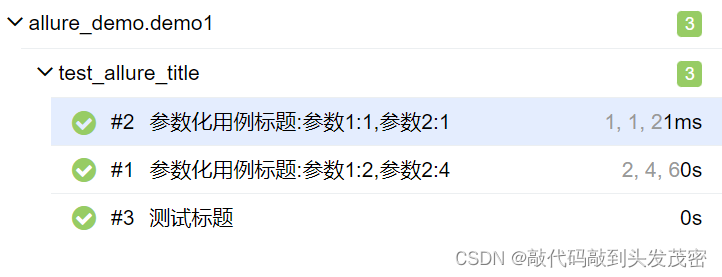
通过使用装饰器@allure.title可以为测试用例自定义一个可阅读性的标题。
allure.title的三种使用方式:
import allure

@allure.title('测试标题')
def test_with_title():
    assert True
@allure.title("参数化用例标题:参数1:{p1},参数2:{p2}")
@pytest.mark.parametrize('p1,p2,p3',[[1,1,2],[2,4,6]])
def test_with_title1(p1,p2,p3):
    assert p1+p2==p3
@allure.title('原始标题')
def test_with_title2():
    assert True
    allure.dynamic.title('更改后的标题')
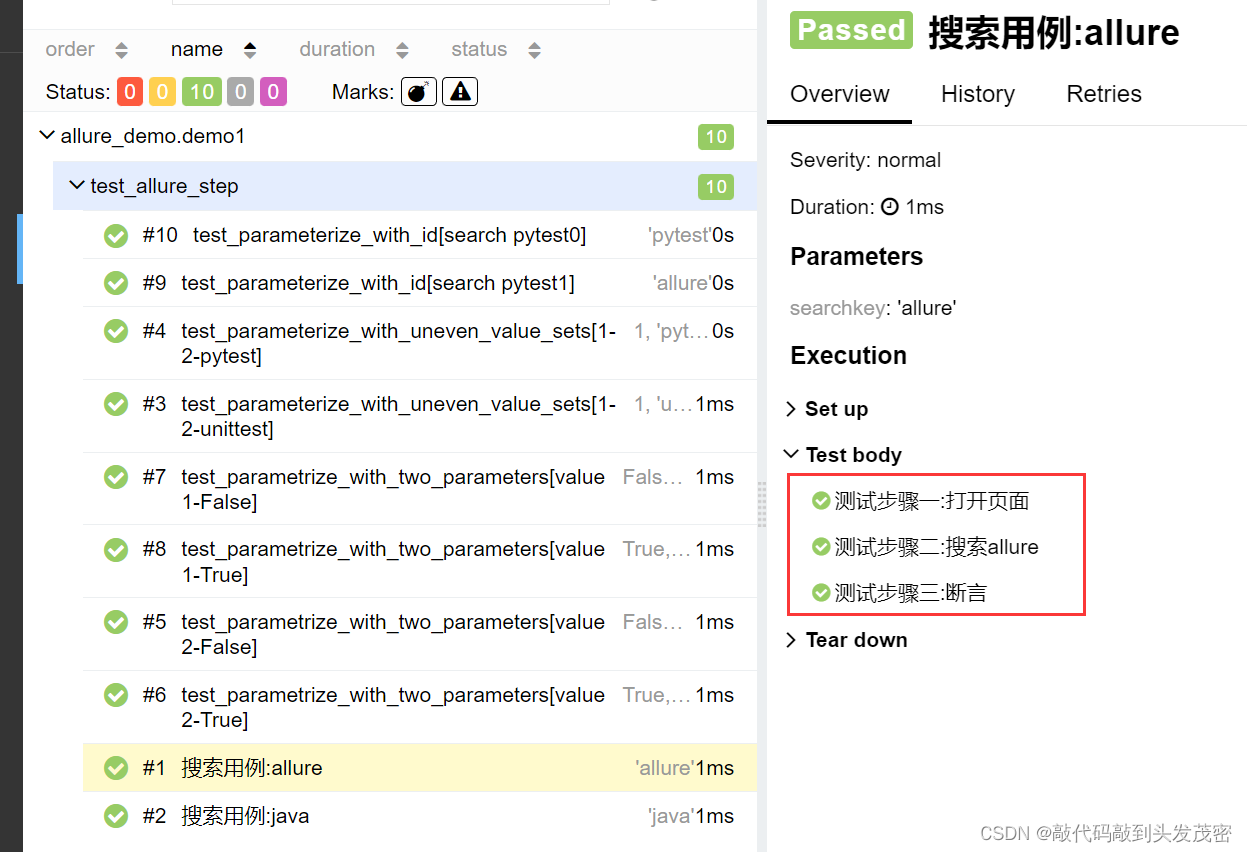
应用场景:编写自动化测试用例的时候经常会遇到需要编写流程性测试用例的场景,一般流程性的测试用例的测试步骤比较多,我们在测试用例中添加详细的步骤会提高测试用例的可阅读性。
import allure
import pytest


@allure.step
def simple_step1(step_param1,step_param2=None):
    """定义一个测试步骤"""
    print(f'步骤1:打开页面,参数1:{step_param1},参数2:{step_param2}')


@allure.step
def simple_step2(step_param):
    """定义一个测试步骤"""
    print(f'步骤1:完成搜索{step_param}功能')


@pytest.mark.parametrize('param1',['pytest','allure'],ids=['search pytest','search pytest'])
def test_parameterize_with_id(param1):
    simple_step2(param1)

@pytest.mark.parametrize('param1',[True, False])
@pytest.mark.parametrize('param2', ['value 1', 'value 2'])
def test_parametrize_with_two_parameters(param1, param2):
    simple_step1(param1,param2)

@pytest.mark.parametrize('param2',['pytest', 'unittest'])
@pytest.mark.parametrize('param1,param3', [[1,2]])
def test_parameterize_with_uneven_value_sets(param1, param2, param3):
    simple_step1(param1,param3)
    simple_step2(param2)
@allure.title("搜索用例:{searchkey}")
@pytest.mark.parametrize("searchkey",['java','allure'])
def test_step_in_method(searchkey):
    with allure.step("测试步骤一:打开页面"):
        print("操作a")
        print("操作b")
    with allure.step(f"测试步骤二:搜索{searchkey}"):
        print(f"搜索操作{searchkey}")
    with allure.step("测试步骤三:断言"):
        assert True
应用场景:将报告与bug管理系统或测试用例管理系统集成,可以添加链接装饰器
allure. link、@allure.issue和allure.testcase。
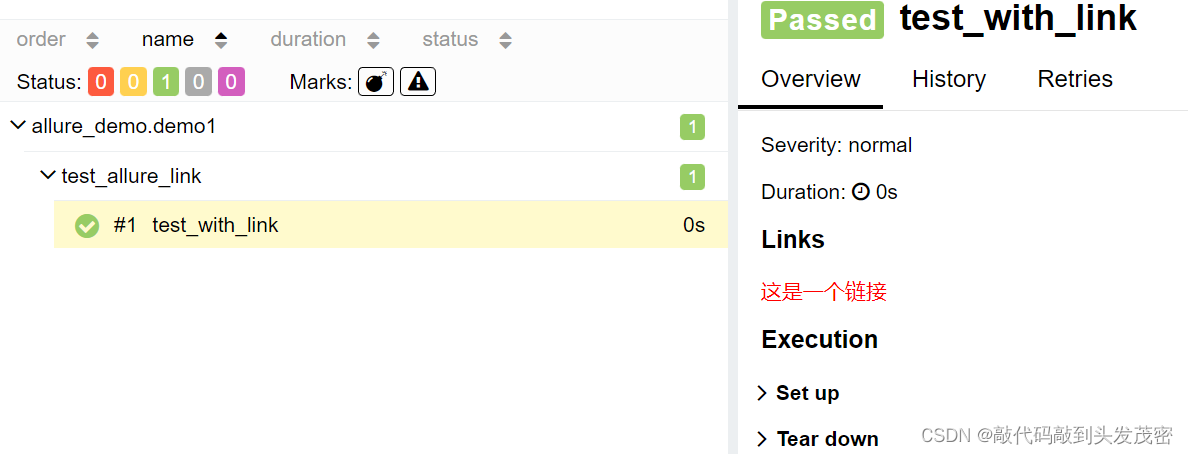
格式1: @allure.link (url, name)添加一个普通的link链接,name:起别名
import allure


@allure.link('http://www.baidu.com',name='这是一个链接')
def test_with_link():
    pass
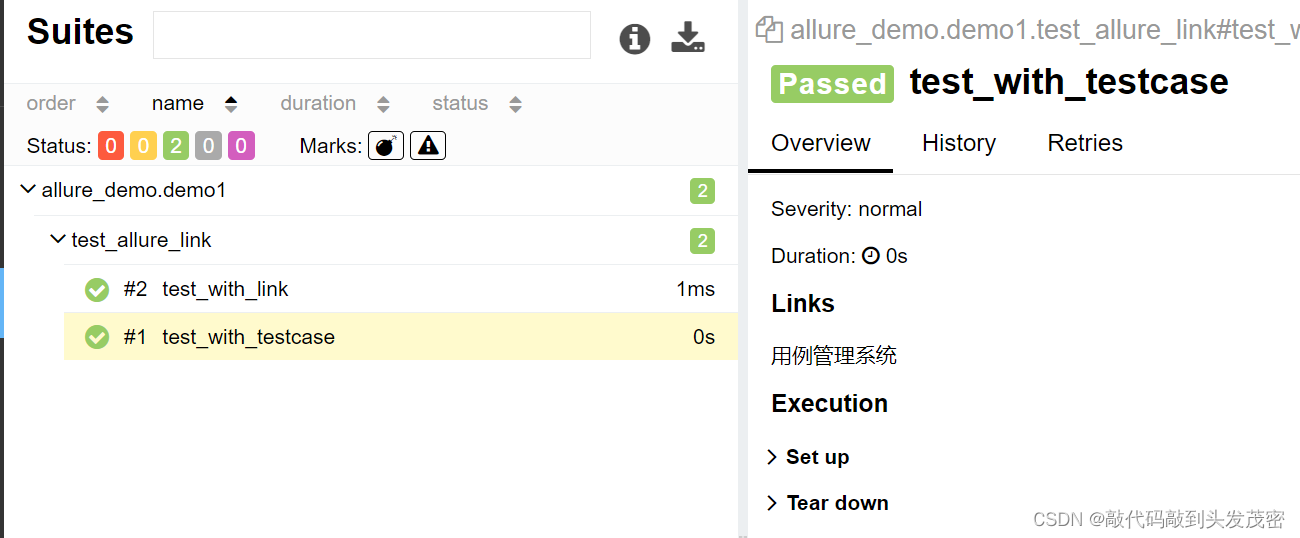
格式2: allure.testcase( url,name)添加一个用例管理系统链接。
TEST_CASE_LINK='http://www.baidu.com'

@allure.testcase(TEST_CASE_LINK,'用例管理系统')
def test_with_testcase():
    pass
格式3: @allure.issue(url,name),添加bug管理系统链接。
@allure.issue('66666','bug管理系统')
def test_with_issue():
    pass
应用场景:可以为项目,以及项目下的不同模块对用例进行分类管理。也可以运行某个类别下的用例。
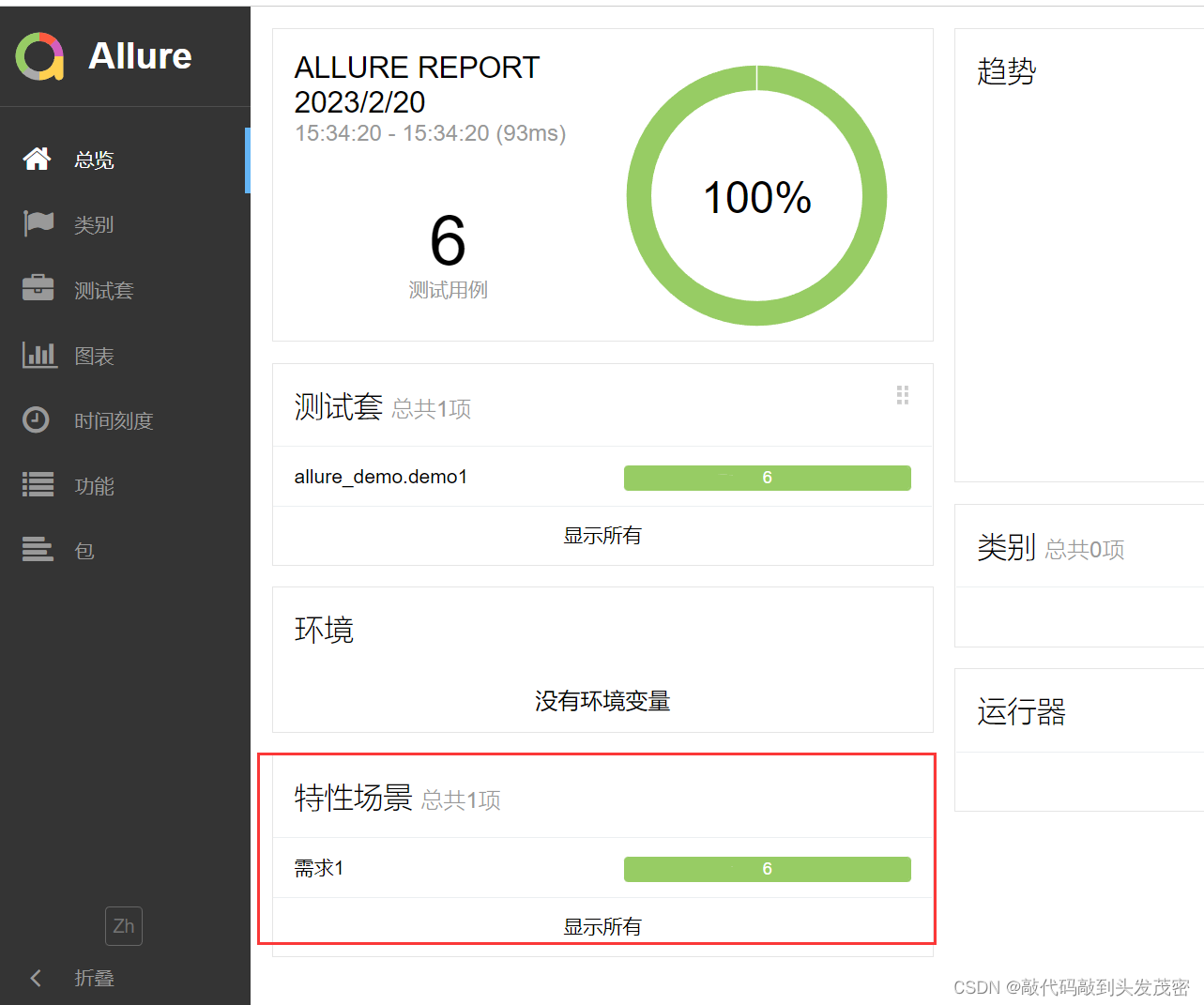
报告展示:类别会展示在测试报告的Behaviors栏目下。
Allure提供了三个装饰器:
@allure.epic:敏捷里面的概念,定义史诗,往下是feature。
import allure

@allure.epic('需求1')
class TestEpic:

    def test_case1(self):
        print('用例1')

    def test_case2(self):
        print('用例2')

    def test_case3(self):
        print('用例3')


@allure.epic('需求1')
class TestEpic1:

    def test_case1(self):
        print('用例1')

    def test_case2(self):
        print('用例2')

    def test_case3(self):
        print('用例3')
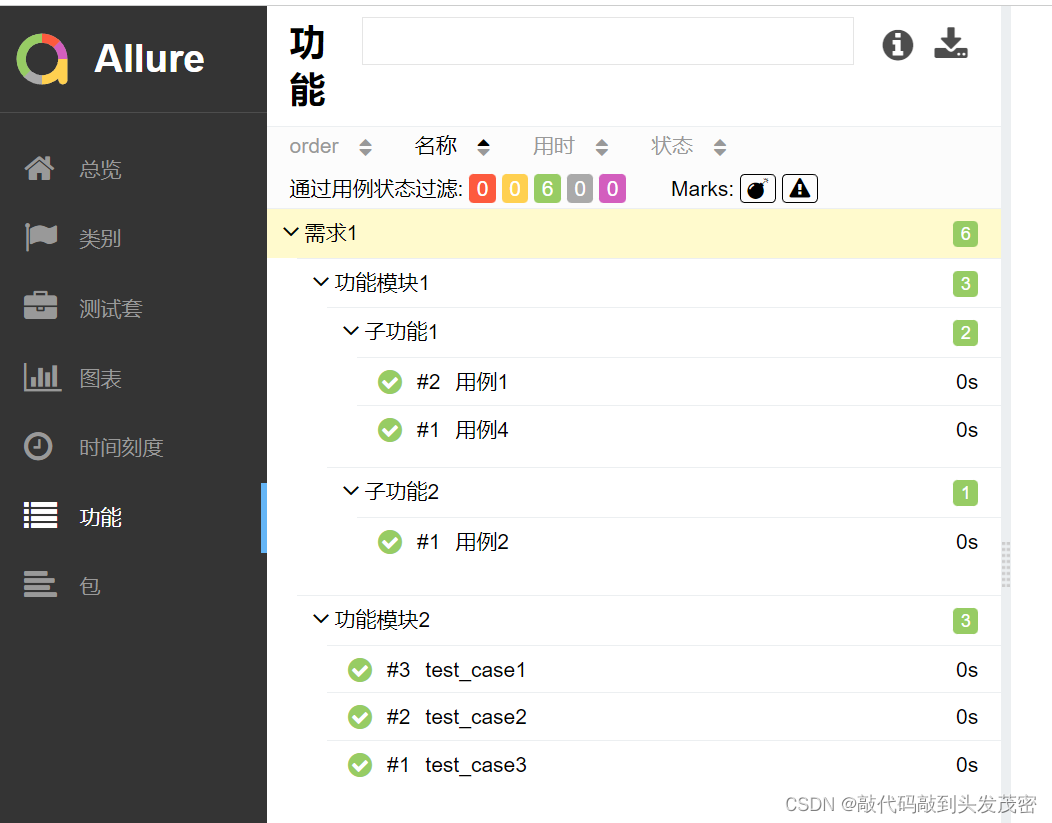
场景:希望在报告中看到测试功能,子功能或场景。
子功能上加@allure.story、@allure.feature
@allure.feature:功能点的描述,理解成模块往下是story。
@allure.story:故事story是 feature的子集。
import allure

@allure.epic('需求1')
@allure.feature('功能模块1')
class TestEpic:

    @allure.story('子功能1')
    @allure.title('用例1')
    def test_case1(self):
        print('用例1')

    @allure.story('子功能2')
    @allure.title('用例2')
    def test_case2(self):
        print('用例2')

    @allure.story('子功能2')
    @allure.title('用例3')
    def test_case3(self):
        print('用例3')

    @allure.story('子功能1')
    @allure.title('用例4')
    def test_case4(self):
        print('用例4')

    @allure.story('子功能3')
    @allure.title('用例5')
    def test_case5(self):
        print('用例5')


@allure.epic('需求1')
@allure.feature('功能模块2')
class TestEpic1:

    @allure.story('子功能4')
    def test_case1(self):
        print('用例1')

    @allure.story('子功能5')
    def test_case2(self):
        print('用例2')

    def test_case3(self):
        print('用例3')


@allure.epic('需求2')
@allure.feature('功能模块1')
class TestEpic2:

    def test_case1(self):
        print('用例1')

    def test_case2(self):
        print('用例2')

    def test_case3(self):
        print('用例3')
运行特定类别的用例
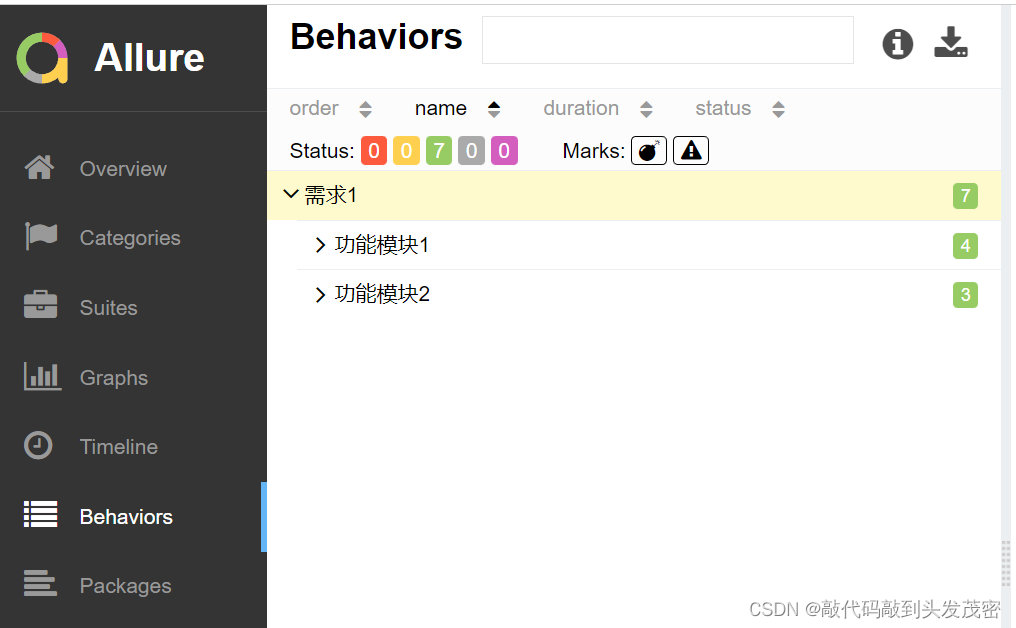
1、只运行epic名为”需求1“的测试用例
pytest demo1/test_allure_feature.py --alluredir=./reports --clean-all
uredir --allure-epics=需求1
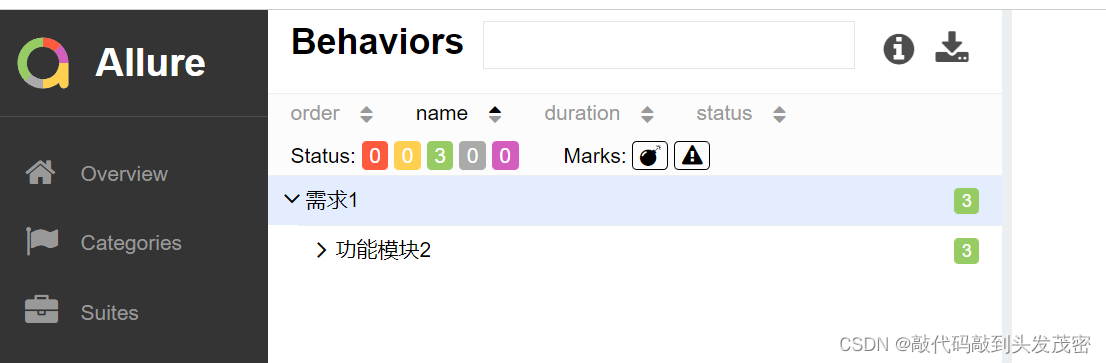
2、只运行feature名为”功能模块2“的测试用例
pytest demo1/test_allure_feature.py --alluredir=./reports --clean-all
uredir --allure-features=功能模块2
3、只运行story名为”子功能1“的测试用例
pytest demo1/test_allure_feature.py --alluredir=./reports --clean-all
uredir --allure-stories=子功能1
4、只运行story名为”子功能2“和”子功能2“的测试用例
pytest demo1/test_allure_feature.py --alluredir=./reports --clean-all
uredir --allure-stories=子功能2,子功能3 -vs
5、运行story名为”子功能2“和 feature名”功能模块1“的测试用例
pytest demo1/test_allure_feature.py --alluredir=./reports --clean-all
uredir --allure-stories=子功能2 --allure-features=功能模块1
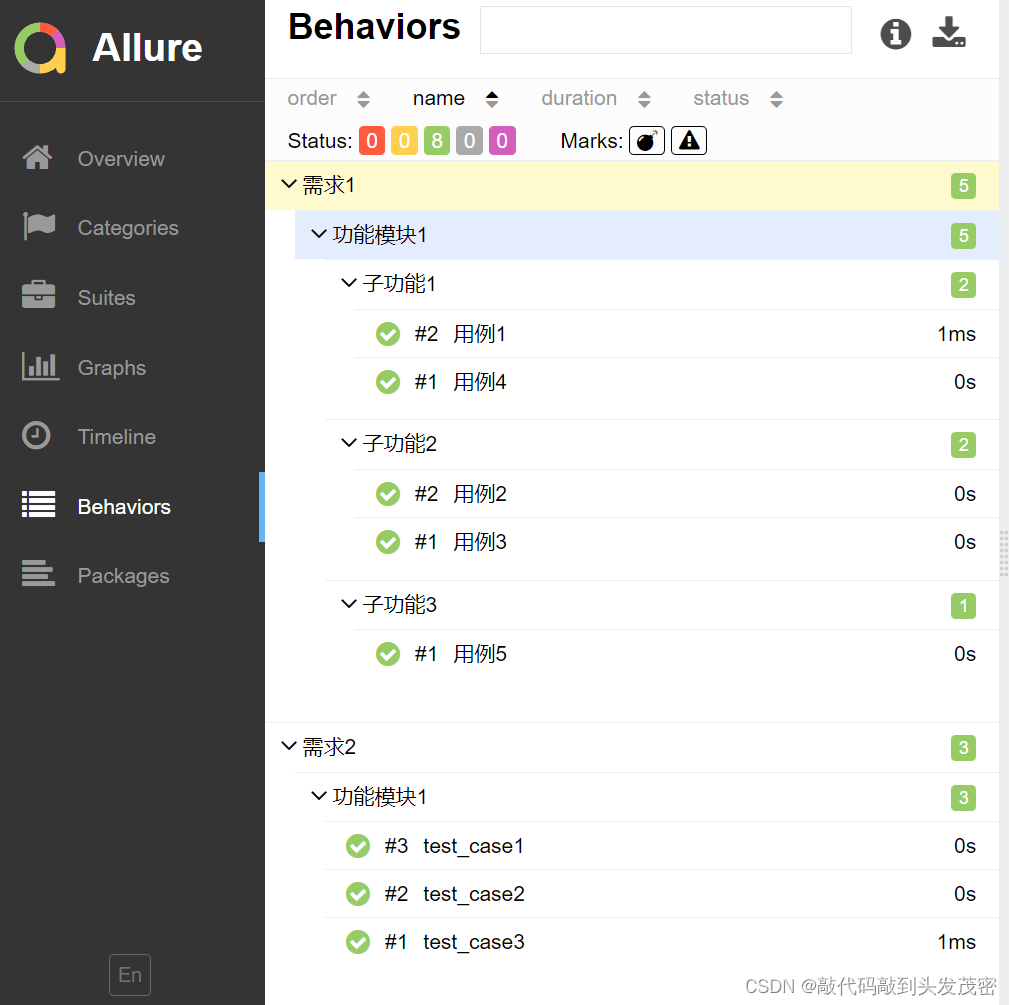
epic:相当于定义一个项目。
feature:相当于一个功能模块,相当于testsuite,可以管理很多个子分支story
story:相当于对应这个功能或者模块下的不同场景,分支功能。
epic 与feature、feature 与story类似于父子关系。
应用场景:Allure支持往测试报告中对测试用例添加非常详细的描述语,用来描述测试用例详情。
Allure添加描述的四种方式:
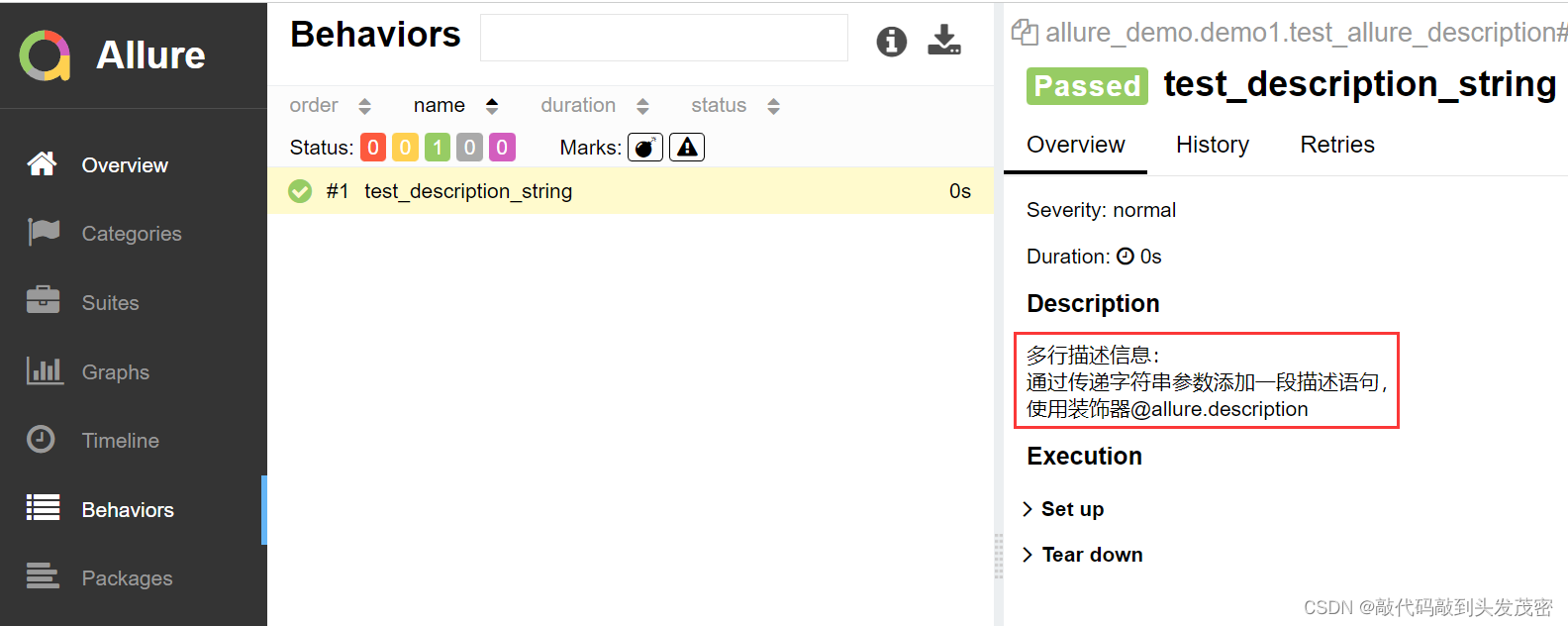
方式一:使用装饰器
@allure.description()传递一个字符串参数来描述测试用例。
import allure

@allure.description("""
多行描述信息:<br/>
通过传递字符串参数添加一段描述语句,</br>
使用装饰器@allure.description
""")
def test_description_string():
    assert True
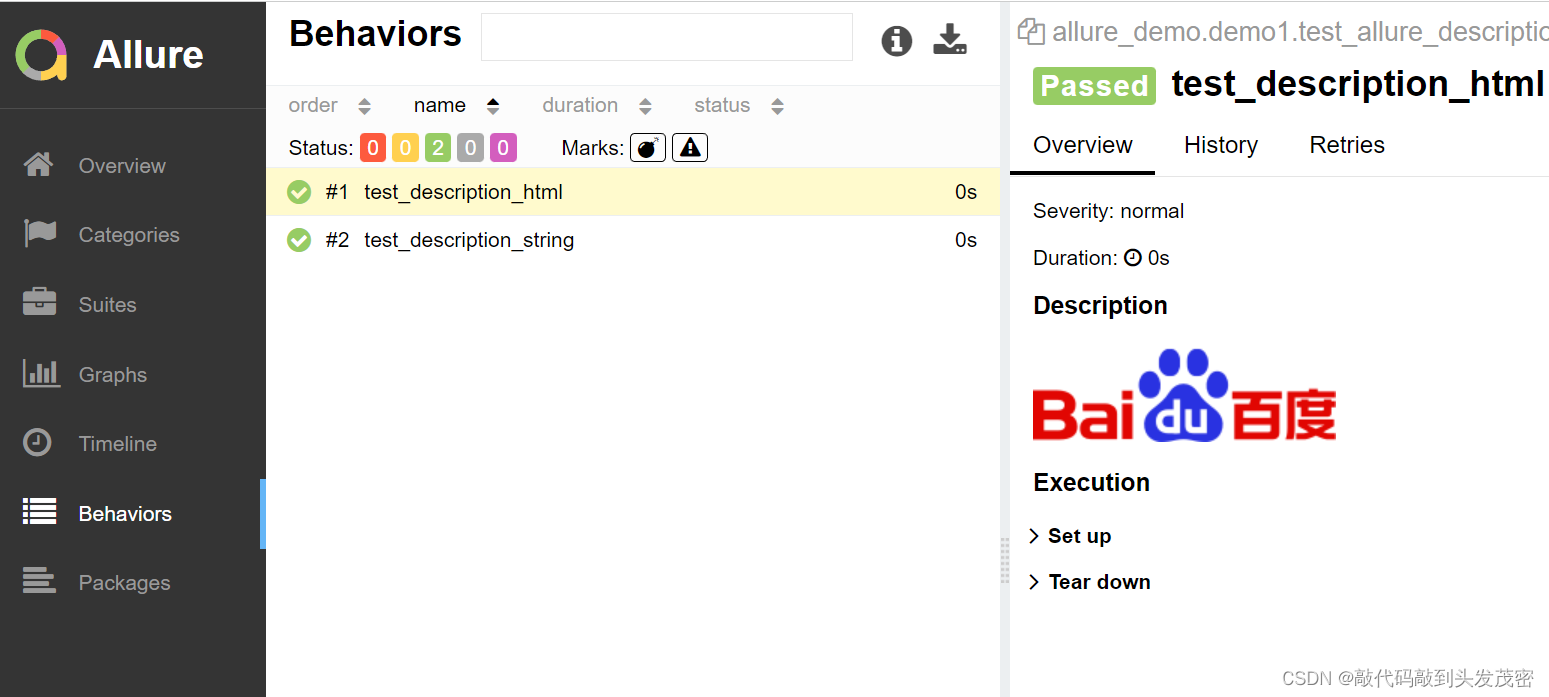
方式二:使用装饰器
@allure.description_ html传递一段HTML文本来描述测试用例。
@allure.description_html("""
<img class="index-logo-src" src="//www.baidu.com/img/flexible/logo/pc/result.png" alt="到百度首页" title="到百度首页">
""")
def test_description_html():
    assert True
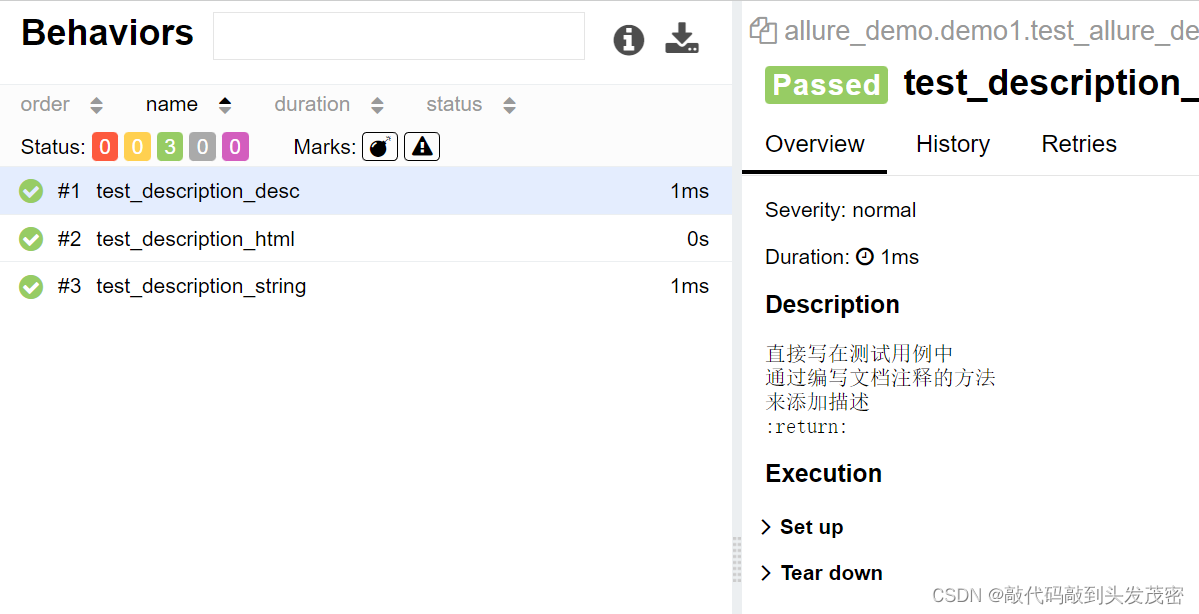
方式三:直接在测试用例方法中通过编写文档注释的方法来添加描述。会按照给定的格式展示,不需要添加<br/>
def test_description_desc():
    """
    直接写在测试用例中
    通过编写文档注释的方法
    来添加描述
    会按照给定的格式展示,不需要添加<br/>
    :return:
    """
    assert True
应用场景:用例执行时,希望按照严重级别执行测试用例。
解决:可以为每个用例添加一个等级的装饰器,用法: allure.severity。
Allure对严重级别的定义分为5个级别:
Blocker级别:中断缺陷(客户端程序无响应,无法执行下一步操作)。
Critical级别:临界缺陷(功能点缺失)。
Normal级别:普通缺陷(数值计算错误)。
Minor级别:次要缺陷(界面错误与UI需求不符)。
Trivial级别:轻微缺陷(必输项无提示,或者提示不规范)。
使用装饰器添加用例方法/类的级别。
类上添加的级别,对类中没有添加级别的方法生效。
未加级别标签的用例,在运行时,是不会被收集上来的
但是在类中没有加标签,会随着类上加的标签来收集的
import allure

未加级别标签的用例,在运行时,是不会被收集上来的
def test_with_no_serverity_label():
    pass

@allure.severity(allure.severity_level.TRIVIAL)
def test_with_trivial_serverity():
    pass

@allure.severity(allure.severity_level.NORMAL)
def test_with_trivial_serverity1():
    pass
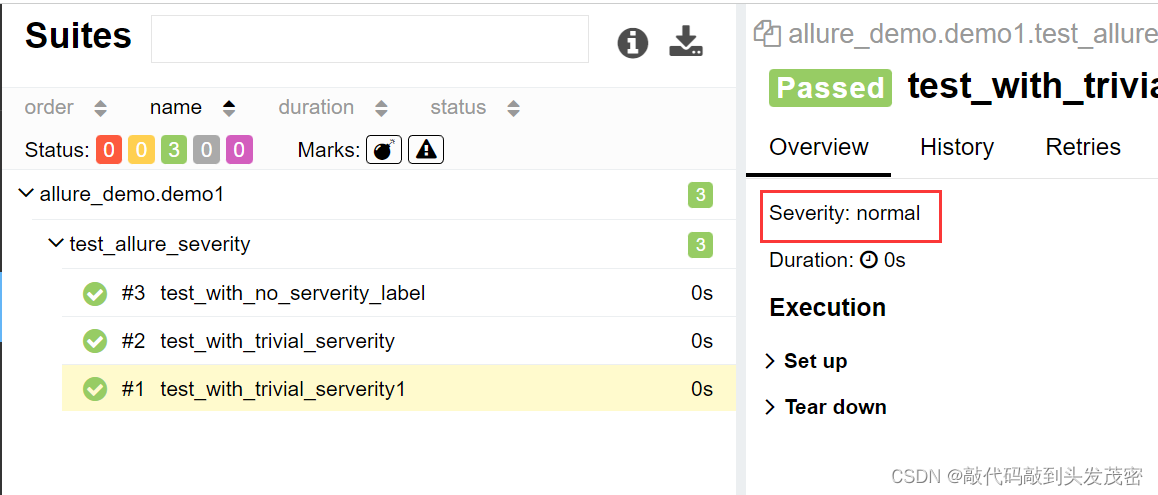
对某一级别的用例运行时添加命令行参数–allure-severities:
pytest test_allure_severity.py --alluredir=./reports --clean-al
luredir --allure-severities=trivial
Allure报告支持的一些常见Pytest特性包括xfail、
skipif、fixture等。测试结果会展示特定的标识在用例详情页面。
应用场景:fixture和finalizer是分别在测试开始之前和测试结束之后由Pytest调用的实用程序函数。Allure跟踪每个fixture的调用,并详细显示调用了哪些方法以及哪些参数,从而保持了调用的正确顺序。
import allure
import pytest

@pytest.fixture()
def func():
    print('前置操作')
    yield
    print('后置操作')

class TestDemo:

    def test_a(self,func):
        assert True

    def test_b(self):
        pass
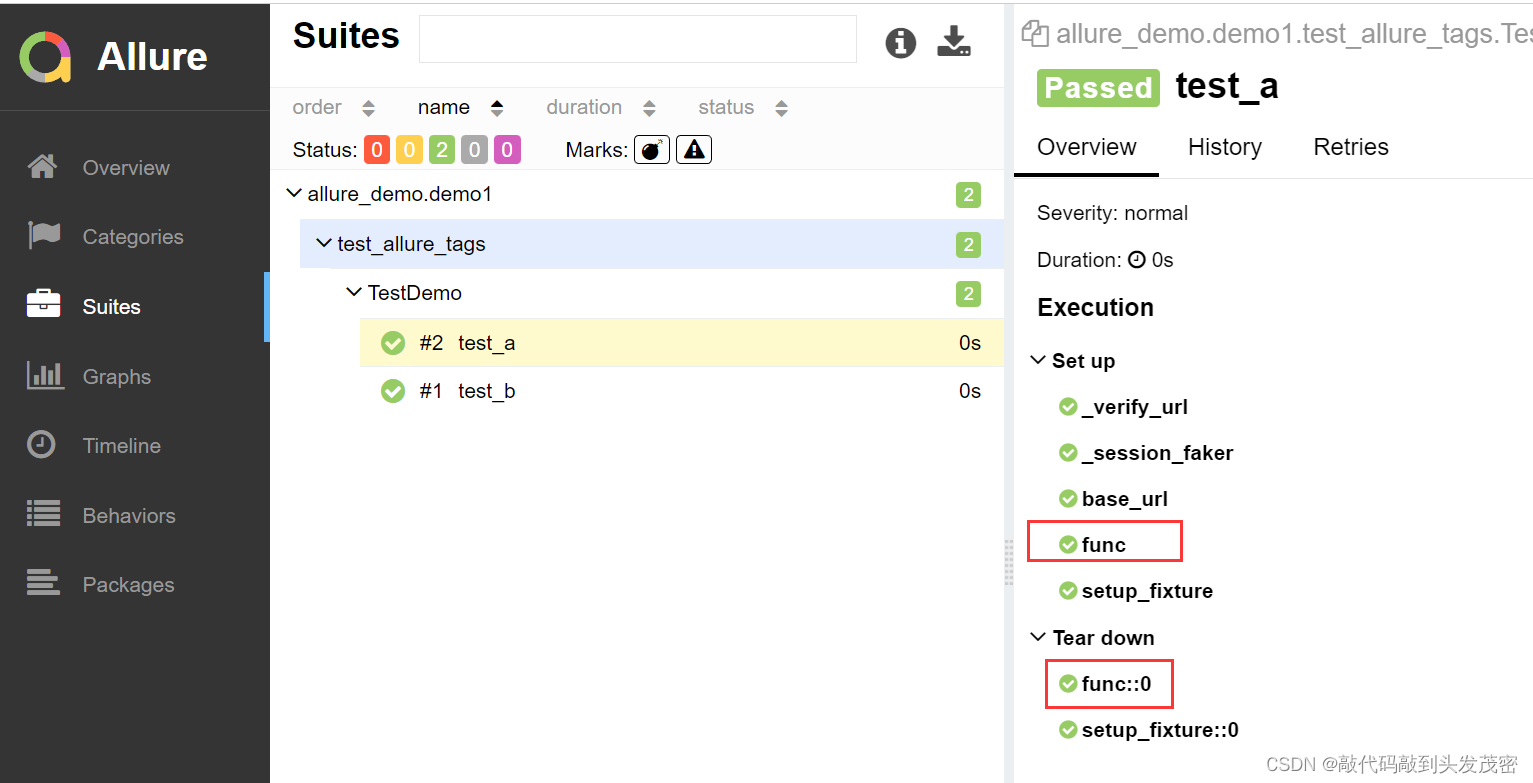
Allure可以收集用例运行期间,重试的用例的结果,以及这段时间重试的历史记录。
安装:
pip install pytest-rerunfailures
import pytest
import allure


@pytest.mark.flaky(reruns=2,reruns_delay=2)
class TestDemo:

    def test_a(self):
        assert True

    def test_b(self):
        assert False
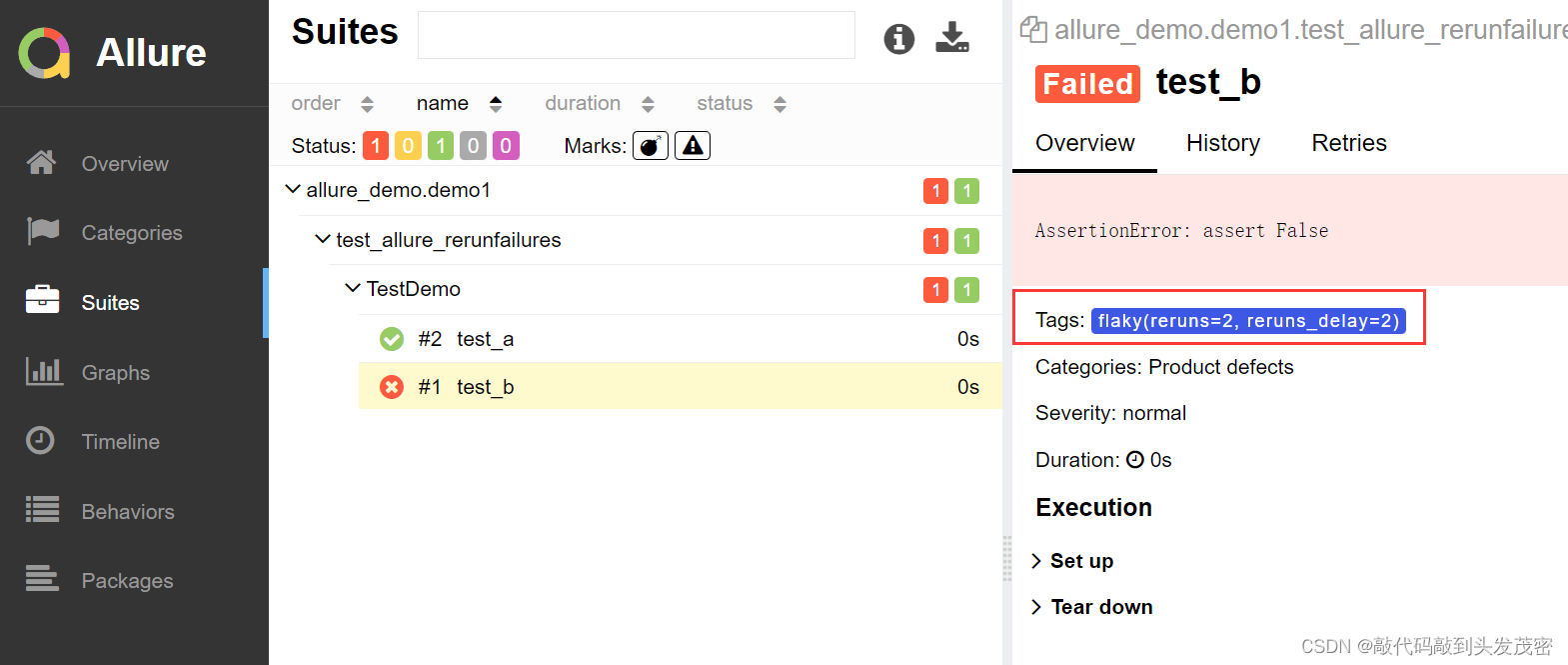
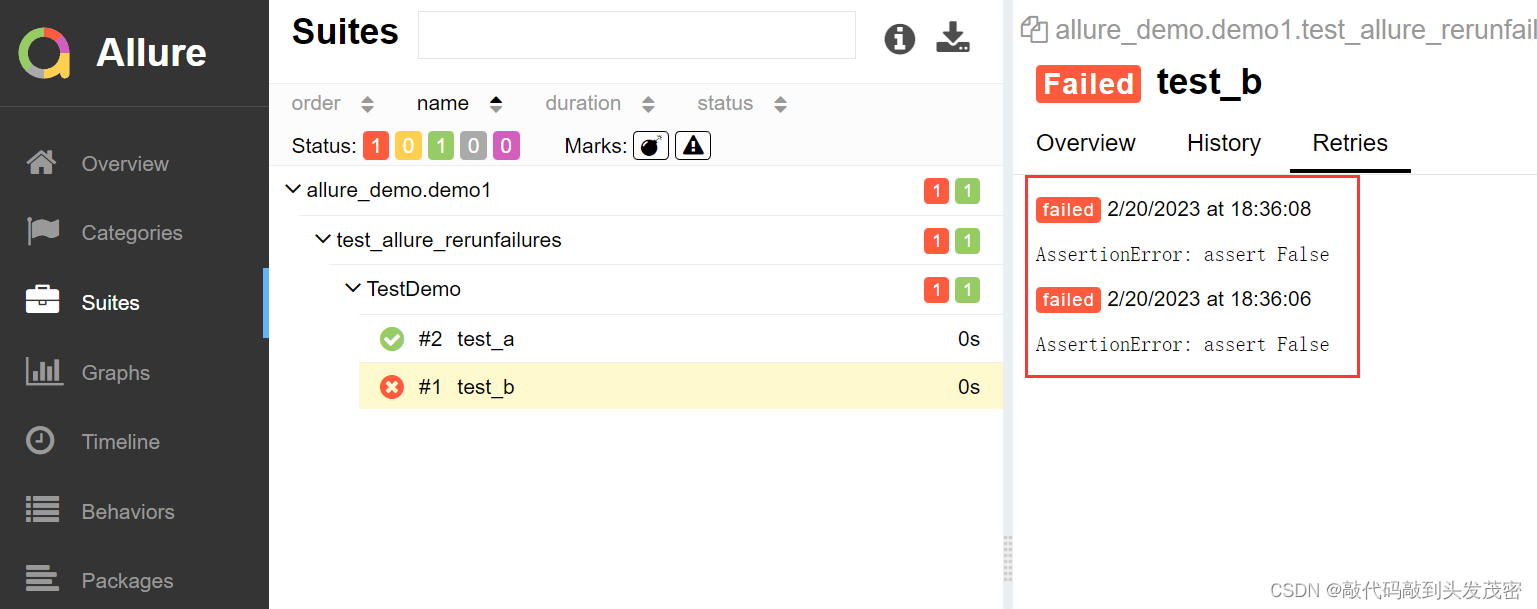
应用场景:在做UI自动化测试时,可以将页面截图,或者出错的页面进行截图,将截图添加到测试报告中展示,辅助定位问题。
解决方案:使用allure.attach或者allure.attach.file()添加图片。
语法:allure.attach.file( source,name, attachment_type,extension)
参数解释:
source:文件路径,相当于传一个文件。
name:附件名字。
attachment_type:附件类型,是
allure.attachment_type其中的一种(支持PNG、JPG、BMP、GIF等)。
extension:附件的扩展名。
案例1
import pytest
import allure


class TestWithAttach:

    def test_pic(self):


        allure.attach.file(source="./1.jpeg",
                           name='图片',
                           attachment_type=allure.attachment_type.PNG,
                           extension="jpeg")
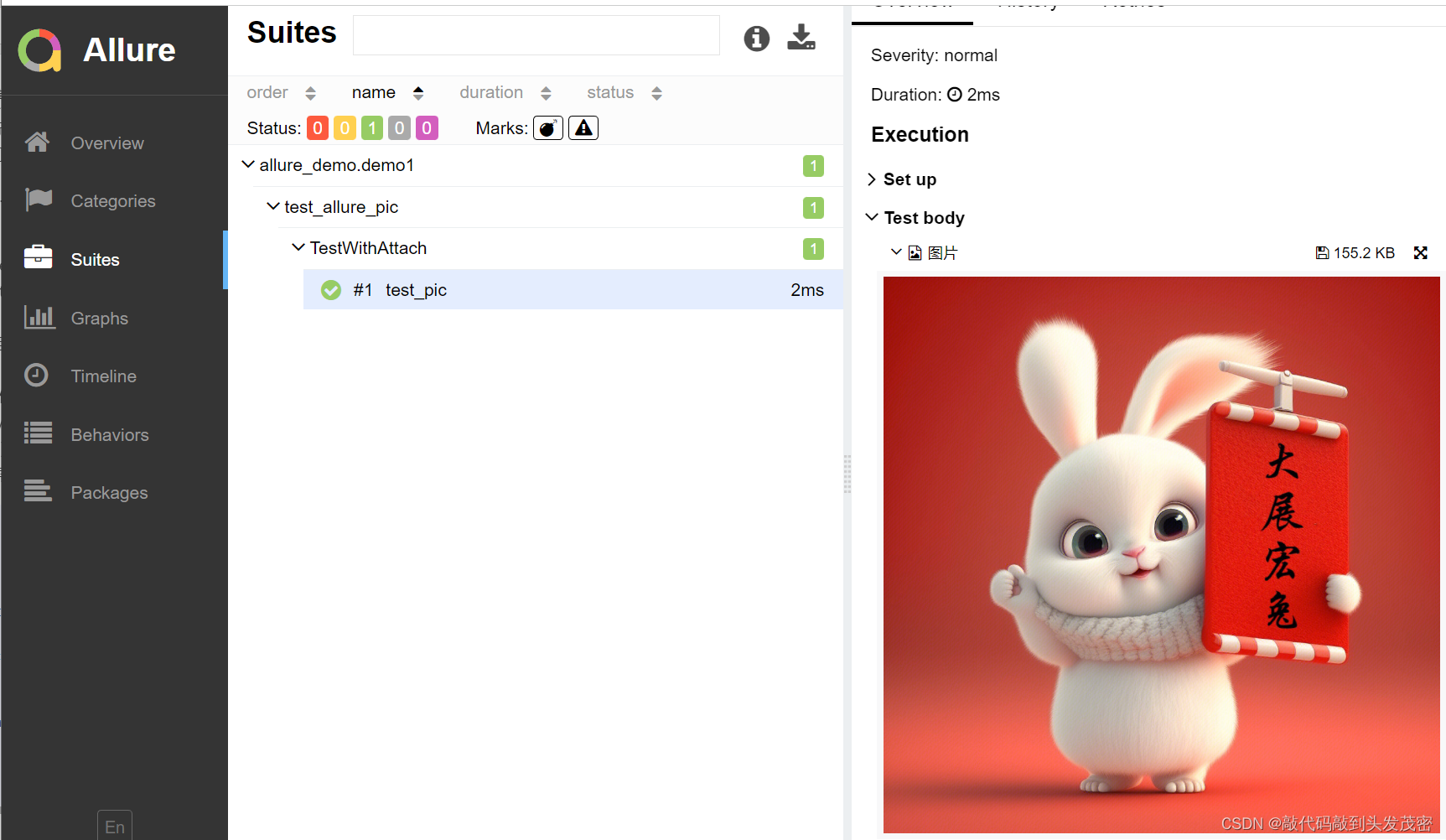
案例2
#!/usr/bin/env python
# -*- coding: utf-8 -*-
# @Time    : 2023/2/20 18:46
# @Author  : 杜兰特
# @File    : test_allure_pic.py

import pytest
import allure


class TestWithAttach:

    def test_pic(self):


        allure.attach.file(source="./1.jpeg",
                           name='图片',
                           attachment_type=allure.attachment_type.PNG,
                           extension="jpeg")


    def test_pic1(self):
        with open('./1.jpeg',mode='rb') as f:
            file=f.read()
            print(file)
            allure.attach(file,name='页面截图',attachment_type=allure.attachment_type.PNG)
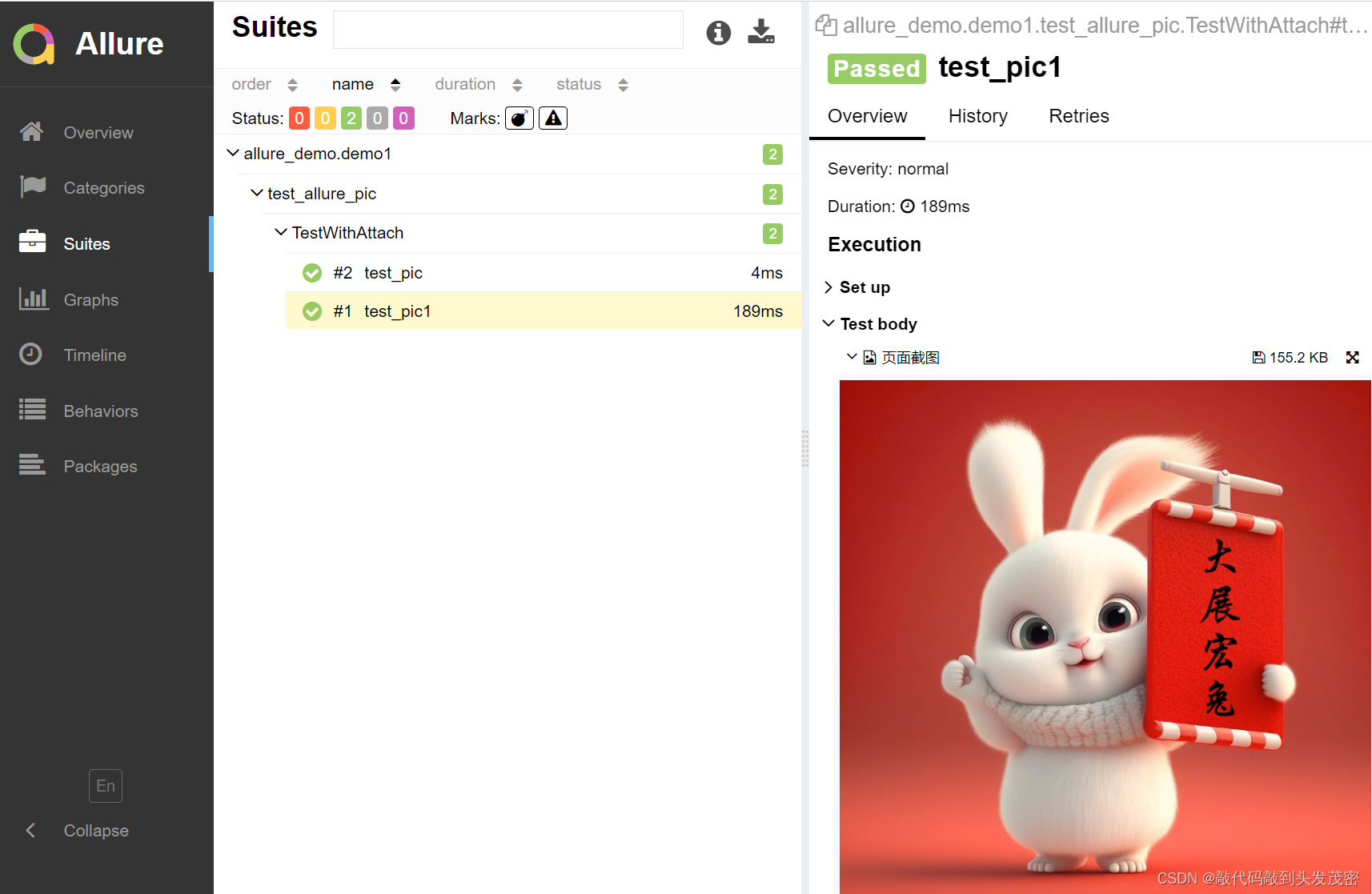
应用场景:报告中添加详细的日志信息,有助于分析定位问题。
解决方案:使用python自带的logging模块生成日志,日志会自动添加到测试报告中。
import allure

from utils.log_util import logger


@allure.epic("需求1")
@allure.feature("功能模块一")
class TestEpic:
    @allure.story("子功能一")
    @allure.title("用例1")
    def test_case1(self):
        logger.info("这是 TestEpic 第一条用例")
        print("用例1")

    @allure.story("子功能二")
    @allure.title("用例2")
    def test_case2(self):
        logger.debug("这是 TestEpic 第二条用例")
        print("用例2")

    @allure.story("子功能二")
    @allure.title("用例3")
    def test_case3(self):
        logger.warning("这是 TestEpic 第三条用例")
        print("用例3")

    @allure.story("子功能一")
    @allure.title("用例4")
    def test_case4(self):
        logger.error("这是 TestEpic 第四条用例")
        print("用例4")

    @allure.story("子功能三")
    @allure.title("用例5")
    def test_case5(self):
        print("用例5")

@allure.epic("需求1")
@allure.feature("功能模块二")
class TestEpic1:
    @allure.story("子功能四")
    def test_case1(self):
        print("用例1")

    @allure.story("子功能五")
    def test_case2(self):
        print("用例2")

    def test_case3(self):
        print("用例3")


@allure.epic("需求2")
class TestEpic2:
    def test_case1(self):
        print("用例1")

    def test_case2(self):
        print("用例2")

    def test_case3(self):
        print("用例3")
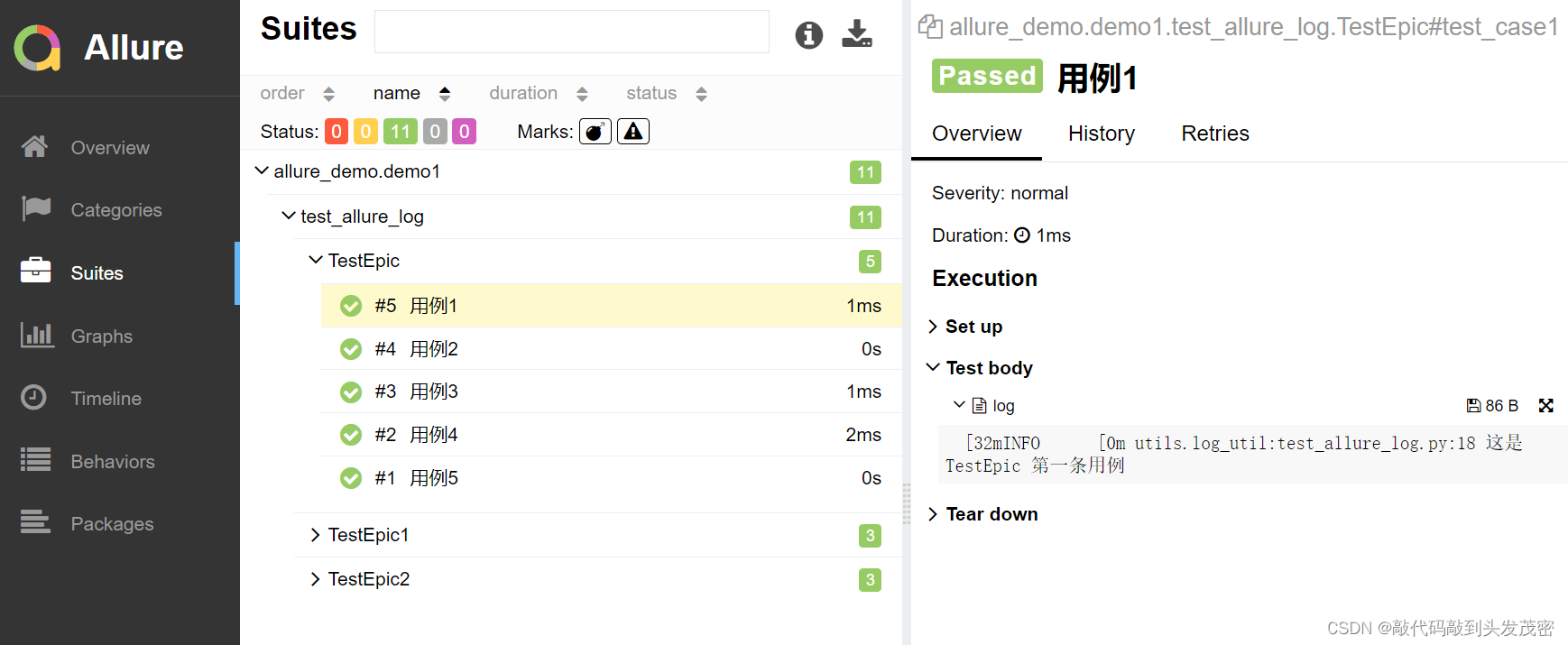
应用场景:可以定制测试报告页面效果,可以将HTML类型的附件显示在报告页面上。
解决方案:使用allure.attach()添加html代码。
语法:
allure.attach (body ,name,attachment_type,extension),参数解释:
body:要写入附件的内容(HTML代码块)。
name:附件名字。
attachment_type:附件类型,是allure.attachment_type其中的一种。
extension:附件的扩展名。
import allure
from utils.log_util import logger

class TestAllureHTML:

    def test_html(self):
        logger.info('测试日志')
        allure.attach(body="""
        <img class="index-logo-src" src="//www.baidu.com/img/flexible/logo/pc/result.png" alt="到百度首页" title="到百度首页">
        """,
                      name='添加html',
                      attachment_type=allure.attachment_type.HTML,
                      extension='html')
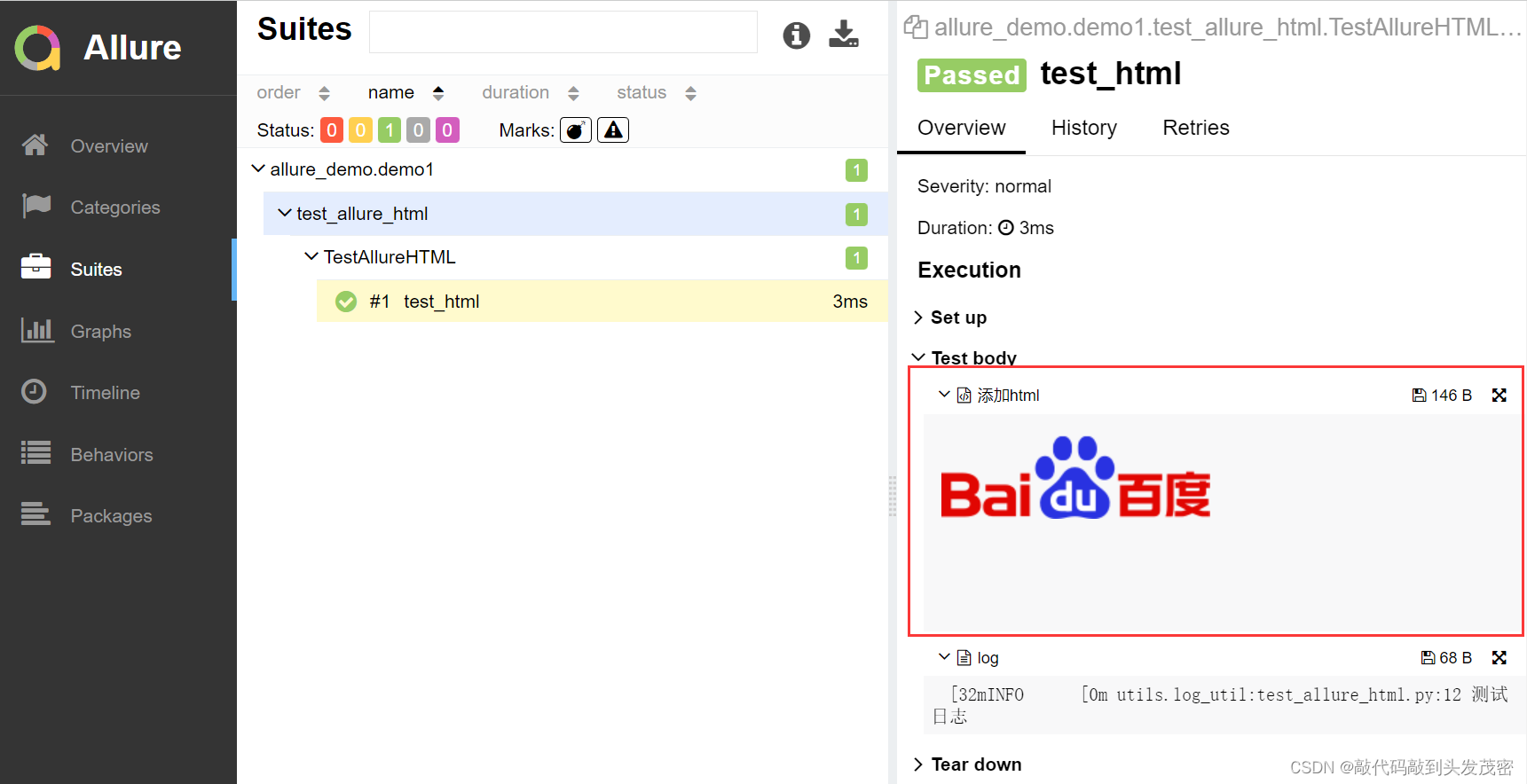
应用场景:在做UI自动化测试时,可以将页面截图,或者出错的页面进行截图,将截图添加到测试报告中展示,辅助定位问题。
解决方案:使用allure.attach. file()添加视频。
语法:
allure.attach (body ,name,attachment_type,extension),参数解释:
body:要写入附件的内容(HTML代码块)。
name:附件名字。
attachment_type:附件类型,是allure.attachment_type其中的一种。
extension:附件的扩展名。
import allure

class TestWithAttach:

    def test_video(self):
        allure.attach.file("xxx.mp4",
                           name='视频资源',
                           attachment_type=allure.attachment_type.MP4,
                           extension='mp4')
应用场景:针对不同的项目可能需要对测试报告展示的效果进行定制,比如修改页面的logo、修改项目的标题或者添加一些定制的功能等等。
1.修改allure.yml文件,添加logo插件custom-logo-plugin(在allure安装路径下,可以通过where allure或者which allure查看allure安装路径))。
2.编辑styles.css文件,配置logo图片。
很好奇,就使用rubyonrails自动化单元测试而言,你们正在做什么?您是否创建了一个脚本来在cron中运行rake作业并将结果邮寄给您?git中的预提交Hook?只是手动调用?我完全理解测试,但想知道在错误发生之前捕获错误的最佳实践是什么。让我们理所当然地认为测试本身是完美无缺的,并且可以正常工作。下一步是什么以确保他们在正确的时间将可能有害的结果传达给您? 最佳答案 不确定您到底想听什么,但是有几个级别的自动代码库控制:在处理某项功能时,您可以使用类似autotest的内容获得关于哪些有效,哪些无效的即时反馈。要确保您的提
我正在编写一个包含C扩展的gem。通常当我写一个gem时,我会遵循TDD的过程,我会写一个失败的规范,然后处理代码直到它通过,等等......在“ext/mygem/mygem.c”中我的C扩展和在gemspec的“扩展”中配置的有效extconf.rb,如何运行我的规范并仍然加载我的C扩展?当我更改C代码时,我需要采取哪些步骤来重新编译代码?这可能是个愚蠢的问题,但是从我的gem的开发源代码树中输入“bundleinstall”不会构建任何native扩展。当我手动运行rubyext/mygem/extconf.rb时,我确实得到了一个Makefile(在整个项目的根目录中),然后当
我有一个围绕一些对象的包装类,我想将这些对象用作散列中的键。包装对象和解包装对象应映射到相同的键。一个简单的例子是这样的:classAattr_reader:xdefinitialize(inner)@inner=innerenddefx;@inner.x;enddef==(other)@inner.x==other.xendenda=A.new(o)#oisjustanyobjectthatallowso.xb=A.new(o)h={a=>5}ph[a]#5ph[b]#nil,shouldbe5ph[o]#nil,shouldbe5我试过==、===、eq?并散列所有无济于事。
我有一些Ruby代码,如下所示:Something.createdo|x|x.foo=barend我想编写一个测试,它使用double代替block参数x,这样我就可以调用:x_double.should_receive(:foo).with("whatever").这可能吗? 最佳答案 specify'something'dox=doublex.should_receive(:foo=).with("whatever")Something.should_receive(:create).and_yield(x)#callthere
Sinatra新手;我正在运行一些rspec测试,但在日志中收到了一堆不需要的噪音。如何消除日志中过多的噪音?我仔细检查了环境是否设置为:test,这意味着记录器级别应设置为WARN而不是DEBUG。spec_helper:require"./app"require"sinatra"require"rspec"require"rack/test"require"database_cleaner"require"factory_girl"set:environment,:testFactoryGirl.definition_file_paths=%w{./factories./test/
我遵循MichaelHartl的“RubyonRails教程:学习Web开发”,并创建了检查用户名和电子邮件长度有效性的测试(名称最多50个字符,电子邮件最多255个字符)。test/helpers/application_helper_test.rb的内容是:require'test_helper'classApplicationHelperTest在运行bundleexecraketest时,所有测试都通过了,但我看到以下消息在最后被标记为错误:ERROR["test_full_title_helper",ApplicationHelperTest,1.820016791]test
我已经构建了一些serverspec代码来在多个主机上运行一组测试。问题是当任何测试失败时,测试会在当前主机停止。即使测试失败,我也希望它继续在所有主机上运行。Rakefile:namespace:specdotask:all=>hosts.map{|h|'spec:'+h.split('.')[0]}hosts.eachdo|host|begindesc"Runserverspecto#{host}"RSpec::Core::RakeTask.new(host)do|t|ENV['TARGET_HOST']=hostt.pattern="spec/cfengine3/*_spec.r
我在app/helpers/sessions_helper.rb中有一个帮助程序文件,其中包含一个方法my_preference,它返回当前登录用户的首选项。我想在集成测试中访问该方法。例如,这样我就可以在测试中使用getuser_path(my_preference)。在其他帖子中,我读到这可以通过在测试文件中包含requiresessions_helper来实现,但我仍然收到错误NameError:undefinedlocalvariableormethod'my_preference'.我做错了什么?require'test_helper'require'sessions_hel
只是想确保我理解了事情。据我目前收集到的信息,Cucumber只是一个“包装器”,或者是一种通过将事物分类为功能和步骤来组织测试的好方法,其中实际的单元测试处于步骤阶段。它允许您根据事物的工作方式组织您的测试。对吗? 最佳答案 有点。它是一种组织测试的方式,但不仅如此。它的行为就像最初的Rails集成测试一样,但更易于使用。这里最大的好处是您的session在整个Scenario中保持透明。关于Cucumber的另一件事是您(应该)从使用您的代码的浏览器或客户端的角度进行测试。如果您愿意,您可以使用步骤来构建对象和设置状态,但通常您
我有:When/^(?:|I)follow"([^"]*)"(?:within"([^"]*)")?$/do|link,selector|with_scope(selector)doclick_link(link)endend我打电话的地方:Background:GivenIamanexistingadminuserWhenIfollow"CLIENTS"我的HTML是这样的:CLIENTS我一直收到这个错误:.F-.F--U-----U(::)failedsteps(::)nolinkwithtitle,idortext'CLIENTS'found(Capybara::Element
