
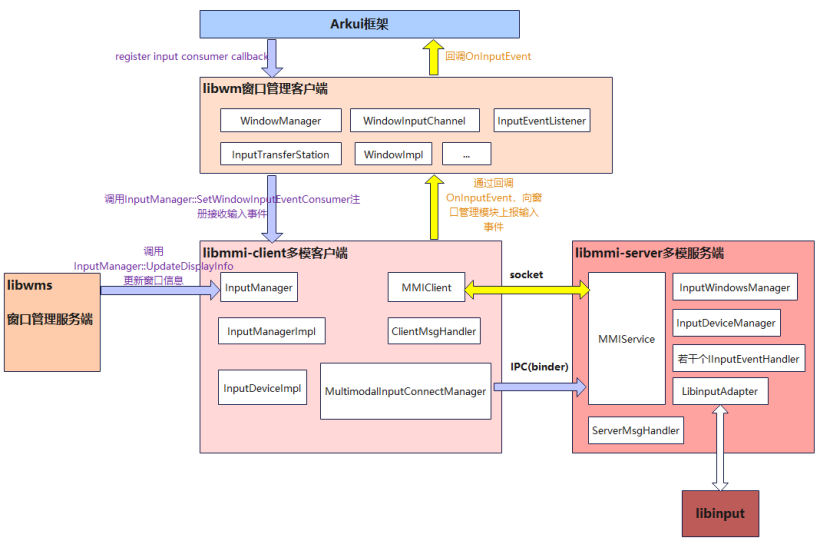
多模输入子系统是 OpenHarmony 输入事件管理框架。多模输入服务接收多种类型输入设备(触摸屏、鼠标、键盘、触摸板等)的输入事件,通过归一/标准化处理后,分发给多模客户端(应用,系统服务)。多模输入还提供事件注入接口,该接口目前仅对系统应用开放。
多模输入子系统分为框架部分和服务部分:框架部分封装了各种接口给其他子系统和应用来调用;服务部分实现了这些接口,并且实现了事件派发处理的核心逻辑。这两个部分运行在不同进程中,根据具体接口,通过socket或者binder ipc机制进行通信。
/foundation/multimodalinput/input
├── frameworks                   # napi接口代码,客户端实现代码
├── interfaces                   # 对外接口存放目录
│   └── native                   # 对外native层接口存放目录
│       └── innerkits            # 对系统内部子系统提供native层接口存放目录
├── service                      # 服务端代码
├── sa_profile                   # 服务启动配置文件
├── tools                        # 输入事件注入工具
├── uinput                       # 输入事件注入模块
├── util                         # socket相关工具类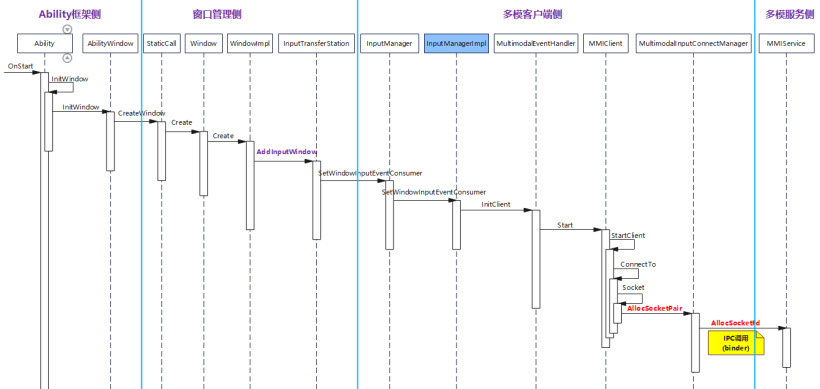
说明:
AceAbility::OnStart()方法中先调用基类Ability::OnStart()方法走完上述时序图的流程,然后调用如下代码段,创建AceWindowListener,并调用WindowImpl::SetInputEventConsumer()注册输入事件回调。
OHOS::sptr<OHOS::Rosen::Window> window = Ability::GetWindow();
    std::shared_ptr<AceAbility> self = std::static_pointer_cast<AceAbility>(shared_from_this());
    OHOS::sptr<AceWindowListener> aceWindowListener = new AceWindowListener(self);
    // register surface change callback and window mode change callback
    window->RegisterWindowChangeListener(aceWindowListener);
    // register drag event callback
    window->RegisterDragListener(aceWindowListener);
    // register Occupied Area callback
    window->RegisterOccupiedAreaChangeListener(aceWindowListener);
    // register ace ability handler callback
    window->SetAceAbilityHandler(aceWindowListener);
    // register input consumer callback
    std::shared_ptr<AceWindowListener> aceInputConsumer = std::make_shared<AceWindowListener>(self);
    window->SetInputEventConsumer(aceInputConsumer);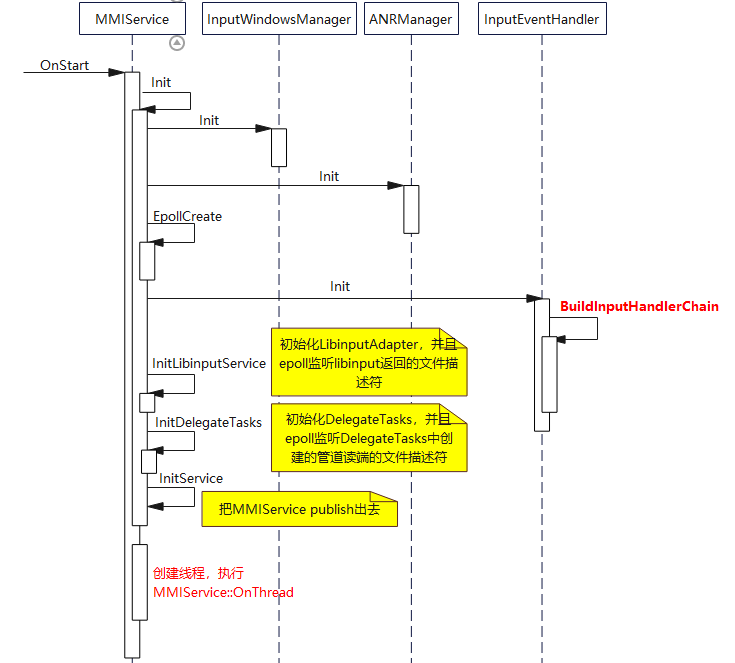
说明:
void MMIService::OnThread()
{
    SetThreadName(std::string("mmi_service"));
    uint64_t tid = GetThisThreadId();
    delegateTasks_.SetWorkerThreadId(tid);
    MMI_HILOGI("Main worker thread start. tid:%{public}" PRId64 "", tid);
#ifdef OHOS_RSS_CLIENT
    tid_.store(tid);
#endif
    libinputAdapter_.RetriggerHotplugEvents();
    libinputAdapter_.ProcessPendingEvents();
    while (state_ == ServiceRunningState::STATE_RUNNING) {
        epoll_event ev[MAX_EVENT_SIZE] = {};
        int32_t timeout = TimerMgr->CalcNextDelay();
        MMI_HILOGD("timeout:%{public}d", timeout);
        int32_t count = EpollWait(ev[0], MAX_EVENT_SIZE, timeout, mmiFd_);
        for (int32_t i = 0; i < count && state_ == ServiceRunningState::STATE_RUNNING; i++) {
            auto mmiEd = reinterpret_cast<mmi_epoll_event*>(ev[i].data.ptr);
            CHKPC(mmiEd);
            if (mmiEd->event_type == EPOLL_EVENT_INPUT) {
                libinputAdapter_.EventDispatch(ev[i]);//处理input事件
            } else if (mmiEd->event_type == EPOLL_EVENT_SOCKET) {
                OnEpollEvent(ev[i]);
            } else if (mmiEd->event_type == EPOLL_EVENT_SIGNAL) {
                OnSignalEvent(mmiEd->fd);
            } else if (mmiEd->event_type == EPOLL_EVENT_ETASK) {
                OnDelegateTask(ev[i]);
            } else {
                MMI_HILOGW("Unknown epoll event type:%{public}d", mmiEd->event_type);
            }
        }
        TimerMgr->ProcessTimers();
        if (state_ != ServiceRunningState::STATE_RUNNING) {
            break;
        }
    }
    MMI_HILOGI("Main worker thread stop. tid:%{public}" PRId64 "", tid);
}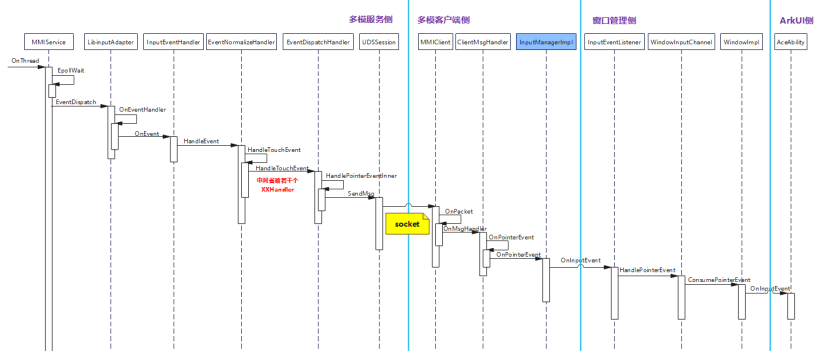
说明:
MMIService收到libinput上报的input事件后,会调用InputEventHandler::OnEvent来处理输入事件。最终EventDispatchHandler通过socket把事件派发给目标应用进程。
多模服务端InputWindowsManager类中有如下成员变量。
DisplayGroupInfo displayGroupInfo_;
    std::map<int32_t, WindowInfo> touchItemDownInfos_;
DisplayGroupInfo中包含了当前获焦的窗口id,以z轴排序的窗口信息列表,物理屏幕信息列表等。displayGroupInfo_信息由窗口管理服务调用。
MMI::InputManager::GetInstance()->UpdateDisplayInfo(displayGroupInfo_)接口设置。
struct DisplayGroupInfo {
    int32_t width; //Width of the logical display
    int32_t height; //Height of the logical display
    int32_t focusWindowId; //ID of the focus window
    //List of window information of the logical display arranged in Z order, with the top window at the top
    std::vector<WindowInfo> windowsInfo;
    std::vector<DisplayInfo> displaysInfo; //Physical screen information list
};
以键盘按键事件为例。
收到libinput上报的输入事件之后,最终走到EventDispatchHandler::DispatchKeyEventPid(UDSServer& udsServer, std::shared_ptr<KeyEvent> key)函数。
简化的调用流程如下:
EventDispatchHandler::DispatchKeyEventPid() =>
InputWindowsManager::UpdateTarget() =>
InputWindowsManager::GetPidAndUpdateTarget()
int32_t InputWindowsManager::GetPidAndUpdateTarget(std::shared_ptr<InputEvent> inputEvent)
{
CALL_DEBUG_ENTER;
CHKPR(inputEvent, INVALID_PID);
const int32_t focusWindowId = displayGroupInfo_.focusWindowId;
WindowInfo* windowInfo = nullptr;
for (auto &item : displayGroupInfo_.windowsInfo) {
if (item.id == focusWindowId) {
windowInfo = &item;
break;
}
}
CHKPR(windowInfo, INVALID_PID);
inputEvent->SetTargetWindowId(windowInfo->id);
inputEvent->SetAgentWindowId(windowInfo->agentWindowId);
MMI_HILOGD("focusWindowId:%{public}d, pid:%{public}d", focusWindowId, windowInfo->pid);
return windowInfo->pid;
}InputWindowsManager::GetPidAndUpdateTarget()函数中把当前获焦windowId信息设置到InputEvent中,并且返回目标窗口所在进程pid,有了目标进程pid,就可以获取到目标进程对应的socket会话的服务端fd,把事件派发给目标进程。
touch事件目标窗口信息的获取和按键事件不同,感兴趣的可以自己查看代码。
本篇文章基于社区weekly_20230207的代码,对多模输入客户端注册监听流程和多模服务端事件派发流程作了简单介绍。相信大家通过本文,对多模输入子系统能有一个大致了解。
我有一个字符串input="maybe(thisis|thatwas)some((nice|ugly)(day|night)|(strange(weather|time)))"Ruby中解析该字符串的最佳方法是什么?我的意思是脚本应该能够像这样构建句子:maybethisissomeuglynightmaybethatwassomenicenightmaybethiswassomestrangetime等等,你明白了......我应该一个字符一个字符地读取字符串并构建一个带有堆栈的状态机来存储括号值以供以后计算,还是有更好的方法?也许为此目的准备了一个开箱即用的库?
我主要使用Ruby来执行此操作,但到目前为止我的攻击计划如下:使用gemsrdf、rdf-rdfa和rdf-microdata或mida来解析给定任何URI的数据。我认为最好映射到像schema.org这样的统一模式,例如使用这个yaml文件,它试图描述数据词汇表和opengraph到schema.org之间的转换:#SchemaXtoschema.orgconversion#data-vocabularyDV:name:namestreet-address:streetAddressregion:addressRegionlocality:addressLocalityphoto:i
我正在使用ruby1.9解析以下带有MacRoman字符的csv文件#encoding:ISO-8859-1#csv_parse.csvName,main-dialogue"Marceu","Giveittohimóhe,hiswife."我做了以下解析。require'csv'input_string=File.read("../csv_parse.rb").force_encoding("ISO-8859-1").encode("UTF-8")#=>"Name,main-dialogue\r\n\"Marceu\",\"Giveittohim\x97he,hiswife.\"\
简而言之错误:NOTE:Gem::SourceIndex#add_specisdeprecated,useSpecification.add_spec.Itwillberemovedonorafter2011-11-01.Gem::SourceIndex#add_speccalledfrom/opt/local/lib/ruby/site_ruby/1.8/rubygems/source_index.rb:91./opt/local/lib/ruby/gems/1.8/gems/rails-2.3.8/lib/rails/gem_dependency.rb:275:in`==':und
电脑0x0000001A蓝屏错误怎么U盘重装系统教学分享。有用户电脑开机之后遇到了系统蓝屏的情况。系统蓝屏问题很多时候都是系统bug,只有通过重装系统来进行解决。那么蓝屏问题如何通过U盘重装新系统来解决呢?来看看以下的详细操作方法教学吧。 准备工作: 1、U盘一个(尽量使用8G以上的U盘)。 2、一台正常联网可使用的电脑。 3、ghost或ISO系统镜像文件(Win10系统下载_Win10专业版_windows10正式版下载-系统之家)。 4、在本页面下载U盘启动盘制作工具:系统之家U盘启动工具。 U盘启动盘制作步骤: 注意:制作期间,U盘会被格式化,因此U盘中的重要文件请注
在应用开发中,有时候我们需要获取系统的设备信息,用于数据上报和行为分析。那在鸿蒙系统中,我们应该怎么去获取设备的系统信息呢,比如说获取手机的系统版本号、手机的制造商、手机型号等数据。1、获取方式这里分为两种情况,一种是设备信息的获取,一种是系统信息的获取。1.1、获取设备信息获取设备信息,鸿蒙的SDK包为我们提供了DeviceInfo类,通过该类的一些静态方法,可以获取设备信息,DeviceInfo类的包路径为:ohos.system.DeviceInfo.具体的方法如下:ModifierandTypeMethodDescriptionstatic StringgetAbiList()Obt
一、引擎主循环UE版本:4.27一、引擎主循环的位置:Launch.cpp:GuardedMain函数二、、GuardedMain函数执行逻辑:1、EnginePreInit:加载大多数模块int32ErrorLevel=EnginePreInit(CmdLine);PreInit模块加载顺序:模块加载过程:(1)注册模块中定义的UObject,同时为每个类构造一个类默认对象(CDO,记录类的默认状态,作为模板用于子类实例创建)(2)调用模块的StartUpModule方法2、FEngineLoop::Init()1、检查Engine的配置文件找出使用了哪一个GameEngine类(UGame
需求:要创建虚拟机,就需要给他提供一个虚拟的磁盘,我们就在/opt目录下创建一个10G大小的raw格式的虚拟磁盘CentOS-7-x86_64.raw命令格式:qemu-imgcreate-f磁盘格式磁盘名称磁盘大小qemu-imgcreate-f磁盘格式-o?1.创建磁盘qemu-imgcreate-fraw/opt/CentOS-7-x86_64.raw10G执行效果#ls/opt/CentOS-7-x86_64.raw2.安装虚拟机使用virt-install命令,基于我们提供的系统镜像和虚拟磁盘来创建一个虚拟机,另外在创建虚拟机之前,提前打开vnc客户端,在创建虚拟机的时候,通过vnc
我正在使用ruby2.1.0我有一个json文件。例如:test.json{"item":[{"apple":1},{"banana":2}]}用YAML.load加载这个文件安全吗?YAML.load(File.read('test.json'))我正在尝试加载一个json或yaml格式的文件。 最佳答案 YAML可以加载JSONYAML.load('{"something":"test","other":4}')=>{"something"=>"test","other"=>4}JSON将无法加载YAML。JSON.load("
这是针对我无法破坏的现有公共(public)API,但我确实希望对其进行扩展。目前,该方法采用字符串或符号或任何其他在作为第一个参数传递给send时有意义的内容我想添加发送字符串、符号等列表的功能。我可以只使用is_a吗?数组,但还有其他发送列表的方法,这不是很像ruby。我将调用列表中的map,所以第一个倾向是使用respond_to?:map。但是字符串也会响应:map,所以这行不通。 最佳答案 如何将它们全部视为数组?String的行为与仅包含String的Array相同:deffoo(obj,arg)[*arg].eac
