 2)挂载光盘解压源代码程序
[root@centos01 ~]# mount /dev/cdrom /mnt/
mount: /dev/sr0 写保护,将以只读方式挂载
[root@centos01 ~]# tar zxf /mnt/httpd-2.2.17.tar.gz -C /usr/src/
[root@centos01 ~]# ls /usr/src/
debug httpd-2.2.17 kernels[root@centos01 src]# cd /usr/src/httpd-2.2.17/
[root@centos01 httpd-2.2.17]# ./configure \
> --prefix=/usr/local/httpd \
> --enable-so \
> --enable-rewrite \
> --enable-charset-lite \
> --enable-cgi[root@centos01 httpd-2.2.17]# make && make install[root@centos01 httpd-2.2.17]# cd
[root@centos01 ~]# cp /usr/local/httpd/bin/apachectl /etc/init.d/httpd
[root@centos01 ~]# chmod +x /etc/init.d/httpd[root@centos01 ~]# vim /etc/init.d/httpd
#!/bin/sh
#chkconfig:35 21 80
#description:Apache Server[root@centos01 ~]# chkconfig --add httpd
[root@centos01 ~]# chkconfig --level 35 httpd on[root@centos01 ~]# ln -s /usr/local/httpd/bin/* /usr/local/bin/[root@centos01 ~]# systemctl start httpd[root@centos01 ~]# netstat -anptu | grep http
tcp6
0 0 :::80 :::* LISTEN 53628/httpd[root@centos01 ~]# mkdir /www
[root@centos01 ~]# echo "www.stz.com" > /www/index.html[root@centos01 ~]# vim
/usr/local/httpd/conf/httpd.conf
97 ServerName www.benet.com:80
131 <Directory "/www">
132 Options Indexes FollowSymLinks
133 AllowOverride None
134 Order allow,deny
135 Allow from all
136 </Directory>
142 <IfModule dir_module>
143 DirectoryIndex index.html
144 </IfModule>[root@centos01 ~]# httpd -t
Syntax OK[root@centos01 ~]# systemctl restart httpd[root@centos02 ~]# mount /dev/cdrom /mnt/
mount: /dev/sr0 写保护,将以只读方式挂载
[root@centos02 ~]# ls /mnt/
CentOS_BuildTag GPL
LiveOS RPM-GPG-KEY-CentOS-7
EFI images Packages
RPM-GPG-KEY-CentOS-Testing-7
EULA isolinux repodata
TRANS.TBL[root@centos02 ~]# rpm -ivh /mnt/Packages/bind-9.9.4-50.el7.x86_64.rpm
[root@centos02 ~]# rpm -ivh /mnt/Packages/bind-chroot-9.9.4-50.el7.x86_64.rpm[root@centos02 ~]# systemctl start named
[root@centos02 ~]# systemctl enable namedoptions {
listen-on port 53 { any; };
directory
"/var/named";
};
zone "stz.com" IN {
type master;
file "/var/named/stz.com.zone";
};[root@centos02 ~]# named-checkconf /etc/named.conf[root@centos02 ~]# vim
/var/named/stz.com.zone
$TTL 86400
@ SOA stz.com. root.stz.com. (
202321210
1H
15M
1W
1D
)
@ NS centos02.stz.com.
centos02 A 192.168.100.20
www A 192.168.100.10[root@centos02 ~]# named-checkzone stz.com /var/named/stz.com.zone
zone stz.com/IN: loaded serial 202321210
OK[root@centos02 ~]# systemctl start named[root@centos02 ~]# netstat -anptu | grep named
tcp
0 0 127.0.0.1:53 0.0.0.0:* LISTEN 39645/named
tcp
0 0 127.0.0.1:953 0.0.0.0:* LISTEN 39645/named
tcp6
0 0 ::1:53 :::* LISTEN 39645/named
tcp6
0 0 ::1:953 :::* LISTEN 39645/named
udp
0 0 127.0.0.1:53 0.0.0.0:* 39645/named
udp6
0 0 ::1:53 :::* 39645/named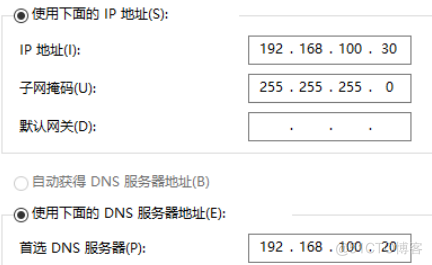 2)配置域名解析
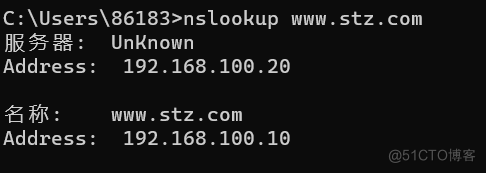 3)访问网站
[root@centos01 ~]# httpd -V
Server version: Apache/2.2.17 (Unix)
Server built:   Feb 12 2023 18:02:11
Server's Module Magic Number: 20051115:25
Server loaded:  APR 1.4.2, APR-Util 1.3.10
Compiled using: APR 1.4.2, APR-Util 1.3.10
Architecture:   64-bit
Server MPM:     Prefork

threaded:     no
    forked:     yes (variable process count)
Server compiled with....
 -D
APACHE_MPM_DIR="server/mpm/prefork"
 -D
APR_HAS_SENDFILE
 -D
APR_HAS_MMAP
 -D
APR_HAVE_IPV6 (IPv4-mapped addresses enabled)
 -D
APR_USE_SYSVSEM_SERIALIZE
 -D
APR_USE_PTHREAD_SERIALIZE
 -D
APR_HAS_OTHER_CHILD
 -D
AP_HAVE_RELIABLE_PIPED_LOGS
 -D
DYNAMIC_MODULE_LIMIT=128
 -D
HTTPD_ROOT="/usr/local/httpd"
 -D
SUEXEC_BIN="/usr/local/httpd/bin/suexec"
 -D
DEFAULT_PIDLOG="logs/httpd.pid"
 -D
DEFAULT_SCOREBOARD="logs/apache_runtime_status"
 -D
DEFAULT_LOCKFILE="logs/accept.lock"
 -D
DEFAULT_ERRORLOG="logs/error_log"
 -D
AP_TYPES_CONFIG_FILE="conf/mime.types"
 -D
SERVER_CONFIG_FILE="conf/httpd.conf"[root@centos01 ~]# vim /usr/local/httpd/conf/extra/httpd-mpm.conf
<IfModule mpm_prefork_module>
StartServers 5 //启动进程数
MinSpareServers 5 //最小空闲进程,空闲小于当前值自动创建
MaxSpareServers 10 //空闲进程大于当前值自动kill掉
Serverlimit 200 //最大进程
MaxClients 150 //最大并发请求数必须前150处理完处理151
MaxRequestsPerChild 0 //每个子进程最大处理请求数0不限制,可以防止内存外溢和负载下降可以减少子进程数
</IfModule>[root@centos01 ~]# ps -ef | grep http
root
53908 1 0 18:26 ? 00:00:00 /usr/local/httpd/bin/httpd -k
start
daemon
53909 53908 0 18:26 ? 00:00:00 /usr/local/httpd/bin/httpd -k
start
daemon
53910 53908 0 18:26 ? 00:00:00 /usr/local/httpd/bin/httpd -k
start
daemon
53911 53908 0 18:26 ? 00:00:00 /usr/local/httpd/bin/httpd -k
start
daemon
53912 53908 0 18:26 ? 00:00:00 /usr/local/httpd/bin/httpd -k
start
daemon
53913 53908 0 18:26 ? 00:00:00 /usr/local/httpd/bin/httpd -k
start
daemon
92661 53908 0 18:51 ? 00:00:00 /usr/local/httpd/bin/httpd -k
start
root
92840 92692 0 19:00 pts/1 00:00:00 grep --color=auto http[root@centos01 httpd-2.2.17]# ./configure
--prefix=/usr/local/httpd/ --enable-so \
> --enable-rewrite \
> --enable-charset-lite \
> --enable-cgi \
> --with-mpm=worker[root@centos01 httpd-2.2.17]# make && make install[root@centos01 ~]# httpd -V
Server version: Apache/2.2.17 (Unix)
Server built: Feb 12 2023 19:06:06
Server's Module Magic Number: 20051115:25
Server loaded: APR 1.4.2, APR-Util 1.3.10
Compiled using: APR 1.4.2, APR-Util 1.3.10
Architecture: 64-bit
Server MPM: Worker
threaded: yes (fixed thread
count)
forked: yes (variable process
count)
Server compiled with....
-D
APACHE_MPM_DIR="server/mpm/worker"
-D
APR_HAS_SENDFILE
-D
APR_HAS_MMAP
-D
APR_HAVE_IPV6 (IPv4-mapped addresses enabled)
-D
APR_USE_SYSVSEM_SERIALIZE
-D
APR_USE_PTHREAD_SERIALIZE
-D
APR_HAS_OTHER_CHILD
-D
AP_HAVE_RELIABLE_PIPED_LOGS
-D
DYNAMIC_MODULE_LIMIT=128
-D
HTTPD_ROOT="/usr/local/httpd/"
-D
SUEXEC_BIN="/usr/local/httpd//bin/suexec"
-D
DEFAULT_SCOREBOARD="logs/apache_runtime_status"
-D
DEFAULT_ERRORLOG="logs/error_log"
-D
AP_TYPES_CONFIG_FILE="conf/mime.types"
-D
SERVER_CONFIG_FILE="conf/httpd.conf"[root@centos01 ~]# vim /usr/local/httpd/conf/httpd.conf
347 Include conf/extra/httpd-mpm.con[root@centos01 ~]# vim /usr/local/httpd/conf/extra/httpd-mpm.conf
<IfModule mpm_worker_module>
StartServers 2 //启动进程
ServerLimit 512 //最大进程数
ThreadLimit 64 //每个进程处理最大线程
MaxClients 12800 //最大连接并发请求
MinSpareThreads 25 //最小空闲线程
MaxSpareThreads 75 //最大空闲线程
ThreadsPerChild 25 //每个进程默认处理线程数
MaxRequestsPerChild 0 ///每个子进程最大处理请求数0不限制
</IfModule>[root@centos01 ~]# httpd -t
Syntax OK[root@centos01 ~]# systemctl restart httpd[root@centos01 ~]# pstree
systemd─┬─ModemManager───2*[{ModemManager}]
├─NetworkManager───2*[{NetworkManager}]
├─VGAuthService
├─2*[abrt-watch-log]
├─abrtd
├─agetty
├─alsactl
├─atd
├─auditd─┬─audispd─┬─sedispatch
│ │ └─{audispd}
│ └─{auditd}
├─avahi-daemon───avahi-daemon
├─chronyd
├─crond
├─cupsd
├─dbus-daemon
├─dnsmasq───dnsmasq
├─gssproxy───5*[{gssproxy}]
├─httpd─┬─httpd
│ └─2*[httpd───26*[{httpd}]]
├─ksmtuned───sleep
├─libvirtd───15*[{libvirtd}]
├─lsmd
├─lvmetad
├─master─┬─pickup
│ └─qmgr
├─polkitd───5*[{polkitd}]
├─rngd
├─rsyslogd───2*[{rsyslogd}]
├─smartd
├─sshd─┬─sshd───bash
│ └─sshd───bash───pstree
├─systemd-journal
├─systemd-logind
├─systemd-udevd
├─tuned───4*[{tuned}]
└─vmtoolsd───{vmtoolsd}[root@centos01 ~]# ab -n1000 -c500
www.stz.com/index.html
This is ApacheBench, Version 2.3
<$Revision: 655654 $>
Copyright 1996 Adam Twiss, Zeus Technology
Ltd, http://www.zeustech.net/
Licensed to The Apache Software Foundation,
http://www.apache.org/
Benchmarking www.stz.com (be patient)
Completed 100 requests
Completed 200 requests
Completed 300 requests
Completed 400 requests
Completed 500 requests
Completed 600 requests
Completed 700 requests
Completed 800 requests
Completed 900 requests
Completed 1000 requests
Finished 1000 requests
Server Software: Apache/2.2.17
Server Hostname: www.stz.com
Server Port: 80
Document Path: /index.html
Document Length: 12 bytes
Concurrency Level: 500
Time taken for tests: 0.823 seconds
Complete requests: 1000
Failed requests: 0
Write errors: 0
Total transferred: 272205 bytes
HTML transferred: 12420 bytes
Requests per second: 1214.71 [#/sec] (mean)
Time per request: 411.623 [ms] (mean)
Time per request: 0.823 [ms] (mean, across all concurrent
requests)
Transfer rate: 322.90 [Kbytes/sec] received
Connection Times (ms)
min
mean[+/-sd] median max
Connect: 0
2 1.9 1
6
Processing: 4
75 137.9 7 816
Waiting: 4
75 138.0 7 816
Total: 4
77 139.3 8 820
Percentage of the requests served within a
certain time (ms)
50% 8
66% 10
75% 11
80% 215
90% 417
95% 420
98% 420
99% 421
100%
820 (longest request)[root@centos01 ~]# pstree -a
systemd --switched-root --system
--deserialize21
├─ModemManager
│ └─2*[{ModemManager}]
├─NetworkManager --no-daemon
│ └─2*[{NetworkManager}]
├─VGAuthService -s
├─abrt-watch-log -F Backtrace /var/log/Xorg.0.log --/usr/b
├─abrt-watch-log -F BUG: WARNING: at WARNING: CPU:INFO: po
├─abrtd -d -s
├─agetty --noclear tty1 linux
├─alsactl -s -n 19 -c -EALSA_CONFIG_PATH=/etc/alsa/alsact
├─atd -f
├─auditd
│ ├─audispd
│ │ ├─sedispatch
│ │ └─{audispd}
│ └─{auditd}
├─avahi-daemon
│ └─avahi-daemon
├─chronyd
├─crond -n
├─cupsd -f
├─dbus-daemon --system --address=systemd: --nofork ...
├─dnsmasq--conf-file=/var/lib/libvirt/dnsmasq/default.con
│
└─dnsmasq--conf-file=/var/lib/libvirt/dnsmasq/default.con
├─gssproxy
-D
│ └─5*[{gssproxy}]
├─httpd -k start
│ ├─httpd -k start
│ ├─httpd -k start
│ │ └─26*[{httpd}]
│ └─httpd -k start
│ └─26*[{httpd}]
├─ksmtuned /usr/sbin/ksmtuned
│ └─sleep 60
├─libvirtd
│ └─15*[{libvirtd}]
├─lsmd -d
├─lvmetad -f
├─master -w
│ ├─pickup -l -t unix -u
│ └─qmgr -l -t unix -u
├─polkitd --no-debug
│ └─5*[{polkitd}]
├─rngd -f
├─rsyslogd -n
│ └─2*[{rsyslogd}]
├─smartd -n -q never
├─sshd -D
│ ├─sshd
│ │ └─bash
│ └─sshd
│ └─bash
│ └─pstree -a
├─systemd-journal
├─systemd-logind
├─systemd-udevd
├─tuned -Es /usr/sbin/tuned -l -P
│ └─4*[{tuned}]
└─vmtoolsd
└─{vmtoolsd}导读:随着叮咚买菜业务的发展,不同的业务场景对数据分析提出了不同的需求,他们希望引入一款实时OLAP数据库,构建一个灵活的多维实时查询和分析的平台,统一数据的接入和查询方案,解决各业务线对数据高效实时查询和精细化运营的需求。经过调研选型,最终引入ApacheDoris作为最终的OLAP分析引擎,Doris作为核心的OLAP引擎支持复杂地分析操作、提供多维的数据视图,在叮咚买菜数十个业务场景中广泛应用。作者|叮咚买菜资深数据工程师韩青叮咚买菜创立于2017年5月,是一家专注美好食物的创业公司。叮咚买菜专注吃的事业,为满足更多人“想吃什么”而努力,通过美好食材的供应、美好滋味的开发以及美食品牌的孵
我希望Ruby的解析器会进行这种微不足道的优化,但似乎并没有(谈到YARV实现,Ruby1.9.x、2.0.0):require'benchmark'deffib1a,b=0,1whileb由于这两种方法除了在第二种方法中使用预定义常量而不是常量表达式外是相同的,因此Ruby解释器似乎在每个循环中一次又一次地计算幂常数。是否有一些Material说明为什么Ruby根本不进行这种基本优化或只在某些特定情况下进行? 最佳答案 很抱歉给出了另一个答案,但我不想删除或编辑我之前的答案,因为它下面有有趣的讨论。正如JörgWMittag所说,
我正在尝试从数据库中读取大量单元格(超过100.000个)并将它们写入VPSUbuntu服务器上的csv文件。碰巧服务器没有足够的内存。我正在考虑一次读取5000行并将它们写入文件,然后再读取5000行,等等。我应该如何重构我当前的代码以使内存不会被完全消耗?这是我的代码:defwrite_rows(emails)File.open(file_path,"w+")do|f|f该函数由sidekiqworker调用:write_rows(user.emails)感谢您的帮助! 最佳答案 这里的问题是,当您调用emails.each时,
更新:当输入“passenger-memory-stats”时,我显示:---Passengerprocesses---Processes:0我该如何解决这个问题?为什么即使我在httpd.conf中添加它并重新启动apache,passenger也不会启动?我无法让PhusionPassenger在服务器上运行RubyonRails。我已经按照Phusion网站上的所有说明安装了passenger并修改并创建了ApacheVirtualHost以指向新目录并验证所有.conf文件都已成功加载。还加载了httpd-Mpassenger_module。我还在本地主机上成功运行了Passe
我正在尝试实现/转换daltonize将色盲人的图像校正为ruby的算法。在javascript中编写了两个主要的引用实现和python+我不熟悉的语言/环境中的其他实现。我几乎没有图像处理方面的经验,更不用说VIPS/ruby-vips了。我想知道如何迈出第一步。该文档似乎主要使用C/C++,而在ruby方面很少。它也非常详细。我什至不确定要使用哪些基本操作。看起来lin函数是一个很好的起点,但我不确定如何应用它。任何具有VIPS经验的人都可能在几分钟内算出整个算法。我想知道是否有人可以给我一些关于从哪里开始的指示。具体来说:如何访问单个(R/G/B)元素?是否有基于道尔顿化
文章目录前言约束硬约束的轨迹优化Corridor-BasedTrajectoryOptimizationBezierCurveOptimizationOtherOptions软约束的轨迹优化Distance-BasedTrajectoryOptimization优化方法前言可以看看我的这几篇Blog1,Blog2,Blog3。上次基于MinimumSnap的轨迹生成,有许多优点,比如:轨迹让机器人可以在某个时间点抵达某个航点。任何一个时刻,都能数学上求出期望的机器人的位置、速度、加速度、导数。MinimumSnap可以把问题转换为凸优化问题。缺点:MnimumSnap可以控制轨迹一定经过中间的
我对为我的RubyonRails3.1.3应用优化我的Unicorn设置的方法很感兴趣。我目前正在高CPU超大实例上生成14个工作进程,因为我的应用程序在负载测试期间似乎受CPU限制。在模拟负载测试中,每秒大约20个请求重放请求,我的实例上的所有8个内核都达到峰值,盒子负载飙升至7-8个。每个unicorn实例使用大约56-60%的CPU。我很好奇可以通过哪些方式对其进行优化?我希望能够每秒将更多请求汇集到这种大小的实例上。内存和所有其他I/O一样完全正常。在我的测试过程中,CPU越来越低。 最佳答案 如果您受CPU限制,您希望使用
美团外卖搜索工程团队在Elasticsearch的优化实践中,基于Location-BasedService(LBS)业务场景对Elasticsearch的查询性能进行优化。该优化基于Run-LengthEncoding(RLE)设计了一款高效的倒排索引结构,使检索耗时(TP99)降低了84%。本文从问题分析、技术选型、优化方案等方面进行阐述,并给出最终灰度验证的结论。1.前言最近十年,Elasticsearch已经成为了最受欢迎的开源检索引擎,其作为离线数仓、近线检索、B端检索的经典基建,已沉淀了大量的实践案例及优化总结。然而在高并发、高可用、大数据量的C端场景,目前可参考的资料并不多。因此
RTS在阿里云视频直播的基础上进行底层技术优化,通过集成阿里云播放器SDK,支持在千万级并发场景下节点间毫秒级延时直播的能力,弥补了传统直播存在3~6秒延时的问题,确保了超低延时、低卡顿、秒开流畅的直播观看体验。本文介绍了基于RTS超低延迟直播优化强互动场景体验的最佳实践方案,并以阿里云播放器Aliplayer为例,详细介绍RTS超低延迟拉流接入、自动降级、排障信息获取等逻辑的实现,助力企业打造互动直播行业的产品竞争力。适用场景该方案适用于对超低延迟直播有诉求的客户,尤其是业务中存在强互动场景直播的场景。强互动场景直播主要是指对主播和观众存在互动,或观众存在更高实时性观看、画面互动需求的情况,
解开谜团:深入探索ChatGPT的技术奇迹。ChatGpt无处不在,无论是在播客、博客、YouTube还是社交媒体上。当我注意到这项新技术如此受欢迎时,我决定试一试,我被震惊了!有很多关于ChatGpt及其魔力的博客,但在这篇博客中,我将深入探讨其内部技术及其工作原理!ChatGpt简介根据OpenAI,ChatGpt被描述为:“我们训练了一个名为ChatGpt的模型,它以对话方式进行交互。对话格式使ChatGpt可以回答后续问题、承认错误、挑战不正确的前提并拒绝不适当的请求。ChatGPT是InstructGPT的兄弟模型,它经过训练可以按照提示中的说明进行操作并提供详细的响应。”OpenA
