es@MEPRDAPP01:/root/opt/elastic/elasticsearch-8.1.2> java -version
java version "1.8.0_221"
Java(TM) SE Runtime Environment (build 1.8.0_221-b11)
Java HotSpot(TM) 64-Bit Server VM (build 25.221-b11, mixed mode)
es@MEPRDAPP01:/root/opt/elastic/elasticsearch-8.1.2> sh start.sh
could not find java in ES_JAVA_HOME at /root/opt/elastic/elasticsearch-8.1.2/jdk/bin/java
es@MEPRDAPP01:/root/opt/elastic/elasticsearch-8.1.2>
从上文中可以看到,全局的java是存在且版本号大于1.8的,并且当前用户非root用户
查看报错的原因:打开elasticsearch elasticsearch-env查看错误原因
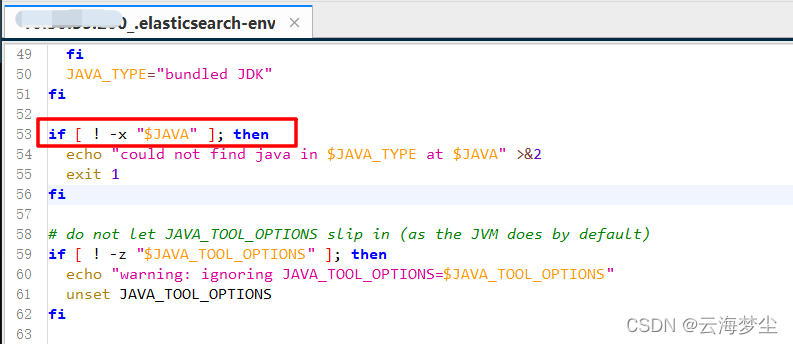
可以看到该错误是文件不可执行时才报错,那么我们看下他是调用了ES_HOME的jdk,看下该目录下文件是否可执行
es@MEPRDAPP01:/root/opt/elastic/elasticsearch-8.1.2> sh start.sh
could not find java in bundled JDK at /root/opt/elastic/elasticsearch-8.1.2/jdk/bin/java
es@MEPRDAPP01:/root/opt/elastic/elasticsearch-8.1.2> .//root/opt/elastic/elasticsearch-8.1.2/jdk/bin/java -version
bash: .//root/opt/elastic/elasticsearch-8.1.2/jdk/bin/java: 没有那个文件或目录
es@MEPRDAPP01:/root/opt/elastic/elasticsearch-8.1.2> ./root/opt/elastic/elasticsearch-8.1.2/jdk/bin/java -version
bash: ./root/opt/elastic/elasticsearch-8.1.2/jdk/bin/java: 没有那个文件或目录
es@MEPRDAPP01:/root/opt/elastic/elasticsearch-8.1.2> cd /root/opt/elastic/elasticsearch-8.1.2/jdk/bin/java
bash: cd: /root/opt/elastic/elasticsearch-8.1.2/jdk/bin/java: 权限不够
由于root目录是root用户的,不能将root目录的用户和用户组设置为es,因此我们在根目录从新新建一个目录/es,将文件全部移动到/es下
MEPRDAPP01:~/opt # cd  /
MEPRDAPP01:/ # mkdir es
MEPRDAPP01:/ # mv /root/opt/ /es
MEPRDAPP01:/ # chown -R es:es /es
MEPRDAPP01:/ # ll
总用量 80
drwxr-xr-x   2 root root  4096 9月  26 2019 bin
drwxr-xr-x   3 root root  4096 9月  26 2019 boot
drwx------   2 root root   151 9月  26 2019 Desktop
drwxr-xr-x  21 root root  3980 4月   7 22:22 dev
drwxr-xr-x   3 es   es      17 4月  14 13:42 es
drwxr-xr-x 127 root root 12288 4月  14 12:22 etc
drwxr-xr-x   5 root root    49 4月  14 10:40 home
es@MEPRDAPP01:/es/opt/elastic/elasticsearch-8.1.2> sh start.sh
ERROR: [1] bootstrap checks failed. You must address the points described in the following [1] lines before starting Elasticsearch.
bootstrap check failure [1] of [1]: max file descriptors [4096] for elasticsearch process is too low, increase to at least [65535]
ERROR: Elasticsearch did not exit normally - check the logs at /es/opt/elastic/logs/elasticsearch.log
修改Elastic的配置文件elasticsearch.yml文件
vim /es/opt/elastic/elasticsearch-8.1.2/config/elasticsearch.yml
添加该配置
node.name: node-1
MEPRDAPP01:~ # vim /etc/security/limits.conf
添加如下配置
es hard nofile 65536
es soft nofile 65536
MEPRDAPP01:~ # vim /etc/sysctl.conf
添加如下配置
vm.max_map_count=655360
查看是否更改
sysctl -p
注销调用户es重新登录,再次启动es
MEPRDAPP01:/es/opt/elastic/elasticsearch-8.1.2 # su es
es@MEPRDAPP01:/es/opt/elastic/elasticsearch-8.1.2> sh start.sh
warning: ignoring JAVA_HOME=/usr/local/java; using bundled JDK
warning: ignoring JAVA_HOME=/usr/local/java; using bundled JDK
warning: ignoring JAVA_HOME=/usr/local/java; using bundled JDK
[2022-04-14T14:23:36,960][INFO ][o.e.n.Node               ] [node-1] version[8.1.2], pid[169299], build[default/tar/31df9689e80bad366ac20176aa7f2371ea5eb4c1/2022-03-29T21:18:59.991429448Z], OS[Linux/4.12.14-94.41-default/amd64], JVM[Eclipse Adoptium/OpenJDK 64-Bit Server VM/17.0.2/17.0.2+8]
[2022-04-14T14:23:36,967][INFO ][o.e.n.Node               ] [node-1] JVM home [/es/opt/elastic/elasticsearch-8.1.2/jdk], using bundled JDK [true]
[2022-04-14T14:23:36,967][INFO ][o.e.n.Node               ] [node-1] JVM arguments [-Xshare:auto, -Des.networkaddress.cache.ttl=60, -Des.networkaddress.cache.negative.ttl=10, -Djava.security.manager=allow, -XX:+AlwaysPreTouch, -Xss1m, -Djava.awt.headless=true, -Dfile.encoding=UTF-8, -Djna.nosys=true, -XX:-OmitStackTraceInFastThrow, -XX:+ShowCodeDetailsInExceptionMessages, -Dio.netty.noUnsafe=true, -Dio.netty.noKeySetOptimization=true, -Dio.netty.recycler.maxCapacityPerThread=0, -Dio.netty.allocator.numDirectArenas=0, -Dlog4j.shutdownHookEnabled=false, -Dlog4j2.disable.jmx=true, -Dlog4j2.formatMsgNoLookups=true, -Djava.locale.providers=SPI,COMPAT, --add-opens=java.base/java.io=ALL-UNNAMED, -XX:+UseG1GC, -Djava.io.tmpdir=/tmp/elasticsearch-3763503562971088099, -XX:+HeapDumpOnOutOfMemoryError, -XX:+ExitOnOutOfMemoryError, -XX:HeapDumpPath=data, -XX:ErrorFile=logs/hs_err_pid%p.log, -Xlog:gc*,gc+age=trace,safepoint:file=logs/gc.log:utctime,pid,tags:filecount=32,filesize=64m, -Xms31744m, -Xmx31744m, -XX:MaxDirectMemorySize=16642998272, -XX:InitiatingHeapOccupancyPercent=30, -XX:G1ReservePercent=25, -Des.path.home=/es/opt/elastic/elasticsearch-8.1.2, -Des.path.conf=/es/opt/elastic/elasticsearch-8.1.2/config, -Des.distribution.flavor=default, -Des.distribution.type=tar, -Des.bundled_jdk=true]
[2022-04-14T14:23:39,443][INFO ][o.e.p.PluginsService     ] [node-1] loaded module [aggs-matrix-stats]
[2022-04-14T14:23:39,443][INFO ][o.e.p.PluginsService     ] [node-1] loaded module [analysis-common]
[2022-04-14T14:23:39,444][INFO ][o.e.p.PluginsService     ] [node-1] loaded module [constant-keyword]
[2022-04-14T14:23:39,444][INFO ][o.e.p.PluginsService     ] [node-1] loaded module [data-streams]
[2022-04-14T14:23:39,444][INFO ][o.e.p.PluginsService     ] [node-1] loaded module [frozen-indices]
[2022-04-14T14:23:39,444][INFO ][o.e.p.PluginsService     ] [node-1] loaded module [ingest-common]
[2022-04-14T14:23:39,444][INFO ][o.e.p.PluginsService     ] [node-1] loaded module [ingest-geoip]
[2022-04-14T14:23:39,445][INFO ][o.e.p.PluginsService     ] [node-1] loaded module [ingest-user-agent]
....
修改启动脚本内容为后台启动
MEPRDAPP01:/es/opt/elastic/elasticsearch-8.1.2 # vim start.sh
./bin/elasticsearch -d
[2022-04-14T14:28:12,711][WARN ][o.e.d.PeerFinder         ] [node-1] address [[::1]:9305], node [null], requesting [false] discovery result: [][[::1]:9305] connect_exception: 拒绝连接: /[0:0:0:0:0:0:0:1]:9305: 拒绝连接
[2022-04-14T14:28:12,711][WARN ][o.e.d.PeerFinder         ] [node-1] address [[::1]:9303], node [null], requesting [false] discovery result: [][[::1]:9303] connect_exception: 拒绝连接: /[0:0:0:0:0:0:0:1]:9303: 拒绝连接
[2022-04-14T14:28:12,711][WARN ][o.e.d.PeerFinder         ] [node-1] address [127.0.0.1:9302], node [null], requesting [false] discovery result: [][127.0.0.1:9302] connect_exception: 拒绝连接: /127.0.0.1:9302: 拒绝连接
[2022-04-14T14:28:12,711][WARN ][o.e.d.PeerFinder         ] [node-1] address [[::1]:9301], node [null], requesting [false] discovery result: [][[::1]:9301] connect_exception: 拒绝连接: /[0:0:0:0:0:0:0:1]:9301: 拒绝连接
[2022-04-14T14:28:12,711][WARN ][o.e.d.PeerFinder         ] [node-1] address [127.0.0.1:9304], node [null], requesting [false] discovery result: [][127.0.0.1:9304] connect_exception: 拒绝连接: /127.0.0.1:9304: 拒绝连接
[2022-04-14T14:28:12,711][WARN ][o.e.d.PeerFinder         ] [node-1] address [127.0.0.1:9301], node [null], requesting [false] discovery result: [][127.0.0.1:9301] connect_exception: 拒绝连接: /127.0.0.1:9301: 拒绝连接
[2022-04-14T14:28:12,711][WARN ][o.e.d.PeerFinder         ] [node-1] address [127.0.0.1:9303], node [null], requesting [false] discovery result: [][127.0.0.1:9303] connect_exception: 拒绝连接: /127.0.0.1:9303: 拒绝连接
[2022-04-14T14:28:12,711][WARN ][o.e.d.PeerFinder         ] [node-1] address [12
修改Elastic的配置文件elasticsearch.yml文件后所有配置如下
cluster.name: my-application
node.name: node-1
path.data: /es/opt/elastic/data
path.logs: /es/opt/elastic/logs
network.host: 0.0.0.0
http.port: 9200
discovery.seed_hosts: ["127.0.0.1"]
xpack.security.enabled: true
xpack.security.enrollment.enabled: true
xpack.security.http.ssl:
  enabled: true
  keystore.path: certs/http.p12
xpack.security.transport.ssl:
  enabled: true
  verification_mode: certificate
  keystore.path: certs/transport.p12
  truststore.path: certs/transport.p12
cluster.initial_master_nodes: ["MEPRDAPP01"]
vim /es/opt/elastic/elasticsearch-8.1.2/config/jvm.options
清除注释
## The heap size is automatically configured by Elasticsearch
## based on the available memory in your system and the roles
## each node is configured to fulfill. If specifying heap is
## required, it should be done through a file in jvm.options.d,
## which should be named with .options suffix, and the min and
## max should be set to the same value. For example, to set the
## heap to 4 GB, create a new file in the jvm.options.d
## directory containing these lines:
##
-Xms10g
-Xmx10g
##
## See https://www.elastic.co/guide/en/elasticsearch/reference/8.1/heap-size.html
## for more information
我真的很习惯使用Ruby编写以下代码:my_hash={}my_hash['test']=1Java中对应的数据结构是什么? 最佳答案 HashMapmap=newHashMap();map.put("test",1);我假设? 关于java-等价于Java中的RubyHash,我们在StackOverflow上找到一个类似的问题: https://stackoverflow.com/questions/22737685/
我正在尝试使用boilerpipe来自JRuby。我看过guide从JRuby调用Java,并成功地将它与另一个Java包一起使用,但无法弄清楚为什么同样的东西不能用于boilerpipe。我正在尝试基本上从JRuby中执行与此Java等效的操作:URLurl=newURL("http://www.example.com/some-location/index.html");Stringtext=ArticleExtractor.INSTANCE.getText(url);在JRuby中试过这个:require'java'url=java.net.URL.new("http://www
我只想对我一直在思考的这个问题有其他意见,例如我有classuser_controller和classuserclassUserattr_accessor:name,:usernameendclassUserController//dosomethingaboutanythingaboutusersend问题是我的User类中是否应该有逻辑user=User.newuser.do_something(user1)oritshouldbeuser_controller=UserController.newuser_controller.do_something(user1,user2)我
什么是ruby的rack或python的Java的wsgi?还有一个路由库。 最佳答案 来自Python标准PEP333:Bycontrast,althoughJavahasjustasmanywebapplicationframeworksavailable,Java's"servlet"APImakesitpossibleforapplicationswrittenwithanyJavawebapplicationframeworktoruninanywebserverthatsupportstheservletAPI.ht
这篇文章是继上一篇文章“Observability:从零开始创建Java微服务并监控它(一)”的续篇。在上一篇文章中,我们讲述了如何创建一个Javaweb应用,并使用Filebeat来收集应用所生成的日志。在今天的文章中,我来详述如何收集应用的指标,使用APM来监控应用并监督web服务的在线情况。源码可以在地址 https://github.com/liu-xiao-guo/java_observability 进行下载。摄入指标指标被视为可以随时更改的时间点值。当前请求的数量可以改变任何毫秒。你可能有1000个请求的峰值,然后一切都回到一个请求。这也意味着这些指标可能不准确,你还想提取最小/
HashMap中为什么引入红黑树,而不是AVL树呢1.概述开始学习这个知识点之前我们需要知道,在JDK1.8以及之前,针对HashMap有什么不同。JDK1.7的时候,HashMap的底层实现是数组+链表JDK1.8的时候,HashMap的底层实现是数组+链表+红黑树我们要思考一个问题,为什么要从链表转为红黑树呢。首先先让我们了解下链表有什么不好???2.链表上述的截图其实就是链表的结构,我们来看下链表的增删改查的时间复杂度增:因为链表不是线性结构,所以每次添加的时候,只需要移动一个节点,所以可以理解为复杂度是N(1)删:算法时间复杂度跟增保持一致查:既然是非线性结构,所以查询某一个节点的时候
遍历文件夹我们通常是使用递归进行操作,这种方式比较简单,也比较容易理解。本文为大家介绍另一种不使用递归的方式,由于没有使用递归,只用到了循环和集合,所以效率更高一些!一、使用递归遍历文件夹整体思路1、使用File封装初始目录,2、打印这个目录3、获取这个目录下所有的子文件和子目录的数组。4、遍历这个数组,取出每个File对象4-1、如果File是否是一个文件,打印4-2、否则就是一个目录,递归调用代码实现publicclassSearchFile{publicstaticvoidmain(String[]args){//初始目录Filedir=newFile("d:/Dev");Datebeg
我基本上来自Java背景并且努力理解Ruby中的模运算。(5%3)(-5%3)(5%-3)(-5%-3)Java中的上述操作产生,2个-22个-2但在Ruby中,相同的表达式会产生21个-1-2.Ruby在逻辑上有多擅长这个?模块操作在Ruby中是如何实现的?如果将同一个操作定义为一个web服务,两个服务如何匹配逻辑。 最佳答案 在Java中,模运算的结果与被除数的符号相同。在Ruby中,它与除数的符号相同。remainder()在Ruby中与被除数的符号相同。您可能还想引用modulooperation.
Java的Collections.unmodifiableList和Collections.unmodifiableMap在Ruby标准API中是否有等价物? 最佳答案 使用freeze应用程序接口(interface):Preventsfurthermodificationstoobj.ARuntimeErrorwillberaisedifmodificationisattempted.Thereisnowaytounfreezeafrozenobject.SeealsoObject#frozen?.Thismethodretur
我想在共享服务器上建立一个jekyll博客。当我尝试安装Jekyll时,我得到“您没有写权限”。我该如何在没有root或sudo的情况下解决这个问题?更多细节:我在共享服务器上有空间,但没有根访问权限。我无法安装Ruby,尽管托管公司应我的要求安装了它。当我尝试安装Jekyll时我使用user@hosting.org[~]#geminstalljekyll这是我得到的回应:ERROR:Whileexecutinggem...(Gem::FilePermissionError)Youdon'thavewritepermissionsintothe/usr/lib/ruby/gems/1.
