散点图的应用很广泛,以前介绍过很多画图方法:Python画图(直方图、多张子图、二维图形、三维图形以及图中图),漏掉了这个,现在补上,用法很简单,我们可以help(plt.scatter)看下它的用法:
Help on function scatter in module matplotlib.pyplot:

scatter(x, y, s=None, c=None, marker=None, cmap=None, norm=None, vmin=None,
vmax=None, alpha=None, linewidths=None, verts=None, edgecolors=None, hold=None, data=None, **kwargs)
    Make a scatter plot of `x` vs `y`

    Marker size is scaled by `s` and marker color is mapped to `c`

    Parameters
    ----------
    x, y : array_like, shape (n, )
        Input data

    s : scalar or array_like, shape (n, ), optional
        size in points^2.  Default is `rcParams['lines.markersize'] ** 2`.

    c : color, sequence, or sequence of color, optional, default: 'b'
        `c` can be a single color format string, or a sequence of color
        specifications of length `N`, or a sequence of `N` numbers to be
        mapped to colors using the `cmap` and `norm` specified via kwargs
        (see below). Note that `c` should not be a single numeric RGB or
        RGBA sequence because that is indistinguishable from an array of
        values to be colormapped.  `c` can be a 2-D array in which the
        rows are RGB or RGBA, however, including the case of a single
        row to specify the same color for all points.

    marker : `~matplotlib.markers.MarkerStyle`, optional, default: 'o'
        See `~matplotlib.markers` for more information on the different
        styles of markers scatter supports. `marker` can be either
        an instance of the class or the text shorthand for a particular
        marker.

    cmap : `~matplotlib.colors.Colormap`, optional, default: None
        A `~matplotlib.colors.Colormap` instance or registered name.
        `cmap` is only used if `c` is an array of floats. If None,
        defaults to rc `image.cmap`.

    norm : `~matplotlib.colors.Normalize`, optional, default: None
        A `~matplotlib.colors.Normalize` instance is used to scale
        luminance data to 0, 1. `norm` is only used if `c` is an array of
        floats. If `None`, use the default :func:`normalize`.

    vmin, vmax : scalar, optional, default: None
        `vmin` and `vmax` are used in conjunction with `norm` to normalize
        luminance data.  If either are `None`, the min and max of the
        color array is used.  Note if you pass a `norm` instance, your
        settings for `vmin` and `vmax` will be ignored.

    alpha : scalar, optional, default: None
        The alpha blending value, between 0 (transparent) and 1 (opaque)

    linewidths : scalar or array_like, optional, default: None
        If None, defaults to (lines.linewidth,).

    verts : sequence of (x, y), optional
        If `marker` is None, these vertices will be used to
        construct the marker.  The center of the marker is located
        at (0,0) in normalized units.  The overall marker is rescaled
        by ``s``.

    edgecolors : color or sequence of color, optional, default: None
        If None, defaults to 'face'

        If 'face', the edge color will always be the same as
        the face color.

        If it is 'none', the patch boundary will not
        be drawn.

        For non-filled markers, the `edgecolors` kwarg
        is ignored and forced to 'face' internally.

    Returns
    -------
    paths : `~matplotlib.collections.PathCollection`

    Other parameters
    ----------------
    kwargs : `~matplotlib.collections.Collection` properties

    See Also
    --------
    plot : to plot scatter plots when markers are identical in size and
        color

    Notes
    -----

    * The `plot` function will be faster for scatterplots where markers
      don't vary in size or color.

    * Any or all of `x`, `y`, `s`, and `c` may be masked arrays, in which
      case all masks will be combined and only unmasked points will be
      plotted.

      Fundamentally, scatter works with 1-D arrays; `x`, `y`, `s`, and `c`
      may be input as 2-D arrays, but within scatter they will be
      flattened. The exception is `c`, which will be flattened only if its
      size matches the size of `x` and `y`.
我们可以看到参数比较多,平时主要用到的就是大小、颜色、样式这三个参数
s:形状的大小,默认 20,也可以是个数组,数组每个参数为对应点的大小,数值越大对应的图中的点越大。
c:形状的颜色,"b":blue "g":green "r":red "c":cyan(蓝绿色,青色) "m":magenta(洋红色,品红色) "y":yellow "k":black "w":white
marker:常见的形状有如下
".":点 ",":像素点 "o":圆形
"v":朝下三角形 "^":朝上三角形 "<":朝左三角形 ">":朝右三角形
"s":正方形 "p":五边星 "*":星型
"h":1号六角形 "H":2号六角形"+":+号标记 "x":x号标记
"D":菱形 "d":小型菱形
"|":垂直线形 "_":水平线形
我们来看几个示例(在一张图显示了)
import matplotlib.pyplot as plt
import numpy as np
import pandas as pd

x=np.array([3,5])
y=np.array([7,8])

x1=np.random.randint(10,size=(25,))
y1=np.random.randint(10,size=(25,))

plt.scatter(x,y,c='r')
plt.scatter(x1,y1,s=100,c='b',marker='*')

#使用pandas来读取
x2=[]
y2=[]
rdata=pd.read_table('1.txt',header=None)
for i in range(len(rdata[0])):
    x2.append(rdata[0][i].split(',')[0])
    y2.append(rdata[0][i].split(',')[1])

plt.scatter(x2,y2,s=200,c='g',marker='o')
plt.show()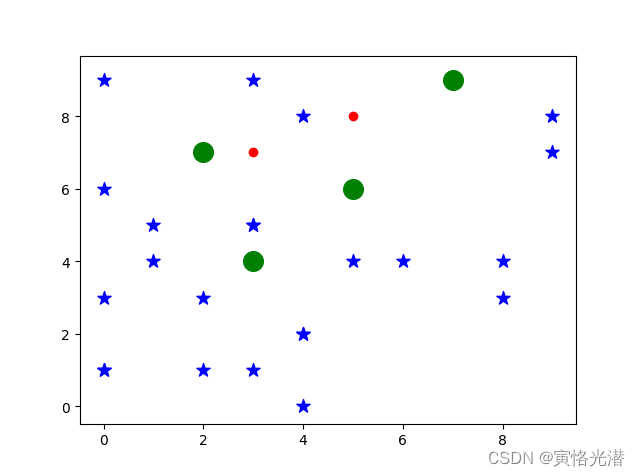
其中文档1.txt内容如下(上面图中的4个绿色大点)
5,6
7,9
3,4
2,7
关闭。这个问题是opinion-based.它目前不接受答案。想要改进这个问题?更新问题,以便editingthispost可以用事实和引用来回答它.关闭4年前。Improvethisquestion我想在固定时间创建一系列低音和高音调的哔哔声。例如:在150毫秒时发出高音调的蜂鸣声在151毫秒时发出低音调的蜂鸣声200毫秒时发出低音调的蜂鸣声250毫秒的高音调蜂鸣声有没有办法在Ruby或Python中做到这一点?我真的不在乎输出编码是什么(.wav、.mp3、.ogg等等),但我确实想创建一个输出文件。
这个问题在这里已经有了答案:关闭10年前。PossibleDuplicate:Pythonconditionalassignmentoperator对于这样一个简单的问题表示歉意,但是谷歌搜索||=并不是很有帮助;)Python中是否有与Ruby和Perl中的||=语句等效的语句?例如:foo="hey"foo||="what"#assignfooifit'sundefined#fooisstill"hey"bar||="yeah"#baris"yeah"另外,类似这样的东西的通用术语是什么?条件分配是我的第一个猜测,但Wikipediapage跟我想的不太一样。
什么是ruby的rack或python的Java的wsgi?还有一个路由库。 最佳答案 来自Python标准PEP333:Bycontrast,althoughJavahasjustasmanywebapplicationframeworksavailable,Java's"servlet"APImakesitpossibleforapplicationswrittenwithanyJavawebapplicationframeworktoruninanywebserverthatsupportstheservletAPI.ht
华为OD机试题本篇题目:明明的随机数题目输入描述输出描述:示例1输入输出说明代码编写思路最近更新的博客华为od2023|什么是华为od,od薪资待遇,od机试题清单华为OD机试真题大全,用Python解华为机试题|机试宝典【华为OD机试】全流程解析+经验分享,题型分享,防作弊指南华为o
我想解析一个已经存在的.mid文件,改变它的乐器,例如从“acousticgrandpiano”到“violin”,然后将它保存回去或作为另一个.mid文件。根据我在文档中看到的内容,该乐器通过program_change或patch_change指令进行了更改,但我找不到任何在已经存在的MIDI文件中执行此操作的库.他们似乎都只支持从头开始创建的MIDI文件。 最佳答案 MIDIpackage会为您完成此操作,但具体方法取决于midi文件的原始内容。一个MIDI文件由一个或多个音轨组成,每个音轨是十六个channel中任何一个上的
本文主要介绍在使用Selenium进行自动化测试或者任务时,对于使用了iframe的页面,如何定位iframe中的元素文章目录场景描述解决方案具体代码场景描述当我们在使用Selenium进行自动化测试的时候,可能会遇到一些界面或者窗体是使用HTML的iframe标签进行承载的。对于iframe中的标签,如果直接查找是无法找到的,会抛出没有找到元素的异常。比如近在咫尺的例子就是,CSDN的登录窗体就是使用的iframe,大家可以尝试通过F12开发者模式查看到的tag_name,class_name,id或者xpath来定位中的页面元素,会抛出NoSuchElementException异常。解决
2022/8/4更新支持加入水印水印必须包含透明图像,并且水印图像大小要等于原图像的大小pythonconvert_image_to_video.py-f30-mwatermark.pngim_dirout.mkv2022/6/21更新让命令行参数更加易用新的命令行使用方法pythonconvert_image_to_video.py-f30im_dirout.mkvFFMPEG命令行转换一组JPG图像到视频时,是将这组图像视为MJPG流。我需要转换一组PNG图像到视频,FFMPEG就不认了。pyav内置了ffmpeg库,不需要系统带有ffmpeg工具因此我使用ffmpeg的python包装p
ValidPalindromeGivenastring,determineifitisapalindrome,consideringonlyalphanumericcharactersandignoringcases. [#125]Example:"Aman,aplan,acanal:Panama"isapalindrome."raceacar"isnotapalindrome.Haveyouconsiderthatthestringmightbeempty?Thisisagoodquestiontoaskduringaninterview.Forthepurposeofthisproblem
是否可以在PyYAML或Ruby的Psych引擎中禁用创建anchor和引用(并有效地显式列出冗余数据)?也许我在网上搜索时遗漏了一些东西,但在Psych中似乎没有太多可用的选项,而且我也无法确定PyYAML是否允许这样做.基本原理是我必须序列化一些数据并将其以可读的形式传递给一个不是真正的技术同事进行手动验证。有些数据是多余的,但我需要以最明确的方式列出它们以提高可读性(anchor和引用是提高效率的好概念,但不是人类可读性)。Ruby和Python是我选择的工具,但如果有其他一些相当简单的方法来“展开”YAML文档,它可能就可以了。 最佳答案
我很好奇.NET将如何影响Python和Ruby应用程序。用IronPython/IronRuby编写的应用程序是否会非常特定于.NET环境,以至于它们实际上将变得特定于平台?如果他们不使用任何.NET功能,那么IronPython/IronRuby相对于非.NET同类产品的优势是什么? 最佳答案 我不能说任何关于IronRuby的东西,但是大多数Python实现(如IronPython、Jython和PyPy)都试图尽可能忠实于CPython实现。不过,IronPython正在迅速成为这方面的佼佼者之一,并且在PlanetPyth
