本次实验在华为ensp模拟器具体实现。
文章目录
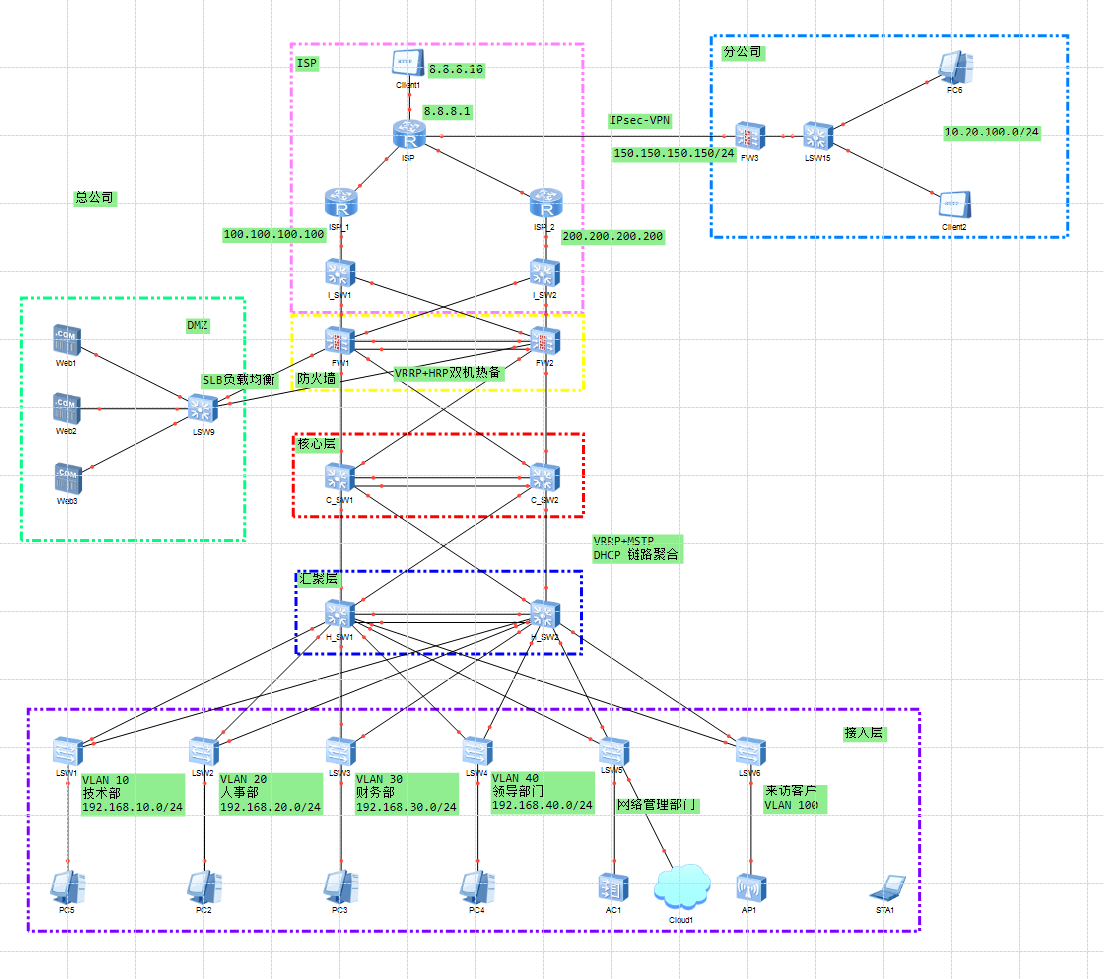
| 区域 | VLAN | 网段 |
|---|---|---|
| 技术部 | VLAN 10 | 192.168.10.0/24 |
| 人事部 | VLAN 20 | 192.168.20.0/24 |
| 财务部 | VLAN 30 | 192.168.30.0/24 |
| 领导部门 | VLAN 40 | 192.168.40.0/24 |
| 来访客户 | VLAN 100 | 192.168.100.0/24 |
| 服务器DMZ | VLAN 90 | 192.138.90.0/24 |
LSW1
vlan batch 10

int e0/0/1
 port link-type trunk
 port trunk allow-pass vlan 10

int e0/0/2
 port link-type trunk
 port trunk allow-pass vlan 10

int e0/0/10
 port link-type access
 port default vlan 10
LSW2
vlan batch 20

int e0/0/1
 port link-type trunk
 port trunk allow-pass vlan 20

int e0/0/2
 port link-type trunk
 port trunk allow-pass vlan 20

int e0/0/10
 port link-type access
 port default vlan 20
LSW3
vlan batch 30

int e0/0/1
 port link-type trunk
 port trunk allow-pass vlan 30

int e0/0/2
 port link-type trunk
 port trunk allow-pass vlan 30

int e0/0/10
 port link-type access
 port default vlan 30
LSW4
vlan batch 40

int e0/0/1
 port link-type trunk
 port trunk allow-pass vlan 40

int e0/0/2
 port link-type trunk
 port trunk allow-pass vlan 40

int e0/0/10
 port link-type access
 port default vlan 40
H_SW1
vlan batch 10 20 30 40

int g0/0/1
 port link-type trunk
 port trunk allow-pass vlan 10

int g0/0/2
 port link-type trunk
 port trunk allow-pass vlan 20

int g0/0/3
 port link-type trunk
 port trunk allow-pass vlan 30

int g0/0/4
 port link-type trunk
 port trunk allow-pass vlan 40
H_SW2
vlan batch 10 20 30 40

int g0/0/1
 port link-type trunk
 port trunk allow-pass vlan 10

int g0/0/2
 port link-type trunk
 port trunk allow-pass vlan 20

int g0/0/3
 port link-type trunk
 port trunk allow-pass vlan 30

int g0/0/4
 port link-type trunk
 port trunk allow-pass vlan 40
H_SW1
vlan batch 100 1000

int g0/0/5
 port link-type trunk
 port trunk allow-pass vlan all

int g0/0/6
 port link-type trunk
 port trunk allow-pass vlan 100 1000

dhcp enable
int vlanif 100
 ip add 192.168.100.1 24
 dhcp select interface
 dhcp server dns-list 8.8.8.8
H_SW2
vlan batch 100 1000

int g0/0/5
 port link-type trunk
 port trunk allow-pass vlan all

int g0/0/6
 port link-type trunk
 port trunk allow-pass vlan 100 1000

dhcp enable
LSW5
vlan batch 100 1000

int e0/0/1
 port link-type trunk
 port trunk allow-pass vlan all

int e0/0/2
 port link-type trunk
 port trunk allow-pass vlan all

int e0/0/10
 port link-type trunk
 port trunk allow-pass vlan 100 1000

dhcp enable
LSW6
vlan batch 100 1000

int e0/0/1
 port link-type trunk
 port trunk allow-pass vlan 100 1000

int e0/0/2
 port link-type trunk
 port trunk allow-pass vlan 100 1000

int e0/0/10
 port link-type trunk
 port trunk allow-pass vlan 100 1000
 port trunk pvid vlan 1000

dhcp enable
AC
u t m
sys
sysname AC

vlan batch 100 1000

int g0/0/1
 port link-type trunk
 port trunk allow-pass vlan 100 1000

dhcp enable
int vlanif 1000
 ip add 192.168.101.1 24
 dhcp select interface

capwap source interface Vlanif 1000

wlan
 ap-group name ap-group1
 regulatory-domain-profile default
  y
 quit

 ap auth-mode mac-auth

 ap-id 0 ap-mac 00e0-fc25-3910
  ap-name area_1
  ap-group ap-group1
   y
  quit

 security-profile name WLAN
  security wpa-wpa2 psk pass-phrase a1234567 aes
  quit

 ssid-profile name WLAN
  ssid WLAN
  quit

 vap-profile name WLAN
  forward-mode direct-forward
  service-vlan vlan-id 100
  security-profile WLAN
  ssid-profile WLAN
  quit

 ap-group name ap-group1
  vap-profile WLAN wlan 1 radio 0
  vap-profile WLAN wlan 1 radio 1
H_SW1
dhcp enable
ip pool vlan10
 gateway-list 192.168.10.254
 network 192.168.10.0 mask 24
 excluded-ip-address 192.168.10.1 192.168.10.10
 excluded-ip-address 192.168.10.150 192.168.10.253
 dns-list 8.8.8.8
 domain-name blue.com

ip pool vlan20
 gateway-list 192.168.20.254
 network 192.168.20.0 mask 255.255.255.0
 excluded-ip-address 192.168.20.1 192.168.20.10
 excluded-ip-address 192.168.20.150 192.168.20.253
 dns-list 8.8.8.8
 domain-name blue.com

ip pool vlan30
 gateway-list 192.168.30.254
 network 192.168.30.0 mask 255.255.255.0
 excluded-ip-address 192.168.30.1 192.168.30.10
 excluded-ip-address 192.168.30.150 192.168.30.253
 dns-list 8.8.8.8
 domain-name blue.com

ip pool vlan40
 gateway-list 192.168.40.254
 network 192.168.40.0 mask 255.255.255.0
 excluded-ip-address 192.168.40.1 192.168.40.10
 excluded-ip-address 192.168.40.150 192.168.40.253
 dns-list 8.8.8.8
 domain-name blue.com

int vlanif10
 ip add 192.168.10.1 255.255.255.0
 dhcp select global

int vlanif20
 ip add 192.168.20.1 255.255.255.0
 dhcp select global

int vlanif30
 ip add 192.168.30.1 255.255.255.0
 dhcp select global

int vlanif40
 ip add 192.168.40.1 255.255.255.0
 dhcp select global
H_SW2
dhcp enable
ip pool vlan10
 gateway-list 192.168.10.254
 network 192.168.10.0 mask 255.255.255.0
 excluded-ip-address 192.168.10.1 192.168.10.149
 excluded-ip-address 192.168.10.250 192.168.10.253
 dns-list 8.8.8.8
 domain-name blue.com

ip pool vlan20
 gateway-list 192.168.20.254
 network 192.168.20.0 mask 255.255.255.0
 excluded-ip-address 192.168.20.1 192.168.20.149
 excluded-ip-address 192.168.20.250 192.168.20.253
 dns-list 8.8.8.8
 domain-name blue.com

ip pool vlan30
 gateway-list 192.168.30.254
 network 192.168.30.0 mask 255.255.255.0
 excluded-ip-address 192.168.30.1 192.168.30.149
 excluded-ip-address 192.168.30.250 192.168.30.253
 dns-list 8.8.8.8
 domain-name blue.com

ip pool vlan40
 gateway-list 192.168.40.254
 network 192.168.40.0 mask 255.255.255.0
 excluded-ip-address 192.168.40.1 192.168.40.149
 excluded-ip-address 192.168.40.250 192.168.40.253
 dns-list 8.8.8.8
 domain-name blue.com

interface Vlanif10
 ip address 192.168.10.2 255.255.255.0
 dhcp select global

interface Vlanif20
 ip address 192.168.20.2 255.255.255.0
 dhcp select global

interface Vlanif30
 ip address 192.168.30.2 255.255.255.0
 dhcp select global

interface Vlanif40
 ip address 192.168.40.2 255.255.255.0
 dhcp select global
在IP地址池创建的过程中,使用了excluded-ip-address命令,使得在主备交换机切换时分配的地址池相互排除,防止主备交换机切换后出现IP地址分配冲突导致网络故障。
H_SW1
int vlanif10
 vrrp vrid 10 virtual-ip 192.168.10.254
 vrrp vrid 10 priority 105

int vlanif20
 vrrp vrid 20 virtual-ip 192.168.20.254
 vrrp vrid 20 priority 105

int vlanif30
 vrrp vrid 30 virtual-ip 192.168.30.254

int vlanif40
 vrrp vrid 40 virtual-ip 192.168.40.254
H_SW2
int vlanif10
vrrp vrid 10 virtual-ip 192.168.10.254

int vlanif20
vrrp vrid 20 virtual-ip 192.168.20.254

int vlanif30
vrrp vrid 30 virtual-ip 192.168.30.254
vrrp vrid 30 priority 105

int vlanif40
vrrp vrid 40 virtual-ip 192.168.40.254
vrrp vrid 40 priority 105
LSW1
stp region-configuration
 region-name Blue_mstp
 revision-level 1
 instance 10 vlan 10
 active region-configuration

int e0/0/10
 stp edged-port enable
LSW2
stp region-configuration
 region-name Blue_mstp
 revision-level 1
 instance 10 vlan 10
 active region-configuration

int e0/0/10
 stp edged-port enable
LSW3
stp region-configuration
 region-name Blue_mstp
 revision-level 1
 instance 30 vlan 30
 active region-configuration
 quit

int e0/0/10
 stp edged-port enable
LSW4
stp region-configuration
 region-name Blue_mstp
 revision-level 1
 instance 40 vlan 40
 active region-configuration

int e0/0/10
 stp edged-port enable
H_SW1
stp instance 12 root primary
stp instance 34 root secondary
stp region-configuration
 region-name Blue_mstp
 revision-level 1
 instance 12 vlan 10 20
 instance 34 vlan 30 40
 active region-configuration

int g0/0/11
 stp disable
int g0/0/12
 stp disable
H_SW2
stp instance 12 root secondary
stp instance 34 root primary
stp region-configuration
 region-name Blue_mstp
 revision-level 1
 instance 12 vlan 10 20
 instance 34 vlan 30 40
 active region-configuration

int g0/0/11
 stp disable
int g0/0/12
 stp disable
H_SW1
acl number 3002
rule 5 deny ip source 192.168.100.0 0.0.0.255 destination 192.168.0.0 0.0.255.255

int g0/0/5
 traffic-filter inbound acl 3002
H_SW2
acl number 3002
rule 5 deny ip source 192.168.100.0 0.0.0.255 destination 192.168.0.0 0.0.255.255

int g0/0/5
 traffic-filter inbound acl 3002
LACP链路聚合,链路聚合的原理是将一组相同属性的物理接口捆绑在一起为一个逻辑接口来增加带宽和可靠性的一种方法。有以下优势:
增加带宽、提高冗余(提高可靠性)、负载分担、节省成本、配置量小
1.增加带宽:链路聚合接口的最大带宽可以达到各个成员接口带宽之和。
2提高冗余:当某条路线出现故障的时候,流量可以切到其他可用的成员链路上。流量会切到其他可用链路上,从而提高链路聚合接口的冗余性。并不会影响数据的传输,相对来说也具有稳定性。
3负载分担:在一个链路聚合组内,可以实现在各成员活动链路上的负载分担。
4节省成本:管理员不需要升级链路速度,对已有的接口进行捆绑。
5配置量小:大部分的配置在组Eth-Trunk下完成。
主要的优势是能增加带宽、提高可靠性和负载分担。
H_SW1
lacp priority 100

int eth-trunk1
 port link-type trunk
 port trunk allow-pass vlan 10 20 30 40
 mode lacp-static
 load-balance src-dst-mac

int g0/0/13
 eth-trunk 1
 lacp priority 100
int g0/0/14
 eth-trunk 1
H_SW2
int eth-trunk1
 port link-type trunk
 port trunk allow-pass vlan 10 20 30 40
 mode lacp-static
 load-balance src-dst-mac

int g0/0/13
 eth-trunk 1
int g0/0/14
 eth-trunk 1
LSW1
int loopback0
 ip add 192.168.1.1 32
LSW2
interface LoopBack0
 ip address 192.168.2.2 255.255.255.255
LSW3
interface LoopBack0
 ip address 192.168.3.3 255.255.255.255
LSW4
interface LoopBack0
 ip address 192.168.4.4 255.255.255.255
H_SW1
int loopback 0
 ip add 192.168.5.5 32

ospf 10 router-id 192.168.5.5
 silent-interface Vlanif10
 silent-interface Vlanif20
 silent-interface Vlanif30
 silent-interface Vlanif40
 area 0
  network 192.168.5.5 0.0.0.0
  network 192.168.10.1 0.0.0.0
  network 192.168.20.1 0.0.0.0
  network 192.168.30.1 0.0.0.0
  network 192.168.40.1 0.0.0.0
  network 192.168.25.5 0.0.0.0
  network 192.168.35.5 0.0.0.0
  network 192.168.100.1 0.0.0.0
H_SW2
interface LoopBack0
 ip address 192.168.6.6 255.255.255.255

ospf 10 router-id 192.168.6.6
 silent-interface Vlanif10
 silent-interface Vlanif20
 silent-interface Vlanif30
 silent-interface Vlanif40
 area 0.0.0.0
  network 192.168.6.6 0.0.0.0
  network 192.168.10.2 0.0.0.0
  network 192.168.20.2 0.0.0.0
  network 192.168.30.2 0.0.0.0
  network 192.168.40.2 0.0.0.0
  network 192.168.24.6 0.0.0.0
  network 192.168.36.6 0.0.0.0
  network 192.168.100.2 0.0.0.0
C_SW1
vlan batch 22 to 25

int g0/0/1
 port link-type access
 port default vlan 25
 stp disable

int g0/0/2
 port link-type access
 port default vlan 24
 stp disable

int g0/0/11
 port link-type access
 port default vlan 22
 stp disable

int g0/0/12
 port link-type access
 port default vlan 23
 stp disable


interface Vlanif22
 ip address 192.168.22.7 255.255.255.0

interface Vlanif23
 ip address 192.168.23.7 255.255.255.0

interface Vlanif24
 ip address 192.168.24.7 255.255.255.0

interface Vlanif25
 ip address 192.168.25.7 255.255.255.0
C_SW2
vlan batch 33 to 36 44 55

int g0/0/1
 port link-type access
 port default vlan 35
 stp disable

int g0/0/2
 port link-type access
 port default vlan 36
 stp disable

int g0/0/11
 port link-type access
 port default vlan 34
 stp disable

int g0/0/12
 port link-type access
 port default vlan 33
 stp disable


interface Vlanif33
 ip address 192.168.33.8 255.255.255.0

interface Vlanif34
 ip address 192.168.34.8 255.255.255.0

interface Vlanif35
 ip address 192.168.35.8 255.255.255.0

interface Vlanif36
 ip address 192.168.36.8 255.255.255.0

interface Vlanif44
 ip address 192.168.44.8 255.255.255.0

interface Vlanif55
 ip address 192.168.55.8 255.255.255.0
H_SW1
vlan batch 25 35

int g0/0/11
 port link-type access
 port default vlan 25
 stp disable

int g0/0/12
 port link-type access
 port default vlan 35
 stp disable


int vlanif25
 ip add 192.168.25.5 24

int vlanif35
 ip add 192.168.35.5 24
H_SW2
vlan batch 24 36

int g0/0/11
 port link-type access
 port default vlan 24
 stp disable

int g0/0/12
 port link-type access
 port default vlan 36
 stp disable


int vlanif24
 ip add 192.168.24.6 24

int vlanif36
 ip add 192.168.36.6 24
C_SW1
int g0/0/1
 stp disable

int g0/0/2
 stp disable

int g0/0/11
 stp disable

int g0/0/12
 stp disable
C_SW2
int g0/0/1
 stp disable

int g0/0/2
 stp disable

int g0/0/11
 stp disable

int g0/0/12
 stp disable
C_SW1
lacp priority 100

int eth-trunk1
 port link-type trunk
 port trunk allow-pass vlan 10 20 30 40
 mode lacp-static
 load-balance src-dst-mac

int g0/0/3
 eth-trunk 1
 lacp priority 100
int g0/0/4
 eth-trunk 1
C_SW2
int eth-trunk1
 port link-type trunk
 port trunk allow-pass vlan 10 20 30 40
 mode lacp-static
 load-balance src-dst-mac

int g0/0/3
 eth-trunk 1
int g0/0/4
 eth-trunk 1
C_SW1
interface LoopBack0
 ip address 192.168.7.7 255.255.255.255

ospf 10 router-id 192.168.7.7
 area 0.0.0.0
  network 192.168.7.7 0.0.0.0
  network 192.168.22.7 0.0.0.0
  network 192.168.23.7 0.0.0.0
  network 192.168.44.7 0.0.0.0
  network 192.168.55.7 0.0.0.0
  network 192.168.24.7 0.0.0.0
  network 192.168.25.7 0.0.0.0
C_SW2
interface LoopBack0
 ip address 192.168.8.8 255.255.255.255

ospf 10 router-id 192.168.8.8
 area 0.0.0.0
  network 192.168.8.8 0.0.0.0
  network 192.168.33.8 0.0.0.0
  network 192.168.34.8 0.0.0.0
  network 192.168.35.8 0.0.0.0
  network 192.168.36.8 0.0.0.0
  network 192.168.44.8 0.0.0.0
  network 192.168.55.8 0.0.0.0
FW1
用户名:admin
原始密码:Admin@123
密码:P@ssw0rd
新密码:Blue@123
undo terminal monitor
language-mode Chinese
sys
sysname FW1

#配置连接防火墙web的接口,IP为虚拟网络对应网段的地址
int g0/0/0
 undo ip add 192.168.0.1 24
 ip add 192.168.94.2 24
 service-manage all permit
FW2
用户名:admin
原始密码:Admin@123
密码:P@ssw0rd
新密码:Blue@123
undo terminal monitor
language-mode Chinese
sys
sysname FW2

int g0/0/0
 undo ip add 192.168.0.1 24
 ip add 192.168.94.3 24
 service-manage all permit
FW1
int g1/0/0
 undo shutdown
 ip add 192.168.90.1 255.255.255.0

int g1/0/1
 undo shutdown
 ip add 192.168.22.1 255.255.255.0
 service-manage all permit

int g1/0/2
 undo shutdown
 ip add 192.168.34.1 255.255.255.0

int g1/0/3
 undo shutdown

int g1/0/4
 undo shutdown

int g1/0/5
 undo shutdown
 ip address 100.100.100.1 255.255.255.0
 service-manage ping permit

int g1/0/6
 undo shutdown
 ip add 200.200.200.1 255.255.255.0
 service-manage ping permit
FW2
int g1/0/0
 undo shutdown
 ip add 192.168.90.2 255.255.255.0

int g1/0/1
 undo shutdown
 ip add 192.168.23.1 255.255.255.0
 service-manage all permit

int g1/0/2
 undo shutdown
 ip add 192.168.33.1 255.255.255.0

int g1/0/3
 undo shutdown

int g1/0/4
 undo shutdown

int g1/0/5
 undo shutdown
 ip address 100.100.100.2 255.255.255.0
 service-manage ping permit

int g1/0/6
 undo shutdown
 ip add 200.200.200.2 255.255.255.0
FW1
int eth-trunk2
 ip add 192.168.2.1 255.255.255.0
 mode lacp-static

int g1/0/3
 eth-trunk 2
int g1/0/4
 eth-trunk 2
FW2
int eth-trunk2
 ip add 192.168.2.2 255.255.255.0
 mode lacp-static

int g1/0/3
 eth-trunk 2
int g1/0/4
 eth-trunk 2
根据拓扑,将接口划入对应的安全区域
注意:两个防火墙之间的心跳接口要必须放进信任区域
FW1
firewall zone trust
 add int g1/0/1
 add int g1/0/2

firewall zone dmz
 add int g1/0/0

firewall zone name heart id 4
 set priority 75
 add int eth-trunk2

firewall zone name ISP1 id 5
 set priority 20
 add int g1/0/5

firewall zone name ISP2 id 6
 set priority 15
 add int g1/0/6
FW2
firewall zone trust
 add int g1/0/1
 add int g1/0/2

firewall zone dmz
 add int g1/0/0

firewall zone name heart id 4
 set priority 75
 add int eth-trunk2

firewall zone name ISP1 id 5
 set priority 15
 add int g1/0/5

firewall zone name ISP2 id 6
 set priority 20
 add int g1/0/6
FW1
 isp name "china mobile" linkif-group 63
 isp name "china unicom" linkif-group 62
 isp name "china telecom" linkif-group 61
 isp name "china educationnet" linkif-group 60
FW2
 isp name "china mobile" linkif-group 63
 isp name "china unicom" linkif-group 62
 isp name "china telecom" linkif-group 61
 isp name "china educationnet" linkif-group 60
BGP、BFD、DHCP、DHCPv6、LDP和OSPF是否受安全策略控制,由基础协议控制开关(firewall packet-filter basic-protocol enable)决定。
FW1
firewall packet-filter basic-protocol enable

firewall defend port-scan enable
firewall defend ip-sweep enable
firewall defend teardrop enable
firewall defend time-stamp enable
firewall defend route-record enable
firewall defend source-route enable
firewall defend ip-fragment enable
firewall defend tcp-flag enable
firewall defend winnuke enable
firewall defend fraggle enable
firewall defend tracert enable
firewall defend icmp-unreachable enable
firewall defend icmp-redirect enable
firewall defend large-icmp enable
firewall defend ping-of-death enable
firewall defend smurf enable
firewall defend land enable
firewall defend ip-spoofing enable
FW2
firewall packet-filter basic-protocol enable

firewall defend port-scan enable
firewall defend ip-sweep enable
firewall defend teardrop enable
firewall defend time-stamp enable
firewall defend route-record enable
firewall defend source-route enable
firewall defend ip-fragment enable
firewall defend tcp-flag enable
firewall defend winnuke enable
firewall defend fraggle enable
firewall defend tracert enable
firewall defend icmp-unreachable enable
firewall defend icmp-redirect enable
firewall defend large-icmp enable
firewall defend ping-of-death enable
firewall defend smurf enable
firewall defend land enable
firewall defend ip-spoofing enable
FW1
security-policy

 #管理区
 rule name Trust_Local
  description Management
  source-zone trust
  destination-zone local
  action permit
FW2
security-policy

 #管理区
 rule name Trust_Local
  description Management
  source-zone trust
  destination-zone local
  action permit
FW1
ip-link check enable
ip-link name isp1
 destination 100.100.100.100 interface GigabitEthernet1/0/5 mode icmp
ip-link name isp2
 destination 200.200.200.200 interface GigabitEthernet1/0/6 mode icmp

#安全策略配置
security-policy
 rule name Local_ISP
  description ip-link
  source-zone local
  destination-zone ISP1
  destination-zone ISP2
  action permit
FW2
ip-link check enable
ip-link name isp1
 destination 100.100.100.100 interface GigabitEthernet1/0/5 mode icmp
ip-link name isp2
 destination 200.200.200.200 interface GigabitEthernet1/0/6 mode icmp

#安全策略配置
security-policy
 rule name Local_ISP
  description ip-link
  source-zone local
  destination-zone ISP1
  destination-zone ISP2
  action permit
FW1
ip route-static 0.0.0.0 0.0.0.0 100.100.100.100 preference 50 track ip-link isp1
ip route-static 0.0.0.0 0.0.0.0 200.200.200.200 preference 50
ip route-static 10.20.100.0 255.255.255.0 GigabitEthernet1/0/5 100.100.100.100
ip route-static 10.20.100.0 255.255.255.0 GigabitEthernet1/0/6 200.200.200.200
ip route-static 10.20.100.0 255.255.255.0 NULL0
FW2
ip route-static 0.0.0.0 0.0.0.0 100.100.100.100
ip route-static 0.0.0.0 0.0.0.0 200.200.200.200 preference 50
ip route-static 10.20.100.0 255.255.255.0 GigabitEthernet1/0/5 100.100.100.100
ip route-static 10.20.100.0 255.255.255.0 GigabitEthernet1/0/6 200.200.200.200
ip route-static 10.20.100.0 255.255.255.0 NULL0
步骤一:配置动态路由
FW1
interface LoopBack0
 ip address 192.168.11.11 255.255.255.255

ospf 10 router-id 192.168.11.11
 default-route-advertise
 area 0.0.0.0
  network 192.168.11.11 0.0.0.0
  network 192.168.22.1 0.0.0.0
  network 192.168.34.1 0.0.0.0
  network 192.168.90.1 0.0.0.0
FW2
interface LoopBack0
 ip address 192.168.22.22 255.255.255.255

ospf 10 router-id 192.168.22.22
 default-route-advertise
 area 0.0.0.0
  network 192.168.22.22 0.0.0.0
  network 192.168.23.1 0.0.0.0
  network 192.168.33.1 0.0.0.0
  network 192.168.90.2 0.0.0.0
步骤二:配置安全策略
FW1
security-policy
 rule name Local_Trust
  description OSPF
  source-zone local
  destination-zone trust
  action permit
FW2
security-policy
 rule name Local_Trust
  description OSPF
  source-zone local
  destination-zone trust
  action permit
主设备:FW1
int g1/0/5
 vrrp vrid 1 virtual-ip 100.100.100.5 active
 vrrp virtual-mac enable

int g1/0/6
 vrrp vrid 2 virtual-ip 200.200.200.5 standby
 vrrp virtual-mac enable
备份设备:FW2
int g1/0/5
 vrrp vrid 1 virtual-ip 100.100.100.5 standby
 vrrp virtual-mac enable

int g1/0/6
 vrrp vrid 2 virtual-ip 200.200.200.5 active
 vrrp virtual-mac enable
FW1
hrp enable
hrp int eth-trunk2 remote 192.168.2.2
hrp mirror session enable
hrp standby config enable
FW2
hrp enable
hrp int eth-trunk2 remote 192.168.2.1
hrp mirror session enable
hrp standby config enable
是内网用户可以访问服务器和外网用户;外网用户只能访问服务器。
注意:只需要配置Master即可,Backup设备不用配置,配置命令会自动从主设备备份到备份设备。
FW1
security-policy
 rule name heart
  source-zone heart
  source-zone local
  destination-zone heart
  destination-zone local
  action permit
FW2
security-policy
 default action permit
 rule name heart
  source-zone heart
  source-zone local
  destination-zone heart
  destination-zone local
  action permit
FW1
ip address-set Web_IP type object
 address 0 100.100.100.5 mask 32
 address 1 200.200.200.5 mask 32
ip address-set PC type object
 address 0 192.168.10.0 mask 24
 address 1 192.168.20.0 mask 24
 address 2 192.168.30.0 mask 24
 address 3 192.168.40.0 mask 24
FW2
ip address-set Web_IP type object
 address 0 100.100.100.5 mask 32
 address 1 200.200.200.5 mask 32
ip address-set PC type object
 address 0 192.168.10.0 mask 24
 address 1 192.168.20.0 mask 24
 address 2 192.168.30.0 mask 24
 address 3 192.168.40.0 mask 24
FW1
security-policy
 rule name Trust_ISP
  description NAT
  source-zone trust
  destination-zone ISP1
  destination-zone ISP2
  source-address address-set PC
  action permit
FW2
security-policy
 rule name Trust_ISP
  description NAT
  source-zone trust
  destination-zone ISP1
  destination-zone ISP2
  source-address address-set PC
  action permit
FW1
nat address-group isp1 0
 mode pat
 section 0 100.100.100.1 100.100.100.2

nat address-group isp2 1
 mode pat
 section 0 200.200.200.1 200.200.200.2

nat-policy
 rule name NO_NAT_ISP1
  source-zone trust
  destination-zone ISP1
  source-address 192.168.10.0 mask 255.255.255.0
  source-address 192.168.20.0 mask 255.255.255.0
  source-address 192.168.30.0 mask 255.255.255.0
  source-address 192.168.40.0 mask 255.255.255.0
  destination-address 10.20.0.0 mask 255.255.0.0
  action no-nat
 rule name NO_NAT_ISP2
  source-zone trust
  destination-zone ISP2
  source-address 192.168.10.0 mask 255.255.255.0
  source-address 192.168.20.0 mask 255.255.255.0
  source-address 192.168.30.0 mask 255.255.255.0
  source-address 192.168.40.0 mask 255.255.255.0
  destination-address 10.20.0.0 mask 255.255.0.0
  action no-nat
 rule name NAT_ISP1
  source-zone trust
  destination-zone ISP1
  action source-nat address-group isp1
 rule name NAT_ISP2
  source-zone trust
  destination-zone ISP2
  action source-nat address-group isp2
FW2
nat address-group isp1 0
 mode pat
 section 0 100.100.100.1 100.100.100.2

nat address-group isp2 1
 mode pat
 section 0 200.200.200.1 200.200.200.2

nat-policy
 rule name NO_NAT_ISP1
  source-zone trust
  destination-zone ISP1
  source-address 192.168.10.0 mask 255.255.255.0
  source-address 192.168.20.0 mask 255.255.255.0
  source-address 192.168.30.0 mask 255.255.255.0
  source-address 192.168.40.0 mask 255.255.255.0
  destination-address 10.20.0.0 mask 255.255.0.0
  action no-nat
 rule name NO_NAT_ISP2
  source-zone trust
  destination-zone ISP2
  source-address 192.168.10.0 mask 255.255.255.0
  source-address 192.168.20.0 mask 255.255.255.0
  source-address 192.168.30.0 mask 255.255.255.0
  source-address 192.168.40.0 mask 255.255.255.0
  destination-address 10.20.0.0 mask 255.255.0.0
  action no-nat
 rule name NAT_ISP1
  source-zone trust
  destination-zone ISP1
  action source-nat address-group isp1
 rule name NAT_ISP2
  source-zone trust
  destination-zone ISP2
  action source-nat address-group isp2
FW1
snmp-agent session-rate trap threshold 100
FW2
snmp-agent session-rate trap threshold 100
FW1
acl number 3000
 rule 5 permit ip source 192.168.0.0 0.0.255.255 destination 10.20.100.0 0.0.0.255
acl number 3001
 rule 5 permit ip source 192.168.0.0 0.0.255.255 destination 10.20.100.0 0.0.0.255
FW2
acl number 3000
 rule 5 permit ip source 192.168.0.0 0.0.255.255 destination 10.20.100.0 0.0.0.255
acl number 3001
 rule 5 permit ip source 192.168.0.0 0.0.255.255 destination 10.20.100.0 0.0.0.255
这是IKE阶段二的策略,在阶段二的策略中安全协议采用ESP,加密算法使用aes-256,验证算法使用sha2-256
FW1
ipsec proposal prop23101638529
 encapsulation-mode auto
 esp authentication-algorithm sha2-256
 esp encryption-algorithm aes-256
ipsec proposal prop23101639469
 encapsulation-mode auto
 esp authentication-algorithm sha2-256
 esp encryption-algorithm aes-256
FW2
ipsec proposal prop23101638529
 encapsulation-mode auto
 esp authentication-algorithm sha2-256
 esp encryption-algorithm aes-256
ipsec proposal prop23101639469
 encapsulation-mode auto
 esp authentication-algorithm sha2-256
 esp encryption-algorithm aes-256
配置IKE Proposal,这是IKE阶段一的策略,在FW1/FW2上部署的相关策略均需与FW3相匹配。IKE阶段一的策略中,身份验证使用的是预共享的认证方式,验证算法使用的是sha2-256,加密算法使用aes-256
FW1
ike proposal 1
 encryption-algorithm aes-256
 dh group14
 authentication-algorithm sha2-256
 authentication-method pre-share
 integrity-algorithm hmac-sha2-256
 prf hmac-sha2-256
ike proposal 2
 encryption-algorithm aes-256
 dh group14
 authentication-algorithm sha2-256
 authentication-method pre-share
 integrity-algorithm hmac-sha2-256
 prf hmac-sha2-256
FW2
ike proposal 1
 encryption-algorithm aes-256
 dh group14
 authentication-algorithm sha2-256
 authentication-method pre-share
 integrity-algorithm hmac-sha2-256
 prf hmac-sha2-256
ike proposal 2
 encryption-algorithm aes-256
 dh group14
 authentication-algorithm sha2-256
 authentication-method pre-share
 integrity-algorithm hmac-sha2-256
 prf hmac-sha2-256
定义预共享秘钥、关联IKE proposal并指定隧道对端节点IP
FW1
ike peer ike231016385293
 exchange-mode auto
 pre-shared-key 123.abc
 ike-proposal 1
 local-id-type fqdn
 remote-id-type none
 local-id C1
 dpd type periodic
 ike negotiate compatible
ike peer ike231016394699
 exchange-mode auto
 pre-shared-key 123.abc
 ike-proposal 2
 local-id-type fqdn
 remote-id-type none
 local-id c2
 dpd type periodic
 ike negotiate compatible
FW2
ike peer ike231016385293
 exchange-mode auto
 pre-shared-key 123.abc
 ike-proposal 1
 local-id-type fqdn
 remote-id-type none
 local-id C1
 dpd type periodic
 ike negotiate compatible
ike peer ike231016394699
 exchange-mode auto
 pre-shared-key 123.abc
 ike-proposal 2
 local-id-type fqdn
 remote-id-type none
 local-id C2
 dpd type periodic
 ike negotiate compatible
创建ipsec policy,绑定ipsec proposal、Ike peer、ACL感兴趣流、配置本地站点地址。
FW1
ipsec policy-template tpl231016385293 1
 security acl 3000
 ike-peer ike231016385293
 proposal prop23101638529
 tunnel local 100.100.100.5
 alias IPsec-1
 sa duration traffic-based 10485760
 sa duration time-based 3600
 route inject dynamic

ipsec policy-template tpl231016394699 1
 security acl 3001
 ike-peer ike231016394699
 proposal prop23101639469
 tunnel local 200.200.200.5
 alias IPsec-2
 sa duration traffic-based 10485760
 sa duration time-based 3600
 route inject dynamic

ipsec policy ipsec2310163852 10000 isakmp template tpl231016385293
ipsec policy ipsec2310163946 10000 isakmp template tpl231016394699
FW2
ipsec policy-template tpl231016385293 1
 security acl 3000
 ike-peer ike231016385293
 proposal prop23101638529
 tunnel local 100.100.100.5
 alias IPsec-1
 sa duration traffic-based 10485760
 sa duration time-based 3600
 route inject dynamic
ipsec policy-template tpl231016394699 1
 security acl 3001
 ike-peer ike231016394699
 proposal prop23101639469
 tunnel local 200.200.200.5
 alias IPsec-2
 sa duration traffic-based 10485760
 sa duration time-based 3600
 route inject dynamic

ipsec policy ipsec2310163852 10000 isakmp template tpl231016385293
ipsec policy ipsec2310163946 10000 isakmp template tpl231016394699
FW1
int g1/0/5
ipsec policy ipsec2310163852 master

int g1/0/6
ipsec policy ipsec2310163946 slave
FW2
int g1/0/5
ipsec policy ipsec2310163852 slave

int g1/0/6
ipsec policy ipsec2310163946 master
FW1
#基于策略路由
policy-based-route
 rule name Trust_DMZ 1
  source-zone trust
  destination-address address-set Web_IP
  action pbr next-hop 192.168.90.3
 rule name ISP1 2
  source-zone trust
  source-address 192.168.10.0 mask 255.255.255.0
  source-address 192.168.20.0 mask 255.255.255.0
  action pbr egress-interface GigabitEthernet1/0/5 next-hop 100.100.100.100
 rule name ISP2 3
  source-zone trust
  source-address 192.168.30.0 mask 255.255.255.0
  source-address 192.168.40.0 mask 255.255.255.0
  action pbr egress-interface GigabitEthernet1/0/6 next-hop 200.200.200.200

#安全策略配置
security-policy
 rule name ISP_Local
  description IPSec
  source-zone ISP1
  source-zone ISP2
  destination-zone local
  destination-address 100.100.100.5 mask 255.255.255.255
  destination-address 200.200.200.5 mask 255.255.255.255
  action permit
 rule name ISP_Trust
  description VPN
  source-zone ISP1
  source-zone ISP2
  destination-zone trust
  destination-address 192.168.0.0 mask 255.255.0.0
  action permit
FW2
#基于策略路由
policy-based-route
 rule name Trust_DMZ 1
  source-zone trust
  destination-address address-set Web_IP
  action pbr next-hop 192.168.90.3
 rule name ISP1 2
  source-zone trust
  source-address 192.168.10.0 mask 255.255.255.0
  source-address 192.168.20.0 mask 255.255.255.0
  action pbr egress-interface GigabitEthernet1/0/5 next-hop 100.100.100.100
 rule name ISP2 3
  source-zone trust
  source-address 192.168.30.0 mask 255.255.255.0
  source-address 192.168.40.0 mask 255.255.255.0
  action pbr egress-interface GigabitEthernet1/0/6 next-hop 200.200.200.200

#安全策略配置
security-policy
 rule name ISP_Local
  description IPSec
  source-zone ISP1
  source-zone ISP2
  destination-zone local
  destination-address 100.100.100.5 mask 255.255.255.255
  destination-address 200.200.200.5 mask 255.255.255.255
  action permit
 rule name ISP_Trust
  description VPN
  source-zone ISP1
  source-zone ISP2
  destination-zone trust
  destination-address 192.168.0.0 mask 255.255.0.0
  action permit
打开防火墙的web界面,依次选择 对象->用户->default,然后新建一个用于登录L2TP VPN的用户,再点击应用。
FW1
l2tp enable

aaa
 service-scheme webServerScheme1649076535499
  quit
 domain default
  service-scheme webServerScheme1649076535499
  service-type l2tp ike
  internet-access mode password
  reference user current-domain
 manager-user password-modify enable
 manager-user audit-admin
  password cipher Blue@123
  service-type web terminal
  level 15

l2tp-group 1
tunnel password cipher blue@123
tunnel name LNS
allow l2tp virtual-template 1 remote L2TP-Client domain default

interface Virtual-Template0
 ppp authentication-mode chap
 y
 remote address 172.16.1.10
 ip address 172.16.1.1 255.255.255.0
 service-manage ping permit
ISP
int g0/0/1
 ip add 10.10.100.3 24

int g0/0/2
 ip add 10.10.200.3 24

int g0/0/3
 ip add 150.150.150.1 24

int e0/0/0
 ip add 8.8.8.1 24

int e0/0/1
 ip add 192.168.94.50 24
ISP_1
int g0/0/1
 ip add 100.100.100.100 24

int g0/0/2
 ip add 10.10.100.1 24
ISP_2
int g0/0/1
 ip add 200.200.200.200 24

int g0/0/2
 ip add 10.10.200.2 24
ISP
int  loopback 0
 ip add 3.3.3.3 32

isis 26
 network-entity 49.0010.0030.0300.3003.00
 is-level level-2
 cost-style wide
 log-peer-change topology

int g0/0/1
 isis enable 26

int g0/0/2
 isis enable 26

int g0/0/3
 isis enable 26

int e0/0/0
 isis enable 26

int e0/0/1
 isis enable 26

int loopback 0
 isis enable 26
ISP_1
int loopback 0
 ip add 1.1.1.1 32

isis 26
 is-level level-2
 cost-style wide
 network-entity 49.0010.0010.0100.1001.00
 log-peer-change topology

int g0/0/1
 isis enable 26

int g0/0/2
 isis enable 26

int loopback 0
 isis enable 26
ISP_2
int loopback 0
 ip add 2.2.2.2 32

isis 26
 is-level level-2
 cost-style wide
 network-entity 49.0010.0020.0200.2002.00
 log-peer-change topology

int  g0/0/1
 isis enable 26

int g0/0/2
 isis enable 26

int loopback 0
 isis enable 26
用户名:admin
原始密码:Admin@123
密码:Blue@123
undo terminal monitor
language-mode Chinese
sys
sysname FW3

int g0/0/0
undo ip add 192.168.0.1 24
ip add 192.168.94.4 24
service-manage all permit
int g1/0/0
 undo shutdown
 ip add 150.150.150.150 255.255.255.0
 service-manage ping permit

int g1/0/1
 undo shutdown
 ip add 10.20.100.254 255.255.255.0
 service-manage ping permit

#创建Tunnel接口并绑定接口
int Tunnel1
 ip add unnumbered int g1/0/0
 alias Tunnel1
 service-manage ping permit

int Tunnel2
 ip add unnumbered int g1/0/0
 alias Tunnel2
 service-manage ping permit
firewall zone trust
 add interface GigabitEthernet1/0/1

firewall zone untrust
 add interface GigabitEthernet1/0/0
 add interface Tunnel1
 add interface Tunnel2
isp name "china mobile" linkif-group 63
isp name "china unicom" linkif-group 62
isp name "china telecom" linkif-group 61
isp name "china educationnet" linkif-group 60
#基础协议控制开关
firewall packet-filter basic-protocol enable

#安全策略
security-policy
 rule name Trust_Untrust
  source-zone trust
  destination-zone untrust
  action permit
ip-link check enable

ip-link name link_100
 destination 100.100.100.5 interface GigabitEthernet1/0/1 mode icmp

ip-link name link_200
 destination 200.200.200.5 interface GigabitEthernet1/0/1 mode icmp
ip route-static 0.0.0.0 0.0.0.0 150.150.150.1
ip route-static 192.168.0.0 255.255.0.0 NULL0
ip route-static 192.168.10.0 255.255.255.0 Tunnel1 preference 10 track ip-link link_100
ip route-static 192.168.10.0 255.255.255.0 Tunnel2 preference 20
ip route-static 192.168.20.0 255.255.255.0 Tunnel1 preference 10 track ip-link link_100
ip route-static 192.168.20.0 255.255.255.0 Tunnel2 preference 20
ip route-static 192.168.30.0 255.255.255.0 Tunnel2 preference 10 track ip-link link_200
ip route-static 192.168.30.0 255.255.255.0 Tunnel1 preference 20
ip route-static 192.168.40.0 255.255.255.0 Tunnel2 preference 10 track ip-link link_200
ip route-static 192.168.40.0 255.255.255.0 Tunnel1 preference 20
#配置NAT策略
nat-policy
 rule name NO_NAT
  source-zone trust
  destination-zone untrust
  source-address 10.20.100.0 mask 255.255.255.0
  destination-address 192.168.0.0 mask 255.255.0.0
  action no-nat
 rule name NAT
  source-zone trust
  destination-zone untrust
  action source-nat easy-ip
步骤一:配置ACL
acl number 3000
 rule 5 permit ip source 10.20.100.0 0.0.0.255 destination 192.168.0.0 0.0.255.255

acl number 3001
 rule 5 permit ip source 10.20.100.0 0.0.0.255 destination 192.168.0.0 0.0.255.255
步骤二:配置IPSec proposal
ipsec proposal prop23101712198
 encapsulation-mode auto
 esp authentication-algorithm sha2-256
 esp encryption-algorithm aes-256
ipsec proposal prop23101713129
 encapsulation-mode auto
 esp authentication-algorithm sha2-256
 esp encryption-algorithm aes-256
步骤三:配置IKE proposal
ike proposal 1
 encryption-algorithm aes-256
 dh group14
 authentication-algorithm sha2-256
 authentication-method pre-share
 integrity-algorithm hmac-sha2-256
 prf hmac-sha2-256
ike proposal 2
 encryption-algorithm aes-256
 dh group14
 authentication-algorithm sha2-256
 authentication-method pre-share
 integrity-algorithm hmac-sha2-256
 prf hmac-sha2-256
步骤四:配置IKE peer
ike peer ike231017121983
 exchange-mode auto
 pre-shared-key 123.abc
 ike-proposal 1
 local-id-type fqdn
 remote-id-type none
 local-id Br1
 dpd type periodic
 remote-address 100.100.100.5
ike peer ike231017131292
 exchange-mode auto
 pre-shared-key 123.abc
 ike-proposal 2
 local-id-type fqdn
 remote-id-type none
 local-id Br2
 dpd type periodic
 remote-address 200.200.200.5
步骤五:配置IPSec Policy
ipsec policy ipsec2310171219 1 isakmp
 security acl 3000
 ike-peer ike231017121983
 proposal prop23101712198
 tunnel local applied-interface
 alias IPSec-1
 sa trigger-mode auto
 sa duration traffic-based 10485760
 sa duration time-based 3600
 route inject dynamic

ipsec policy ipsec2310171312 1 isakmp
 security acl 3001
 ike-peer ike231017131292
 proposal prop23101713129
 tunnel local applied-interface
 alias IPSec-2
 sa trigger-mode auto
 sa duration traffic-based 10485760
 sa duration time-based 3600
 route inject dynamic
步骤六:应用IPSec Policy到接口
int Tunnel1
 tunnel-protocol ipsec
 ipsec policy ipsec2310171219

int Tunnel2
 tunnel-protocol ipsec
 ipsec policy ipsec2310171312
步骤七:配置策略
security-policy
 rule name Local_Untrust
  description IPSEC UPD500
  source-zone local
  destination-zone untrust
  destination-address 100.100.100.5 mask 255.255.255.255
  destination-address 200.200.200.5 mask 255.255.255.255
  action permit

 rule name Untrust_Local
  description IPSec_esp
  source-zone untrust
  destination-zone local
  source-address 100.100.100.5 mask 255.255.255.255
  source-address 200.200.200.5 mask 255.255.255.255
  action permit

 rule name Untrust_Trust
  description VPN
  source-zone untrust
  destination-zone trust
  source-address 192.168.0.0 mask 255.255.0.0
  destination-address 10.20.100.0 mask 255.255.255.0
  action permit
LSW9
vlan batch 90
int vlanif90
ip address 192.168.90.3 255.255.255.0

int g0/0/11
port link-type access
port default vlan 90

int g0/0/12
port link-type access
port default vlan 90

int g0/0/13
port link-type access
port default vlan 90

int g0/0/1
port link-type access
port default vlan 90

int g0/0/2
port link-type access
port default vlan 90
LSW9
int loopback 0
 ip add 192.168.9.9 32

ospf 10 router-id 192.168.9.9
 default-route-advertise
 area 0.0.0.0
  network 192.168.9.9 0.0.0.0
  network 192.168.90.3 0.0.0.0
FW1
#外网访问服务、防火墙到服务器、内网访问服务
security-policy
 rule name ISP_DMZ
  description WWW
  source-zone ISP1
  source-zone ISP2
  destination-zone dmz
  destination-address address-set Web_IP
  service dns
  service ftp
  service http
  service icmp
  long-link enable
  long-link aging-time 10
  action permit

 rule name Local_DMZ
  description OSPF
  source-zone local
  destination-zone dmz
  destination-address 192.168.90.0 mask 255.255.255.0
  service icmp
  action permit

 rule name Trust_DMZ
  source-zone trust
  destination-zone dmz
  service http
  action permit
FW2
security-policy
 rule name ISP_DMZ
  description WWW
  source-zone ISP1
  source-zone ISP2
  destination-zone dmz
  destination-address address-set Web_IP
  service dns
  service ftp
  service http
  service icmp
  long-link enable
  long-link aging-time 10
  action permit

 rule name Local_DMZ
  description OSPF
  source-zone local
  destination-zone dmz
  destination-address 192.168.90.0 mask 255.255.255.0
  service icmp
  action permit

 rule name Trust_DMZ
  source-zone trust
  destination-zone dmz
  service http
  action permit
FW1
slb enable

slb
 group 0 server
  metric roundrobin
  health-check type icmp
  rserver 1 rip 192.168.90.10 port 80 max-connection 10 description server1
  rserver 2 rip 192.168.90.20 port 80 max-connection 20 description server2
  rserver 3 rip 192.168.90.30 port 80 max-connection 30 description server3
  action optimize
 vserver 0 WEB
  vip 0 100.100.100.5
  vip 1 200.200.200.5
  protocol http
  vport 80
  group server
FW2
slb enable

slb
  group 0 server
   metric roundrobin
   health-check type icmp
   rserver 1 rip 192.168.90.10 port 80 max-connection 10 description server1
   rserver 2 rip 192.168.90.20 port 80 max-connection 20 description server2
   rserver 3 rip 192.168.90.30 port 80 max-connection 30 description server3
   action optimize
  vserver 0 WEB
   vip 0 100.100.100.5
   vip 1 200.200.200.5
   protocol http
   vport 80
   group server
我有一个模型:classItem项目有一个属性“商店”基于存储的值,我希望Item对象对特定方法具有不同的行为。Rails中是否有针对此的通用设计模式?如果方法中没有大的if-else语句,这是如何干净利落地完成的? 最佳答案 通常通过Single-TableInheritance. 关于ruby-on-rails-Rails-子类化模型的设计模式是什么?,我们在StackOverflow上找到一个类似的问题: https://stackoverflow.co
我有一个在Linux服务器上运行的ruby脚本。它不使用rails或任何东西。它基本上是一个命令行ruby脚本,可以像这样传递参数:./ruby_script.rbarg1arg2如何将参数抽象到配置文件(例如yaml文件或其他文件)中?您能否举例说明如何做到这一点?提前谢谢你。 最佳答案 首先,您可以运行一个写入YAML配置文件的独立脚本:require"yaml"File.write("path_to_yaml_file",[arg1,arg2].to_yaml)然后,在您的应用中阅读它:require"yaml"arg
我将应用程序升级到Rails4,一切正常。我可以登录并转到我的编辑页面。也更新了观点。使用标准View时,用户会更新。但是当我添加例如字段:name时,它不会在表单中更新。使用devise3.1.1和gem'protected_attributes'我需要在设备或数据库上运行某种更新命令吗?我也搜索过这个地方,找到了许多不同的解决方案,但没有一个会更新我的用户字段。我没有添加任何自定义字段。 最佳答案 如果您想允许额外的参数,您可以在ApplicationController中使用beforefilter,因为Rails4将参数
我有一个用户工厂。我希望默认情况下确认用户。但是鉴于unconfirmed特征,我不希望它们被确认。虽然我有一个基于实现细节而不是抽象的工作实现,但我想知道如何正确地做到这一点。factory:userdoafter(:create)do|user,evaluator|#unwantedimplementationdetailshereunlessFactoryGirl.factories[:user].defined_traits.map(&:name).include?(:unconfirmed)user.confirm!endendtrait:unconfirmeddoenden
我已经在Sinatra上创建了应用程序,它代表了一个简单的API。我想在生产和开发上进行部署。我想在部署时选择,是开发还是生产,一些方法的逻辑应该改变,这取决于部署类型。是否有任何想法,如何完成以及解决此问题的一些示例。例子:我有代码get'/api/test'doreturn"Itisdev"end但是在部署到生产环境之后我想在运行/api/test之后看到ItisPROD如何实现? 最佳答案 根据SinatraDocumentation:EnvironmentscanbesetthroughtheRACK_ENVenvironm
我想在Ruby中创建一个用于开发目的的极其简单的Web服务器(不,不想使用现成的解决方案)。代码如下:#!/usr/bin/rubyrequire'socket'server=TCPServer.new('127.0.0.1',8080)whileconnection=server.acceptheaders=[]length=0whileline=connection.getsheaders想法是从命令行运行这个脚本,提供另一个脚本,它将在其标准输入上获取请求,并在其标准输出上返回完整的响应。到目前为止一切顺利,但事实证明这真的很脆弱,因为它在第二个请求上中断并出现错误:/usr/b
华为OD机试题本篇题目:明明的随机数题目输入描述输出描述:示例1输入输出说明代码编写思路最近更新的博客华为od2023|什么是华为od,od薪资待遇,od机试题清单华为OD机试真题大全,用Python解华为机试题|机试宝典【华为OD机试】全流程解析+经验分享,题型分享,防作弊指南华为o
system-view进入系统视图quit退到系统视图sysname交换机命名vlan20创建vlan(进入vlan20)displayvlan显示vlanundovlan20删除vlan20displayvlan20显示vlan里的端口20Interfacee1/0/24进入端口24portlink-typeaccessvlan20把当前端口放入vlan20undoporte1/0/10删除当前VLAN端口10displaycurrent-configuration显示当前配置02配置交换机支持TELNETinterfacevlan1进入VLAN1ipaddress192.168.3.100
之前在培训新生的时候,windows环境下配置opencv环境一直教的都是网上主流的vsstudio配置属性表,但是这个似乎对新生来说难度略高(虽然个人觉得完全是他们自己的问题),加之暑假之后对cmake实在是爱不释手,且这样配置确实十分简单(其实都不需要配置),故斗胆妄言vscode下配置CV之法。其实极为简单,图比较多所以很长。如果你看此文还配不好,你应该思考一下是不是自己的问题。闲话少说,直接开始。0.CMkae简介有的人到大二了都不知道cmake是什么,我不说是谁。CMake是一个开源免费并且跨平台的构建工具,可以用简单的语句来描述所有平台的编译过程。它能够根据当前所在平台输出对应的m
C#实现简易绘图工具一.引言实验目的:通过制作窗体应用程序(C#画图软件),熟悉基本的窗体设计过程以及控件设计,事件处理等,熟悉使用C#的winform窗体进行绘图的基本步骤,对于面向对象编程有更加深刻的体会.Tutorial任务设计一个具有基本功能的画图软件**·包括简单的新建文件,保存,重新绘图等功能**·实现一些基本图形的绘制,包括铅笔和基本形状等,学习橡皮工具的创建**·设计一个合理舒适的UI界面**注明:你可能需要先了解一些关于winform窗体应用程序绘图的基本知识,以及关于GDI+类和结构的知识二.实验环境Windows系统下的visualstudio2017C#窗体应用程序三.
