环境:
AlmaLinux release 9.1
MySQL Community Server Ver 8.0.33
Replication Manager v2.2.40 for MariaDB 10.x and MySQL 5.7 Series
ProxySQL version 2.5.1-90-gbedaa6c
主机分配情况:
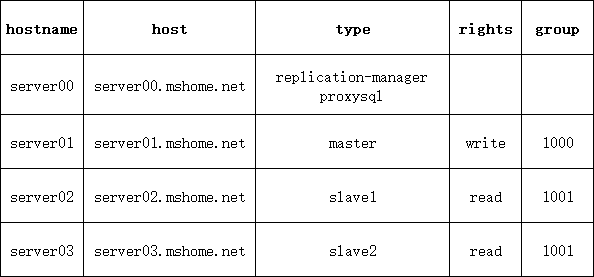
采用hyper-v创建虚拟机的方式进行的,创建1台模板之后另外3台导入虚拟机复制。
1、安装mysql
mysql8的默认加密插件变为了caching_sha2_password需要修改成mysql_native_password,因为proxysql不支持caching_sha2_password
安装完成后在server01、02、03上创建以下用户
rep-manager供replication-manager使用,repl供主从复制使用
mysql> create user 'rep-manager'@'%' identified by 'your password';
Query OK, 0 rows affected (0.01 sec)

mysql> create user 'repl'@'%' identified by 'your password';
Query OK, 0 rows affected (0.02 sec)

mysql> create user 'proxysql'@'%' identified by 'your password';
Query OK, 0 rows affected (0.02 sec)

mysql> grant process,replication slave,replication client on *.* to 'proxysql'@'%';
Query OK, 0 rows affected (0.01 sec)

mysql> grant select,replication slave,replication client,reload,super on *.* to 'repl'@'%';
Query OK, 0 rows affected, 1 warning (0.01 sec)

mysql> grant all privileges on *.* to 'rep-manager'@'%' with grant option;
Query OK, 0 rows affected (0.01 sec)

mysql> flush privileges;
Query OK, 0 rows affected (0.01 sec)
2、复制虚拟机
3、在server00上安装replication-manager
4、在server00上安装proxysql
5、启动mysql,创建主从半同步复制
半同步需要安装插件,在主库和从库上都安装
mysql> install plugin rpl_semi_sync_source soname 'semisync_source.so';
mysql> install plugin rpl_semi_sync_replica soname 'semisync_replica.so';
mysql> show plugins;
+----------------------------------+----------+--------------------+---------------------+---------+
| Name                             | Status   | Type               | Library             | License |
+----------------------------------+----------+--------------------+---------------------+---------+
| binlog                           | ACTIVE   | STORAGE ENGINE     | NULL                | GPL     |
| mysql_native_password            | ACTIVE   | AUTHENTICATION     | NULL                | GPL     |
| sha256_password                  | ACTIVE   | AUTHENTICATION     | NULL                | GPL     |
| caching_sha2_password            | ACTIVE   | AUTHENTICATION     | NULL                | GPL     |
| sha2_cache_cleaner               | ACTIVE   | AUDIT              | NULL                | GPL     |
| daemon_keyring_proxy_plugin      | ACTIVE   | DAEMON             | NULL                | GPL     |
| CSV                              | ACTIVE   | STORAGE ENGINE     | NULL                | GPL     |
| MEMORY                           | ACTIVE   | STORAGE ENGINE     | NULL                | GPL     |
| InnoDB                           | ACTIVE   | STORAGE ENGINE     | NULL                | GPL     |
| INNODB_TRX                       | ACTIVE   | INFORMATION SCHEMA | NULL                | GPL     |
| INNODB_CMP                       | ACTIVE   | INFORMATION SCHEMA | NULL                | GPL     |
| INNODB_CMP_RESET                 | ACTIVE   | INFORMATION SCHEMA | NULL                | GPL     |
| INNODB_CMPMEM                    | ACTIVE   | INFORMATION SCHEMA | NULL                | GPL     |
| INNODB_CMPMEM_RESET              | ACTIVE   | INFORMATION SCHEMA | NULL                | GPL     |
| INNODB_CMP_PER_INDEX             | ACTIVE   | INFORMATION SCHEMA | NULL                | GPL     |
| INNODB_CMP_PER_INDEX_RESET       | ACTIVE   | INFORMATION SCHEMA | NULL                | GPL     |
| INNODB_BUFFER_PAGE               | ACTIVE   | INFORMATION SCHEMA | NULL                | GPL     |
| INNODB_BUFFER_PAGE_LRU           | ACTIVE   | INFORMATION SCHEMA | NULL                | GPL     |
| INNODB_BUFFER_POOL_STATS         | ACTIVE   | INFORMATION SCHEMA | NULL                | GPL     |
| INNODB_TEMP_TABLE_INFO           | ACTIVE   | INFORMATION SCHEMA | NULL                | GPL     |
| INNODB_METRICS                   | ACTIVE   | INFORMATION SCHEMA | NULL                | GPL     |
| INNODB_FT_DEFAULT_STOPWORD       | ACTIVE   | INFORMATION SCHEMA | NULL                | GPL     |
| INNODB_FT_DELETED                | ACTIVE   | INFORMATION SCHEMA | NULL                | GPL     |
| INNODB_FT_BEING_DELETED          | ACTIVE   | INFORMATION SCHEMA | NULL                | GPL     |
| INNODB_FT_CONFIG                 | ACTIVE   | INFORMATION SCHEMA | NULL                | GPL     |
| INNODB_FT_INDEX_CACHE            | ACTIVE   | INFORMATION SCHEMA | NULL                | GPL     |
| INNODB_FT_INDEX_TABLE            | ACTIVE   | INFORMATION SCHEMA | NULL                | GPL     |
| INNODB_TABLES                    | ACTIVE   | INFORMATION SCHEMA | NULL                | GPL     |
| INNODB_TABLESTATS                | ACTIVE   | INFORMATION SCHEMA | NULL                | GPL     |
| INNODB_INDEXES                   | ACTIVE   | INFORMATION SCHEMA | NULL                | GPL     |
| INNODB_TABLESPACES               | ACTIVE   | INFORMATION SCHEMA | NULL                | GPL     |
| INNODB_COLUMNS                   | ACTIVE   | INFORMATION SCHEMA | NULL                | GPL     |
| INNODB_VIRTUAL                   | ACTIVE   | INFORMATION SCHEMA | NULL                | GPL     |
| INNODB_CACHED_INDEXES            | ACTIVE   | INFORMATION SCHEMA | NULL                | GPL     |
| INNODB_SESSION_TEMP_TABLESPACES  | ACTIVE   | INFORMATION SCHEMA | NULL                | GPL     |
| MyISAM                           | ACTIVE   | STORAGE ENGINE     | NULL                | GPL     |
| MRG_MYISAM                       | ACTIVE   | STORAGE ENGINE     | NULL                | GPL     |
| PERFORMANCE_SCHEMA               | ACTIVE   | STORAGE ENGINE     | NULL                | GPL     |
| TempTable                        | ACTIVE   | STORAGE ENGINE     | NULL                | GPL     |
| ARCHIVE                          | ACTIVE   | STORAGE ENGINE     | NULL                | GPL     |
| BLACKHOLE                        | ACTIVE   | STORAGE ENGINE     | NULL                | GPL     |
| FEDERATED                        | DISABLED | STORAGE ENGINE     | NULL                | GPL     |
| ndbcluster                       | DISABLED | STORAGE ENGINE     | NULL                | GPL     |
| ndbinfo                          | DISABLED | STORAGE ENGINE     | NULL                | GPL     |
| ndb_transid_mysql_connection_map | DISABLED | INFORMATION SCHEMA | NULL                | GPL     |
| ngram                            | ACTIVE   | FTPARSER           | NULL                | GPL     |
| mysqlx_cache_cleaner             | ACTIVE   | AUDIT              | NULL                | GPL     |
| mysqlx                           | ACTIVE   | DAEMON             | NULL                | GPL     |
| rpl_semi_sync_source             | ACTIVE   | REPLICATION        | semisync_source.so  | GPL     |
| rpl_semi_sync_replica            | ACTIVE   | REPLICATION        | semisync_replica.so | GPL     |
+----------------------------------+----------+--------------------+---------------------+---------+
50 rows in set (0.00 sec)
要想永久启用半同步需将配置写入my.cnf看下面的配置即可。
在主库上查看是否启用了半同步
 mysql> show variables like 'rpl_semi%';
+---------------------------------------------+------------+
| Variable_name                               | Value      |
+---------------------------------------------+------------+
| rpl_semi_sync_replica_enabled               | OFF        |
| rpl_semi_sync_replica_trace_level           | 32         |
| rpl_semi_sync_source_enabled                | ON         |
| rpl_semi_sync_source_timeout                | 10000      |
| rpl_semi_sync_source_trace_level            | 32         |
| rpl_semi_sync_source_wait_for_replica_count | 1          |
| rpl_semi_sync_source_wait_no_replica        | ON         |
| rpl_semi_sync_source_wait_point             | AFTER_SYNC |
+---------------------------------------------+------------+
从库上
mysql> show variables like 'rpl_semi%';
+---------------------------------------------+------------+
| Variable_name                               | Value      |
+---------------------------------------------+------------+
| rpl_semi_sync_replica_enabled               | ON         |
| rpl_semi_sync_replica_trace_level           | 32         |
| rpl_semi_sync_source_enabled                | ON         |
| rpl_semi_sync_source_timeout                | 10000      |
| rpl_semi_sync_source_trace_level            | 32         |
| rpl_semi_sync_source_wait_for_replica_count | 1          |
| rpl_semi_sync_source_wait_no_replica        | ON         |
| rpl_semi_sync_source_wait_point             | AFTER_SYNC |
+---------------------------------------------+------------+
8 rows in set (0.01 sec)
master主机mysql配置my.cnf如下
# For advice on how to change settings please see
# http://dev.mysql.com/doc/refman/8.0/en/server-configuration-defaults.html

[mysqld]
#
# Remove leading # and set to the amount of RAM for the most important data
# cache in MySQL. Start at 70% of total RAM for dedicated server, else 10%.
# innodb_buffer_pool_size = 128M
#
# Remove the leading "# " to disable binary logging
# Binary logging captures changes between backups and is enabled by
# default. It's default setting is log_bin=binlog
# disable_log_bin
#
# Remove leading # to set options mainly useful for reporting servers.
# The server defaults are faster for transactions and fast SELECTs.
# Adjust sizes as needed, experiment to find the optimal values.
# join_buffer_size = 128M
# sort_buffer_size = 2M
# read_rnd_buffer_size = 2M
#
# Remove leading # to revert to previous value for default_authentication_plugin,
# this will increase compatibility with older clients. For background, see:
# https://dev.mysql.com/doc/refman/8.0/en/server-system-variables.html#sysvar_default_authentication_plugin
# default-authentication-plugin=mysql_native_password

datadir=/var/lib/mysql
socket=/var/lib/mysql/mysql.sock

log-error=/var/log/mysqld.log
pid-file=/var/run/mysqld/mysqld.pid
default_authentication_plugin=mysql_native_password
######replication settings######
server-id=1001
log-bin=mysql-bin
binlog_format=row

binlog-ignore-db=mysql
binlog-ignore-db=information_schema
binlog-ignore-db=performance_schema
binlog-ignore-db=sys

######gtid#######
gtid_mode=on
enforce_gtid_consistency=on
binlog_gtid_simple_recovery=on

relay_log_recovery = ON
relay-log-index=mysql-relay
relay-log=mysql-relay

rpl_semi_sync_source_enabled = ON
rpl_semi_sync_replica_enabled = ON
log_slow_replica_statements = 1
slave主机myql的配置如下:
# For advice on how to change settings please see
# http://dev.mysql.com/doc/refman/8.0/en/server-configuration-defaults.html

[mysqld]
#
# Remove leading # and set to the amount of RAM for the most important data
# cache in MySQL. Start at 70% of total RAM for dedicated server, else 10%.
# innodb_buffer_pool_size = 128M
#
# Remove the leading "# " to disable binary logging
# Binary logging captures changes between backups and is enabled by
# default. It's default setting is log_bin=binlog
# disable_log_bin
#
# Remove leading # to set options mainly useful for reporting servers.
# The server defaults are faster for transactions and fast SELECTs.
# Adjust sizes as needed, experiment to find the optimal values.
# join_buffer_size = 128M
# sort_buffer_size = 2M
# read_rnd_buffer_size = 2M
#
# Remove leading # to revert to previous value for default_authentication_plugin,
# this will increase compatibility with older clients. For background, see:
# https://dev.mysql.com/doc/refman/8.0/en/server-system-variables.html#sysvar_default_authentication_plugin
# default-authentication-plugin=mysql_native_password

datadir=/var/lib/mysql
socket=/var/lib/mysql/mysql.sock

log-error=/var/log/mysqld.log
pid-file=/var/run/mysqld/mysqld.pid
default_authentication_plugin=mysql_native_password
######replication settings######
server-id=1002
log-bin=mysql-bin
binlog_format=row
log_slave_updates=on
relay_log_recovery=1

binlog-ignore-db=mysql
binlog-ignore-db=information_schema
binlog-ignore-db=performance_schema
binlog-ignore-db=sys

######gtid#######
gtid_mode=on
enforce_gtid_consistency=on
binlog_gtid_simple_recovery=on

relay_log_recovery = ON
relay-log-index=mysql-relay
relay-log=mysql-relay

rpl_semi_sync_source_enabled = ON
rpl_semi_sync_replica_enabled = ON
log_slow_replica_statements = 1

read_only = on
启动主从
mysql> CHANGE REPLICATION SOURCE to SOURCE_HOST='server01.mshome.net',SOURCE_USER='repl',SOURCE_PASSWORD='your password',SOURCE_PORT=3306;
Query OK, 0 rows affected, 3 warnings (0.03 sec)

mysql> start replica;
Query OK, 0 rows affected (0.02 sec)

mysql> show replica status\G;
*************************** 1. row ***************************
             Replica_IO_State: Waiting for source to send event
                  Source_Host: server01.mshome.net
                  Source_User: repl
                  Source_Port: 3306
                Connect_Retry: 60
              Source_Log_File: mysql-bin.000009
          Read_Source_Log_Pos: 157
               Relay_Log_File: mysql-relay.000010
                Relay_Log_Pos: 373
        Relay_Source_Log_File: mysql-bin.000009
           Replica_IO_Running: Yes
          Replica_SQL_Running: Yes
              Replicate_Do_DB:
          Replicate_Ignore_DB:
           Replicate_Do_Table:
       Replicate_Ignore_Table:
      Replicate_Wild_Do_Table:
  Replicate_Wild_Ignore_Table:
                   Last_Errno: 0
                   Last_Error:
                 Skip_Counter: 0
          Exec_Source_Log_Pos: 157
              Relay_Log_Space: 795
              Until_Condition: None
               Until_Log_File:
                Until_Log_Pos: 0
           Source_SSL_Allowed: No
           Source_SSL_CA_File:
           Source_SSL_CA_Path:
              Source_SSL_Cert:
            Source_SSL_Cipher:
               Source_SSL_Key:
        Seconds_Behind_Source: 0
Source_SSL_Verify_Server_Cert: No
                Last_IO_Errno: 0
                Last_IO_Error:
               Last_SQL_Errno: 0
               Last_SQL_Error:
  Replicate_Ignore_Server_Ids:
             Source_Server_Id: 1001
                  Source_UUID: 590af332-e04e-11ed-8935-00155d030202
             Source_Info_File: mysql.slave_master_info
                    SQL_Delay: 0
          SQL_Remaining_Delay: NULL
    Replica_SQL_Running_State: Replica has read all relay log; waiting for more updates
           Source_Retry_Count: 86400
                  Source_Bind:
      Last_IO_Error_Timestamp:
     Last_SQL_Error_Timestamp:
               Source_SSL_Crl:
           Source_SSL_Crlpath:
           Retrieved_Gtid_Set:
            Executed_Gtid_Set:
                Auto_Position: 0
         Replicate_Rewrite_DB:
                 Channel_Name:
           Source_TLS_Version:
       Source_public_key_path:
        Get_Source_public_key: 1
            Network_Namespace:
1 row in set (0.00 sec)

ERROR:
No query specified
server00主机上安装了replication-manager和proxysql
replication-manager的配置如下
查看replication-manager配置文件cluster1.toml
cat /etc/replication-manager/cluster.d/cluster1.toml[cluster1]
title = "cluster1"
prov-orchestrator = "onpremise"
prov-db-tags = "innodb,noquerycache,slow,pfs,pkg,linux,smallredolog,logtotable"
prov-db-memory = "256"
prov-db-memory-shared-pct = "threads:16,innodb:60,myisam:10,aria:10,rocksdb:1,tokudb:1,s3:1,archive:1,querycache:0"
prov-db-disk-size = "1"
prov-db-cpu-cores = "1"
prov-db-disk-iops = "300"
db-servers-hosts = "server01.mshome.net:3306,server02.mshome.net:3306,server03.mshome.net:3306"
db-servers-prefered-master = "server01.mshome.net:3306"
db-servers-credential = "rep-manager:yourpassword"
db-servers-connect-timeout = 5
replication-credential = "rep-manager:yourpassword"
verbose = false
log-failed-election = true
log-level = 1
log-rotate-max-age = 7
log-rotate-max-backup = 7
log-rotate-max-size = 5
log-sql-in-monitoring = true
log-sst = true
##############
## TOPOLOGY ##
##############
replication-multi-master = false
replication-multi-tier-slave = false
############
# BACKUPS ##
###########
backup-streaming = false
backup-streaming-aws-access-key-id = "admin"
backup-streaming-aws-access-secret = "xxxx"
backup-streaming-endpoint= "https://s3.signal18.io/"
backup-streaming-region= "fr-1"
backup-streaming-bucket= "repman"
#####这里可以设置备份工具restic,工具可以跨服务器,结合minio备份就很爽了,后续再介绍吧
backup-restic = false
backup-restic-aws = false
backup-physical-type = "mariabackup"
backup-logical-type = "mysqldump"
backup-restic-aws-access-secret = "xxxx"
backup-restic-password = "xxxx"
backup-restic-binary-path = "/usr/bin/restic"
monitoring-scheduler = true
scheduler-db-servers-logical-backup = true
scheduler-db-servers-logical-backup-cron= "0 30 23 * * 6"
scheduler-db-servers-logs = false
scheduler-db-servers-logs-cron = "0 0 * * * *"
scheduler-db-servers-logs-table-keep = 4
scheduler-db-servers-logs-table-rotate = false
scheduler-db-servers-logs-table-rotate-cron = "0 0 0/6 * * *"
scheduler-db-servers-optimize = false
scheduler-db-servers-optimize-cron = "0 0 3 1 * 5"
scheduler-db-servers-physical-backup = true
scheduler-db-servers-physical-backup-cron = "0 30 23 * * *"
##############
## FAILOVER ##
##############
failover-mode = "manual"
failover-pre-script = ""
failover-post-script = ""
## Slaves will re enter with read-only
failover-readonly-state = true
failover-event-scheduler = false
failover-event-status = false
## Failover after N failures detection
failover-falsepositive-ping-counter = 5
## Cancel failover if already N failover
## Cancel failover if last failover was N seconds before
## Cancel failover in semi-sync when one slave is not in sync
## Cancel failover if one slave receive master heartbeat
## Cancel failover when replication delay is more than N seconds
failover-limit = 0
failover-time-limit = 0
failover-at-sync = false
failover-max-slave-delay = 30
failover-restart-unsafe = false
# failover-falsepositive-heartbeat = true
# failover-falsepositive-heartbeat-timeout = 3
# failover-falsepositive-maxscale = false
# failover-falsepositive-maxscale-timeout = 14
# failover-falsepositive-external = false
# failover-falsepositive-external-port = 80
################
## SWITCHOVER ##
################
## In switchover Wait N milliseconds before killing long running transactions
## Cancel switchover if transaction running more than N seconds
## Cancel switchover if write query running more than N seconds
## Cancel switchover if one of the slaves is not synced based on GTID equality
switchover-wait-kill = 5000
switchover-wait-trx = 10
switchover-wait-write-query = 10
switchover-at-equal-gtid = false
switchover-at-sync = false
switchover-max-slave-delay = 30
############
## REJOIN ##
############
autorejoin = true
autorejoin-script = ""
autorejoin-semisync = true
autorejoin-backup-binlog = true
autorejoin-flashback = false
autorejoin-mysqldump = false
####################
## CHECKS & FORCE ##
####################
check-replication-filters = true
check-binlog-filters = true
check-replication-state = true
force-slave-heartbeat= false
force-slave-heartbeat-retry = 5
force-slave-heartbeat-time = 3
force-slave-gtid-mode = false
force-slave-semisync = false
force-slave-failover-readonly-state = false
force-binlog-row = false
force-binlog-annotate = false
force-binlog-slowqueries = false
force-binlog-compress = false
force-binlog-checksum = false
force-inmemory-binlog-cache-size = false
force-disk-relaylog-size-limit = false
force-disk-relaylog-size-limit-size = 1000000000
force-sync-binlog = false
force-sync-innodb = false
##############
## MAXSCALE ##
##############
## for 2 nodes cluster maxscale can be driven by replication manager
maxscale = false
maxscale-binlog = false
maxscale-servers = "192.168.0.201"
maxscale-port = 4003
maxscale-user = "admin"
maxscale-pass = "mariadb"
## When true replication manager drive maxscale server state
## Not required unless multiple maxscale or release does not support detect_stale_slave
maxscale-disable-monitor = false
## maxinfo|maxadmin
maxscale-get-info-method = "maxadmin"
maxscale-maxinfo-port = 4002
maxscale-write-port = 4007
maxscale-read-port = 4008
maxscale-read-write-port = 4006
maxscale-binlog-port = 4000
#############
## HAPROXY ##
#############
## Wrapper mode unless maxscale or proxysql required to be located with replication-manager
haproxy = false
haproxy-binary-path = "/usr/sbin/haproxy"
## Read write traffic
## Read only load balance least connection traffic
haproxy-write-port = 3306
haproxy-read-port = 3307
####################
## SHARDING PROXY ##
####################
mdbshardproxy = false
mdbshardproxy-hosts = "127.0.0.1:3306"
mdbshardproxy-user = "root:mariadb"
#################################
###### proxysql settings ########
#################################
proxysql = true
proxysql-servers = "127.0.0.1"
proxysql-port = "6033"
proxysql-admin-port = "6032"
proxysql-writer-hostgroup = "1000"
proxysql-reader-hostgroup = "1001"
proxysql-user = "admin"
proxysql-password = "admin"
proxysql-bootstrap = false
proxysql-bootstrap-users = false #不从master复制用户到proxysql,因为复制会出问题
proxysql-bootstrap-hostgroups = false
proxysql-bootstrap-variables = false查看replication-manager配置文件config.toml
cat /etc/replication-manager/config.toml[Default]
include = "/etc/replication-manager/cluster.d"
monitoring-save-config = false
monitoring-datadir = "/var/lib/replication-manager"
#monitoring-sharedir = "/usr/share/replication-manager"
## Timeout in seconds between consecutive monitoring
monitoring-ticker = 2
#########
## LOG ##
#########
log-file = "/var/log/replication-manager.log"
log-heartbeat = false
log-syslog = false
#################
## ARBITRATION ##
#################
arbitration-external = false
arbitration-external-secret = "13787932529099014144"
arbitration-external-hosts = "88.191.151.84:80"
arbitration-peer-hosts ="127.0.0.1:10002"
## Unique value on each replication-manager
arbitration-external-unique-id = 0
##########
## HTTP ##
##########
http-server = true
http-bind-address = "0.0.0.0"
http-port = "10001"
http-auth = false
http-session-lifetime = 3600
http-bootstrap-button = false
http-refresh-interval = 4000
#########
## API ##
#########
api-credentials = "admin:repman"
api-port = "10005"
api-https-bind = false
api-credentials-acl-allow = "admin:cluster proxy db prov,dba:cluster proxy db,foo:"
api-credentials-acl-discard = false
api-credentials-external = "dba:repman,foo:bar"
############
## ALERTS ##
############
mail-from = "replication-manager@localhost"
mail-smtp-addr = "localhost:25"
mail-to = "replication-manager@signal18.io"
mail-smtp-password=""
mail-smtp-user=""
alert-slack-channel = "#support"
alert-slack-url = ""
alert-slack-user = "svar"
##########
# STATS ##
##########
graphite-metrics = false
graphite-carbon-host = "127.0.0.1"
graphite-carbon-port = 2003
graphite-embedded = false
graphite-carbon-api-port = 10002
graphite-carbon-server-port = 10003
graphite-carbon-link-port = 7002
graphite-carbon-pickle-port = 2004
graphite-carbon-pprof-port = 7007
####这里可以设置逻辑备份和物理备份的程序,结合上面的配置里的restic做备份,很不错,后续有时间了再继续配置吧
backup-mydumper-path = "/usr/local/bin/mydumper"
backup-myloader-path = "/usr/local/bin/myloader"
backup-mysqlbinlog-path = "/usr/local/bin/mysqlbinlog"
backup-mysqldump-path = "/usr/local/bin/mysqldump"
##############
# BENCHMARK ##
##############
sysbench-binary-path = "/usr/bin/sysbench"
sysbench-threads = 4
sysbench-time = 100
sysbench-v1 = true查看proxysql的配置
cat /etc/proxysql.cnf#file proxysql.cfg
########################################################################################
# This config file is parsed using libconfig , and its grammar is described in:
# http://www.hyperrealm.com/libconfig/libconfig_manual.html#Configuration-File-Grammar
# Grammar is also copied at the end of this file
########################################################################################
########################################################################################
# IMPORTANT INFORMATION REGARDING THIS CONFIGURATION FILE:
########################################################################################
# On startup, ProxySQL reads its config file (if present) to determine its datadir.
# What happens next depends on if the database file (disk) is present in the defined
# datadir (i.e. "/var/lib/proxysql/proxysql.db").
#
# If the database file is found, ProxySQL initializes its in-memory configuration from
# the persisted on-disk database. So, disk configuration gets loaded into memory and
# then propagated towards the runtime configuration.
#
# If the database file is not found and a config file exists, the config file is parsed
# and its content is loaded into the in-memory database, to then be both saved on-disk
# database and loaded at runtime.
#
# IMPORTANT: If a database file is found, the config file is NOT parsed. In this case
# ProxySQL initializes its in-memory configuration from the persisted on-disk
# database ONLY. In other words, the configuration found in the proxysql.cnf
# file is only used to initial the on-disk database read on the first startup.
#
# In order to FORCE a re-initialise of the on-disk database from the configuration file
# the ProxySQL service should be started with "systemctl start proxysql-initial".
#
########################################################################################
datadir="/var/lib/proxysql"
errorlog="/var/lib/proxysql/proxysql.log"
admin_variables=
{
admin_credentials="admin:admin"
# mysql_ifaces="127.0.0.1:6032;/tmp/proxysql_admin.sock"
mysql_ifaces="0.0.0.0:6032"
# refresh_interval=2000
# debug=true
}
mysql_variables=
{
threads=4
max_connections=2048
default_query_delay=0
default_query_timeout=36000000
have_compress=true
poll_timeout=2000
# interfaces="0.0.0.0:6033;/tmp/proxysql.sock"
interfaces="0.0.0.0:6033"
default_schema="information_schema"
stacksize=1048576
server_version="5.5.30"
connect_timeout_server=3000
# make sure to configure monitor username and password
# https://github.com/sysown/proxysql/wiki/Global-variables#mysql-monitor_username-mysql-monitor_password
monitor_username="monitor"
monitor_password="monitor"
monitor_history=600000
monitor_connect_interval=60000
monitor_ping_interval=10000
monitor_read_only_interval=1500
monitor_read_only_timeout=500
ping_interval_server_msec=120000
ping_timeout_server=500
commands_stats=true
sessions_sort=true
connect_retries_on_failure=10
}
# defines all the MySQL servers
mysql_servers =
(
# {
# address = "127.0.0.1" # no default, required . If port is 0 , address is interpred as a Unix Socket Domain
# port = 3306 # no default, required . If port is 0 , address is interpred as a Unix Socket Domain
# hostgroup = 0 # no default, required
# status = "ONLINE" # default: ONLINE
# weight = 1 # default: 1
# compression = 0 # default: 0
# max_replication_lag = 10 # default 0 . If greater than 0 and replication lag passes such threshold, the server is shunned
# },
# {
# address = "/var/lib/mysql/mysql.sock"
# port = 0
# hostgroup = 0
# },
# {
# address="127.0.0.1"
# port=21891
# hostgroup=0
# max_connections=200
# },
# { address="127.0.0.2" , port=3306 , hostgroup=0, max_connections=5 },
# { address="127.0.0.1" , port=21892 , hostgroup=1 },
# { address="127.0.0.1" , port=21893 , hostgroup=1 }
# { address="127.0.0.2" , port=3306 , hostgroup=1 },
# { address="127.0.0.3" , port=3306 , hostgroup=1 },
# { address="127.0.0.4" , port=3306 , hostgroup=1 },
# { address="/var/lib/mysql/mysql.sock" , port=0 , hostgroup=1 }
)
# defines all the MySQL users
mysql_users:
(
# {
# username = "username" # no default , required
# password = "password" # default: ''
# default_hostgroup = 0 # default: 0
# active = 1 # default: 1
# },
# {
# username = "root"
# password = ""
# default_hostgroup = 0
# max_connections=1000
# default_schema="test"
# active = 1
# },
# { username = "user1" , password = "password" , default_hostgroup = 0 , active = 0 }
)
#defines MySQL Query Rules
mysql_query_rules:
(
# {
# rule_id=1
# active=1
# match_pattern="^SELECT .* FOR UPDATE$"
# destination_hostgroup=0
# apply=1
# },
# {
# rule_id=2
# active=1
# match_pattern="^SELECT"
# destination_hostgroup=1
# apply=1
# }
)
scheduler=
(
# {
# id=1
# active=0
# interval_ms=10000
# filename="/var/lib/proxysql/proxysql_galera_checker.sh"
# arg1="0"
# arg2="0"
# arg3="0"
# arg4="1"
# arg5="/var/lib/proxysql/proxysql_galera_checker.log"
# }
)
mysql_replication_hostgroups=
(
# {
# writer_hostgroup=30
# reader_hostgroup=40
# comment="test repl 1"
# },
# {
# writer_hostgroup=50
# reader_hostgroup=60
# comment="test repl 2"
# }
)
# http://www.hyperrealm.com/libconfig/libconfig_manual.html#Configuration-File-Grammar
#
# Below is the BNF grammar for configuration files. Comments and include directives are not part of the grammar, so they are not included here.
#
# configuration = setting-list | empty
#
# setting-list = setting | setting-list setting
#
# setting = name (":" | "=") value (";" | "," | empty)
#
# value = scalar-value | array | list | group
#
# value-list = value | value-list "," value
#
# scalar-value = boolean | integer | integer64 | hex | hex64 | float
# | string
#
# scalar-value-list = scalar-value | scalar-value-list "," scalar-value
#
# array = "[" (scalar-value-list | empty) "]"
#
# list = "(" (value-list | empty) ")"
#
# group = "{" (setting-list | empty) "}"
#
# empty =其实proxysql配置基本上在启动了之后都是通过数据库来设置的配置文件
proxysql的配置如下,进入proxysql
[root@server00 ~]# mysql -uadmin -p -P6032 -h127.0.0.1 --prompt='proxysql Admin> '
Enter password:
Welcome to the MySQL monitor.  Commands end with ; or \g.
Your MySQL connection id is 9037
Server version: 5.5.30 (ProxySQL Admin Module)

Copyright (c) 2000, 2023, Oracle and/or its affiliates.

Oracle is a registered trademark of Oracle Corporation and/or its
affiliates. Other names may be trademarks of their respective
owners.

Type 'help;' or '\h' for help. Type '\c' to clear the current input statement.

proxysql Admin>
proxysql Admin> set mysql-monitor_username='proxysql';
Query OK, 1 row affected (0.00 sec)

proxysql Admin> set mysql-monitor_password='your password';
Query OK, 1 row affected (0.00 sec)
proxysql Admin> select * from global_variables;

| mysql-monitor_username                                               | proxysql                                   |
| mysql-monitor_password                                               | your password                              |
| mysql-monitor_history                                                | 600000                                     |
| mysql-monitor_connect_interval                                       | 60000                                      |
| mysql-monitor_ping_interval                                          | 10000                                      |
| mysql-monitor_read_only_interval                                     | 1500                                       |
| mysql-monitor_read_only_timeout                                      | 500                                        |
| mysql-ping_interval_server_msec                                      | 120000                                     |
| mysql-ping_timeout_server                                            | 500                                        |
| mysql-commands_stats                                                 | true                                       |
| mysql-sessions_sort                                                  | true                                       |
| mysql-connect_retries_on_failure                                     | 10                                         |
| mysql-server_capabilities                                            | 569899                                     |
+----------------------------------------------------------------------+--------------------------------------------+
proxysql Admin> load mysql variables to runtime;
Query OK, 0 rows affected (0.00 sec)

proxysql Admin> save mysql variables to disk;
Query OK, 155 rows affected (0.01 sec)
proxysql Admin> insert into mysql_replication_hostgroups values(1000,1001,'read_only','读1000写1001分离');
Query OK, 1 row affected (0.00 sec)

proxysql Admin> insert into mysql_servers(hostgroup_id,hostname,port) values(1000,'server01.mshome.net',3306);
Query OK, 1 row affected (0.00 sec)

proxysql Admin> insert into mysql_servers(hostgroup_id,hostname,port) values(1001,'server02.mshome.net',3306);
Query OK, 1 row affected (0.00 sec)

proxysql Admin> insert into mysql_servers(hostgroup_id,hostname,port) values(1001,'server03.mshome.net',3306);
Query OK, 1 row affected (0.00 sec)

proxysql Admin> load mysql servers to runtime;
Query OK, 0 rows affected (0.00 sec)

proxysql Admin> save mysql servers to disk;
Query OK, 0 rows affected (0.05 sec)
proxysql Admin> delete from mysql_users;
Query OK, 1 row affected (0.00 sec)

proxysql Admin> insert into mysql_users(username,password,default_hostgroup) values('appbox','Appbox@123',1000);
Query OK, 1 row affected (0.00 sec)

proxysql Admin> load mysql users to runtime;
Query OK, 0 rows affected (0.00 sec)

proxysql Admin> save mysql users to disk;
Query OK, 0 rows affected (0.02 sec)
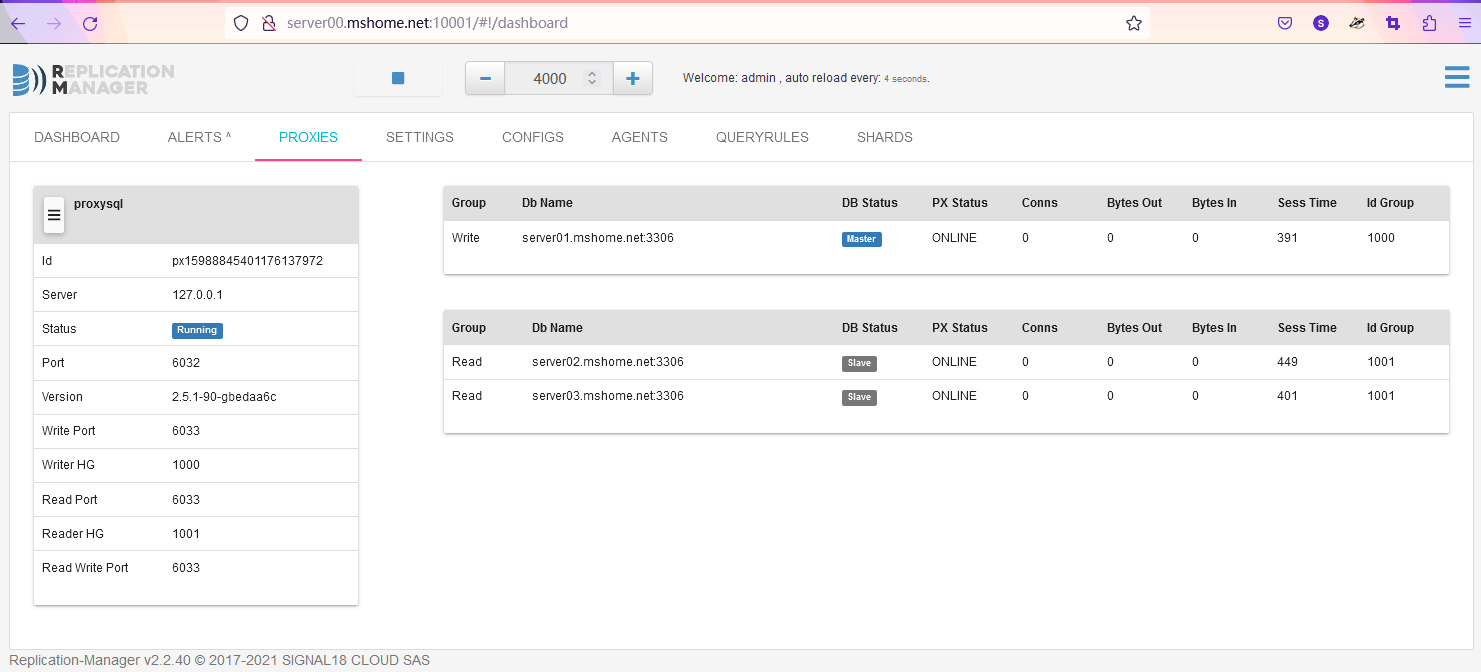
按照以上配置打开replication-manager的web管理端,默认账号admin密码repman
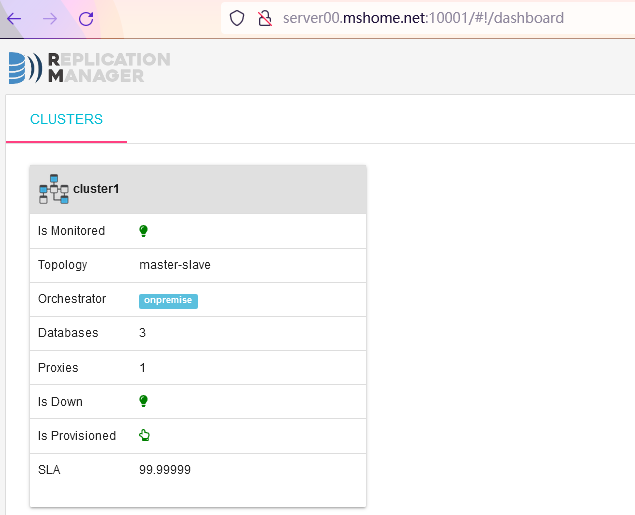
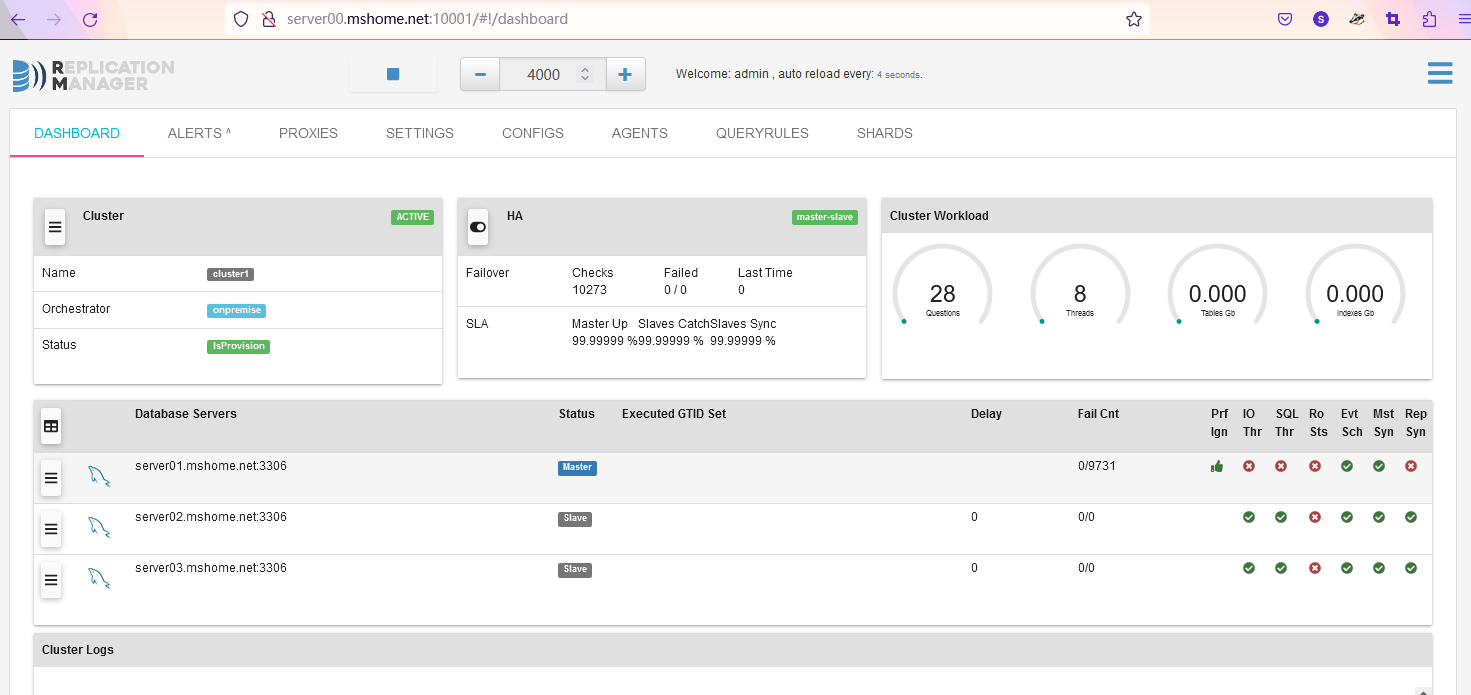
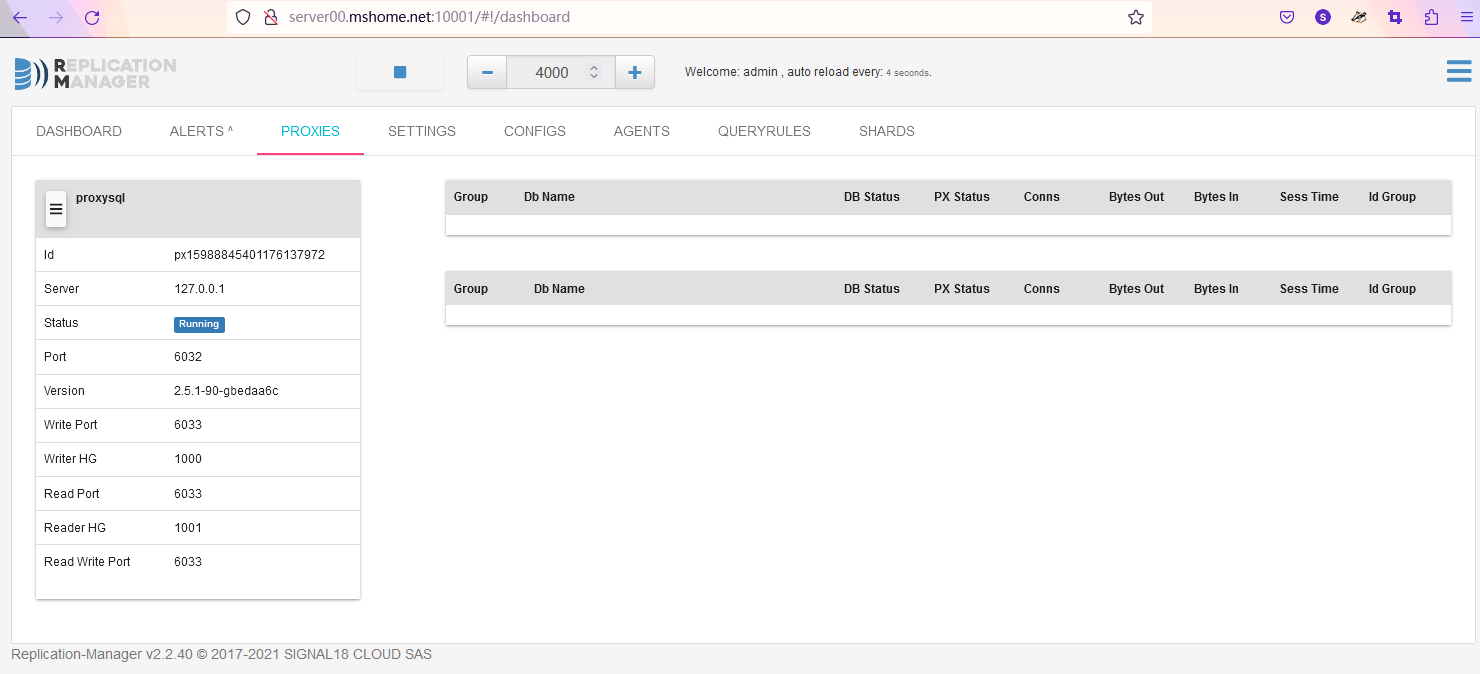
在server01的主库上创建appbox用户
mysql> create user appbox@'%' identified by 'Appbox@123';
Query OK, 0 rows affected (0.01 sec)

mysql> create database appboxdb character set utf8mb4;
Query OK, 1 row affected (0.01 sec)

mysql> grant all privileges on appboxdb.* to appbox@'%';
Query OK, 0 rows affected (0.01 sec)

mysql>
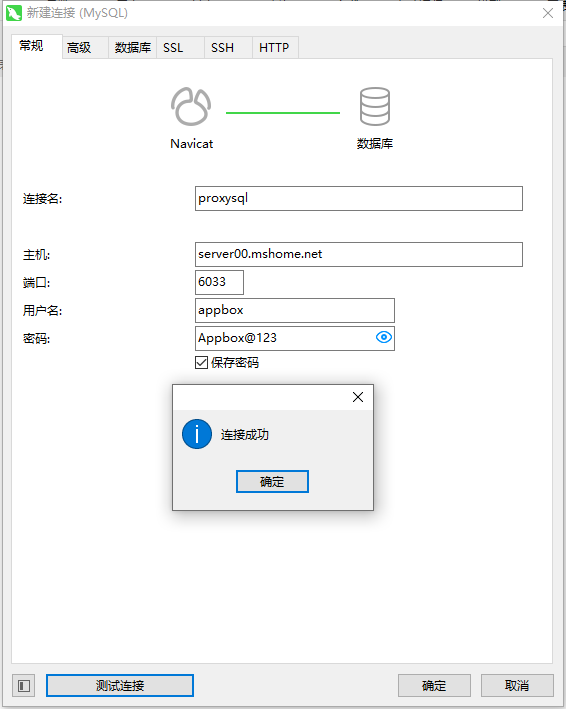
用Navicat连proxysql
在proxysql中插入读写规则
insert into mysql_query_rules(rule_id,active,match_digest,destination_hostgroup,apply)values(1,1,'^SELECT.*FOR UPDATE$',100,1);
insert into mysql_query_rules(rule_id,active,match_digest,destination_hostgroup,apply)values(2,1,'^SELECT',1000,1);
load mysql query rules to runtime;
save mysql query rules to disk;
bash下进行读写测试
for i in {1..100}; do mysql -uappbox -pAppbox@123 -h server00.mshome.net -P6033 -e 'select * from mysql.user LIMIT 2;' ; sleep 0.5; done如果有用,欢迎打赏,不限金额

我在app/helpers/sessions_helper.rb中有一个帮助程序文件,其中包含一个方法my_preference,它返回当前登录用户的首选项。我想在集成测试中访问该方法。例如,这样我就可以在测试中使用getuser_path(my_preference)。在其他帖子中,我读到这可以通过在测试文件中包含requiresessions_helper来实现,但我仍然收到错误NameError:undefinedlocalvariableormethod'my_preference'.我做错了什么?require'test_helper'require'sessions_hel
文章目录一、概述简介原理模块二、配置Mysql使用版本环境要求1.操作系统2.mysql要求三、配置canal-server离线下载在线下载上传解压修改配置单机配置集群配置分库分表配置1.修改全局配置2.实例配置垂直分库水平分库3.修改group-instance.xml4.启动监听四、配置canal-adapter1修改启动配置2配置映射文件3启动ES数据同步查询所有订阅同步数据同步开关启动4.验证五、配置canal-admin一、概述简介canal是Alibaba旗下的一款开源项目,Java开发。基于数据库增量日志解析,提供增量数据订阅&消费。Git地址:https://github.co
我看到其他人也遇到过类似的问题,但没有一个解决方案对我有用。0.3.14gem与其他gem文件一起存在。我已经完全按照此处指示完成了所有操作:https://github.com/brianmario/mysql2.我仍然得到以下信息。我不知道为什么安装程序指示它找不到include目录,因为我已经检查过它存在。thread.h文件存在,但不在ruby目录中。相反,它在这里:C:\RailsInstaller\DevKit\lib\perl5\5.8\msys\CORE\我正在运行Windows7并尝试在Aptana3中构建我的Rails项目。我的Ruby是1.9.3。$gemin
我想编写一个ruby脚本来递归复制目录结构,但排除某些文件类型。因此,给定以下目录结构:folder1folder2file1.txtfile2.txtfile3.csfile4.htmlfolder2folder3file4.dll我想复制这个结构,但不包含.txt和.cs文件。因此,生成的目录结构应如下所示:folder1folder2file4.htmlfolder2folder3file4.dll 最佳答案 您可以使用查找模块。这是一个代码片段:require"find"ignored_extensions=[".cs"
我已经开始使用mysql2gem。我试图弄清楚一些基本的事情——其中之一是如何明确地执行事务(对于批处理操作,比如多个INSERT/UPDATE查询)。在旧的ruby-mysql中,这是我的方法:client=Mysql.real_connect(...)inserts=["INSERTINTO...","UPDATE..WHEREid=..",#etc]client.autocommit(false)inserts.eachdo|ins|beginclient.query(ins)rescue#handleerrorsorabortentirelyendendclient.commi
我的rails3.1.6应用程序中有一个自定义访问器方法,它为一个属性分配一个值,即使该值不存在。my_attr属性是一个序列化的哈希,除非为空白,否则应与给定值合并指定了值,在这种情况下,它将当前值设置为空值。(添加了检查以确保值是它们应该的值,但为简洁起见被删除,因为它们不是我的问题的一部分。)我的setter定义为:defmy_attr=(new_val)cur_val=read_attribute(:my_attr)#storecurrentvalue#makesureweareworkingwithahash,andresetvalueifablankvalueisgiven
之前有人问过这个问题,我发现了以下clip关于如何一次设置一个类对象的所有属性,但由于批量分配保护,这在Rails中是不可能的。(例如,您不能Object.attributes={})有没有一种很好的方法可以将一个类的属性合并到另一个类中?object1.attributes=object2.attributes.inject({}){|h,(k,v)|h[k]=vifObjectModel.column_names.include?(k);h}谢谢。 最佳答案 利用assign_attributes使用:without_prote
(跟进我之前的问题,Ruby:howcanIcopyavariablewithoutpointingtothesameobject?)我正在编写一个简单的Ruby程序来在.svg文件中进行一些替换。第一步是从文件中提取信息并将其放入数组中。为了避免每次调用此函数时都从磁盘读取文件,我尝试使用memoize设计模式-在第一次调用后的每次调用中都使用缓存结果。为此,我使用了一个在函数之前定义的全局变量。但是,即使我在返回局部变量之前将该变量.dup为局部变量,调用该变量的函数仍在修改全局变量。这是我的实际代码:#memoizetokeepfromhavingtoreadoriginalfi
我正在尝试绕过rails配置这个极其复杂的迷宫。到目前为止,我设法在ubuntu上设置了rvm(出于某种原因,ruby在ubuntu存储库中已经过时了)。我设法建立了一个Rails项目。我希望我的测试项目使用mysql而不是mysqlite。当我尝试“rakedb:migrate”时,出现错误:“!!!缺少mysql2gem。将其添加到您的Gemfile:gem'mysql2'”当我尝试“geminstallmysql”时,出现错误,告诉我需要为安装命令提供参数。但是,参数列表很大,我不知道该选择哪些。如何通过在ubuntu上运行的rvm和mysql获取rails3?谢谢。
有没有办法在liquidtemplate中输出(用于调试/信息目的)可用对象和对象属性??也就是说,假设我正在使用jekyll站点生成工具,并且我在我的index.html模板中(据我所知,这是一个液体模板)。它可能看起来像这样{%forpostinsite.posts%}{{post.date|date_to_string}}»{{post.title}}{%endfor%}是否有任何我可以使用的模板标签会告诉我/输出名为post的变量在此模板(以及其他模板)中可用。此外,是否有任何模板标签可以告诉我post对象具有键date、title、url、摘录、永久链接等
