目录
在浏览器与服务器通信间,传统的 HTTP 请求在某些场景下并不理想,比如实时聊天、实时性的小游戏等等,
其面临主要两个缺点:
其基于 HTTP 的主要解决方案有:
可以看到,基于 HTTP 协议的方案都包含一个本质缺陷 —— 「被动性」,服务端无法下推消息,仅能由客户端发起请求不断询问是否有新的消息,同时对于客户端与服务端都存在性能消耗。
WebSocket 是 HTML5 开始提供的一种浏览器与服务器间进行全双工通讯的网络技术。 WebSocket 通信协议于2011年被IETF定为标准RFC 6455,WebSocketAPI 被 W3C 定为标准。 在 WebSocket API 中,浏览器和服务器只需要要做一个握手的动作,然后,浏览器和服务器之间就形成了一条快速通道。两者之间就直接可以数据互相传送。
WebSocket 是 HTML5 中提出的新的网络协议标准,其包含几个特点:
实践
准配工作
所需要架包 注意:springboot环境 版本2.7.7
  <dependency>
      <groupId>org.springframework.boot</groupId>
      <artifactId>spring-boot-starter-web</artifactId>
  </dependency>
  <dependency>
      <groupId>org.springframework.boot</groupId>
      <artifactId>spring-boot-starter-websocket</artifactId>
  </dependency>

  <dependency>
      <groupId>org.projectlombok</groupId>
      <artifactId>lombok</artifactId>
      <optional>true</optional>
  </dependency>
  <dependency>
      <groupId>org.springframework.boot</groupId>
      <artifactId>spring-boot-starter-test</artifactId>
      <scope>test</scope>
  </dependency>
<!--  <dependency>
      <groupId>cn.hutool</groupId>
      <artifactId>hutool-json</artifactId>
      <version>5.8.9</version>
  </dependency>-->
  <dependency>
      <groupId>com.alibaba</groupId>
      <artifactId>fastjson</artifactId>
      <version>2.0.21</version>
  </dependency>
  <dependency>
      <groupId>org.apache.commons</groupId>
      <artifactId>commons-lang3</artifactId>
      <version>3.7</version>
  </dependency>
application配置
server.port=8080
server.servlet.context-path=/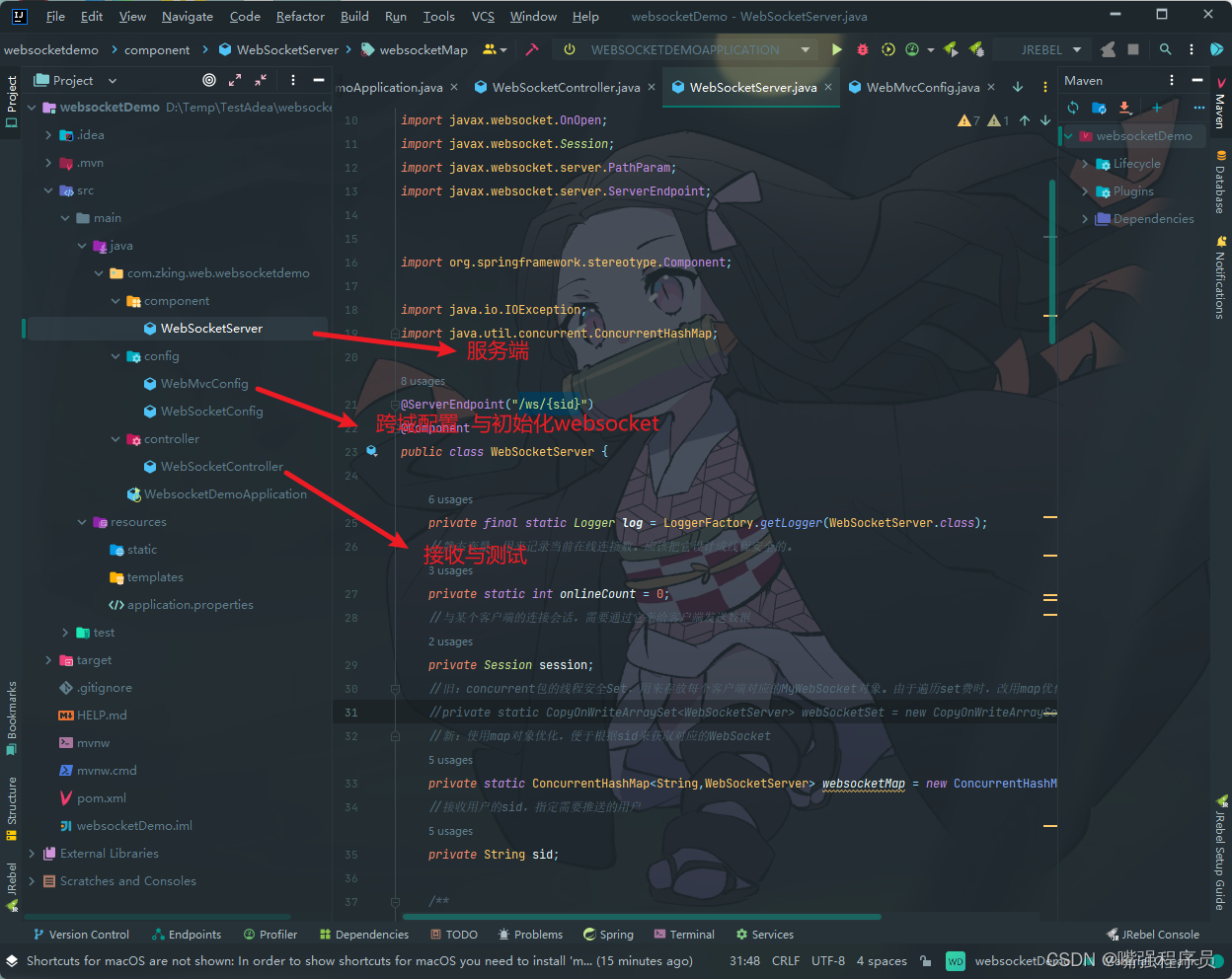
package com.zking.web.websocketdemo.config;

import org.slf4j.Logger;
import org.slf4j.LoggerFactory;
import org.springframework.context.annotation.Bean;
import org.springframework.context.annotation.Configuration;
import org.springframework.web.servlet.config.annotation.CorsRegistry;
import org.springframework.web.servlet.config.annotation.WebMvcConfigurer;
import org.springframework.web.socket.server.standard.ServerEndpointExporter;


/**
 * Spring MVC 配置
 */
@Configuration
public class WebMvcConfig implements WebMvcConfigurer {

    private final Logger logger = LoggerFactory.getLogger(WebMvcConfig.class);

    //服务器支持跨域
    @Override
    public void addCorsMappings(CorsRegistry registry) {
        registry.addMapping("/**")
                .allowedOrigins("*")
                .allowedMethods("GET", "POST","OPTIONS")
                .allowedHeaders("*")
                .exposedHeaders("Access-Control-Allow-Headers",
                        "Access-Control-Allow-Methods",
                        "Access-Control-Allow-Origin",
                        "Access-Control-Max-Age",
                        "X-Frame-Options")
                .allowCredentials(false)
                .maxAge(3600);
    }


    /**
     * The bean shown in the preceding example registers any @ServerEndpoint
     * annotated beans with the underlying WebSocket container. When deployed to a
     * standalone servlet container, this role is performed by a servlet container
     * initializer, and the ServerEndpointExporter bean is not required.
     *
     * @return
     * 在Spring中可以直接使用Java WebSocket API来提供服务,如果使用内置的web容器,需要做的仅仅是需要在下面添加
     */
    /** 注入ServerEndpointExporter,这个bean会自动注册使用了@ServerEndpoint注解声明的Websocket endpoint 。
     * 要注意,如果使用独立的servlet容器,而不是直接使用springboot的内置容器,就不要注入ServerEndpointExporter,因为它将由容器自己提供和管理。*/
    @Bean
    public ServerEndpointExporter serverEndpointExporter() {
        return new ServerEndpointExporter();
    }

}websocket 是 javax.websocket下面的,不需要任何依赖,直接就可以使用
@ServerEndpoint 标记声明一个websocket 服务 ,configurator 属性指定 鉴权 配置类,@ServerEndpoint 标记的类 为每个链接会创建一个该对象实例,也就是成员变量这个链接内私有。
@OnOpen , @OnClose , @OnMessage , @OnError 4个事件方法,对应事件触发的时候调用 (除了@PathParam("path") 标记的参数以外,最多只能有 String message, Session session 两个参数)
package com.zking.web.websocketdemo.component;

import org.apache.commons.lang3.StringUtils;
import org.slf4j.Logger;
import org.slf4j.LoggerFactory;

import javax.websocket.OnClose;
import javax.websocket.OnError;
import javax.websocket.OnMessage;
import javax.websocket.OnOpen;
import javax.websocket.Session;
import javax.websocket.server.PathParam;
import javax.websocket.server.ServerEndpoint;


import org.springframework.stereotype.Component;

import java.io.IOException;
import java.util.concurrent.ConcurrentHashMap;

@ServerEndpoint("/ws/{sid}")
@Component
public class WebSocketServer {

    private final static Logger log = LoggerFactory.getLogger(WebSocketServer.class);
    //静态变量,用来记录当前在线连接数。应该把它设计成线程安全的。
    private static int onlineCount = 0;
    //与某个客户端的连接会话,需要通过它来给客户端发送数据
    private Session session;
    //旧:concurrent包的线程安全Set,用来存放每个客户端对应的MyWebSocket对象。由于遍历set费时,改用map优化
    //private static CopyOnWriteArraySet<WebSocketServer> webSocketSet = new CopyOnWriteArraySet<WebSocketServer>();
    //新:使用map对象优化,便于根据sid来获取对应的WebSocket
    private static ConcurrentHashMap<String,WebSocketServer> websocketMap = new ConcurrentHashMap<>();
    //接收用户的sid,指定需要推送的用户
    private String sid;

    /**
     * 连接成功后调用的方法
     */
    @OnOpen
    public void onOpen(Session session,@PathParam("sid") String sid) {
        this.session = session;
        //webSocketSet.add(this);     //加入set中
        websocketMap.put(sid,this); //加入map中
        addOnlineCount();           //在线数加1
        log.info("有新窗口开始监听:"+sid+",当前在线人数为" + getOnlineCount());
        this.sid=sid;
        try {
            sendMessage("连接成功");
        } catch (IOException e) {
            log.error("websocket IO异常");
        }
    }

    /**
     * 连接关闭调用的方法
     */
    @OnClose
    public void onClose() {
        if(websocketMap.get(this.sid)!=null){
            //webSocketSet.remove(this);  //从set中删除
            websocketMap.remove(this.sid);  //从map中删除
            subOnlineCount();           //在线数减1
            log.info("有一连接关闭!当前在线人数为" + getOnlineCount());
        }
    }

    /**
     * 收到客户端消息后调用的方法,根据业务要求进行处理,这里就简单地将收到的消息直接群发推送出去
     * @param message 客户端发送过来的消息
     */
    @OnMessage
    public void onMessage(String message, Session session) {
        log.info("收到来自窗口"+sid+"的信息:"+message);
        if(StringUtils.isNotBlank(message)){
            for(WebSocketServer server:websocketMap.values()) {
                try {
                    server.sendMessage(message);
                } catch (IOException e) {
                    e.printStackTrace();
                    continue;
                }
            }
        }
    }

    /**
     * 发生错误时的回调函数
     * @param session
     * @param error
     */
    @OnError
    public void onError(Session session, Throwable error) {
        log.error("发生错误");
        error.printStackTrace();
    }

    /**
     * 实现服务器主动推送消息
     */
    public void sendMessage(String message) throws IOException {
        this.session.getBasicRemote().sendText(message);
    }


    /**
     * 群发自定义消息(用set会方便些)
     * */
    public static void sendInfo(@PathParam("message")  String message,@PathParam("sid") String sid) throws IOException {
        log.info("推送消息到窗口"+sid+",推送内容:"+message);
        /*for (WebSocketServer item : webSocketSet) {
            try {
                //这里可以设定只推送给这个sid的,为null则全部推送
                if(sid==null) {
                    item.sendMessage(message);
                }else if(item.sid.equals(sid)){
                    item.sendMessage(message);
                }
            } catch (IOException e) {
                continue;
            }
        }*/
        if(StringUtils.isNotBlank(message)){
            for(WebSocketServer server:websocketMap.values()) {
                try {
                    // sid为null时群发,不为null则只发一个
                    if (sid == null) {
                        server.sendMessage(message);
                    } else if (server.sid.equals(sid)) {
                        server.sendMessage(message);
                    }
                } catch (IOException e) {
                    e.printStackTrace();
                    continue;
                }
            }
        }
    }

    public static synchronized int getOnlineCount() {
        return onlineCount;
    }
    public static synchronized void addOnlineCount() {
        WebSocketServer.onlineCount++;
    }
    public static synchronized void subOnlineCount() {
        WebSocketServer.onlineCount--;
    }
}
package com.zking.web.websocketdemo.controller;

import com.zking.web.websocketdemo.component.WebSocketServer;
import com.zking.web.websocketdemo.config.WebSocketConfig;
import org.springframework.beans.factory.annotation.Autowired;
import org.springframework.stereotype.Controller;
import org.springframework.web.bind.annotation.GetMapping;
import org.springframework.web.bind.annotation.PathVariable;
import org.springframework.web.bind.annotation.RequestMapping;
import org.springframework.web.bind.annotation.ResponseBody;
import org.springframework.web.servlet.ModelAndView;

import java.io.IOException;
import java.util.HashMap;
import java.util.Map;

@Controller
@RequestMapping("/websocket")
public class WebSocketController {

    //页面请求
    @GetMapping("/socket/{cid}")
    public ModelAndView socket(@PathVariable String cid) {
        ModelAndView mav=new ModelAndView("/socket");
        mav.addObject("cid", cid);
        return mav;
    }
    //推送数据接口
    @ResponseBody
    @RequestMapping("/socket/push/{cid}")
    public Map<String,Object> pushToWeb(@PathVariable String cid, String message) {
        Map<String,Object> result = new HashMap<>();
        try {
            WebSocketServer.sendInfo(message,cid);
            result.put("status","success");
        } catch (IOException e) {
            e.printStackTrace();
            result.put("status","fail");
            result.put("errMsg",e.getMessage());
        }
        return result;
    }

}
后端准配完毕
<!DOCTYPE html>
<html>
<head>
    <meta charset="utf-8">
    <title>websocket通讯</title>
</head>
<script src="https://cdn.bootcss.com/jquery/3.3.1/jquery.js"></script>
<script>
    var socket;
    function openSocket() {
        if(typeof(WebSocket) == "undefined") {
            console.log("您的浏览器不支持WebSocket");
        }else{
            console.log("您的浏览器支持WebSocket");
            //实现化WebSocket对象,指定要连接的服务器地址与端口  建立连接
            //等同于socket = new WebSocket("ws://localhost:8888/xxxx/im/25");
            //var socketUrl="${request.contextPath}/im/"+$("#userId").val();
            var socketUrl="http://localhost:8080/ws/"+$("#userId").val();
            socketUrl=socketUrl.replace("https","ws").replace("http","ws");
            console.log(socketUrl);
            if(socket!=null){
                socket.close();
                socket=null;
            }
            socket = new WebSocket(socketUrl);
            //打开事件
            socket.onopen = function() {
                console.log("websocket已打开");
                //socket.send("这是来自客户端的消息" + location.href + new Date());
            };
            //获得消息事件
            socket.onmessage = function(msg) {
                console.log(msg.data);
                //发现消息进入    开始处理前端触发逻辑
            };
            //关闭事件
            socket.onclose = function() {
                console.log("websocket已关闭");
            };
            //发生了错误事件
            socket.onerror = function() {
                console.log("websocket发生了错误");
            }
        }
    }
    function sendMessage() {
        if(typeof(WebSocket) == "undefined") {
            console.log("您的浏览器不支持WebSocket");
        }else {
            console.log("您的浏览器支持WebSocket");
            console.log('{"toUserId":"'+$("#toUserId").val()+'","contentText":"'+$("#contentText").val()+'"}');
            socket.send('{"toUserId":"'+$("#toUserId").val()+'","contentText":"'+$("#contentText").val()+'"}');
        }
    }
</script>
<body>
<p>【userId】:<div><input id="userId" name="userId" type="text" value="10"></div>
<p>【toUserId】:<div><input id="toUserId" name="toUserId" type="text" value="20"></div>
<p>【toUserId】:<div><input id="contentText" name="contentText" type="text" value="hello websocket"></div>
<p>【操作】:<div><a onclick="openSocket()">开启socket</a></div>
<p>【操作】:<div><a onclick="sendMessage()">发送消息</a></div>
</body>
</html>
运行前端与后端
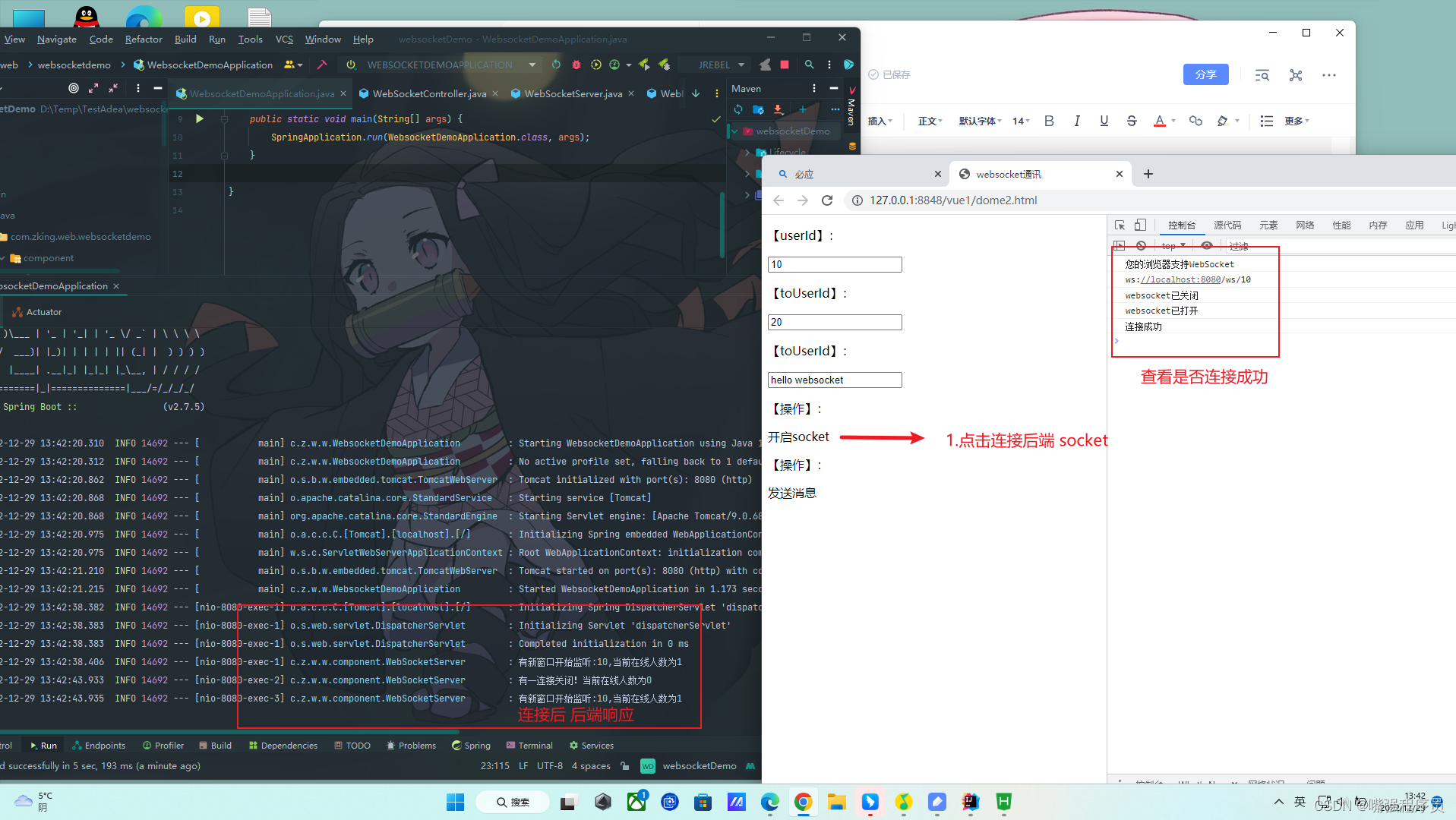
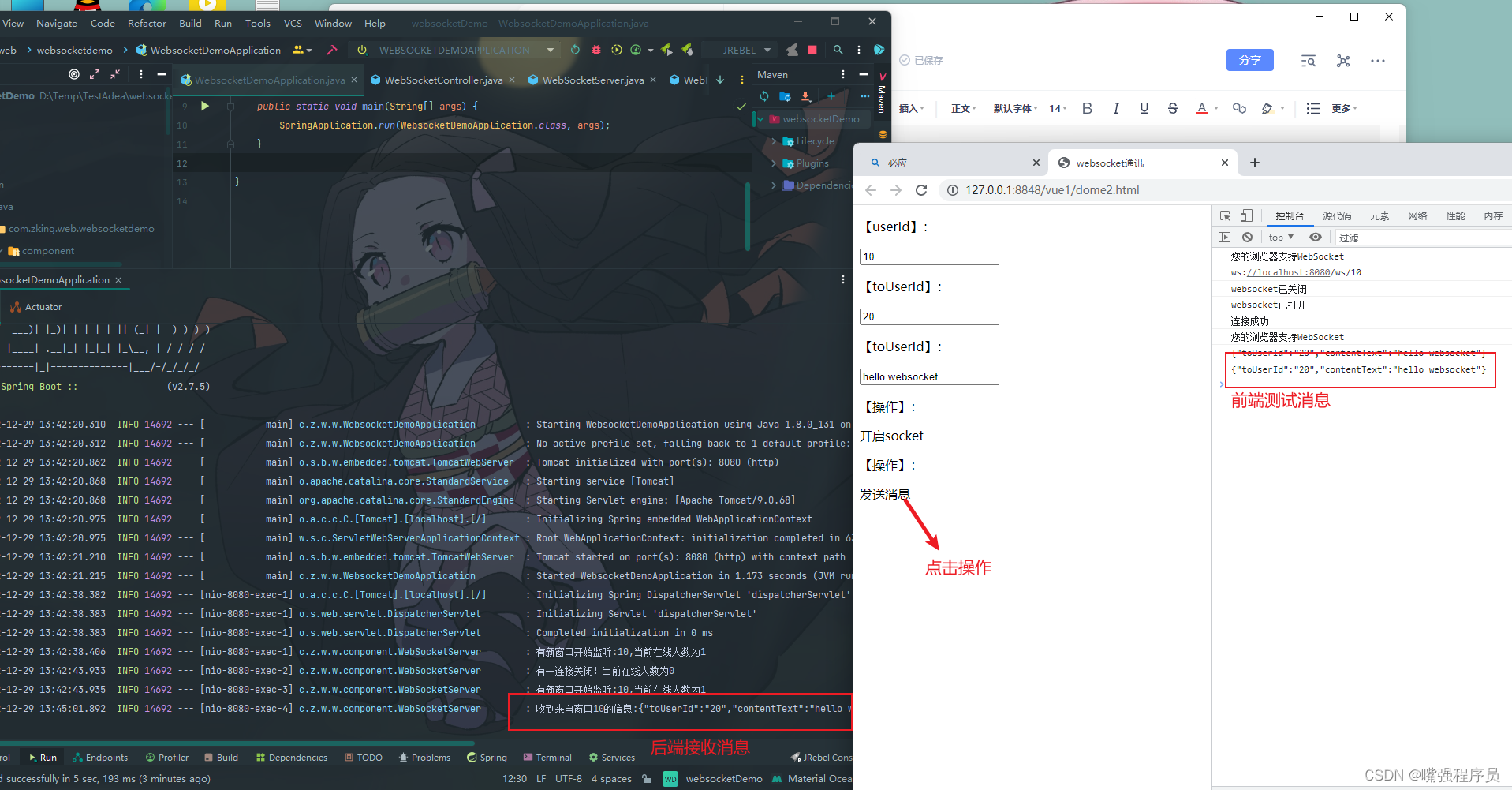
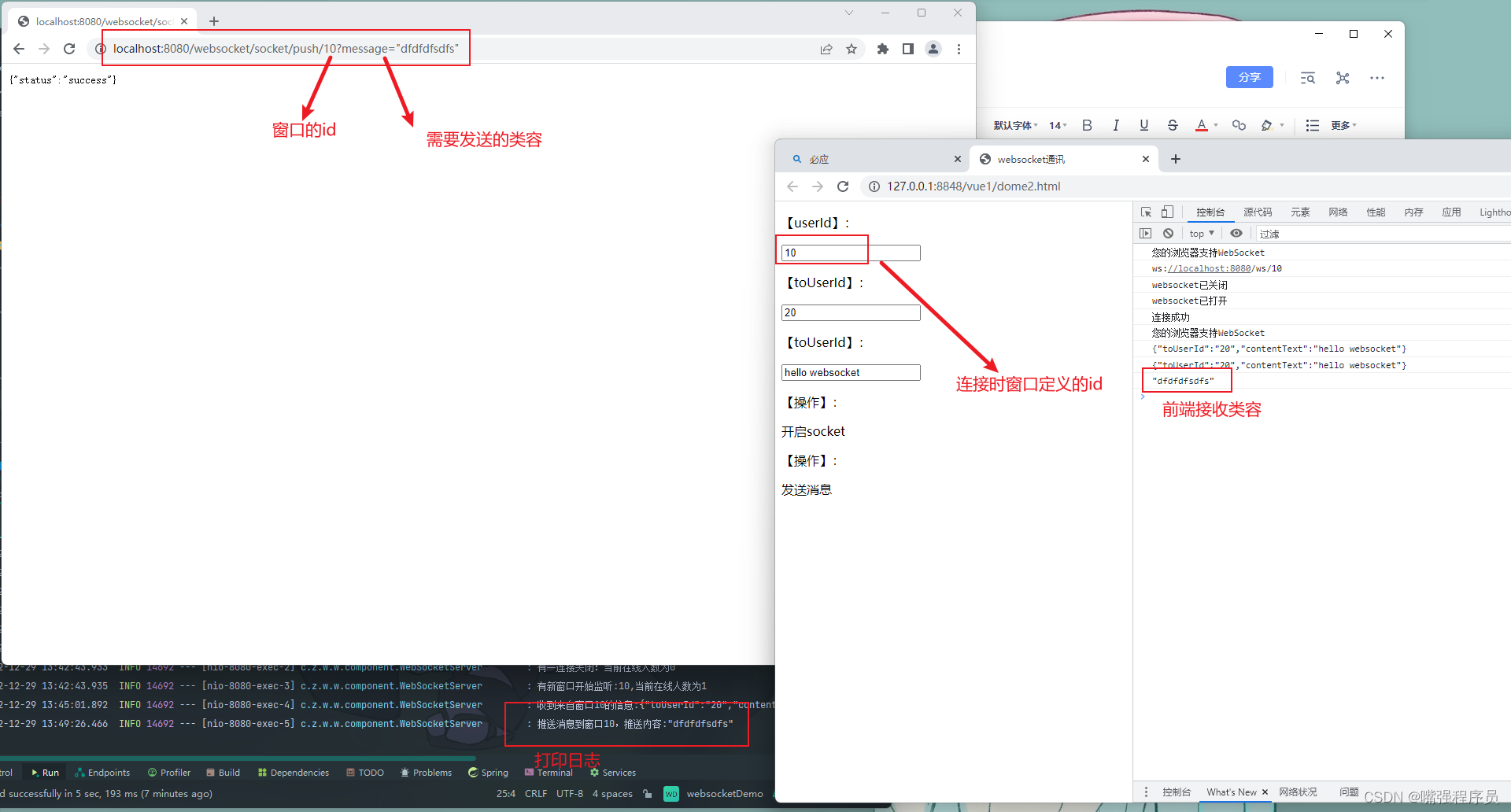
我正在学习如何使用Nokogiri,根据这段代码我遇到了一些问题:require'rubygems'require'mechanize'post_agent=WWW::Mechanize.newpost_page=post_agent.get('http://www.vbulletin.org/forum/showthread.php?t=230708')puts"\nabsolutepathwithtbodygivesnil"putspost_page.parser.xpath('/html/body/div/div/div/div/div/table/tbody/tr/td/div
我有一个Ruby程序,它使用rubyzip压缩XML文件的目录树。gem。我的问题是文件开始变得很重,我想提高压缩级别,因为压缩时间不是问题。我在rubyzipdocumentation中找不到一种为创建的ZIP文件指定压缩级别的方法。有人知道如何更改此设置吗?是否有另一个允许指定压缩级别的Ruby库? 最佳答案 这是我通过查看rubyzip内部创建的代码。level=Zlib::BEST_COMPRESSIONZip::ZipOutputStream.open(zip_file)do|zip|Dir.glob("**/*")d
类classAprivatedeffooputs:fooendpublicdefbarputs:barendprivatedefzimputs:zimendprotecteddefdibputs:dibendendA的实例a=A.new测试a.foorescueputs:faila.barrescueputs:faila.zimrescueputs:faila.dibrescueputs:faila.gazrescueputs:fail测试输出failbarfailfailfail.发送测试[:foo,:bar,:zim,:dib,:gaz].each{|m|a.send(m)resc
很好奇,就使用rubyonrails自动化单元测试而言,你们正在做什么?您是否创建了一个脚本来在cron中运行rake作业并将结果邮寄给您?git中的预提交Hook?只是手动调用?我完全理解测试,但想知道在错误发生之前捕获错误的最佳实践是什么。让我们理所当然地认为测试本身是完美无缺的,并且可以正常工作。下一步是什么以确保他们在正确的时间将可能有害的结果传达给您? 最佳答案 不确定您到底想听什么,但是有几个级别的自动代码库控制:在处理某项功能时,您可以使用类似autotest的内容获得关于哪些有效,哪些无效的即时反馈。要确保您的提
假设我做了一个模块如下:m=Module.newdoclassCendend三个问题:除了对m的引用之外,还有什么方法可以访问C和m中的其他内容?我可以在创建匿名模块后为其命名吗(就像我输入“module...”一样)?如何在使用完匿名模块后将其删除,使其定义的常量不再存在? 最佳答案 三个答案:是的,使用ObjectSpace.此代码使c引用你的类(class)C不引用m:c=nilObjectSpace.each_object{|obj|c=objif(Class===objandobj.name=~/::C$/)}当然这取决于
我正在尝试使用ruby和Savon来使用网络服务。测试服务为http://www.webservicex.net/WS/WSDetails.aspx?WSID=9&CATID=2require'rubygems'require'savon'client=Savon::Client.new"http://www.webservicex.net/stockquote.asmx?WSDL"client.get_quotedo|soap|soap.body={:symbol=>"AAPL"}end返回SOAP异常。检查soap信封,在我看来soap请求没有正确的命名空间。任何人都可以建议我
关闭。这个问题是opinion-based.它目前不接受答案。想要改进这个问题?更新问题,以便editingthispost可以用事实和引用来回答它.关闭4年前。Improvethisquestion我想在固定时间创建一系列低音和高音调的哔哔声。例如:在150毫秒时发出高音调的蜂鸣声在151毫秒时发出低音调的蜂鸣声200毫秒时发出低音调的蜂鸣声250毫秒的高音调蜂鸣声有没有办法在Ruby或Python中做到这一点?我真的不在乎输出编码是什么(.wav、.mp3、.ogg等等),但我确实想创建一个输出文件。
我在我的项目目录中完成了compasscreate.和compassinitrails。几个问题:我已将我的.sass文件放在public/stylesheets中。这是放置它们的正确位置吗?当我运行compasswatch时,它不会自动编译这些.sass文件。我必须手动指定文件:compasswatchpublic/stylesheets/myfile.sass等。如何让它自动运行?文件ie.css、print.css和screen.css已放在stylesheets/compiled。如何在编译后不让它们重新出现的情况下删除它们?我自己编译的.sass文件编译成compiled/t
我想将html转换为纯文本。不过,我不想只删除标签,我想智能地保留尽可能多的格式。为插入换行符标签,检测段落并格式化它们等。输入非常简单,通常是格式良好的html(不是整个文档,只是一堆内容,通常没有anchor或图像)。我可以将几个正则表达式放在一起,让我达到80%,但我认为可能有一些现有的解决方案更智能。 最佳答案 首先,不要尝试为此使用正则表达式。很有可能你会想出一个脆弱/脆弱的解决方案,它会随着HTML的变化而崩溃,或者很难管理和维护。您可以使用Nokogiri快速解析HTML并提取文本:require'nokogiri'h
我想为Heroku构建一个Rails3应用程序。他们使用Postgres作为他们的数据库,所以我通过MacPorts安装了postgres9.0。现在我需要一个postgresgem并且共识是出于性能原因你想要pggem。但是我对我得到的错误感到非常困惑当我尝试在rvm下通过geminstall安装pg时。我已经非常明确地指定了所有postgres目录的位置可以找到但仍然无法完成安装:$envARCHFLAGS='-archx86_64'geminstallpg--\--with-pg-config=/opt/local/var/db/postgresql90/defaultdb/po
