目录
Vlan虽然控制了广播域,但是不同vlan之间不能通信。 为实现交换机不同vlan下也可进行通信,引出单臂路由。
路由器与交换机连接的接口处,而且是trunk链路,此接口有子接口,而子接口可用作两个网段,相当于正常的路由器接口,可配置IP地址。用两个子接口实现路由功能。
Pc发送到另一个pc时,经过交换机,交换机首先检查从哪个接口来的,根据接口的vlan,向上找网关,子接口经过vlan绑定后,只能识别该vlan的数据,路由器收到后,查看目标IP,根据路由表,找另一个子接口,因为另一个子接口在另一个vlan中,所以,在下发时,子接口就加上vlan的标签号,再经过交换机后,交换机先检查vlan的标签号,再看目的地址.
Int f0/0.1(此命令相当于在f0/0接口中衍生出的子接口)
在此接口配置 encapsulation dot1q + vlan的号 (对路由接口绑定,只能封装和解包该vlan号上面的,成为该vlan的网关)
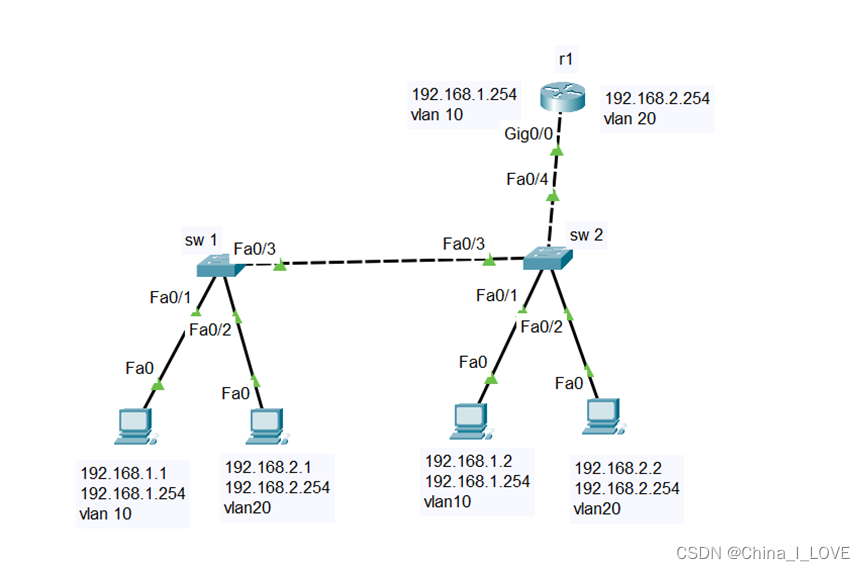
配置sw1交换机
Sw1(config)#vlan 10
Sw1(config-vlan)#exit
Sw1(config)#vlan 20
Sw1(config-vlan)#exit
Sw1(config)#int f0/1
Sw1(config-if)#switchport access vlan 10
Sw1(config-if)#exit
Sw1(config)#int f0/2
Sw1(config-if)#switchport access vlan 20
Sw1(config-if)#exit
Sw1(config)#int f0/3
Sw1(config-if)#switchport mode trunk
Sw1(config-if)#exit
配置sw2交换机
Sw2(config)#vlan 10
Sw2(config-vlan)#exit
Sw2(config)#vlan 20
Sw2(config-vlan)#exit
Sw2(config)#int f0/1
Sw2(config-if)#switchport access vlan 10
Sw2(config-if)#exit
Sw2(config)#int f0/2
Sw2(config-if)#switchport access vlan 20
Sw2(config-if)#exit
Sw2(config)#int f0/3
Sw2(config-if)#switchport mode trunk
Sw2(config-if)#exit
Sw2(config)#int f0/4
Sw2(config-if)#switchport mode trunk
Sw2(config-if)#exit
配置路由器r1
R1(config)#int g0/0.1
R1(config-subif)#encapsulation dot1Q 10
R1(config-subif)#ip address 192.168.1.254 255.255.255.0
R1(config-subif)#no shutdown
R1(config-subif)#exit
R1(config)#int g0/0.2
R1(config-subif)#encapsulation dot1Q 20
R1(config-subif)#ip address 192.168.2.254 255.255.255.0
R1(config-subif)#no sh
R1(config-subif)#exit
R1(config)#int g0/0
R1(config-if)#no shutdown在实验1的基础上进行扩展
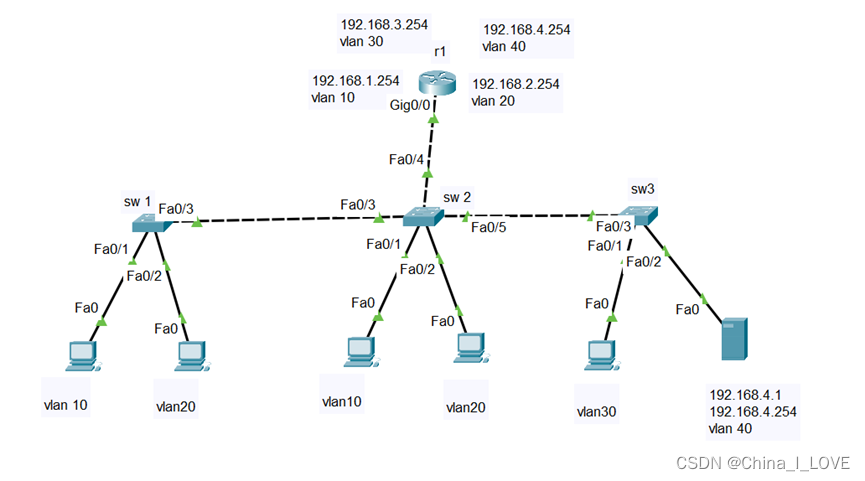
交换机的配置与实验1的vlan划分同理,此处就忽略
路由器配置
ip dhcp excluded-address 192.168.1.1 192.168.1.99
ip dhcp excluded-address 192.168.2.1 192.168.2.99
ip dhcp excluded-address 192.168.3.1 192.168.3.99
ip dhcp excluded-address 192.168.4.1 192.168.4.99

ip dhcp pool v10
    network 192.168.1.0 255.255.255.0
    default-router 192.168.1.254
    dns-server 192.168.4.1

ip dhcp pool v20
    network 192.168.2.0 255.255.255.0
    default-router 192.168.2.254
    dns-server 192.168.4.1

ip dhcp pool v30
    network 192.168.3.0 255.255.255.0
    default-router 192.168.3.254
    dns-server 192.168.4.1

ip dhcp pool v40
    network 192.168.4.0 255.255.255.0
    default-router 192.168.4.254
    dns-server 192.168.4.1
路由器的网段分配由端口的vlan号提供,而在路由器中valn绑定的IP地址只有一个网段,所以根据vlan号,即可确定pc的网段。
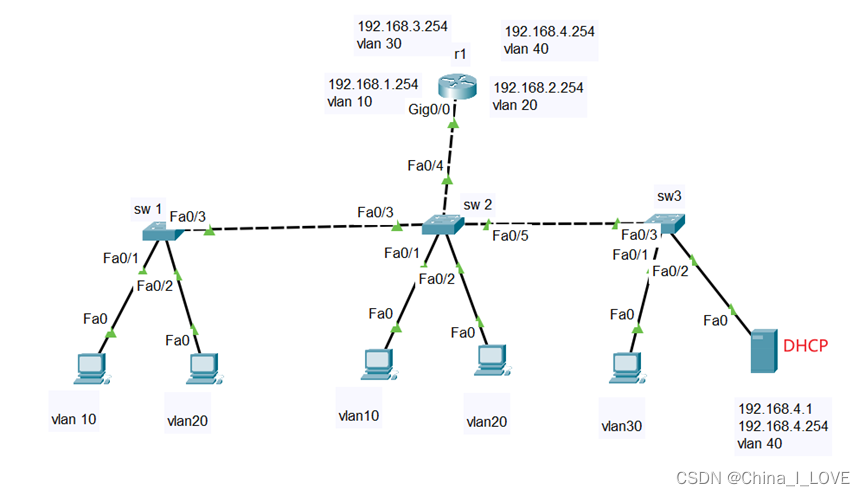
由DHCP服务器配置地址池,而由于vlan的不同,不能使pc获取到动态IP地址
此时,由路由器进行中继转发。
路由器主要配置命令如下:
Router(config)#int g0/0.3
Router(config-subif)#ip helper-address 192.168.4.1
Router(config-subif)#exit
其余配置,与实验2一致
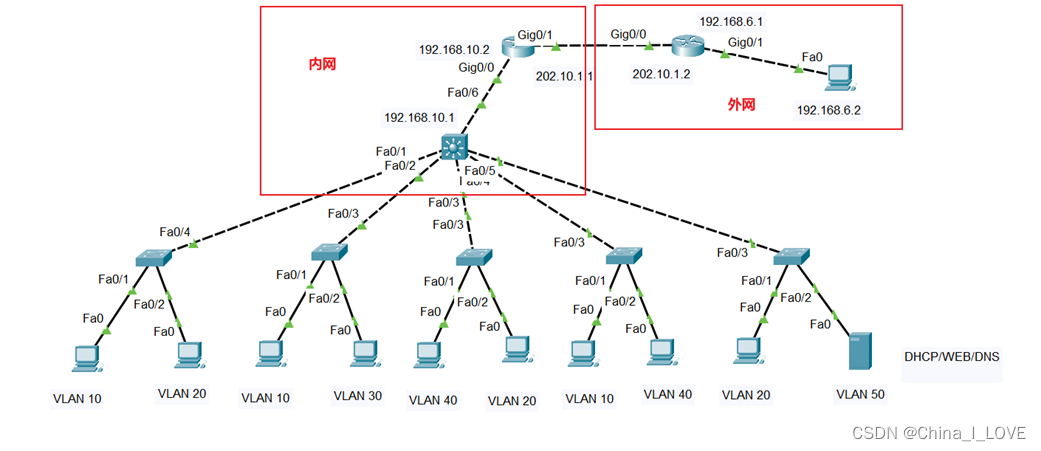
对二层交换机的配置
Switch(config)#vlan +id
Switch(config)#int f0/0                        //进入连接PC的链路
Switch(config-if)#switchport access vlan +id   //对其划分vlan
Switch(config)#int f0/4                        //进入连接三层交换机的链路
Switch(config-if)#switchport mode trunk        //配置trunk链路
其余二层交换机类似
对三层交换机配置
Switch(config)#int range f0/1 – 5                               //进入端口1--15
Switch(config-range-if)#switchport trunk encapsulation dot1q    //封装协议—802.1q
Switch(config-rang-if)#switchport mode trunk                    //设置为trunk
Switch(config)#vtp domain [name]                                //开启VTP,即vlan中继
Switch(config)#vlan +id                                         //创建vlan,VTP,配置后,在同一域中的交换机自动学习到vlan
Switch(config)#int vlan +id
Switch(config-vlan)#ip address IP 地址  子网掩码
Switch(config-vlan)#ip helper-address                           //DHCP中继
Switch(config)#ip routing                                       //开启三层交换机的路由功能
Switch(config)#int f0/6
Switch(config-if)#no switchport                                 //把该端口设置为路由接口
Switch(config-if)# ip address IP地址  子网掩码
Switch(config)#ip route 0.0.0.0  0.0.0.0  192.168.10.2          //配置默认路由
对内网中的路由器进行配置
首先配置IP地址,这里就不再说
Switch(config)#ip address IP地址   子网掩码

Switch(config)# ip route 192.168.1.0 255.255.255.0 192.168.10.1  //配置路由,每一个网段

……………………                                                        //中间省略

Switch(config)#ip route 192.168.6.0 255.255.255.0 202.10.1.2 //配置连接外网的路由
对外网的路由器进行配置
首先配置IP地址,这里不说了
Switch(config)#ip route 0.0.0.0 0.0.0.0 202.10.1.1 //这里配置默认路由即可
Rails2.3可以选择随时使用RouteSet#add_configuration_file添加更多路由。是否可以在Rails3项目中做同样的事情? 最佳答案 在config/application.rb中:config.paths.config.routes在Rails3.2(也可能是Rails3.1)中,使用:config.paths["config/routes"] 关于ruby-on-rails-Rails3中的多个路由文件,我们在StackOverflow上找到一个类似的问题
我没有找到太多关于如何执行此操作的信息,尽管有很多关于如何使用像这样的redirect_to将参数传递给重定向的建议:action=>'something',:controller=>'something'在我的应用程序中,我在路由文件中有以下内容match'profile'=>'User#show'我的表演Action是这样的defshow@user=User.find(params[:user])@title=@user.first_nameend重定向发生在同一个用户Controller中,就像这样defregister@title="Registration"@user=Use
我真的为这个而疯狂。我一直在搜索答案并尝试我找到的所有内容,包括相关问题和stackoverflow上的答案,但仍然无法正常工作。我正在使用嵌套资源,但无法使表单正常工作。我总是遇到错误,例如没有路线匹配[PUT]"/galleries/1/photos"表格在这里:/galleries/1/photos/1/edit路线.rbresources:galleriesdoresources:photosendresources:galleriesresources:photos照片Controller.rbdefnew@gallery=Gallery.find(params[:galle
Rails中有没有一种方法可以提取与路由关联的HTTP动词?例如,给定这样的路线:将“users”匹配到:“users#show”,通过:[:get,:post]我能实现这样的目标吗?users_path.respond_to?(:get)(显然#respond_to不是正确的方法)我最接近的是通过执行以下操作,但它似乎并不令人满意。Rails.application.routes.routes.named_routes["users"].constraints[:request_method]#=>/^GET$/对于上下文,我有一个设置cookie然后执行redirect_to:ba
路由有如下代码:resources:orders,only:[:create],defaults:{format:'json'}resources:users,only:[:create,:update],defaults:{format:'json'}resources:delivery_types,only:[:index],defaults:{format:'json'}resources:time_corrections,only:[:index],defaults:{format:'json'}是否可以使用1个字符串为所有资源设置默认格式,每行不带“默认值”散列?谢谢。
我正在使用rails3和cucumber,除了这个小问题,一切都很顺利GivenIamonthe"editautomobile"pageNoroutematches{:controller=>"automobiles",:action=>"edit"}(ActionController::RoutingError)现在路径在paths.rb中设置为edit_automobile_path在routes.rb中我有汽车作为资源,我搭建了它所以请告诉我我遗漏了什么,清楚地定义了路线并且匹配,因为我运行了rake路线并看到了路线。请指出正确的方向 最佳答案
有什么方法可以为url/path助手提供默认值吗?我有一个可选范围环绕我的所有路线:#config/routes.rbFoo::Application.routes.drawdoscope"(:current_brand)",:constraints=>{:current_brand=>/(foo)|(bar)/}do#...allotherroutesgohereendend我希望用户能够使用这些URL访问网站:/foo/some-place/bar/some-place/some-place为了方便起见,我在我的ApplicationController中设置了一个@current
我如何将像“root_path”这样的Rails路由助手作为类方法添加到像my_model.rb这样的类中?所以我的课是这样的:ClassMyModeldefself.fooreturnself.root_pathendendMyModel.foo以上不起作用,因为ClassMyModel不响应root_path这是我所知道的:我可以使用includeRails.application.routes.url_helpers,但这只会将模块的方法添加为实例方法我试过扩展Rails.application.routes.url_helpers但它没用请随时给我上课:)
尝试从我的AngularJS端将数据发布到Rails服务器时出现问题。服务器错误:ActionController::RoutingError(Noroutematches[OPTIONS]"/users"):actionpack(4.1.9)lib/action_dispatch/middleware/debug_exceptions.rb:21:in`call'actionpack(4.1.9)lib/action_dispatch/middleware/show_exceptions.rb:30:in`call'railties(4.1.9)lib/rails/rack/logg
我正在尝试根据RyanBatesscreencastonsubdomains在Rails3中设置子域.但是它对我不起作用。我有以下设置:#routes.rbconstraints(Subdomain)doget'devices'=>'devices#all'end#lib/subdomain.rbclassSubdomaindefself.matches?(request)#binding.pryrequest.subdomain.present?&&request.subdomain=="admin"endend加载urladmin.localhost:3000/devices应该将
