本人是web后端研发,习惯使用spring boot 相关框架,因此技术选型直接使用的是spring boot,目前并未使用 spring-data-hadoop 依赖,因为这个依赖已经在 2019 年终止了,可以点击查看 ,所以我这里使用的是自己找的依赖,
声明:此依赖可能和你使用的不兼容,我这个适用于我自己的CDH配套环境,如果遇到不兼容情况,自行修改相关版本即可
代码库地址:https://github.com/lcy19930619/cdh-demo
Hadoop是一个由Apache基金会所开发的分布式系统基础架构。用户可以在不了解分布式底层细节的情况下,开发分布式程序。充分利用集群的威力进行高速运算和存储。Hadoop 中的HDFS 是CDH数据系统中的核心存储单元,也是学习其他组件的基础
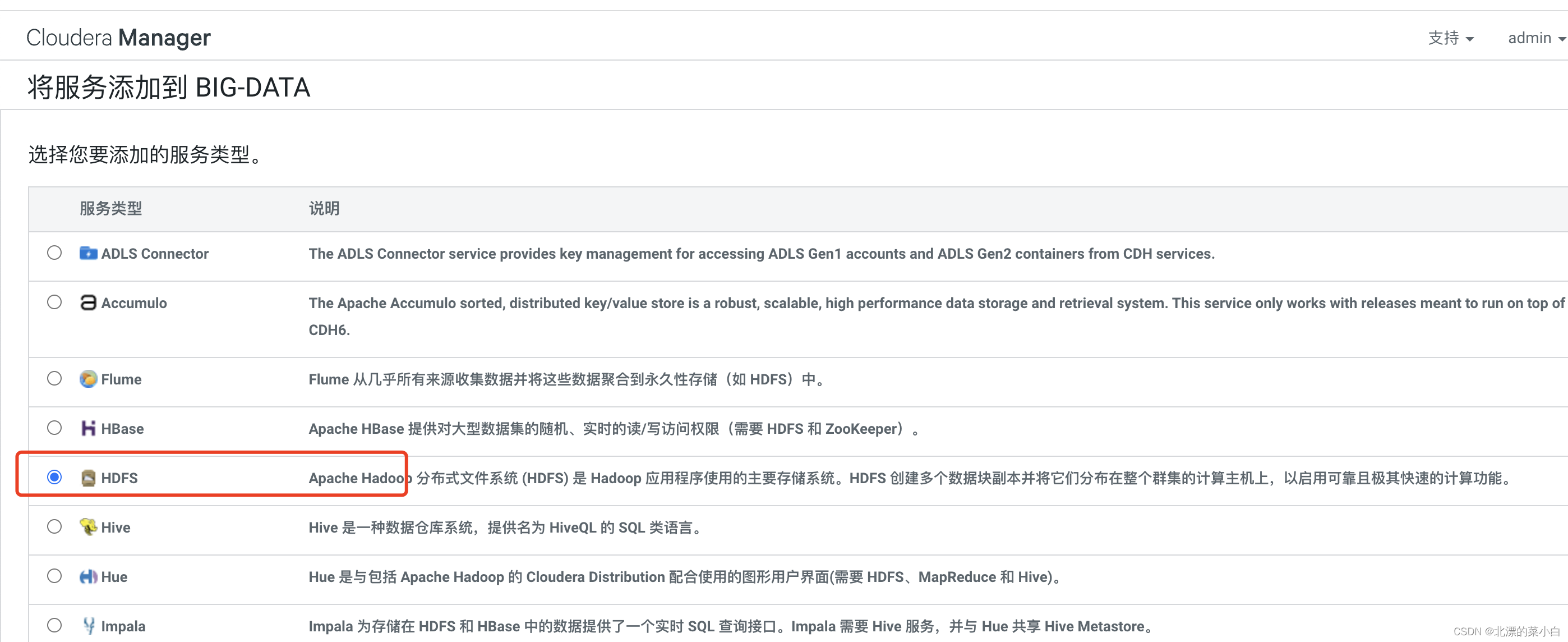
管理文件系统名称空间和控制外部客户机的访问。没有经过 NameNode,只有表示 DataNode 和块的文件映射的元数据经过 NameNode。当外部客户机发送请求要求创建文件时,NameNode 会以块标识和该块的第一个副本的 DataNode IP 地址作为响应。这个 NameNode 还会通知其他将要接收该块的副本的 DataNode机架的形式组织,机架通过一个交换机将所有系统连接起来。Hadoop 的一个假设是:机架内部节点之间的传输速度快于机架间节点的传输速度DataNode 响应来自 HDFS 客户机的读写请求。它们还响应来自 NameNode 的创建、删除和复制块的命令。NameNode 依赖来自每个 DataNode 的定期心跳(heartbeat)消息。每条消息都包含一个块报告,NameNode 可以根据这个报告验证块映射和其他文件系统元数据。如果 DataNode 不能发送心跳消息,NameNode 将采取修复措施,重新复制在该节点上丢失的块文件操作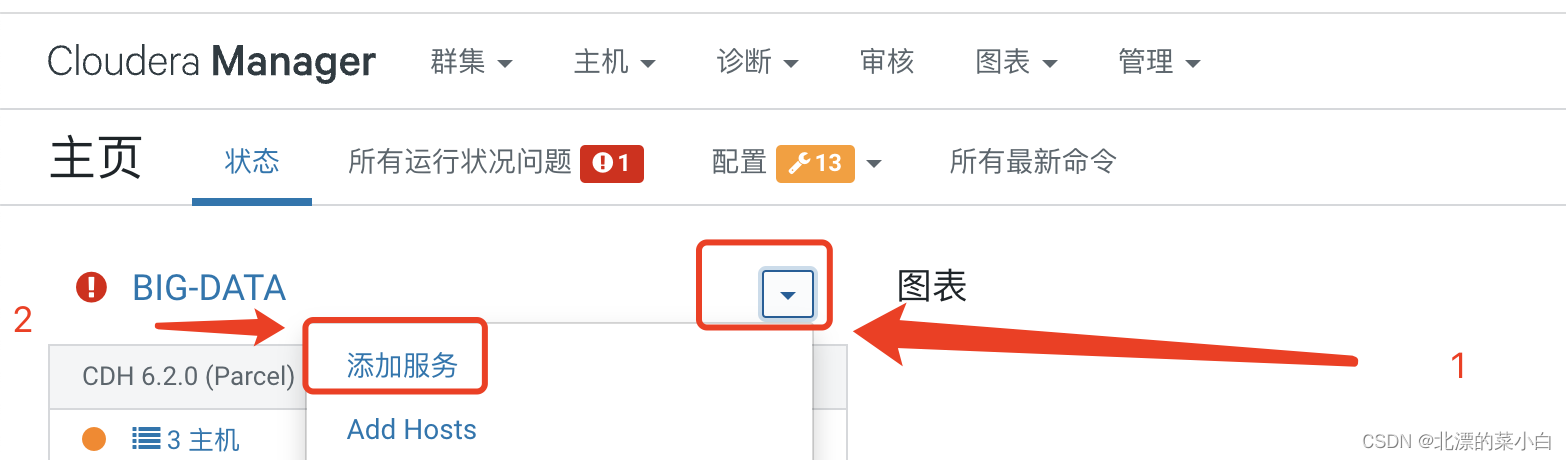
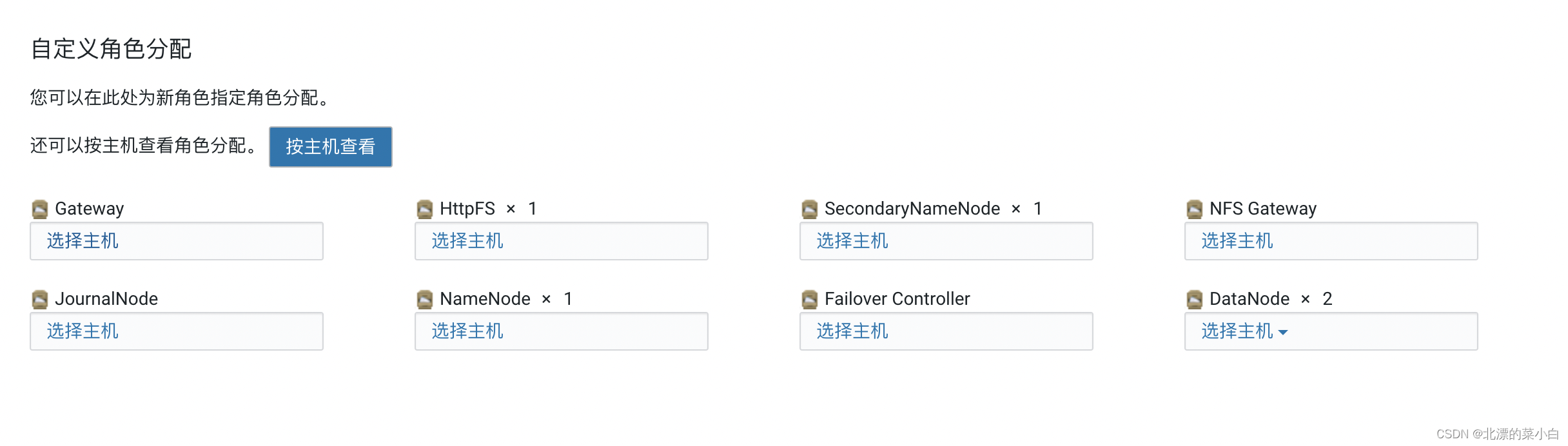
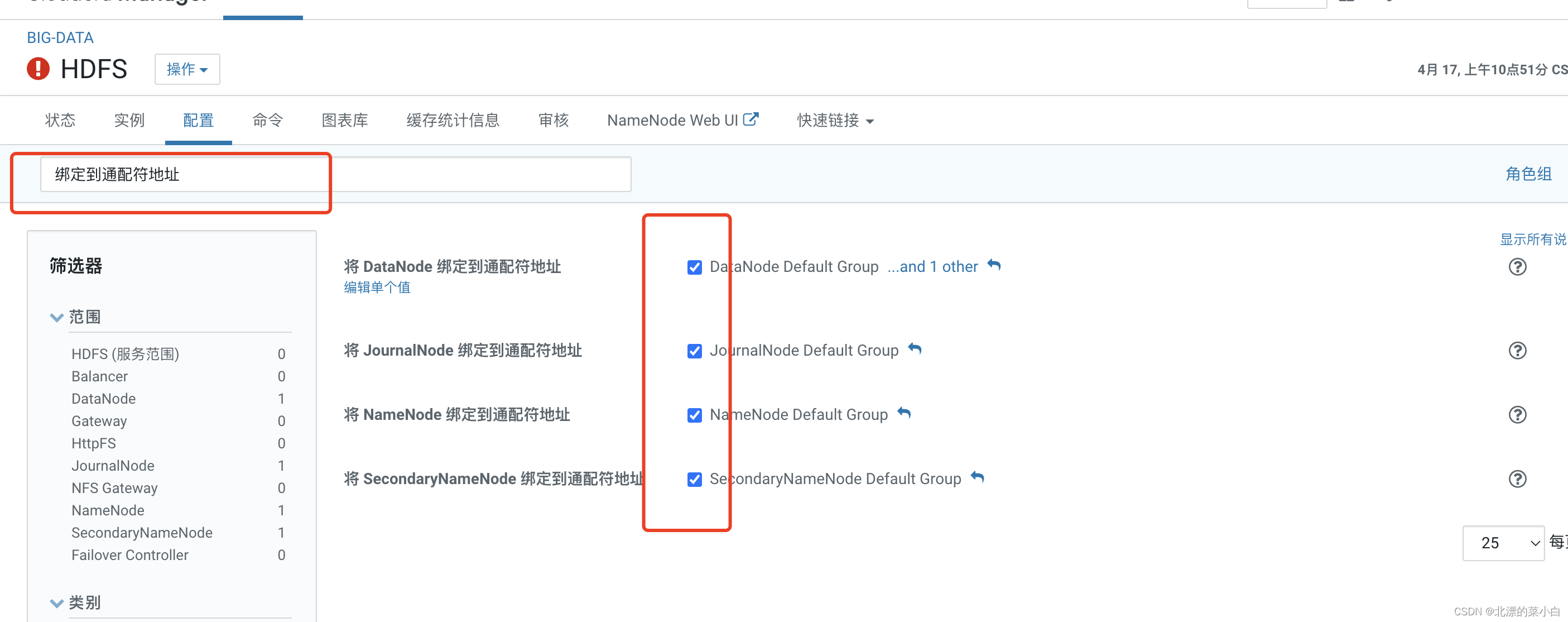
搜索关键值 ‘绑定到通配符地址’
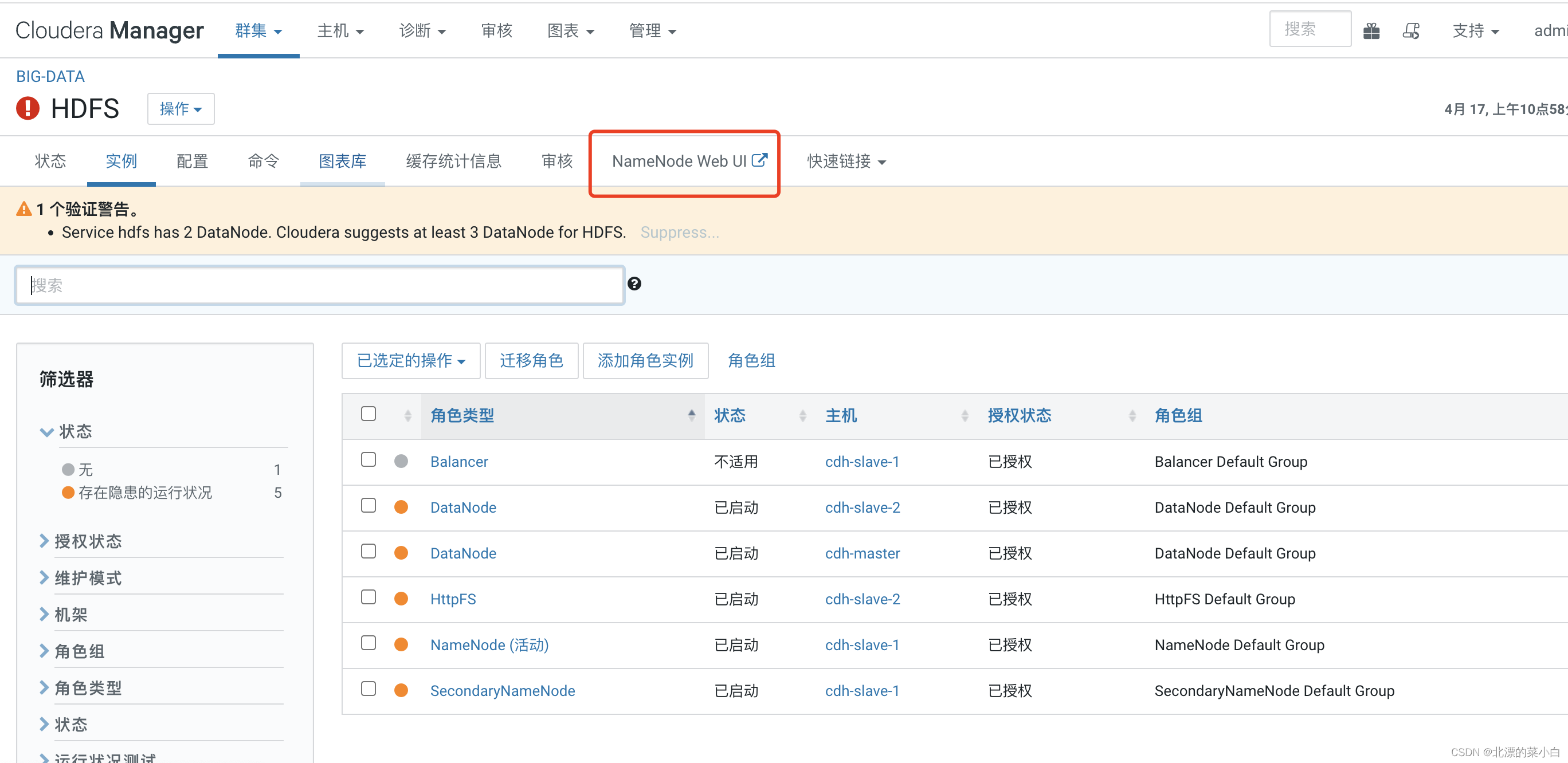
点击红款部分,访问 NameNode 检查集群情况
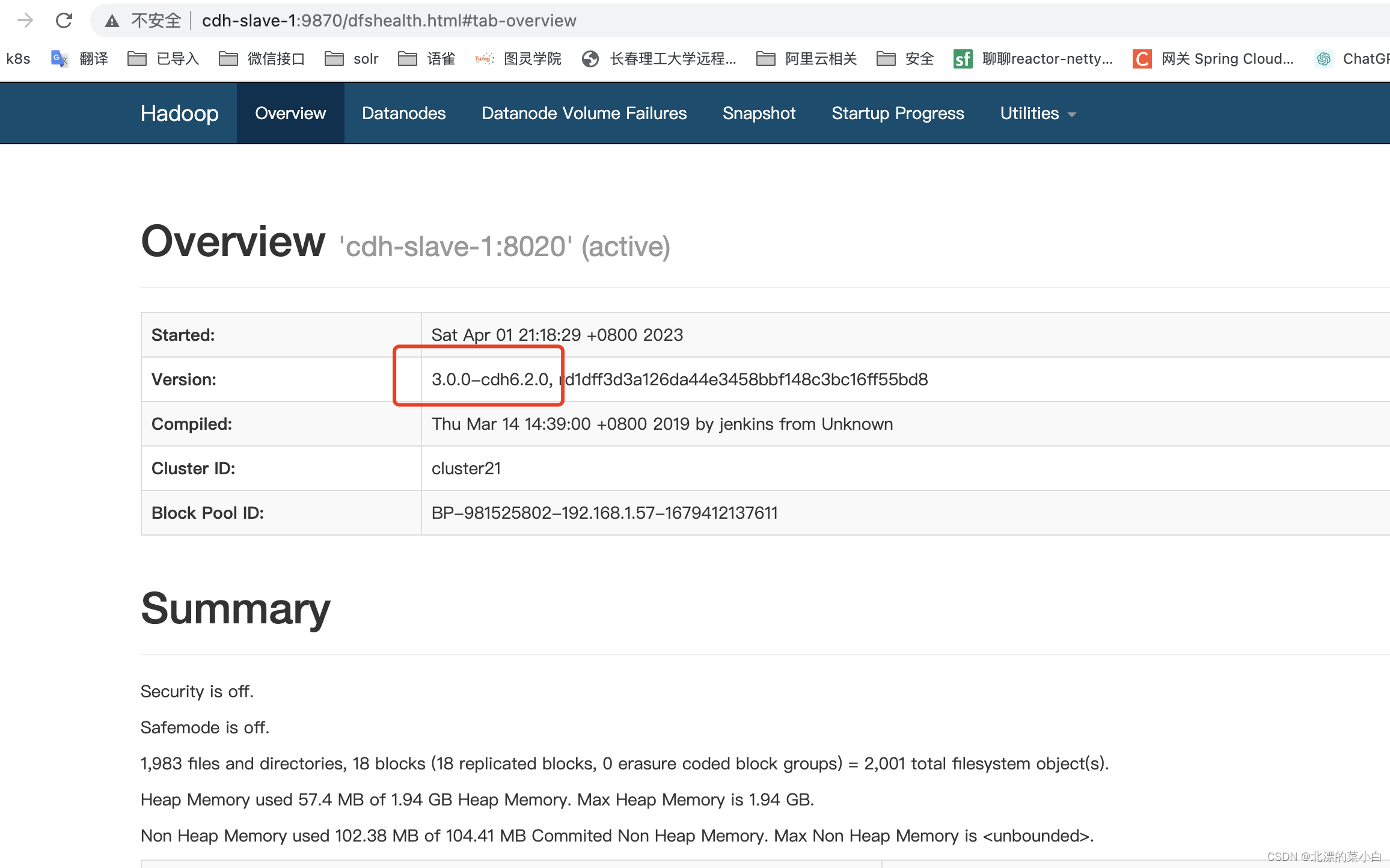
可以看到 hadoop 正常启动,且集群版本为 ``
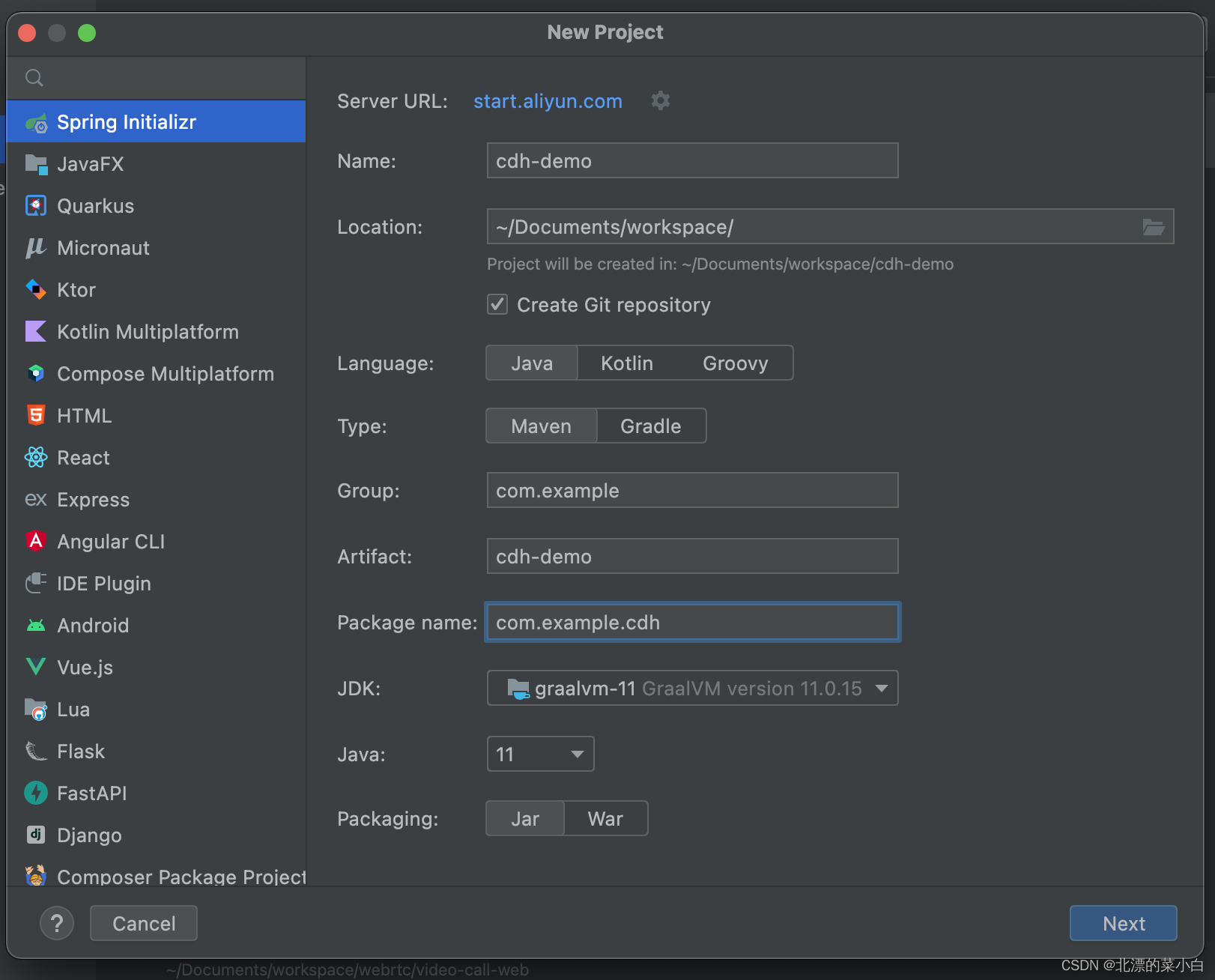
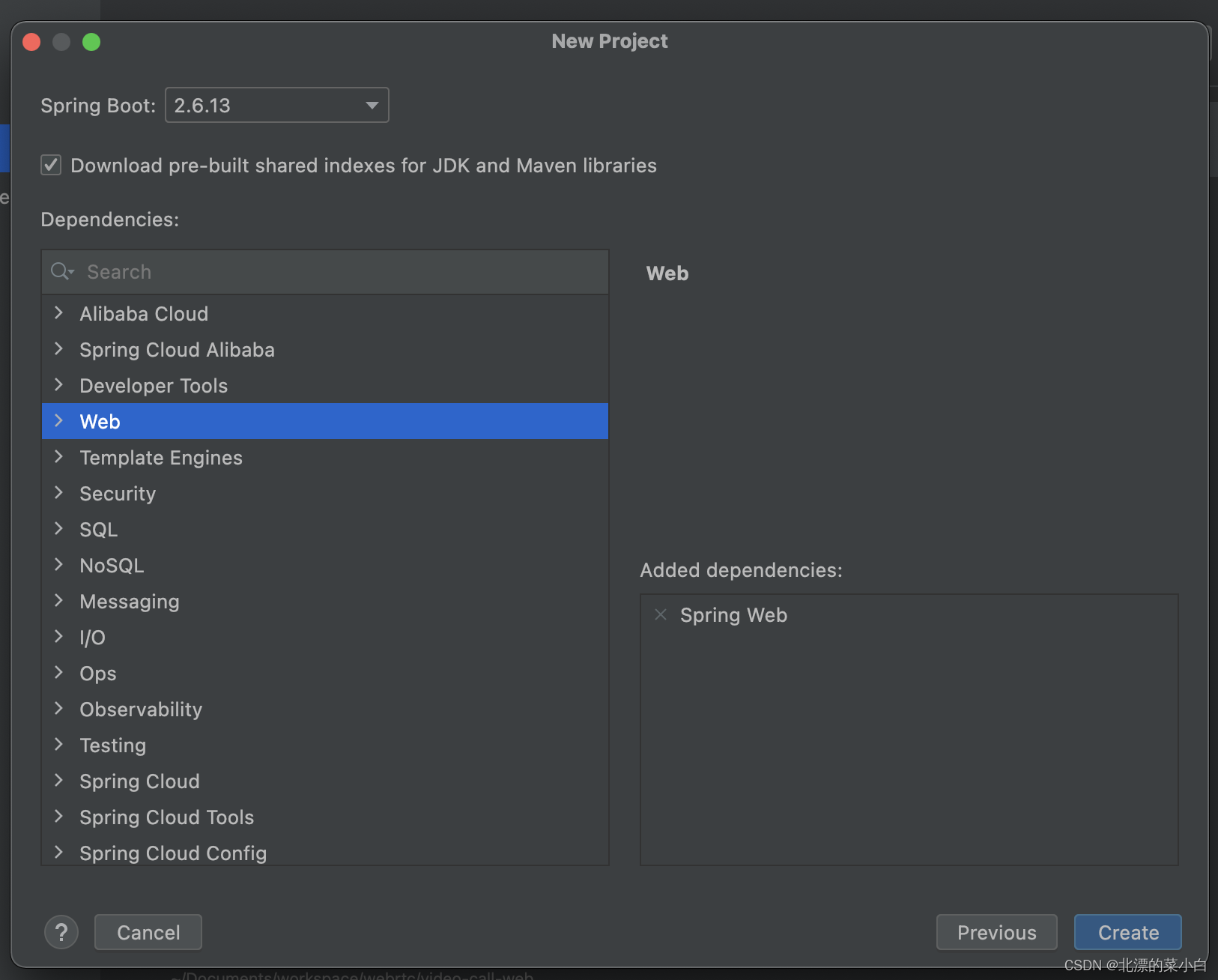
<repositories>
	<repository>
    	<id>cloudera.repo</id>
        <url>https://repository.cloudera.com/artifactory/cloudera-repos/</url>
    </repository>
</repositories>
<?xml version="1.0" encoding="UTF-8"?>
<project xmlns="http://maven.apache.org/POM/4.0.0" xmlns:xsi="http://www.w3.org/2001/XMLSchema-instance"
         xsi:schemaLocation="http://maven.apache.org/POM/4.0.0 https://maven.apache.org/xsd/maven-4.0.0.xsd">
    <modelVersion>4.0.0</modelVersion>
    <groupId>com.example</groupId>
    <artifactId>cdh-demo</artifactId>
    <version>0.0.1-SNAPSHOT</version>
    <name>cdh-demo</name>
    <description>cdh-demo</description>
    <properties>
        <java.version>1.8</java.version>
        <project.build.sourceEncoding>UTF-8</project.build.sourceEncoding>
        <project.reporting.outputEncoding>UTF-8</project.reporting.outputEncoding>
        <spring-boot.version>2.6.13</spring-boot.version>
        <hadoop.version>3.0.0-cdh6.2.0</hadoop.version>
    </properties>
    <dependencies>
        <dependency>
            <groupId>org.springframework.boot</groupId>
            <artifactId>spring-boot-configuration-processor</artifactId>
        </dependency>
        <dependency>
            <groupId>org.apache.hadoop</groupId>
            <artifactId>hadoop-common</artifactId>
            <version>${hadoop.version}</version>
            <exclusions>
                <exclusion>
                    <artifactId>slf4j-reload4j</artifactId>
                    <groupId>org.slf4j</groupId>
                </exclusion>
            </exclusions>
        </dependency>
        <dependency>
            <groupId>org.apache.hadoop</groupId>
            <artifactId>hadoop-hdfs</artifactId>
            <version>${hadoop.version}</version>
        </dependency>
        <dependency>
            <groupId>org.apache.hadoop</groupId>
            <artifactId>hadoop-mapreduce-client-core</artifactId>
            <version>${hadoop.version}</version>
            <exclusions>
                <exclusion>
                    <artifactId>slf4j-reload4j</artifactId>
                    <groupId>org.slf4j</groupId>
                </exclusion>
            </exclusions>
        </dependency>
        <dependency>
            <groupId>org.apache.hadoop</groupId>
            <artifactId>hadoop-mapreduce-client-jobclient</artifactId>
            <version>${hadoop.version}</version>
            <exclusions>
                <exclusion>
                    <artifactId>slf4j-reload4j</artifactId>
                    <groupId>org.slf4j</groupId>
                </exclusion>
            </exclusions>
        </dependency>
        <dependency>
            <groupId>org.apache.hadoop</groupId>
            <artifactId>hadoop-mapreduce-client-common</artifactId>
            <version>${hadoop.version}</version>
            <exclusions>
                <exclusion>
                    <artifactId>slf4j-reload4j</artifactId>
                    <groupId>org.slf4j</groupId>
                </exclusion>
            </exclusions>
        </dependency>
        <dependency>
            <groupId>org.springframework.boot</groupId>
            <artifactId>spring-boot-starter-web</artifactId>
        </dependency>

        <dependency>
            <groupId>org.springframework.boot</groupId>
            <artifactId>spring-boot-starter-test</artifactId>
            <scope>test</scope>
        </dependency>
    </dependencies>
    <dependencyManagement>
        <dependencies>
            <dependency>
                <groupId>org.springframework.boot</groupId>
                <artifactId>spring-boot-dependencies</artifactId>
                <version>${spring-boot.version}</version>
                <type>pom</type>
                <scope>import</scope>
            </dependency>
        </dependencies>
    </dependencyManagement>
    <repositories>
        <repository>
            <id>cloudera.repo</id>
            <url>https://repository.cloudera.com/artifactory/cloudera-repos/</url>
        </repository>
    </repositories>

    <build>
        <plugins>
            <plugin>
                <groupId>org.apache.maven.plugins</groupId>
                <artifactId>maven-compiler-plugin</artifactId>
                <version>3.8.1</version>
                <configuration>
                    <source>1.8</source>
                    <target>1.8</target>
                    <encoding>UTF-8</encoding>
                </configuration>
            </plugin>
            <plugin>
                <groupId>org.springframework.boot</groupId>
                <artifactId>spring-boot-maven-plugin</artifactId>
                <version>${spring-boot.version}</version>
                <configuration>
                    <mainClass>com.example.cdh.CdhDemoApplication</mainClass>
                    <skip>true</skip>
                </configuration>
                <executions>
                    <execution>
                        <id>repackage</id>
                        <goals>
                            <goal>repackage</goal>
                        </goals>
                    </execution>
                </executions>
            </plugin>
        </plugins>
    </build>
</project>
hadoop:
  # 我的 hdfs namenode 在 slave-1这台机器上
  url: hdfs://cdh-slave-1:8020
  replication: 3
  blockSize: 2097152
  user: root
package com.example.cdh.properties;

import org.springframework.boot.context.properties.ConfigurationProperties;
import org.springframework.context.annotation.Configuration;

/**
 * @author chunyang.leng
 * @date 2023-04-17 10:31
 */
@Configuration
@ConfigurationProperties(prefix = "hadoop")
public class HadoopProperties {
    /**
     * namenode 地址,示例:hdfs://cdh-master:8020
     */
    private String url;

    /**
     * 分片数量
     */
    private String replication;
    /**
     * 块文件大小
     */
    private String blockSize;
    /**
     * 操作的用户
     */
    private String user;

    public String getUrl() {
        return url;
    }

    public void setUrl(String url) {
        this.url = url;
    }

    public String getReplication() {
        return replication;
    }

    public void setReplication(String replication) {
        this.replication = replication;
    }

    public String getBlockSize() {
        return blockSize;
    }

    public void setBlockSize(String blockSize) {
        this.blockSize = blockSize;
    }

    public String getUser() {
        return user;
    }

    public void setUser(String user) {
        this.user = user;
    }

}
package com.example.cdh.configuration;

import com.example.cdh.properties.HadoopProperties;
import java.io.IOException;
import java.net.URI;
import java.net.URISyntaxException;
import org.apache.hadoop.conf.Configuration;
import org.apache.hadoop.fs.FileSystem;
import org.springframework.context.annotation.Bean;

/**
 * @author chunyang.leng
 * @date 2023-04-17 10:40
 */
@org.springframework.context.annotation.Configuration
public class HadoopAutoConfiguration {

    @Bean
    public FileSystem fileSystem(
        HadoopProperties hadoopProperties) throws URISyntaxException, IOException, InterruptedException {
        // 获取连接集群的地址
        URI uri = new URI(hadoopProperties.getUrl());
        // 创建一个配置文件
        Configuration configuration = new Configuration();
        // 设置配置文件中副本的数量
        configuration.set("dfs.replication", hadoopProperties.getReplication());
        // 设置配置文件块大小
        configuration.set("dfs.blocksize", hadoopProperties.getBlockSize());
        // 获取到了客户端对象
        return FileSystem.get(uri, configuration, hadoopProperties.getUser());
    }
}
package com.example.cdh.service;

import java.io.IOException;
import java.io.OutputStream;
import java.util.ArrayList;
import java.util.List;
import org.apache.commons.io.IOUtils;
import org.apache.hadoop.fs.FSDataInputStream;
import org.apache.hadoop.fs.FSDataOutputStream;
import org.apache.hadoop.fs.FileSystem;
import org.apache.hadoop.fs.LocatedFileStatus;
import org.apache.hadoop.fs.Path;
import org.apache.hadoop.fs.RemoteIterator;
import org.springframework.beans.factory.annotation.Autowired;
import org.springframework.stereotype.Component;

/**
 * @author chunyang.leng
 * @date 2023-04-17 11:06
 */
@Component
public class HdfsService {
    @Autowired
    private FileSystem fileSystem;
    /**
     * 上传文件到 HDFS
     * @param data 文件数据
     * @param url 文件名称和路径
     * @param overwrite  是否允许覆盖文件
     */
    public void uploadFile(byte[] data, String url,boolean overwrite) throws IOException {
        try (FSDataOutputStream stream = fileSystem.create(new Path(url), overwrite)){
            IOUtils.write(data, stream);
        }
    }

    /**
     * 下载文件到本地
     * @param url
     * @return
     */
    public void download(String url, OutputStream outputStream) throws IOException {
        Path path = new Path(url);
        try (FSDataInputStream open = fileSystem.open(path)){
            IOUtils.copy(open, outputStream);
        }
    }

    /**
     * 遍历全部文件,并返回所有文件路径
     * @param url
     * @param recursive 是否为递归遍历
     * @return
     * @throws IOException
     */
    public List<Path> listFiles(String url,boolean recursive) throws IOException {
        Path path = new Path(url);
        RemoteIterator<LocatedFileStatus> iterator = fileSystem.listFiles(path, true);
        List<Path> list= new ArrayList<Path>();
        while (iterator.hasNext()){
            LocatedFileStatus file = iterator.next();
            Path filePath = file.getPath();
            list.add(filePath);
        }
        return list;
    }

    /**
     * 删除文件
     * @param path 文件路径
     * @param recursive 是否为递归删除
     * @throws IOException
     */
    public void delete(String path,boolean recursive) throws IOException{
        fileSystem.delete(new Path(path),recursive);
    }
}
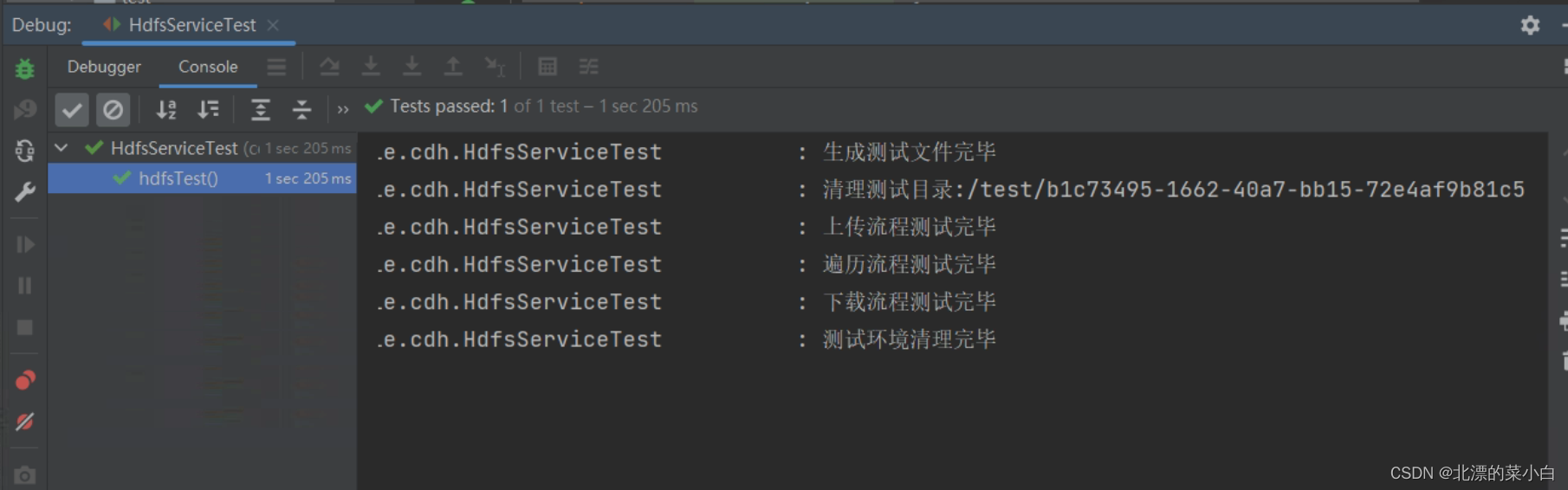
使用单元测试操作hdfs
package com.example.cdh;

import com.example.cdh.service.HdfsService;
import java.io.ByteArrayOutputStream;
import java.io.File;
import java.io.IOException;
import java.util.List;
import java.util.UUID;
import org.apache.commons.io.FileUtils;
import org.apache.hadoop.fs.Path;
import org.junit.jupiter.api.Test;
import org.slf4j.Logger;
import org.slf4j.LoggerFactory;
import org.springframework.beans.factory.annotation.Autowired;
import org.springframework.boot.test.context.SpringBootTest;
import org.springframework.util.Assert;
import org.springframework.util.CollectionUtils;
import org.springframework.util.DigestUtils;

/**
 * @author chunyang.leng
 * @date 2023-04-17 11:26
 */
@SpringBootTest
public class HdfsServiceTest {
    private static final Logger logger = LoggerFactory.getLogger(HdfsServiceTest.class);
    String fileContent = UUID.randomUUID().toString();

    @Autowired
    private HdfsService hdfsService;

    @Test
    public void hdfsTest() throws IOException {
        File testFile = new File("./test", "hdfs-test.txt");
        FileUtils.writeStringToFile(testFile,fileContent,"utf-8");
        logger.info("生成测试文件完毕");
        byte[] before = FileUtils.readFileToByteArray(testFile);

        String testPath = "/test/" +UUID.randomUUID().toString();
        hdfsService.delete(testPath,true);
        logger.info("清理测试目录:{}",testPath);

        String hdfsFilePath = testPath +"/test.txt";
        hdfsService.uploadFile(before,hdfsFilePath,true);
        logger.info("上传流程测试完毕");

        List<Path> paths = hdfsService.listFiles(testPath, true);
        Assert.isTrue(!CollectionUtils.isEmpty(paths),"测试目录不应该为空");
        logger.info("遍历流程测试完毕");

        ByteArrayOutputStream outputStream = new ByteArrayOutputStream();
        hdfsService.download(hdfsFilePath,outputStream);
        byte[] after = outputStream.toByteArray();

        String beforeMd5 = DigestUtils.md5DigestAsHex(before);
        String afterMd5 = DigestUtils.md5DigestAsHex(after);

        Assert.isTrue(beforeMd5.equals(afterMd5),"上传与下载的文件内容应该一致");
        logger.info("下载流程测试完毕");

  		hdfsService.delete(testPath,true);
        testFile.delete();
        logger.info("测试环境清理完毕");
    }
}
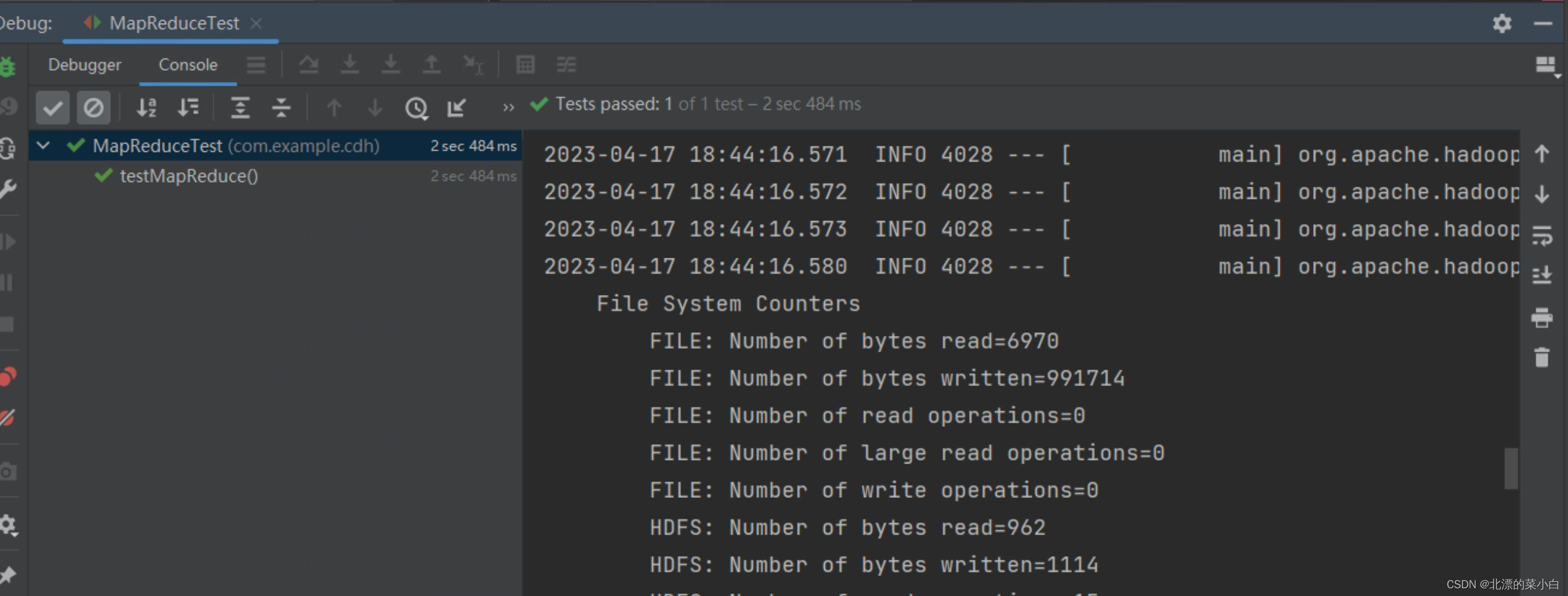
切分输入数据:MapReduce会将输入数据切分成若干个小块,让不同的Map任务来处理这些小块。
执行Map任务:对于每一个Map任务,MapReduce框架会调用Map函数来处理该任务所负责的输入数据块。Map函数可以根据输入数据生成若干个键值对,这些键值对可以是简单的数据类型(如整数、字符串等),也可以是自定义的数据类型。Map函数执行完毕后,会将生成的键值对按照键的哈希值分发给不同的Reduce任务。
执行Shuffle过程:MapReduce框架会将所有Map任务生成的键值对按照键的哈希值发送到不同的Reduce任务。这个过程被称为Shuffle过程。Shuffle过程是MapReduce框架中最耗时的操作之一。
执行Reduce任务:每一个Reduce任务会收到多个Map任务发来的键值对,并根据键将这些键值对进行合并,并执行Reduce函数来生成最终的输出结果。Reduce函数的输入和输出可以是简单的数据类型(如整数、字符串等),也可以是自定义的数据类型。
输出结果:所有Reduce任务执行完毕后,MapReduce框架会将最终的输出结果写入输出文件或输出数据库中,然后输出结果。
用户编程的程序分成三个部分:Mapper、Reducer、Driver。
| Java类型 | Hadoop writable类型 |
|---|---|
| boolean | BooleanWritable |
| byte | ByteWritable |
| int | IntWritable |
| float | FloatWritable |
| long | LongWritable |
| double | DoubleWritable |
| String | Text |
| map | MapWritable |
| array | ArrayWritable |
package com.example.cdh.service.mapreduce.wordcount;

import java.io.IOException;
import org.apache.commons.lang3.StringUtils;
import org.apache.hadoop.io.IntWritable;
import org.apache.hadoop.io.LongWritable;
import org.apache.hadoop.io.Text;
import org.apache.hadoop.mapreduce.Mapper;

/**
 * @author chunyang.leng
 * @date 2023-04-17 13:26
 */
public class WordCountMapper extends Mapper<LongWritable, Text, Text, IntWritable> {
    private final Text outK = new Text();
    private final IntWritable outV = new IntWritable(1);

    @Override
    protected void map(LongWritable key,
        Text value,
        Mapper<LongWritable, Text, Text, IntWritable>.Context context) throws IOException, InterruptedException {
        String line = value.toString();
        char[] chars = line.toCharArray();
        for (char aChar : chars) {
            String str = Character.toString(aChar);
            if (StringUtils.isBlank(str)){
                continue;
            }
            outK.set(str);
            context.write(outK, outV);

        }
    }
}
package com.example.cdh.service.mapreduce.wordcount;

import java.io.IOException;
import org.apache.hadoop.io.IntWritable;
import org.apache.hadoop.io.Text;
import org.apache.hadoop.mapreduce.Reducer;

/**
 * @author chunyang.leng
 * @date 2023-04-17 13:27
 */
public class WordCountReducer extends Reducer<Text, IntWritable, Text, IntWritable> {
    private final IntWritable outV = new IntWritable();

    @Override
    protected void reduce(Text key, Iterable<IntWritable> values, Reducer<Text, IntWritable, Text, IntWritable>.Context context) throws IOException, InterruptedException {
        int sum = 0;
        for (IntWritable value : values) {
            sum += value.get();
        }
        outV.set(sum);
        context.write(key, outV);
    }
}
package com.example.cdh.service.mapreduce.wordcount;

import java.io.IOException;
import org.apache.hadoop.io.IntWritable;
import org.apache.hadoop.io.Text;
import org.apache.hadoop.mapred.JobConf;
import org.apache.hadoop.mapreduce.Job;
import org.apache.hadoop.mapreduce.lib.input.FileInputFormat;
import org.apache.hadoop.mapreduce.lib.output.FileOutputFormat;

/**
 * @author chunyang.leng
 * @date 2023-04-17 13:27
 */
public class WordCountDriver {

    private final Job instance;

    public WordCountDriver(String inputPath, String outputPath) throws IOException {

        JobConf jobConf = new JobConf();
        // 设置要计算的文件读取路径
        jobConf.set(FileInputFormat.INPUT_DIR,inputPath);
        // 设置计算结果存储路径
        jobConf.set(FileOutputFormat.OUTDIR,outputPath);

        // 1.创建job实例
        instance = Job.getInstance(jobConf);
        // 2.设置jar
        instance.setJarByClass(WordCountDriver.class);
        // 3.设置Mapper和Reducer
        instance.setMapperClass(WordCountMapper.class);
        instance.setReducerClass(WordCountReducer.class);
        // 4.设置map输出的kv类型
        instance.setMapOutputKeyClass(Text.class);
        instance.setMapOutputValueClass(IntWritable.class);
        // 5.设置最终输出的kv类型
        instance.setOutputKeyClass(Text.class);
        instance.setOutputValueClass(IntWritable.class);
    }

    /**
     * 提交 job 运行
     * @throws IOException
     * @throws InterruptedException
     * @throws ClassNotFoundException
     */
    public void run() throws IOException, InterruptedException, ClassNotFoundException {
        instance.waitForCompletion(true);
    }
}
package com.example.cdh;

import com.example.cdh.service.HdfsService;
import com.example.cdh.service.mapreduce.WordCountJob;
import java.io.ByteArrayOutputStream;
import java.nio.charset.StandardCharsets;
import java.util.List;
import java.util.UUID;
import org.apache.commons.io.IOUtils;
import org.apache.hadoop.fs.FSDataInputStream;
import org.apache.hadoop.fs.FileStatus;
import org.apache.hadoop.fs.FileSystem;
import org.apache.hadoop.fs.Path;
import org.junit.jupiter.api.Test;
import org.slf4j.Logger;
import org.slf4j.LoggerFactory;
import org.springframework.beans.factory.annotation.Autowired;
import org.springframework.boot.test.context.SpringBootTest;

/**
 * @author chunyang.leng
 * @date 2023-04-17 15:28
 */
@SpringBootTest
public class MapReduceTest {

    private static final Logger logger = LoggerFactory.getLogger(MapReduceTest.class);
    String context = "Spring Boot makes it easy to create stand-alone, production-grade Spring based Applications that you can \"just run\". " +
        "We take an opinionated view of the Spring platform and third-party libraries so you can get started with minimum fuss. Most Spring Boot applications need minimal Spring configuration. " +
        "If you’re looking for information about a specific version, or instructions about how to upgrade from an earlier release, check out the project release notes section on our wiki.";
    @Autowired
    private HdfsService hdfsService;
    @Autowired
    private WordCountJob wordCountJob;
    @Autowired
    private FileSystem fileSystem;

    @Test
    public void testMapReduce() throws Exception {
        String fileName = "mapreduce.txt";
        String path = "/test/" + UUID.randomUUID().toString();

        String inputHdfsFilePath = path + "/" + fileName;

        String outPutHdfsFile = path + "/result/";
        hdfsService.delete(inputHdfsFilePath, true);
        logger.info("测试环境数据清理完毕");

        hdfsService.uploadFile(context.getBytes(StandardCharsets.UTF_8), inputHdfsFilePath, true);
        logger.info("MapReduce 测试文本上传完毕,开始执行 word count job");

        wordCountJob.runJob("hdfs://cdh-slave-1:8020" + inputHdfsFilePath, "hdfs://cdh-slave-1:8020" + outPutHdfsFile);
        logger.info("MapReduce 测试job执行完毕");


        List<Path> paths = hdfsService.listFiles(outPutHdfsFile, true);
        for (Path resultPath : paths) {
            FileStatus status = fileSystem.getFileStatus(resultPath);
            if (status.isDirectory()){
                continue;
            }
            if (status.isFile() && !resultPath.getName().startsWith("_SUCCESS")){
                // 是文件,并且不是成功标识文件

                try (FSDataInputStream open = fileSystem.open(resultPath);
                     ByteArrayOutputStream outputStream = new ByteArrayOutputStream()){
                    IOUtils.copy(open, outputStream);
                    byte[] bytes = outputStream.toByteArray();
                    logger.info("任务执行完毕,获取结果:{}", new String(bytes, StandardCharsets.UTF_8));
                }

            }
        }

        hdfsService.delete(path, true);
        logger.info("测试结束,清理空间完毕");

    }
}
我正在学习如何使用Nokogiri,根据这段代码我遇到了一些问题:require'rubygems'require'mechanize'post_agent=WWW::Mechanize.newpost_page=post_agent.get('http://www.vbulletin.org/forum/showthread.php?t=230708')puts"\nabsolutepathwithtbodygivesnil"putspost_page.parser.xpath('/html/body/div/div/div/div/div/table/tbody/tr/td/div
我有一个Ruby程序,它使用rubyzip压缩XML文件的目录树。gem。我的问题是文件开始变得很重,我想提高压缩级别,因为压缩时间不是问题。我在rubyzipdocumentation中找不到一种为创建的ZIP文件指定压缩级别的方法。有人知道如何更改此设置吗?是否有另一个允许指定压缩级别的Ruby库? 最佳答案 这是我通过查看rubyzip内部创建的代码。level=Zlib::BEST_COMPRESSIONZip::ZipOutputStream.open(zip_file)do|zip|Dir.glob("**/*")d
类classAprivatedeffooputs:fooendpublicdefbarputs:barendprivatedefzimputs:zimendprotecteddefdibputs:dibendendA的实例a=A.new测试a.foorescueputs:faila.barrescueputs:faila.zimrescueputs:faila.dibrescueputs:faila.gazrescueputs:fail测试输出failbarfailfailfail.发送测试[:foo,:bar,:zim,:dib,:gaz].each{|m|a.send(m)resc
很好奇,就使用rubyonrails自动化单元测试而言,你们正在做什么?您是否创建了一个脚本来在cron中运行rake作业并将结果邮寄给您?git中的预提交Hook?只是手动调用?我完全理解测试,但想知道在错误发生之前捕获错误的最佳实践是什么。让我们理所当然地认为测试本身是完美无缺的,并且可以正常工作。下一步是什么以确保他们在正确的时间将可能有害的结果传达给您? 最佳答案 不确定您到底想听什么,但是有几个级别的自动代码库控制:在处理某项功能时,您可以使用类似autotest的内容获得关于哪些有效,哪些无效的即时反馈。要确保您的提
假设我做了一个模块如下:m=Module.newdoclassCendend三个问题:除了对m的引用之外,还有什么方法可以访问C和m中的其他内容?我可以在创建匿名模块后为其命名吗(就像我输入“module...”一样)?如何在使用完匿名模块后将其删除,使其定义的常量不再存在? 最佳答案 三个答案:是的,使用ObjectSpace.此代码使c引用你的类(class)C不引用m:c=nilObjectSpace.each_object{|obj|c=objif(Class===objandobj.name=~/::C$/)}当然这取决于
我正在尝试使用ruby和Savon来使用网络服务。测试服务为http://www.webservicex.net/WS/WSDetails.aspx?WSID=9&CATID=2require'rubygems'require'savon'client=Savon::Client.new"http://www.webservicex.net/stockquote.asmx?WSDL"client.get_quotedo|soap|soap.body={:symbol=>"AAPL"}end返回SOAP异常。检查soap信封,在我看来soap请求没有正确的命名空间。任何人都可以建议我
关闭。这个问题是opinion-based.它目前不接受答案。想要改进这个问题?更新问题,以便editingthispost可以用事实和引用来回答它.关闭4年前。Improvethisquestion我想在固定时间创建一系列低音和高音调的哔哔声。例如:在150毫秒时发出高音调的蜂鸣声在151毫秒时发出低音调的蜂鸣声200毫秒时发出低音调的蜂鸣声250毫秒的高音调蜂鸣声有没有办法在Ruby或Python中做到这一点?我真的不在乎输出编码是什么(.wav、.mp3、.ogg等等),但我确实想创建一个输出文件。
我在我的项目目录中完成了compasscreate.和compassinitrails。几个问题:我已将我的.sass文件放在public/stylesheets中。这是放置它们的正确位置吗?当我运行compasswatch时,它不会自动编译这些.sass文件。我必须手动指定文件:compasswatchpublic/stylesheets/myfile.sass等。如何让它自动运行?文件ie.css、print.css和screen.css已放在stylesheets/compiled。如何在编译后不让它们重新出现的情况下删除它们?我自己编译的.sass文件编译成compiled/t
我想将html转换为纯文本。不过,我不想只删除标签,我想智能地保留尽可能多的格式。为插入换行符标签,检测段落并格式化它们等。输入非常简单,通常是格式良好的html(不是整个文档,只是一堆内容,通常没有anchor或图像)。我可以将几个正则表达式放在一起,让我达到80%,但我认为可能有一些现有的解决方案更智能。 最佳答案 首先,不要尝试为此使用正则表达式。很有可能你会想出一个脆弱/脆弱的解决方案,它会随着HTML的变化而崩溃,或者很难管理和维护。您可以使用Nokogiri快速解析HTML并提取文本:require'nokogiri'h
我想为Heroku构建一个Rails3应用程序。他们使用Postgres作为他们的数据库,所以我通过MacPorts安装了postgres9.0。现在我需要一个postgresgem并且共识是出于性能原因你想要pggem。但是我对我得到的错误感到非常困惑当我尝试在rvm下通过geminstall安装pg时。我已经非常明确地指定了所有postgres目录的位置可以找到但仍然无法完成安装:$envARCHFLAGS='-archx86_64'geminstallpg--\--with-pg-config=/opt/local/var/db/postgresql90/defaultdb/po
