if 标签:
判断语句(单条件分支)。必须结合 test 属性联合使用。
常用场景:
mapper接口方法:
public List<User> findByIdAndUsernameIf(User user);
xml文件:
<select id="findByIdAndUsernameIf" parameterType="user" resultType="user">
    select * from user
    <!-- where 1=1 是多条件拼接时的小技巧,后面的条件查询就可以都用and了 -->
    <!-- where 1 = 1 -->

    <!-- where 标签:相当于 where 1=1 功能,
		 当if条件都不满足时,where 将不会拼接在sql语句中
		 当if有条件满足时,where 将会拼接在sql语句中,且去掉第一个成立的 if 标签下的 and | or 等  -->
  	<where>
        <if test="id != null">
            and id = #{id}
        </if>
        <if test="username != null">
            and username like concat('%',#{username}),'%')
        </if>
    </where>
</select>
choose when otherwise 标签可以帮我们实现 if else 的逻辑(或 java 中的 switch 语句)。
一个 choose 标签至少有一个 when,最多一个otherwise。
mapper接口方法:
public List<User> findByIdAndUsernameChoose(User user);
xml文件:
<!--
        choose标签 相当于 switch语句
        when标签 相当于 case+break语句
        otherwise 相当于 default语句
-->
<select id="findByIdAndUsernameChoose" parameterType="user" resultType="user">
    select * from user
    <where>
        <choose>
            <when test="id != null">
                and id = #{id}
            </when>
            <when test="username != null">
                 and username like concat(concat('%',#{username}),'%')
            </when>
            <otherwise>
                and 1 = 1
            </otherwise>
        </choose>
    </where>
</select>
可以去掉 set 标签中的最后一个条件的 逗号
mapper接口方法:
public void updateIf(User user);
xml方法:
<update id="updateIf" parameterType="user">
    update user
    <set>
        <if test="username != null">
            username=#{username},
        </if>
        <if test="birthday != null">
            birthday=#{birthday},
        </if>
        <if test="sex != null">
            sex = #{sex},
        </if>
        <if test="address != null">
            address = #{address},
        </if>
    </set>
    where id = #{id}
</update>
做数据的循环遍历
* 例如:
	select * from user where id in (1,2,3)
	在这样的语句中,传入的参数部分必须依靠 foreach遍历才能实现。
foreach 标签中的属性:
mapper接口方法:
// foreach标签 遍历
public List<User> findByList(List<Integer> ids);

public List<User> findByArray(Integer[] ids);

// 传递引用数据类型 list属性或者array属性
public List<User> findByPojo(QueryVo queryVo);
xml文件:
<!-- 传递 普通类型list集合   collection=""   取值:collection、list -->
<select id="findByList" parameterType="list" resultType="user">
    select * from user where
    <foreach collection="list" open="id in (" close=")" item="id" separator=",">
        #{id}
    </foreach>
</select>

<!-- 传递 普通类型array数组   collection=""   取值:array -->
<select id="findByArray" parameterType="int[]" resultType="user">
    select * from user where
    <foreach collection="array" open="id in (" close=")" item="id" separator=",">
        #{id}
    </foreach>
</select>

<!-- 传递 引用数据类型list集合属性   collection="" 取值   集合或数组的 属性名 -->
<select id="findByPojo" parameterType="QueryVo" resultType="user">
    select * from user where
    <foreach collection="ids" open="id in (" close=")" item="id" separator=",">
        #{id}
    </foreach>
</select>
mapper接口方法:
    // 批量插入学生
    int insertList(List<Student> students);
xml文件:
    <insert id="insertList">
        insert into student(name, phone, email, sex, locked)
        values
        <foreach collection="list" item="student" separator=",">
            (
            #{student.name}, #{student.phone},#{student.email},
            #{student.sex},#{student.locked}
            )
        </foreach>
    </insert>
trim 标签的属性
set 和 where 其实都是 trim 标签的一种类型, 该两种功能都可以使用 trim 标签进行实现。
trim 标签来实现 where 标签
当 trim 标签中含有内容时,添加 where,且第一个为 and 或 or 时,会将其去掉;而如果没有内容,则不添加 where
<trim prefix="where" prefixOverrides="AND |OR">
</trim>
trim 标签来实现 set 标签
当 trim 标签中含有内容时,添加 set,且最后的内容为 , 时,会将其去掉;而没有内容,不添加 set
<trim prefix="SET" suffixOverrides=",">
</trim>
bind 元素允许在 OGNL 表达式以外创建一个变量,并将其绑定到当前的上下文。
如在 selectByStudentSelective 方法中,有如下
<if test="name != null and name !=''">
      and name like concat('%', #{name}, '%')
</if>
在 MySQL 中,concat 函数支持多参数,但在 Oracle 中只支持两个参数。通过使用 bind 来让该 SQL 达到支持两个数据库的作用
<if test="name != null and name !=''">
     <bind name="nameLike" value="'%'+name+'%'"/>
     and name like #{nameLike}
</if>
<!-- 可以将公共部分进行抽取 -->
<sql id="userSelect">
    select * from user
</sql>

<!-- 引入sql片段 -->
<select id="findByArray" parameterType="int[]" resultType="user">
    <include refid="userSelect"></include>
    where
    <foreach collection="array" open="id in (" close=")" item="id" separator=",">
        #{id}
    </foreach>
</select>

<select id="findByPojo" parameterType="QueryVo" resultType="user">
    <include refid="userSelect"></include>
    where
    <foreach collection="ids" open="id in (" close=")" item="id" separator=",">
        #{id}
    </foreach>
</select>
往数据库中插入记录时,生成主键并将主键返回到原实体对象中。
方式1:<selectKey>【复杂,但通用】
既支持主键自增类型,也支持 UUID 类型的主键的生成与返回
方式2:useGeneratedKeys【简单,但不通用】
注意:这种方式仅支持主键自增类型的数据库,如 MySQL 和 sqlServer,oracle不支持
xml文件:
<!--
	方式1:<selectKey>
		keyColumn    	数据库表的主键字段
		keyProperty		指定实体的主键属性名。selectKey语句结果应该被设置的目标属性
		resultType		指定实体主键的类型。
						可以不写,Mybatis通常可以推算出来。Mybatis允许任何简单类型作为主键的类型,包括字符串。
		order="AFTER"  selectKey的sql语句是在insert执行之前(执行),还是之后(执行)
			AFTER 	之后执行。适合返回自增id的情况(主键是自增列,插入之后才能获知)。SELECT LAST_INSERT_ID() FROM DUAL
			BEFORE 	之前执行。适合返回UUID的情况(主键不是自增列,需要预先生成)。SELECT UUID() FROM DUAL
    -->
<insert id="save2" parameterType="user">
    <selectKey keyColumn="id" keyProperty="id" resultType="int" order="AFTER">
        SELECT LAST_INSERT_ID() FROM DUAL
    </selectKey>
    insert into user(username, birthday, sex, address) values(#{username}, #{birthday}, #{sex}, #{address})
</insert>

<!--
	方式2:useGeneratedKeys
        useGeneratedKeys="true" 开启返回主键功能
		keyColumn    			数据库表的主键字段
		keyProperty  			指定实体的主键属性名

    -->
<insert id="save1" parameterType="user" useGeneratedKeys="true" keyColumn="id" keyProperty="id">
    insert into user(username,birthday,sex,address) values(#{username},#{birthday},#{sex},#{address})
</insert>
一对一   	订单与用户。查询站在订单角度:一个订单只能属于一个用户
一对多   	用户和订单。查询站在用户角度:一个用户可以拥有多个订单
多对一		订单和用户。多个订单,可以被一个用户拥有
多对多   	用户和角色。	- 站在用户角度:一个用户可以拥有多个角色
					  - 站在角色角度:一个角色可以被多个用户拥有


mybatis:一个表是一个实体的映射(user  orders)
实体: 实体属性、集合属性
1 v 1: 实体属性
1 v N: 1的一方有多的一方的集合属性  多的一方有1的一方的实体对象


* 一对一配置:使用<resultMap>+<association>做配置
	association:
    	property:关联的实体属性名
    	javaType:关联的实体类型(使用别名)

* 一对多配置:使用<resultMap>+<collection>做配置
	collection:
		property:关联的集合属性名
		ofType:关联的集合泛型类型(使用别名)

* 多对多配置:使用<resultMap>+<collection>做配置
	collection:
		property:关联的集合属性名
		ofType:关联的集合泛型类型(别名)

* 多对多的配置跟一对多很相似,区别在于SQL语句的编写。
Orders(订单)实体类
@Data
public class Orders {
    private Integer id;
    private Date ordertime;
    private Double money;
    // 订单所属的用户
    private User user;
}
User(用户)实体类
@Data
public class User {
    private Integer id;
    private String username;
    private Date birthday;
    private String sex;
    private String address;

    // 一个用户有多个角色
    private List<Role> roleList;

    // 一个用户有多个订单
    private List<Orders> orders;
}
Role(角色)实体类
@Data
public class Role {
    private Integer id;
    private String roleName;
    private String roleDesc;
}
一对一查询的实例:
需求:查询一个订单,与此同时查询出该订单所属的用户(1 v 1)
OrdersMapper.xml映射文件(一对一映射关系)
<?xml version="1.0" encoding="UTF-8" ?>
<!DOCTYPE mapper
        PUBLIC "-//mybatis.org//DTD Mapper 3.0//EN"
        "http://mybatis.org/dtd/mybatis-3-mapper.dtd">
<mapper namespace="cn.test.dao.OrdersDao">

    <!--手动封装-->
    <resultMap id="findOrderswithUserResultMap" type="orders">
            <!--订单orders-->
            <id column="iid" property="id"></id>
            <result column="ordertime" property="ordertime"></result>
            <result column="money" property="money"></result>
            <!--订单中的用户User(一对一的封装)
                    association标签
                    	property:订单实体类中的用户属性名
                        javaType:要封装数据的属性属于什么类型。不写则自动映射
            -->
            <association property="user" javaType="cn.test.domain.User">
                    <id column="uid" property="id"></id>
                    <result column="username" property="username"></result>
                    <result column="birthday" property="birthday"></result>
                    <result column="sex" property="sex"></result>
                    <result column="address" property="address"></result>
            </association>
    </resultMap>

    <!-- 查询当前订单以及所属用户的信息 -->
    <select id="findOrderswithUser" parameterType="int" resultMap="findOrderswithUserResultMap">
        select *, o.id iid from orders o left join user u on o.uid=u.id where o.id=#{id}
    </select>
</mapper>
一对多查询的实例:
需求:查询一个用户,与此同时查询出该用户具有的所有订单(1 v N)
UserMapper.xml映射文件
<?xml version="1.0" encoding="UTF-8" ?>
<!DOCTYPE mapper
        PUBLIC "-//mybatis.org//DTD Mapper 3.0//EN"
        "http://mybatis.org/dtd/mybatis-3-mapper.dtd">
<mapper namespace="cn.test.dao.UserDao">

    <!--手动封装-->
    <resultMap id="findUserwithOrdersResultMap" type="user">
        <!--封装user数据-->
        <id column="id" property="id"></id>
        <result column="username" property="username"></result>
        <result column="birthday" property="birthday"></result>
        <result column="sex" property="sex"></result>
        <result column="address" property="address"></result>
        <!--封装user的list集合属性(一对多)
            	collection标签
                	property:用户的订单集合属性名
                    ofType:要封装的list集合中的泛型类型
        -->
        <collection property="list" ofType="orders">
            <id column="iid" property="id"></id>
            <result column="ordertime" property="ordertime"></result>
            <result column="money" property="money"></result>
        </collection>
    </resultMap>

    <!-- 查询一个用户及订单的信息 -->
    <select id="findUserwithOrders" parameterType="int" resultMap="findUserwithOrdersResultMap">
        select *, o.id as iid from user u left join orders o on u.id=o.uid where u.id=#{id}
    </select>
</mapper>
多对多的查询的实例:
需求: 查询某个用户的所有角色或者是某个角色的所有用户
UserMapper.xml映射文件
<?xml version="1.0" encoding="UTF-8" ?>
<!DOCTYPE mapper
        PUBLIC "-//mybatis.org//DTD Mapper 3.0//EN"
        "http://mybatis.org/dtd/mybatis-3-mapper.dtd">
<mapper namespace="cn.test.dao.UserDao">

	<resultMap id="findUserwithRoleResult" type="user">
            <!--用户数据-->
            <id column="id" property="id"></id>
            <result column="username" property="username"></result>
            <result column="birthday" property="birthday"></result>
            <result column="sex" property="sex"></result>
            <result column="address" property="address"></result>
            <!--用户的角色集合(一对多)
                	collection标签
                    	property:用户的角色集合属性名
                        oftype:要封装的类型
            -->
            <collection property="roleList"  ofType="Role">
                    <id column="rid" property="id"></id>
                    <result column="role_name" property="roleName"></result>
                   <result column="role_desc" property="roleDesc"></result>
            </collection>
    </resultMap>

    <!-- 查询某个用户及角色信息 -->
    <select id="findUserwithRole" parameterType="int" resultMap="findUserwithRoleResult">
        select * from user u
        left join user_role ur on u.id=ur.uid
        left join role r on r.id=ur.rid
        where u.id=#{id}
    </select>
</mapper>
Mybatis嵌套查询 介绍:将多表查询的复杂sql语句拆分多个单表查询,再由mybatis框架进行嵌套组合
简单示例:
* 需求:查询一个订单,与此同时查询出该订单所属的用户  1v1

# 关联查询
select * from orders o left join user u on o.uid=u.id where o.id=1;

# 嵌套查询 将一条sql语句能完成的事情拆分成多条单表查询去完成
#1 查询订单号为1的订单
#2 在根据查询的订单的uid去查用户表
#3 mybatis进行组装(映射文件中组装)因最终要返回的是订单 所以去订单映射文件中组装
一对一(多对一)
需求:查询一个订单,与此同时查询出该订单所属的用户
xml映射文件
<?xml version="1.0" encoding="UTF-8" ?>
<!DOCTYPE mapper PUBLIC "-//mybatis.org//DTD Mapper 3.0//EN" "http://mybatis.org/dtd/mybatis-3-mapper.dtd">
<mapper namespace="cn.test.mapper.OrdersMapper">

    <resultMap id="ordersResultMap" type="orders">
        <id column="id" property="id"></id>
        <result column="ordertime" property="ordertime"></result>
        <result column="address" property="address"></result>
        <!--mybatis框架嵌套查询(一对一映射)
                association标签
                    property:要封装的对象属性名
                    select:数据来源的方法名
                    column:方法需要的参数(uid)
        -->
        <association property="user" select="cn.test.mapper.UserMapper.findUserById"
                     column="uid">
        </association>
    </resultMap>

    <!-- 查询当前订单 -->
    <select id="findOrderById" parameterType="int" resultMap="ordersResultMap">
        select * from orders where id=#{id}
    </select>
</mapper>
<?xml version="1.0" encoding="UTF-8" ?>
<!DOCTYPE mapper PUBLIC "-//mybatis.org//DTD Mapper 3.0//EN" "http://mybatis.org/dtd/mybatis-3-mapper.dtd">
<mapper namespace="cn.test.mapper.UserMapper">
    <!-- 查询当前用户 -->
    <select id="findUserByUId" parameterType="int" resultType="user">
        select * from user where id=#{id}
    </select>
</mapper>
一对多
需求:查询一个用户,与此同时查询出该用户具有的订单
xml映射文件:
<?xml version="1.0" encoding="UTF-8" ?>
<!DOCTYPE mapper PUBLIC "-//mybatis.org//DTD Mapper 3.0//EN" "http://mybatis.org/dtd/mybatis-3-mapper.dtd">
<mapper namespace="cn.test.mapper.UserMapper">

    <resultMap id="userResultMap" type="user">
        <id column="id" property="id"></id>
        <result column="username" property="username"></result>
        <result column="birthday" property="birthday"></result>
        <result column="sex" property="sex"></result>
        <result column="address" property="address"></result>
        <!-- 嵌套查询(一对多的映射)
                collection标签
                    property;要封装的对象集合属性
                    ofType:泛型类型
				    select:数据的来源方法
				    column:方法需要的参数数据(用户的id)
        -->
        <collection property="orders" ofType="Orders" select="cn.test.mapper.OrdersMapper.findBylist"
                    column="id">
        </collection>

    <!-- 查询当前用户 -->
    </resultMap>
    <select id="findUserById" parameterType="int" resultMap="userResultMap">
        select * from user where id=#{id}
    </select>
</mapper>
<?xml version="1.0" encoding="UTF-8" ?>
<!DOCTYPE mapper PUBLIC "-//mybatis.org//DTD Mapper 3.0//EN" "http://mybatis.org/dtd/mybatis-3-mapper.dtd">
<mapper namespace="cn.test.mapper.OrdersMapper">

    <!--查询多个订单-->
    <select id="findBylist" parameterType="int" resultType="Orders">
        select * from orders where uid=#{id}
    </select>
</mapper>
多对多(由二个一对多组成)
需求:查询用户同时查询出该用户的所有角色
xml映射文件:
<?xml version="1.0" encoding="UTF-8" ?>
<!DOCTYPE mapper PUBLIC "-//mybatis.org//DTD Mapper 3.0//EN" "http://mybatis.org/dtd/mybatis-3-mapper.dtd">
<mapper namespace="cn.test.mapper.UserMapper">

    <resultMap id="userResultMap" type="user">
        <id column="id" property="id"></id>
        <result column="username" property="username"></result>
        <result column="birthday" property="birthday"></result>
        <result column="sex" property="sex"></result>
        <result column="address" property="address"></result>
        <!-- 嵌套查询(一对多的映射)
                collection标签
                    property;要封装的对象集合属性
                    ofType:泛型类型
                    select:数据的来源方法
				   column:方法需要的参数数据(用户的id)

        -->
        <collection property="roleList" ofType="role" select="cn.test.mapper.RoleMapper.findRoles"
                    column="id">
        </collection>
    </resultMap>

    <!--查询当前用户-->
    <select id="findUserById" parameterType="int" resultMap="userResultMap">
        select * from user where id=#{id}
    </select>
</mapper>
<?xml version="1.0" encoding="UTF-8" ?>
<!DOCTYPE mapper PUBLIC "-//mybatis.org//DTD Mapper 3.0//EN" "http://mybatis.org/dtd/mybatis-3-mapper.dtd">
<mapper namespace="cn.test.mapper.RoleMapper">

    <resultMap id="RoleResultMap" type="role">
        <id column="id" property="id"></id>
        <result column="role_name" property="roleName"></result>
        <result column="role_desc" property="roleDesc"></result>
    </resultMap>

    <!--查询当前用户的角色-->
    <select id="findRoles" resultMap="RoleResultMap" parameterType="int">
        SELECT * FROM user_role ur INNER JOIN role r ON ur.rid=r.id WHERE ur.uid=#{id}
    </select>
</mapper>
在mapper文件中可以使用statementType标记使用什么的对象操作SQL语句。
statementType:标记操作SQL的对象
取值说明:
示例:
创建insert_user存储过程(MySql)
CREATE PROCEDURE insert_user(OUT u_id INTEGER,IN u_name VARCHAR(20),IN u_sex VARCHAR(20),IN u_age INTEGER)
BEGIN
INSERT INTO t_user (name,sex,age) VALUES (u_name,u_sex,u_age);
SET u_id=LAST_INSERT_ID();
END
在UserMapper.xml中调用insert_user存储过程
<!-- 添加用户 -->
<insert id="addUser" parameterType="com.po.User" statementType="CALLABLE">
    {call insert_user(#{id,mode=OUT,jdbcType=INTEGER},#{name,mode=IN},#{sex,mode=IN},#{age,mode=IN})}
</insert>
创建deleteUser存储过程(MySql)
CREATE PROCEDURE deleteUser(IN u_id INTEGER)
BEGIN
   DELETE FROM t_user WHERE id=u_id;
END
在UserMapper.xml中调用deleteUser存储过程
<!-- 删除用户 -->
<delete id="deleteUser" parameterType="Integer" statementType="CALLABLE">
    {call deleteUser(#{id,mode=IN})}
</delete>
创建updateUser存储过程(MySql)
CREATE PROCEDURE updateUser(IN u_id INTEGER,IN u_name VARCHAR(20),IN u_sex VARCHAR(20),IN u_age INTEGER)
BEGIN
    UPDATE t_user SET name=u_name,sex=u_sex,age=u_age WHERE id=u_id;
END
在UserMapper.xml中调用updateUser存储过程
<!-- 更新用户 -->
<update id="updateUser" parameterType="user" statementType="CALLABLE">
    {call updateUser(#{id,mode=IN},#{name,mode=IN},#{sex,mode=IN},#{age,mode=IN})}
</update>
创建getUserById存储过程(MySql)
CREATE PROCEDURE getUserById(IN u_id INTEGER)
BEGIN
    SELECT id,name,sex,age FROM t_user WHERE id=u_id;
END
在UserMapper.xml中调用getUserById存储过程
<!-- 根据id查询用户 -->
<select id="getUserById" parameterType="Integer" resultType="user" statementType="CALLABLE">
    {call getUserById(#{id,mode=IN})}
</select>

1)environments标签
数据库环境配置
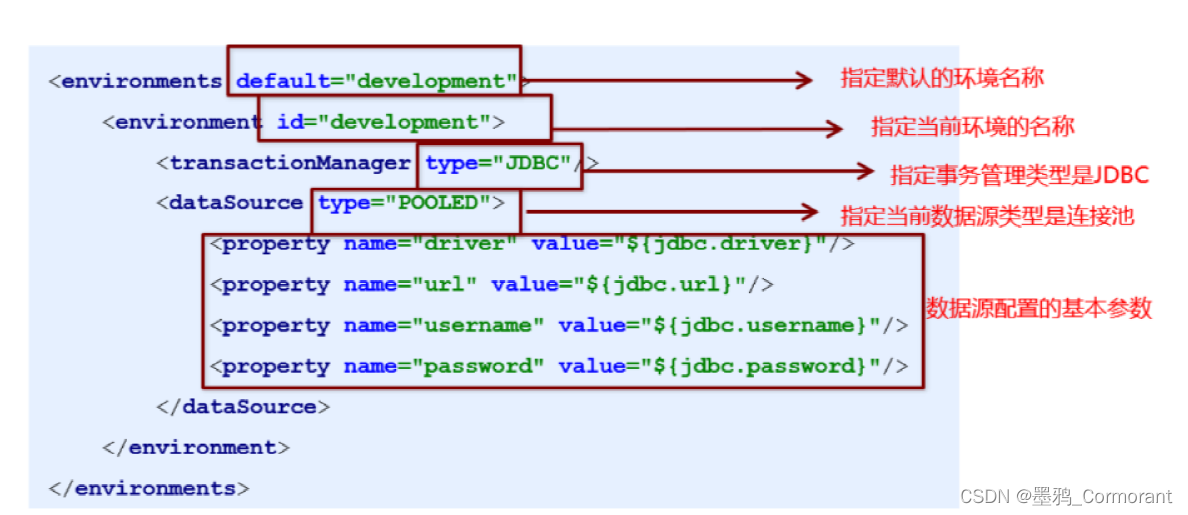
2)properties标签
第三方属性配置
实际开发中,习惯将数据源的配置信息单独抽取成一个properties文件
	 <properties resource="jdbc.properties"></properties>

	 <environments default="mysql">
        <!--mysql数据库环境-->
        <environment id="mysql">
            <!-- 使用JDBC类型事务管理器 -->
            <transactionManager type="JDBC"></transactionManager>
            <!-- 数据源(连接池)配置  POOLED-->
            <dataSource type="POOLED">
                <property name="driver" value="${jdbc.driver}"></property>
                <property name="url" value="${jdbc.url}"></property>
                <property name="username" value="${jdbc.username}"></property>
                <property name="password" value="${jdbc.password}"></property>
            </dataSource>
        </environment>
    </environments>
3)typeAliases标签
实体类型别名配置
	<typeAliases>
        <!--指定一个实体类和对应的别名-->
        <!--<typeAlias type="com.test.domain.User" alias="user"></typeAlias>-->

        <!--指定当前包下所有的实体设置别名  默认: 别名(类名) -->
        <package name="com.test.domain"></package>
    </typeAliases>

4)mappers标签
映射关系配置(加载映射配置文件)
	<!-- 加载指定的src目录下的映射文件 -->
	<mapper resource="org/mybatis/builder/AuthorMapper.xml"/>
核心配置文件标签顺序

1)Resources
专门用于加载mybatis核心配置文件,返回的 io流
InputStream in = Resources.getResourceAsStream("SqlMapConfig.xml");
2)SqlSessionFactoryBuilder
专门用于生产SqlSessionFactory工厂对象
SqlSessionFactory sqlSessionFactory = new SqlSessionFactoryBuilder().build(in);
3)SqlSessionFactory
一个项目只有一个工厂对象,生产sqlSession对象
// 需要手动提交事务,DML语句才会持久化到数据库中
SqlSession openSession();	// 【推荐】

// 设置是否开启自动提交,如果设置为true,开启自动提交事务
SqlSession openSession(boolean autoCommit);
	参数说明
		true:每一条DML类型语句都会自动提交事务
		false(默认值):需要手动提交事务
4)SqlSession
是mybatis核心对象,可以对数据库进行CRUD基本操作
//  方法
<T> T selectOne(String statement, Object parameter);
<E> List<E> selectList(String statement, Object parameter);
int insert(String statement, Object parameter);
int update(String statement, Object parameter);
int delete(String statement, Object parameter);

// 事务
void commit();
void rollback();
Mybatis的延迟加载是针对嵌套查询而言的,是指在进行查询的时候先只查询最外层的SQL,对于内层SQL将在需要使用的时候才查询出来。
使用延迟加载的场景:一对多、多对多
不推荐使用延迟加载的场景:一对一(使用 立即加载)
特别注意:延迟加载是基于 嵌套查询 组合使用
1)局部延迟加载
* 需要手动在每一个select相关标签中单独配置
	<association>、<collection>
		fetchType="lazy"  懒加载
		fetchType="eager" 立即加载
2)全局延迟加载
lazyLoadingEnabled:延迟加载的全局开关。当开启时,所有关联对象都会延迟加载,特定关联关系中可通过设置 fetchType 属性来覆盖该项的开关状态。默认值为false。
	<!-- 在核心配置文件SqlMapConfig.xml,设置全局参数 -->
    <settings>
        <!--开启懒加载-->
        <setting name="lazyLoadingEnabled" value="true"/>
    </settings>
若是pringboot集成,在yaml配置文件中配置开启延迟加载。
mybatis:
  configuration:
    lazy-loading-enabled: true 		#开启延时加载开关
注意:如果全局配置了延迟加载,那么一对一也会起作用
可以为一对一设置局部的立即加载,因为局部优先级高于全局延迟加载
<association property="user" javaType="User" column="uid" select="com.itheima.mapper.UserMapper.findById"
             fetchType="eager">
</association>
3)指定触发延迟加载的方法配置
lazyLoadTriggerMethods 默认情况下仅仅支持自动将 equals,clone,hashCode,toString 这几个方法定义为延迟加载的加载触发方法。
* 在SqlMapConfig.xml核心配置文件,设置全局参数
	<settings>
		<!-- 如果将 Person 的 doLazyLoadingNow()方法加入这个列表中,
			 则调用 doLazyLoadingNow()方法将会导致 Person 上的所有延迟加载属性的关联对象被执行加载。 -->
		<setting name="lazyLoadTriggerMethods" value="doLazyLoadingNow,equals,clone,hashCode,toString"/>
	</settings>
若是springboot集成,在yaml配置文件中配置
mybatis:
  configuration:
    lazy-loading-enabled: true 		# 开启延时加载开关
    aggressive-lazy-loading: false 	# 将积极加载改为消极加载(即按需加载),默认值就是false
    # 指定触发延迟加载的方法
    lazy-load-trigger-methods: "doLazyLoadingNow,equals,clone,hashCode,toString"
参考:https://blog.csdn.net/jinhaijing/article/details/84230810
缓存是服务器内存的一块区域。经常访问但又不会时时发生变化的数据适合使用缓存。
mybatis也支持缓存:提高查询速度,减轻数据库访问压力。
MyBatis自带一级缓存且不可卸载
当执行查询以后,查询的结果会同时缓存到SqlSession为我们提供的一块区域中,该区域的结构是一个Map,当再次查询同样的数据时,mybatis会先去sqlsession中查询缓存,有的话直接拿出来用。当SqlSession对象消失时,mybatis的一级缓存也就消失了,同时一级缓存是SqlSession范围的缓存,当调用SqlSession的修改、添加、删除、commit(),close等方法时,就会清空一级缓存。
特点:随着sqlSession的创建而存在,随着SqlSession的销毁而销毁
简称:sqlSession级别的缓存
一级缓存失效的四种情况:
sqlSession不同(会话不同)
sqlSession相同,查询缓存中没有的数据
sqlSession相同,但两次查询之间执行了增删改操作
说明:为了防止增删改对当前数据的影响,即使查的同一个对象,也会重新查数据库
原因:每个增删改标签都有默认刷新缓存配置:flushCache=“true”(刷新一级和二级缓存)
sqlSession相同,但手动清楚了一级缓存(缓存清空)
手动清空一级缓存:openSession.clearCache();
没有使用到当前一级缓存的情况,就会再次向数据库发出查询
基于 mapper.xml 中 namespace 命名空间级别的缓存,即同一个 namespace 对应一个二级缓存。两个mapper.xml的namespace如果相同,则这两个mapper执行sql查询到数据将存在相同的二级缓存区域中。
也称为SqlSessionFactory级别的缓存,由同一个SqlSessionFactory对象创建的多个SqlSession共享其缓存,但是其中缓存的是数据而不是对象,所以从二级缓存再次查询出得结果的对象与第一次存入的对象是不一样的。
注意:不是程序自带的,需要配置。仅做了解,一般不推荐使用(一般使用Redis缓存)。
配置流程:
在核心配置文件 SqlMapConfig.xml 中开启二级缓存(可以省略)
<settings>
    <!--开启对二级缓存的支持 默认是支持的可以不用配置-->
    <setting name="cacheEnabled" value="true"/>
</settings>
若是springboot集成,在yaml配置文件中配置开启二级缓存(可以省略)
mybatis:
  configuration:
    cache-enabled: true #打开全局缓存开关(二级环境),默认值就是true
在mapper配置文件中开启使用二级缓存
<?xml version="1.0" encoding="UTF-8" ?>
<!DOCTYPE mapper
 PUBLIC "-//mybatis.org//DTD Mapper 3.0//EN"
 "http://mybatis.org/dtd/mybatis-3-mapper.dtd">
<mapper namespace="com.atguigu.mybatis.dao.EmployeeMapper">

    <!-- 声明使用二级缓存 -->
	<cache><cache/>
<!--	<cache eviction="FIFO" flushInterval="60000" readOnly="false" size="1024"></cache>  -->

 	<select id="getEmpByLastNameLikeReturnMap" resultType="com.atguigu.mybatis.bean.Employee">
 		select * from tbl_employee where last_name like #{lastName}
 	</select>
</mapper>
<cache>中可以配置一些参数:
eviction:缓存的回收策略:
flushInterval:缓存刷新间隔。缓存多长时间清空一次,默认不清空,可以设置一个毫秒值
readOnly:是否只读:
true:只读;mybatis认为所有从缓存中获取数据的操作都是只读操作,不会修改数据。
mybatis为了加快获取速度,直接就会将数据在缓存中的引用交给用户。不安全,速度快
false:非只读:mybatis觉得获取的数据可能会被修改。
mybatis会利用序列化&反序列的技术克隆一份新的数据给你。安全,速度慢
size:缓存存放多少元素
type=“”:指定自定义缓存的全类名
实体类对象需要实现序列化接口
public class User implements Serializable
操作的过程中需要提交之后才会存入到二级缓存
查询数据提交到二级缓存中:sqlsession.commit | sqlsession.close
**注意:**如果 openSession.close(); 在第二次查询之后才关闭,则第二次查询会从一级缓存中查,如果不是一个session,则查询不到数据,然后就会发送sql去查数据库;
@Test
public void testSecondLevelCache() throws IOException{
	SqlSessionFactory sqlSessionFactory = getSqlSessionFactory();
	SqlSession openSession = sqlSessionFactory.openSession();
	SqlSession openSession2 = sqlSessionFactory.openSession();
	try{
		EmployeeMapper mapper = openSession.getMapper(EmployeeMapper.class);
		EmployeeMapper mapper2 = openSession2.getMapper(EmployeeMapper.class);

		Employee emp01 = mapper.getEmpById(1);
		System.out.println(emp01);

		Employee emp02 = mapper2.getEmpById(1);
		System.out.println(emp02);
		openSession.close();
		openSession2.close();
	}
}
工作机制:
一个会话,查询一条数据,这个数据会默认先被放在当前会话的一级缓存中;
当会话关闭或者提交后,一级缓存中的数据会被保存到二级缓存中;
然后当有新的会话查询数据,若是同一个 namespace 就可以获取二级缓存中的内容。
sqlSession ==> EmployeeMapper ==> Employee
mybatis全局配置文件中配置全局缓存开启和清空
1)控制二级缓存的开启和关闭
	<setting name="cacheEnabled" value="true"/>
	<!-- cacheEnabled=true:开启缓存;false:关闭缓存(二级缓存关闭)(一级缓存一直可用的) -->
2)控制一级缓存的开启和关闭
	<setting name="localCacheScope" value="SESSION"/>
	<!-- localCacheScope:本地缓存作用域(一级缓存SESSION);
     	 当前会话的所有数据保存在会话缓存中;STATEMENT:可以禁用一级缓存 -->
注意:一级缓存关闭后,二级缓存自然也无法使用;
mapper.xml 中也可以配置一级和二级缓存开启和使用
1)每个select标签都默认配置了useCache=“true”,表示会将本条语句的结果进行二级缓存。
如果useCache= false:则表示不使用缓存(一级缓存依然使用,二级缓存不使用)
2)每个 增删改 标签都默认配置了 flushCache=“true”,表示增删改执行完成后就会刷新一级二级缓存。
注意:查询标签 <select> 默认 flushCache=“false”:如果 flushCache=true; 则每次查询之后都会清空缓存;一级和二级缓存都无法使用。
如果配置了 DatabaseIdProvider,可以在动态代码中使用名为 “_databaseId” 的变量来为不同的数据库构建特定的语句。
示例:
<insert id="insert">
    <selectKey keyProperty="id" resultType="int" order="BEFORE">
        <if test="_databaseId == 'oracle'">
            select seq_users.nextval from dual
        </if>
        <if test="_databaseId == 'db2'">
            select nextval for seq_users from sysibm.sysdummy1"
        </if>
    </selectKey>
    insert into users values (#{id}, #{name})
</insert>
DatabaseIdProvider 配置
	@Bean
    public DatabaseIdProvider databaseIdProvider() {
        DatabaseIdProvider databaseIdProvider = new VendorDatabaseIdProvider();
        Properties p = new Properties();
        p.setProperty("Oracle", "oracle");
        p.setProperty("TiDB", "tidb");
        p.setProperty("PostgreSQL", "postgresql");
        p.setProperty("DB2", "db2");
        p.setProperty("SQL Server", "sqlserver");
        databaseIdProvider.setProperties(p);
        return databaseIdProvider;
    }
MyBatis 从 3.2 版本开始支持插入脚本语言,这允许插入一种语言驱动,并基于这种语言来编写动态 SQL 查询语句。
可以通过实现以下接口来插入一种语言:
public interface LanguageDriver {
  ParameterHandler createParameterHandler(MappedStatement mappedStatement, Object parameterObject, BoundSql boundSql);
  SqlSource createSqlSource(Configuration configuration, XNode script, Class<?> parameterType);
  SqlSource createSqlSource(Configuration configuration, String script, Class<?> parameterType);
}
实现自定义语言驱动后,就可以在 mybatis-config.xml 文件中将它设置为默认语言:
<typeAliases>
  <typeAlias type="org.sample.MyLanguageDriver" alias="myLanguage"/>
</typeAliases>
<settings>
  <setting name="defaultScriptingLanguage" value="myLanguage"/>
</settings>
或者,也可以使用 lang 属性为特定的语句指定语言:
<select id="selectBlog" lang="myLanguage">
  SELECT * FROM BLOG
</select>
或者,在 mapper 接口上添加 @Lang 注解:
public interface Mapper {
  @Lang(MyLanguageDriver.class)
  @Select("SELECT * FROM BLOG")
  List<Blog> selectBlog();
}
* @Insert:实现新增,代替了<insert></insert>

* @Update:实现更新,代替了<update></update>

* @Delete:实现删除,代替了<delete></delete>

* @Select:实现查询,代替了<select></select>

* @Result:实现结果集封装,代替了<result></result>

* @Results:可以与@Result 一起使用,封装多个结果集,代替了<resultMap></resultMap>
注解对用户表实现增删改查操作
import cn.test.doman.User;
import org.apache.ibatis.annotations.*;

import java.util.List;

// 注解的单表crud操作
@Mapper
public interface UserMapper {

    //1 根据id做查询
    @Select("select * from user where id =#{id}")
    public User findById(int id);


    //2 全查
    @Select("SELECT id AS iid,username AS name,birthday AS bir,sex AS se,address AS addr FROM USER")
    @Results({
            /*column:字段
            * property:对象属性
            * id:默认是false 代表当前不是主键
            * */
            @Result(column = "iid",property = "id",id=true),
            @Result(column = "name",property = "username"),
            @Result(column = "bir",property = "birthday"),
            @Result(column = "se",property = "sex"),
            @Result(column = "addr",property = "address")
    })
    public List<User> findAll();


    //3 新增
    @Insert("insert into user(username,birthday,sex,address) "
            + "values(#{username},#{birthday},#{sex},#{address})")
    public void save(User user);

    //4 修改
    @Update("update user set username=#{username},birthday=#{birthday},sex=#{sex},address=#{address} "
            + "where id=#{id}")
    public void update(User user);

    //5 删除
    @Delete("delete from user where id=#{id}")
    public void delete(int id);
}
注解开发的多表查询是嵌套查询方式
@Results	代替的是标签<resultMap>。该注解中可以使用单个@Result注解,也可以使用@Result集合。
			使用格式:@Results({@Result(), @Result()})或@Results(@Result())

@Result		代替<id>标签和<result>标签
			@Result中属性介绍:
				column:数据库的列名
				property:需要装配的属性名
				one:需要使用@One注解(@Result(one=@One ()))
				many:需要使用@Many注解(@Result(many=@Many ()))

@One(一对一)	代替了<assocation>标签,是多表查询的关键,在注解中用来指定子查询返回单一对象。
				@One注解属性介绍:
					select:指定用来多表查询的 sqlmapper
				使用格式:@Result(column=" ", property=" ", one=@One(select=""))

@Many(一对多)	代替了<collection>标签,是多表查询的关键,在注解中用来指定子查询返回对象集合。
				使用格式:@Result(column=" ", property=" ", many=@Many(select=""))
1)一对一
import org.apache.ibatis.annotations.One;
import org.apache.ibatis.annotations.Result;
import org.apache.ibatis.annotations.Results;
import org.apache.ibatis.annotations.Select;

@Mapper
public interface OrdersMapper {

    // 查询订单
    @Select("select * from orders where id=#{id}")
    @Results({
            @Result(column = "id",property = "id",id = true),
            @Result(column = "ordertime",property = "ordertime"),
            @Result(column = "money",property = "money"),
            /* 组装用户
            *    一对一 one=@one
            *    select:代表要封装的数据方法来源
            *    column:方法需要的参数
            *    property:要封装的对象属性名
            *    javaType:对象属性名的字节码(.class)类型
            * */
            @Result(one=@One(select = "cn.test.mapper.UserMapper.findById")
                    ,property = "user",javaType = User.class, column = "uid")
    })
    public Orders findOrders(int id);
}
@Mapper
public interface UserMapper {

    //1 根据id做查询
    @Select("select * from user where id =#{id}")
    public User findById(int id);
}
2)一对多
@Mapper
public interface UserMapper {

    //1 根据id做查询
    @Select("select * from user where id =#{id}")
    @Results({
            @Result(column = "id",property = "id",id=true),
            @Result(column = "username",property = "username"),
            @Result(column = "birthday",property = "birthday"),
            @Result(column = "sex",property = "sex"),
            @Result(column = "address",property = "address"),
            /*组装订单orders
            *     一对多
            *     many=@many
             *     select:代表要封装的数据方法来源
             *     column:方法需要的参数
             *     property:要封装的对象属性名
             *     javaType:对象属性名的字节码(.class)类型
            * */
            @Result(many = @Many(select = "cn.test.mapper.OrdersMapper.findOrdersList"),
                    property = "ordersList",javaType =List.class,column = "id")
    })
    public User findById(int id);
}
@Mapper
public interface OrdersMapper {
	/*根据用户id获取订单集合*/
    @Select("select * from orders where uid=#{用户的id}")
    public List<Orders> findOrdersList(int id);
}
3)多对多
@Mapper
public interface UserMapper {

    //1 根据id做查询
    @Select("select * from user where id =#{id}")
    @Results({
            @Result(column = "id",property = "id",id=true),
            @Result(column = "username",property = "username"),
            @Result(column = "birthday",property = "birthday"),
            @Result(column = "sex",property = "sex"),
            @Result(column = "address",property = "address"),
            // 组装订单orders
            @Result(many = @Many(select = "cn.test.mapper.OrdersMapper.findOrdersList"
                                 , fetchType = FetchType.LAZY)
                    , property = "ordersList",javaType =List.class,column = "id"),
			// 组装角色
            @Result(many = @Many(select = "cn.test.mapper.RoleMapper.findRoles")
                    ,property = "roleList",javaType = List.class,column = "id")
    })
    public User findById(int id);
}
@Mapper
public interface RoleMapper {

    /*查询指定用户的角色*/
    @Select("SELECT * FROM user_role ur INNER JOIN role r ON ur.rid=r.id WHERE ur.uid=#{id}")
    @Results({
            @Result(column = "id",property = "id",id=true),
            @Result(column = "role_name",property = "roleName"),
            @Result(column = "role_desc",property = "roleDesc")
    })
    public List<Role> findRoles(int id);
}
我正在学习如何使用Nokogiri,根据这段代码我遇到了一些问题:require'rubygems'require'mechanize'post_agent=WWW::Mechanize.newpost_page=post_agent.get('http://www.vbulletin.org/forum/showthread.php?t=230708')puts"\nabsolutepathwithtbodygivesnil"putspost_page.parser.xpath('/html/body/div/div/div/div/div/table/tbody/tr/td/div
我有一个Ruby程序,它使用rubyzip压缩XML文件的目录树。gem。我的问题是文件开始变得很重,我想提高压缩级别,因为压缩时间不是问题。我在rubyzipdocumentation中找不到一种为创建的ZIP文件指定压缩级别的方法。有人知道如何更改此设置吗?是否有另一个允许指定压缩级别的Ruby库? 最佳答案 这是我通过查看rubyzip内部创建的代码。level=Zlib::BEST_COMPRESSIONZip::ZipOutputStream.open(zip_file)do|zip|Dir.glob("**/*")d
类classAprivatedeffooputs:fooendpublicdefbarputs:barendprivatedefzimputs:zimendprotecteddefdibputs:dibendendA的实例a=A.new测试a.foorescueputs:faila.barrescueputs:faila.zimrescueputs:faila.dibrescueputs:faila.gazrescueputs:fail测试输出failbarfailfailfail.发送测试[:foo,:bar,:zim,:dib,:gaz].each{|m|a.send(m)resc
很好奇,就使用rubyonrails自动化单元测试而言,你们正在做什么?您是否创建了一个脚本来在cron中运行rake作业并将结果邮寄给您?git中的预提交Hook?只是手动调用?我完全理解测试,但想知道在错误发生之前捕获错误的最佳实践是什么。让我们理所当然地认为测试本身是完美无缺的,并且可以正常工作。下一步是什么以确保他们在正确的时间将可能有害的结果传达给您? 最佳答案 不确定您到底想听什么,但是有几个级别的自动代码库控制:在处理某项功能时,您可以使用类似autotest的内容获得关于哪些有效,哪些无效的即时反馈。要确保您的提
假设我做了一个模块如下:m=Module.newdoclassCendend三个问题:除了对m的引用之外,还有什么方法可以访问C和m中的其他内容?我可以在创建匿名模块后为其命名吗(就像我输入“module...”一样)?如何在使用完匿名模块后将其删除,使其定义的常量不再存在? 最佳答案 三个答案:是的,使用ObjectSpace.此代码使c引用你的类(class)C不引用m:c=nilObjectSpace.each_object{|obj|c=objif(Class===objandobj.name=~/::C$/)}当然这取决于
我正在尝试使用ruby和Savon来使用网络服务。测试服务为http://www.webservicex.net/WS/WSDetails.aspx?WSID=9&CATID=2require'rubygems'require'savon'client=Savon::Client.new"http://www.webservicex.net/stockquote.asmx?WSDL"client.get_quotedo|soap|soap.body={:symbol=>"AAPL"}end返回SOAP异常。检查soap信封,在我看来soap请求没有正确的命名空间。任何人都可以建议我
关闭。这个问题是opinion-based.它目前不接受答案。想要改进这个问题?更新问题,以便editingthispost可以用事实和引用来回答它.关闭4年前。Improvethisquestion我想在固定时间创建一系列低音和高音调的哔哔声。例如:在150毫秒时发出高音调的蜂鸣声在151毫秒时发出低音调的蜂鸣声200毫秒时发出低音调的蜂鸣声250毫秒的高音调蜂鸣声有没有办法在Ruby或Python中做到这一点?我真的不在乎输出编码是什么(.wav、.mp3、.ogg等等),但我确实想创建一个输出文件。
我在我的项目目录中完成了compasscreate.和compassinitrails。几个问题:我已将我的.sass文件放在public/stylesheets中。这是放置它们的正确位置吗?当我运行compasswatch时,它不会自动编译这些.sass文件。我必须手动指定文件:compasswatchpublic/stylesheets/myfile.sass等。如何让它自动运行?文件ie.css、print.css和screen.css已放在stylesheets/compiled。如何在编译后不让它们重新出现的情况下删除它们?我自己编译的.sass文件编译成compiled/t
我想将html转换为纯文本。不过,我不想只删除标签,我想智能地保留尽可能多的格式。为插入换行符标签,检测段落并格式化它们等。输入非常简单,通常是格式良好的html(不是整个文档,只是一堆内容,通常没有anchor或图像)。我可以将几个正则表达式放在一起,让我达到80%,但我认为可能有一些现有的解决方案更智能。 最佳答案 首先,不要尝试为此使用正则表达式。很有可能你会想出一个脆弱/脆弱的解决方案,它会随着HTML的变化而崩溃,或者很难管理和维护。您可以使用Nokogiri快速解析HTML并提取文本:require'nokogiri'h
我想为Heroku构建一个Rails3应用程序。他们使用Postgres作为他们的数据库,所以我通过MacPorts安装了postgres9.0。现在我需要一个postgresgem并且共识是出于性能原因你想要pggem。但是我对我得到的错误感到非常困惑当我尝试在rvm下通过geminstall安装pg时。我已经非常明确地指定了所有postgres目录的位置可以找到但仍然无法完成安装:$envARCHFLAGS='-archx86_64'geminstallpg--\--with-pg-config=/opt/local/var/db/postgresql90/defaultdb/po
