1、关于chatGPT
最近用https://github.com/Hitachi-Automotive-And-Industry-Lab/semantic-segmentation-editor的基于React的web端数据标记工具,挺好用。
但发现即便删除了container,之前标注的label都还在,觉得很奇怪,因为mongodb也一起删除了,数据应该没有才对
但看见docker-compose的配置文件里有这么一句在mongodb下,其中data应该是本地路径,data/db是container内部路径,一个映射罢了
volumes:
      - data:/data/db
查了很久,包括stack overflow,官网,但还是半明白,因为我找不到这个data在本地什么位置
好不容易查到这似乎是一种volume,docker volume ls可以查看到
local     fb3597f34e995983a81b99f4f6fcebb74a1fcd6d19c676a2af363bf608083985
local     fc588f7ad21e2e7eeb0ee0931bc2780e98589b45cc83ea6abdc46bce30df1084
local     labelling_data
可见果然有这么个volume叫labelling_data存储着我标记的数据,也可以删除,但还是找不到在本地什么位置
于是抱着侥幸问了下chatGPT,惊了
我问:
In desktop docker’s configure file, I found ‘data:/data/db’ in the volume field of mongodb, what does the data mean, where is this data in my local windows system
chatGPT答:
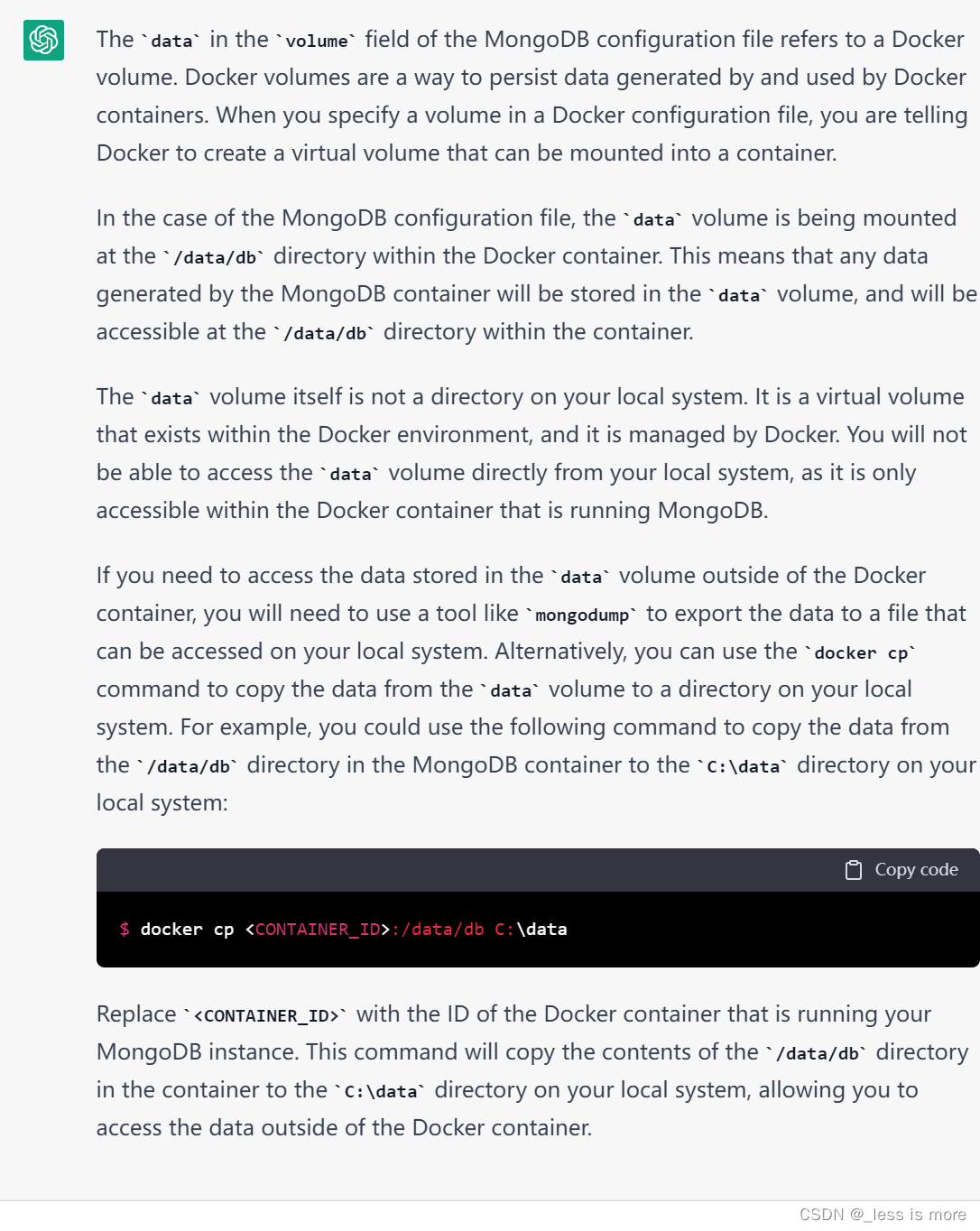
原来data并不是本地某一个文件夹,而是由docker管理的一个虚拟volume,不能直接访问
2、完整的docker-compose配置文件
使用前唯一要改的是app的volumes的本地路径,改成相应的图像所在文件夹路径即可
version: '3'

services:
  app:
    image: dmandrioli/semantic-segmentation-editor
    volumes:
      - "C:/Users/ASUS/Desktop/labelling/test:/root/sse-images:rw"
    ports:
      - '80:3000'
    depends_on:
      - mongo
    environment:
      ROOT_URL: ${APP_ROOT_URL:-http://localhost}
      MONGO_URL: mongodb://mongo:27017/meteor
      PORT: 3000
      METEOR_SETTINGS: '{
  "configuration": {
    "images-folder": "",
    "internal-folder": "",
    "demo-mode": false
  },
  "sets-of-classes": [
    {
      "name": "Cityscapes", "objects": [
      {"label": "VOID", "color": "#CFCFCF"},
      {"label": "Road", "color": "#804080", "icon": "Road"},
      {"label": "Sidewalk", "color": "#F423E8", "icon": "NaturePeople"},
      {"label": "Parking", "color": "#FAAAA0", "icon": "Parking"},
      {"label": "Rail Track", "color": "#E6968C", "icon": "Train"},
      {"label": "Person", "color": "#DC143C", "icon": "Walk"},
      {"label": "Rider", "color": "#FF0000", "icon": "Motorbike"},
      {"label": "Car", "color": "#0000E8", "icon": "Car"},
      {"label": "Truck", "color": "#000046", "icon": "Truck"},
      {"label": "Bus", "color": "#003C64", "icon": "Bus"},
      {"label": "On Rails", "color": "#E6968C", "icon": "Train"},
      {"label": "Motorcycle", "color": "#0000E6", "icon": "Motorbike"},
      {"label": "Bicycle", "color": "#770B20", "icon": "Bike"},
      {"label": "Caravan", "color": "#00005A", "icon": "Caravan"},
      {"label": "Trailer", "color": "#00006E", "icon": "TruckTrailer"},
      {"label": "Building", "color": "#464646", "icon": "HomeVariant"},
      {"label": "Wall", "color": "#66669C", "icon": "Wall"},
      {"label": "Fence", "color": "#BE9999", "icon": "Gate"},
      {"label": "Guard Rail", "color": "#B4A5B4", "icon": "SignCaution"},
      {"label": "Bridge", "color": "#966464", "icon": "Bridge"},
      {"label": "Tunnel", "color": "#96785A", "icon": "AlarmLight"},
      {"label": "Pole", "color": "#999999", "icon": "Instapaper"},
      {"label": "Pole Group", "color": "#999999", "icon": "Instapaper"},
      {"label": "Traffic Sign", "color": "#DCDC00", "icon": "SignDirection"},
      {"label": "Traffic Light", "color": "#FAAA1E", "icon": "TrafficLight"},
      {"label": "Vegetation", "color": "#6B8E23", "icon": "PineTree"},
      {"label": "Terrain", "color": "#98FB98", "icon": "Terrain"},
      {"label": "Sky", "color": "#4682B4", "icon": "WeatherPartlycloudy"},
      {"label": "Ground", "color": "#510051", "icon": "Drag"},
      {"label": "Dynamic", "color": "#6F4A00", "icon": "RunFast"},
      {"label": "Static", "color": "#000000", "icon": "Anchor"}
    ]
    },
    {
      "name": "AD20", "objects": [
        {"label": "VOID", "color": "#CFCFCF"},
        {"label": "Void", "color": "#FF8800", "icon": "BorderNoneVariant"},
        {"label": "Road", "color": "#799024", "icon": "Road"},
        {"label": "Pedestrian", "color": "#FAFFF5", "icon": "Walk"},
        {"label": "Car", "color": "#FF6D67", "icon": "Car"},
        {"label": "Truck", "color": "#FF5B8E", "icon": "Truck"},
        {"label": "Bus", "color": "#FF6FA2", "icon": "Bus"},
        {"label": "On rails", "color": "#FF7FC3", "icon": "Train"},
        {"label": "Motorcycle", "color": "#FFA859", "icon": "Motorbike"},
        {"label": "Bicycle", "color": "#FFDB62", "icon": "Bike"},
        {"label": "Sky", "color": "#87D8FF", "icon": "WeatherPartlycloudy"},
        {"label": "Vegetation", "color": "#7BC32B", "icon": "PineTree"},
        {"label": "Sidewalk", "color": "#827E67", "icon": "NaturePeople"},
        {"label": "Traffic sign", "color": "#9E9BFF", "icon": "SignDirection"},
        {"label": "Lane marking", "color": "#DDCDFF", "icon": "RoadVariant"},
        {"label": "Building", "color": "#785C6F", "icon": "HomeVariant"},
        {"label": "Traffic light", "color": "#119599", "icon": "SignDirection"},
        {"label": "Snow covered", "color": "#F1F1EF", "icon": "Snowflake"},
        {"label": "Pole", "color": "#FBB577", "icon": "Instapaper"},
        {"label": "Unpaved road", "color": "#C0AE89", "icon": "BlurLinear"},
        {"label": "Guard rail", "color": "#4D3D48", "icon": "SignCaution"}
      ]
    },
    {
      "name": "33 Classes", "objects": [
      {"label": "VOID", "color": "#CFCFCF"},
      {"label": "Class 1"},
      {"label": "Class 2"},
      {"label": "Class 3"},
      {"label": "Class 4"},
      {"label": "Class 5"},
      {"label": "Class 6"},
      {"label": "Class 7"},
      {"label": "Class 8"},
      {"label": "Class 9"},
      {"label": "Class 10"},
      {"label": "Class 11"},
      {"label": "Class 12"},
      {"label": "Class 13"},
      {"label": "Class 14"},
      {"label": "Class 15"},
      {"label": "Class 16"},
      {"label": "Class 17"},
      {"label": "Class 18"},
      {"label": "Class 19"},
      {"label": "Class 20"},
      {"label": "Class 21"},
      {"label": "Class 22"},
      {"label": "Class 23"},
      {"label": "Class 24"},
      {"label": "Class 25"},
      {"label": "Class 26"},
      {"label": "Class 27"},
      {"label": "Class 28"},
      {"label": "Class 29"},
      {"label": "Class 30"},
      {"label": "Class 31"},
      {"label": "Class 32"}
    ]
    }
  ]
}'

  mongo:
    image: mongo:latest
    command:
      - --storageEngine=wiredTiger
    volumes:
      - data:/data/db

volumes:
  data:
我想为Heroku构建一个Rails3应用程序。他们使用Postgres作为他们的数据库,所以我通过MacPorts安装了postgres9.0。现在我需要一个postgresgem并且共识是出于性能原因你想要pggem。但是我对我得到的错误感到非常困惑当我尝试在rvm下通过geminstall安装pg时。我已经非常明确地指定了所有postgres目录的位置可以找到但仍然无法完成安装:$envARCHFLAGS='-archx86_64'geminstallpg--\--with-pg-config=/opt/local/var/db/postgresql90/defaultdb/po
尝试通过RVM将RubyGems升级到版本1.8.10并出现此错误:$rvmrubygemslatestRemovingoldRubygemsfiles...Installingrubygems-1.8.10forruby-1.9.2-p180...ERROR:Errorrunning'GEM_PATH="/Users/foo/.rvm/gems/ruby-1.9.2-p180:/Users/foo/.rvm/gems/ruby-1.9.2-p180@global:/Users/foo/.rvm/gems/ruby-1.9.2-p180:/Users/foo/.rvm/gems/rub
使用带有Rails插件的vim,您可以创建一个迁移文件,然后一次性打开该文件吗?textmate也可以这样吗? 最佳答案 你可以使用rails.vim然后做类似的事情::Rgeneratemigratonadd_foo_to_bar插件将打开迁移生成的文件,这正是您想要的。我不能代表textmate。 关于ruby-使用VimRails,您可以创建一个新的迁移文件并一次性打开它吗?,我们在StackOverflow上找到一个类似的问题: https://sta
我需要从一个View访问多个模型。以前,我的links_controller仅用于提供以不同方式排序的链接资源。现在我想包括一个部分(我假设)显示按分数排序的顶级用户(@users=User.all.sort_by(&:score))我知道我可以将此代码插入每个链接操作并从View访问它,但这似乎不是“ruby方式”,我将需要在不久的将来访问更多模型。这可能会变得很脏,是否有针对这种情况的任何技术?注意事项:我认为我的应用程序正朝着单一格式和动态页面内容的方向发展,本质上是一个典型的网络应用程序。我知道before_filter但考虑到我希望应用程序进入的方向,这似乎很麻烦。最终从任何
我想要做的是有2个不同的Controller,client和test_client。客户端Controller已经构建,我想创建一个test_clientController,我可以使用它来玩弄客户端的UI并根据需要进行调整。我主要是想绕过我在客户端中内置的验证及其对加载数据的管理Controller的依赖。所以我希望test_clientController加载示例数据集,然后呈现客户端Controller的索引View,以便我可以调整客户端UI。就是这样。我在test_clients索引方法中试过这个:classTestClientdefindexrender:template=>
我的最终目标是安装当前版本的RubyonRails。我在OSXMountainLion上运行。到目前为止,这是我的过程:已安装的RVM$\curl-Lhttps://get.rvm.io|bash-sstable检查已知(我假设已批准)安装$rvmlistknown我看到当前的稳定版本可用[ruby-]2.0.0[-p247]输入命令安装$rvminstall2.0.0-p247注意:我也试过这些安装命令$rvminstallruby-2.0.0-p247$rvminstallruby=2.0.0-p247我很快就无处可去了。结果:$rvminstall2.0.0-p247Search
如果您尝试在Ruby中的nil对象上调用方法,则会出现NoMethodError异常并显示消息:"undefinedmethod‘...’fornil:NilClass"然而,有一个tryRails中的方法,如果它被发送到一个nil对象,它只返回nil:require'rubygems'require'active_support/all'nil.try(:nonexisting_method)#noNoMethodErrorexceptionanymore那么try如何在内部工作以防止该异常? 最佳答案 像Ruby中的所有其他对象
关闭。这个问题需要detailsorclarity.它目前不接受答案。想改进这个问题吗?通过editingthispost添加细节并澄清问题.关闭8年前。Improvethisquestion为什么SecureRandom.uuid创建一个唯一的字符串?SecureRandom.uuid#=>"35cb4e30-54e1-49f9-b5ce-4134799eb2c0"SecureRandom.uuid方法创建的字符串从不重复?
由于fast-stemmer的问题,我很难安装我想要的任何rubygem。我把我得到的错误放在下面。Buildingnativeextensions.Thiscouldtakeawhile...ERROR:Errorinstallingfast-stemmer:ERROR:Failedtobuildgemnativeextension./System/Library/Frameworks/Ruby.framework/Versions/2.0/usr/bin/rubyextconf.rbcreatingMakefilemake"DESTDIR="cleanmake"DESTDIR=
我有一个正在构建的应用程序,我需要一个模型来创建另一个模型的实例。我希望每辆车都有4个轮胎。汽车模型classCar轮胎模型classTire但是,在make_tires内部有一个错误,如果我为Tire尝试它,则没有用于创建或新建的activerecord方法。当我检查轮胎时,它没有这些方法。我该如何补救?错误是这样的:未定义的方法'create'forActiveRecord::AttributeMethods::Serialization::Tire::Module我测试了两个环境:测试和开发,它们都因相同的错误而失败。 最佳答案
