文章目录
因为HybridCLR实例代码中使用的是传统AssetBundle打包方式,将预制体,程序集,场景打包到ab包中,在这里我们将替换为Addressables打包
1.创建热更程序集Hotfix
新建文件夹HotFix
新建文件HotFix.asmdef并检视界面修改属性如下
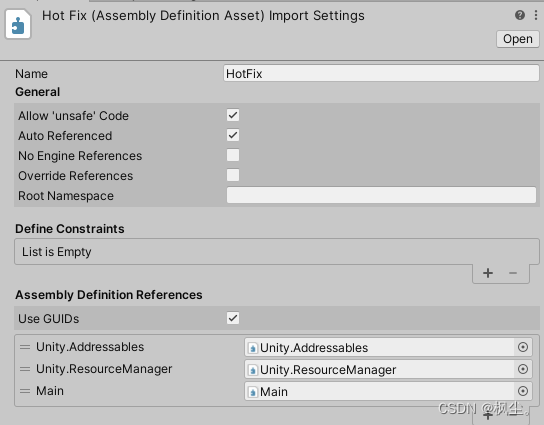
新建文件App.cs
App.cs代码如下
using System;
using System.Collections.Generic;
using UnityEngine;
using UnityEngine.AddressableAssets;

namespace HotFix
{
    struct MyValue
    {
        public int x;
        public float y;
        public string s;
    }
    public class App
    {
        public static int Main()
        {
#if !UNITY_EDITOR
            LoadMetadataForAOTAssembly();
            Debug.Log("ydd-- AOT程序集加载完毕!");
#endif
            TestAOTGeneric();

            LoadScene();
            return 0;
        }
        /// <summary>
        /// 测试 aot泛型
        /// </summary>
        public static void TestAOTGeneric()
        {
            var arr = new List<MyValue>();
            arr.Add(new MyValue() { x = 1, y = 10, s = "abc" });
            Debug.Log("AOT泛型补充元数据机制测试正常");
        }
        /// <summary>
        /// 切换场景
        /// </summary>
        static async void LoadScene()
        {
            var handler = await Addressables.LoadSceneAsync("MainScene").Task;
            handler.ActivateAsync();
        }

        /// <summary>
        /// 为aot assembly加载原始metadata, 这个代码放aot或者热更新都行。
        /// 一旦加载后,如果AOT泛型函数对应native实现不存在,则自动替换为解释模式执行
        /// </summary>
        public static unsafe void LoadMetadataForAOTAssembly()
        {
            // 可以加载任意aot assembly的对应的dll。但要求dll必须与unity build过程中生成的裁剪后的dll一致,而不能直接使用原始dll。
            // 我们在Huatuo_BuildProcessor_xxx里添加了处理代码,这些裁剪后的dll在打包时自动被复制到 {项目目录}/HuatuoData/AssembliesPostIl2CppStrip/{Target} 目录。

            /// 注意,补充元数据是给AOT dll补充元数据,而不是给热更新dll补充元数据。
            /// 热更新dll不缺元数据,不需要补充,如果调用LoadMetadataForAOTAssembly会返回错误


            foreach (var dllBytes in LoadDll.aotDllBytes)
            {
                fixed (byte* ptr = dllBytes.bytes)
                {
                    // 加载assembly对应的dll,会自动为它hook。一旦aot泛型函数的native函数不存在,用解释器版本代码
                    int err = HybridCLR.RuntimeApi.LoadMetadataForAOTAssembly((IntPtr)ptr, dllBytes.bytes.Length);
                    Debug.Log($"LoadMetadataForAOTAssembly:{dllBytes.name}. ret:{err}");
                }
            }
        }
    }
}
Main/Main.asmdef文件,加入对Addressables的引用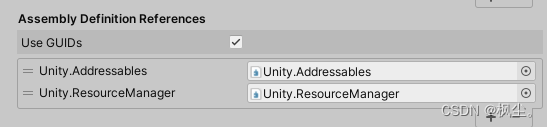
2.打开LoadDll.cs,修改代码如下
using System;
using System.Collections;
using System.Collections.Generic;
using System.Linq;
using System.Reflection;
using UnityEngine;
#if !UNITY_EDITOR
using UnityEngine.AddressableAssets;
#endif

/// <summary>
/// 加载热更新Dll
/// </summary>
public class LoadDll : MonoBehaviour
{
    Assembly gameAss;
    public static TextAsset[] aotDllBytes;
    public static readonly List<string> aotDlls = new List<string>()
            {
                "mscorlib.dll",
                "System.dll",
                "System.Core.dll",// 如果使用了Linq,需要这个
                // "Newtonsoft.Json.dll",
                // "protobuf-net.dll",
                // "Google.Protobuf.dll",
                // "MongoDB.Bson.dll",
                // "DOTween.Modules.dll",
                // "UniTask.dll",
            };
    // Start is called before the first frame update
    void Start()
    {
        LoadGameDll();
        RunMain();
    }

    void LoadGameDll()
    {
#if !UNITY_EDITOR
            aotDllBytes = new TextAsset[aotDlls.Count];
            for (int i = 0; i < aotDlls.Count; i++)
            {
                aotDllBytes[i] = Addressables.LoadAssetAsync<TextAsset>(aotDlls[i]).WaitForCompletion();
            }
            TextAsset hotfixDll = Addressables.LoadAssetAsync<TextAsset>("HotFix.dll").WaitForCompletion();
            gameAss = Assembly.Load(hotfixDll.bytes);
#else
        gameAss = AppDomain.CurrentDomain.GetAssemblies().First(assembly => assembly.GetName().Name == "HotFix");
#endif
    }

    public void RunMain()
    {
        if (gameAss == null)
        {
            UnityEngine.Debug.LogError("dll未加载");
            return;
        }
        var appType = gameAss.GetType("HotFix.App");
        var mainMethod = appType.GetMethod("Main");
        mainMethod.Invoke(null, null);

        // 如果是Update之类的函数,推荐先转成Delegate再调用,如
        //var updateMethod = appType.GetMethod("Update");
        //var updateDel = System.Delegate.CreateDelegate(typeof(Action<float>), null, updateMethod);
        //updateDel(deltaTime);
    }
}
使用上一章工程
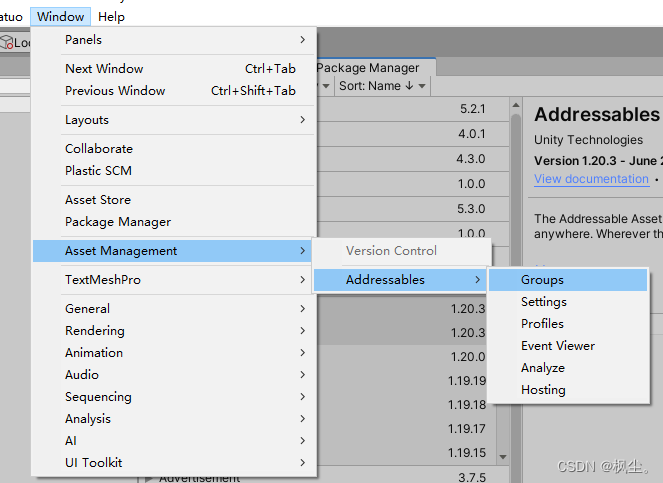
1.修改默认场景名为Entry并加入BuildSetting作为热更新的入口,新建场景MainScene作为热更场景,然后打开Addressable Groups选择Create
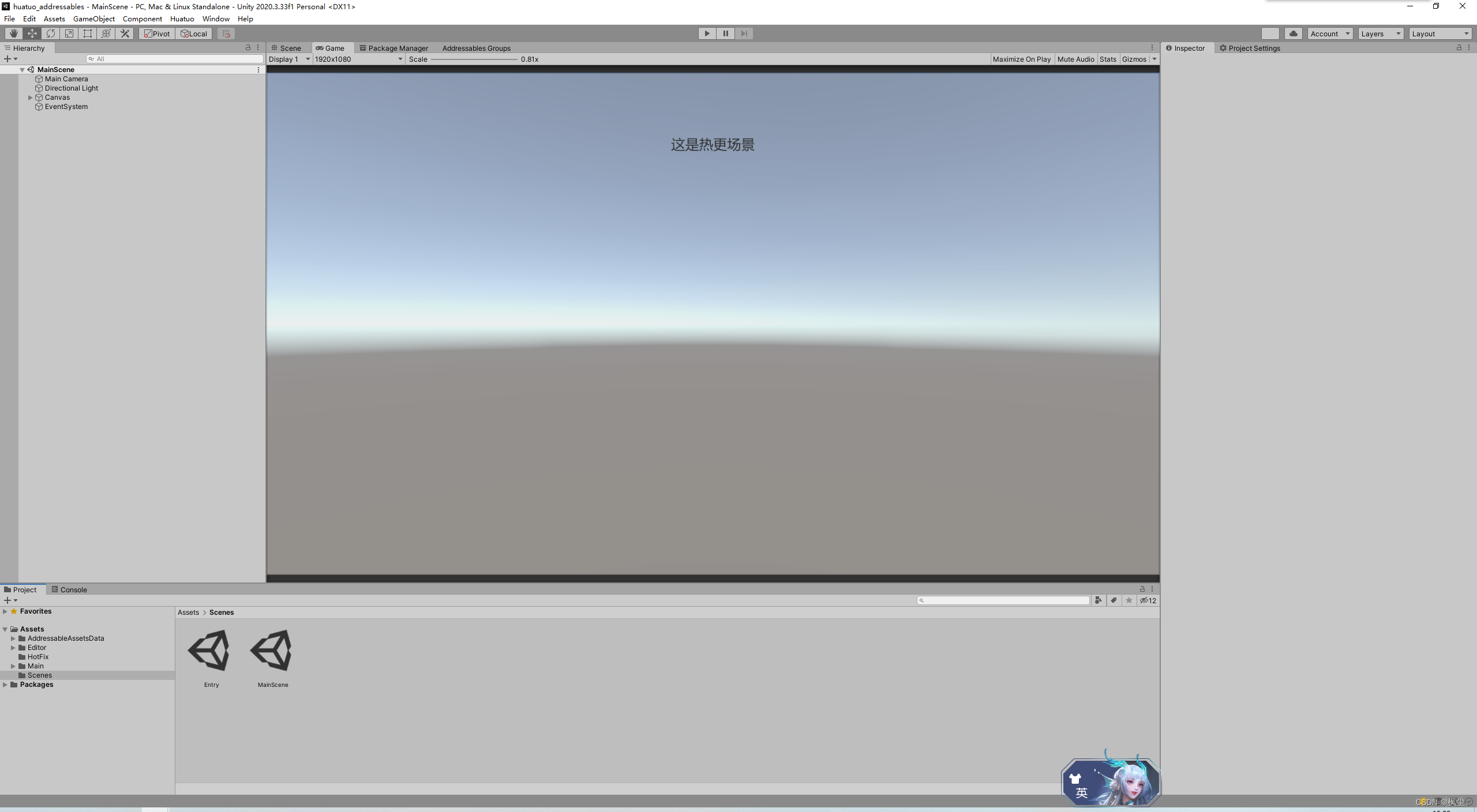

2.在检视界面将MainScene标记为可寻址,名称为MainScene

3.打开Entry场景,修改界面UI如下,添加空对象挂载脚本LoadDll.cs
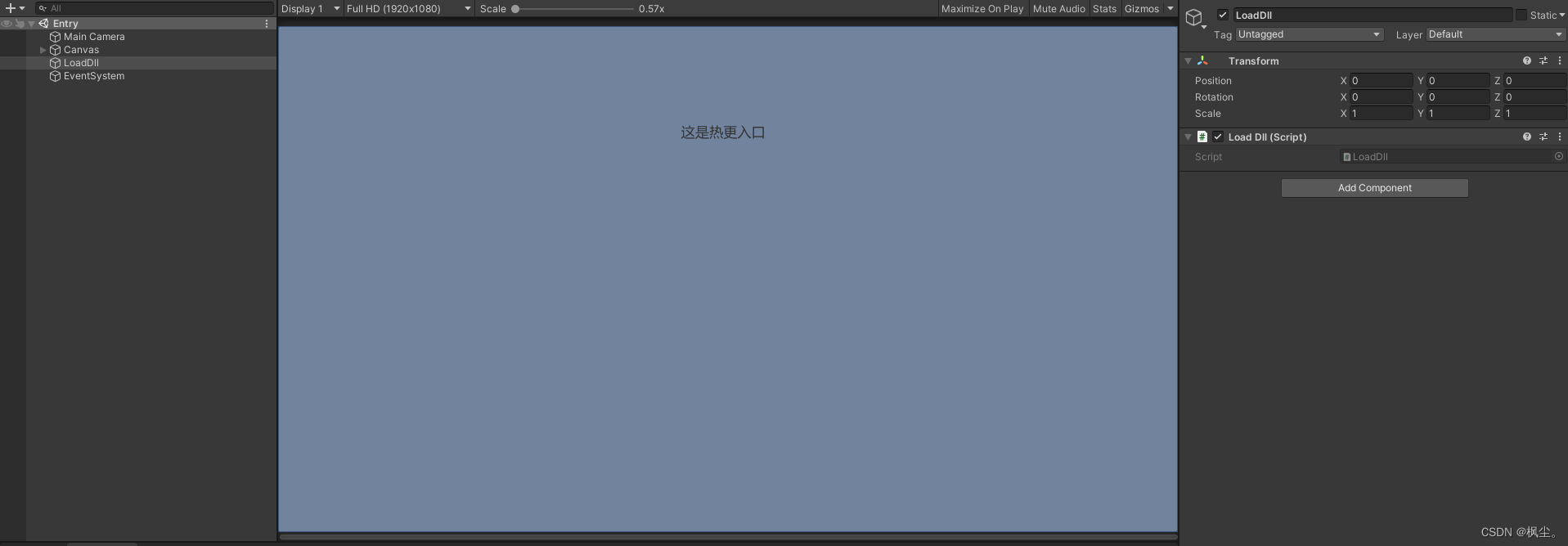
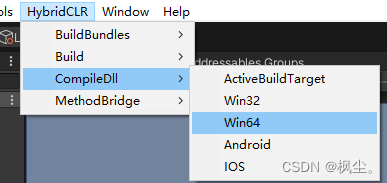
4.编译dll
5.首次打包获取aot dll(此次为无效打包,仅为获取aot dll),然后HybridCLRData/AssembliesPostIl2CppStrip/StandaloneWindows64目录会如下
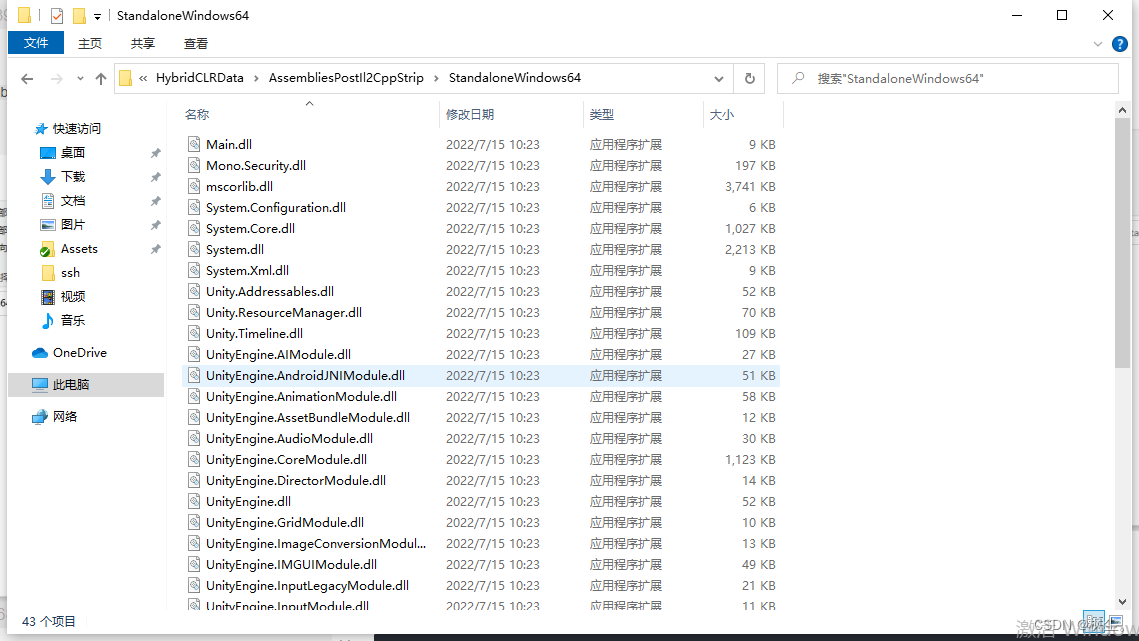
6.复制4.5步中的HotFix.dll,mscorlib.dll,System.dll,System.Core.dll到Assets目录下
因为Addressables只能加载Assets目录下的资源,所以我们需要将HybridCLR生成的dll复制过去
在Assets/Editor目录下编写编辑器脚本CopeDll2Assets.cs如下
using System.Collections;
using System.Collections.Generic;
using UnityEngine;
using UnityEditor;
using HybridCLR;
using System.IO;

public class CopeDll2Assets : Editor
{
    [MenuItem("Tools/复制Dll到Assets/ActiveBuildTarget")]
    static void CopeByActive()
    {
        Copy(EditorUserBuildSettings.activeBuildTarget);
    }
    [MenuItem("Tools/复制Dll到Assets/Win32")]
    static void CopeByStandaloneWindows32()
    {
        Copy(BuildTarget.StandaloneWindows);
    }
    [MenuItem("Tools/复制Dll到Assets/Win64")]
    static void CopeByStandaloneWindows64()
    {
        Copy(BuildTarget.StandaloneWindows64);
    }

    [MenuItem("Tools/复制Dll到Assets/Android")]
    static void CopeByAndroid()
    {
        Copy(BuildTarget.Android);
    }
    [MenuItem("Tools/复制Dll到Assets/IOS")]
    static void CopeByIOS()
    {
        Copy(BuildTarget.iOS);
    }

    static void Copy(BuildTarget target)
    {
        List<string> copyDlls = new List<string>()
        {
            "HotFix.dll",
        };
        string outDir = BuildConfig.GetHotFixDllsOutputDirByTarget(target);
        string exportDir = Application.dataPath + "/Res/Dlls";
        if (!Directory.Exists(exportDir))
        {
            Directory.CreateDirectory(exportDir);
        }
        foreach (var copyDll in copyDlls)
        {
            File.Copy($"{outDir}/{copyDll}", $"{exportDir}/{copyDll}.bytes", true);
        }

        string aotDllDir = $"{BuildConfig.AssembliesPostIl2CppStripDir}/{target}";
        foreach (var dll in LoadDll.aotDlls)
        {
            string dllPath = $"{aotDllDir}/{dll}";
            if (!File.Exists(dllPath))
            {
                Debug.LogError($"ab中添加AOT补充元数据dll:{dllPath} 时发生错误,文件不存在。需要构建一次主包后才能生成裁剪后的AOT dll");
                continue;
            }
            string dllBytesPath = $"{exportDir}/{dll}.bytes";
            File.Copy(dllPath, dllBytesPath, true);
        }
        AssetDatabase.Refresh();
        Debug.Log("热更Dll复制成功!");
    }
}
执行Tools/复制Dll到Assets/Win64,结构如下:
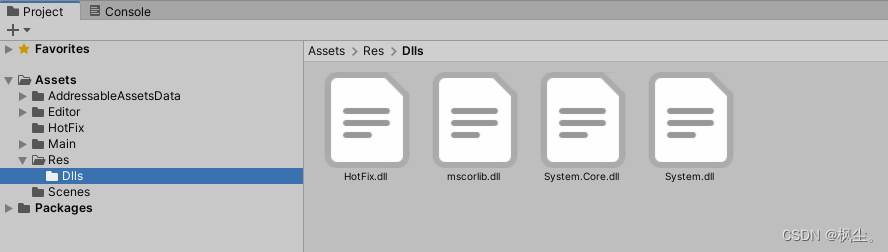
7.将4个文件均加入Addressables并修改名称
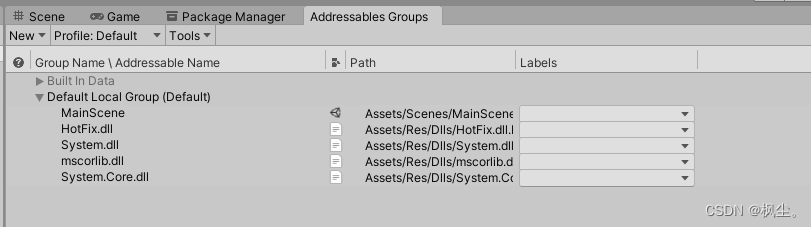
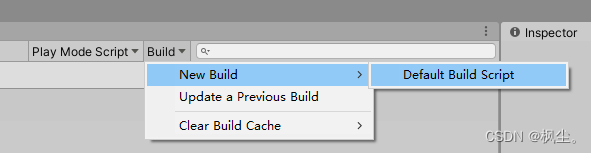
1.打包Addressables Group Befault build Script
2.打PC包测试

直接进入热更场景,说明在热更工程App.Main中的Addressables加载场景与async/await语法糖也能正确使用
        /// <summary>
        /// 切换场景
        /// </summary>
        static async void LoadScene()
        {
            var handler = await Addressables.LoadSceneAsync("MainScene").Task;
            handler.ActivateAsync();
        }
hybridclr与 addressables的使用已经完毕,下一章会演示同时更新资源与代码
如何在buildr项目中使用Ruby?我在很多不同的项目中使用过Ruby、JRuby、Java和Clojure。我目前正在使用我的标准Ruby开发一个模拟应用程序,我想尝试使用Clojure后端(我确实喜欢功能代码)以及JRubygui和测试套件。我还可以看到在未来的不同项目中使用Scala作为后端。我想我要为我的项目尝试一下buildr(http://buildr.apache.org/),但我注意到buildr似乎没有设置为在项目中使用JRuby代码本身!这看起来有点傻,因为该工具旨在统一通用的JVM语言并且是在ruby中构建的。除了将输出的jar包含在一个独特的、仅限ruby
在rails源中:https://github.com/rails/rails/blob/master/activesupport/lib/active_support/lazy_load_hooks.rb可以看到以下内容@load_hooks=Hash.new{|h,k|h[k]=[]}在IRB中,它只是初始化一个空哈希。和做有什么区别@load_hooks=Hash.new 最佳答案 查看rubydocumentationforHashnew→new_hashclicktotogglesourcenew(obj)→new_has
我的主要目标是能够完全理解我正在使用的库/gem。我尝试在Github上从头到尾阅读源代码,但这真的很难。我认为更有趣、更温和的踏脚石就是在使用时阅读每个库/gem方法的源代码。例如,我想知道RubyonRails中的redirect_to方法是如何工作的:如何查找redirect_to方法的源代码?我知道在pry中我可以执行类似show-methodmethod的操作,但我如何才能对Rails框架中的方法执行此操作?您对我如何更好地理解Gem及其API有什么建议吗?仅仅阅读源代码似乎真的很难,尤其是对于框架。谢谢! 最佳答案 Ru
当我尝试安装Ruby时遇到此错误。我试过查看this和this但无济于事➜~brewinstallrubyWarning:YouareusingOSX10.12.Wedonotprovidesupportforthispre-releaseversion.Youmayencounterbuildfailuresorotherbreakages.Pleasecreatepull-requestsinsteadoffilingissues.==>Installingdependenciesforruby:readline,libyaml,makedepend==>Installingrub
我的假设是moduleAmoduleBendend和moduleA::Bend是一样的。我能够从thisblog找到解决方案,thisSOthread和andthisSOthread.为什么以及什么时候应该更喜欢紧凑语法A::B而不是另一个,因为它显然有一个缺点?我有一种直觉,它可能与性能有关,因为在更多命名空间中查找常量需要更多计算。但是我无法通过对普通类进行基准测试来验证这一点。 最佳答案 这两种写作方法经常被混淆。首先要说的是,据我所知,没有可衡量的性能差异。(在下面的书面示例中不断查找)最明显的区别,可能也是最著名的,是你的
几个月前,我读了一篇关于rubygem的博客文章,它可以通过阅读代码本身来确定编程语言。对于我的生活,我不记得博客或gem的名称。谷歌搜索“ruby编程语言猜测”及其变体也无济于事。有人碰巧知道相关gem的名称吗? 最佳答案 是这个吗:http://github.com/chrislo/sourceclassifier/tree/master 关于ruby-寻找通过阅读代码确定编程语言的rubygem?,我们在StackOverflow上找到一个类似的问题:
我目前正在使用以下方法获取页面的源代码:Net::HTTP.get(URI.parse(page.url))我还想获取HTTP状态,而无需发出第二个请求。有没有办法用另一种方法做到这一点?我一直在查看文档,但似乎找不到我要找的东西。 最佳答案 在我看来,除非您需要一些真正的低级访问或控制,否则最好使用Ruby的内置Open::URI模块:require'open-uri'io=open('http://www.example.org/')#=>#body=io.read[0,50]#=>"["200","OK"]io.base_ur
我真的为这个而疯狂。我一直在搜索答案并尝试我找到的所有内容,包括相关问题和stackoverflow上的答案,但仍然无法正常工作。我正在使用嵌套资源,但无法使表单正常工作。我总是遇到错误,例如没有路线匹配[PUT]"/galleries/1/photos"表格在这里:/galleries/1/photos/1/edit路线.rbresources:galleriesdoresources:photosendresources:galleriesresources:photos照片Controller.rbdefnew@gallery=Gallery.find(params[:galle
前言作为一名程序员,自己的本质工作就是做程序开发,那么程序开发的时候最直接的体现就是代码,检验一个程序员技术水平的一个核心环节就是开发时候的代码能力。众所周知,程序开发的水平提升是一个循序渐进的过程,每一位程序员都是从“菜鸟”变成“大神”的,所以程序员在程序开发过程中的代码能力也是根据平时开发中的业务实践来积累和提升的。提高代码能力核心要素程序员要想提高自身代码能力,尤其是新晋程序员的代码能力有很大的提升空间的时候,需要针对性的去提高自己的代码能力。提高代码能力其实有几个比较关键的点,只要把握住这些方面,就能很好的、快速的提高自己的一部分代码能力。1、多去阅读开源项目,如有机会可以亲自参与开源
?博客主页:https://xiaoy.blog.csdn.net?本文由呆呆敲代码的小Y原创,首发于CSDN??学习专栏推荐:Unity系统学习专栏?游戏制作专栏推荐:游戏制作?Unity实战100例专栏推荐:Unity实战100例教程?欢迎点赞?收藏⭐留言?如有错误敬请指正!?未来很长,值得我们全力奔赴更美好的生活✨------------------❤️分割线❤️-------------------------
