目录
最近有个项目需求就是在客户端的右上角要实时展示提醒消息,下面来看下简单的实现步骤
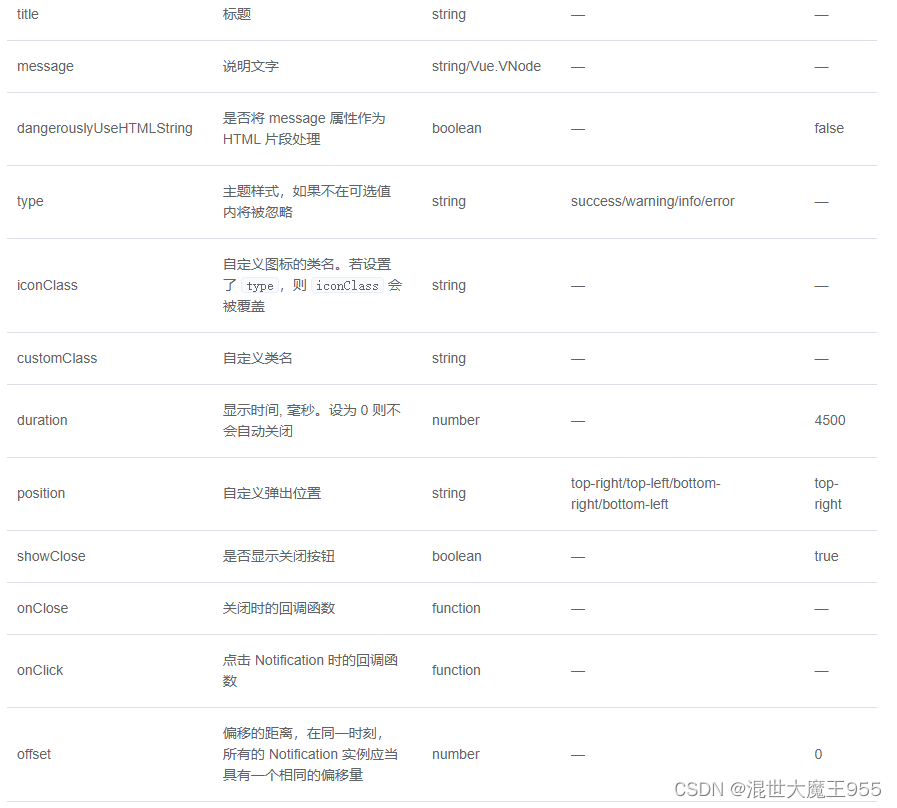
这是基于悬浮出现在页面角落,显示全局的通知提醒消息。这个elmennt-ui组件可以实现我们上面的功能。
element 为 Vue.prototype 添加了全局方法 $notify。因此在 vue instance 中可以采用本页面中的方式调用 Notification。
import { Notification } from 'element-ui';
此时调用方法为 Notification(options)。我们也为每个 type 定义了各自的方法,如 Notification.success(options)。并且可以调用 Notification.closeAll() 手动关闭所有实例。
右上角就会弹出我们写的html代码段是不是特别简单
<template>
  <el-button
    plain
    @click="open">
    使用 HTML 片段
  </el-button>
</template>

<script>
  export default {
    methods: {
      open() {
        this.$notify({
          title: 'HTML 片段',
          dangerouslyUseHTMLString: true,
          message: '<strong>这是 <i>HTML</i> 片段</strong>'
        });
      }
    }
  }
</script>这里大概说一下我的流程,我这里需要建立Websocket连接,服务器实时推送信息给客户端在右上角展示,这里需要用到Websocket以及本章学的通知。Websocket在前一章有讲。案例仅供参考。
/* 全局Notification */
	Vue.prototype.$baseNotify = (message, title, type, position) => {
		Notification({
			title: title,
			message: message,
			position: position || 'top-right',
			type: type || 'success',
			duration: messageDuration,
		})
}initWebSocket() {
const token = getAccessToken()
const wsurl = `${this.troubelUrl}?code=trouble&token=${token}`
this.twebsock = new WebSocket(wsurl)
this.twebsock.onmessage = this.websocketonmessage
this.twebsock.onopen = this.websocketonopen
this.twebsock.onerror = this.websocketonerror
this.twebsock.onclose = this.websocketclose
},
websocketonopen() {
//webscoket定时心跳
this.troubleTimer = setInterval(() => {
let pageUrl = window.location.hash
if (pageUrl !== '' && pageUrl !== '#/login') {
this.websocketsend('heartbeat')
}
}, 50000)
console.log('数据发送...')
},
websocketonerror(e) {
//连接建立失败重连
setTimeout(() => {
this.initWebSocket()
}, 10000)
console.log('故障连接出错~')
},
websocketonmessage(evt) {
var monitorData = evt.data
monitorData = JSON.parse(monitorData)
this.switchOther(this.troublePush, monitorData)
},
//根据数据判断进行弹框(紧急呼叫,长时间关人)
switchOther(switchValue, monitorData) {
if (switchValue === true || switchValue === 'true') {
this.handleOpen(monitorData)
}
},
websocketsend(data) {
this.twebsock.send(data)
},
websocketclose(e) {
if (this.twebsock == null) {
return
}
this.twebsock.close()
this.twebsock = null
clearInterval(this.troubleTimer)
console.log('故障推送关闭~')
}, //monitorItem取的前面Websocket返回回来的值
handleOpen(monitorItem) {
this.openDialogflase = true
const h = this.$createElement
let notify = this.$notify({
title: monitorItem.troubleType,
message: h('p', null, [
h(
'span',
{
style: {
display: 'inline-block',
margin: '0 0 10px 0',
},
},
`${monitorItem.projectName}-${monitorItem.useCode}`
),
h(
'p',
{
style: {
display: 'flex',
alignItems: 'center',
justifyContent: 'space-between',
margin: '0 0 5px 0',
},
},
[
h('span', null, monitorItem.duration),
h(
'span',
{
style: {
color: '#efefef',
},
},
monitorItem.fromType
),
]
),
h('p', null, monitorItem.address),
h(
'button',
{
style: {
padding: '5px 20px',
fontSize: '14px',
borderRadius: '4px',
color: '#fff',
background: '#ff575a',
border: 'none',
margin: '10px 10px 0 0',
display: 'inline-block',
},
on: {
click: this.clickBtn.bind(this, monitorItem),
},
},
'查看详情'
),
h(
'button',
{
style: {
padding: '5px 20px',
fontSize: '14px',
borderRadius: '4px',
color: '#fff',
background: '#ff575a',
border: 'none',
margin: '10px 10px 0 0',
display: 'inline-block',
},
on: {
click: this.handleShi.bind(this, monitorItem),
},
},
'双向视频'
),
h(
'button',
{
style: {
padding: '5px 20px',
fontSize: '14px',
borderRadius: '4px',
color: '#fff',
background: '#ff575a',
border: 'none',
margin: '10px 0 0 0',
display: 'inline-block',
},
on: {
click: this.handleQuXiao.bind(this, monitorItem),
},
},
'取消'
),
]),
duration: 0,
showClose: false,
})
//将通知实例放入
this.notifications[monitorItem.orderKey] = notify
this.handleAudio()
},
//关闭当前故障弹框
handleQuXiao(monitorItem) {
this.openDialogflase = false
this.notifications[monitorItem.orderKey].close()
delete this.notifications[monitorItem.orderKey]
},
//关闭所有弹窗
closeAll() {
let vue = this
for (let key in vue.notifications) {
vue.notifications[key].close()
delete vue.notifications[key]
}
},大约一年前,我决定确保每个包含非唯一文本的Flash通知都将从模块中的方法中获取文本。我这样做的最初原因是为了避免一遍又一遍地输入相同的字符串。如果我想更改措辞,我可以在一个地方轻松完成,而且一遍又一遍地重复同一件事而出现拼写错误的可能性也会降低。我最终得到的是这样的:moduleMessagesdefformat_error_messages(errors)errors.map{|attribute,message|"Error:#{attribute.to_s.titleize}#{message}."}enddeferror_message_could_not_find(obje
我是rails的新手,想在form字段上应用验证。myviewsnew.html.erb.....模拟.rbclassSimulation{:in=>1..25,:message=>'Therowmustbebetween1and25'}end模拟Controller.rbclassSimulationsController我想检查模型类中row字段的整数范围,如果不在范围内则返回错误信息。我可以检查上面代码的范围,但无法返回错误消息提前致谢 最佳答案 关键是您使用的是模型表单,一种显示ActiveRecord模型实例属性的表单。c
我的工作要求我为某些测试自动生成电子邮件。我一直在四处寻找,但未能找到可以快速实现的合理解决方案。它需要在outlook而不是其他邮件服务器中,因为我们有一些奇怪的身份验证规则,我们需要保存草稿而不是仅仅发送邮件的选项。显然win32ole可以做到这一点,但我找不到任何相当简单的例子。 最佳答案 假设存储了Outlook凭据并且您设置为自动登录到Outlook,WIN32OLE可以很好地完成此操作:require'win32ole'outlook=WIN32OLE.new('Outlook.Application')message=
有人知道在发布新版本的Ruby和Rails时收到电子邮件的方法吗?他们有邮件列表,RubyonRails有一个推特,但我不想听到那些随之而来的喧嚣,我只想知道什么时候发布新版本,尤其是那些有安全修复的版本。 最佳答案 从therailsblog获取提要.http://weblog.rubyonrails.org/feed/atom.xml 关于ruby-on-rails-如何在发布新的Ruby或Rails版本时收到通知?,我们在StackOverflow上找到一个类似的问题:
我正在使用Ruby,我正在与一个网络端点通信,该端点在发送消息本身之前需要格式化“header”。header中的第一个字段必须是消息长度,它被定义为网络字节顺序中的2二进制字节消息长度。比如我的消息长度是1024。如何将1024表示为二进制双字节? 最佳答案 Ruby(以及Perl和Python等)中字节整理的标准工具是pack和unpack。ruby的packisinArray.您的长度应该是两个字节长,并且按网络字节顺序排列,这听起来像是n格式说明符的工作:n|Integer|16-bitunsigned,network(bi
项目介绍随着我国经济迅速发展,人们对手机的需求越来越大,各种手机软件也都在被广泛应用,但是对于手机进行数据信息管理,对于手机的各种软件也是备受用户的喜爱小学生兴趣延时班预约小程序的设计与开发被用户普遍使用,为方便用户能够可以随时进行小学生兴趣延时班预约小程序的设计与开发的数据信息管理,特开发了小程序的设计与开发的管理系统。小学生兴趣延时班预约小程序的设计与开发的开发利用现有的成熟技术参考,以源代码为模板,分析功能调整与小学生兴趣延时班预约小程序的设计与开发的实际需求相结合,讨论了小学生兴趣延时班预约小程序的设计与开发的使用。开发环境开发说明:前端使用微信微信小程序开发工具:后端使用ssm:VU
如果我在模型中设置验证消息validates:name,:presence=>{:message=>'Thenamecantbeblank.'}我如何让该消息显示在闪光警报中,这是我迄今为止尝试过的方法defcreate@message=Message.new(params[:message])if@message.valid?ContactMailer.send_mail(@message).deliverredirect_to(root_path,:notice=>"Thanksforyourmessage,Iwillbeintouchsoon")elseflash[:error]
RSpec似乎按顺序匹配方法接收的消息。我不确定如何使以下代码工作:allow(a).toreceive(:f)expect(a).toreceive(:f).with(2)a.f(1)a.f(2)a.f(3)我问的原因是a.f的一些调用是由我的代码的上层控制的,所以我不能对这些方法调用添加期望。 最佳答案 RSpecspy是测试这种情况的一种方式。要监视一个方法,用allowstub,除了方法名称之外没有任何约束,调用该方法,然后expect确切的方法调用。例如:allow(a).toreceive(:f)a.f(2)a.f(1)
我以为它们存储在cookie中-但不,检查cookie没有任何结果。session也不存储它们。那么,我在哪里可以找到它们?我需要这个来直接设置它们(而不是通过flashhash)。 最佳答案 它们存储在inyoursessionstore.自rails2.0以来的默认设置是cookie存储,但请检查config/initializers/session_store.rb以检查您是否使用默认设置以外的东西。 关于ruby-on-rails-闪存消息存储在哪里?,我们在StackOverf
我正在尝试在ruby脚本中连接到服务器https://www.xpiron.com/schedule。但是,当我尝试连接时:require'open-uri'doc=open('https://www.xpiron.com/schedule')我收到以下错误消息:OpenSSL::SSL::SSLError:SSL_connectreturned=1errno=0state=SSLv2/v3readserverhelloA:sslv3alertunexpectedmessagefrom/usr/local/lib/ruby/1.9.1/net/http.rb:678:in`conn
