本机配置 Y9000P RTX3060 Win11
正常下载安装,启动Git Bash
设置用户名
$ git config --global user.name "**"
$ git config --global user.email "–*******@gmail.com"
$ git config --global --list
user.name=**
user.email=<U+0096>********@gmail.com
由于以上邮箱是从浏览器拷贝的,所以前面带了个•也就是<U+0096>,但是在终端上不可见(浏览器拷贝的东西经常会有这玩意儿)。解决方法就是重新手动输入命令
$ git config --global user.email "*********@gmail.com"
$ ssh-keygen  -t  rsa  -C "*******@gmail.com"
Generating public/private rsa key pair.
Enter file in which to save the key (/c/Users/****/.ssh/id_rsa):
Created directory '/c/Users/****/.ssh'.
Enter passphrase (empty for no passphrase):
Enter same passphrase again:
Your identification has been saved in /c/Users/****.ssh/id_rsa
Your public key has been saved in /c/Users/****/.ssh/id_rsa.pub
The key fingerprint is:
SHA256:****************** ****@gmail.com
The key's randomart image is:
+---[RSA 3072]----+
|    ...  o.=. .  |
|   . ****.       |
|    o . .o.*o. ..|
|. .    .. =o  .  |
|E*****           |
|=.O     +        |
|oB.-----         |
|= =.B            |
|.+ *.            |
+----[SHA256]-----+
$ ssh git@github.com
The authenticity of host 'github.com (20.205.243.166)' can't be established.
ED25519 key fingerprint is SHA256:+DiY3wvvV6TuJJhbpZisF/zLDA0zPMSvHdkr4UvCOqU.
This key is not known by any other names
Are you sure you want to continue connecting (yes/no/[fingerprint])? yes
Warning: Permanently added 'github.com' (ED25519) to the list of known hosts.
PTY allocation request failed on channel 0
Hi **********! You've successfully authenticated, but GitHub does not provide shell access.
Connection to github.com closed.
$ git clone --recursive https://github.com/nvlabs/instant-ngp
fatal: unable to access 'https://github.com/nvlabs/instant-ngp/': OpenSSL SSL_read: Connection was reset, errno 10054
solution:
$ git config --global http.sslVerify false
fatal: unable to access 'https://github.com/nvlabs/instant-ngp/': Failed to connect to github.com port 443 after 21083 ms: Timed out
代理的问题,把Clash中设置的端口号添加到 config 中
solution:
    $ git config --global http.proxy http://127.0.0.1:7890
    $ git config --global https.proxy https://127.0.0.1:7890
在开发人员命令提示符窗口(developer command prompt 直接用这个英文搜)执行
$ cd instant-ngp
instant-ngp$ cmake . -B build
输出如下:
D:\Project\CmakeProject\instant-ngp>cmake . -B build
-- Building for: Visual Studio 16 2019
-- Selecting Windows SDK version 10.0.19041.0 to target Windows 10.0.22000.
-- The C compiler identification is MSVC 19.29.30145.0
-- The CXX compiler identification is MSVC 19.29.30145.0
-- The CUDA compiler identification is NVIDIA 11.1.105
-- Detecting C compiler ABI info
-- Detecting C compiler ABI info - done
-- Check for working C compiler: D:/Program Files (x86)/Microsoft Visual Studio/2019/Community/VC/Tools/MSVC/14.29.30133/bin/Hostx64/x64/cl.exe - skipped
-- Detecting C compile features
-- Detecting C compile features - done
-- Detecting CXX compiler ABI info
-- Detecting CXX compiler ABI info - done
-- Check for working CXX compiler: D:/Program Files (x86)/Microsoft Visual Studio/2019/Community/VC/Tools/MSVC/14.29.30133/bin/Hostx64/x64/cl.exe - skipped
-- Detecting CXX compile features
-- Detecting CXX compile features - done
-- Detecting CUDA compiler ABI info
-- Detecting CUDA compiler ABI info - done
-- Check for working CUDA compiler: D:/Program Files (x86)/NVIDIA/NVIDIA GPU Computing Toolkit/CUDA/v11.1/bin/nvcc.exe - skipped
-- Detecting CUDA compile features
-- Detecting CUDA compile features - done
-- Targeting GPU architectures: 86
-- Module support is disabled.
-- Version: 9.0.0
-- Build type:
-- CXX_STANDARD: 14
-- Required features: cxx_variadic_templates
-- Could NOT find Vulkan (missing: Vulkan_LIBRARY Vulkan_INCLUDE_DIR) (found version "")
CMake Warning at CMakeLists.txt:118 (message):
  Vulkan was not found.  Neural graphics primitives will still compile and
  run correctly, but DLSS will not be supported.


-- Looking for pthread.h
-- Looking for pthread.h - not found
-- Found Threads: TRUE
-- Using Win32 for window creation
-- Found OpenMP_C: -openmp (found version "2.0")
-- Found OpenMP_CXX: -openmp (found version "2.0")
-- Found OpenMP: TRUE (found version "2.0")
-- !!! Warning OptiX_INSTALL_DIR not set in environment. using default
-- OptiX_INSTALL_DIR value: C:\ProgramData\NVIDIA Corporation\OptiX SDK 7.5.0
-- OptiX headers (optix.h and friends) not found.
CMake Warning at CMakeLists.txt:194 (message):
  OptiX was not found.  Neural graphics primitives will still compile and run
  correctly.  However, SDF training in 'raystab' and 'pathescape' modes will
  be significantly slower.


-- Found Python: D:/ProgramData/Anaconda3/python.exe (found suitable version "3.9.12", minimum required is "3.7") found components: Interpreter Development Development.Module Development.Embed
-- pybind11 v2.7.1
CMake Warning (dev) at D:/Program Files (x86)/CMake/share/cmake-3.23/Modules/CMakeDependentOption.cmake:89 (message):
  Policy CMP0127 is not set: cmake_dependent_option() supports full Condition
  Syntax.  Run "cmake --help-policy CMP0127" for policy details.  Use the
  cmake_policy command to set the policy and suppress this warning.
Call Stack (most recent call first):
  dependencies/pybind11/CMakeLists.txt:98 (cmake_dependent_option)
This warning is for project developers.  Use -Wno-dev to suppress it.

-- Performing Test HAS_MSVC_GL_LTCG
-- Performing Test HAS_MSVC_GL_LTCG - Success
-- Configuring done
-- Generating done
-- Build files have been written to: D:/Project/CmakeProject/instant-ngp/build
少了一些东西,安装一个OptiX试试,我看大多数教程都安装了这玩意儿
安装的位置是D:\Program Files (x86)\NVIDIA\NVIDIA Corporation\OptiX SDK 7.5.0,需要把他放到系统变量中(N是变量名,V是变量值)
N:	OptiX_INSTALL_DIR
V:	D:\Program Files (x86)\NVIDIA\NVIDIA Corporation\OptiX SDK 7.5.0
光加上还不成,需要更新一下系统变量,set PATH=C: ,关闭 shell 再打开 echo %PATH% ,重新cmake,输出如下
D:\Project\CmakeProject\instant-ngp>cmake . -B build
-- Selecting Windows SDK version 10.0.19041.0 to target Windows 10.0.22000.
-- Targeting GPU architectures: 86
-- Module support is disabled.
-- Version: 9.0.0
-- Build type:
-- CXX_STANDARD: 14
-- Required features: cxx_variadic_templates
-- Could NOT find Vulkan (missing: Vulkan_LIBRARY Vulkan_INCLUDE_DIR) (found version "")
CMake Warning at CMakeLists.txt:118 (message):
  Vulkan was not found.  Neural graphics primitives will still compile and
  run correctly, but DLSS will not be supported.


-- Using Win32 for window creation
-- OptiX_INSTALL_DIR value: D:\Program Files (x86)\NVIDIA\NVIDIA Corporation\OptiX SDK 7.5.0
-- pybind11 v2.7.1
CMake Warning (dev) at D:/Program Files (x86)/CMake/share/cmake-3.23/Modules/CMakeDependentOption.cmake:89 (message):
  Policy CMP0127 is not set: cmake_dependent_option() supports full Condition
  Syntax.  Run "cmake --help-policy CMP0127" for policy details.  Use the
  cmake_policy command to set the policy and suppress this warning.
Call Stack (most recent call first):
  dependencies/pybind11/CMakeLists.txt:98 (cmake_dependent_option)
This warning is for project developers.  Use -Wno-dev to suppress it.

-- Configuring done
-- Generating done
-- Build files have been written to: D:/Project/CmakeProject/instant-ngp/build
OptiX完事了,但还是有不少问题,先看看Vulkan
同样下载安装,根据其默认安装目录,实际安装目录调整为 D:\Program Files (x86)\NVIDIA\VulkanSDK\1.3.224.1
同样添加环境变量,估计cmake提示,需要两个,分别为
N:	Vulkan_LIBRARY
V:	D:\Program Files (x86)\NVIDIA\VulkanSDK\1.3.224.1\Lib

N:	Vulkan_INCLUDE_DIR
V:	D:\Program Files (x86)\NVIDIA\VulkanSDK\1.3.224.1\Include
同样更新环境变量(见上)
重新Cmake,输出如下
D:\Project\CmakeProject\instant-ngp>cmake . -B build
-- Selecting Windows SDK version 10.0.19041.0 to target Windows 10.0.22000.
-- Targeting GPU architectures: 86
-- Module support is disabled.
-- Version: 9.0.0
-- Build type:
-- CXX_STANDARD: 14
-- Required features: cxx_variadic_templates
-- Found Vulkan: D:/Program Files (x86)/NVIDIA/VulkanSDK/1.3.224.1/Lib/vulkan-1.lib (found version "1.3.224")
-- Using Win32 for window creation
-- OptiX_INSTALL_DIR value: D:\Program Files (x86)\NVIDIA\NVIDIA Corporation\OptiX SDK 7.5.0
-- pybind11 v2.7.1
CMake Warning (dev) at D:/Program Files (x86)/CMake/share/cmake-3.23/Modules/CMakeDependentOption.cmake:89 (message):
  Policy CMP0127 is not set: cmake_dependent_option() supports full Condition
  Syntax.  Run "cmake --help-policy CMP0127" for policy details.  Use the
  cmake_policy command to set the policy and suppress this warning.
Call Stack (most recent call first):
  dependencies/pybind11/CMakeLists.txt:98 (cmake_dependent_option)
This warning is for project developers.  Use -Wno-dev to suppress it.

-- Configuring done
-- Generating done
-- Build files have been written to: D:/Project/CmakeProject/instant-ngp/build
似乎只剩下了cmake相关的问题
根据提示执行 cmake --help-policy CMP0127
D:\Project\CmakeProject\instant-ngp>cmake --help-policy CMP0127
CMP0127
-------

.. versionadded:: 3.22

``cmake_dependent_option()`` supports full :ref:`Condition Syntax`.

The ``<depends>`` parameter accepts a :ref:`semicolon-separated list <CMake
Language Lists>` of conditions.  CMake 3.21 and lower evaluates each
``condition`` as ``if(${condition})``, which does not properly handle
conditions with nested paren groups.  CMake 3.22 and above instead prefer
to evaluate each ``condition`` as ``if(<condition>)``, where ``<condition>``
is re-parsed as if literally written in a call to ``if()``.  This
allows expressions like::

 "A AND (B OR C)"

but requires expressions like::

 "FOO MATCHES (UPPER|lower)"

to be re-written as::

 "FOO MATCHES \"(UPPER|lower)\""

Policy ``CMP0127`` provides compatibility for projects that have not
been updated to expect the new behavior.

This policy was introduced in CMake version 3.22.  CMake version
3.23.2 warns when the policy is not set and uses ``OLD`` behavior.
Use the ``cmake_policy()`` command to set it to ``OLD`` or ``NEW``
explicitly.

.. note::
  The ``OLD`` behavior of a policy is
  ``deprecated by definition``
  and may be removed in a future version of CMake.
太抽象了,没咋看明白,面向Google编程,结合cmake输出,尝试n次,终于最后参考这篇博客解决了,精髓的是,必须要在报错行前面加才可以,好家伙好家伙
根据cmake提示,报错行在 dependencies/pybind11/CMakeLists.txt:98 (cmake_dependent_option),找到这个CMakeLists.txt 在97行添加以下三行代码
if(POLICY CMP0127)
cmake_policy(SET CMP0127 NEW)
endif()
cmake_dependent_option(PYBIND11_FINDPYTHON "Force new FindPython" OFF
                       "NOT CMAKE_VERSION VERSION_LESS 3.12" OFF)
重新cmake
D:\Project\CmakeProject\instant-ngp>cmake . -B build
-- Selecting Windows SDK version 10.0.19041.0 to target Windows 10.0.22000.
-- Targeting GPU architectures: 86
-- Module support is disabled.
-- Version: 9.0.0
-- Build type:
-- CXX_STANDARD: 14
-- Required features: cxx_variadic_templates
-- Using Win32 for window creation
-- OptiX_INSTALL_DIR value: D:\Program Files (x86)\NVIDIA\NVIDIA Corporation\OptiX SDK 7.5.0
-- pybind11 v2.7.1
-- Configuring done
-- Generating done
-- Build files have been written to: D:/Project/CmakeProject/instant-ngp/build
cmake成功,无报错,就是不造第4行的 Module support is disabled 是啥意思,确认一下
似乎没人问过这个问题,Github上贴出来的示例代码也有这句话,先不管它
接下来是下一句cmake命令,同样在developer command prompt里执行
instant-ngp$ cmake --build build --config RelWithDebInfo -j
一堆错,输出太多,放几个报错输出看一下
D:\Program Files (x86)\Microsoft Visual Studio\2019\Community\VC\Tools\MSVC\14.29.30133\include\xutility(1260): error :
 expected a "(" [D:\Project\CmakeProject\instant-ngp\build\optix_program.vcxproj]
            detected during instantiation of "void std::_Adl_verify_range(const _Iter &, const _Sentinel &) [with _Iter
  =const char *, _Sentinel=const char *]"
  D:\Program Files (x86)\Microsoft Visual Studio\2019\Community\VC\Tools\MSVC\14.29.30133\include\xlocale(1971): here

D:\Program Files (x86)\Microsoft Visual Studio\2019\Community\VC\Tools\MSVC\14.29.30133\include\xutility(1261): error :
 identifier "_Verify_range" is undefined [D:\Project\CmakeProject\instant-ngp\build\optix_program.vcxproj]
            detected during instantiation of "void std::_Adl_verify_range(const _Iter &, const _Sentinel &) [with _Iter
  =const char *, _Sentinel=const char *]"
  D:\Program Files (x86)\Microsoft Visual Studio\2019\Community\VC\Tools\MSVC\14.29.30133\include\xlocale(1971): here

D:\Program Files (x86)\Microsoft Visual Studio\2019\Community\VC\Tools\MSVC\14.29.30133\include\xutility(1261): error :
 identifier "_Verify_range" is undefined [D:\Project\CmakeProject\instant-ngp\build\optix_program.vcxproj]
            detected during instantiation of "void std::_Adl_verify_range(const _Iter &, const _Sentinel &) [with _Iter
  =const char *, _Sentinel=const char *]"
  D:\Program Files (x86)\Microsoft Visual Studio\2019\Community\VC\Tools\MSVC\14.29.30133\include\xlocale(1971): here


D:\Program Files (x86)\Microsoft Visual Studio\2019\Community\MSBuild\Microsoft\VC\v160\BuildCustomizations\CUDA 11.1.t
argets(785,9): error MSB3721: 命令“"D:\Program Files (x86)\NVIDIA\NVIDIA GPU Computing Toolkit\CUDA\v11.1\bin\nvcc.exe"
--use-local-env -ccbin "D:\Program Files (x86)\Microsoft Visual Studio\2019\Community\VC\Tools\MSVC\14.29.30133\bin\Hos
tX64\x64" -x cu   -I"D:\Program Files (x86)\NVIDIA\VulkanSDK\1.3.224.1\Include" -I"D:\Project\CmakeProject\instant-ngp\
dependencies\dlss\include" -I"D:\Project\CmakeProject\instant-ngp\dependencies\glfw\include" -I"D:\Project\CmakeProject
\instant-ngp\dependencies\imgui" -I"D:\Project\CmakeProject\instant-ngp\dependencies\gl3w" -I"D:\Project\CmakeProject\i
nstant-ngp\dependencies" -I"D:\Project\CmakeProject\instant-ngp\dependencies\eigen" -I"D:\Project\CmakeProject\instant-
ngp\dependencies\filesystem" -I"D:\Project\CmakeProject\instant-ngp\dependencies\nanovdb" -I"D:\Project\CmakeProject\in
stant-ngp\dependencies\tinylogger" -I"D:\Program Files (x86)\NVIDIA\NVIDIA Corporation\OptiX SDK 7.5.0\include" -I"D:\P
roject\CmakeProject\instant-ngp\include" -I"D:\Project\CmakeProject\instant-ngp\dependencies\tiny-cuda-nn\include" -I"D
:\Project\CmakeProject\instant-ngp\dependencies\tiny-cuda-nn\dependencies" -I"D:\Project\CmakeProject\instant-ngp\depen
dencies\tiny-cuda-nn\dependencies\cutlass\include" -I"D:\Project\CmakeProject\instant-ngp\dependencies\tiny-cuda-nn\dep
endencies\cutlass\tools\util\include" -I"D:\Project\CmakeProject\instant-ngp\dependencies\tiny-cuda-nn\dependencies\fmt
\include" -I"D:\Program Files (x86)\NVIDIA\NVIDIA GPU Computing Toolkit\CUDA\v11.1\include"     --keep-dir x64\RelWithD
ebInfo -maxrregcount=0  --machine 64 -ptx -cudart shared --expt-relaxed-constexpr -std=c++14 -Xcompiler="/EHsc -Zi -Ob1
" -o optix_program.dir\RelWithDebInfo\raystab.ptx  -D_WINDOWS -DNDEBUG -DNGP_VULKAN -DGLFW_INCLUDE_VULKAN -DNGP_GUI -DN
GP_OPTIX -D"NGP_VERSION=\"1.0dev\"" -DTCNN_MIN_GPU_ARCH=0 -D"CMAKE_INTDIR=\"RelWithDebInfo\"" -D_MBCS -D"CMAKE_INTDIR=\
"RelWithDebInfo\"" "D:\Project\CmakeProject\instant-ngp\src\optix\raystab.cu"”已退出,返回代码为 1。 [D:\Project\CmakeProject\ins
tant-ngp\build\optix_program.vcxproj]
D:\Program Files (x86)\Microsoft Visual Studio\2019\Community\VC\Tools\MSVC\14.29.30133\include\xmemory(58): error : ex
pected a "(" [D:\Project\CmakeProject\instant-ngp\build\optix_program.vcxproj]
关键词 [D:\Project\CmakeProject\instant-ngp\build\optix_program.vcxproj] ,十有八九跟它有关。
终于找到原因,跟Optix没关系,是CUDA版本的问题,所以接下来要安装CUDA 11.6
装好后,重新cmake
cmake . -B build
cmake --build build --config RelWithDebInfo -j 16
等个三分钟的样子,完成无报错,输出太多,在这儿只放最后几行
    正在创建库 D:/Project/CmakeProject/instant-ngp/build/RelWithDebInfo/testbed.lib 和对象 D:/Project/CmakeProject/instant-ngp/
  build/RelWithDebInfo/testbed.exp
  testbed.vcxproj -> D:\Project\CmakeProject\instant-ngp\build\testbed.exe
  python_api.cu
    正在创建库 D:/Project/CmakeProject/instant-ngp/build/RelWithDebInfo/pyngp.lib 和对象 D:/Project/CmakeProject/instant-ngp/bu
  ild/RelWithDebInfo/pyngp.exp
  pyngp.vcxproj -> D:\Project\CmakeProject\instant-ngp\build\pyngp.cp39-win_amd64.pyd
  Building Custom Rule D:/Project/CmakeProject/instant-ngp/CMakeLists.txt
接下来就开始使用了
anaconda创建虚拟环境
conda create -n ngp python=3.9
conda activate ngp
pip install -r requirements.txt
跑了一下狐狸的数据,感觉还可以
instant-ngp$ ./build/testbed --scene data/nerf/fox
自己要玩一下的话就离不开它,下载即用的,不用安装过程,依惯例,能自定义安装路径的软件都移到 D:\Program Files (x86)目录下。添加环境变量
N:	Path
V:	D:\Program Files (x86)\COLMAP\COLMAP-3.7-windows-cuda
计算位姿
将您的自定义图像集放在data/<image_set_name>
transform.json从以下命令获取。将您的图像路径插入到<image/path>
python scripts/colmap2nerf.py --colmap_matcher exhaustive --run_colmap --aabb_scale 16 --images <image/path>
transform.json将在根文件夹中生成,将其拖放到您的data/<image_set_name>文件夹中仿照 示例数据fox 重新组织数据结构和并修改 transform.json中影像路径
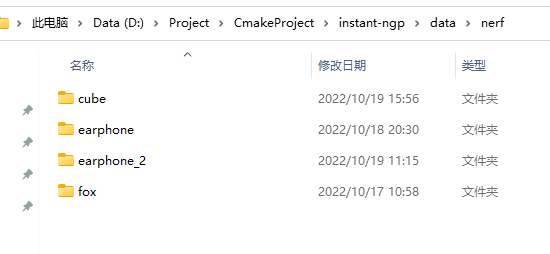

把根目录下的transform.json移到位置后记得修改其中影像路径,同样仿照示例数据,类似 images/img.jpg就行
用自己拍的照片试一下
python scripts/colmap2nerf.py --colmap_matcher exhaustive --run_colmap --aabb_scale 16 --images data/earphone
重新组织数据,重写 transform.json ,run
instant-ngp$ ./build/testbed --scene data/nerf/earphone

#include<iostream>
#include<icecream.hpp>
#include <vector>
#include <io.h>
#include <fstream>
#include <string>
#include <opencv2/opencv.hpp>
#include<opencv2/highgui.hpp>
#include <opencv2/highgui/highgui_c.h>
using namespace std;


/************************************************************************/
/*  获取文件夹下所有文件名
    输入:
        path    :   文件夹路径
        exd     :   所要获取的文件名后缀,如jpg、png等;如果希望获取所有
                    文件名, exd = ""
    输出:
        files   :   获取的文件名列表
/************************************************************************/
void getFiles(string path, string exd, vector<string>& files)
{
    //文件句柄
    long long   hFile = 0;
    //文件信息
    struct _finddata_t fileinfo;
    string pathName, exdName;

    if (0 != strcmp(exd.c_str(), ""))
    {
        exdName = "\\*." + exd;
    }
    else
    {
        exdName = "\\*";
    }

    if ((hFile = _findfirst(pathName.assign(path).append(exdName).c_str(), &fileinfo)) != -1)
    {
        do
        {
            //如果是文件夹中仍有文件夹,迭代之
            //如果不是,加入列表
            // 不推荐使用,硬要使用的话,需要修改else 里面的语句
            /*if((fileinfo.attrib &  _A_SUBDIR))
            {
                if(strcmp(fileinfo.name,".") != 0  &&  strcmp(fileinfo.name,"..") != 0)
                    getFiles( pathName.assign(path).append("\\").append(fileinfo.name), exd, files );
            }
            else */
            {
                if (strcmp(fileinfo.name, ".") != 0 && strcmp(fileinfo.name, "..") != 0)
                    //files.push_back(pathName.assign(path).append("\\").append(fileinfo.name)); // 要得到绝对目录使用该语句
                    //如果使用
                    files.push_back(fileinfo.name); // 只要得到文件名字使用该语句
            }
        } while (_findnext(hFile, &fileinfo) == 0);
        _findclose(hFile);
    }
}


int main()
{
	string rootPath = "D:\\Project\\CmakeProject\\instant-ngp\\data\\nerf\\earphone_2";
	vector<string> imgLists;
    getFiles(rootPath, "jpg", imgLists);
	IC(imgLists);
    for (int i = 0; i < imgLists.size(); i++)
    {
        cv::Mat img = cv::imread(rootPath + "\\" + imgLists[i]);
        cv::Mat dst;
        cv::resize(img, dst, cv::Size(img.cols / 2, img.rows / 2), 0, 0, cv::INTER_AREA);
        cv::imwrite(rootPath + "\\rsz_" + imgLists[i], dst);
    }

	return 0;
}
我正在学习如何使用Nokogiri,根据这段代码我遇到了一些问题:require'rubygems'require'mechanize'post_agent=WWW::Mechanize.newpost_page=post_agent.get('http://www.vbulletin.org/forum/showthread.php?t=230708')puts"\nabsolutepathwithtbodygivesnil"putspost_page.parser.xpath('/html/body/div/div/div/div/div/table/tbody/tr/td/div
我有一个Ruby程序,它使用rubyzip压缩XML文件的目录树。gem。我的问题是文件开始变得很重,我想提高压缩级别,因为压缩时间不是问题。我在rubyzipdocumentation中找不到一种为创建的ZIP文件指定压缩级别的方法。有人知道如何更改此设置吗?是否有另一个允许指定压缩级别的Ruby库? 最佳答案 这是我通过查看rubyzip内部创建的代码。level=Zlib::BEST_COMPRESSIONZip::ZipOutputStream.open(zip_file)do|zip|Dir.glob("**/*")d
类classAprivatedeffooputs:fooendpublicdefbarputs:barendprivatedefzimputs:zimendprotecteddefdibputs:dibendendA的实例a=A.new测试a.foorescueputs:faila.barrescueputs:faila.zimrescueputs:faila.dibrescueputs:faila.gazrescueputs:fail测试输出failbarfailfailfail.发送测试[:foo,:bar,:zim,:dib,:gaz].each{|m|a.send(m)resc
很好奇,就使用rubyonrails自动化单元测试而言,你们正在做什么?您是否创建了一个脚本来在cron中运行rake作业并将结果邮寄给您?git中的预提交Hook?只是手动调用?我完全理解测试,但想知道在错误发生之前捕获错误的最佳实践是什么。让我们理所当然地认为测试本身是完美无缺的,并且可以正常工作。下一步是什么以确保他们在正确的时间将可能有害的结果传达给您? 最佳答案 不确定您到底想听什么,但是有几个级别的自动代码库控制:在处理某项功能时,您可以使用类似autotest的内容获得关于哪些有效,哪些无效的即时反馈。要确保您的提
假设我做了一个模块如下:m=Module.newdoclassCendend三个问题:除了对m的引用之外,还有什么方法可以访问C和m中的其他内容?我可以在创建匿名模块后为其命名吗(就像我输入“module...”一样)?如何在使用完匿名模块后将其删除,使其定义的常量不再存在? 最佳答案 三个答案:是的,使用ObjectSpace.此代码使c引用你的类(class)C不引用m:c=nilObjectSpace.each_object{|obj|c=objif(Class===objandobj.name=~/::C$/)}当然这取决于
我正在尝试使用ruby和Savon来使用网络服务。测试服务为http://www.webservicex.net/WS/WSDetails.aspx?WSID=9&CATID=2require'rubygems'require'savon'client=Savon::Client.new"http://www.webservicex.net/stockquote.asmx?WSDL"client.get_quotedo|soap|soap.body={:symbol=>"AAPL"}end返回SOAP异常。检查soap信封,在我看来soap请求没有正确的命名空间。任何人都可以建议我
关闭。这个问题是opinion-based.它目前不接受答案。想要改进这个问题?更新问题,以便editingthispost可以用事实和引用来回答它.关闭4年前。Improvethisquestion我想在固定时间创建一系列低音和高音调的哔哔声。例如:在150毫秒时发出高音调的蜂鸣声在151毫秒时发出低音调的蜂鸣声200毫秒时发出低音调的蜂鸣声250毫秒的高音调蜂鸣声有没有办法在Ruby或Python中做到这一点?我真的不在乎输出编码是什么(.wav、.mp3、.ogg等等),但我确实想创建一个输出文件。
我在我的项目目录中完成了compasscreate.和compassinitrails。几个问题:我已将我的.sass文件放在public/stylesheets中。这是放置它们的正确位置吗?当我运行compasswatch时,它不会自动编译这些.sass文件。我必须手动指定文件:compasswatchpublic/stylesheets/myfile.sass等。如何让它自动运行?文件ie.css、print.css和screen.css已放在stylesheets/compiled。如何在编译后不让它们重新出现的情况下删除它们?我自己编译的.sass文件编译成compiled/t
我想将html转换为纯文本。不过,我不想只删除标签,我想智能地保留尽可能多的格式。为插入换行符标签,检测段落并格式化它们等。输入非常简单,通常是格式良好的html(不是整个文档,只是一堆内容,通常没有anchor或图像)。我可以将几个正则表达式放在一起,让我达到80%,但我认为可能有一些现有的解决方案更智能。 最佳答案 首先,不要尝试为此使用正则表达式。很有可能你会想出一个脆弱/脆弱的解决方案,它会随着HTML的变化而崩溃,或者很难管理和维护。您可以使用Nokogiri快速解析HTML并提取文本:require'nokogiri'h
我想为Heroku构建一个Rails3应用程序。他们使用Postgres作为他们的数据库,所以我通过MacPorts安装了postgres9.0。现在我需要一个postgresgem并且共识是出于性能原因你想要pggem。但是我对我得到的错误感到非常困惑当我尝试在rvm下通过geminstall安装pg时。我已经非常明确地指定了所有postgres目录的位置可以找到但仍然无法完成安装:$envARCHFLAGS='-archx86_64'geminstallpg--\--with-pg-config=/opt/local/var/db/postgresql90/defaultdb/po
