UI自动化-uiautomation
做应用程序自动点击的记录,暂不完整,仅供参考。参考多位大佬文章,链接在后面
涉及工具
- inspect【应用程序元素定位辅助工具; UI SPY 这个软件好像也可以,见别人用过】
- uiautomation【本文自动化的重点】
- pyautogui【技术不到位,有些元素没法精确定位,用uiautomation获取旁边元素的位置坐标,再用这个模拟键鼠操作】
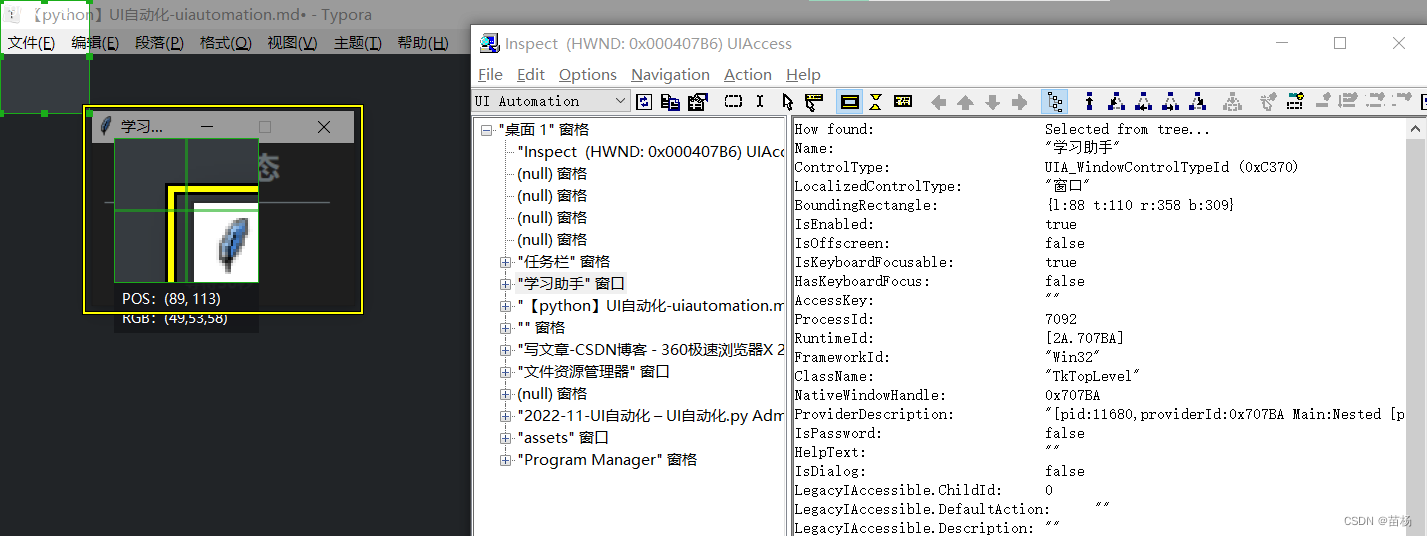
# --常用解析--

# Name,有些程序有,有些没有
Name:	"学习助手"

# ControlType,控件类型,查找窗口的时候 不同控件类型,用不同方法
ControlType:	UIA_WindowControlTypeId (0xC370)

# BoundingRectangle,边界矩形,显示这个窗口或按钮、标签、文本框  的 位置信息【左上x坐标,左上y坐标,右下x坐标,右下y坐标】
BoundingRectangle:	{l:88 t:110 r:358 b:309}

# 这个 查找窗口的时候 用
ClassName:	"TkTopLevel"
How found:	Selected from tree...
Name:	"微信"
ControlType:	UIA_WindowControlTypeId (0xC370)
LocalizedControlType:	"窗口"
BoundingRectangle:	{l:-498 t:193 r:642 b:998}
IsEnabled:	true
IsOffscreen:	false
IsKeyboardFocusable:	false
HasKeyboardFocus:	false
AccessKey:	""
ProcessId:	2708
RuntimeId:	[2A.2406AE]
FrameworkId:	"Win32"
ClassName:	"WeChatMainWndForPC"
NativeWindowHandle:	0x2406AE
IsControlElement:	true
ProviderDescription:	"[pid:2400,providerId:0x2406AE Main:Nested [pid:2708,providerId:0x2406AE Annotation(parent link):Microsoft: Annotation Proxy (unmanaged:uiautomationcore.dll); Main:Microsoft: MSAA Proxy (IAccessible2) (unmanaged:uiautomationcore.dll)]; Hwnd(parent link):Microsoft: HWND Proxy (unmanaged:uiautomationcore.dll)]"
AriaProperties:	""
IsPassword:	false
IsRequiredForForm:	false
IsDataValidForForm:	true
HelpText:	""
Culture:	0
IsDialog:	false
LegacyIAccessible.ChildId:	0
LegacyIAccessible.DefaultAction:	""
LegacyIAccessible.Description:	""
LegacyIAccessible.Help:	""
LegacyIAccessible.KeyboardShortcut:	""
LegacyIAccessible.Name:	"微信"
LegacyIAccessible.Role:	客户端 (0xA)
LegacyIAccessible.State:	正常 (0x0)
LegacyIAccessible.Value:	""
Transform.CanMove:	true
Transform.CanResize:	true
Transform.CanRotate:	false
Window.CanMaximize:	true
Window.CanMinimize:	true
Window.IsModal:	false
Window.IsTopmost:	false
Window.WindowInteractionState:	ReadyForUserInteraction (2)
Window.WindowVisualState:	Normal (0)
IsAnnotationPatternAvailable:	false
IsDragPatternAvailable:	false
IsDockPatternAvailable:	false
IsDropTargetPatternAvailable:	false
IsExpandCollapsePatternAvailable:	false
IsGridItemPatternAvailable:	false
IsGridPatternAvailable:	false
IsInvokePatternAvailable:	false
IsItemContainerPatternAvailable:	false
IsLegacyIAccessiblePatternAvailable:	true
IsMultipleViewPatternAvailable:	false
IsObjectModelPatternAvailable:	false
IsRangeValuePatternAvailable:	false
IsScrollItemPatternAvailable:	true
IsScrollPatternAvailable:	false
IsSelectionItemPatternAvailable:	false
IsSelectionPatternAvailable:	false
IsSpreadsheetItemPatternAvailable:	false
IsSpreadsheetPatternAvailable:	false
IsStylesPatternAvailable:	false
IsSynchronizedInputPatternAvailable:	false
IsTableItemPatternAvailable:	false
IsTablePatternAvailable:	false
IsTextChildPatternAvailable:	false
IsTextEditPatternAvailable:	false
IsTextPatternAvailable:	false
IsTextPattern2Available:	false
IsTogglePatternAvailable:	false
IsTransformPatternAvailable:	true
IsTransform2PatternAvailable:	false
IsValuePatternAvailable:	false
IsVirtualizedItemPatternAvailable:	false
IsWindowPatternAvailable:	true
IsCustomNavigationPatternAvailable:	false
IsSelectionPattern2Available:	false
FirstChild:	"" 窗格
LastChild:	"" 窗格
Next:	"【python】UI自动化-uiautomation.md• - Typora" 窗口
Previous:	"Home - 360极速浏览器X 21.0" 窗口
Other Props:	Object has no additional properties
Children:	"" 窗格
	"" 窗格
Ancestors:	"桌面 1" 窗格
	[ No Parent ]
一、uiautomation方法
| 方法 | 备注 |
|---|---|
| WindowContrl(searchDepth,ClassName,SubName) | 查找窗口中的程序,如果有中文则需用Unicode |
| window.Exists(maxSearchSeconds) | 来判断此窗口是否存在 |
| EditControl(searchFromControl) | 查找编辑位置,找到后可用DoubleClick()来改变电脑的focus;edit.SetValue(“string”)输入值 |
| Win32API.SendKeys(“string”) | 如果已在编辑位置,则可用此方法来输入值,{Ctrl}为ctrl键,其他类似;{@8}格式可输入8个@,对于数字也可实现此功能,但对于字母不能…; |
| MenuItemControl(searchFromControl,Name) | 查找菜单按钮 |
| ComboBoxControl(searchFromControl,AutomationI) | 查找下拉框,然后在此基础上用Select(“name”)方法来选择需要的选项 |
import uiautomation
import subprocess

# 查找窗口中的程序,如果有中文则需用Unicode;可用
uiautomation.WindowContrl(searchDepth,ClassName,SubName)

# 来判断此窗口是否存在
uiautomation.window.Exists(maxSearchSeconds)

# 查找编辑位置,找到后可用DoubleClick()来改变电脑的focus;edit.SetValue(“string”)输入值
uiautomation.EditControl(searchFromControl)

# 查找菜单按钮
uiautomation.MenuItemControl(searchFromControl,Name)

#  查找下拉框,然后在此基础上用Select(“name”)方法来选择需要的选项
uiautomation.ComboBoxControl(searchFromControl,AutomationI)

# 查找按钮
uiautomation.BottonControl(searchFromControl,Name,SubName)
# Uiautomation元素获取方法如下

程序窗口:uiautomation.WindowControl
按钮:uiautomation.ButtonControl
文本:uiautomation.TextControl
输入窗口:uiautomation.EditControl
文档控件:uiautomation.DocumentControl
单选控件:uiautomation.CheckBoxControl
复选控件:uiautomation.ComboBoxControl
日历控件:uiautomation.CalendarControl

'''
ControlType为”ControlType.Window”
那么捕获窗口就用:uiautomation.WindowControl

如果ControlType为”ControlType.Text”
那么捕获窗口就用:uiautomation.TextControl

依次类推...
如果ControlType为”ControlType.Xxx”
那么捕获窗口就用:uiautomation.XxxControl

如果类型不明确,则使用uiautomation.Control
'''
# 常用的操作有
DoubleClick()双击
Click()单击
RightClick()右键点击
SendKeys()发送字符
SetValue()传值
# 三、对windows程序常用操作

subprocess.Popen(‘Name’)   用进程打开程序;

window.Close()         关闭窗口;

window.SetActive()     使用;

window.SetTopMost()     设置为顶层

window.ShowWindow(uiautomation.ShowWindow.Maximize) 窗口最大化

window.CaptureToImage(‘Notepad.png’) 截图;
下面代码引入的文件 的内容
192.168.1.78
vEJU4Fasd/asdadagsdaasdgadfasdasfasfaasffffffddddddddddddddda6W8=
rustdesk-1.1.9-putes.exe

---读取顺序---
---第1行 服务器ip---
---第2行 KEY---
---第3行 rustdesk安装包名字[要带拓展名]---

功能:自动安装rustdesk客户端,安装后开启"允许IP直接访问",执行期间不要使用键盘鼠标
# -*- coding: utf-8 -*-
# @Time : 2022/11/18 9:06
# @File : UI自动化.py
# @Software: PyCharm

import time
import uiautomation as auto
import subprocess

import pyautogui
import pyperclip
import os

f = open('key.txt', mode='r', encoding='utf-8')
key_list = f.read().split('\n')
f.close()

# 打开软件
subprocess.Popen(key_list[2])
auto.uiautomation.SetGlobalSearchTimeout(5)  # 设置全局搜索超时 5

# 获取
print('----开始安装--请勿操作键盘鼠标----')
win_0 = auto.WindowControl(searchDepth=1, Name="", ClassName='H-SMILE-FRAME')
win_0.ButtonControl(Name='同意并安装').Click()
# time.sleep(int(key_list[2]))
time.sleep(10)
for i in range(1, 20):
    print(f'{i}')
    if os.access(r'C:\Users\Public\Desktop\RustDesk.lnk', os.X_OK):
        time.sleep(5)

        try:
            win_0 = auto.WindowControl(searchDepth=1, Name="", ClassName='H-SMILE-FRAME')
            win_0.ButtonControl(Name='关闭').Click()
            time.sleep(3)
        except:
            pass
        break
    else:
        time.sleep(1)

# -------执行-----
print('打开软件')
subprocess.Popen(r"C:\Program Files\RustDesk\RustDesk.exe")
# os.system(r'start C:\"Program Files"\RustDesk\RustDesk.exe')
auto.uiautomation.SetGlobalSearchTimeout(5)  # 设置全局搜索超时 5

# 获取
win = auto.WindowControl(searchDepth=1, Name="", ClassName='H-SMILE-FRAME')
print(win.BoundingRectangle)

# 点击最大化
# win.ButtonControl(Name="最大化").Click()

# 控制的应用窗口前置
win.SetTopmost(True)

# 获取 三个点 位置
button = win.TextControl(Name='你的桌面可以通过下面的ID和密码访问。')
# print(button.BoundingRectangle)

# ---把三个点的位置转换成列表,并点击---
a = str(button.BoundingRectangle)

a = list(map(int, a[1:a.find(')')].split(',')))  # 把列表中的字符串转成整型

print(a)

# x,y 为 单击坐标,button 为 鼠标左或右键点击('left' / 'right')
pyautogui.click(a[2], a[3] + 20, button='left')
time.sleep(1)
# ---把三个点的位置转换成列表,并点击---END---

# 设置
win.TextControl(Name='允许IP直接访问').Click()

pyautogui.click(a[2], a[3] + 20, button='left')
time.sleep(1)
win.TextControl(Name='ID/中继服务器').Click()
time.sleep(1)


# pyautogui.hotkey('ctrl', 'a')  # 按下 ctrl + c 组合键。此次测试不生效
# ---------
def key_cv(c, v):
    """ 模拟执行快捷键 """
    pyautogui.keyDown(c)
    pyautogui.keyDown(v)
    pyautogui.keyUp(v)
    pyautogui.keyUp(c)


key_cv('ctrl', 'a')

pyperclip.copy(key_list[0])  # 复制
pyperclip.paste()  # 粘贴

key_cv('ctrl', 'v')

# ---------

time.sleep(0.5)
pyautogui.press('Tab')
pyautogui.press('Tab')
pyautogui.press('Tab')

# ---------
key_cv('ctrl', 'a')

pyperclip.copy(key_list[1])  # 复制
pyperclip.paste()  # 粘贴

key_cv('ctrl', 'v')

time.sleep(1)
pyautogui.press('tab')
pyautogui.press('tab')
time.sleep(0.5)
pyautogui.press('enter')

time.sleep(1)

win.ButtonControl(Name='关闭').Click()
print('--------执行结束--------')
time.sleep(5)
# inspect
https://blog.csdn.net/knighthood2001/article/details/124297008

# uiautomation
https://blog.csdn.net/yangzhichao_csdn/article/details/124799781
https://blog.csdn.net/chenmozhe22/article/details/106926071
https://blog.csdn.net/qq_21142893/article/details/84874406

# PyautoGui
https://blog.csdn.net/weixin_38640052/article/details/112387653
很好奇,就使用rubyonrails自动化单元测试而言,你们正在做什么?您是否创建了一个脚本来在cron中运行rake作业并将结果邮寄给您?git中的预提交Hook?只是手动调用?我完全理解测试,但想知道在错误发生之前捕获错误的最佳实践是什么。让我们理所当然地认为测试本身是完美无缺的,并且可以正常工作。下一步是什么以确保他们在正确的时间将可能有害的结果传达给您? 最佳答案 不确定您到底想听什么,但是有几个级别的自动代码库控制:在处理某项功能时,您可以使用类似autotest的内容获得关于哪些有效,哪些无效的即时反馈。要确保您的提
我正在使用i18n从头开始构建一个多语言网络应用程序,虽然我自己可以处理一大堆yml文件,但我说的语言(非常)有限,最终我想寻求外部帮助帮助。我想知道这里是否有人在使用UI插件/gem(与django上的django-rosetta不同)来处理多个翻译器,其中一些翻译器不愿意或无法处理存储库中的100多个文件,处理语言数据。谢谢&问候,安德拉斯(如果您已经在rubyonrails-talk上遇到了这个问题,我们深表歉意) 最佳答案 有一个rails3branchofthetolkgem在github上。您可以通过在Gemfi
关闭。这个问题是opinion-based.它目前不接受答案。想要改进这个问题?更新问题,以便editingthispost可以用事实和引用来回答它.关闭4年前。Improvethisquestion我想在固定时间创建一系列低音和高音调的哔哔声。例如:在150毫秒时发出高音调的蜂鸣声在151毫秒时发出低音调的蜂鸣声200毫秒时发出低音调的蜂鸣声250毫秒的高音调蜂鸣声有没有办法在Ruby或Python中做到这一点?我真的不在乎输出编码是什么(.wav、.mp3、.ogg等等),但我确实想创建一个输出文件。
我收到这个错误:RuntimeError(自动加载常量Apps时检测到循环依赖当我使用多线程时。下面是我的代码。为什么会这样?我尝试多线程的原因是因为我正在编写一个HTML抓取应用程序。对Nokogiri::HTML(open())的调用是一个同步阻塞调用,需要1秒才能返回,我有100,000多个页面要访问,所以我试图运行多个线程来解决这个问题。有更好的方法吗?classToolsController0)app.website=array.join(',')putsapp.websiteelseapp.website="NONE"endapp.saveapps=Apps.order("
这个问题在这里已经有了答案:关闭10年前。PossibleDuplicate:Pythonconditionalassignmentoperator对于这样一个简单的问题表示歉意,但是谷歌搜索||=并不是很有帮助;)Python中是否有与Ruby和Perl中的||=语句等效的语句?例如:foo="hey"foo||="what"#assignfooifit'sundefined#fooisstill"hey"bar||="yeah"#baris"yeah"另外,类似这样的东西的通用术语是什么?条件分配是我的第一个猜测,但Wikipediapage跟我想的不太一样。
按照目前的情况,这个问题不适合我们的问答形式。我们希望答案得到事实、引用或专业知识的支持,但这个问题可能会引发辩论、争论、投票或扩展讨论。如果您觉得这个问题可以改进并可能重新打开,visitthehelpcenter指导。关闭10年前。问题1)我想知道rubyonrails是否有功能类似于primefaces的gem。我问的原因是如果您使用primefaces(http://www.primefaces.org/showcase-labs/ui/home.jsf),开发人员无需担心javascript或jquery的东西。据我所知,JSF是一个规范,基于规范的各种可用实现,prim
什么是ruby的rack或python的Java的wsgi?还有一个路由库。 最佳答案 来自Python标准PEP333:Bycontrast,althoughJavahasjustasmanywebapplicationframeworksavailable,Java's"servlet"APImakesitpossibleforapplicationswrittenwithanyJavawebapplicationframeworktoruninanywebserverthatsupportstheservletAPI.ht
华为OD机试题本篇题目:明明的随机数题目输入描述输出描述:示例1输入输出说明代码编写思路最近更新的博客华为od2023|什么是华为od,od薪资待遇,od机试题清单华为OD机试真题大全,用Python解华为机试题|机试宝典【华为OD机试】全流程解析+经验分享,题型分享,防作弊指南华为o
我想解析一个已经存在的.mid文件,改变它的乐器,例如从“acousticgrandpiano”到“violin”,然后将它保存回去或作为另一个.mid文件。根据我在文档中看到的内容,该乐器通过program_change或patch_change指令进行了更改,但我找不到任何在已经存在的MIDI文件中执行此操作的库.他们似乎都只支持从头开始创建的MIDI文件。 最佳答案 MIDIpackage会为您完成此操作,但具体方法取决于midi文件的原始内容。一个MIDI文件由一个或多个音轨组成,每个音轨是十六个channel中任何一个上的
我们目前正在为ROR3.2开发自定义cms引擎。在这个过程中,我们希望成为我们的rails应用程序中的一等公民的几个类类型起源,这意味着它们应该驻留在应用程序的app文件夹下,它是插件。目前我们有以下类型:数据源数据类型查看我在app文件夹下创建了多个目录来保存这些:应用/数据源应用/数据类型应用/View更多类型将随之而来,我有点担心应用程序文件夹被这么多目录污染。因此,我想将它们移动到一个子目录/模块中,该子目录/模块包含cms定义的所有类型。所有类都应位于MyCms命名空间内,目录布局应如下所示:应用程序/my_cms/data_source应用程序/my_cms/data_ty
