1.1 用户对屏幕的操作的事件可以划分为3种最基础的事件:
1.ACTION_DOWN:手指刚接触屏幕,按下去的那一瞬间产生该事件
2.ACTION_MOVE:手指在屏幕上移动时候产生该事件
3.ACTION_UP:手指从屏幕上松开的瞬间产生该事件
1.2 用户对屏幕的操作最终可以划分为这三种事件,用户的ACTION_DOWN到ACTION_UP的操作可以称为一个事件序列
一个事件序列主要有以下两种组成:
一: ACTION_DOWN->ACTION_UP
二 :ACTION_DOWN->许多个ACTION_MOVE>ACTION_UP
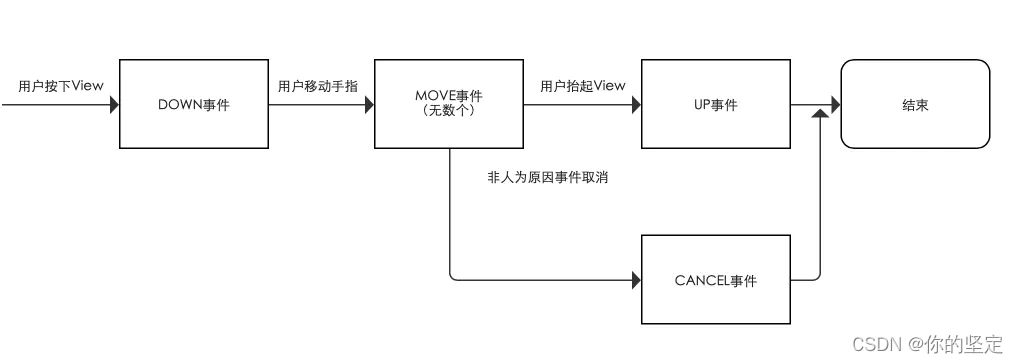
1.3 Android 的事件分发机制大体可以分为三部分 事件生产 事件分发 事件消费 事件的生产是由用户点击屏幕产生,这篇文章着重分析事件的分发和消费,因为事件分发和处理联系的过于紧密,这篇文章将把事件的分发和消费放在一起分析
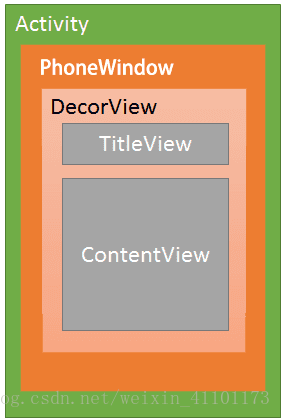
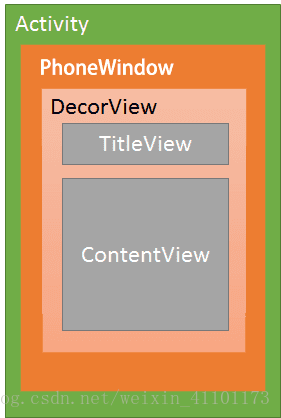
在Activity上的事件分发和Activity PhoneView DecorView ViewGroup view 密不可分, 其中 Activity PhoneView DecorView ViewGroup view的关系可以用如下图来描述:
若干GroupView和若干View组成的控件树可以用下午来概括:
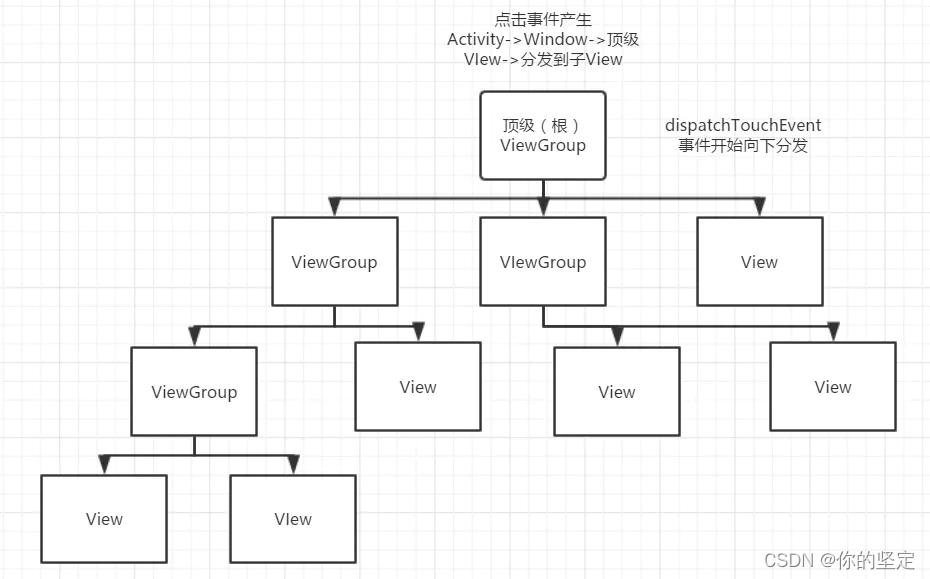
1.4 事件分发的大概流程可以这样来描述:Activity -> PhoneWindow ->DecorView(DecorView其实就是一种ViewGroup) ->View
1.5 事件分发需要的三个重要方法来共同完成:
public boolean dispatchTouchEvent(event):用于进行点击事件的分发
public boolean onInterceptTouchEvent(event):用于进行点击事件的拦截
public boolean onTouchEvent(event):用于处理点击事件
三个函数的参数均为even,即上面所说的3种类型的输入事件,返回值均为boolean 类型
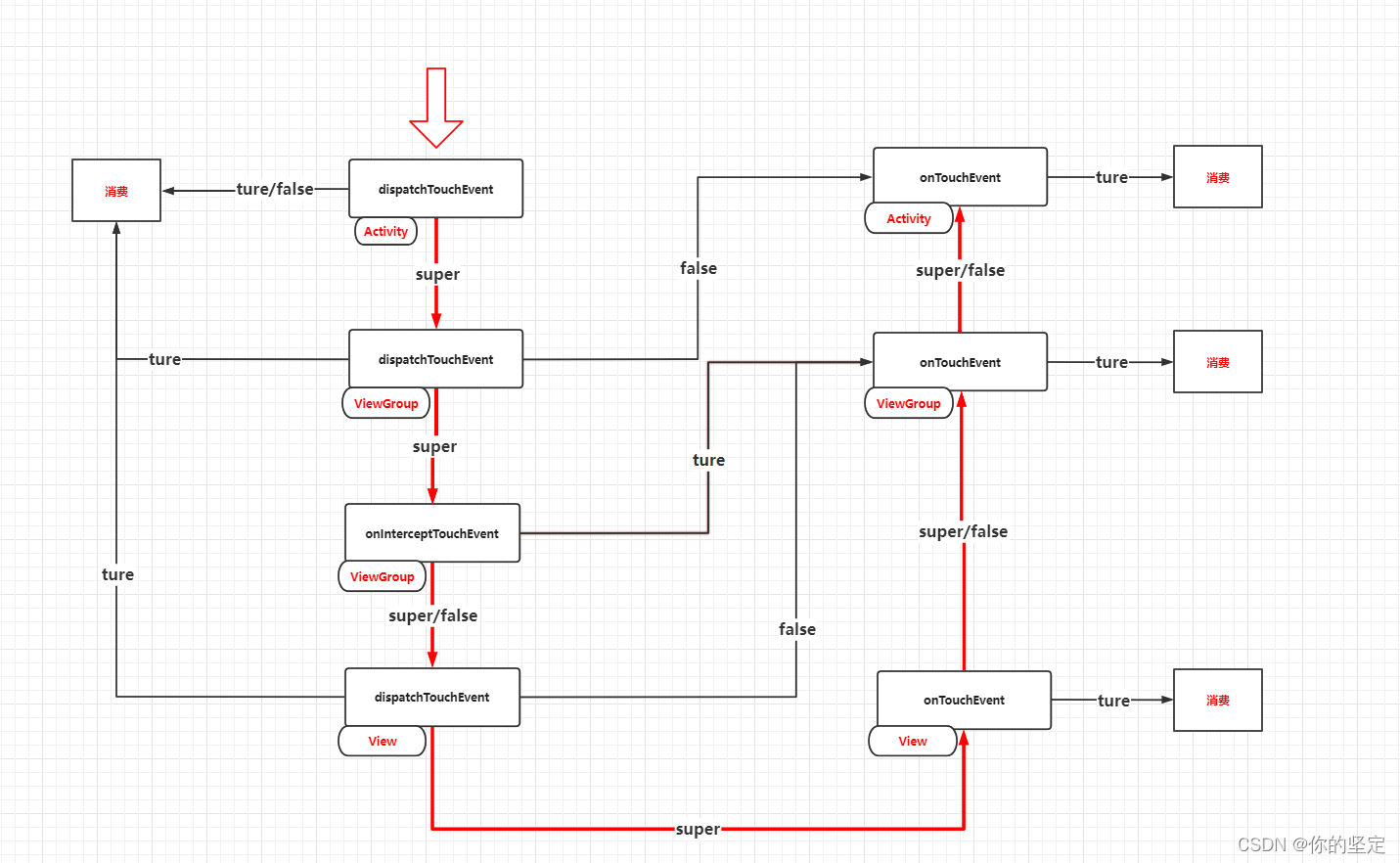
上面的三种方法的调用关系大致可以用下面的伪代码来描述
    public boolean dispatchTouchEvent(MotionEvent ev) {
        boolean consume = false;//事件是否被消费
        if (onInterceptTouchEvent(ev)){//调用onInterceptTouchEvent判断是否拦截事件
            consume = onTouchEvent(ev);//如果拦截则调用自身的onTouchEvent方法
        }else{
            consume = child.dispatchTouchEvent(ev);//不拦截调用子View的dispatchTouchEvent方法
        }
        return consume;//返回值表示事件是否被消费,true事件终止,false调用父View的onTouchEvent方法
    }
事件的分发到处理的过程大致可以用一个U形图来描述:
1.6 对ACTION_MOVE 和ACTION_UP事件的处理
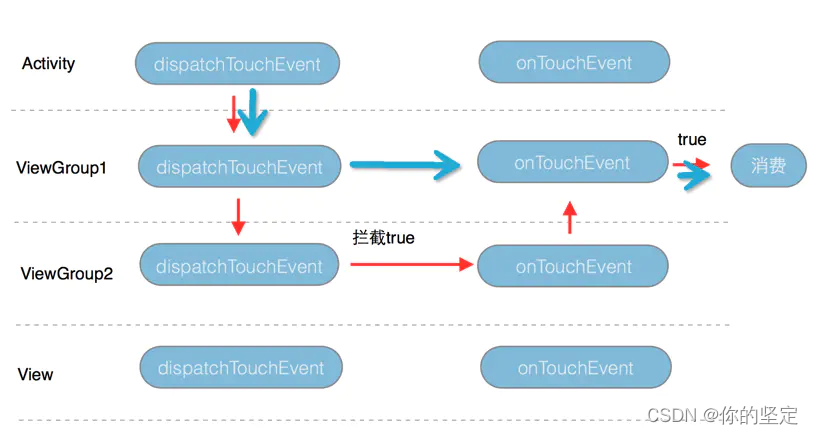
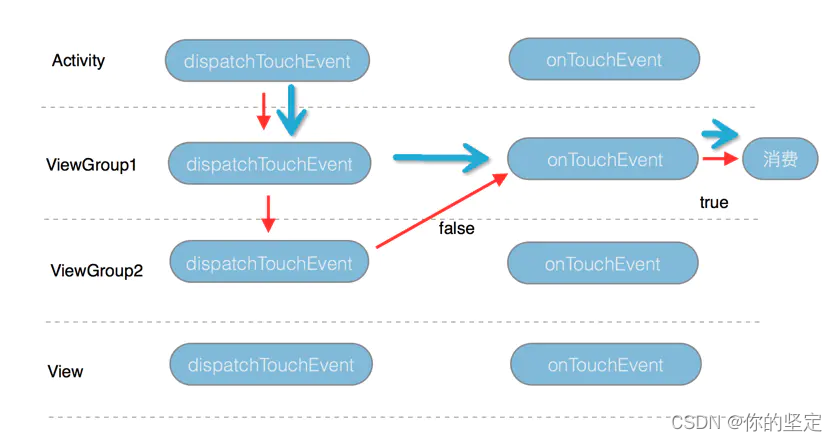
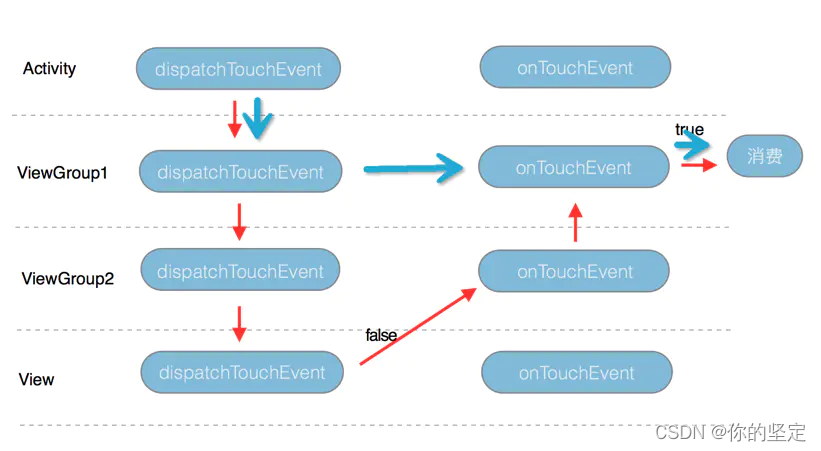
1. 从Activity到ViewGroup
Activity.java
  public boolean dispatchTouchEvent(MotionEvent ev) {
	......
    // ->>分析1
    if (getWindow().superDispatchTouchEvent(ev)) {  //getWindow返回的是一个PhoneWindow
    												//对象 ,即这里调用的是PhoneWindow
    												// 的superDispatchTouchEvent,也就
    												//说在这里Activity把时间传给了
    												//PhoneWindow

        return true;
        // 若getWindow().superDispatchTouchEvent(ev)的返回true
        // 则Activity.dispatchTouchEvent()就返回true,则方法结束。即 :该点击事件停止往下传递 & 事件传递过程结束
        // 否则:继续调用Activity.onTouchEvent

    }
    return onTouchEvent(ev);
  }

	// :当一个点击事件未被Activity下任何一个View接收/处理时,就会调用该方法
   public boolean onTouchEvent(MotionEvent event) {
        if (mWindow.shouldCloseOnTouch(this, event)) {
            finish();
            return true;
        }

        return false;
    }
PhoneWindow.java
  @Override
  public boolean superDispatchTouchEvent(MotionEvent event) {
      return mDecor.superDispatchTouchEvent(event);
      // mDecor的类型是DecorView,DecorView是PhoneWindow的内部类,继承自FrameLayout,而FrameLayout是ViewGroup的子类,
      // 所以mDecor是一个顶级的ViewGroup,在这里就实现了事件从PhoneWindow到顶级
      //ViewGroup的传递
  }
DecorView:

  public boolean superDispatchTouchEvent(MotionEvent event) {

      return super.dispatchTouchEvent(event);
      // 在这里它调用了父类的dispatchTouchEvent,而DecorView的父类是FrameLayout,而
      // FrameLayout的父类是ViewGroup,到这里就是我们熟悉的ViewGroup 的dispatchTouchEvent

  }
总结
当一个点击事件发生时,从Activity的事件分发开始(Activity.dispatchTouchEvent()),流程总结如下:
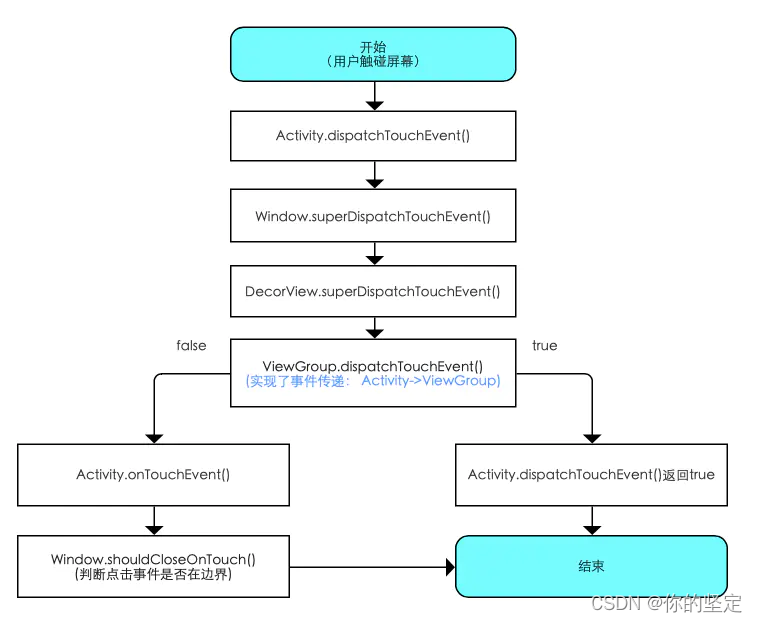
1. ViewGroup中的分发
1.1
class ViewGroup:
    public boolean dispatchTouchEvent(MotionEvent ev) {
        ...
        final int action = ev.getAction();
        final int actionMasked = action & MotionEvent.ACTION_MASK;
        // Handle an initial down.
        if (actionMasked == MotionEvent.ACTION_DOWN) {
            cancelAndClearTouchTargets(ev);
            //清除FLAG_DISALLOW_INTERCEPT设置并且mFirstTouchTarget 设置为null
            resetTouchState();
        }
        // Check for interception.
        final boolean intercepted;//是否拦截事件
        if (actionMasked == MotionEvent.ACTION_DOWN
                || mFirstTouchTarget != null) {   // 注意这里 -> 分析一
            //FLAG_DISALLOW_INTERCEPT是子View通过
            //requestDisallowInterceptTouchEvent方法进行设置的
            final boolean disallowIntercept = (mGroupFlags & FLAG_DISALLOW_INTERCEPT) != 0;                                      // 分析二
            if (!disallowIntercept) {
                //调用onInterceptTouchEvent方法判断是否需要拦截
                intercepted = onInterceptTouchEvent(ev);
                ev.setAction(action); // restore action in case it was changed
            } else {
                intercepted = false;
            }
        } else {
            // There are no touch targets and this action is not an initial down
            // so this view group continues to intercept touches.
            intercepted = true;
        }
        ...
    }
分析一
这里首先判断事件是否为DOWN事件,如果是,则进行初始化,resetTouchState方法中会把 mFirstTouchTarget的值置为null。这里为什么要进行初始化呢?原因就是一个完整的事件序列是以 DOWN开始,以UP结束的。所以如果是DOWN事件,那么说明这是一个新的事件序列,故而需要初 始化之前的状态。接着往下看,上面代码注释1处的条件如果满足,则执行下面的句子,mFirstTouchTarget 的意义是:当 前ViewGroup 是否拦截了事件,如果拦截了, mFirstTouchTarget=null;如果没有拦截并交由子View来处 理,mFirstTouchTarget!=null 从上面代码我们可以看出,ViewGroup在如下两种情况下会判断是否要拦截当前事件:事件类型为ACTION DOWN或者mFirstTouchTarget != null。ACTION_ DOWN事件好理解,那么mFirstTouchTarget!=null是什么意思呢?这个从后面的代码逻辑可以看出来,当事件由ViewGroup的子元素成功处理时,mFirstTouchTarget 会被赋值并指向子
元素,换种方式来说,当ViewGroup 不拦截事件并将事件交由子元素处理时
mFirstTouchTarget != null。 反过来,一旦事件由当前ViewGroup 拦截时,mFirstTouchTarget != null就不成立。那么当ACTION_ MOVE和ACTION UP事件到来
时,由于(actionMasked == MotionEvent. ACTION DOWN II mFirstTouchTarget != null)这
个条件为false, 将导致ViewGroup的onInterceptTouchEvent 不会再被调用,并且同一序列中的其他事件都会默认交给它处理。
分析二
当然,这里有一种特殊情况,那就是FLAG_ DISALLOW_ INTERCEPT 标记位,这个
标记位是通过requestDisallowInterceptTouchEvent 方法来设置的,一般用于子 View中。 FLAG_ DISALLOW_ INTERCEPT 一旦设置后,ViewGroup 将无法拦截除了 ACTION_ DOWN以外的其他点击事件。为什么说是除了ACTION_ DOWN以外的其他事 件呢?这是因为ViewGroup在分发事件时,如果是ACTION DOWN就会重置 FLAG_ DISALLOW_ INTERCEPT这个标记位,将导致子View中设置的这个标记位无效。 因此,当面对ACTION_DOWN事件时,ViewGroup总是会调用自己的onInterceptTouchEvent方法来询问自己是否要拦截事件,这一点从源码中也可以看出来。
分析三
如果ViewGroup在这里对事件进行了ACTION_DOWN拦截,则会调用 super.dispatchTouchEvent(event)对事 件进行处理,因为ViewGroup的父类为View,在View的dispatchTouchEvent()中会调用onTouchEvent(),即ViewGroup在选择对事件进行拦截后会交给ViewGroup的onTouchEvent去处理。
分析四
ViewGroup消费了ACTION_DOWN后,对后续事件的处理
分析过ViewGroup的dispatchTouchEvent()发现,当ViewGroup对ACTION_DOWN事件拦截后, mFirstTouchTarget 的值应该还是空的,这就使得ViewGroup的(dispatchTouchEventactionMasked == MotionEvent.ACTION_DOWN|| mFirstTouchTarget != null)不成立 走else,使得intercepted = false;这样的话 ,ViewGroup在这里对事件进行了ACTION_DOWN拦截之后的,对后续的ACTION_MOVE 和ACTION_UP都进行拦截,流程与ViewGroup对事件ACTION_DOWN处理的流程一致。
1.2
class ViewGroup:
    public boolean dispatchTouchEvent(MotionEvent ev) {

	....

        final View[] children = mChildren;
        //对子View进行遍历
        //我们看到了for循环。首先遍历ViewGroup的子元素,判断子元素是否能够接收到点
		//击事件,如果子元素能够接收到点击事件,则交由子元素来处理。需要注意这个for循环				  		 //是倒序遍历的,即从最上层的子View开始往内层遍历。
        for (int i = childrenCount - 1; i >= 0; i--) {
            final int childIndex = getAndVerifyPreorderedIndex(
                    childrenCount, i, customOrder);
            final View child = getAndVerifyPreorderedView(
                    preorderedList, children, childIndex);

            // If there is a view that has accessibility focus we want it
            // to get the event first and if not handled we will perform a
            // normal dispatch. We may do a double iteration but this is
            // safer given the timeframe.
            if (childWithAccessibilityFocus != null) {
                if (childWithAccessibilityFocus != child) {
                    continue;
                }
                childWithAccessibilityFocus = null;
                i = childrenCount - 1;
            }
			// 注释1 具体分析在下文
            //判断1,View可见并且没有播放动画。2,点击事件的坐标落在View的范围内
            //如果上述两个条件有一项不满足则continue继续循环下一个View
            if (!canViewReceivePointerEvents(child)
                    || !isTransformedTouchPointInView(x, y, child, null)) {
                ev.setTargetAccessibilityFocus(false);
                continue;
            }
			// 注释 2  具体分析见下文
            newTouchTarget = getTouchTarget(child);
            //如果有子View处理即newTouchTarget 不为null则跳出循环。
            if (newTouchTarget != null) {
                // Child is already receiving touch within its bounds.
                // Give it the new pointer in addition to the ones it is handling.
                newTouchTarget.pointerIdBits |= idBitsToAssign;
                break;
            }

            resetCancelNextUpFlag(child);
            //dispatchTransformedTouchEvent第三个参数child这里不为null
            //实际调用的是child的dispatchTouchEvent方法
            if (dispatchTransformedTouchEvent(ev, false, child, idBitsToAssign)) {
                // Child wants to receive touch within its bounds.
                mLastTouchDownTime = ev.getDownTime();
                if (preorderedList != null) {
                    // childIndex points into presorted list, find original index
                    for (int j = 0; j < childrenCount; j++) {
                        if (children[childIndex] == mChildren[j]) {
                            mLastTouchDownIndex = j;
                            break;
                        }
                    }
                } else {
                    mLastTouchDownIndex = childIndex;
                }
                mLastTouchDownX = ev.getX();
                mLastTouchDownY = ev.getY();
                //当child处理了点击事件,那么会设置mFirstTouchTarget 在addTouchTarget被赋值
                newTouchTarget = addTouchTarget(child, idBitsToAssign);
                alreadyDispatchedToNewTouchTarget = true;
                //子View处理了事件,然后就跳出了for循环
                break;
            }
        }
    }
分析1
在注释1处,有这样的判断 if (!canViewReceivePointerEvents(child)
|| !isTransformedTouchPointInView(x, y, child, null))
判断1,View可见并且没有播放动画。2,点击事件的坐标落在View的范围内
若该判断不生效即 不可见 没播放动画, 或者 坐标点不在该View里面,则执行continue跳过这次循环。
    /**
     * Returns true if a child view can receive pointer events.
     * @hide
     */
     // 判断有没有可见并且没有播放动画的函数
    private static boolean canViewReceivePointerEvents(@NonNull View child) {
        return (child.mViewFlags & VISIBILITY_MASK) == VISIBLE
                || child.getAnimation() != null;
    }
    /**
     * Returns true if a child view contains the specified point when transformed
     * into its coordinate space.
     * Child must not be null.
     * @hide
     */
     // 判断坐标是否落在了 该View里面
    protected boolean isTransformedTouchPointInView(float x, float y, View child,
            PointF outLocalPoint) {
        final float[] point = getTempPoint();
        point[0] = x;
        point[1] = y;
        transformPointToViewLocal(point, child);
        //调用View的pointInView方法进行判断坐标点是否在View内
        final boolean isInView = child.pointInView(point[0], point[1]);
        if (isInView && outLocalPoint != null) {
            outLocalPoint.set(point[0], point[1]);
        }
        return isInView;
    }
分析2
在1.2代码里 对view可见性 坐标是否落在该View等条件判断完后,会有这样的步骤
newTouchTarget = getTouchTarget(child),此时由于ACTION_DOWN事件还未被该ViewGroup的任何一个子View处理,结合上面的分析此时mFirstTouchTarget为null,所以此时getTouchTarget的返回值为null
    private TouchTarget getTouchTarget(@NonNull View child) {
        for (TouchTarget target = mFirstTouchTarget; target != null; target = target.next) {
            if (target.child == child) {
                return target;
            }
        }
        return null;
    }
分析3
因为getTouchTarget()在ViewGroup的返回值为null,最有接下来进入到 if (dispatchTransformedTouchEvent(ev, false, child, idBitsToAssign)) ,把之前的代码copy下来方便分析,dispatchTransformedTouchEvent这和函数将会调用ViewGroup中子View的dispatchTouchEvent,并把结果返回回来,如果子View的onTouchEven()消费了事件,那么
dispatchTransformedTouchEvent的返回值为Ture,先回在注释1处调用newTouchTarget = addTouchTarget(child, idBitsToAssign),这一步会把消费掉ACTION_DOWN的子View记录下来,同时使得mFirstTouchTarget 不再为null,然后在注释2处break ,结束ViewGroup中对子View的遍历
class ViewGroup:
    public boolean dispatchTouchEvent(MotionEvent ev) {

    .....

      if (dispatchTransformedTouchEvent(ev, false, child, idBitsToAssign)) {
            // Child wants to receive touch within its bounds.
            mLastTouchDownTime = ev.getDownTime();
            if (preorderedList != null) {
                // childIndex points into presorted list, find original index
                for (int j = 0; j < childrenCount; j++) {
                    if (children[childIndex] == mChildren[j]) {
                        mLastTouchDownIndex = j;
                        break;
                    }
                }
            } else {
                mLastTouchDownIndex = childIndex;
            }
            mLastTouchDownX = ev.getX();
            mLastTouchDownY = ev.getY();
            //当child处理了点击事件,那么会设置mFirstTouchTarget 在addTouchTarget被赋值
            newTouchTarget = addTouchTarget(child, idBitsToAssign);  // 注释1
            alreadyDispatchedToNewTouchTarget = true;
            //子View处理了事件,然后就跳出了for循环
            break;   // 注释2
        }
// 通过这函数可以看出,这里采用了头插法把target 插入到一个单向链表中,
//其中TouchTarget.obtain是产生一个TouchTarget 对象,TouchTarget存有消费事件的View
   private TouchTarget addTouchTarget(@NonNull View child, int pointerIdBits) {
        final TouchTarget target = TouchTarget.obtain(child, pointerIdBits);
        target.next = mFirstTouchTarget;
        mFirstTouchTarget = target;
        return target;
    }
TouchTarget.java
// 观察TouchTarget的字段可以发现吗,TouchTarget里面存有消费事件的View,
//pointerIdBits(和多点触碰有关),还有指向下一个节点的引用
  private static final class TouchTarget {
        private static final int MAX_RECYCLED = 32;
        private static final Object sRecycleLock = new Object[0];
        private static TouchTarget sRecycleBin;
        private static int sRecycledCount;

        public static final int ALL_POINTER_IDS = -1; // all ones

        // The touched child view.
        @UnsupportedAppUsage
        public View child;

        // The combined bit mask of pointer ids for all pointers captured by the target.
        public int pointerIdBits;

        // The next target in the target list.
        public TouchTarget next;
分析4
ViewGroup的子View消费了ACTION_DOWN事件后,ViewGroup对后续事件的处理
这里的处理逻辑在代码里的注释了做了详细的说明,这里就不再赘述了。
class ViewGroup:
    public boolean dispatchTouchEvent(MotionEvent ev) {

    .....
 // Dispatch to touch targets.
 			// 由之前的分析可知,当ViewGroup中的一子View消费了事件后,mFirstTouchTarget
 			//不在为空,故将执行else
            if (mFirstTouchTarget == null) {
                // No touch targets so treat this as an ordinary view.
                handled = dispatchTransformedTouchEvent(ev, canceled, null,
                        TouchTarget.ALL_POINTER_IDS);
            } else {
                //  mFirstTouchTarget != null会走到这里
                // Dispatch to touch targets, excluding the new touch target if we already
                // dispatched to it.  Cancel touch targets if necessary.
                TouchTarget predecessor = null;
                TouchTarget target = mFirstTouchTarget;
                while (target != null) {
                //注释1 在这里会不断从target链表里在取出target对象,(在单点触摸的时候
                //只有一个对象),
                    final TouchTarget next = target.next;
                    if (alreadyDispatchedToNewTouchTarget && target == newTouchTarget) {
                        handled = true;
                    } else {
                        final boolean cancelChild = resetCancelNextUpFlag(target.child)
                                || intercepted;
                         // 注释2 在这里调用了dispatchTransformedTouchEvent 参数中
                         // target.child传了进去,target.child是消费ACTION_DOWN事件
                         // 的View ,dispatchTransformedTouchEvent 将会调用该View的
                         // dispatchTouchEvent去处理事件。
                        if (dispatchTransformedTouchEvent(ev, cancelChild,
                                target.child, target.pointerIdBits)) {
                            handled = true;
                        }
                        if (cancelChild) {
                            if (predecessor == null) {
                                mFirstTouchTarget = next;
                            } else {
                                predecessor.next = next;
                            }
                            // 对target做回收,实现复用
                            target.recycle();
                            target = next;
                            continue;
                        }
                    }
                    predecessor = target;
                    target = next;
                }
            }

        }

        return handled;
    }
    ......
2. View中的分发
2.1
在View的dispatchTouchEvent有以下流程:
class View:
    public boolean dispatchTouchEvent(MotionEvent ev) {
        // If the event should be handled by accessibility focus first.
        if (event.isTargetAccessibilityFocus()) {
            // We don't have focus or no virtual descendant has it, do not handle the event.
            if (!isAccessibilityFocusedViewOrHost()) {
                return false;
            }
            // We have focus and got the event, then use normal event dispatch.
            event.setTargetAccessibilityFocus(false);
        }

        boolean result = false;

        if (mInputEventConsistencyVerifier != null) {
            mInputEventConsistencyVerifier.onTouchEvent(event, 0);
        }

        final int actionMasked = event.getActionMasked();
        if (actionMasked == MotionEvent.ACTION_DOWN) {
            // Defensive cleanup for new gesture
            stopNestedScroll();
        }
		// //如果窗口没有被遮盖  注释1 具体分析见下文
        if (onFilterTouchEventForSecurity(event)) {
            if ((mViewFlags & ENABLED_MASK) == ENABLED && handleScrollBarDragging(event)) {
                result = true;
            }
            //noinspection SimplifiableIfStatement
            ListenerInfo li = mListenerInfo;
            if (li != null && li.mOnTouchListener != null
                    && (mViewFlags & ENABLED_MASK) == ENABLED
                    && li.mOnTouchListener.onTouch(this, event)) {
                result = true;
            }

            if (!result && onTouchEvent(event)) {
                result = true;
            }
        }

        if (!result && mInputEventConsistencyVerifier != null) {
            mInputEventConsistencyVerifier.onUnhandledEvent(event, 0);
        }

        // Clean up after nested scrolls if this is the end of a gesture;
        // also cancel it if we tried an ACTION_DOWN but we didn't want the rest
        // of the gesture.
        if (actionMasked == MotionEvent.ACTION_UP ||
                actionMasked == MotionEvent.ACTION_CANCEL ||
                (actionMasked == MotionEvent.ACTION_DOWN && !result)) {
            stopNestedScroll();
        }

        return result;
    }
下面的代码是对上文代码注释1处的截取
从下下面代码的注释1可以看得出上面代码我们可以看到View会先判断是否设置了OnTouchListener,如果设置了OnTouchListener并且onTouch方法返回了true,那么onTouchEvent不会被调用。当没有设置OnTouchListener或者设置了OnTouchListener但是onTouch方法返回false则会调用View自己的onTouchEvent方法。
        //如果窗口没有被遮盖
        if (onFilterTouchEventForSecurity(event)) {
            if ((mViewFlags & ENABLED_MASK) == ENABLED && handleScrollBarDragging(event)) {
                result = true;
            }
            //noinspection SimplifiableIfStatement
            //当前监听事件
            ListenerInfo li = mListenerInfo;
            //需要特别注意这个判断当中的li.mOnTouchListener.onTouch(this, event)条件 //注释1
            if (li != null && li.mOnTouchListener != null
                    && (mViewFlags & ENABLED_MASK) == ENABLED
                    && li.mOnTouchListener.onTouch(this, event)) {
                result = true;
            }
            //result为false调用自己的onTouchEvent方法处理
            if (!result && onTouchEvent(event)) {
                result = true;
            }
        }
2.2
接下来看onTouchEvent方法。
class View:
    public boolean onTouchEvent(MotionEvent event) {
        final float x = event.getX();
        final float y = event.getY();
        final int viewFlags = mViewFlags;
        final int action = event.getAction();
        //1.如果View是设置成不可用的(DISABLED)仍然会消费点击事件
        if ((viewFlags & ENABLED_MASK) == DISABLED) {
            if (action == MotionEvent.ACTION_UP && (mPrivateFlags & PFLAG_PRESSED) != 0) {
                setPressed(false);
            }
            // A disabled view that is clickable still consumes the touch
            // events, it just doesn't respond to them.
            return (((viewFlags & CLICKABLE) == CLICKABLE
                    || (viewFlags & LONG_CLICKABLE) == LONG_CLICKABLE)
                    || (viewFlags & CONTEXT_CLICKABLE) == CONTEXT_CLICKABLE);
        }
        ...
        //2.CLICKABLE 和LONG_CLICKABLE只要有一个为true就消费这个事件
        if (((viewFlags & CLICKABLE) == CLICKABLE ||
                (viewFlags & LONG_CLICKABLE) == LONG_CLICKABLE) ||
                (viewFlags & CONTEXT_CLICKABLE) == CONTEXT_CLICKABLE) {
            switch (action) {
                case MotionEvent.ACTION_UP:
                    boolean prepressed = (mPrivateFlags & PFLAG_PREPRESSED) != 0;
                    if ((mPrivateFlags & PFLAG_PRESSED) != 0 || prepressed) {
                        // take focus if we don't have it already and we should in
                        // touch mode.
                        boolean focusTaken = false;
                        if (isFocusable() && isFocusableInTouchMode() && !isFocused()) {
                            focusTaken = requestFocus();
                        }

                        if (prepressed) {
                            // The button is being released before we actually
                            // showed it as pressed.  Make it show the pressed
                            // state now (before scheduling the click) to ensure
                            // the user sees it.
                            setPressed(true, x, y);
                        }

                        if (!mHasPerformedLongPress && !mIgnoreNextUpEvent) {
                            // This is a tap, so remove the longpress check
                            removeLongPressCallback();

                            // Only perform take click actions if we were in the pressed state
                            if (!focusTaken) {
                                // Use a Runnable and post this rather than calling
                                // performClick directly. This lets other visual state
                                // of the view update before click actions start.
                                if (mPerformClick == null) {
                                    mPerformClick = new PerformClick();
                                }
                                if (!post(mPerformClick)) {
                                    //3.在ACTION_UP方法发生时会触发performClick()方法
                                    performClick();
                                }
                            }
                        }
                        ...
                    break;
            }
            ...
            return true;
        }
        return false;
    }
2.3
View事件方法执行顺序
onTouchListener > onTouchEvent > onLongClickListener > onClickListener
上文对onTouchListener 和onTouchEvent 的处理做了简单的分析,接下来分析 onLongClickListener 和 onClickListener
onLongClickListener
长按事件可以分解为 按下 和 抬起 两个步骤,先在ACTION_DOWN事件里找找。具体分析见注释。
public boolean onTouchEvent(MotionEvent event) {
	...
	case MotionEvent.ACTION_DOWN:
		...
		//mHasPerformedLongPress用于标记是否已经长按
		mHasPerformedLongPress = false;

		if (!clickable) {
           checkForLongClick(
           		// ViewConfiguration.getLongPressTimeout 方法可以获取到长按触发所需的时间,默认是500ms。
                ViewConfiguration.getLongPressTimeout(),
                x,
                y,
                TOUCH_GESTURE_CLASSIFIED__CLASSIFICATION__LONG_PRESS);
                break;
        }
	...
}
接下来分析checkForLongClick方法
完成了相关的设置后把 mPendingCheckForLongPress延迟一段时间(delay)再发送出去,这里使用了Handel(改日写一篇handler的文章), postDelayed(mPendingCheckForLongPress, delay)的第一个参数是一定延时后执行的任务,第二个参数是延时。
private void checkForLongClick(long delay, float x, float y, int classification) {
        if ((mViewFlags & LONG_CLICKABLE) == LONG_CLICKABLE || (mViewFlags & TOOLTIP) == TOOLTIP) {
            mHasPerformedLongPress = false;

            if (mPendingCheckForLongPress == null) {
                mPendingCheckForLongPress = new CheckForLongPress();
            }
            mPendingCheckForLongPress.setAnchor(x, y);
            mPendingCheckForLongPress.rememberWindowAttachCount();
            mPendingCheckForLongPress.rememberPressedState();
            mPendingCheckForLongPress.setClassification(classification);
            //1
            postDelayed(mPendingCheckForLongPress, delay);
        }
}
CheckForLongPress 类实现了run方法,那么在消息发出的500毫秒后将会执行run该run方法
private final class CheckForLongPress implements Runnable {
        ...
        @Override
        public void run() {
            if ((mOriginalPressedState == isPressed()) && (mParent != null)
                    && mOriginalWindowAttachCount == mWindowAttachCount) {
                recordGestureClassification(mClassification);
                //1
                if (performLongClick(mX, mY)) {  //注意这里
                	//2
                    mHasPerformedLongPress = true;
                }
            }
        }
        ...
    }
观察代码发现,在onLongClickListener 发送的延时消息中,在回调onLongClick()方法之前的一系列调用中都没有进行判断,也就是说只要这个callback没有被移除,在指定时间之后肯定要回调onLongClick()方法,所以说有这种状况当我么长按了490ms时还未达到500ms,这时候手指抬分发ACTION_UP事件,同时移除hander机制中消息队列中onLongClickListener 发送的延时消息,那么当时间到达500ms时onLongClickListener 并不会得到执行。
public boolean performLongClick(float x, float y) {
        mLongClickX = x;
        mLongClickY = y;
        final boolean handled = performLongClick();
        mLongClickX = Float.NaN;
        mLongClickY = Float.NaN;
        return handled;
}

public boolean performLongClick() {
        return performLongClickInternal(mLongClickX, mLongClickY);
}

 private boolean performLongClickInternal(float x, float y) {
        sendAccessibilityEvent(AccessibilityEvent.TYPE_VIEW_LONG_CLICKED);

        boolean handled = false;
        final ListenerInfo li = mListenerInfo;
        if (li != null && li.mOnLongClickListener != null) {
        	//1
            handled = li.mOnLongClickListener.onLongClick(View.this);
        }
        ...
        return handled;
}
查看View 的onTouchEvent方法中case : ACTION_UP的情况: 确实有点击时发送的延时消息进行了移除。
若没有进行移除,表明点击的时间大于了500ms则会先检查有没有长按事件的监听,再执行onLongClick。
if (!mHasPerformedLongPress && !mIgnoreNextUpEvent) {
    // This is a tap, so remove the longpress check
    removeLongPressCallback(); //移除长按的callback

    if (!focusTaken) {

        if (mPerformClick == null) {
            mPerformClick = new PerformClick();
        }
        if (!post(mPerformClick)) {
            performClick();
        }
    }
}
onClickListener
在View的onTouchEvent中的case ACTION_UP中有对onClickListener的处理,具体分析见源码中的注释
View.java
public boolean onTouchEvent(MotionEvent event) {

	...

 	case MotionEvent.ACTION_UP:
                    boolean prepressed = (mPrivateFlags & PFLAG_PREPRESSED) != 0;
                    if ((mPrivateFlags & PFLAG_PRESSED) != 0 || prepressed) {
                        // take focus if we don't have it already and we should in
                        // touch mode.
                        boolean focusTaken = false;
                        if (isFocusable() && isFocusableInTouchMode() && !isFocused()) {
                            focusTaken = requestFocus();
                        }

                        if (prepressed) {
                            // The button is being released before we actually
                            // showed it as pressed.  Make it show the pressed
                            // state now (before scheduling the click) to ensure
                            // the user sees it.
                            setPressed(true, x, y);
                        }

                        if (!mHasPerformedLongPress && !mIgnoreNextUpEvent) {
                            // This is a tap, so remove the longpress check
                            removeLongPressCallback();

                            // Only perform take click actions if we were in the pressed state
                            if (!focusTaken) {
                                // Use a Runnable and post this rather than calling
                                // performClick directly. This lets other visual state
                                // of the view update before click actions start.
                                if (mPerformClick == null) {
                              //在这里可以看到new 出了一个PerformClick,在后面的中又通过post将他post到handler
                              //中,所以想都不用想 PerformClick继承自Runable 实现了run方法
                                    mPerformClick = new PerformClick();
                                }
                                // 在这里通过无延迟的post的方法将PerformClick psot到主线程处理
                                if (!post(mPerformClick)) {

                                    performClick();
                                }
                            }
                        }
                        ...
                    break;
           ...
进入到 PerformClick类中瞧瞧
   private final class PerformClick implements Runnable {
        @Override
        public void run() {
            recordGestureClassification(TOUCH_GESTURE_CLASSIFIED__CLASSIFICATION__SINGLE_TAP);
            performClickInternal();  //在run方法里面执行了 performClickInternal
        }
    }
    private boolean performClickInternal() {
        // Must notify autofill manager before performing the click actions to avoid scenarios where
        // the app has a click listener that changes the state of views the autofill service might
        // be interested on.
        notifyAutofillManagerOnClick();
		//performClickInternal中又调用了 performClick
        return performClick();
    }
在performClick中我们可以清晰的看到对OnClickListener 进行了处理
  public boolean performClick() {
        // We still need to call this method to handle the cases where performClick() was called
        // externally, instead of through performClickInternal()
        notifyAutofillManagerOnClick();

        final boolean result;
        final ListenerInfo li = mListenerInfo;
        if (li != null && li.mOnClickListener != null) {
            playSoundEffect(SoundEffectConstants.CLICK);
            // 在这里调用了onClick事件
            li.mOnClickListener.onClick(this);
            result = true;
        } else {
            result = false;
        }

        sendAccessibilityEvent(AccessibilityEvent.TYPE_VIEW_CLICKED);

        notifyEnterOrExitForAutoFillIfNeeded(true);

        return result;
    }
回到在View的onTouchEvent中的case ACTION_UP的源码(如下):细心的人可能已经发现了,通过上面的 在 注意这里 1 post消息 中最后还是调用 performClick来调用onClick的处理,在 注意这里 2 中当 post不成功时,直接调用performClick 对消进行处理,那么为什不能在上面直接调用performClick进行处理,非要大费周章的使用handler机制来处理呢??哈哈在上面的英文注释中已经说明了很清楚了:Use a Runnable and post this rather than calling
performClick directly. This lets other visual stateof the view update before click actions start.说白了 就是怕这个performClick处理的 太久影响了view视图的更新。
View.java
public boolean onTouchEvent(MotionEvent event) {

	...

 	case MotionEvent.ACTION_UP:
                    boolean prepressed = (mPrivateFlags & PFLAG_PREPRESSED) != 0;
                    if ((mPrivateFlags & PFLAG_PRESSED) != 0 || prepressed) {
                        // take focus if we don't have it already and we should in
                        // touch mode.
                        boolean focusTaken = false;
                        if (isFocusable() && isFocusableInTouchMode() && !isFocused()) {
                            focusTaken = requestFocus();
                        }

                        if (prepressed) {
                            // The button is being released before we actually
                            // showed it as pressed.  Make it show the pressed
                            // state now (before scheduling the click) to ensure
                            // the user sees it.
                            setPressed(true, x, y);
                        }

                        if (!mHasPerformedLongPress && !mIgnoreNextUpEvent) {
                            // This is a tap, so remove the longpress check
                            removeLongPressCallback();

                            // Only perform take click actions if we were in the pressed state
                            if (!focusTaken) {
                                // Use a Runnable and post this rather than calling
                                // performClick directly. This lets other visual state
                                // of the view update before click actions start.
                                if (mPerformClick == null) {
                              //在这里可以看到new 出了一个PerformClick,在后面的中又通过post将他post到handler
                              //中,所以想都不用想 PerformClick继承自Runable 实现了run方法
                                    mPerformClick = new PerformClick();
                                }
                                // 在这里通过无延迟的post的方法将PerformClick psot到主线程处理
                                if (!post(mPerformClick)) {  注意这里 1

                                    performClick();     注意这里 2
                                }
                            }
                        }
                        ...
                    break;
           ...
简单总结一下 onLongClickListener 和 onClickListener的处理过程:当ACTION_DOWN到达一个view后,他会想通过handler post一个500ms消息(我称之为长按消息)给主线程,这个消息里面封装着LongClickListener的处理任务,如果在500ms之内收到了ACTION_UP事件,则首先会移除掉主线程消息队列中的长按消息,然后去执行onClickListener对Click的执行逻辑,因为主线程中长按消息已经被移除,所以500ms后不会执行LongClick的任务。
android的事件分发流程分析到这里就结束了,因为时间和我自己技术还是很浅薄的原因,这篇文章里难免会有些错误的地方,我欢迎大家给我指出来,我们共同进步
同时写这个博客的时候参考很多优秀的博客和书籍,在这里向各位作者表示感谢,我也只是站在前人的肩膀上。谢谢大家的支持!
是否有简单的方法来更改默认ISO格式(yyyy-mm-dd)的ActiveAdmin日期过滤器显示格式? 最佳答案 您可以像这样为日期选择器提供额外的选项,而不是覆盖js:=f.input:my_date,as::datepicker,datepicker_options:{dateFormat:"mm/dd/yy"} 关于ruby-on-rails-事件管理员日期过滤器日期格式自定义,我们在StackOverflow上找到一个类似的问题: https://s
最近因为项目需要,需要将Android手机系统自带的某个系统软件反编译并更改里面某个资源,并重新打包,签名生成新的自定义的apk,下面我来介绍一下我的实现过程。APK修改,分为以下几步:反编译解包,修改,重打包,修改签名等步骤。安卓apk修改准备工作1.系统配置好JavaJDK环境变量2.需要root权限的手机(针对系统自带apk,其他软件免root)3.Auto-Sign签名工具4.apktool工具安卓apk修改开始反编译本文拿Android系统里面的Settings.apk做demo,具体如何将apk获取出来在此就不过多介绍了,直接进入主题:按键win+R输入cmd,打开命令窗口,并将路
我正在尝试将以下SQL查询转换为ActiveRecord,它正在融化我的大脑。deletefromtablewhereid有什么想法吗?我想做的是限制表中的行数。所以,我想删除少于最近10个条目的所有内容。编辑:通过结合以下几个答案找到了解决方案。Temperature.where('id这给我留下了最新的10个条目。 最佳答案 从您的SQL来看,您似乎想要从表中删除前10条记录。我相信到目前为止的大多数答案都会如此。这里有两个额外的选择:基于MurifoX的版本:Table.where(:id=>Table.order(:id).
这是我在ActiveAdmin中的自定义页面ActiveAdmin.register_page"Settings"doaction_itemdolink_to('Importprojects','settings/importprojects')endcontentdopara"Text"endcontrollerdodefimportprojectssystem"rakedataspider:import_projects_ninja"para"OK"endendend我想做的是,当我单击“导入项目”按钮时,我想在Controller中执行rake任务。但是我无法访问该方法。可能是什
例如,假设我有一个名为Products的模型,并且在ProductsController中,我有以下代码用于product_listView以显示已排序的产品。@products=Product.order(params[:order_by])让我们想象一下,在product_listView中,用户可以使用下拉菜单按价格、评级、重量等进行排序。数据库中的产品不会经常更改。我很难理解的是,每次用户选择新的order_by过滤器时,rails是否必须查询,或者rails是否能够以某种方式缓存事件记录以在服务器端重新排序?有没有一种方法可以编写它,以便在用户排序时rails不会重新查询结果
我有一个将某些事件写入队列的Rails3应用。现在我想在服务器上创建一个服务,每x秒轮询一次队列,并按计划执行其他任务。除了创建ruby脚本并通过cron作业运行它之外,还有其他稳定的替代方案吗? 最佳答案 尽管启动基于Rails的持久任务是一种选择,但您可能希望查看更有序的系统,例如delayed_job或Starling管理您的工作量。我建议不要在cron中运行某些东西,因为启动整个Rails堆栈的开销可能很大。每隔几秒运行一次它是不切实际的,因为Rails上的启动时间通常为5-15秒,具体取决于您的硬件。不过,每天这样做几
我有一个帖子属于城市的关系,城市又属于一个州,例如:classPost现在我想找到所有帖子及其所属的城市和州。我编写了以下查询来获取带有城市的帖子,但不知道如何在同一查找器中获取带有城市的相应州:@post=Post.find:all,:include=>[:city]感谢任何帮助。谢谢。 最佳答案 Post.all(:include=>{:city=>:state}) 关于ruby-on-rails-使用Rails事件记录获取二级模型,我们在StackOverflow上找到一个类似的问
我觉得我错过了什么。我正在编写一个rubygem,它允许与事件记录进行交互,作为其主要功能的附加功能。在为其编写测试用例时,我需要能够指定虚拟事件记录模型来测试此功能。如果我可以获得一个事件记录模型的实例,它不需要与数据库的任何连接,可以有关系,所有这些东西,但不需要我在数据库中设置表,那就太棒了。我对测试还很陌生,在Rails测试之外我也很陌生,但似乎我应该能够相当轻松地完成类似的事情,但我什么也没找到。谁能告诉我我错过了什么?我看过工厂、制造商、固定装置,所有这些似乎都想达到目标。人们如何在您只需要AR对象进行测试的地方测试gem? 最佳答案
我想创建一个模块,为从事件记录库继承的类提供一些通用方法。以下是我们可以实现的两种方式。1)moduleCommentabledefself.extended(base)base.class_evaldoincludeInstanceMethodsextendClassMethodsendendmoduleClassMethodsdeftest_commentable_classmethodputs'testclassmethod'endendmoduleInstanceMethodsdeftest_commentable_instance_methodputs'testinstanc
我有以下模型:activity.rbtag.rbtagging.rb标签是事件和标签的连接模型。我想搜索具有2个或更多标签的事件。我如何在Rails中执行此操作?例如:我有tag1=Christmas,tag2=Florida,tag3=John如果存在,我想找到tag1、tag2和tag3存在的Activity。[编辑]我最终做了什么:tags=[tag1,tag2,tag3]activities=[]tags.eachdo|tag|activities如果任何组值的大小等于tags.size,则该事件包含所有标签。 最佳答案 如
