目录
gateway网关内置了支持socket长链接的路由转发功能。
本篇主要讲解通过socket客户端、web页面两周方式建立socket,通过gateway网关路由到socket服务端的实现。
因为gateway默认使用netty,我们引入socket时,也适用netty。
网关端口设置为9990。
对于网关来讲,只需要在配置文件中添加以下配置:
#服务名称
spring:
  application:
    name: zhufeng-gateway-config
  cloud:
    gateway:
      routes:
        - id: zhufeng-route-socket
          uri: ws://127.0.0.1:8880
          predicates:
            - Path=/nio/info
请求地址以 ws 开头,上述配置意思是当请求 /nio/info 时,将请求转发到 ws:127.0.0.1:8880
pom依赖:
<dependency>
    <groupId>io.netty</groupId>
    <artifactId>netty-all</artifactId>
    <!-- <version>4.1.82.Final</version>-->
    <version>5.0.0.Alpha2</version>
</dependency>
新建一个socket服务,端口为 8880
public class WebSocketNettyServer {

    private static SimpleDateFormat sdf = new SimpleDateFormat("yyyy-MM-dd HH:mm:ss");

    public static void main(String[] args) {

        // 创建两个线程池
        // 主线程池
        NioEventLoopGroup mainGrp = new NioEventLoopGroup();
        // 从线程池
        NioEventLoopGroup subGrp = new NioEventLoopGroup();

        try {
            // 创建Netty服务器启动对象
            ServerBootstrap serverBootstrap = new ServerBootstrap();

            // 初始化服务器启动对象
            serverBootstrap
                    // 指定使用上面创建的两个线程池
                    .group(mainGrp, subGrp)
                    // 指定Netty通道类型
                    .channel(NioServerSocketChannel.class)
                    // 指定通道初始化器用来加载当Channel收到事件消息后,
                    // 如何进行业务处理
                    .childHandler(new WebSocketChannelInitializer());

            // 绑定服务器端口,以同步的方式启动服务器
            ChannelFuture future = serverBootstrap.bind(8880).sync();
            // 等待服务器关闭
            future.channel().closeFuture().sync();
        } catch (InterruptedException e) {
            e.printStackTrace();
        } finally {
            // 优雅关闭服务器
            mainGrp.shutdownGracefully();
            subGrp.shutdownGracefully();
        }
    }
}
自定义socket通道:
public class WebSocketChannelInitializer extends ChannelInitializer<SocketChannel>{
    // 初始化通道
    @Override
    protected void initChannel(SocketChannel ch) throws Exception {
        // 获取管道,将一个一个的ChannelHandler添加到管道中
        ChannelPipeline pipeline = ch.pipeline();

        // 添加一个http的编解码器
        pipeline.addLast(new HttpServerCodec());
        // 添加一个用于支持大数据流的支持
        pipeline.addLast(new ChunkedWriteHandler());
        // 添加一个聚合器,这个聚合器主要是将HttpMessage聚合成FullHttpRequest/Response
        pipeline.addLast(new HttpObjectAggregator(1024 * 1024));

        // 需要指定接收请求的路由
        // 必须使用以 /nio/info 后缀结尾的url才能访问
        pipeline.addLast(new WebSocketServerProtocolHandler("/nio/info"));
        // 添加自定义的Handler
        pipeline.addLast(new MyScocketHandler());
    }
}
自定义socket消息处理:
public class MyScocketHandler extends SimpleChannelInboundHandler<TextWebSocketFrame> {

    /**用来保存所有的客户端连接*/
    public static ChannelGroup clients = new DefaultChannelGroup(GlobalEventExecutor.INSTANCE);
    /**时间格式化*/
    private SimpleDateFormat sdf = new SimpleDateFormat("yyyy-MM-dd HH:mm:ss");

    /**
     * 当有新的客户端连接服务器之后,会自动调用这个方法
     * @param ctx
     * @throws Exception
     */
    @Override
    public void handlerAdded(ChannelHandlerContext ctx) throws Exception {
        // 将新的通道加入到clients
        clients.add(ctx.channel());
    }

    @Override
    protected void messageReceived(ChannelHandlerContext channelHandlerContext, TextWebSocketFrame msg) throws Exception {
        StringBuilder resMsg = new StringBuilder();
        // 获取客户端发送过来的文本消息
        String text = msg.text();
        System.out.println("获取客户端发送内容:" + text);
        //发送所有客户端
        /**
        for (Channel client : clients) {
            System.out.println("获取客户端:" + client.id());
            // 将消息发送到所有的客户端
         resMsg.append(text).append(",").append(channelHandlerContext.channel().id()).append(",").append(sdf.format(new Date()));
            client.writeAndFlush(new TextWebSocketFrame(resMsg.toString()));
        }
         */
        //发送指定客户端
        resMsg.append(text).append(",").append(channelHandlerContext.channel().id()).append(",").append(sdf.format(new Date()));
        channelHandlerContext.channel().writeAndFlush(new TextWebSocketFrame(resMsg.toString()));

    }
}
在低版本的netty依赖中 实现 channelRead0 方法来接收消息
高版本中使用 messageReceived 方法来接收消息
public class WebSocketNettyClient {

    public static void main(String[] args)  {

        EventLoopGroup group = new NioEventLoopGroup();
        final ClientHandler clientHandler =new ClientHandler();
        try {
            Bootstrap bootstrap = new Bootstrap();
            bootstrap.group(group).channel(NioSocketChannel.class)
                    .option(ChannelOption.TCP_NODELAY, true)
                    .option(ChannelOption.SO_KEEPALIVE,true)
                    .handler(new ChannelInitializer<SocketChannel>() {
                        @Override
                        protected void initChannel(SocketChannel ch) throws Exception {
                            ChannelPipeline pipeline = ch.pipeline();
                            // 添加一个http的编解码器
                            pipeline.addLast(new HttpClientCodec());
                            // 添加一个用于支持大数据流的支持
                            pipeline.addLast(new ChunkedWriteHandler());
                            // 添加一个聚合器,这个聚合器主要是将HttpMessage聚合成FullHttpRequest/Response
                            pipeline.addLast(new HttpObjectAggregator(1024 * 1024));

                            pipeline.addLast(clientHandler);

                        }
                    });

            URI websocketURI = new URI("ws://localhost:9990/nio/info");
            HttpHeaders httpHeaders = new DefaultHttpHeaders();
            //进行握手
            WebSocketClientHandshaker handshaker = WebSocketClientHandshakerFactory.newHandshaker(websocketURI, WebSocketVersion.V13, (String)null, true,httpHeaders);

            final Channel channel=bootstrap.connect(websocketURI.getHost(),websocketURI.getPort()).sync().channel();
            clientHandler.setHandshaker(handshaker);
            handshaker.handshake(channel);
            //阻塞等待是否握手成功
            clientHandler.handshakeFuture().sync();

            //发送消息
            JSONObject userInfo = new JSONObject();
            userInfo.put("userId","u1001");
            userInfo.put("userName","月夜烛峰");
            channel.writeAndFlush(new TextWebSocketFrame(userInfo.toString()));

            // 等待连接被关闭
            channel.closeFuture().sync();
        } catch (Exception e) {
            e.printStackTrace();
        } finally {

            group.shutdownGracefully();
        }

    }
}
上述代码中:
URI websocketURI = new URI("ws://localhost:9990/nio/info");
请求的是gateway的地址。
客户端逻辑处理:
public class ClientHandler extends SimpleChannelInboundHandler<Object> {

    private WebSocketClientHandshaker handshaker;
    ChannelPromise handshakeFuture;

    /**
     * 当客户端主动链接服务端的链接后,调用此方法
     *
     * @param channelHandlerContext ChannelHandlerContext
     */
    @Override
    public void channelActive(ChannelHandlerContext channelHandlerContext) {
        System.out.println("客户端Active .....");
        handlerAdded(channelHandlerContext);
    }

    @Override
    public void exceptionCaught(ChannelHandlerContext ctx, Throwable cause) {
        System.err.println("exceptionCaught:异常信息:" + cause.getMessage());
        ctx.close();
    }

    public void setHandshaker(WebSocketClientHandshaker handshaker) {
        this.handshaker = handshaker;
    }

    @Override
    public void handlerAdded(ChannelHandlerContext ctx) {
        this.handshakeFuture = ctx.newPromise();
    }

    public ChannelFuture handshakeFuture() {
        return this.handshakeFuture;
    }

    @Override
    protected void messageReceived(ChannelHandlerContext ctx, Object o) throws Exception {
        // 握手协议返回,设置结束握手
        if (!this.handshaker.isHandshakeComplete()) {
            FullHttpResponse response = (FullHttpResponse) o;
            this.handshaker.finishHandshake(ctx.channel(), response);
            this.handshakeFuture.setSuccess();
            System.out.println("握手成功::messageReceived HandshakeComplete...");
            return;
        } else if (o instanceof TextWebSocketFrame) {
            TextWebSocketFrame textFrame = (TextWebSocketFrame) o;
            System.out.println("接收消息::messageReceived textFrame: " + textFrame.text());
        } else if (o instanceof CloseWebSocketFrame) {
            System.out.println("关闭链接::messageReceived CloseWebSocketFrame");
        }
    }
}分别启动gateway网关、socket服务端、socket客户端
运行客户端后,控制台打印:
客户端Active .....
握手成功::messageReceived HandshakeComplete...
接收消息::messageReceived textFrame: {"userName":"月夜烛峰","userId":"u1001"},20a1a1e5,2022-09-26 15:52:09
服务端控制台:
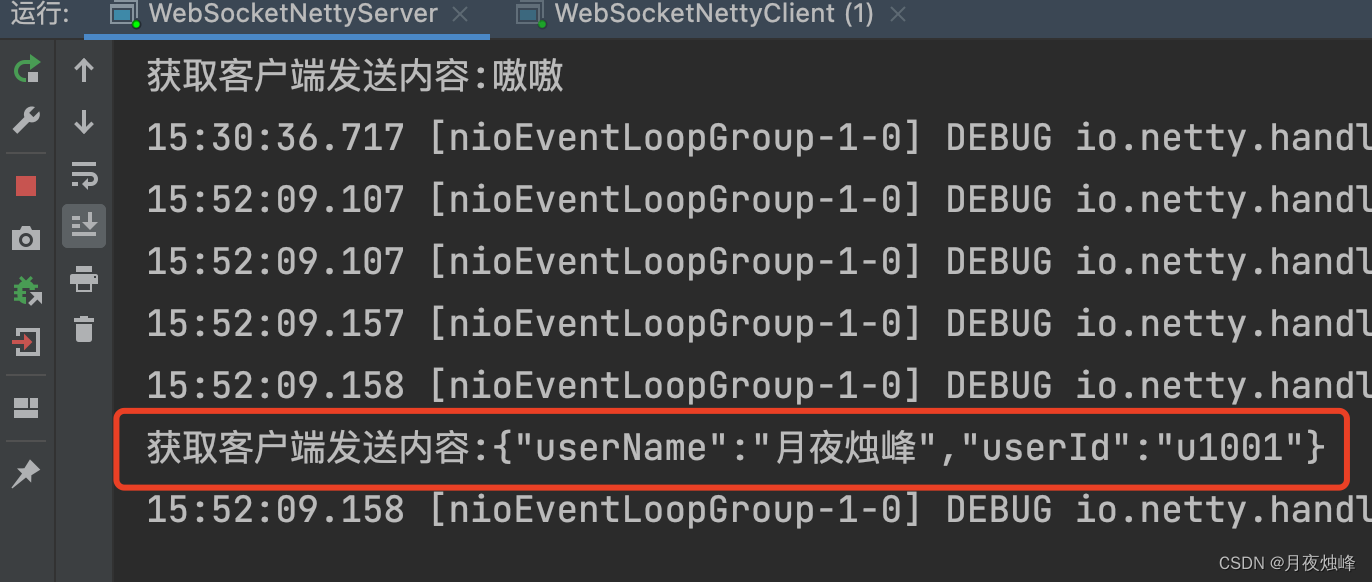
客户端发送内容,服务端已经收到,说明socket链接已经建立并可以使用。
为了更直观测试,通过web socket来访问
<!DOCTYPE html>
<html>
<head>
    <meta charset="utf-8">
    <title>websocket</title>
    <style>
        table {
            border-collapse: collapse;
            border-spacing: 0;
            table-layout: fixed;
        }
    </style>
</head>
<body>

<div id="main" style="display: flex;margin-top:20px;">
    <div style="width: 20px"></div>
    <div style="border: 1px solid grey;width:700px;">
        <div class="card_header" style="padding: 0.5rem 1rem;border-bottom: 1px solid grey "><span>消息列表 </span>
        </div>
        <div class="card_header"
             style="padding: 0.5rem 1rem;font-size:15px;border-bottom: 1px dashed grey;height: 21px">
            <table style="width: 100%;">
                <thead>
                <tr>
                    <th>消息内容</th>
                    <th>发送者</th>
                    <th>发送时间</th>
                </tr>
                </thead>
            </table>
        </div>
        <div id="socket_keep_alive" style="height: 300px;overflow-y:auto;padding: 0rem 1rem 1rem 1rem;font-size:16px">
            <table id="socket_keep_alive_table" style="width: 100%;">
                <tbody style="width: 100%;text-align: center;">

                </tbody>
            </table>
        </div>
    </div>
    <div style="width: 20px"></div>
    <form onsubmit="return false">
        <div id="show_jvm_info" style="border: 1px solid grey;width: 450px;">
            <div class="card_header" style="padding: 0.5rem 1rem;border-bottom: 1px solid grey;"><span>消息发送 </span>
                <button style="float: right;margin-right: 20px;"
                        onclick="send(this.form.message.value);this.form.reset()">发送
                </button>

            </div>
            <textarea name="message" style="height: 345px; width: 445px;border: none;"></textarea>
        </div>
    </form>

</div>

</body>
<script src="/js/jquery-1.8.3.min.js"></script>
<script>

    function cleanInfo(id) {
        $("#" + id).empty();
    }

    function appendInfo(data, id) {
        var sinfo = data.split(",");
        var tableData = "<tr>";
        $.each(sinfo, function (k, v) {
            //console.log(k+':'+v);
            tableData = tableData + "<td>" + v + "</td>";
        })
        tableData = tableData + "</tr>";
        console.log(tableData);
        $("#" + id).prepend(tableData);

    }

    var socket;
    //判断当前浏览器是否支持websocket
    if (window.WebSocket) {
        //go on
        socket = new WebSocket("ws://localhost:9990/nio/info");
        //相当于channelReado, ev 收到服务器端回送的消息
        socket.onmessage = function (msg) {

            appendInfo(msg.data, "socket_keep_alive_table");
        }

        //相当于连接开启(感知到连接开启)
        socket.onopen = function (ev) {
            console.log("websocket 已打开");
        }

        //相当于连接关闭(感知到连接关闭)
        socket.onclose = function (ev) {
            console.log("websocket 已关闭");
        }
    } else {
        alert("当前浏览器不支持websocket")
    }

    //发送消息到服务器
    function send(message) {
        if (!window.socket) { //先判断socket是否创建
            return;
        }
        if (socket.readyState == WebSocket.OPEN) {
            //通过socket 发送消息
            socket.send(message)
        } else {
            alert("连接没有开启");
        }
    }
</script>

</html>
html页面中也访问gateway网关地址,访问页面:

我正在使用Rails构建一个简单的聊天应用程序。当用户输入url时,我希望将其输出为html链接(即“url”)。我想知道在Ruby中是否有任何库或众所周知的方法可以做到这一点。如果没有,我有一些不错的正则表达式示例代码可以使用... 最佳答案 查看auto_linkRails提供的辅助方法。这会将所有URL和电子邮件地址变成可点击的链接(htmlanchor标记)。这是文档中的代码示例。auto_link("Gotohttp://www.rubyonrails.organdsayhellotodavid@loudthinking.
我正在尝试用Prawn生成PDF。在我的PDF模板中,我有带单元格的表格。在其中一个单元格中,我有一个电子邮件地址:cell_email=pdf.make_cell(:content=>booking.user_email,:border_width=>0)我想让电子邮件链接到“mailto”链接。我知道我可以这样链接:pdf.formatted_text([{:text=>booking.user_email,:link=>"mailto:#{booking.user_email}"}])但是将这两行组合起来(将格式化文本作为内容)不起作用:cell_email=pdf.make_c
在VMware16.2.4安装Ubuntu一、安装VMware1.打开VMwareWorkstationPro官网,点击即可进入。2.进入后向下滑动找到Workstation16ProforWindows,点击立即下载。3.下载完成,文件大小615MB,如下图:4.鼠标右击,以管理员身份运行。5.点击下一步6.勾选条款,点击下一步7.先勾选,再点击下一步8.去掉勾选,点击下一步9.点击下一步10.点击安装11.点击许可证12.在百度上搜索VM16许可证,复制填入,然后点击输入即可,亲测有效。13.点击完成14.重启系统,点击是15.双击VMwareWorkstationPro图标,进入虚拟机主
我有一个未排序的链接列表,我将其保存在旁边,我想单击每个链接并确保它转到真实页面而不是404、500等。问题是我不知道该怎么做。是否有一些我可以检查的对象会给我http状态代码或任何东西?mylinks=Browser.ul(:id,'my_ul_id').linksmylinks.eachdo|link|link.click#needtocheckfora200statusorsomethinghere!how?Browser.backend 最佳答案 我的回答与铁皮人的想法类似。require'net/http'require'
我一直在玩一个脚本,它在Chrome中获取选定的文本并在Google中查找它,提供四个最佳选择,然后粘贴相关链接。它以不同的格式粘贴,具体取决于当前在Chrome中打开的页面-DokuWiki打开的DokuWiki格式,普通网站的HTML,我想要我的WordPress所见即所得编辑器的富文本。我尝试使用pbpaste-Preferrtf来查看没有其他样式的富文本链接在粘贴板上的样子,但它仍然输出纯文本。在文本编辑中保存文件并进行试验后,我想出了以下内容text=%q|{\rtf1{\field{\*\fldinst{HYPERLINK"URL"}}{\fldrsltTEXT}}}|te
基本上,我试图在用户单击链接(或按钮或某种类型的交互元素)时执行Rails方法。我试着把它放在View中:但这似乎没有用。它最终只是在用户甚至没有点击“添加”链接的情况下调用该函数。我也用link_to试过了,但也没用。我开始认为没有一种干净的方法可以做到这一点。无论如何,感谢您的帮助。附言。我在ApplicationController中定义了该方法,它是一个辅助方法。 最佳答案 View和Controller是相互独立的。为了使链接在Controller内执行函数调用,您需要对应用程序中的端点执行ajax调用。该路由应调用rub
我有这个:AccountSummary我想单击该链接,但在使用link_to时出现错误。我试过:bot.click(page.link_with(:href=>/menu_home/))bot.click(page.link_with(:class=>'top_level_active'))bot.click(page.link_with(:href=>/AccountSummary/))我得到的错误是:NoMethodError:nil:NilClass的未定义方法“[]” 最佳答案 那是一个javascript链接。Mechan
假设您有一个可执行文件foo.rb,其库bar.rb的布局如下:/bin/foo.rb/lib/bar.rb在foo.rb的header中放置以下要求以在bar.rb中引入功能:requireFile.dirname(__FILE__)+"../lib/bar.rb"只要对foo.rb的所有调用都是直接的,这就可以正常工作。如果你把$HOME/project和符号链接(symboliclink)foo.rb放入$HOME/usr/bin,然后__FILE__解析为$HOME/usr/bin/foo.rb,因此无法找到bar.rb关于foo.rb的目录名.我意识到像rubygems这
在我的mac上安装几个东西时遇到这个问题,我认为这个问题来自将我的豹子升级到雪豹。我认为这个问题也与macports有关。/usr/local/lib/libz.1.dylib,filewasbuiltfori386whichisnotthearchitecturebeinglinked(x86_64)有什么想法吗?更新更具体地说,这发生在安装nokogirigem时日志看起来像:xslt_stylesheet.c:127:warning:passingargument1of‘Nokogiri_wrap_xml_document’withdifferentwidthduetoproto
我正在尝试使用nokogirigem提取页面上的所有url及其链接文本,并将链接文本和url存储在散列中。FooBar我想回去{"Foo"=>"#foo","Bar"=>"#bar"} 最佳答案 这是一个单行:Hash[doc.xpath('//a[@href]').map{|link|[link.text.strip,link["href"]]}]#=>{"Foo"=>"#foo","Bar"=>"#bar"}拆分一点可以说更具可读性:h={}doc.xpath('//a[@href]').eachdo|link|h[link.t
