本文参加新星计划人工智能(Pytorch)赛道:https://bbs.csdn.net/topics/613989052
目录
在此项目中,目的是预测爱荷华州Ames的房价,给定81个特征,描述了房子、面积、土地、基础设施、公共设施等。埃姆斯数据集具有分类和连续特征的良好组合,大小适中,也许最重要的是,它不像其他类似的数据集(如波士顿住房)那样存在潜在的红线或数据输入问题。在这里我将主要讨论PyTorch建模的相关方面,作为一点额外的内容,我还将演示PyTorch中开发的模型的神经元重要性。你可以在PyTorch中尝试不同的网络架构或模型类型。本项目中的重点是方法论,而不是详尽地寻找最佳解决方案。
为了准备这个项目,我们首先需要下载数据,并通过以下步骤进行一些预处理。
from sklearn.datasets import fetch_openml
data = fetch_openml(data_id=42165, as_frame=True)
关于该数据集的完整描述,你可以去该网址查看:https://www.openml.org/d/42165。
查看数据特征
import pandas as pd
data_ames = pd.DataFrame(data.data, columns=data.feature_names)
data_ames['SalePrice'] = data.target
data_ames.info()
下面是DataFrame的信息
<class 'pandas.core.frame.DataFrame'>
RangeIndex: 1460 entries, 0 to 1459
Data columns (total 81 columns):
Id               1460 non-null float64
MSSubClass       1460 non-null float64
MSZoning         1460 non-null object
LotFrontage      1201 non-null float64
LotArea          1460 non-null float64
Street           1460 non-null object
Alley            91 non-null object
LotShape         1460 non-null object
LandContour      1460 non-null object
Utilities        1460 non-null object
LotConfig        1460 non-null object
LandSlope        1460 non-null object
Neighborhood     1460 non-null object
Condition1       1460 non-null object
Condition2       1460 non-null object
BldgType         1460 non-null object
HouseStyle       1460 non-null object
OverallQual      1460 non-null float64
OverallCond      1460 non-null float64
YearBuilt        1460 non-null float64
YearRemodAdd     1460 non-null float64
RoofStyle        1460 non-null object
RoofMatl         1460 non-null object
Exterior1st      1460 non-null object
Exterior2nd      1460 non-null object
MasVnrType       1452 non-null object
MasVnrArea       1452 non-null float64
ExterQual        1460 non-null object
ExterCond        1460 non-null object
Foundation       1460 non-null object
BsmtQual         1423 non-null object
BsmtCond         1423 non-null object
BsmtExposure     1422 non-null object
BsmtFinType1     1423 non-null object
BsmtFinSF1       1460 non-null float64
BsmtFinType2     1422 non-null object
BsmtFinSF2       1460 non-null float64
BsmtUnfSF        1460 non-null float64
TotalBsmtSF      1460 non-null float64
Heating          1460 non-null object
HeatingQC        1460 non-null object
CentralAir       1460 non-null object
Electrical       1459 non-null object
1stFlrSF         1460 non-null float64
2ndFlrSF         1460 non-null float64
LowQualFinSF     1460 non-null float64
GrLivArea        1460 non-null float64
BsmtFullBath     1460 non-null float64
BsmtHalfBath     1460 non-null float64
FullBath         1460 non-null float64
HalfBath         1460 non-null float64
BedroomAbvGr     1460 non-null float64
KitchenAbvGr     1460 non-null float64
KitchenQual      1460 non-null object
TotRmsAbvGrd     1460 non-null float64
Functional       1460 non-null object
Fireplaces       1460 non-null float64
FireplaceQu      770 non-null object
GarageType       1379 non-null object
GarageYrBlt      1379 non-null float64
GarageFinish     1379 non-null object
GarageCars       1460 non-null float64
GarageArea       1460 non-null float64
GarageQual       1379 non-null object
GarageCond       1379 non-null object
PavedDrive       1460 non-null object
WoodDeckSF       1460 non-null float64
OpenPorchSF      1460 non-null float64
EnclosedPorch    1460 non-null float64
3SsnPorch        1460 non-null float64
ScreenPorch      1460 non-null float64
PoolArea         1460 non-null float64
PoolQC           7 non-null object
Fence            281 non-null object
MiscFeature      54 non-null object
MiscVal          1460 non-null float64
MoSold           1460 non-null float64
YrSold           1460 non-null float64
SaleType         1460 non-null object
SaleCondition    1460 non-null object
SalePrice        1460 non-null float64
dtypes: float64(38), object(43)
memory usage: 924.0+ KB
接下来,我们还将使用一个库,即 captum,它可以检查 PyTorch 模型的特征和神经元重要性。
pip install captum在做完这些准备工作后,我们来看看如何预测房价。
在这里,首先要进行数据缩放处理,因为所有的变量都有不同的尺度。分类变量需要转换为数值类型,以便将它们输入到我们的模型中。我们可以选择一热编码,即我们为每个分类因子创建哑变量,或者是序数编码,即我们对所有因子进行编号,并用这些数字替换字符串。我们可以像其他浮动变量一样将虚拟变量送入,而序数编码则需要使用嵌入,即线性神经网络投影,在多维空间中对类别进行重新排序。我们在这里采取嵌入的方式。
import numpy as np
from category_encoders.ordinal import OrdinalEncoder
from sklearn.preprocessing import StandardScaler

num_cols = list(data_ames.select_dtypes(include='float'))
cat_cols = list(data_ames.select_dtypes(include='object'))

ordinal_encoder = OrdinalEncoder().fit(
    data_ames[cat_cols]
)
standard_scaler = StandardScaler().fit(
    data_ames[num_cols]
)

X = pd.DataFrame(
    data=np.column_stack([
        ordinal_encoder.transform(data_ames[cat_cols]),
        standard_scaler.transform(data_ames[num_cols])
    ]),
    columns=cat_cols + num_cols
)
在构建模型之前,我们需要将数据拆分为训练集和测试集。在这里,我们添加了一个数值变量的分层。这可以确保不同的部分(其中五个)在训练集和测试集中都以同等的数量包含。
np.random.seed(12)
from sklearn.model_selection import train_test_split

bins = 5
sale_price_bins = pd.qcut(
    X['SalePrice'], q=bins, labels=list(range(bins))
)
X_train, X_test, y_train, y_test = train_test_split(
    X.drop(columns='SalePrice'),
    X['SalePrice'],
    random_state=12,
    stratify=sale_price_bins
)接下来开始建立我们的PyTorch模型。我们将使用PyTorch实现一个具有批量输入的神经网络回归,具体将涉及以下步骤。
首先将数据转换为torch tensors
from torch.autograd import Variable

num_features = list(
    set(num_cols) - set(['SalePrice', 'Id'])
)
X_train_num_pt = Variable(
    torch.cuda.FloatTensor(
        X_train[num_features].values
    )
)
X_train_cat_pt = Variable(
    torch.cuda.LongTensor(
        X_train[cat_cols].values
    )
)
y_train_pt = Variable(
    torch.cuda.FloatTensor(y_train.values)
).view(-1, 1)
X_test_num_pt = Variable(
    torch.cuda.FloatTensor(
        X_test[num_features].values
    )
)
X_test_cat_pt = Variable(
   torch.cuda.LongTensor(
        X_test[cat_cols].values
    ).long()
)
y_test_pt = Variable(
    torch.cuda.FloatTensor(y_test.values)
).view(-1, 1)
这可以确保我们将数字和分类数据加载到单独的变量中,类似于NumPy。如果你把数据类型混合在一个变量(数组/矩阵)中,它们就会变成对象。我们希望把数值变量弄成浮点数,把分类变量弄成长(或int),索引我们的类别。我们还将训练集和测试集分开。显然,一个ID变量在模型中不应该是重要的。在最坏的情况下,如果ID与目标有任何相关性,它可能会引入目标泄漏。我们已经把它从这一步的处理中删除了。
class RegressionModel(torch.nn.Module):

    def __init__(self, X, num_cols, cat_cols, device=torch.device('cuda'), embed_dim=2, hidden_layer_dim=2, p=0.5):
        super(RegressionModel, self).__init__()
        self.num_cols = num_cols
        self.cat_cols = cat_cols
        self.embed_dim = embed_dim
        self.hidden_layer_dim = hidden_layer_dim

        self.embeddings = [
            torch.nn.Embedding(
                num_embeddings=len(X[col].unique()),
                embedding_dim=embed_dim
            ).to(device)
            for col in cat_cols
        ]
        hidden_dim = len(num_cols) + len(cat_cols) * embed_dim,

        # hidden layer
        self.hidden = torch.nn.Linear(torch.IntTensor(hidden_dim), hidden_layer_dim).to(device)
        self.dropout_layer = torch.nn.Dropout(p=p).to(device)
        self.hidden_act = torch.nn.ReLU().to(device)

        # output layer
        self.output = torch.nn.Linear(hidden_layer_dim, 1).to(device)

    def forward(self, num_inputs, cat_inputs):
        '''Forward method with two input variables -
        numeric and categorical.
        '''
        cat_x = [
            torch.squeeze(embed(cat_inputs[:, i] - 1))
            for i, embed in enumerate(self.embeddings)
        ]
        x = torch.cat(cat_x + [num_inputs], dim=1)
        x = self.hidden(x)
        x = self.dropout_layer(x)
        x = self.hidden_act(x)
        y_pred = self.output(x)
        return y_pred

house_model = RegressionModel(
    data_ames, num_features, cat_cols
)
我们在两个线性层(上的激活函数是整流线性单元激活(ReLU)函数。这里需要注意的是,我们不可能将相同的架构(很容易)封装成一个顺序模型,因为分类和数值类型上发生的操作不同。
接下来,定义损失准则和优化器。我们将均方误差(MSE)作为损失,随机梯度下降作为我们的优化算法。
criterion = torch.nn.MSELoss().to(device)
optimizer = torch.optim.SGD(house_model.parameters(), lr=0.001)现在,创建一个数据加载器,每次输入一批数据。
data_batch = torch.utils.data.TensorDataset(
    X_train_num_pt, X_train_cat_pt, y_train_pt
)
dataloader = torch.utils.data.DataLoader(
    data_batch, batch_size=10, shuffle=True
)
我们设置了10个批次的大小,接下来我们可以进行训练了。
基本上,我们要在epoch上循环,在每个epoch内推理出性能,计算出误差,优化器根据误差进行调整。这是在没有训练的内循环的情况下,在epochs上的循环。
from tqdm.notebook import trange

train_losses, test_losses = [], []
n_epochs = 30
for epoch in trange(n_epochs):
    train_loss, test_loss = 0, 0

    # print the errors in training and test:
    if epoch % 10 == 0 :
        print(
            'Epoch: {}/{}\t'.format(epoch, 1000),
            'Training Loss: {:.3f}\t'.format(
                train_loss / len(dataloader)
            ),
            'Test Loss: {:.3f}'.format(
                test_loss / len(dataloader)
            )
        )
训练是在这个循环里面对所有批次的训练数据进行的。
for (x_train_num_batch,x_train_cat_batch,y_train_batch) in dataloader:
        (x_train_num_batch,x_train_cat_batch, y_train_batch) = (
                x_train_num_batch.to(device),
                x_train_cat_batch.to(device),
                y_train_batch.to(device))
        pred_ytrain = house_model.forward(x_train_num_batch, x_train_cat_batch)
        loss = torch.sqrt(criterion(pred_ytrain, y_train_batch))

        optimizer.zero_grad()
        loss.backward()
        optimizer.step()
        train_loss += loss.item()
        with torch.no_grad():
            house_model.eval()
            pred_ytest = house_model.forward(X_test_num_pt, X_test_cat_pt)
            test_loss += torch.sqrt(criterion(pred_ytest, y_test_pt))

        train_losses.append(train_loss / len(dataloader))
        test_losses.append(test_loss / len(dataloader))
训练结果如下:
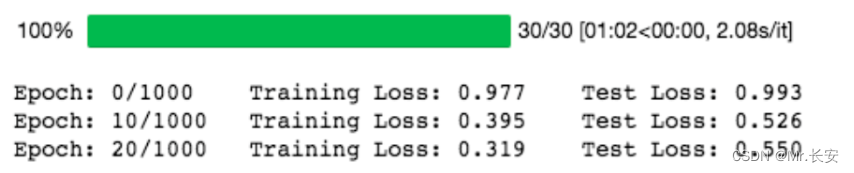
我们取 nn.MSELoss 的平方根,因为 PyTorch 中 nn.MSELoss 的定义如下:
((input-target)**2).mean()绘制一下我们的模型在训练期间对训练和验证数据集的表现。
plt.plot(
    np.array(train_losses).reshape((n_epochs, -1)).mean(axis=1),
    label='Training loss'
)
plt.plot(
    np.array(test_losses).reshape((n_epochs, -1)).mean(axis=1),
    label='Validation loss'
)
plt.legend(frameon=False)
plt.xlabel('epochs')
plt.ylabel('MSE')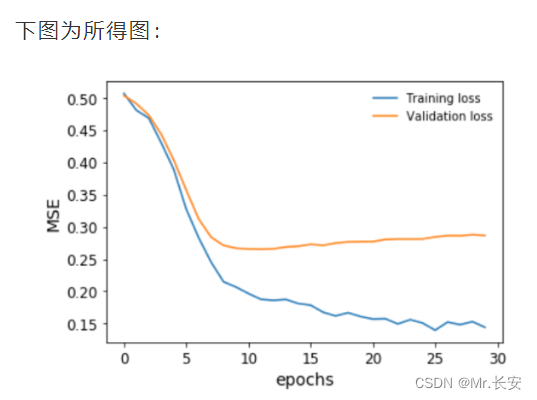
在我们的验证损失停止下降之前,我们及时停止了训练。我们还可以对目标变量进行排序和bin,并将预测结果与之对比绘制,以便了解模型在整个房价范围内的表现。这是为了避免回归中的情况,尤其是用MSE作为损失,即你只对一个中值范围的预测很好,接近平均值,但对其他任何东西都做得不好。

我们可以看到,事实上,这个模型在整个房价范围内的预测非常接近。事实上,我们得到的Spearman秩相关度约为93%,具有非常高的显著性,这证实了这个模型的表现具有很高的准确性。
深度学习神经网络框架使用不同的优化算法。其中流行的有随机梯度下降(SGD)、均方根推进(RMSProp)和自适应矩估计(ADAM)。我们定义了随机梯度下降作为我们的优化算法。另外,我们还可以定义其他优化器。
opt_SGD = torch.optim.SGD(net_SGD.parameters(), lr=LR)
opt_Momentum = torch.optim.SGD(net_Momentum.parameters(), lr=LR, momentum=0.6)
opt_RMSprop = torch.optim.RMSprop(net_RMSprop.parameters(), lr=LR, alpha=0.1)
opt_Adam = torch.optim.Adam(net_Adam.parameters(), lr=LR, betas=(0.8, 0.98))
SGD的工作原理与梯度下降相同,只是它每次只在一个例子上工作。有趣的是,收敛性与梯度下降相似,并且更容易占用计算机内存。
RMSProp的工作原理是根据梯度符号来调整算法的学习率。最简单的变体是检查最后两个梯度符号,然后调整学习率,如果它们相同,则增加一个分数,如果它们不同,则减少一个分数。
ADAM是最流行的优化器之一。它是一种自适应学习算法,根据梯度的第一和第二时刻改变学习率。
Captum是一个工具,可以帮助我们了解在数据集上学习的神经网络模型的来龙去脉。它可以帮助我们学习以下内容。
特征重要性
层级重要性
神经元的重要性
这在学习可解释的神经网络中是非常重要的。在这里,综合梯度已经被应用于理解特征重要性。之后,还用层传导法来证明神经元的重要性。
既然我们已经定义并训练了我们的神经网络,那么让我们使用 captum 库找到重要的特征和神经元。
from captum.attr import (
    IntegratedGradients,
    LayerConductance,
    NeuronConductance
)
house_model.cpu()
for embedding in house_model.embeddings:
    embedding.cpu()

house_model.cpu()
ing_house = IntegratedGradients(forward_func=house_model.forward, )
#X_test_cat_pt.requires_grad_()
X_test_num_pt.requires_grad_()
attr, delta = ing_house.attribute(
 X_test_num_pt.cpu(),
 target=None,
 return_convergence_delta=True,
 additional_forward_args=X_test_cat_pt.cpu()
)
attr = attr.detach().numpy()
现在,我们有了一个NumPy的特征重要性数组。层和神经元的重要性也可以用这个工具获得。让我们来看看我们第一层的神经元importances。我们可以传递house_model.act1,这是第一层线性层上面的ReLU激活函数。
cond_layer1 = LayerConductance(house_model, house_model.act1)
cond_vals = cond_layer1.attribute(X_test, target=None)
cond_vals = cond_vals.detach().numpy()
df_neuron = pd.DataFrame(data = np.mean(cond_vals, axis=0), columns=['Neuron Importance'])
df_neuron['Neuron'] = range(10)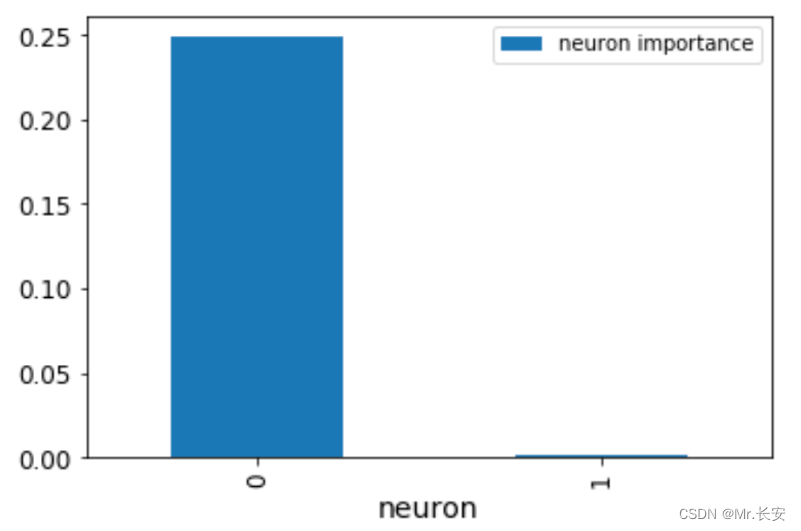
这张图显示了神经元的重要性。显然,一个神经元就是不重要的。我们还可以通过对之前得到的NumPy数组进行排序,看到最重要的变量。
df_feat = pd.DataFrame(np.mean(attr, axis=0), columns=['feature importance'] )
df_feat['features'] = num_features
df_feat.sort_values(
    by='feature importance', ascending=False
).head(10)
这里列出了10个最重要的变量
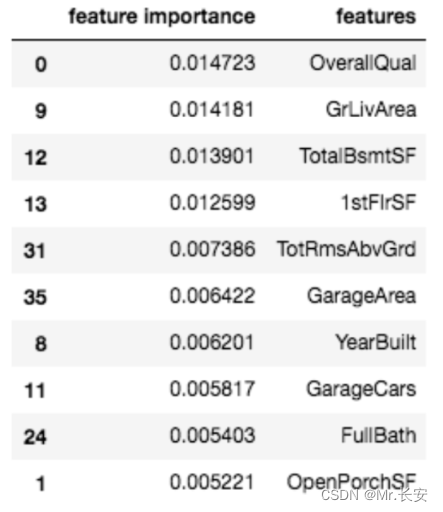
通常情况下,特征导入可以帮助我们既理解模型,又修剪我们的模型,使其变得不那么复杂(希望减少过度拟合)。
我有一个模型:classItem项目有一个属性“商店”基于存储的值,我希望Item对象对特定方法具有不同的行为。Rails中是否有针对此的通用设计模式?如果方法中没有大的if-else语句,这是如何干净利落地完成的? 最佳答案 通常通过Single-TableInheritance. 关于ruby-on-rails-Rails-子类化模型的设计模式是什么?,我们在StackOverflow上找到一个类似的问题: https://stackoverflow.co
使用带有Rails插件的vim,您可以创建一个迁移文件,然后一次性打开该文件吗?textmate也可以这样吗? 最佳答案 你可以使用rails.vim然后做类似的事情::Rgeneratemigratonadd_foo_to_bar插件将打开迁移生成的文件,这正是您想要的。我不能代表textmate。 关于ruby-使用VimRails,您可以创建一个新的迁移文件并一次性打开它吗?,我们在StackOverflow上找到一个类似的问题: https://sta
我需要从一个View访问多个模型。以前,我的links_controller仅用于提供以不同方式排序的链接资源。现在我想包括一个部分(我假设)显示按分数排序的顶级用户(@users=User.all.sort_by(&:score))我知道我可以将此代码插入每个链接操作并从View访问它,但这似乎不是“ruby方式”,我将需要在不久的将来访问更多模型。这可能会变得很脏,是否有针对这种情况的任何技术?注意事项:我认为我的应用程序正朝着单一格式和动态页面内容的方向发展,本质上是一个典型的网络应用程序。我知道before_filter但考虑到我希望应用程序进入的方向,这似乎很麻烦。最终从任何
我想要做的是有2个不同的Controller,client和test_client。客户端Controller已经构建,我想创建一个test_clientController,我可以使用它来玩弄客户端的UI并根据需要进行调整。我主要是想绕过我在客户端中内置的验证及其对加载数据的管理Controller的依赖。所以我希望test_clientController加载示例数据集,然后呈现客户端Controller的索引View,以便我可以调整客户端UI。就是这样。我在test_clients索引方法中试过这个:classTestClientdefindexrender:template=>
我有一个包含模块的模型。我想在模块中覆盖模型的访问器方法。例如:classBlah这显然行不通。有什么想法可以实现吗? 最佳答案 您的代码看起来是正确的。我们正在毫无困难地使用这个确切的模式。如果我没记错的话,Rails使用#method_missing作为属性setter,因此您的模块将优先,阻止ActiveRecord的setter。如果您正在使用ActiveSupport::Concern(参见thisblogpost),那么您的实例方法需要进入一个特殊的模块:classBlah
我有一个表单,其中有很多字段取自数组(而不是模型或对象)。我如何验证这些字段的存在?solve_problem_pathdo|f|%>... 最佳答案 创建一个简单的类来包装请求参数并使用ActiveModel::Validations。#definedsomewhere,atthesimplest:require'ostruct'classSolvetrue#youcouldevencheckthesolutionwithavalidatorvalidatedoerrors.add(:base,"WRONG!!!")unlesss
我想向我的Controller传递一个参数,它是一个简单的复选框,但我不知道如何在模型的form_for中引入它,这是我的观点:{:id=>'go_finance'}do|f|%>Transferirde:para:Entrada:"input",:placeholder=>"Quantofoiganho?"%>Saída:"output",:placeholder=>"Quantofoigasto?"%>Nota:我想做一个额外的复选框,但我该怎么做,模型中没有一个对象,而是一个要检查的对象,以便在Controller中创建一个ifelse,如果没有检查,请帮助我,非常感谢,谢谢
如果您尝试在Ruby中的nil对象上调用方法,则会出现NoMethodError异常并显示消息:"undefinedmethod‘...’fornil:NilClass"然而,有一个tryRails中的方法,如果它被发送到一个nil对象,它只返回nil:require'rubygems'require'active_support/all'nil.try(:nonexisting_method)#noNoMethodErrorexceptionanymore那么try如何在内部工作以防止该异常? 最佳答案 像Ruby中的所有其他对象
关闭。这个问题需要detailsorclarity.它目前不接受答案。想改进这个问题吗?通过editingthispost添加细节并澄清问题.关闭8年前。Improvethisquestion为什么SecureRandom.uuid创建一个唯一的字符串?SecureRandom.uuid#=>"35cb4e30-54e1-49f9-b5ce-4134799eb2c0"SecureRandom.uuid方法创建的字符串从不重复?
我有一些非常大的模型,我必须将它们迁移到最新版本的Rails。这些模型有相当多的验证(User有大约50个验证)。是否可以将所有这些验证移动到另一个文件中?说app/models/validations/user_validations.rb。如果可以,有人可以提供示例吗? 最佳答案 您可以为此使用关注点:#app/models/validations/user_validations.rbrequire'active_support/concern'moduleUserValidationsextendActiveSupport:
