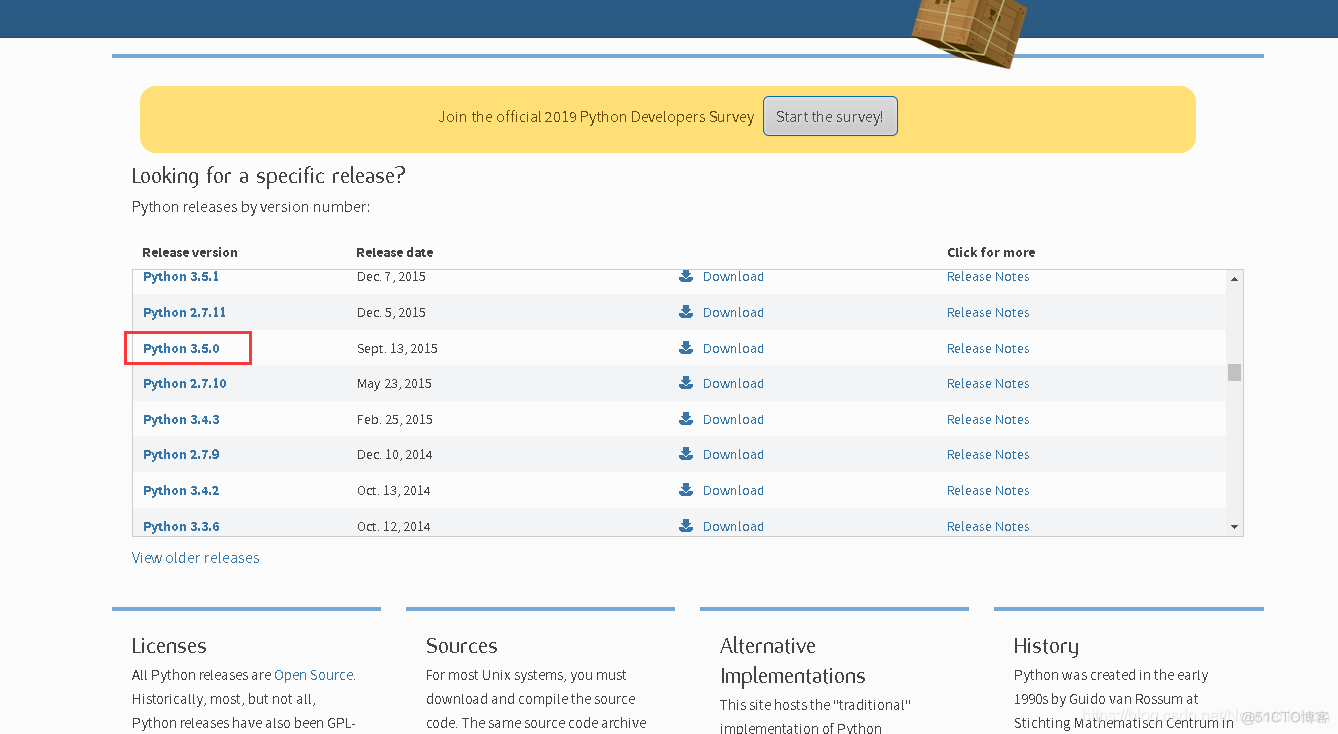
 3. 下载完成,直接双击运行,即可,安装路径可选。
(注意:在双击运行后,打开安装程序界面,建议选择“增加环境变量”)
3. 下载完成,直接双击运行,即可,安装路径可选。
(注意:在双击运行后,打开安装程序界面,建议选择“增加环境变量”)
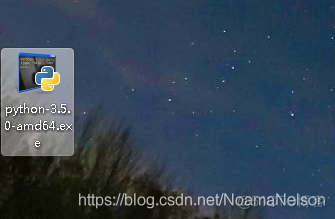 4. 环境变量设置
如果步骤3已经勾选了“增加环境变量”的话,就不用再设置环境变量。如果没有勾选,环境变量设置方法如下:
找到自己的Python3.5的安装路径(例如我的是:D:\Python 3.5),把以下几个路径添加到系统环境变量中。
①计算机--邮件--属性,打开如下界面:
4. 环境变量设置
如果步骤3已经勾选了“增加环境变量”的话,就不用再设置环境变量。如果没有勾选,环境变量设置方法如下:
找到自己的Python3.5的安装路径(例如我的是:D:\Python 3.5),把以下几个路径添加到系统环境变量中。
①计算机--邮件--属性,打开如下界面:
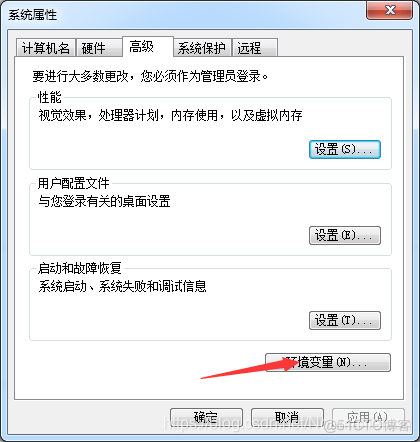
 ②点击“高级系统设置”,再点击“环境变量”,如下:
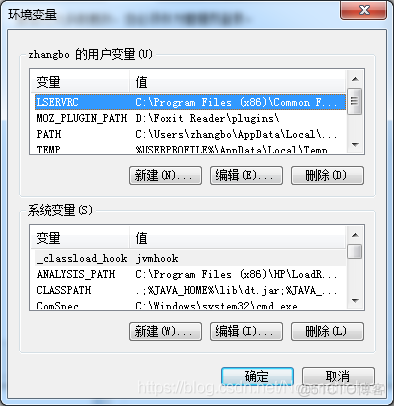 ③在系统变量中找到path,双击打开path,然后再路径的最末尾加入:
Python的路径,要以“;”隔开,即可:
D:\Python35; D:\Python35\Lib; D:\Python35\Scripts;
③在系统变量中找到path,双击打开path,然后再路径的最末尾加入:
Python的路径,要以“;”隔开,即可:
D:\Python35; D:\Python35\Lib; D:\Python35\Scripts;
 ④验证Python是否安装成功,开始---输入“cmd”,回车打开命令行,输入:Python,看到如下界面就表示Python安装成功。

python -m install --upgrade pip
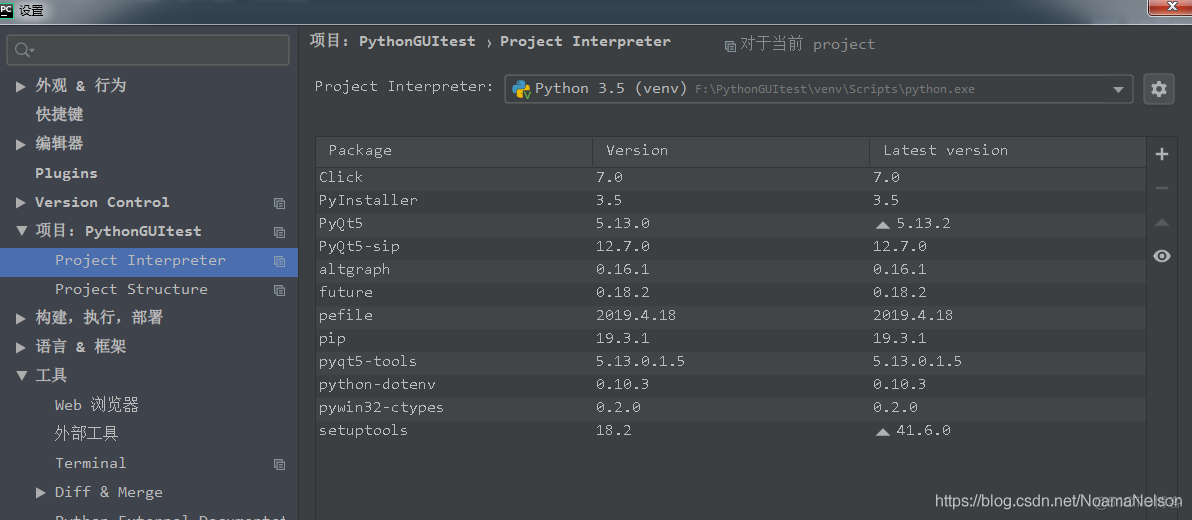
pip install pyqt5
pip install pyqt5-tools
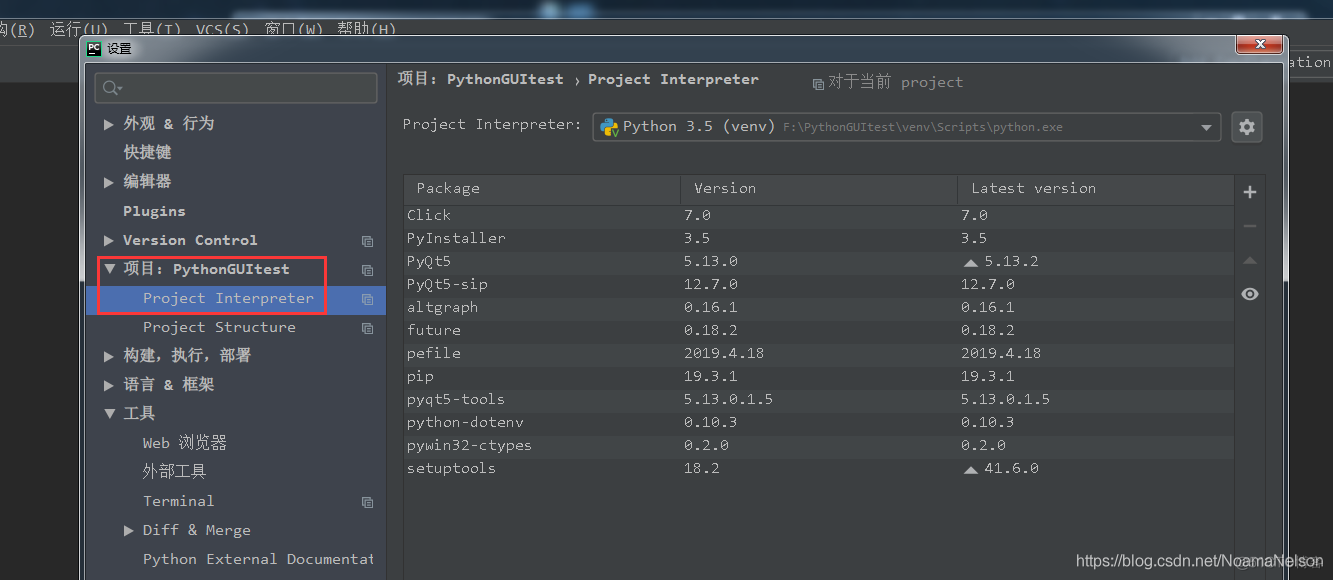
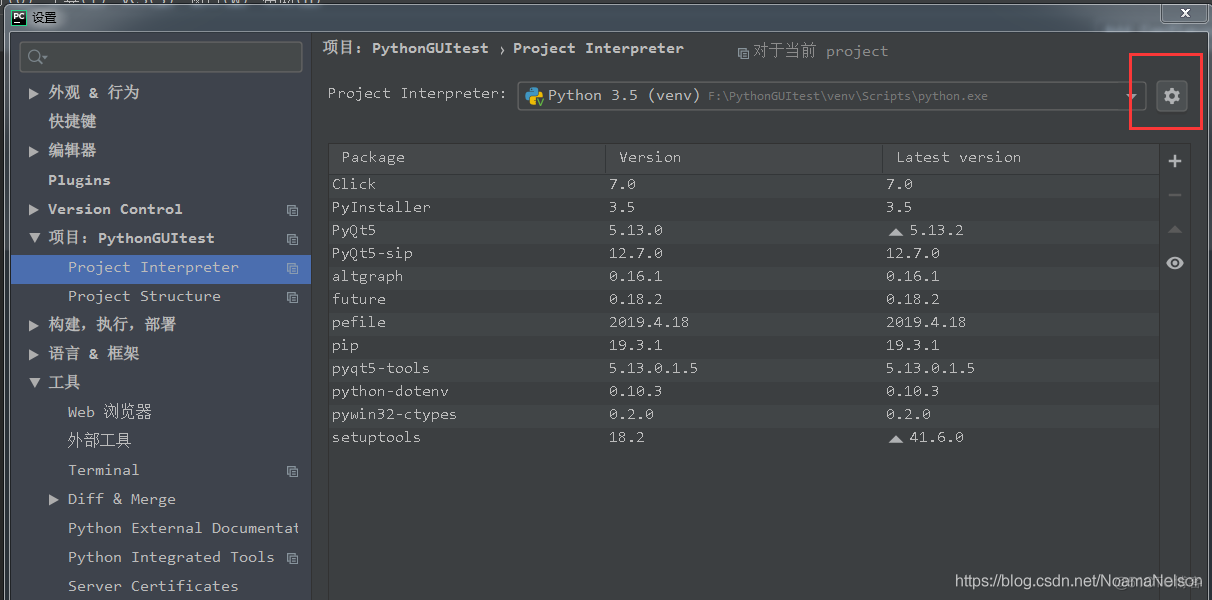
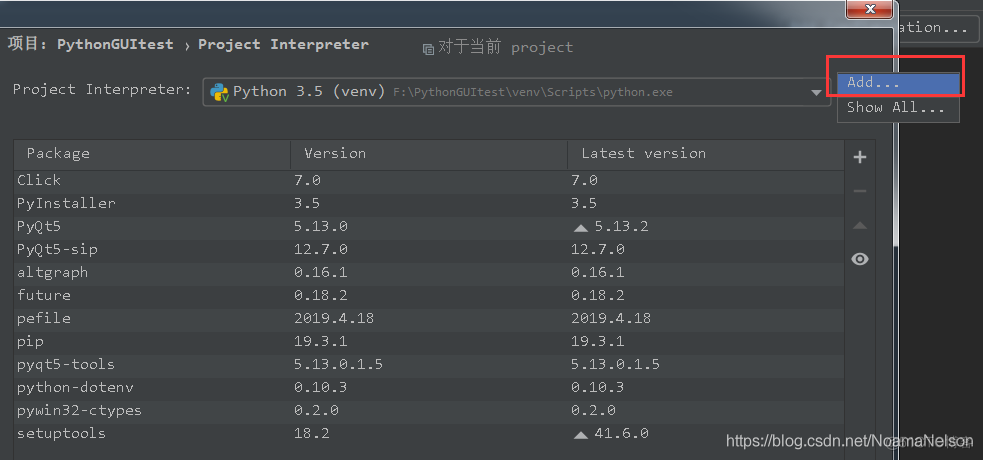
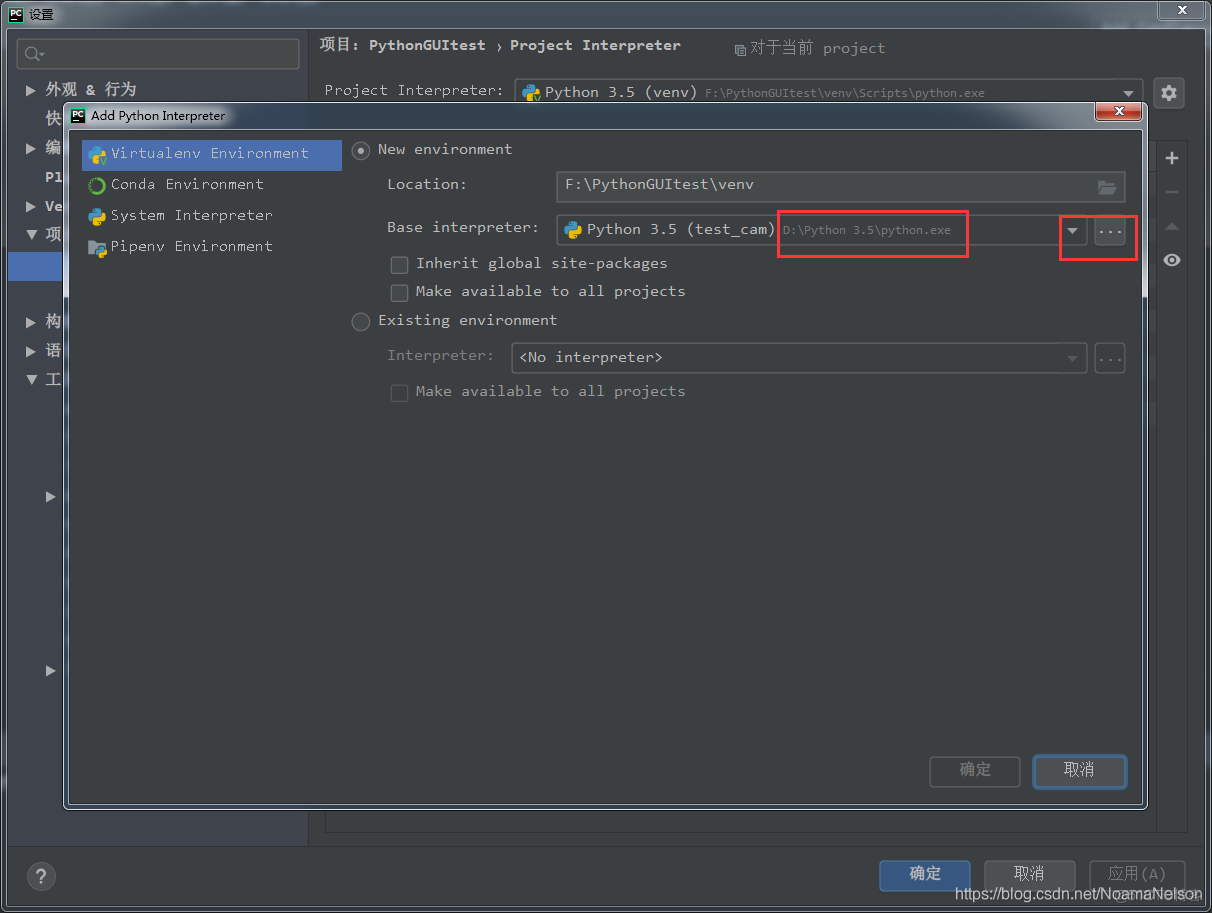

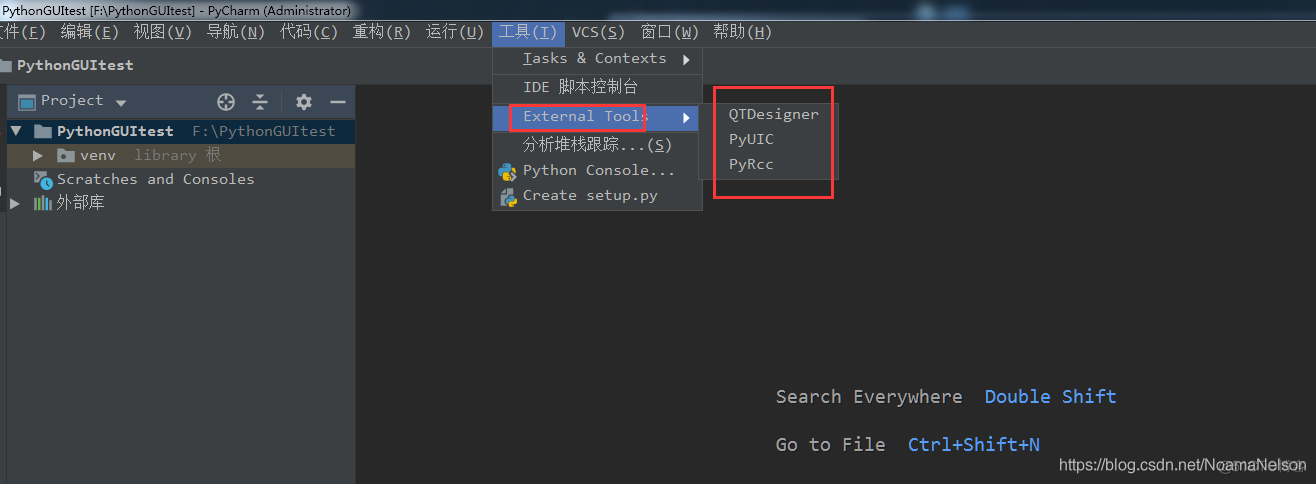
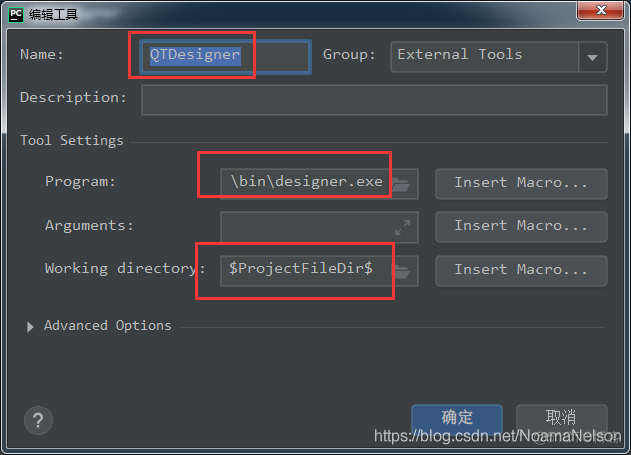 ① program:
D:\Python 3.5\Lib\site-packages\pyqt5_tools\Qt\bin\designer.exe,(换成自己的目录即可)
②arguments:
$FileDir$\$FileName$
③working directory:
$FileDir$
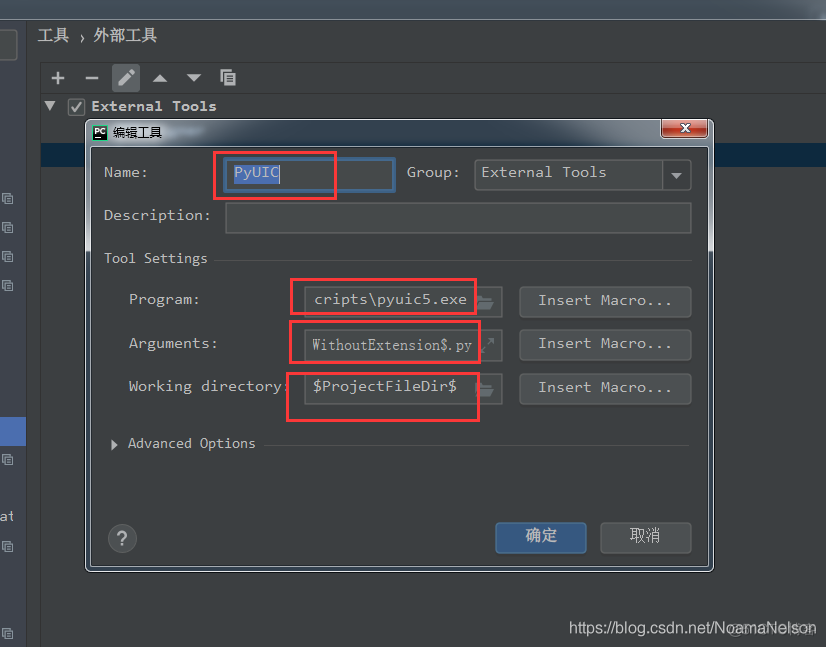
D:\Python 3.5\Scripts\pyuic5.exe(换成自己的目录即可)
②arguments:
$FileName$ -o $FileNameWithoutExtension$.py
③working directory:
$FileDir$
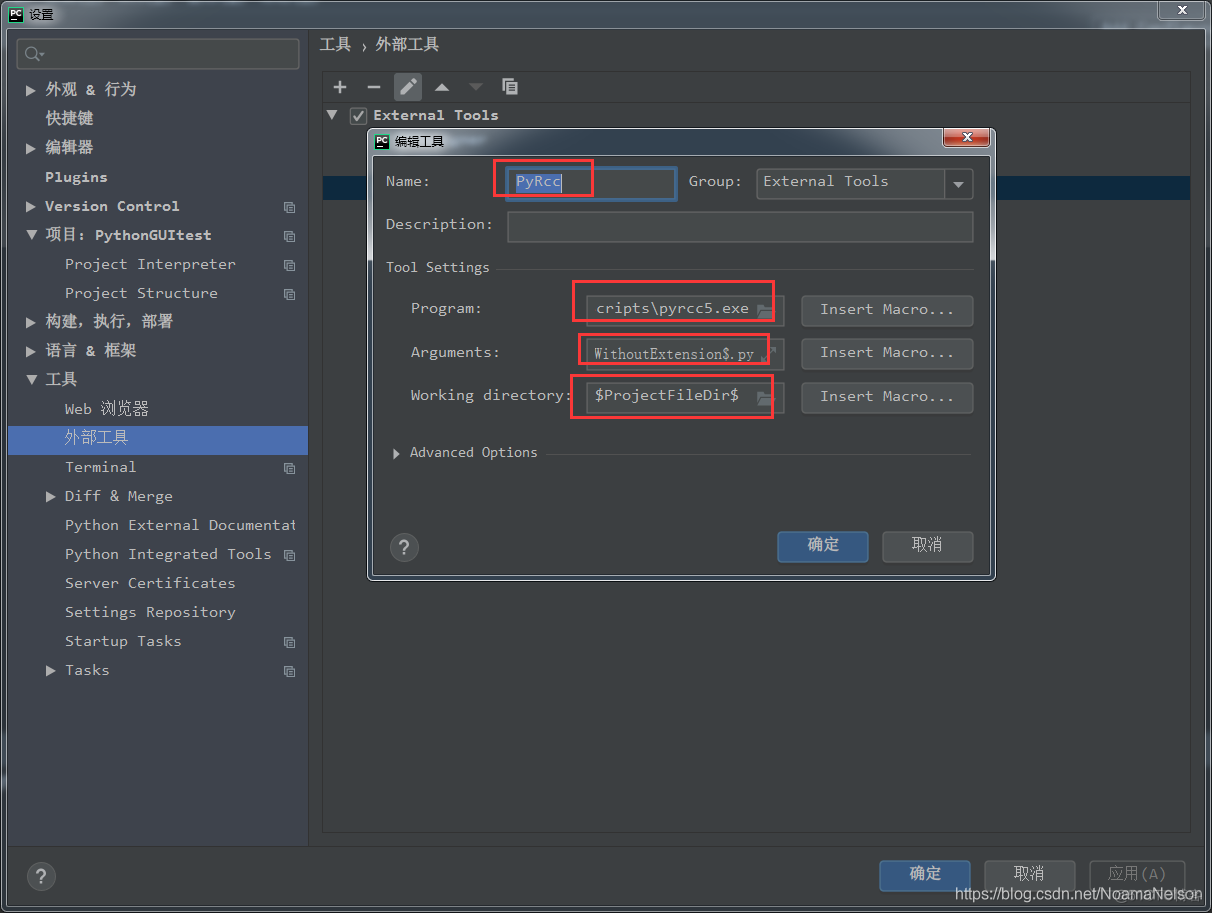
D:\Python 3.5\Scripts\pyrcc5.exe(换成自己的目录即可)
②arguments:
$FileName$ -o $FileNameWithoutExtension$.py
③working directory:
$FileDir$
pip3 install pyinstaller
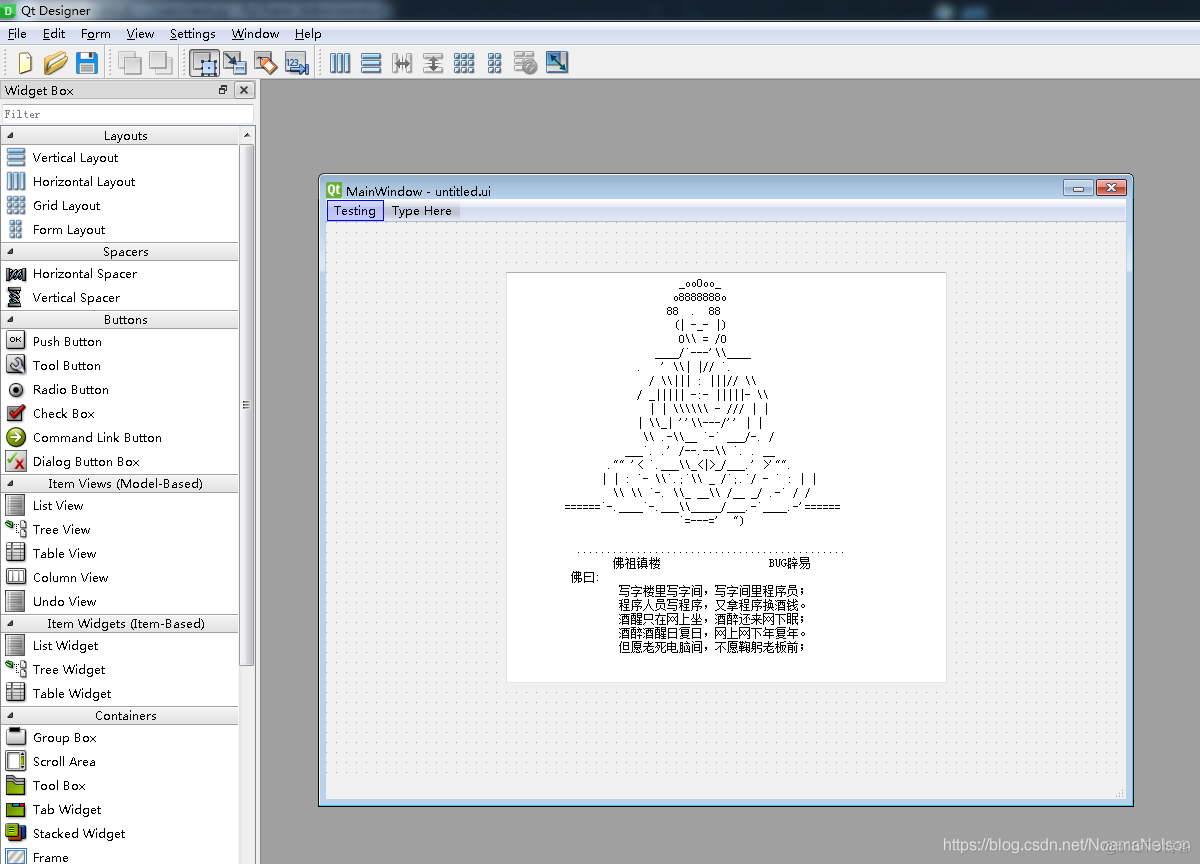
# -*- coding: utf-8 -*-
from PyQt5 import QtCore, QtGui, QtWidgets
class Ui_MainWindow(object):
def setupUi(self, MainWindow):
MainWindow.setObjectName("MainWindow")
MainWindow.resize(800, 600)
self.centralwidget = QtWidgets.QWidget(MainWindow)
self.centralwidget.setObjectName("centralwidget")
self.textEdit = QtWidgets.QTextEdit(self.centralwidget)
self.textEdit.setGeometry(QtCore.QRect(180, 50, 441, 411))
self.textEdit.setObjectName("textEdit")
MainWindow.setCentralWidget(self.centralwidget)
self.statusbar = QtWidgets.QStatusBar(MainWindow)
self.statusbar.setObjectName("statusbar")
MainWindow.setStatusBar(self.statusbar)
self.menubar = QtWidgets.QMenuBar(MainWindow)
self.menubar.setGeometry(QtCore.QRect(0, 0, 800, 23))
self.menubar.setObjectName("menubar")
self.menutes = QtWidgets.QMenu(self.menubar)
self.menutes.setObjectName("menutes")
MainWindow.setMenuBar(self.menubar)
self.menubar.addAction(self.menutes.menuAction())
self.retranslateUi(MainWindow)
QtCore.QMetaObject.connectSlotsByName(MainWindow)
def retranslateUi(self, MainWindow):
_translate = QtCore.QCoreApplication.translate
MainWindow.setWindowTitle(_translate("MainWindow", "MainWindow"))
self.textEdit.setHtml(_translate("MainWindow", "<!DOCTYPE HTML PUBLIC \"-//W3C//DTD HTML 4.0//EN\" \"http://www.w3.org/TR/REC-html40/strict.dtd\">\n"
"<html><head><meta name=\"qrichtext\" content=\"1\" /><style type=\"text/css\">\n"
"p, li { white-space: pre-wrap; }\n"
"</style></head><body style=\" font-family:\'SimSun\'; font-size:9pt; font-weight:400; font-style:normal;\">\n"
"<p style=\" margin-top:0px; margin-bottom:0px; margin-left:0px; margin-right:0px; -qt-block-indent:0; text-indent:0px;\"> _ooOoo_ </p>\n"
"<p style=\" margin-top:0px; margin-bottom:0px; margin-left:0px; margin-right:0px; -qt-block-indent:0; text-indent:0px;\"> o8888888o </p>\n"
"<p style=\" margin-top:0px; margin-bottom:0px; margin-left:0px; margin-right:0px; -qt-block-indent:0; text-indent:0px;\"> 88 . 88 </p>\n"
"<p style=\" margin-top:0px; margin-bottom:0px; margin-left:0px; margin-right:0px; -qt-block-indent:0; text-indent:0px;\"> (| -_- |) </p>\n"
"<p style=\" margin-top:0px; margin-bottom:0px; margin-left:0px; margin-right:0px; -qt-block-indent:0; text-indent:0px;\"> O\\\\ = /O </p>\n"
"<p style=\" margin-top:0px; margin-bottom:0px; margin-left:0px; margin-right:0px; -qt-block-indent:0; text-indent:0px;\"> ____/`---\'\\\\____ </p>\n"
"<p style=\" margin-top:0px; margin-bottom:0px; margin-left:0px; margin-right:0px; -qt-block-indent:0; text-indent:0px;\"> . \' \\\\| |// `. </p>\n"
"<p style=\" margin-top:0px; margin-bottom:0px; margin-left:0px; margin-right:0px; -qt-block-indent:0; text-indent:0px;\"> / \\\\||| : |||// \\\\ </p>\n"
"<p style=\" margin-top:0px; margin-bottom:0px; margin-left:0px; margin-right:0px; -qt-block-indent:0; text-indent:0px;\"> / _||||| -:- |||||- \\\\ </p>\n"
"<p style=\" margin-top:0px; margin-bottom:0px; margin-left:0px; margin-right:0px; -qt-block-indent:0; text-indent:0px;\"> | | \\\\\\\\\\\\ - /// | | </p>\n"
"<p style=\" margin-top:0px; margin-bottom:0px; margin-left:0px; margin-right:0px; -qt-block-indent:0; text-indent:0px;\"> | \\\\_| \'\'\\\\---/\'\' | | </p>\n"
"<p style=\" margin-top:0px; margin-bottom:0px; margin-left:0px; margin-right:0px; -qt-block-indent:0; text-indent:0px;\"> \\\\ .-\\\\__ `-` ___/-. / </p>\n"
"<p style=\" margin-top:0px; margin-bottom:0px; margin-left:0px; margin-right:0px; -qt-block-indent:0; text-indent:0px;\"> ___`. .\' /--.--\\\\ `. . __ </p>\n"
"<p style=\" margin-top:0px; margin-bottom:0px; margin-left:0px; margin-right:0px; -qt-block-indent:0; text-indent:0px;\"> ."" \'< `.___\\\\_<|>_/___.\' >\'"". </p>\n"
"<p style=\" margin-top:0px; margin-bottom:0px; margin-left:0px; margin-right:0px; -qt-block-indent:0; text-indent:0px;\"> | | : `- \\\\`.;`\\\\ _ /`;.`/ - ` : | | </p>\n"
"<p style=\" margin-top:0px; margin-bottom:0px; margin-left:0px; margin-right:0px; -qt-block-indent:0; text-indent:0px;\"> \\\\ \\\\ `-. \\\\_ __\\\\ /__ _/ .-` / / </p>\n"
"<p style=\" margin-top:0px; margin-bottom:0px; margin-left:0px; margin-right:0px; -qt-block-indent:0; text-indent:0px;\"> ======`-.____`-.___\\\\_____/___.-`____.-\'====== </p>\n"
"<p style=\" margin-top:0px; margin-bottom:0px; margin-left:0px; margin-right:0px; -qt-block-indent:0; text-indent:0px;\"> `=---=\' ")</p>\n"
"<p style=\"-qt-paragraph-type:empty; margin-top:0px; margin-bottom:0px; margin-left:0px; margin-right:0px; -qt-block-indent:0; text-indent:0px;\"><br /></p>\n"
"<p style=\" margin-top:0px; margin-bottom:0px; margin-left:0px; margin-right:0px; -qt-block-indent:0; text-indent:0px;\"> ............................................. </p>\n"
"<p style=\" margin-top:0px; margin-bottom:0px; margin-left:0px; margin-right:0px; -qt-block-indent:0; text-indent:0px;\"> 佛祖镇楼 BUG辟易</p>\n"
"<p style=\" margin-top:0px; margin-bottom:0px; margin-left:0px; margin-right:0px; -qt-block-indent:0; text-indent:0px;\"> 佛曰: </p>\n"
"<p style=\" margin-top:0px; margin-bottom:0px; margin-left:0px; margin-right:0px; -qt-block-indent:0; text-indent:0px;\"> 写字楼里写字间,写字间里程序员;</p>\n"
"<p style=\" margin-top:0px; margin-bottom:0px; margin-left:0px; margin-right:0px; -qt-block-indent:0; text-indent:0px;\"> 程序人员写程序,又拿程序换酒钱。 </p>\n"
"<p style=\" margin-top:0px; margin-bottom:0px; margin-left:0px; margin-right:0px; -qt-block-indent:0; text-indent:0px;\"> 酒醒只在网上坐,酒醉还来网下眠;</p>\n"
"<p style=\" margin-top:0px; margin-bottom:0px; margin-left:0px; margin-right:0px; -qt-block-indent:0; text-indent:0px;\"> 酒醉酒醒日复日,网上网下年复年。</p>\n"
"<p style=\" margin-top:0px; margin-bottom:0px; margin-left:0px; margin-right:0px; -qt-block-indent:0; text-indent:0px;\"> 但愿老死电脑间,不愿鞠躬老板前; </p></body></html>"))
self.menutes.setTitle(_translate("MainWindow", "Testing"))
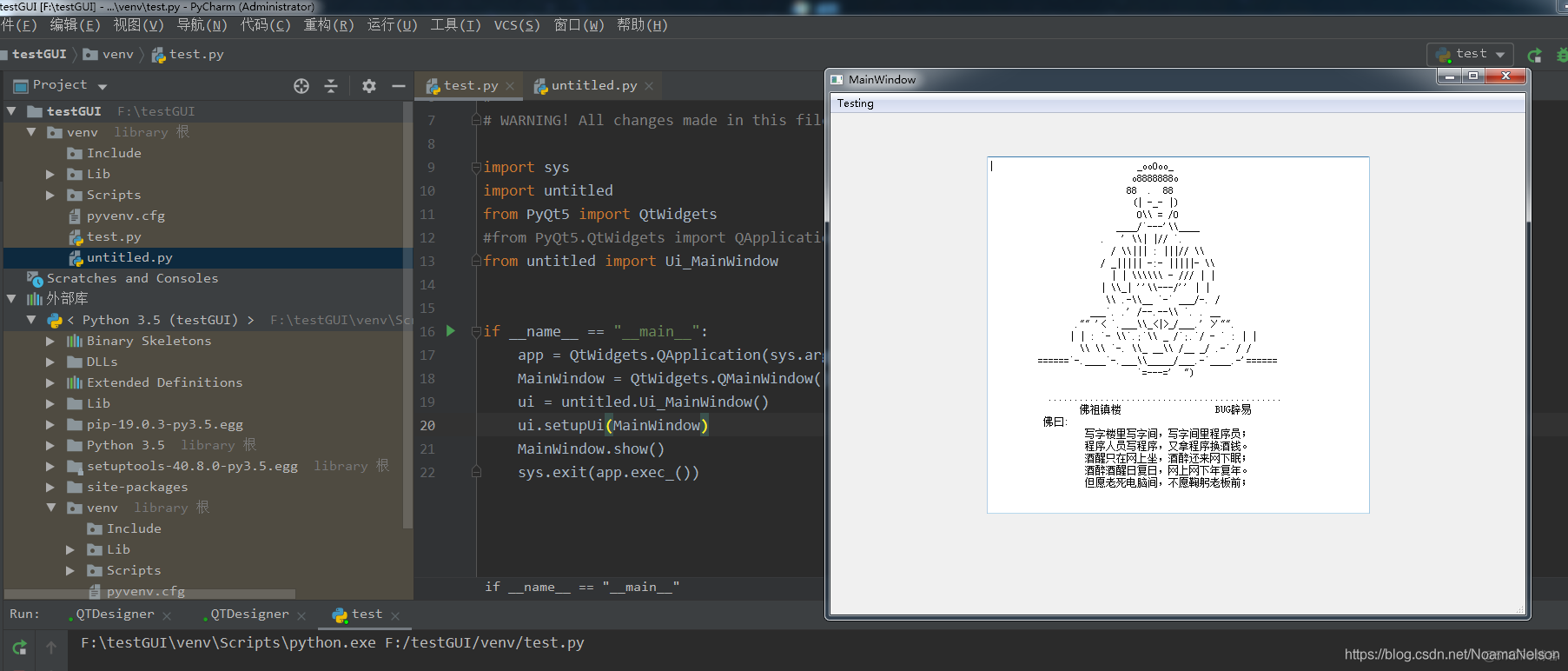
import sys
import untitled
from PyQt5 import QtWidgets
#from PyQt5.QtWidgets import QApplication,QMainWindow
from untitled import Ui_MainWindow


if __name__ == "__main__":
    app = QtWidgets.QApplication(sys.argv)
    MainWindow = QtWidgets.QMainWindow()
    ui = untitled.Ui_MainWindow()
    ui.setupUi(MainWindow)
    MainWindow.show()
    sys.exit(app.exec_())
关闭。这个问题是opinion-based.它目前不接受答案。想要改进这个问题?更新问题,以便editingthispost可以用事实和引用来回答它.关闭4年前。Improvethisquestion我想在固定时间创建一系列低音和高音调的哔哔声。例如:在150毫秒时发出高音调的蜂鸣声在151毫秒时发出低音调的蜂鸣声200毫秒时发出低音调的蜂鸣声250毫秒的高音调蜂鸣声有没有办法在Ruby或Python中做到这一点?我真的不在乎输出编码是什么(.wav、.mp3、.ogg等等),但我确实想创建一个输出文件。
我正在编写一个包含C扩展的gem。通常当我写一个gem时,我会遵循TDD的过程,我会写一个失败的规范,然后处理代码直到它通过,等等......在“ext/mygem/mygem.c”中我的C扩展和在gemspec的“扩展”中配置的有效extconf.rb,如何运行我的规范并仍然加载我的C扩展?当我更改C代码时,我需要采取哪些步骤来重新编译代码?这可能是个愚蠢的问题,但是从我的gem的开发源代码树中输入“bundleinstall”不会构建任何native扩展。当我手动运行rubyext/mygem/extconf.rb时,我确实得到了一个Makefile(在整个项目的根目录中),然后当
我已经在Sinatra上创建了应用程序,它代表了一个简单的API。我想在生产和开发上进行部署。我想在部署时选择,是开发还是生产,一些方法的逻辑应该改变,这取决于部署类型。是否有任何想法,如何完成以及解决此问题的一些示例。例子:我有代码get'/api/test'doreturn"Itisdev"end但是在部署到生产环境之后我想在运行/api/test之后看到ItisPROD如何实现? 最佳答案 根据SinatraDocumentation:EnvironmentscanbesetthroughtheRACK_ENVenvironm
我们的git存储库中目前有一个Gemfile。但是,有一个gem我只在我的环境中本地使用(我的团队不使用它)。为了使用它,我必须将它添加到我们的Gemfile中,但每次我checkout到我们的master/dev主分支时,由于与跟踪的gemfile冲突,我必须删除它。我想要的是类似Gemfile.local的东西,它将继承从Gemfile导入的gems,但也允许在那里导入新的gems以供使用只有我的机器。此文件将在.gitignore中被忽略。这可能吗? 最佳答案 设置BUNDLE_GEMFILE环境变量:BUNDLE_GEMFI
这似乎非常适得其反,因为太多的gem会在window上破裂。我一直在处理很多mysql和ruby-mysqlgem问题(gem本身发生段错误,一个名为UnixSocket的类显然在Windows机器上不能正常工作,等等)。我只是在浪费时间吗?我应该转向不同的脚本语言吗? 最佳答案 我在Windows上使用Ruby的经验很少,但是当我开始使用Ruby时,我是在Windows上,我的总体印象是它不是Windows原生系统。因此,在主要使用Windows多年之后,开始使用Ruby促使我切换回原来的系统Unix,这次是Linux。Rub
我正在玩HTML5视频并且在ERB中有以下片段:mp4视频从在我的开发环境中运行的服务器很好地流式传输到chrome。然而firefox显示带有海报图像的视频播放器,但带有一个大X。问题似乎是mongrel不确定ogv扩展的mime类型,并且只返回text/plain,如curl所示:$curl-Ihttp://0.0.0.0:3000/pr6.ogvHTTP/1.1200OKConnection:closeDate:Mon,19Apr201012:33:50GMTLast-Modified:Sun,18Apr201012:46:07GMTContent-Type:text/plain
这个问题在这里已经有了答案:关闭10年前。PossibleDuplicate:Pythonconditionalassignmentoperator对于这样一个简单的问题表示歉意,但是谷歌搜索||=并不是很有帮助;)Python中是否有与Ruby和Perl中的||=语句等效的语句?例如:foo="hey"foo||="what"#assignfooifit'sundefined#fooisstill"hey"bar||="yeah"#baris"yeah"另外,类似这样的东西的通用术语是什么?条件分配是我的第一个猜测,但Wikipediapage跟我想的不太一样。
什么是ruby的rack或python的Java的wsgi?还有一个路由库。 最佳答案 来自Python标准PEP333:Bycontrast,althoughJavahasjustasmanywebapplicationframeworksavailable,Java's"servlet"APImakesitpossibleforapplicationswrittenwithanyJavawebapplicationframeworktoruninanywebserverthatsupportstheservletAPI.ht
无论您是想搭建桌面端、WEB端或者移动端APP应用,HOOPSPlatform组件都可以为您提供弹性的3D集成架构,同时,由工业领域3D技术专家组成的HOOPS技术团队也能为您提供技术支持服务。如果您的客户期望有一种在多个平台(桌面/WEB/APP,而且某些客户端是“瘦”客户端)快速、方便地将数据接入到3D应用系统的解决方案,并且当访问数据时,在各个平台上的性能和用户体验保持一致,HOOPSPlatform将帮助您完成。利用HOOPSPlatform,您可以开发在任何环境下的3D基础应用架构。HOOPSPlatform可以帮您打造3D创新型产品,HOOPSSDK包含的技术有:快速且准确的CAD
华为OD机试题本篇题目:明明的随机数题目输入描述输出描述:示例1输入输出说明代码编写思路最近更新的博客华为od2023|什么是华为od,od薪资待遇,od机试题清单华为OD机试真题大全,用Python解华为机试题|机试宝典【华为OD机试】全流程解析+经验分享,题型分享,防作弊指南华为o
